
Add GIZMOCHINA as Preferred Source on Google
WhatsApp has released an official app for Wear OS 3. This means that users will be able to use the instant messaging platform right from their Wear OS-powered smartwatches. However, the functionality is currently in the beta stage and only accessible to beta testers of the Android app. Some of the smartwatches powered by Wear OS 3 include Samsung Galaxy Watch 5 and 6 series, Pixel Watch, Fossil Gen 6 etc.
WhatsApp for Wear OS lets users message from smartwatch
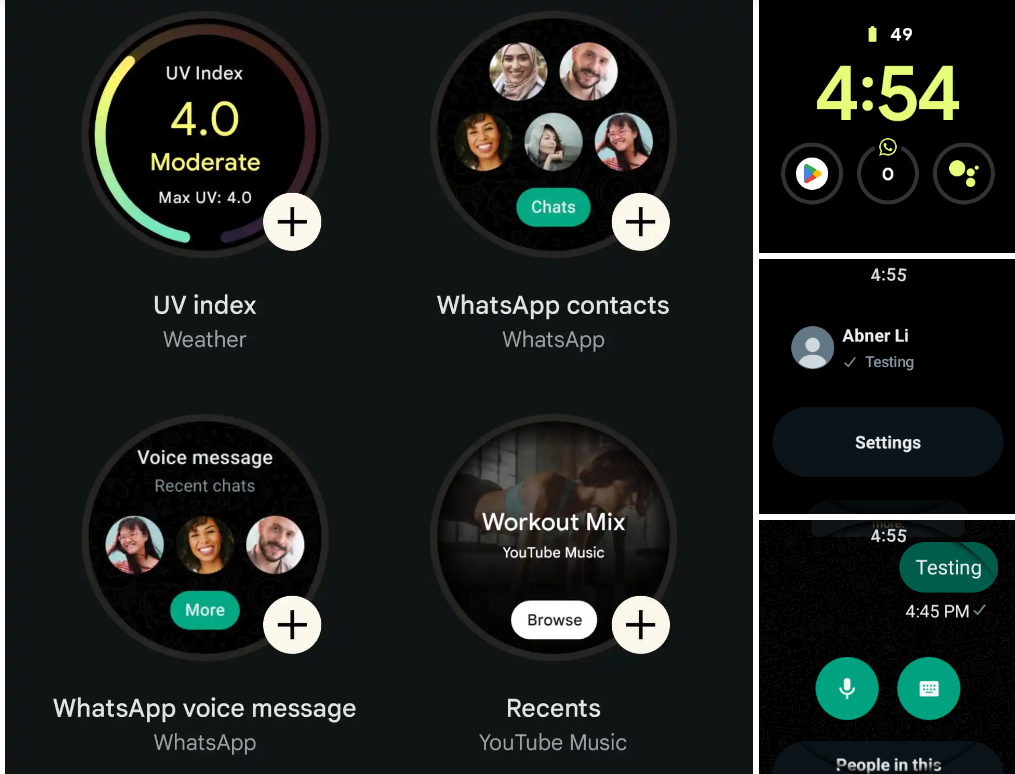
WhatsApp for Wear OS 3 is available with the latest beta version 2.23.10.10 for Android. Users who are interested in trying can join and become a beta tester here. Additionally, both the phone and watch should have the app version 2.23.10.10 or later. To set up the app, users have to enter an eight-digit code from their watch into the phone app. Then the chats will sync across devices safely which will also be end-to-end encrypted.
The WhatsApp for Wear OS offers all the necessary features including the ability to send messages directly from the wrist. However, there’s no option to start a new chat if the user has never sent a message to the WhatsApp contact before. The Wear OS app shows a simple list of recent contacts, a settings menu, and more. There are two tiles for WhatsApp Contacts’ to jump to a contact and the ‘WhatsApp Voice Message’ tile lets the user quickly start recording a voice message.
The WhatsApp for Wear OS app also lets users to scroll through old conversations. Users can reply to messages using voice messages or a system keyboard. Scrolling through group chats will display ‘People in this conversation’.
The WhatsApp for Wear OS app is expected to get a stable version in the coming weeks. It seems like a great option to quickly send a message from the wrist instead of reaching for a smartphone.
Related:
- WhatsApp’s latest update comes with improved polling and flexible captioning
- Truecaller will no longer offer call recording feature, here’s why
- No More iCloud Backup: WhatsApp Simplifies iPhone Chat Transfers



Comments