If you are an iPhone user, chances are you’ve already experienced the perks of Apple’s ecosystem. From seamless communication through iMessage to effortless file sharing with AirDrop, and continuity features that let you transition between devices, it’s all designed to work together.
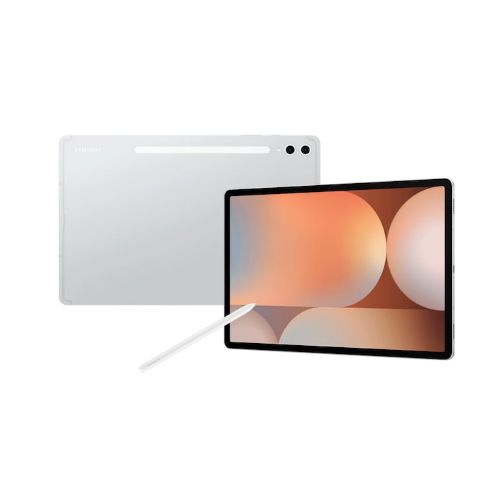
But what happens if you step outside this bubble? Say, by pairing an iPhone with an Android tablet from Samsung. Like the flagship Galaxy Tab S10 Ultra. At first glance, it might seem like a solid alternative to the iPad. It’s powerful, packed with features, and it’s also more affordable than Apple’s top-of-the-line iPad Pro M4.
Yet, the experience might fall short when you pair it with an iPhone. There are several reasons for this. And no, this isn’t about Android vs. iOS or Samsung vs. Apple. It’s about compatibility, user experience, and the compromises you’ll face. Let’s break it down.
Apple’s iMessage isn’t just a messaging app; it’s a central pillar of Apple’s ecosystem. If you own an iPhone, chances are you rely heavily on iMessage to communicate with friends and family. Add a Galaxy Tab to the mix, and you’re immediately cut off from this convenience.
Unlike iPads, Galaxy Tabs don’t support iMessage. Sure, there are workarounds like forwarding texts to your Android tablet, and Apple now supports RCS messaging as well. But it’s not like the native solution, to say the least. For group chats or conversations that rely on iMessage-specific features—like reactions, shared media, and location sharing—you’ll quickly feel the limitations or differences.
2. File Sharing Frustrations
One of Apple’s biggest strengths is AirDrop. It allows quick file sharing across iPhones, iPads, and Macs. Whether you’re sending photos, videos, or documents, AirDrop works seamlessly without relying on third-party apps or cloud uploads.
Unfortunately, Galaxy Tabs lack anything comparable to iPhones. Samsung’s Quick Share is a great feature for Android and Galaxy devices but doesn’t extend to iOS. If you want to share files between your iPhone and a Galaxy Tab, you’ll need to rely on cloud services like Google Drive or OneDrive, which introduces extra steps and also eats up your internet bandwidth.
3. App experience
Apple and Google both offer extensive app libraries for large screens, but it’s not hard to say that the Android tablet app experience lacks the polish of Apple iPads.
Apple has iPadOS specifically designed for tablets and takes a more focused approach to screen sizes and form factors. In contrast, Android tablets often feel like oversized smartphones with minimal optimization for larger screens.
Apple also works diligently to build a rich library of apps tailored just for iPads. Apps like Final Cut Pro and DaVinci Resolve leverage the larger screen for productivity. This positions iPads as powerful tools for work, whereas Android tablets appear less focused on productivity.
4. The Continuity Problem
Apple’s ecosystem is all about continuity. Features like Handoff allow you to start tasks on one device and finish them on another. For instance, you can begin writing an email on your iPhone and pick it up instantly on your iPad. Similarly, the Universal Clipboard lets you copy something on one Apple device and paste it on another.
With a Galaxy Tab, you lose access to these conveniences. While Samsung has its own ecosystem features, like linking Galaxy devices to Windows PCs or using Samsung Flow, they don’t extend to iPhones. Switching between your iPhone and Galaxy Tab will feel disjointed in comparison.
5. Accessory Challenges
If you’ve invested in Apple accessories like the Apple Pencil, Magic Keyboard, or AirPods, they work effortlessly with an iPad but not with a Galaxy Tab. Although the Galaxy Tab supports alternatives like the S Pen and various keyboards, these won’t integrate as seamlessly with your existing Apple setup.
AirPods, for example, can technically pair with a Galaxy Tab, but you’ll lose features like automatic device switching and spatial audio optimization, both of which shine within Apple’s ecosystem.
6. When a Galaxy Tab Might Work
This isn’t to say Galaxy Tabs are inherently bad. In fact, Galaxy S-series tablets are some of the best Android tablets on the market, with vibrant AMOLED displays, excellent multitasking capabilities, and robust hardware. But they’re designed with Android and Samsung users in mind.
If you’re someone who already owns other Galaxy devices or prefers Android’s customization options, the Galaxy Tab makes sense. However, for iPhone users accustomed to Apple’s ecosystem, the transition won’t be seamless—and that’s the crux of the problem.
7. Why Stick to an iPad
If you’re set on adding a tablet to your Apple-dominated setup, an iPad is the obvious choice. Whether it’s the entry-level iPad or the high-end iPad Pro, Apple’s tablets integrate perfectly with iPhones.
With features like iCloud syncing, shared subscriptions, and seamless accessory support, an iPad will feel like an extension of your iPhone rather than a separate device. You’ll also enjoy better resale value, as Apple products tend to hold their worth longer than most Android devices.
8. Final Thoughts
Buying a tablet is about more than just specs. It’s about how well it fits into your existing setup and the experience it offers. If you use an iPhone, a Galaxy Tab might feel like an awkward mismatch. It might force you to work around limitations rather than enjoy seamless integration.
Sure, a Galaxy Tab might save some money or offer features that rival the iPad. But when compatibility, ecosystem, and long-term usability come into play, sticking with an iPad is the smarter choice.
Ultimately, it’s not about which device is “better.” It’s about choosing the right tool for the job—and in this case, an iPad is the clear winner for iPhone users.
We use cookies on our website to give you the most relevant experience by remembering your preferences and repeat visits. By clicking “Accept”, you consent to the use of ALL the cookies.
This website uses cookies to improve your experience while you navigate through the website. Out of these, the cookies that are categorized as necessary are stored on your browser as they are essential for the working of basic functionalities of the website. We also use third-party cookies that help us analyze and understand how you use this website. These cookies will be stored in your browser only with your consent. You also have the option to opt-out of these cookies. But opting out of some of these cookies may affect your browsing experience.
Necessary cookies are absolutely essential for the website to function properly. This category only includes cookies that ensures basic functionalities and security features of the website. These cookies do not store any personal information.
Any cookies that may not be particularly necessary for the website to function and is used specifically to collect user personal data via analytics, ads, other embedded contents are termed as non-necessary cookies. It is mandatory to procure user consent prior to running these cookies on your website.