
Apple has been teasing usage caps on its more advanced Apple Intelligence features for a while, but the latest iOS 27.3 beta finally shows how the system actually works under the hood.

A detailed analysis of the beta code has revealed the token-based metering and the multipliers that come with higher iCloud+ plans, details the company itself has not fully spelled out yet.
The limits apply to advanced Siri AI requests that need cloud processing, Image Playground, intelligent photo tools such as Clean Up, Extend and Spatial Reframing, certain Shortcuts automations that rely on Apple’s foundation models, and third-party apps that use Private Cloud Compute. Basic Siri commands like setting a timer or alarm stay unlimited even after the daily allowance runs out.
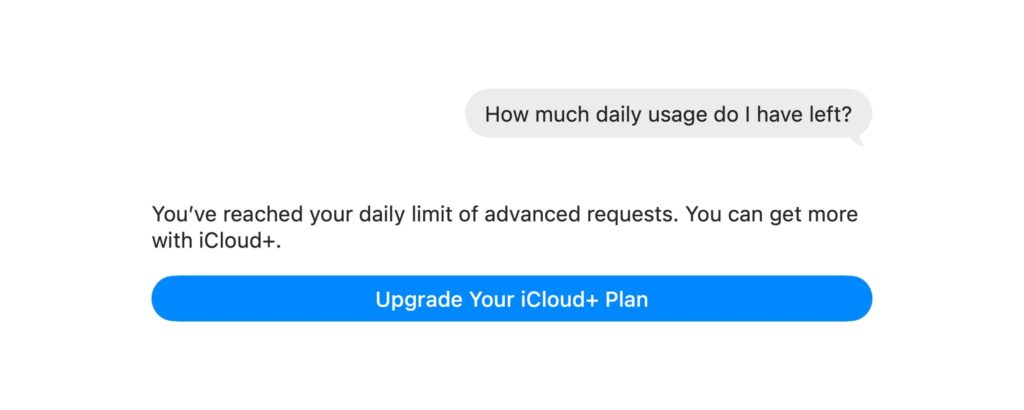
According to researcher pdfu’s look at iOS 27.3 beta 2, Apple tracks usage in tokens. Each request sent to the company’s Private Cloud Compute servers costs one token, and a single user question can burn more than one if it involves multiple server calls. Standard daily allowances per device currently appear to be:
- Siri AI (advanced requests): 20 tokens
- Image Playground and AI photo editing: 10 tokens
- Standard AFM Cloud model in Shortcuts: 5 tokens
- AFM Cloud Pro model in Shortcuts: 0 tokens (rising to 5 with the 200 GB plan)
- Third-party apps using Apple’s cloud foundation models: 5 tokens
A real-world example shows asking Siri to find a nearby bookshop that is currently open can cost two tokens because the task splits into planning and response generation steps.
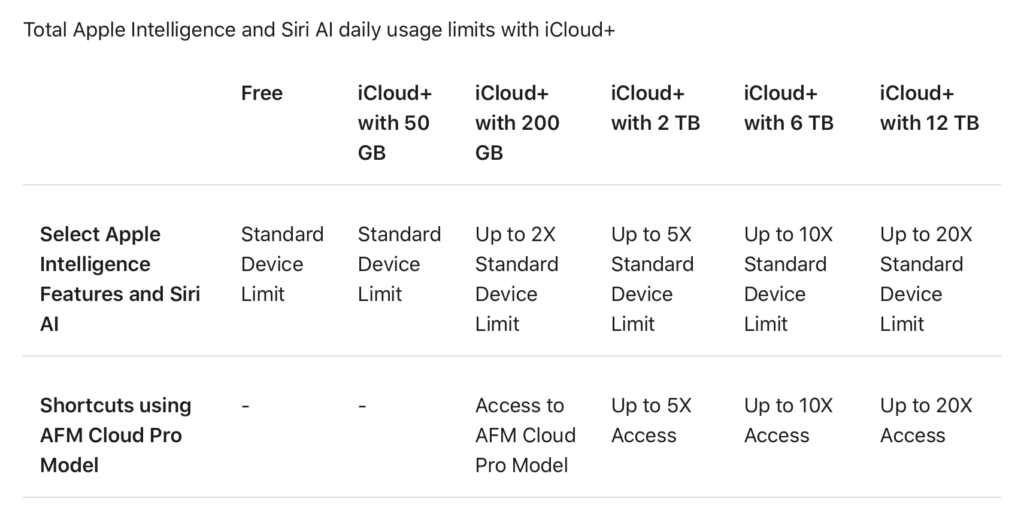
iCloud+ subscribers get multipliers on top of the base allowance. The 200 GB plan ($2.99/month) offers up to 2×, the 2 TB plan ($9.99) up to 5×, the 6 TB plan ($29.99) up to 10×, and the 12 TB plan ($59.99) up to 20×.
Each device first spends its own free daily pool. Once that is exhausted, it can draw from the extra shared allowance that covers all devices signed into the same Apple Account and any Family Sharing members. Unused tokens do not roll over, and the counters reset around midnight local time.
(Source: @itspdfu on X)
FREE DAILY NEWSLETTER
Joel Explains
What matters in phones and gadgets, before it reaches you. From Gizmochina’s editor-in-chief, every morning.
Join 1,500+ readers. One email a day, unsubscribe in one click.


Comments