
Add GIZMOCHINA as Preferred Source on Google
Android 11 is just over a month old at this point and is slowly rolling out for various smartphones. While the new OS arrives with improvements and other new features, it is also plagued with a couple of bugs. An annoying one, in particular, prevents applications from going into fullscreen.
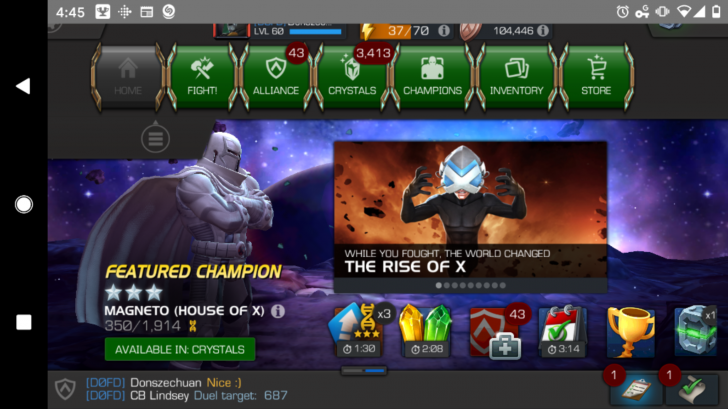
At the moment, there are several minor bugs that surface in the relatively new and latest Android version. This includes glitchy media controls, issues with multitasking, and now a bug that affects mobile games, that do not completely go into fullscreen. In other words, the navigation bar from the bottom can still be found on one of the sides while the status bar is also visible on the top.
Editor’s Pick: Lenovo launches Xiaoxin Air 14, Pro 14, and Air 15 2021 in China, features 11th Gen Intel Processors
This makes for a very inconsistent experience and can also lead to mistaken inputs quite often. Usually, a media app like YouTube or a mobile game like PUBG Mobile takes up the entire screen and the status and navigation bars are only seen after a swipe or a system prompt. But with the new Android OS, it is ever present even during intense gaming or a simple movie session. This wouldn’t have been such a major problem, but the fact that crucial UI aspects from various applications are covered by these bars.
Currently, there is no particular fix to this issue. However, certain users have found success in closing and restarting the application. Although, this also depends on the app in question. The bug is also reflected in custom skins like the One UI 3.0 from Samsung, as per an AndroidPolice report. Unfortunately, it seems that people had reported this bug to Android Issue Tracker but since they couldn’t reproduce the it, the case has since been closed. So stay tuned for more updates and hopefully a fix is one the way.
UP NEXT: Smartisan Nut R2 launched; features 6.67-inch 90Hz display, SD865 chipset, 16 GB RAM, 108 MP quad-camera, and more

Comments