
Add GIZMOCHINA as Preferred Source on Google
WhatsApp recently rolled out a “mute forever” on its messaging platform. However, it is available for a long time on its rival messaging platforms like Telegram. Now, the company is finally working on another feature that is again quite old on the latter. A new FAQ page on WhatsApp provides details about the upcoming “Disappearing Messages” feature.

As stopped by WABetaInfo, WhatsApp has opened a new FAQ support page for the feature. In it, it describes what’s coming and how to enable/disable it. It says the new messages sent after enabling the feature will be deleted after seven days. However, this negates the previous Expiring Messages feature in Beta that allowed users to customize the time. This started back in 2019, when we saw in a Beta version that users can delete the messages after an hr/a day/a week/a month/a year.
Prospects of Disappearing Messages
To compare, this is available as a self-destruct option for secret chats on Telegram. And users can customize the time interval as well. Still, this feature on WhatsApp looks like it will work across the board when it launches. Moving on, WhatsApp says the messages sent before enabling it won’t get affected. Although users get to control it on individual chats, only Admins can enable/disable it on Groups.
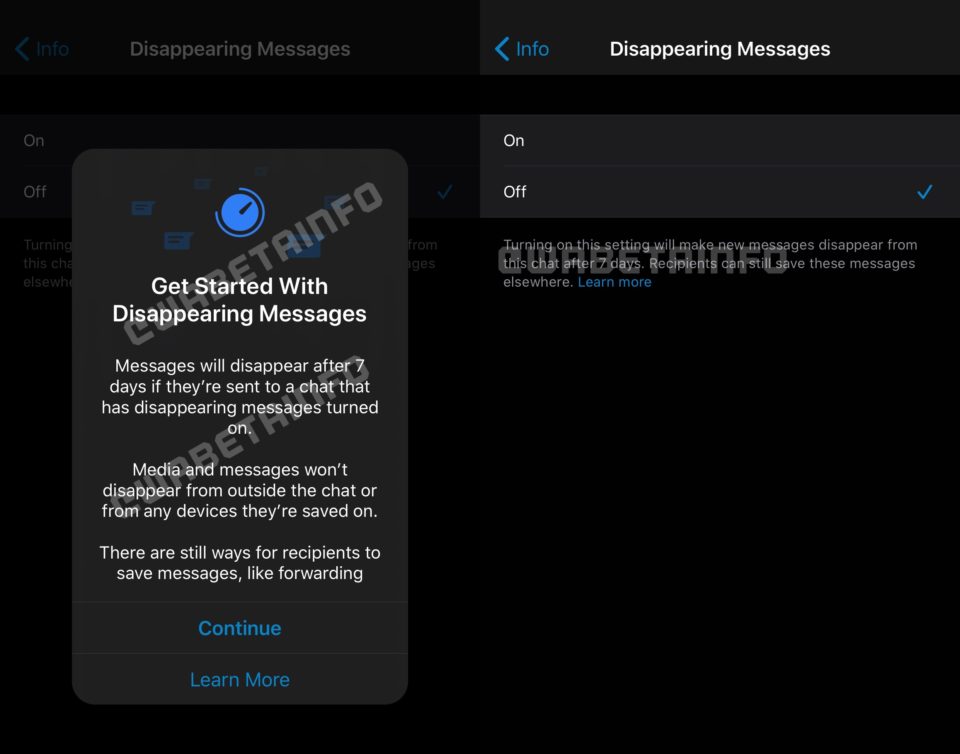
That said, the feature comes with a lot of conditions as well. If a recipient doesn’t open his WhatsApp for seven days he can still see the preview of messages in the notification window although it gets deleted inside the chat. Similarly, if you quote a disappearing message, the quote text might stay. Also, if you forward disappearing messages to a group/chat where the feature is off, it won’t vanish.
EDITOR’S PICK: WhatsApp Web to receive support for Voice and Video calls: Report
A few Disclaimers of the feature
For backups, every new backup will include the disappearing messages as well. And it will get deleted if the backup is restored after seven days. Having said that WhatsApp also has a disclaimer regarding the feature.
It says users can still take a screenshot, forward, copy & save content, or capture it with another camera to save the messages. And WABetaInfo says the “save to camera roll” will save the disappearing media to local device irrespective of the chats.
How to enable/disable it- Finally, the WhatsApp FAQ page also has steps to enable/disable it on Android/iOS/Web/Desktop/KaiOS. To enable/disable, Open WhatsApp. Go into an individual/group chat. Tap on the name. Now, you can toggle the feature on/off by selecting the Disappearing Messages option.
Currently, there is no ETA for this feature but we can expect it anytime soon after the multi-device support.



Comments