
Add GIZMOCHINA on Google:
Motorola has been doing quite well in the market. Their recently released budget smartphone offers a great set of hardware specifications and offering a clean stock android experience is another pro for the brand. The firm has now announced a new Moto secure app which enables users to control their privacy settings more easily. The newly announced application from Motorola is designed to be the “go-to destination for all the vital device security and privacy features” on your Moto smartphone.
The Moto Secure App provides quick and simple access to all Android and Motorola security apps and settings installed on your phone and is powered by Motorola’s Thinkshield, a security platform created to safeguard your smartphone from malware, phishing, and other dangers. However, the new Moto Secure App provides more than simply a central location to manage your phone’s security settings. Additionally, it has a few new security measures that are intended to give you an added measure of security and, in Motorola’s words, “peace of mind.”
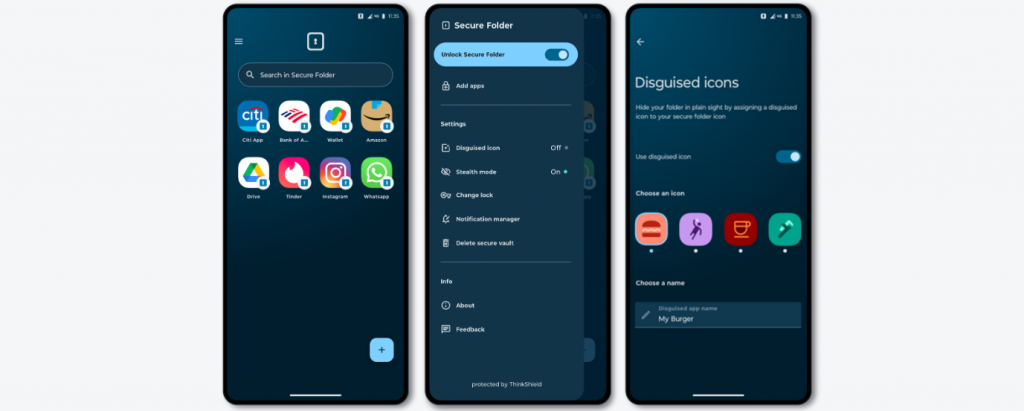
“Secure Folder” is a function that comes with the Moto Secure App. This enables you to store critical data and apps in a password-protected folder. Additionally, you can use the Disguised Mode capability that is already integrated into your device to alter the names and icons of any programmes or files that are stored in the safe folder by choosing from four different names and icon options. By using images and labels that only you understand, you can conceal important information like email accounts, digital wallets, and financial apps.
Network Protection is another new function in Motorola’s new security software. When it discovers a security risk with a hotspot or Wi-Fi, this one will automatically let you know. By limiting 2G connections, the function can prevent spoofing—a technique by which a malicious actor impersonates a recognised or trusted source—and stop specific programmes from using open networks.
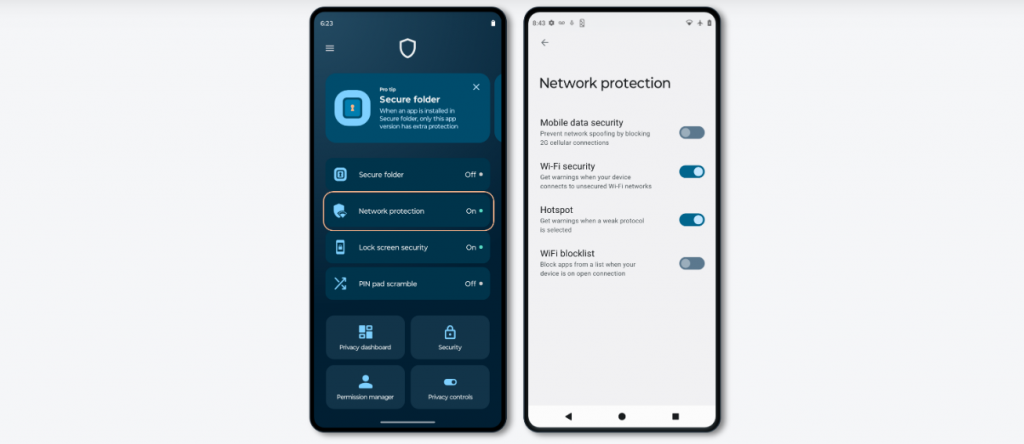
The Moto Secure App also includes a Privacy Dashboard that provides you with a clear, detailed overview of which apps have recently had access to your calendar, contacts, files, camera, microphone, and location. You can manage app permissions, update security settings, and modify privacy controls directly from the Moto Secure App using the Privacy Dashboard. So you can quickly let an app know who is in charge if it doesn’t recognise its boundaries.
RELATED
- Samsung Galaxy Book 3 Ultra Could Feature Company’s New 120Hz OLED Panel
- Moto G23, G13 With Helio G85 SoC, 90Hz Display Launched
- Moto G73 5G Launched In Global Markets, G53 5G Tags Along


Comments