
Add GIZMOCHINA on Google:
Google has finally started working on “Cross-device services” to provide a more seamless experience. Since it’s still in the roll-out phase, it might not be available on all devices yet. However, once it is, you can activate it in your Android device settings under Settings > Google > Devices & Sharing > Cross-Device.
Cross-device services enable simultaneous calls and password-free internet sharing across your devices
Cross-Device Services enable smooth data transfer between devices signed in with the same Google Account. According to images shared by 9to5Google, two new features are underway: Call Casting and Internet Sharing (Instant Hotspot).
Call Casting feature allows you to effortlessly cast an ongoing video call to another device and continue the call there. Currently, it’s only available for Google Meet calls, but we can expect support for more apps in the future. Let’s say you joined a video call on your phone, but you want to view it on your tablet since it has a bigger display. Instead of ending the call and rejoining on your tablet, you can simply cast the call with one tap.
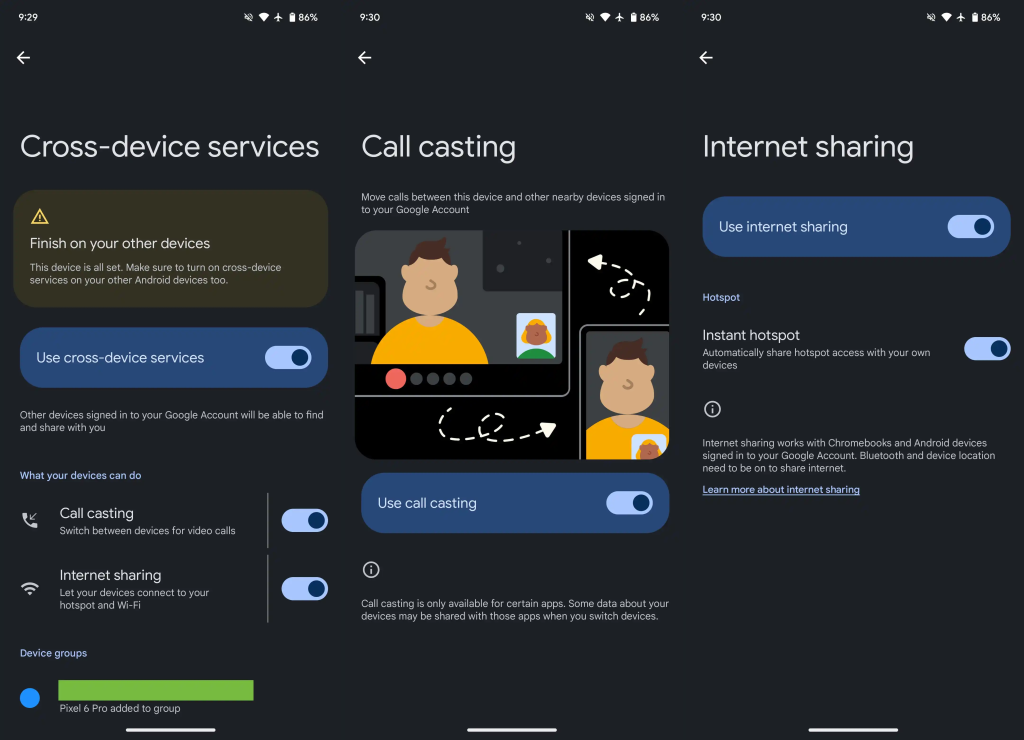
Instant Hotspot makes sharing your internet connection easier. After adding your devices to the same Google Account, you can toggle the Instant Hotspot feature to share the internet without manually activating the hotspot on one device and entering the password on another. One tap will instantly share the internet connection without entering any password.
Google’s new Cross-Device Services are in beta and are being gradually released to devices. You can access it in Google Play Services version 24.28.34.




Comments