
Add GIZMOCHINA as Preferred Source on Google
Android 15 has arrived, and it’s bringing some seriously impressive features to the table. This isn’t just a minor update; it’s a complete overhaul with a focus on enhanced privacy, seamless multitasking, and intuitive user experiences. Here are 12 game-changing features that will change the way you interact with your phone:
ALSO READ: The 5 best foldable phones to buy in 2024
ALSO READ: Top 5 foldable phones to watch in 2025
1. Circle to Search
Forget tedious copying and pasting! With Circle to Search, you can simply draw a circle around any text or image on your screen to instantly share it or initiate a search. This intuitive feature takes content sharing and information discovery to a whole new level. Imagine circling a product image to quickly compare prices online or sharing a quote from an article with a friend in just a few taps.
2. Gemini Integration
Android 15 integrates Google’s powerful Gemini AI model, bringing advanced language processing and contextual awareness to your fingertips. Use Gemini for intelligent text generation, translation, and summarization.
Ask complex questions, get creative writing assistance, or have your emails drafted with the help of this powerful AI. Gemini is your personal assistant, making your interactions with your phone more intuitive and efficient.
3. App Pairing
Android 15 takes multitasking to the next level with App Pairing. Tired of constantly switching between apps when working on a project or planning a trip? Now you can save frequently used app combinations as a “pair” for quick and easy access.
Launch YouTube and Keep Notes simultaneously with a single tap, or have your map and messaging app ready to go in split-screen mode. This feature is a game-changer for productivity enthusiasts.
4. Private Space
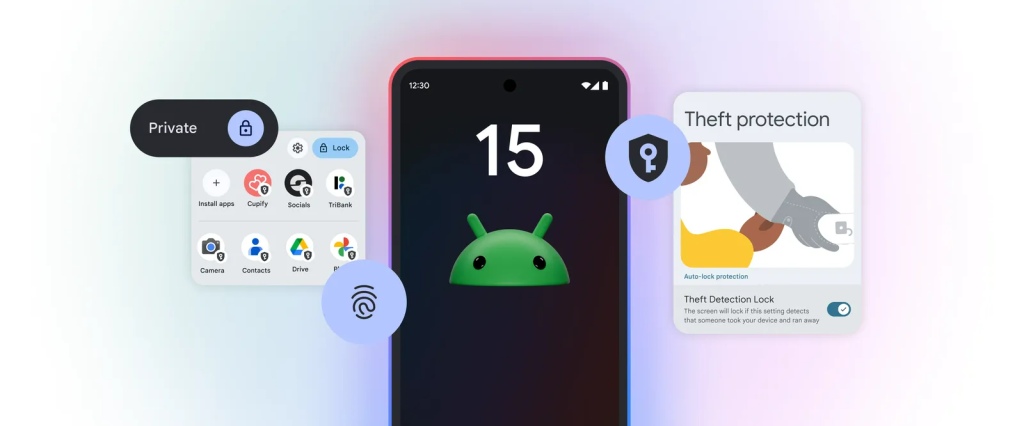
Privacy gets a major upgrade in Android 15 with Private Space. This secure area within your phone acts as a digital vault for sensitive apps like banking, dating, or social media platforms. When locked, apps within Private Space become virtually invisible, hidden from your app list, recent apps view, notifications, and even settings.
Accessing this space requires an additional layer of authentication, ensuring your private data remains truly private.
5. AI-Powered Personalization
Android 15 leverages the power of AI to personalize your phone experience like never before. It learns your preferences and anticipates your needs, offering relevant suggestions and automating tasks throughout your day.
Imagine your phone automatically adjusting settings based on your location or proactively suggesting apps you might need based on your usage patterns. This is AI integration that truly enhances your daily life.
6. Foldable Phone Optimization
Android 15 takes full advantage of foldable phone technology. Apps seamlessly transition between the folded and unfolded states, offering intuitive and immersive experiences. Imagine watching a video on the cover screen and then unfolding your phone for a larger, cinematic view. Android 15 optimizes app layouts and functionalities for different folding postures, making the most of this innovative form factor.
7. Enhanced Privacy Controls
Android 15 gives you even more control over your privacy with granular permission controls and a new Privacy Dashboard. Monitor which apps are accessing your camera, microphone, and location in real-time. The system actively prevents apps from collecting data in the background without your explicit permission. With Android 15, you can enjoy peace of mind knowing your data is truly yours.
8. App Archiving
Running low on storage? App Archiving allows you to free up space without completely uninstalling apps. Archive infrequently used apps to remove them from your home screen and app drawer while retaining their data.
If you need the app again, simply restore it from the archive. This feature is perfect for keeping your phone organized and maximizing storage capacity.
9. Theft Protection
Android 15 introduces advanced theft protection features to safeguard your device and data. If your phone is stolen, you can remotely lock it, erase its data, and even track its location. The new Find My Device feature is more robust than ever, providing detailed location history and utilizing nearby Android devices to help pinpoint your lost phone.
10. Partial Screen Recording
No need to record your entire screen anymore! Android 15 allows you to select specific areas for recording, capturing only the content you need. This is perfect for recording tutorials, gameplay highlights, or specific sections of a video call. Partial screen recording gives you more control and flexibility when capturing content on your phone.
11. Ultra-Wideband (UWB) Enhancements
Android 15 leverages Ultra-Wideband technology for precise location tracking and device interaction. Use your phone to accurately locate other UWB-enabled devices, like smart home gadgets or even your car keys. This technology opens up exciting possibilities for seamless device connectivity and location-based experiences.
12. Seamless Updates
Say goodbye to disruptive system updates! Android 15 introduces seamless updates, allowing you to continue using your phone normally while the update downloads and installs in the background. This means no more waiting for updates to complete before you can access your apps and data.
The Android 15 rollout has commenced, starting with Google’s own Pixel devices. After a period of beta testing and refinement, the update will gradually make its way to other popular brands like Samsung, OnePlus, Xiaomi, Motorola, and more, each offering their own unique flavor of Android 15 with custom skins and features.



Comments