
Add GIZMOCHINA as Preferred Source on Google
Google has begun the rollout of its new Identity Check feature for Android, starting with Pixel phones running Android 15. Announced last week, this security measure adds an extra layer of protection by requiring biometric verification for access to sensitive device functions when users are outside of their designated trusted locations.
What is Android’s new Identity Check feature?
The core function of Identity Check is to allow users to specify locations they consider safe. When the device is outside of these trusted zones, users will be prompted to authenticate themselves biometrically before accessing certain settings and features. This is designed to protect sensitive information and prevent unauthorized changes to the device.
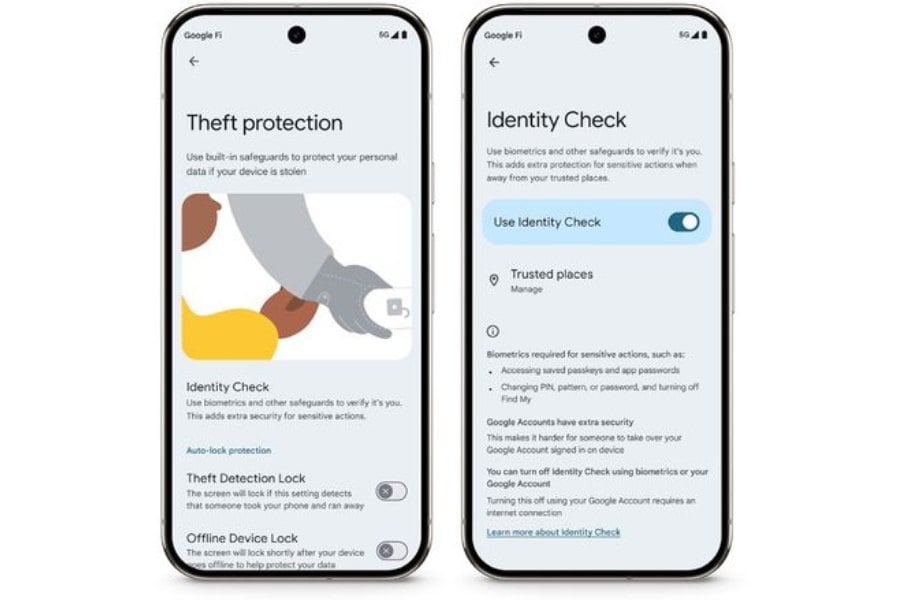
Google has outlined the specific actions that will trigger the Identity Check prompt when outside a trusted location. These include managing Google accounts on the device (adding or removing), setting up a new device using the current one, disabling Identity Check itself, viewing or modifying trusted places, disabling Theft Protection features, turning off Find My Device, performing a factory reset, changing biometric data, and accessing passwords and passkeys stored in Google Password Manager, including auto-filling passwords in apps.
Identity Check complements other security features already available on Android, such as Theft Detection Lock, Offline Device Lock, and Remote Lock, all aimed at enhancing device security and protecting user data in case of theft or loss.
How to enable Identity Check
Enabling Identity Check on a compatible Pixel phone involves a few steps:
-Users should first ensure their device is running the latest version of Android.
– Then, within the Settings app, go to the Google section, then All Services, and finally Theft Protection. From there, enable the Identity Check feature.
-You will then be prompted to sign into their Google account, set up a lock screen and biometrics if they haven’t already, and then designate their trusted locations.
– Once these steps are completed, the feature will get activated.
The rollout is currently underway for Pixel devices running Android 15. Google has indicated that the feature will be coming to eligible Samsung phones with One UI 7 in the coming weeks, with broader availability for other Android devices expected later this year. While the initial release focuses on Pixel users, the wider rollout will bring this added security measure to a broader range of Android devices in the near future.
For more daily updates, please visit our News Section.
Don’t miss a thing! Join our Telegram community for instant updates and grab our free daily newsletter for the best tech stories!




Comments