
Add GIZMOCHINA on Google:
Samsung’s Secure Folder, a feature designed to provide industry-grade security for sensitive data on Galaxy devices, has been found to have a significant flaw. Recent discoveries reveal that apps and photos stored in the Secure Folder can be accessed under certain conditions, which raises concerns about the privacy and security of information stored in the space.
Here’s how it works and how you can avoid the flaw
The Secure Folder functions as a “Work” profile, which allows users to store private apps, photos, and files separately from their main profile. Normally, if an app attempts to access files from the Secure Folder, the system blocks access unless the app is explicitly permitted.
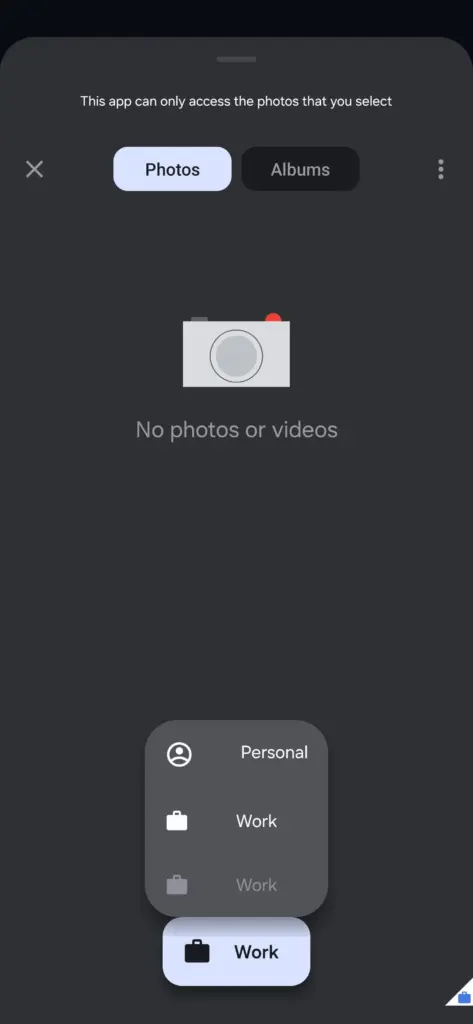
However, a Reddit user named lawyerz88 discovered that this security measure fails when using a “Work” app (with a media picker) tied to a separate work profile. In that case, files stored inside the Secure Folder become accessible through that app. So it’s not too difficult to bypass the intended privacy protections.
“If you have the work profile enabled through something like Island or Shelter (or you know, your actual workplace), any apps in the work profile can access the entirety of files saved in secure folder without any restrictions whatsoever.” notes the Reddit user. “It seems it’s restricted by policy only and only from the personal profile and someone forgot to restrict access via another work profile.”
Android Authority confirmed the flaw using the Shelter app, which can create a work profile on any device. This means that anyone with physical access to a Galaxy device could potentially exploit this vulnerability to view Secure Folder data. The flaw undermines Samsung’s claims of robust security, as sensitive information stored in the Secure Folder could be exposed without the owner’s knowledge.
While accessing the Secure Folder typically requires biometric authentication or a PIN/password, the workaround through Work apps renders these protections ineffective. The user reported his findings, and in response, Samsung reportedly confirmed that they were aware of it. The company recently fixed the boot loop issue associated with the Secure Folder and now that many people are aware of this issue, we hope the company fixes it as soon as possible.
If you want to test the flow yourself:
You can download “Island” or a similar app from the play store, set up the work profile, download an app with a media picker, and try to upload a photo. You may see an option to choose media from two work profiles, one of which is your Secure Folder.
Stay ahead in tech! Join our Telegram community and sign up for our daily newsletter of top stories!
For more daily updates, please visit our News Section.
(Source: Reddit | Android Authority)



Comments