
Add GIZMOCHINA as Preferred Source on Google
The iPhone Air is Apple’s thinnest phone yet, coming in at just 5.6mm with a titanium frame. It feels feather-light and is clearly built for people who value sleekness over heft. But that sleekness comes with its own set of trade-offs.
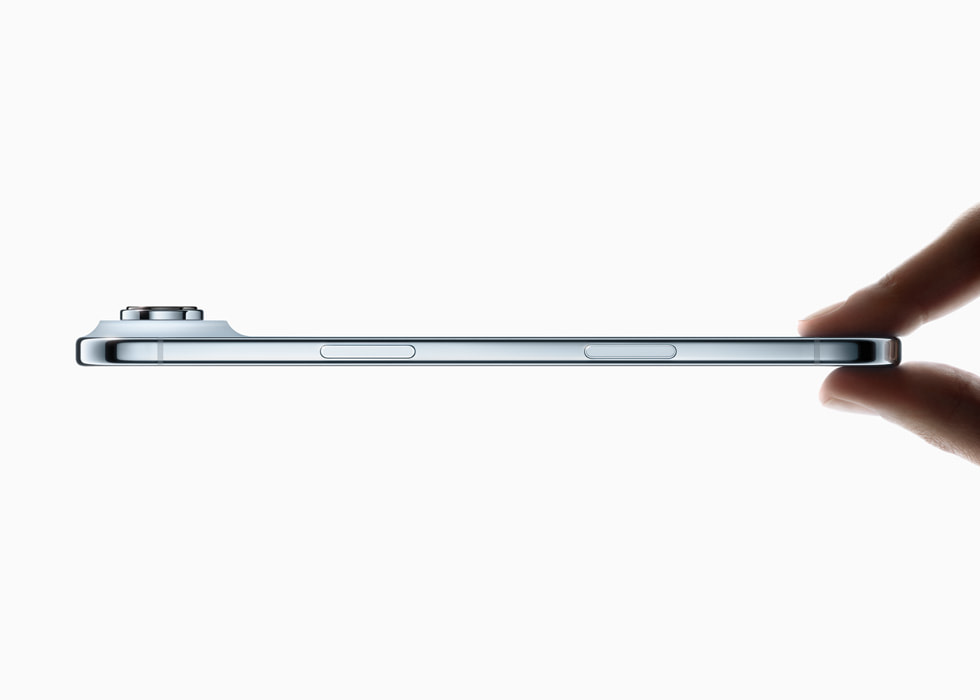
There’s less room for a large battery, only a single speaker, and fewer cameras than you’d find on Apple’s flagship models. It also leans heavily on accessories to fill in the gaps.
The right add-ons can make the iPhone Air feel more complete, and in some cases, more practical. So here are the best accessories worth considering for the iPhone Air.
What Apple offers
Apple isn’t leaving iPhone Air owners totally on their own. Alongside the phone, the company has introduced a few accessories designed specifically for its slim frame.
MagSafe Battery for iPhone Air
There’s a MagSafe Battery made just for the iPhone Air. Apple claims it delivers up to 65% more charge. However, note that the battery pack’s magnetic alignment is only perfect with the iPhone Air. Because of the phone’s design (camera bump, etc.), it doesn’t sit flush or work as well with other iPhones.

Moreover, the MagSafe battery is capped at 12 W, whereas the iPhone Air supports up to 20W of wireless charging. So if you want faster wireless top-ups, you can consider third-party MagSafe batteries.
| Preview | Product | |
|---|---|---|

|
Apple iPhone Air MagSafe Battery | Check Price on Amazon |
Please Note: When you buy something using the links in our articles, we may earn a small commission at no cost to you.
Ttranslucent case/strap
The iPhone Air also has an official translucent case with MagSafe, polycarbonate frames, and a bumper, available in four different finishes. Last but not least, Apple offers a crossbody strap with magnets built into the straps so they align nicely.

So, Apple is giving us the basics: protection (cases/bumpers), battery backup (MagSafe battery), and a new carrying style. What they don’t give is everything — you’ll still want more, depending on how you use your phone.
What you should get
Apart from the MagSafe Battery and a case, here are the accessories I think every iPhone Air owner should seriously consider.
A high-quality screen protector
It seems obvious, but with such a slim, beautifully polished glass front and ceramic shield, you’ll want something that protects without interfering with feel. So consider a tempered glass protector with good edge coverage. Make sure it doesn’t disrupt touch sensitivity, screen clarity, or the quality of the front camera. Plus point if the protector has anti-glare or privacy filters.
The cost of one protector is tiny compared to repairing or replacing a cracked screen, especially with repair costs being high.
| Preview | Product | |
|---|---|---|

|
CASEOLOGY By Spigen Snap Fit Tempered Glass Screen Guard Protector Compatible With Iphone 15 Pro Max… | Check Price on Amazon |
Please Note: When you buy something using the links in our articles, we may earn a small commission at no cost to you.
Reliable wired charging gear
Even with a good MagSafe battery, there are times you’ll want to plug in and charge quickly. Since Apple doesn’t include a charger in the box, getting a reliable USB-C charger is a must.
Look for one that outputs at least 20W and ideally has multiple ports so you can charge two devices at once. For example, Belkin’s BoostCharge Pro 45W adapter offers two ports, including USB-C, and retails for around $40.
Earbuds for Audio
Because of its size and thin frame, the iPhone Air only packs a single speaker, which means the sound quality isn’t the best here. So earbuds are almost a necessity here.
Apple would, of course, like you to pick up a pair of its new AirPods Pro 3, but there are plenty of cheaper alternatives from other brands if you don’t want to spend that much.
Why these accessories matter more with the iPhone Air
Since the phone is so slim and light, with that premium titanium frame, the smallest design details start to matter. A chipped edge ruins the look. A weaker battery feels like a compromise. If the magnets don’t hold up, your battery pack or strap won’t sit right. In a device like this, accessories can make or break the experience.
Don’t miss a thing! Join our Telegram community for instant updates and grab our free daily newsletter for the best tech stories!
For more daily updates, please visit our News Section.



Comments