
Add GIZMOCHINA as Preferred Source on Google
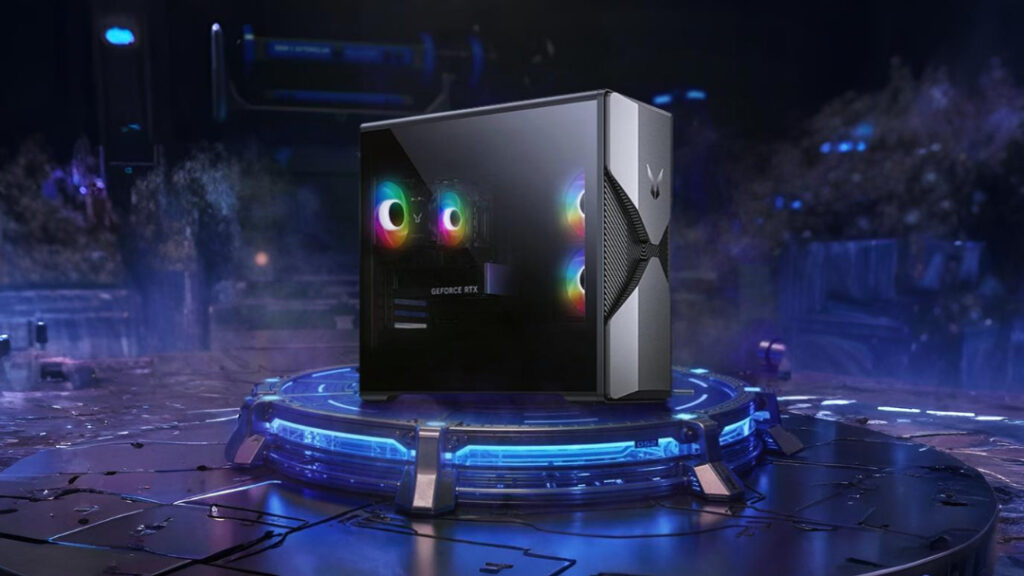
Lenovo’s Lecoo sub-brand has launched the new Bellator Feng 7000 desktop PC series in China. The company describes the lineup as an all-purpose high-performance system designed for mainstream users, gamers, and content creators.
Lenovo Lecoo Bellator Feng 7000 Specifications
The Feng 7000 features a distinctive mecha-style chassis with a blackened steel finish and a side-transparent tempered glass panel. The case includes a dual-spike front design and an internal Hurricane Cooling system. The airflow structure uses multi-zone heat dissipation and can handle up to 700W of thermal output. RGB lighting is available with several preset effects for customization.
The top variant comes with an Intel Core i5-13400F processor, which features 10 cores and 16 threads, with a maximum boost clock of 4.6GHz. Lenovo pairs this CPU with 32GB of DDR5 RAM and a 1TB solid-state drive. Graphics are handled by the Nvidia GeForce RTX 5060 with 8GB of GDDR7 VRAM. The GPU supports DLSS 4 frame generation and delivers up to 614 TOPS of AI computing performance.
Lenovo also offers a second configuration that uses the Intel Core i5-12400F processor and Nvidia RTX 3050 GPU. This version ships with 16GB of RAM and a 512GB SSD. Both variants include custom Bellator cooling fans.
For connectivity, it includes Wi-Fi 6 with an external antenna and Bluetooth 5.2. Lenovo has designed the tower to support future upgrades, with multiple expansion slots available.
The Feng 7000 ships with Windows 11 Home Edition pre-installed. According to the company, each unit undergoes 152 quality tests and 52 reliability assessments before reaching consumers.
Pricing and Availability
The Bellator Feng 7000 will go on sale in China starting October 20. The top-end variant is priced at 6,499 yuan ($913), while the base model is priced at 4,699 yuan ($660).
For more daily updates, please visit our News Section.
Stay ahead in tech! Join our Telegram community and sign up for our daily newsletter of top stories! 💡
(JD)



Comments