
Add GIZMOCHINA as Preferred Source on Google

Motorola is making a strong push on the software front this year. Shortly after Google rolled out the first Android 17 beta, the company quickly launched its own Android 17 beta program. Even better, Motorola is steadily expanding the beta to more devices.
So, how do you get access to the Android 17 beta program on a Motorola phone? We’ll tell you all the steps you need to follow here.
Which Motorola phones are eligible for the Android 17 beta program?
Motorola began its Android 17 beta program with Moto G57, Moto G57 Power, and Edge 2025, and quickly expanded to cover more Edge and Moto G series models.
Here’s the complete list:
Motorola Razr series
- Motorola Razr 70 Plus
- Motorola Razr 70 Ultra
- Motorola Razr 60 Ultra
- Motorola Razr 50 Ultra
- Motorola Razr+ (2026)
- Motorola Razr+ (2025)
- Motorola Razr+ (2024)
- Motorola Razr Fold
Motorola Edge series
- Motorola Edge 70
- Motorola Edge 70 Plus
- Motorola Edge 70 Pro
- Motorola Edge 70 Fusion
- Motorola Edge 70 Fusion+
- Motorola Edge 70 Neo
- Motorola Edge 60
- Motorola Edge 60 Fusion
- Motorola Edge 50 Ultra
- Motorola Edge (2025)
Motorola Moto G series
- Moto G86
- Moto G86 Power
- Moto G57
- Moto G57 Power
- Moto G Power (2026)
- Moto G Power (2025)
- Moto G (2026)
- Moto G (2025)
- Moto G Play (2026)
More Motorola smartphones should get access to the Android 17 beta program in the coming days and weeks. We’ll update the list periodically to keep it up-to-date.
If your Motorola phone is on the list, you can sign up for the Android 17 beta program to get early access to the latest features and upgrades before the stable release.
Steps to sign up for the Android 17 beta program on Motorola devices
Beta builds may contain bugs or broken features. Therefore, it’s advised to install them on a secondary device. Here are the required steps to follow:
Step 1: Create an account on Motorola’s community website. Skip this step if you already have it.
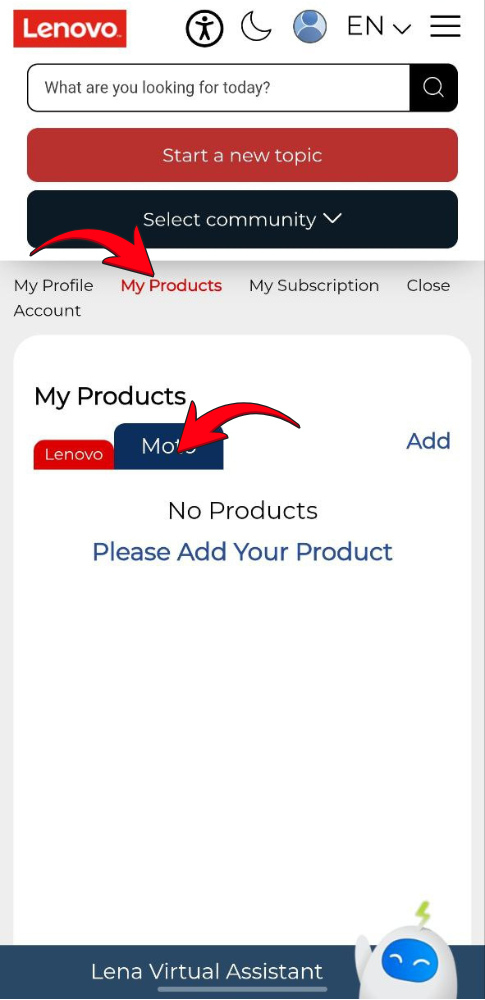
Step 2: Go to “My products” section and and tap “Moto”.
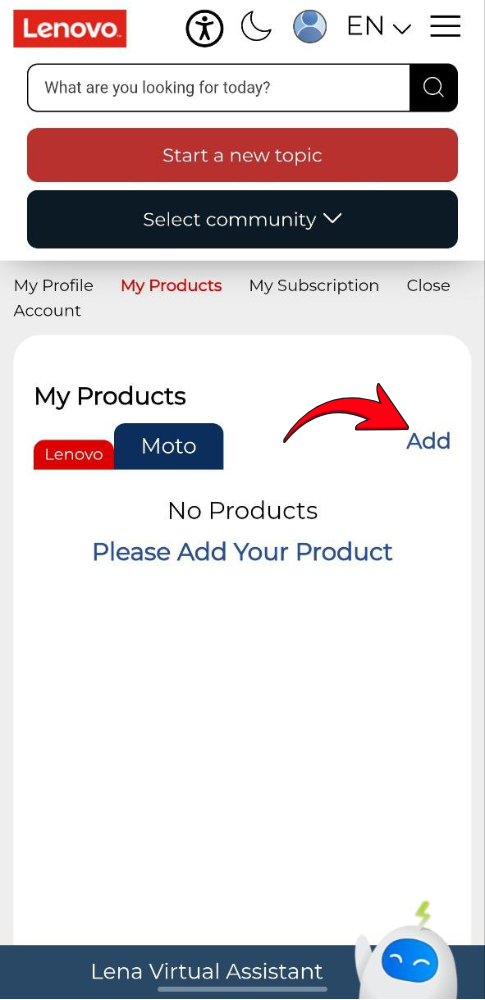
Step 3: Click “Add” and enter the details of your Motorola device.
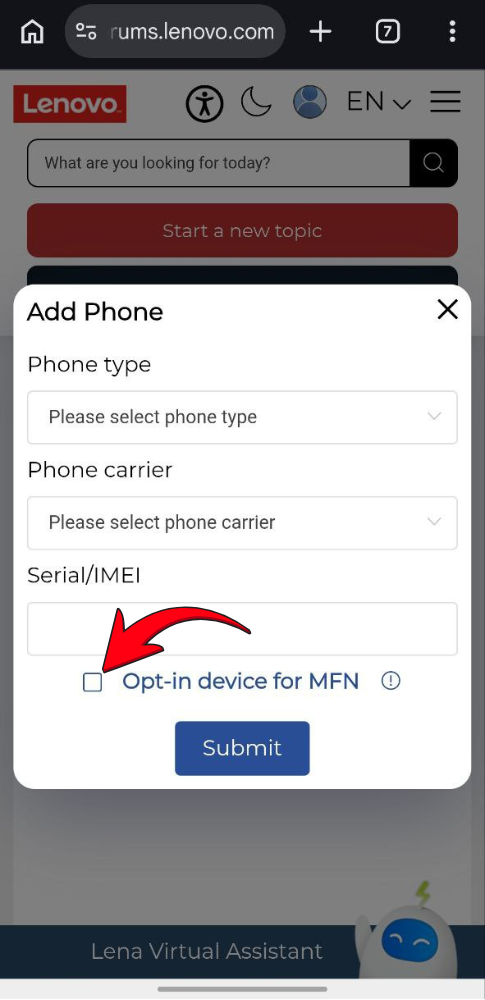
Step 4: Check the “Opt-in device for MFN” box and click “Submit”.
Step 5: Go to the MFN Beta Testing page and look for the available testing opportunity for your Motorola device.
Step 6: Tap the registration link and fill in the required details.
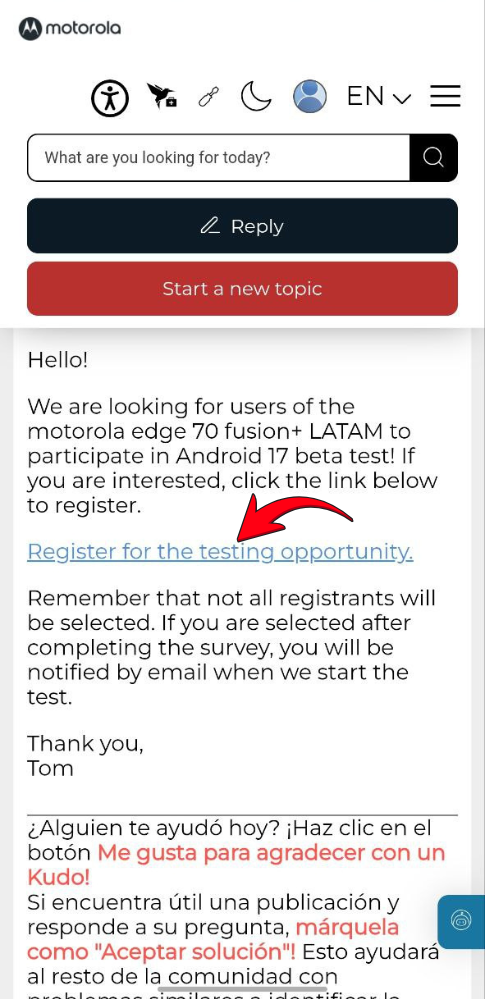
Motorola may send emails regarding your beta application. Therefore, remember to check your inbox regularly, including the spam folder.
Please note that seats may be limited, so not everyone who signs up for the beta program may receive early access. To increase your chances, you must complete the steps as soon as Motorola announces the beta program for your device.
Once your application gets approved, you’ll receive an OTA update soon. You can also manually check for updates by navigating to Settings > System updates > Check for updates.
We’ll keep posting the latest updates in the Motorola section. Remember to visit that regularly to get fresh updates. Alternatively, you can join our Telegram channel to get instant notifications about the latest in tech.



Comments