
Add GIZMOCHINA on Google:
Monthly updates are supposed to keep things running smoothly. Microsoft’s April 2026 Patch Tuesday update has done the opposite for some Windows 11 users.
The update in question, KB5083769, is reportedly triggering serious boot issues on systems running Windows 11 24H2 and 25H2. Complaints started showing up on Microsoft’s Learn Q&A forums shortly after the update rolled out on April 14, and the reports follow a similar pattern.
For many users, the update installs normally at first. After the restart, things start to go wrong. Some systems show distorted or pixelated visuals before crashing into a Blue Screen of Death. From there, it turns into a loop. Windows offers recovery options, but selecting them often just sends the system back to the same screen again.
The issue does not seem tied to a specific setup. Reports include an HP Pavilion with a Ryzen 5 2600 and GTX 1080 Ti, as well as Dell desktops where multiple machines ran into the same problem. That makes it harder to pin down exactly what is causing it.
There are a couple of other side effects as well. Microsoft has acknowledged that the update can trigger BitLocker recovery on some systems after a restart. If you do not have your recovery key handy, that can quickly become a problem. Some users are also seeing more restarts than usual during installation, sometimes four or more before it completes.
So far, there is no emergency fix from Microsoft. If a system is already stuck, the suggested approach is to boot into the Windows Recovery Environment and try System Restore. If that does not work, Startup Repair is the next option. Resetting the PC locally remains a last resort.
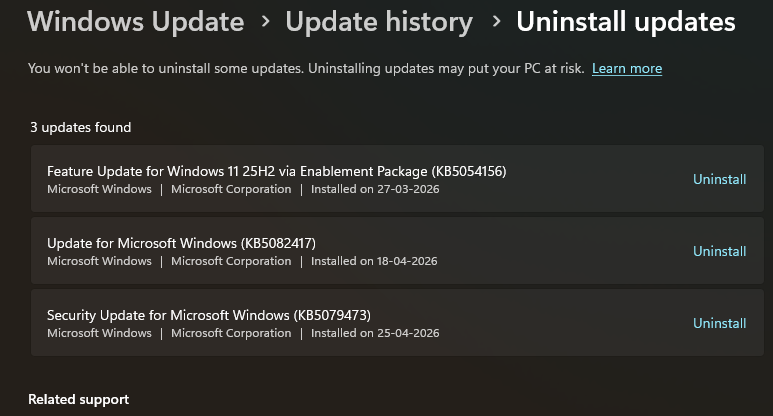
Users who are unsure whether KB5083769 is installed can head to Settings → Windows Update → Update history and check the list. If it is there, uninstall it and pause updates immediately afterward to avoid triggering the issue.
Don’t miss a thing! Join our Telegram community for instant updates and grab our free daily newsletter for the best tech stories!
For more daily updates, please visit our News Section.
Source: Microsoft



Comments