
Add GIZMOCHINA on Google:
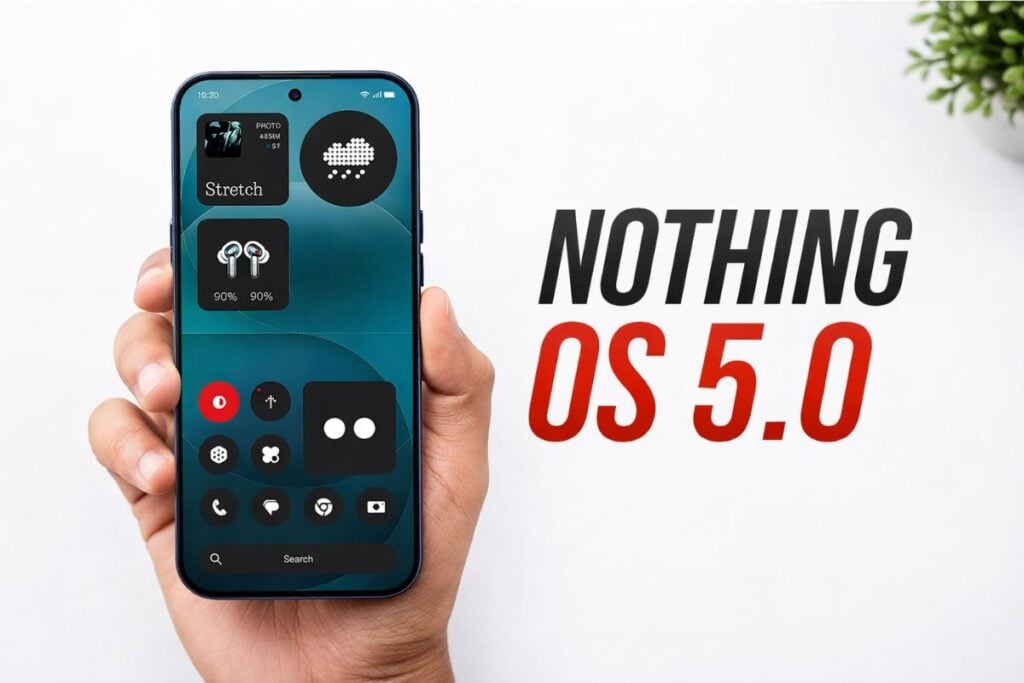
Nothing OS 5.0 is officially announced, and it’s one of the biggest software releases for the Nothing phones in recent years. Based on Android 17, the latest iteration brings an on-device AI app builder, a dedicated Glyph app, new widgets, and performance enhancements, among other major upgrades.
Alongside the new features and major upgrades, the brand has also revealed which Nothing phones will be upgraded to Nothing OS 5.0 and when they will receive the update. So, here’s everything you may need to know about the Nothing OS 5.0.
Nothing OS 5.0 supported devices list
Nothing has officially confirmed that these phones will be upgraded to Nothing OS 5.0:
- Nothing Phone (3)
- Nothing Phone (4a)
- Nothing Phone (4a) Pro
- Nothing Phone (3a)
- Nothing Phone (3a) Pro
- Nothing Phone (2a)
- Nothing Phone (2a) Plus
- Nothing Phone (3a) Lite
- Nothing Phone (4b)
- CMF Phone 2 Pro
Three phones, the Nothing Phone (1), Nothing Phone (2), and CMF Phone 1, are not eligible for the upgrade, as they have already reached the end of life (EOL) for software updates.
Nothing OS 5.0 Open Beta and stable rollout schedule
The Open Beta program kicks off August 26th, starting with the Phone (3), and will gradually expand to the remaining devices over the next 4-6 weeks. Unfortunately, the Phone (3a) Lite and CMF Phone 2 Pro won’t get beta releases.
The stable rollout goes live in mid-October, starting with Phone (3), and will be completed around mid-January 2027. Here’s a more detailed look at the official timeline:
| Model | Open Beta | General Release |
|---|---|---|
| Phone (3) | August 26 | Mid October |
| Phone (4a) Pro | Early September | Early November |
| Phone (4a) | Late September | Early November |
| Phone (3a) Pro | Late September | Early November |
| Phone (3a) | Late September | Early November |
| Phone (2a) | Mid October | Mid November |
| Phone (2a) Plus | Mid October | Mid November |
| Phone (3a) Lite | – | Late December |
| Phone (4b) | Mid December | Mid January |
| CMF Phone 2 Pro | – | Mid January |
If you want to be a part of the beta program, you may read this dedicated post on the Nothing Community to know about the registration process and some important things you need to keep in mind.
How to install Nothing OS 5.0 beta update on your phone
Once the Nothing OS 5.0 Open Beta program goes live for your device, you can follow these steps to get the beta update.
Make sure to back up your important data, and that your phone is updated to the latest available firmware. Go to Settings > System > System updates to check for available updates.
- Download the Nothing Beta Hub V2.0 APK from the official website.
- Install the Beta Hub APK.
- Go to Settings > System > Nothing Beta and tap Check Version.
- Tap Join Beta to register.
- Once done, tap Go to Update and install the update.
If Go to Update doesn’t work, go to Settings > System > System updates and check for updates manually.
During registration, if you get an error that joining the beta has failed, the server might be under heavy load. You should try again in a few hours.
Nothing OS 5.0 update: New features and major upgrade
Visual upgrades and refinements
- Separated Notifications & Quick Settings: Swiping down from the top-left corner shows all your notifications, while swiping down from the top-right corner opens a redesigned control center. The classic quick settings are still present, in case you don’t like the change.
- Redesigned Control Center: The updated Control Center features iOS-like volume and brightness sliders, resizable tiles, and smoother animations. Tapping a Bluetooth device inside the Bluetooth tile now instantly connects or disconnects it rather than opening a separate menu.
- Lucent theme: A brand new theme that adds translucent effects and Gaussian blur across widgets, search, home screen interactions, and first-party apps like Gallery.
- Refreshed visuals: Status bar icons and animations are more expressive. Plus, redesigned icons and a clearer Settings app layout.
Home screen and lock screen customizations
- Wallpaper-adaptive colors: App icons and 1×1 quick settings tiles naturally shift their color palettes to match the current wallpaper.
- Away Time widget: Displays time spent away from the phone and weekly trends.
- Collector widget: A digital frame widget that showcases your photos directly on the home screen.
- Glyph Timer: Starts the timer directly from the home screen and displays the remaining time on the rear Glyph interface.
- Improved Depth Effect: Improved subject positioning around the clock with edge blur and transparency.
- New clock faces: “Gooey” features a bold, playful design, while “Micrographics” is inspired by mechanical typography. The latter is still undergoing final development.
Essential AI upgrades
- Essential Voice: Upgraded on-device voice engine for faster speech processing and real-time transcription. Plus, improved formatting and Super Mic support for Ear (3).
- Essential Space:
- Adds Smart Selection to automatically group, sort, and organize your scattered photos and screen captures.
- Adds MCP support to enable compatible AI platforms to search and read selected information from Essential Space.
- Essential Apps Builder: Allows users to build custom apps by describing them in natural language and deploys them directly to the home screen.
Useful upgrades to built-in apps
- Optimized Camera controls: Viewfinder controls are simplified, moving lens options to the top-left corner for less visual clutter.
- Static QR code scanning: Results remain stationary at the bottom of the screen rather than shaking over the live viewfinder.
- Dedicated Glyph app: Moves Glyph settings into a standalone app to control custom lighting animations, ringtone schedules, and sounds.
Android 17 core features
- Expanded Dark Mode: Forces custom dark themes onto apps that don’t natively support dark mode.
- Cross-Platform Quick Share: Generates QR codes to instantly share large files directly with iPhones and other non-Android devices.
- Floating screen recorder: Adds a floating action pill for quick controls, editing, and sharing.
- Privacy indicator changes: New status bar icons identifying AI processing, location access, and other sensitive permissions.
- Isolated audio controls: You can now fine-tune smart assistant volume levels completely independently of our main system media slider.

Comments