
Add GIZMOCHINA as Preferred Source on Google
Apple‘s iOS 18 beta introduces a new accessibility feature called Vocal Shortcuts. While it is intended to provide alternative control methods, users have discovered a way to use it for a different purpose: to give Siri a new wake word.
Vocal Shortcuts lets users assign custom voice phrases to launch shortcuts and perform various tasks on their iPhones. Interestingly, one such shortcut can be programmed to activate Siri itself. That is, users can set a custom wake word through Vocal Shortcuts to replace “Hey Siri” with a phrase of their choice.
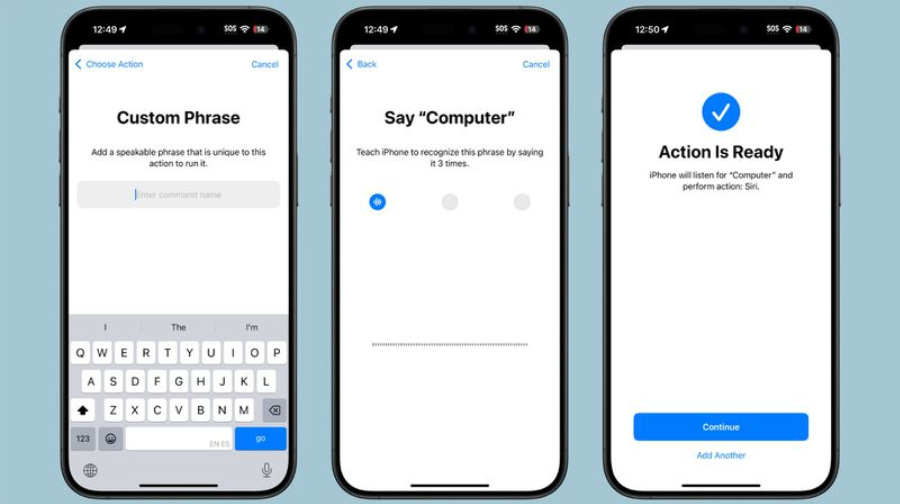
If you’re on iOS and want to try it, navigate through the Settings app to Accessibility and then to Vocal Shortcuts. Here, select “Set Up Vocal Shortcuts” and then choose “Siri” (not “Siri Request”). Next, enter your desired wake word, such as “Computer,” as shown in the image below.
Once configured, you can say that phrase to activate Siri on your iPhone. However, there are some limitations you should be aware of. The custom wake word only works on the specific device it’s set up on and doesn’t sync across Apple devices like the HomePod. They still demand “Hey Siri” to activate.
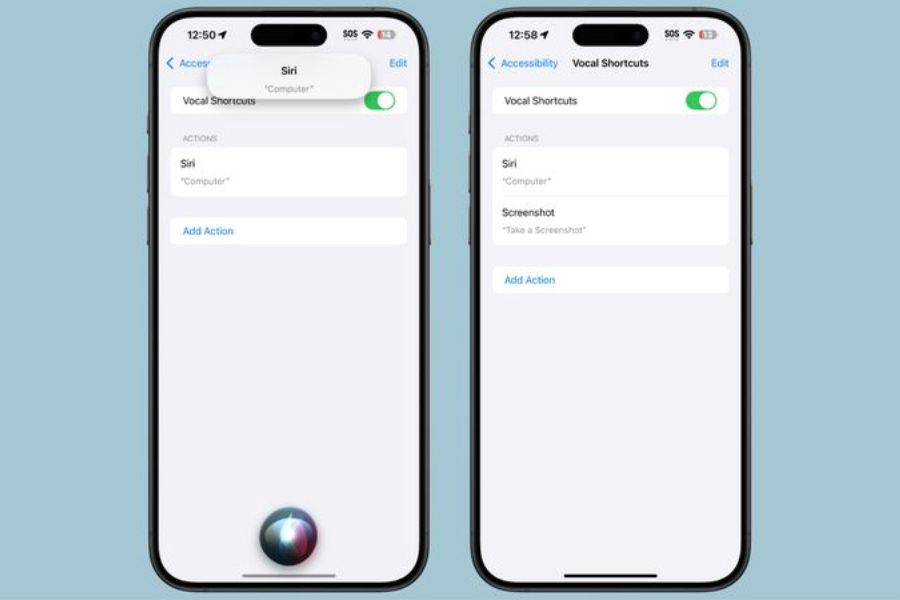
Additionally, you won’t be able to use a seamless flow in commands like “Hey Siri, what time is it?” with the custom wake word. You will need to pause briefly after saying the custom wake word before giving an actual request, which can disrupt the natural flow of interaction.
Given these limitations, many users might opt not to use this feature. However, it still provides an alternative for those who prefer a different activation method or have accessibility needs. Note that “Hey Siri” will still work to wake up the assistant even when a custom wake word is set through Vocal Shortcuts.
(Via)



Comments