
Add GIZMOCHINA as Preferred Source on Google
Over the past few years, Samsung has introduced security features like Knox and Secure Folder to Galaxy devices. Now the company has announced two new security features to the list – Quick Share Private Sharing and Samsung Cloud Enhanced Data Protection.
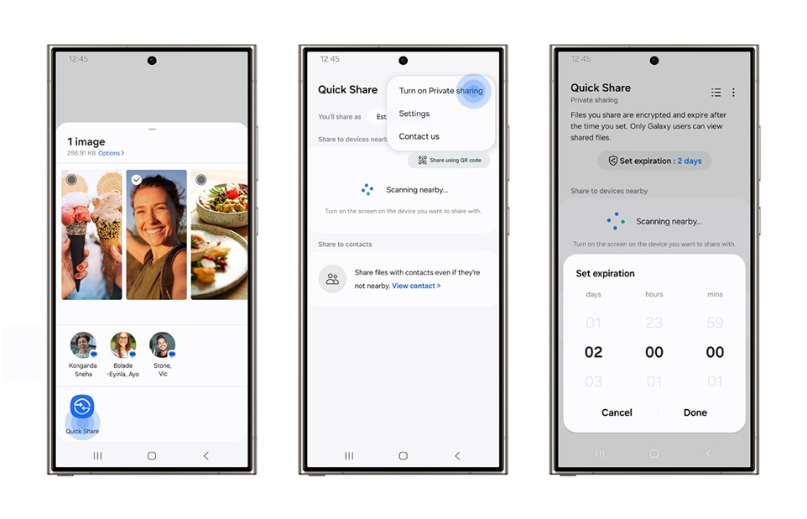
Quick Share Private Sharing
This is a built-in “privacy-preserving file-sharing function” that lets you share your data with peace of mind. You don’t have to worry about your files somehow ending up online or visible to anyone other than those you intended.
With this private sharing feature, users can ensure that only the designated recipients can open the files they share. Users can also set permissions and expiration dates for the data, so it’s only viewable for a limited amount of time. In addition to all of that, users can give read-only access without the ability to re-share, revoke the data access whenever they like, restrict screenshotting, and see when the recipient received and opened the file.
This feature allows the user to share up to 20 files at once with a total size of up to 200MB. According to the company, they are using blockchain-based encryption technology for this feature.
To use this feature, users can follow the steps – Select file > Quick Share > Three dots (more options) > Turn on Private sharing. Once the message has been sent, users can check what they’ve sent and change the expiration date or revoke sharing permissions.
Samsung Cloud Enhanced Data Protection
Samsung claims that with its Enhanced Data Protection, users can be confident that their data remains secure in the Samsung Cloud. Starting with the Galaxy S24, Enhanced Data Protection offers additional protection for Galaxy devices when the user data is synced or backed up with Samsung Cloud. It intends to mitigate data loss via end-to-end encryption (E2EE) and ensures that data can only be encrypted or decrypted on the user’s device and cannot be accessed by anyone else. In other words, the user data will remain safe even if the server is compromised or the account details are stolen.
During activation of this feature, users will need to write down a recovery code to help prevent data loss when the device is stolen or damaged. To activate this feature, users can follow the steps – Samsung Cloud > Three dots (more options) > Settings > Enhanced data protection. Alternatively, users can also go to Settings > Security and privacy > More security settings > Enhanced data protection.


Comments