
Add GIZMOCHINA as Preferred Source on Google
Google has unveiled a suite of updates for its ubiquitous Chrome browser, targeting both individual users and businesses. The focus lies on enhancing ease of use and streamlining workflows across desktops, Android, and iOS devices.
One key feature receiving an upgrade is Chrome’s tab grouping functionality. Previously, users could manually save and sync these groups across devices. Now, Google lets you enable automatic syncing – regardless of whether you’re using a desktop computer, Android phone, or iPhone.
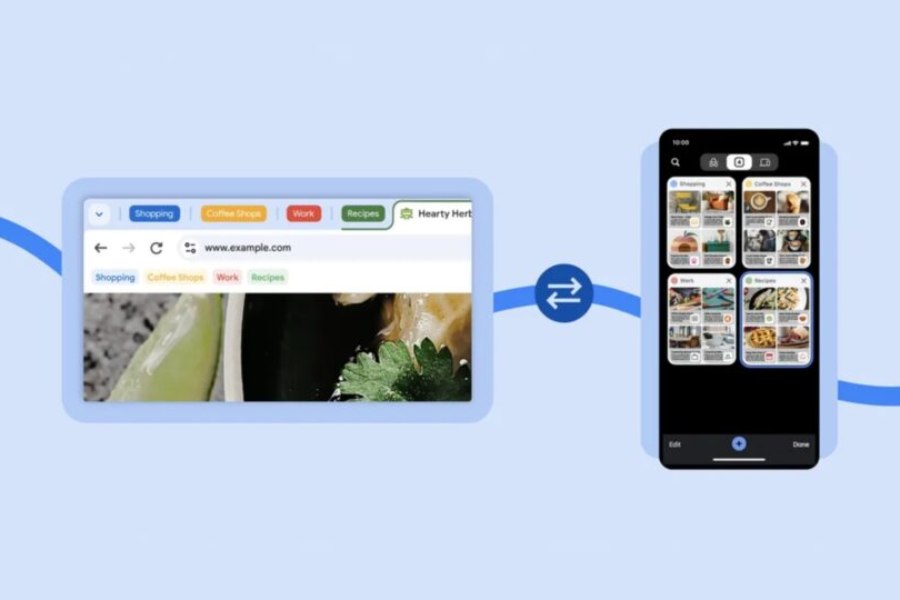
This seamless transition eliminates the hassle of manual saves, ensuring your research projects, shopping sprees, or open articles seamlessly follow you between devices. So if you’re exploring a topic on your laptop, you can later pick up your phone and continue exactly where you left off, with all relevant tabs ready.
Google is also currently testing a new feature that intelligently suggests web pages you might want to revisit. Essentially, Chrome analyzes tabs you’ve opened on one device and prompts you to open similar websites on your other devices.
For instance, Chrome might suggest opening the same news website you were reading on your work computer on your phone’s new tab. It’s for users who juggle between multiple devices throughout the day. No more bookmarking or frantically searching your history – simply rely on Chrome’s suggested revisit prompts to pick up where you left off.
Moving onto the realm of business, Chrome’s update caters to Google Workspace users. There’s a brand-new feature that shows the user’s daily calendar when you open a new tab.
It will enable employees to quickly check schedules or access virtual meetings without needing to launch the full Calendar app. According to Google, this feature will be gradually rolled out for Workspace users.
All in all, the new update adds some quality-of-life features to Chrome for bother personal and professional users.
(Source)


Comments