
Add GIZMOCHINA on Google:
One UI 7.0 introduces a range of new visual features, which includes the Now Bar—a lock screen widget that is designed to display ongoing activities like timers, music playback, and food delivery tracking.
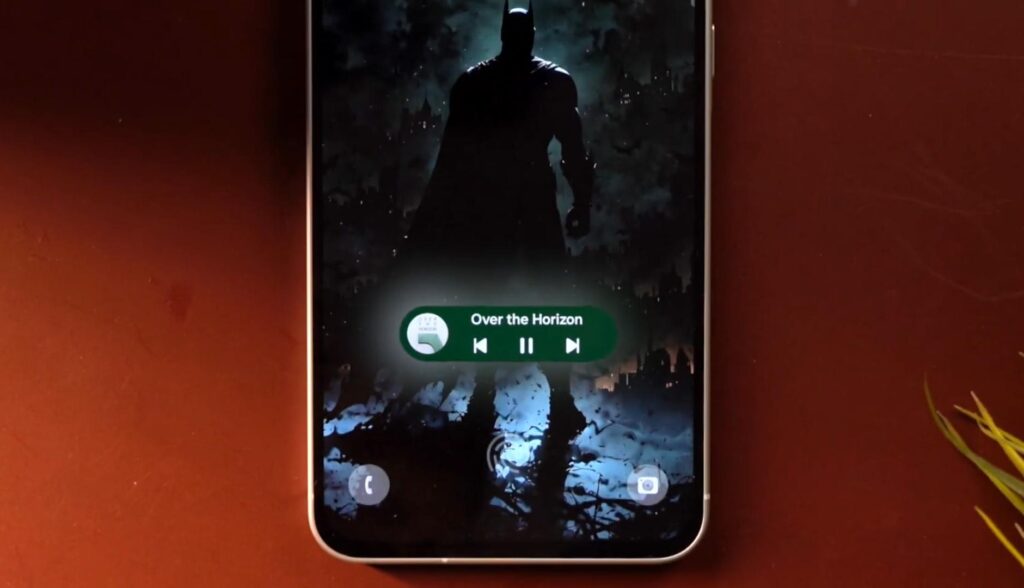
Unfortunately, more affordable phones like the Galaxy A56 cannot offer the same visual experience as the S25 or S24 series. On the A56, the UI element is positioned much higher on the screen, which takes away the clean look.
It’s not because the phone is cheaper than the flagships
On the Galaxy S24 and S25, the Now Bar is positioned neatly at the bottom of the screen, between the quick-launch shortcuts and below the ultrasonic fingerprint scanner. However, on the more affordable Galaxy A series models, the fingerprint scanner itself is positioned at the very bottom of the screen, which means the fingerprint icon would overlap with the Now Bar. So, the reason behind this difference is not the type of fingerprint scanner, but the placement of it.
That said, models with side-mounted fingerprint scanners, such as the Galaxy A26 and A06, should face no problem in displaying the Now Bar at the bottom of the screen, just like the flagships. I also assume the placement of the optical fingerprint scanner can be adjusted to match the needs of the UI.
So, I’m hoping to see a uniform look of the lock screen across different price segments, starting with future models. Still, it remains to be seen whether this slightly unpleasant look is enough for the giant to allocate some time and effort to it.
And for Galaxy A56 users, the feature can be turned off by navigating to Settings » Lock Screen and AOD » Now Bar.
Tech enthusiast? Get the latest news first! Follow our Telegram channel and subscribe to our free newsletter for your daily tech fix!
For more daily updates, please visit our News Section.
(Source)


Comments