
Add GIZMOCHINA as Preferred Source on Google
Some Galaxy S26 Ultra users started noticing an unwanted reddish tint on the display last month, and now the software fix meant to clear it up might be creating fresh headaches for a few of them.
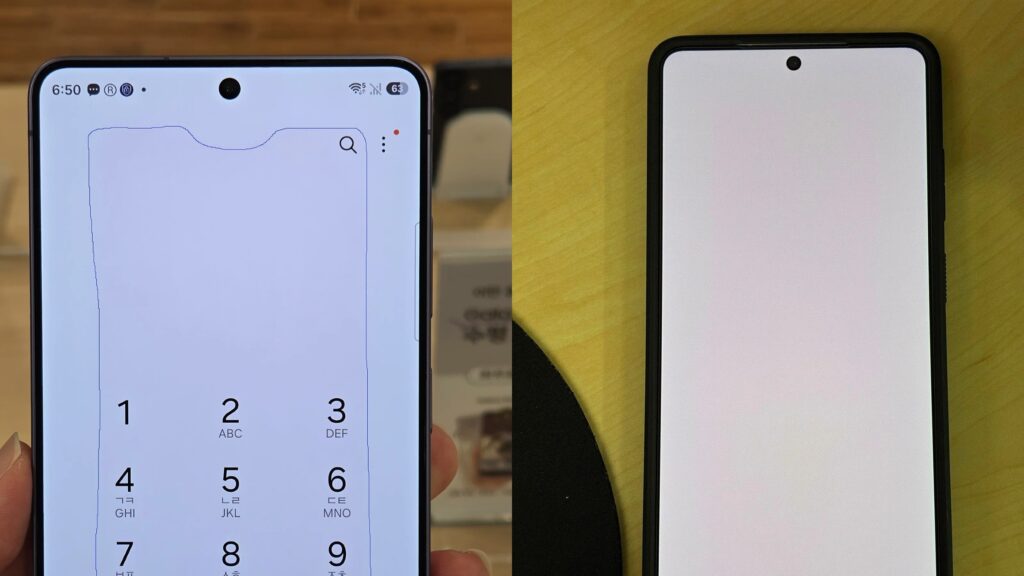
The original issue looked like a rectangular patch right in the middle of the screen. It was most obvious on white backgrounds, especially when the brightness was cranked up under strong ambient light. Complaints started trickling in a few months after the March 2026 launch and really picked up in July.
Samsung looked into it and said it’s not hardware, not burn-in, and not the panel itself degrading. According to them, it’s a software glitch in the color optimization and calibration routines. They noted that leaving the phone at max brightness under intense light for long stretches could throw the color balance off on some units.
Their fix was pretty straightforward: free same-day color calibration at service centers in South Korea (no matter how much warranty is left), plus an over-the-air software update. The August 2026 update started rolling out earlier this week, beginning in Korea. It apparently includes the color calibration correction along with the usual security patches. Samsung’s position is that most people won’t need to visit a service center. The software should handle it.

But here’s where it gets interesting. Some owners who already got the calibration, either through the update or at a service center, are now reporting tiny dot-like marks appearing on the display. These are still just individual user reports. There’s no official word that the dots are caused by the calibration process, and nothing yet to suggest it’s a widespread problem. Samsung hasn’t connected the new complaints to the software changes either.
Samsung has been clear that the red tint is a software calibration issue, not a result of the new Privacy Display hardware, but the novel panel design has still been part of the wider conversation about how this screen behaves.
For now, it makes sense to take the new dot reports with a grain of salt. If those marks stick around or start multiplying, the practical move is to get the phone checked at a service center so they can figure out whether it’s software-related or needs a closer look at the display.
Don’t miss a thing! Join our Telegram community for instant updates and grab our free daily newsletter for the best tech stories!
For more daily updates, please visit our News Section.
(Source)



Comments