
Add GIZMOCHINA on Google:
Oppo unveiled ColorOS 17 at its developer conference in China on September 17, and the company has now revealed most of what is coming with the update. Along with the new software, Oppo also announced a rollout schedule for Oppo, OnePlus, and Realme devices, which we covered in our official launch and rollout schedule report.
This time, we’re taking a closer look at the changes you are most likely to notice in everyday use, before getting to the phones that will receive the update and when.
ColorOS 17 is based on Android 17. It is also the first version of the software shared across Oppo, OnePlus and Realme phones, following OnePlus and Realme’s confirmation that they are moving to ColorOS.
1. Floating island navigation
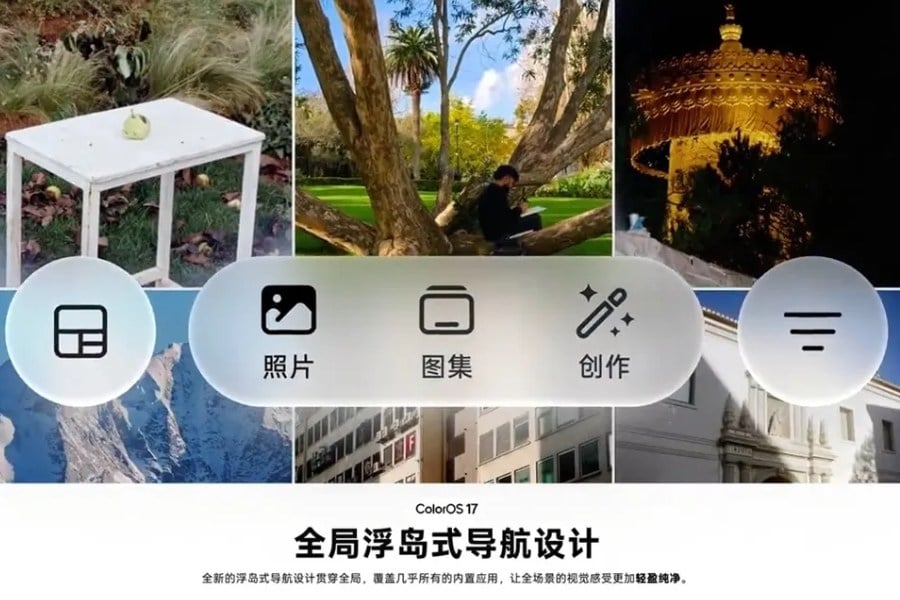
One of the first things you may notice is the new navigation design. Instead of sitting along the bottom edge of the screen, the navigation bar now floats above your content as a transparent, pill-shaped bar.
Oppo has brought the design to many of its own apps, including Files, Photos, Phone Manager, Compass and Notes. Background activities can also appear as tappable capsules, while the lock screen gets a separate Lockscreen Island for things such as music, calls and navigation.
The idea is to keep these controls within easier reach, especially when you are using the phone with one hand.
2. Fluid Design animations
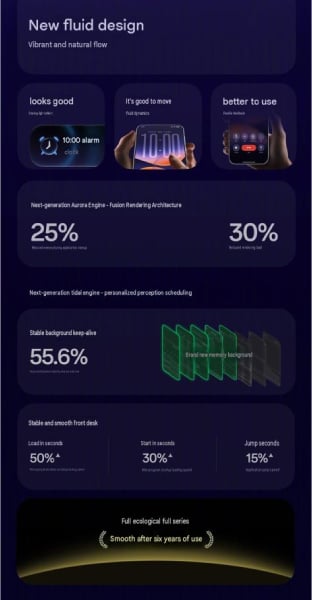
The new navigation is part of a wider visual change that Oppo calls Fluid Design. Rather than keeping every element rigid, the interface now reacts more noticeably to how you interact with it.
For example, buttons and selection boxes can stretch or squeeze slightly when you press them, then settle back into place. The clock also moves between the lock screen and home screen as you unlock the phone, making the transition feel more connected.
The animations respond to your touch as well. A quick flick gets a quick response, while slowly dragging an element gives you a little more resistance. Oppo says the Aurora Engine handles the rendering, with a separate animation layer taking care of the motion.
3. Frosted-glass look and new lock screen clocks
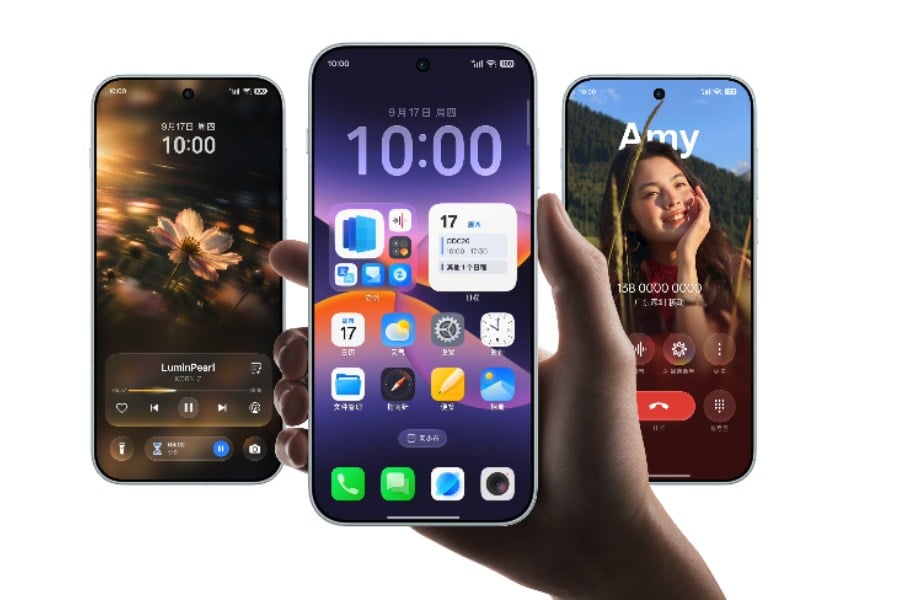
The visual changes don’t stop with animations. ColorOS 17 also brings a translucent, frosted-glass look to parts of the interface, including the Control Centre, Media Player, Notes, Files and lock screen.
The system uses different levels of blur to create a sense of depth, while a soft outline called Contour Glow helps separate cards and selected items from the background. The Control Centre has also been redesigned with fully circular toggles.
There is some resemblance to Apple’s iOS 26 design here, although Oppo says it has kept the refraction effect more restrained. The company also says the translucent elements are designed to keep text and icons easy to read.
The lock screen gets some attention of its own, with three new clock styles to choose from. If you like one of them, you can also use the same clock styles as widgets on the home screen.
4. Faster app switching with the Tidal Engine
Beyond the visual changes, Oppo is also trying to make ColorOS 17 feel faster when you move between apps.
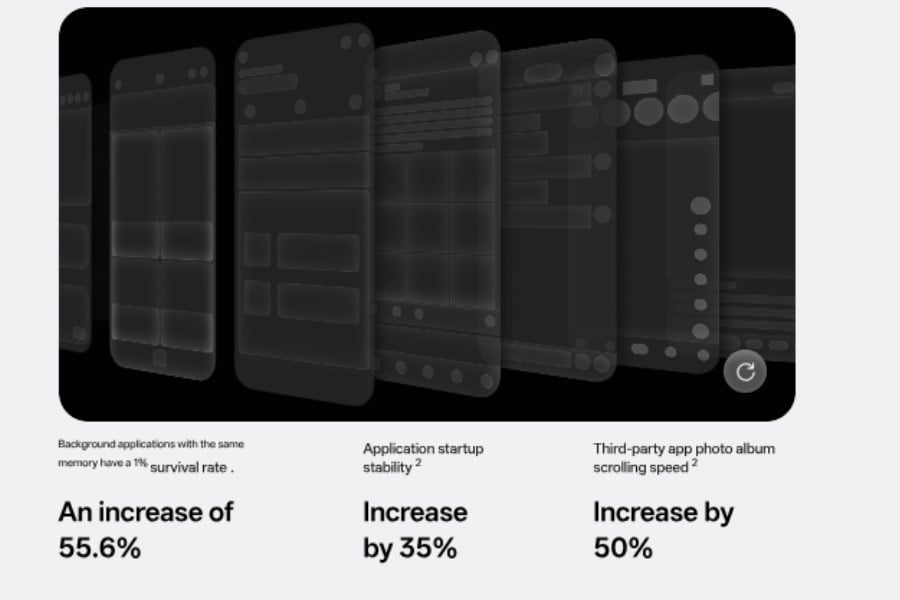
That’s where its Tidal Engine comes in. The system learns which apps you use most often and how long you typically spend in them, then adjusts how resources are allocated. It also works to keep more apps running in the background, so returning to an app doesn’t always mean starting from the beginning.
Oppo’s own figures show a 55.6% improvement in background app retention, along with 35% better app launch stability. The company also claims 50% faster scrolling and loading in third-party photo galleries and 15% faster app switching.
There is another system called the Polar Light Engine, which Oppo says can reduce the memory used when launching apps by 25% and cut rendering load by 30%. As always, the actual difference will depend on the phone’s hardware and how the software performs on it.
5. AI Photo Editor and AI Memory Gallery
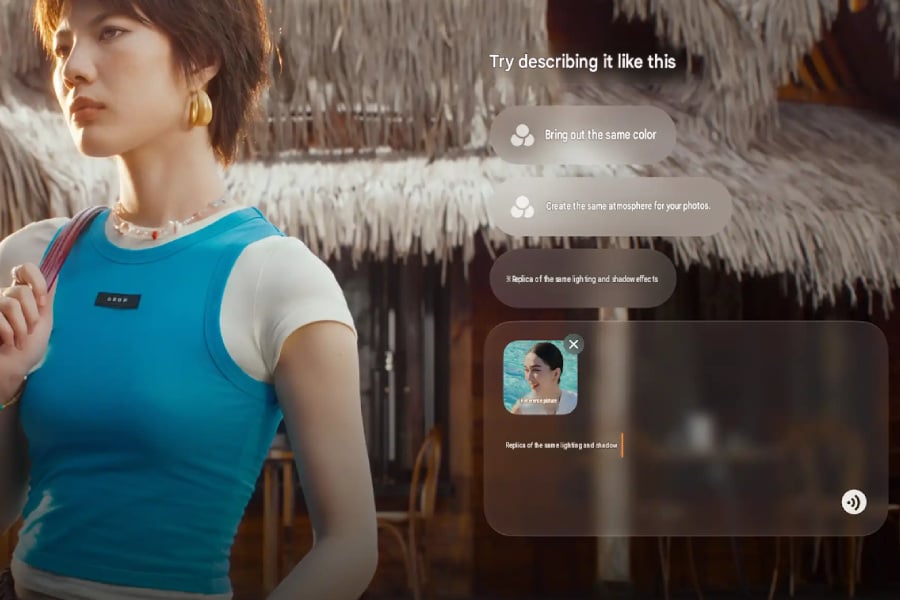
AI is also becoming a bigger part of the photo experience in ColorOS 17. With the AI Photo Editor, you can simply describe the change you want instead of going through individual editing tools.
You can also give the editor a reference image and ask it to use that image’s colors, lighting, or skin tone. On top of that, it can remove unwanted objects, reduce motion blur, and adjust colors and tones. Oppo says its DaVinci visual model powers these features.
The gallery gets some AI features too. AI Memory Gallery can turn your photos into photo blogs, which Oppo calls Plogs, and generate the accompanying text for you.
There is also a more useful change if you regularly shoot with other devices. Footage from cameras such as the Insta360 GO Ultra, as well as files stored on NAS devices, can be accessed directly from the album through Album Direct Connection without first taking up space on your phone.
6. AI Notes and live translation

ColorOS 17 also gives AI Notes a bigger role in meetings and other situations where you need to keep track of information.
The app can listen to a meeting while taking notes at the same time. You can also bring in videos, books, and other ideas with a single click and have them turned into structured notes. If you need to share the results of a meeting, the system can create an editable overview diagram as well.
Oppo is also bringing live translation into the mix. When compatible Oppo earphones are connected, the system can translate another person’s speech in real time and play the translation into your ear. Your response can then be played through the phone’s speaker.
7. Xiao Bu assistant
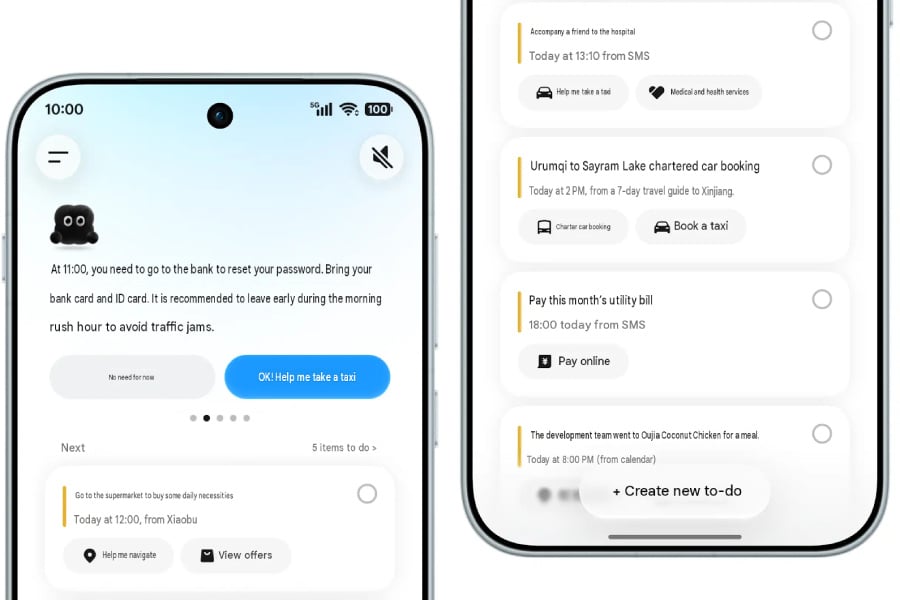
Oppo’s assistant, known as Heytap Assistant, Breeno or Xiao Bu depending on the market, is getting a more proactive role with Xiao Bu Space.
Instead of simply waiting for commands, it can keep track of tasks and flag things that need attention. Oppo gives examples such as an overdue credit card payment or a forgotten reservation, with the assistant pointing you toward the service that can resolve the issue.
Travel is another area where Oppo is putting Xiao Bu to work. You can describe a trip in one sentence and have it create an itinerary covering things like transport, accommodation, tasks and precautions. Once you’re travelling, it can show your boarding pass, arrange a taxi after you land, and even warn you if you have selected the wrong airport, station, or terminal.
Oppo says the assistant supports more than 700 scenarios. For now, these features have been announced for the China version of ColorOS 17, and it has not confirmed which ones will make their way to global builds.
8. Scam and deepfake protection
Oppo is also using AI to add more protection against scams and deepfakes.
One of the new tools is AI Cross-App Anti-Fraud, which looks at activity across calls, web browsing, and app installations. If it detects a chain of behavior that could eventually lead to a coerced payment, it can warn the user and record the event.
Then there is AI Face-Swapping Detection, which checks video calls for signs that someone’s face may have been digitally replaced and reminds you to verify who you are speaking with.
Finally, AI Call Anti-Fraud uses a new language model to look for scam scripts and AI-generated voices. Oppo says it can work across its own apps as well as third-party apps.
9. Car, watch and earphone features
ColorOS 17 is also expanding beyond the phone itself. Oppo has added Car+ connectivity, which allows supported cars and phones to work together more closely.
For example, Walking-Navigation Handover can move navigation from your phone to the car’s larger display when you start driving.
Oppo’s watches get some new tricks as well. Air gestures let you control parts of the phone without touching the screen. A double pinch can switch songs or videos, while a wrist flip or double tap can skip backward. You can also use the watch as a remote shutter for the phone’s camera.
For fitness, FatMax can set personalized heart-rate zones and provide voice coaching, while Sports Fluid Cloud can send heart-rate and calorie data to a phone or tablet in real time.
The Oppo Watch S2, which is among the first devices to run ColorOS 17, includes FatMax mode and launches on September 22.
10. Smaller changes testers have found
There are also a few smaller changes that have shown up in the closed beta. These aren’t necessarily final, so Oppo could still change them before the stable release.
For calls, you can swipe up to answer and swipe down to end one, with an option to reverse those gestures if you prefer. The status bar has also been rearranged, with the battery shown first, followed by Wi-Fi and signal information. On dual-SIM phones, the two signal indicators can also appear as a single block.
The torch gets a new full-screen interface with a brightness slider, while the charging animation now uses a glowing battery bar.
11. Which phones get ColorOS 17?
Oppo’s ColorOS 17 page lists the Oppo Find X10 series, OnePlus 16, and Oppo Watch S2 among the first devices to debut the new software. You can also check our Oppo Find X10 series roundup for what we know about that lineup so far.
For existing devices, Oppo has already published a rollout schedule for models in China. The stable rollout starts on October 8, although that doesn’t mean every device in a particular batch will receive the update on the same day. Oppo describes these as rollout start dates, and the schedule can still change.
Here are the main batches:
- October 8: Oppo Find X9 series and Find N6, OnePlus 15 and OnePlus 15T, Realme GT8 Pro.
- October 16: Oppo Find X8 series, Find N5 and Pad 5 Pro, OnePlus 13 and OnePlus 13T, Realme GT7 Pro, GT8 and Neo8.
- October 20: OnePlus Ace 6 series and Oppo Watch X3.
- October 22: Oppo Reno 16 and Reno 16 Pro.
- November 26: Oppo Find X7 Ultra, Reno 15 and Reno 14 series, OnePlus 12, OnePlus Ace 5 series, Realme GT5 Pro, GT7, Neo7 and Realme 15 Pro, along with more Oppo tablets and foldables.
- December: OnePlus 11, OnePlus Ace 3 Pro, Realme GT6, Neo6 and Realme 14 Pro+.
For users outside China, the wait is a little longer. Oppo has not yet published a global or India rollout calendar.
The company is already running a closed beta in India for the Oppo Find X9 Pro, Reno 15 Pro, Reno 15 Pro Mini, OnePlus 15, OnePlus 15R and Realme GT 8 Pro. That gives us an idea of which phones could be among the first to get the stable update, although Oppo has not confirmed its final rollout dates. The ColorOS 17 beta expansion has more details on the wider beta list.
OnePlus users will also have a choice when the transition happens. They can move from OxygenOS to ColorOS and roll back later if they decide they want to return. Realme India, meanwhile, has confirmed that its upcoming phones will launch with ColorOS 17 instead of Realme UI.
FREE NEWSLETTER
Get Gizmochina Daily
Every morning: the phone and gadget news that matters, with our take. 4 minutes.