
Add GIZMOCHINA as Preferred Source on Google
Google Fi Wireless, the mobile virtual network operator (MVNO) operated by Google, has recently announced the rollout of a redesigned companion app. This update not only introduces a fresh name and new plan features but also brings a family-centric focus to the app for both Android and iOS users. The aim is to provide users with enhanced control over their family’s digital safety settings and simplify the management of family members within the app.
The Rebranded Google Fi App has a Material Design
The revamped app prominently displays a “Cycle ends” countdown in the top-right corner of the Home feed, ensuring users stay aware of their billing cycle. Large user avatars are featured in top tabs, starting with the “Group” tab that showcases offers, deals, and plan highlights. Material You shapes on these tabs provide informative content about the benefits available to customers. The “Manage plan” section allows users to view costs, list members and devices, and make changes to their plan.
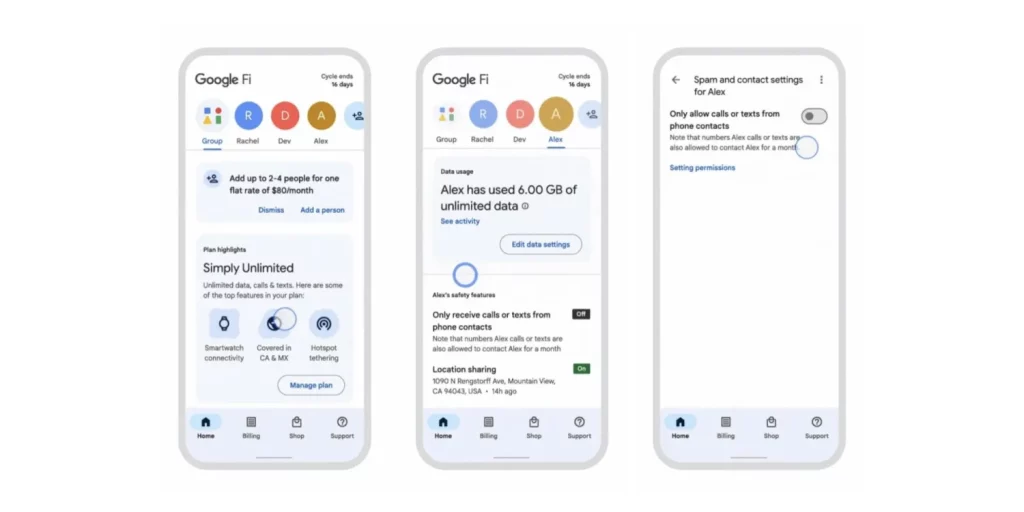
While scrolling, the tabs remain docked along with the app bar, making navigation convenient. However, users who are the sole members of their Fi plan may find the design slightly sparse, with a significant amount of empty space, particularly at the top. Nevertheless, relevant cards related to offers and deals will still populate the feed.
For managers overseeing the account, a data usage card displays Overall and Daily views, excluding those on Unlimited plans. The “Your safety features” or “Help protect [user]” section prominently presents the status of crucial safety settings like Silence unknown callers, receive calls or texts only from phone contacts, location sharing, and data alerts. Phone and Account settings remain unchanged, with the “International features” toggles placed at the bottom.
The Google Fi Wireless app redesign is being rolled out with V85 on Android. Users have reported widespread activation of the server-side component within the past day, indicating a full-scale deployment of the new features and interface.
RELATED:
- Google Contacts rolling out birthday notifications for Android users
- Google Play Store Users Warned of Malicious Guerrilla App That Can Steal Personal Information
- Best Budget-friendly Drawing Tablets in 2023
(Via)




Comments