
Add GIZMOCHINA as Preferred Source on Google
OnePlus has launched OxygenOS 15, based on Android 15, showcasing various changes and new features. It introduces a fresh design, more personalization options, and several AI-powered tools. OnePlus has also shared its timeline for public beta testing across eligible devices, ahead of the stable release for everyone. Check the list below for details.
OnePlus OxygenOS 15 Open Beta Rollout Timeline
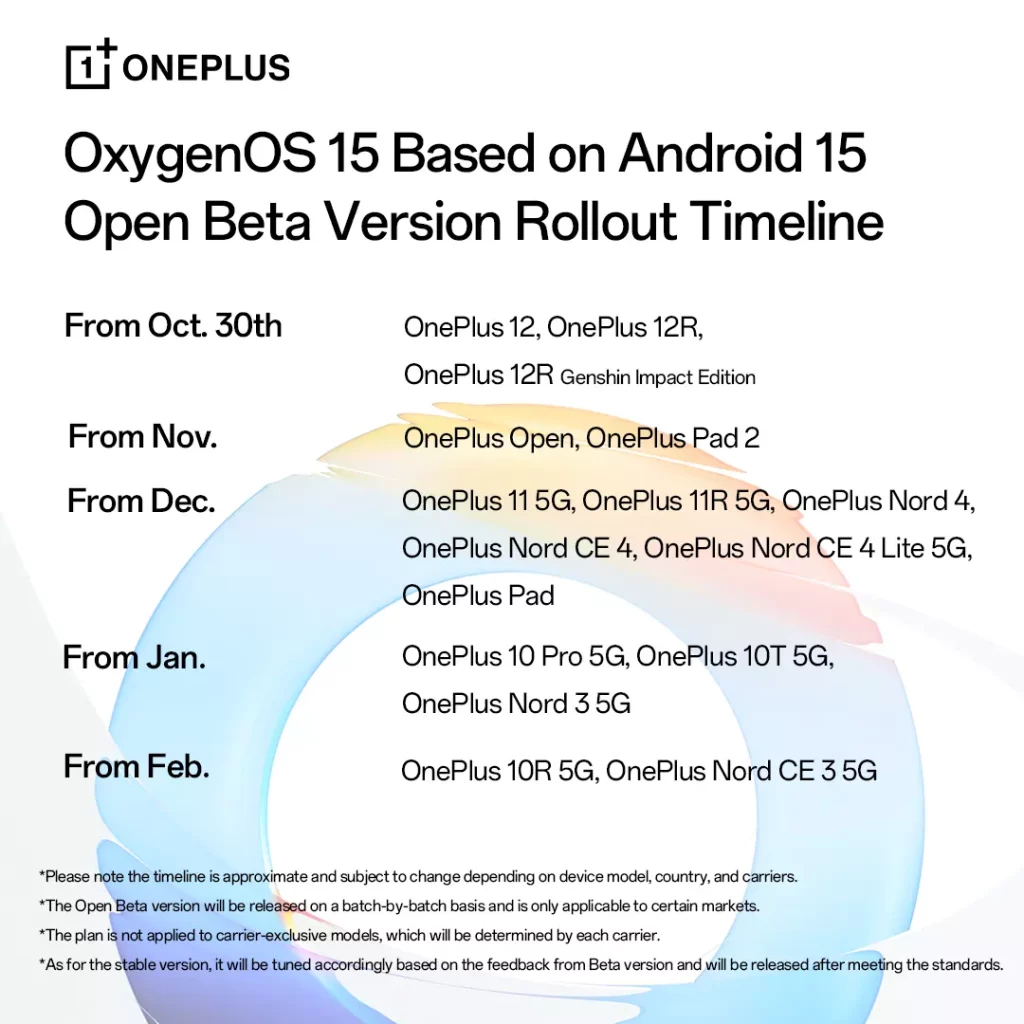
- October 30th: OnePlus 12, OnePlus 12R, OnePlus 12R Genshin Impact Edition
- November: OnePlus Open, OnePlus Pad 2
- December: OnePlus 11 5G, OnePlus 11R 5G, OnePlus Nord 4, OnePlus Nord CE 4, OnePlus Nord CE 4 Lite 5G, OnePlus Pad
- January: OnePlus 10 Pro 5G, OnePlus 10T 5G, OnePlus Nord 3 5G
- February: OnePlus 10R 5G, OnePlus Nord CE 3 5G
The brand has noted that the timeline is approximate and subject to change, and the Open Beta will only be available in select markets. Carrier-exclusive models may have a different rollout schedule. The stable version will be released once it meets quality standards based on the feedback from the Beta program. You can check out a brief overview of the features coming with the OxygenOS 15 update below:
OxygenOS 15 features
Performance:
- Industry-first parallel processing for smoother animations.
- System-wide swipe consistency for a uniform experience.
Design:
- Revamped icons and a new home screen design.
- Enhanced Shelf with more card options.
- Split mode for separate notification drawer and Quick Settings.
Customization:
- OnePlus OneTake for personalized visual experiences.
- Lock screen enhancements like clock color blending and blurred wallpapers.
- Home screen customization with glass patterns and blurred wallpapers.
AI:
- OnePlus AI for enhanced photography features like AI Eraser, AI Unblur, AI Reflection Eraser, and AI Detail Boost.
- Pass Scan for easily adding boarding passes to Google Wallet.
- AI Notes for improved writing and communication.
- AI Toolbox 2.0 for various AI-powered tools.
Productivity:
- Circle to Search for easily finding information on your screen.
- Intelligent Search for accessing key information from Settings, My Files, Notes, and Photos.
- Open Canvas for three-app split-screen functionality.
- Fluid Cloud for improved app compatibility and real-time synchronization.
Security and Privacy:
- Google Play Protect Live Threat Detection for malware protection.
- Theft Protection features like Screen-Lock after theft, Remote Lock, and Offline Lock.
(Source)


Comments