Add GIZMOCHINA as Preferred Source on Google
In an age dominated by touchscreen smartphones, the physical keyboard seems like a relic of the past, yet it still holds a certain allure for a niche audience. Physical keyboards on smartphones, popularized by brands like BlackBerry and Palm, evoke nostalgia and promise unparalleled typing precision.
But are they worth revisiting in the current era of sleek and versatile touch interfaces? Let’s evaluate whether physical keyboards deserve a place in modern smartphones.
1. Advantages of Physical Keyboards
Tactile Feedback and Typing Accuracy: Physical keyboards provide tactile feedback through mechanical key presses, enabling users to type with greater accuracy. This haptic response reduces the likelihood of typographical errors, a common issue with touchscreens where the absence of physical keys can lead to mistypes. For professionals who rely on extensive typing, such as emails or document editing, this precision is invaluable.
Unobstructed Screen View: With a physical keyboard, the entire screen remains available for content display, as typing does not require an on-screen keyboard that occupies a portion of the display. This is particularly beneficial for tasks that demand full-screen visibility, enhancing user experience in activities like reading, gaming, or watching videos.
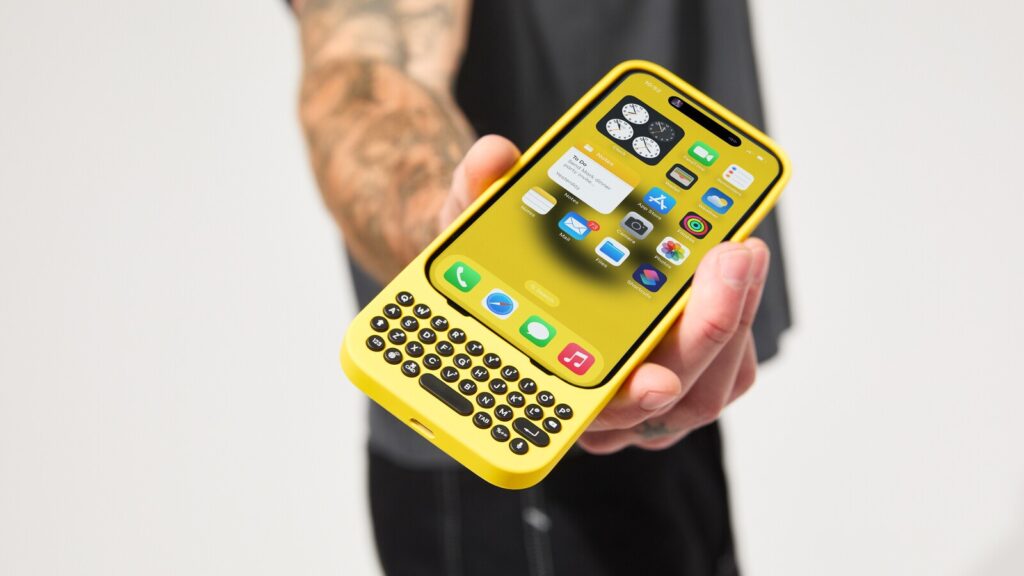
Keyboard Shortcuts and Productivity: Physical keyboards often support customizable shortcuts, allowing users to execute commands swiftly without navigating through multiple menus. This feature enhances productivity, especially in professional settings where time efficiency is crucial. For instance, the Clicks keyboard case for iPhones enables users to utilize keyboard shortcuts for various functions, streamlining workflow.
2. Technical Considerations
Design and Ergonomics: Integrating a physical keyboard into a smartphone necessitates design modifications, often resulting in increased device thickness and weight. Manufacturers must balance ergonomic comfort with portability, ensuring that the keyboard is user-friendly without compromising the device’s sleekness. The Clicks keyboard case, for example, adds length to the iPhone, which may affect handling and storage.
Durability and Maintenance: Physical keyboards are susceptible to wear and tear, including key degradation and potential mechanical failures. Regular maintenance, such as cleaning to prevent debris accumulation, is essential to maintain functionality.
Software Integration: Effective utilization of a physical keyboard requires seamless integration with the smartphone’s operating system. This includes support for keyboard shortcuts, language options, and compatibility with various applications. Inadequate software support can hinder the user experience, making the physical keyboard more of a hindrance than a benefit.
3. Limitations and Challenges
Market Demand and Device Availability: The rise of touchscreens has diminished the presence of smartphones with physical keyboards. This decline has narrowed consumer options, with physical keyboards now largely confined to niche markets or available only as aftermarket accessories. The Clicks keyboard case is one such accessory, designed for users who prefer a tactile typing experience while using iPhones.
Adaptation and Learning Curve: Users accustomed to touchscreens may find transitioning to a physical keyboard challenging. The learning curve associated with mastering key placement and typing techniques can deter users from adopting devices with physical keyboards, especially if they perceive no significant advantage.
Technological Redundancy: Bigger screens and advancements in touchscreen technology, including haptic feedback and predictive text, have mitigated most of the advantages traditionally associated with physical keyboards. As touchscreens have now become super responsive and accurate, the necessity for physical keyboards diminishes.
4. Is a Physical Keyboard Worth It on Smartphones?
The physical keyboard era for smartphones is essentially over and now only appeals to a niche market of enthusiasts who specifically seek the tactile experience of physical keys. For the majority of smartphone users, there is no practical need for a physical keyboard. Modern smartphones with larger displays have eliminated typing issues, and advancements in haptic feedback have effectively addressed the need for tactile response.
When it comes to tablets, however, the scenario is different. Physical keyboards play a crucial role in enhancing productivity on tablets, making them a necessary accessory for typing-intensive tasks. But for smartphones, there’s little justification for the inclusion of a physical keyboard in today’s touch-centric world.
If you are still adamant about having a physical keyboard, there are options available. Accessories like the Clicks keyboard case provide a way to enjoy the tactile typing experience on modern smartphones, albeit with some trade-offs in portability. Alternatively, smart feature phones with physical keyboards remain a viable choice for those who prioritize traditional typing experiences over the convenience of touchscreen interfaces.
In related news, don’t miss our roundup of the best book-style foldable smartphones of 2024 and the best affordable flagship smartphones of 2024.
Stay ahead in tech! Join our Telegram community and sign up for our daily newsletter of top stories! 💡