
Add GIZMOCHINA as Preferred Source on Google
Android’s virtual RAM feature—called RAM Plus on Samsung, Extended RAM on vivo, or Memory Extension on Xiaomi—has sparked debate for years, with many users believing it occupies internal storage. A detailed Reddit post and recent findings bust this myth: virtual RAM, or zRam, doesn’t use storage by default, but confusion persists due to vague explanations from phone makers.
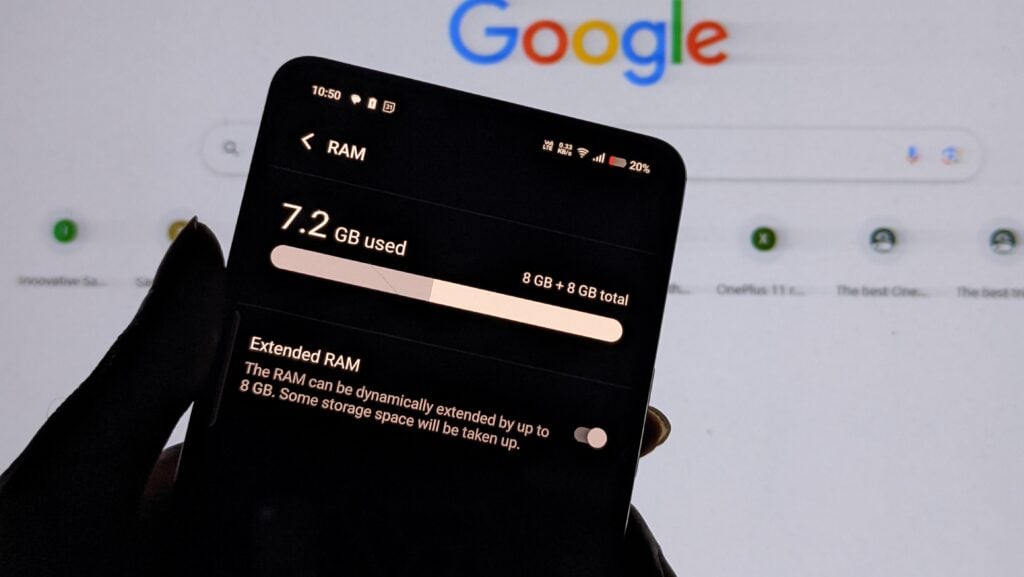
Virtual RAM, a staple on Android devices, is often misunderstood. The toggle to turn on the feature usually includes a disclaimer about storage use, like my iQOO Neo9 Pro says, “The RAM can be dynamically extended by up to 8GB. Some storage space will be taken up,” and my Xiaomi Poco X3 phone says, “Add 1GB of RAM by occupying storage. Use this feature only when there’s enough storage available on your device.”
This fuels the idea that this RAM extension feature sacrifices internal storage, but that’s not the full story, per a Reddit deep dive by PurelyOxified.
How it actually works:
The RAM extension feature relies on zRam, a kernel module that carves out a chunk of system RAM to store compressed data at around 2:1 ratio, squeezing more into less space. It doesn’t touch internal storage by default, despite what the settings menus claim. The catch? If zRam fills up, least-used data can spill into a swap file on storage, using minimal read/write to avoid wear. For example, enabling “8GB+8GB” Extended RAM on my Neo9 Pro occupied 2GB of storage space during the reboot. But it will only be used if zRam maxes out.
This explains why storage is still needed—and shows that manufacturers weren’t lying, just not telling the full story—yet it won’t constantly perform read/write operations. zRam’s trade-off is minor CPU overhead for compression.
Next time you toggle “Extended RAM” or “Memory extension” (or whatever your phone calls it), know that it’s boosting RAM efficiency—not stealing your storage—unless you push zRam to its limits.
Don’t miss a thing! Join our Telegram community for instant updates and grab our free daily newsletter for the best tech stories!
For more daily updates, please visit our News Section.




Comments