Add GIZMOCHINA as Preferred Source on Google
As an Amazon Associate, Gizmochina earns from qualifying purchases. Links on this page may earn us a commission at no extra cost to you.
The idea of smart glasses is not new, but it’s only recently that it’s finally catching up. If you remember Google Glass from more than a decade ago, you know what we mean.
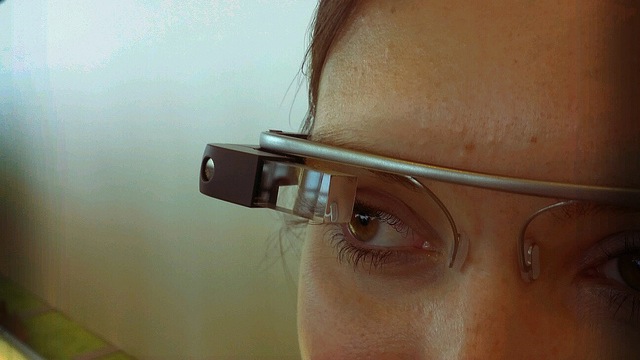
The whole industry started with more promise than practicality. The early smart glasses hardware looked unfinished, the features were limited, and most people didn’t want to walk around with something that made them look like a test pilot. After that, the category stayed quiet for years.
But things have changed quietly in the past few years. Smaller chips, better cameras, and more power-efficient displays have made it possible for a smart glass to look like a normal shade while offering smart features.
But even with all these improvements, buying smart glasses can still be confusing. Every company promises a different vision of what these glasses should be. Some focus on AI features, some want to be your wearable camera, and some are basically just Bluetooth headphones shaped like glasses.

So before you choose a pair, it’s worth knowing what you need smart glasses for and what actually matters in them.
1. Decide What Type of Smart Glasses You Actually Want
Let’s start with the basics. Since the market is now crowded with types of smart glasses, it’s only natural to learn first about them.
Audio-only smart glasses
These look like regular glasses but have speakers in the temples. They’re mainly for listening to music, taking calls, or using voice assistants hands-free. They don’t have displays or cameras.
These are lightweight, the battery lasts longer, and they’re usually the cheapest option. But don’t expect them to do anything beyond audio tasks.
Camera-equipped smart glasses
These include products like the Ray-Ban Meta glasses. They look normal but include one or two small cameras for capturing photos/videos and live-streaming. They usually support voice control and have open-ear speakers.
These are more useful if you’re into hands-free content creation, travel photography, or documenting daily life without pulling out your phone. But they also raise privacy concerns and may not be welcome everywhere.
Display-based smart glasses
These are the closest to “true” smart glasses. They use a tiny projector or microOLED display to show notifications, navigation directions, or other information in your field of view.
These are the most technically impressive but also the most limited in battery life. The display is usually small and meant for brief glances rather than long interactions.
Before you start comparing specs, figure out which type matches your needs. Buying display glasses when you only wanted good audio won’t make sense, and vice versa.
2. Check How Natural They Look and Feel
One of the biggest improvements in this industry is design. Early smart glasses resembled bulky, experimental pieces with thick frames and temples.
That’s certainly not the case anymore, and in fact, the newer ones even come with a polarizing lens and stylish designs, making it easy to wear in public without attracting attention. Still, there are things to keep in check.
Weight
Anything over 50–55 grams might start to feel heavy on the nose and ears after an hour. Display-equipped glasses often go beyond that, so try to find the lightest model that still offers the features you need.
Fit
Smart glasses must feel like normal eyewear. Thick temples, tight frames, or uneven weight distribution can make them tiring to use.
Prescription lenses
If you wear glasses already, check whether the model supports prescription lenses and whether the brand offers them officially. Not all frames can be adjusted by your local optician.
3. Battery Life
Battery life is one area where progress has been slow. Even the best smart glasses today struggle to last a full day if you use all the features.
Audio-only models usually offer 4–6 hours of continuous playback. For glasses with cameras, the battery life heavily depends on how you use them. If you click more photos and videos, you can easily deplete their battery in less than an hour.
And it’s not getting any better with the ones with display built-in. The projector consumes more power than you expect. You can expect these glasses to last only a few hours with the display active.
4. Camera Quality and Privacy Considerations
If the glasses have a camera, don’t expect smartphone-level quality. Sensors are tiny, and processing power is limited.
Things to check:
- Resolution: 1080p is common; anything higher is a bonus.
- Low-light performance: Most struggle in the dark.
- Stabilization: Useful if you’re walking while recording.
- Audio capture: Important for vlogging or live-streaming.
But the more important thing is privacy. Wearing a camera on your face isn’t the same as holding a phone. Some people will be uncomfortable around you. Some places may ban them outright.
Brands have added LED indicators to show when recording is active, but it’s still your responsibility to be aware of your surroundings. If you’re uncomfortable with these social rules, camera glasses may not be for you.
5. Display Quality (If Your Glasses Have One)
Not all smart glasses have displays in them. But it’s surely becoming mainstream, take Meta RayBan Display for instance. You should consider a few things before buying one with a display:
- Brightness: Can you see the display outdoors?
- Field of view: Wider is more comfortable.
- Color vs. monochrome: Basic displays are often monochrome.
- Clarity: Some displays look grainy or low-res.
Smart glasses displays are usually useful for quick glances, and are still not ready to replace your smartphones.


Please Note: When you buy something using the links in our articles, we may earn a small commission at no cost to you.
Final Thoughts
Smart glasses are on a journey from prototypes to actual consumer gadgets. But they’re still in an early phase where every model has trade-offs. Some focus on cameras, some on audio, some on displays, and none of them are perfect replacements for your smartphone.
If you’re buying a pair today, the best approach is to be practical rather than optimistic. Focus on what you’ll use daily, ignore features that sound impressive but unrealistic, and make sure the glasses look and feel like something you’re comfortable wearing outside.
Don’t miss a thing! Join our Telegram community for instant updates and grab our free daily newsletter for the best tech stories!
For more daily updates, please visit our News Section.