
Add GIZMOCHINA as Preferred Source on Google
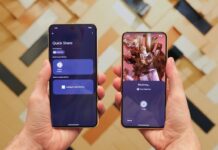
For Android users, moving a file from one device to another has often felt more complicated than it should. Quick Share aims to eliminate that friction by offering a seamless, cross-platform file transfer tool that just works. Originally split between Google’s Nearby Share and Samsung’s own Quick Share, the two systems merged in early 2024 to create a unified feature that now supports Android phones, Chromebooks, and Windows PCs. It even reaches into iOS, in a limited but very real way.

Quick Share is fast, secure, offline-friendly, and deeply integrated into Android. It’s positioned as a true AirDrop alternative for the Google ecosystem, and with recent expansions, it’s clear this isn’t just about convenience anymore. It’s a step toward breaking down the wall between mobile platforms.
Seamless Transfers, No Internet Required
Quick Share doesn’t rely on mobile data or active Wi-Fi connections. It initiates transfers over Bluetooth and switches to Wi-Fi Direct for the actual file delivery. This ensures high-speed performance, especially when sharing large files like 4K videos, uncompressed images, or multi-gigabyte folders.
Transfers work in environments with no internet access, whether you’re commuting underground, stuck in airplane mode, or somewhere off-grid. The entire process happens locally and uses barely any power. It’s fast, and it doesn’t interrupt the receiving device’s active connections.
Cross-Platform, Finally Done Right
Quick Share supports more than just Android to Android transfers. ChromeOS devices have built-in support, and Windows PCs can access the same feature through an official Quick Share app. Once installed, the app allows drag and drop transfers, push-to-device actions, and access to nearby devices.
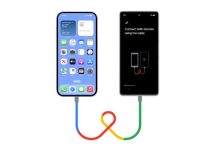
Just a few days back, Google made a surprise move by quietly enabling Quick Share to work with Apple’s AirDrop, but only on Pixel 10 devices. When a nearby iPhone has AirDrop set to “Everyone for 10 minutes,” it appears in the Quick Share menu. Tapping the iPhone sends the file directly, just like to another Android phone. No third-party apps, no weird hacks.
Apple didn’t participate in the integration, and Google confirmed it built the feature without any official help. Still, it works. Qualcomm has now confirmed that Snapdragon-powered Android devices will also gain access soon. That means Samsung, Xiaomi, OnePlus, and other brands are likely next in line.
Secure and Smart by Design
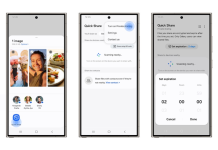
All transfers are encrypted. Users control who can see their device, either Everyone, Contacts, or Just Your Devices. For sensitive files, Samsung phones include a “Private Sharing” mode that disables screenshots, sets expiration dates, and prevents recipients from saving or resharing content.
Visibility can be set for short periods (10 minutes), and there’s a fallback option when the target device doesn’t appear. Just scan a QR code to begin the transfer. For long-distance sharing, Quick Share can also generate a secure link via the cloud, allowing up to 10GB of content per day.
For more daily updates, please visit our News Section.
Stay ahead in tech! Join our Telegram community and sign up for our daily newsletter of top stories! 💡

Comments