An Android version of the popular Wii U emulator, Cemu, has been leaked online. However, the developers have quickly clarified that this version is not intended for public release and is currently in a very early stage of development.
The leaked version has very limited game compatibility
The leaked version is reported to only support high-end devices with Qualcomm processors and has limited game compatibility. Additionally, the emulator’s performance is heavily dependent on the device’s hardware, with many games currently unplayable.
Cemu’s official team has emphasized that the leaked version is not representative of the final product and has discouraged users from seeking help or reporting issues at this time. They have also warned about the potential for malware disguised as Cemu APK files.
The developers have provided an FAQ document addressing common questions about the leaked version and its development status. Key points include the emulator’s reliance on Qualcomm processors, compatibility with Android 12 and later, and the expectation of a long development timeline before a public release.
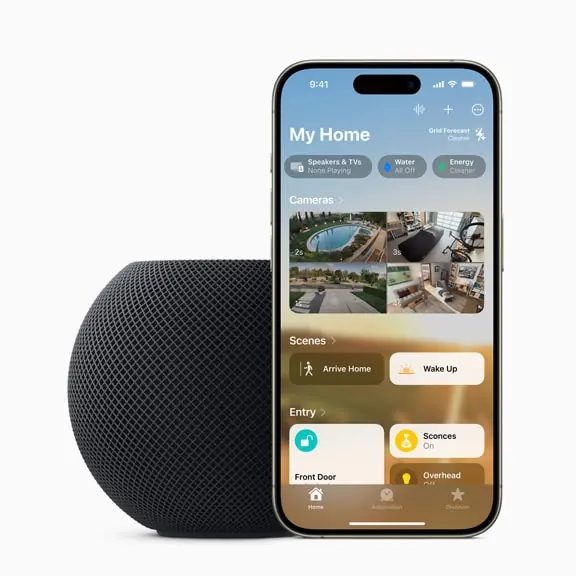
Apple has introduced a new midnight color for its HomePod mini smart speaker. The new color is made with 100% recycled mesh fabric and joins the existing blue, yellow, orange, and white color options. The HomePod mini with the new midnight color will be available for purchase starting July 17.
The speaker can be used with Apple Music, or paired with Apple TV 4K
The HomePod mini is a compact smart speaker that offers big sound in a small package. It features a seamless,acoustically transparent mesh exterior and a backlit touch surface that illuminates from edge to edge. The HomePod mini can be used with Apple Music to access over 100 million songs, and it can also be used to create a home theater experience with Apple TV 4K.
Originally released in November 2020, the HomePod mini has become a popular choice for consumers seeking a compact, high-quality smart speaker. With the addition of the new midnight color, the company continues to expand its options for customers while maintaining its commitment to sustainability.
The HomePod mini is priced at $99 in the United States. It is available for purchase on Apple.com and at Apple Store locations.
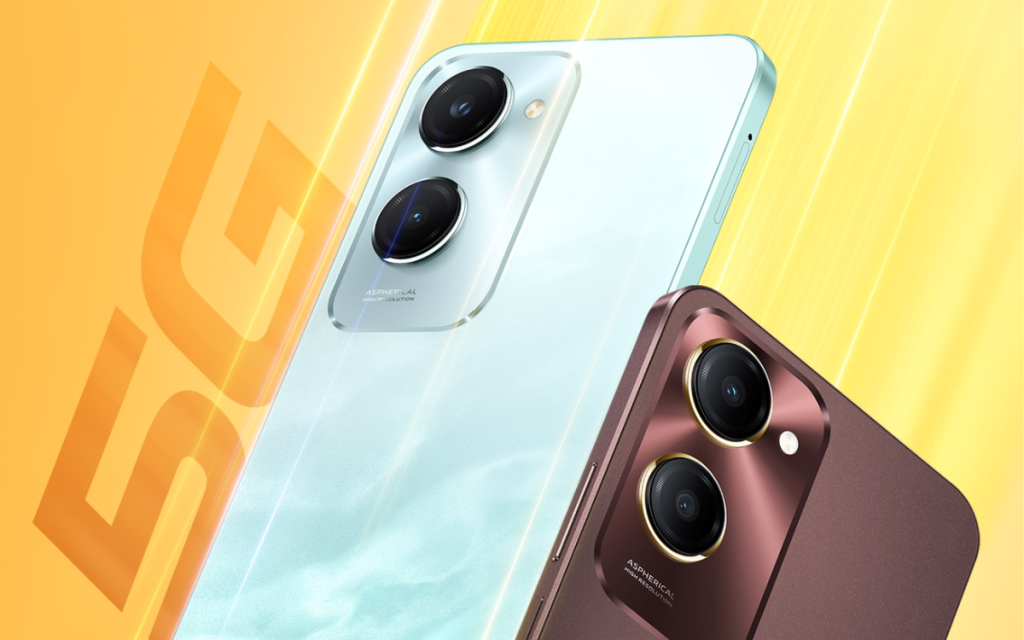
The budget smartphone market is heating up with the launch of the iQOO Z9 Lite 5G and the Realme C65 5G. Both phones offer 5G connectivity, capable processors, and attractive features at competitive prices. However, there are key differences to consider before making a purchase decision. This detailed comparison will delve into the specifics of each phone to help you determine which one is the right fit for you.
The iQOO Z9 Lite 5G features a 6.56-inch HD+ (1612 x 720 pixels) LCD display with a 90Hz refresh rate. The Realme C65 5G boasts a larger 6.67-inch HD+ (1604 x 720 pixels) LCD display with a 120Hz refresh rate.
While both offer an immersive viewing experience for everyday use, the Realme C65 5G wins with a slightly bigger screen and a smoother 120Hz refresh rate for gamers and those who prioritize a fluid visual experience. However, iQOO Z9 Lite 5G shines brighter with its 840 nits peak brightness compared to Realme C65 5G’s 625 nits.
2. Design and Build
The iQOO Z9 Lite 5G comes in Aqua Flow and Mocha Brown colors and weighs 185g. The Realme C65 5G is available in Feather Green and Glowing Black colors and weighs 190g. Both phones offer a side-mounted fingerprint sensor and a 3.5mm headphone jack.
The iQOO Z9 Lite 5G boasts dust and splash resistance with an IP64 rating. The Realme C65 5G offers a similar level of protection with an IP54 rating. Both phones should be able to withstand splashes and dust, but the iQOO Z9 Lite 5G might offer slightly better protection against dust ingress.
3. Performance and Software
Both phones are powered by the MediaTek Dimensity 6300 processor, which is a capable chipset for everyday tasks and light gaming. They come with options for either 4GB or 6GB of LPDDR4x RAM.
Both devices offer an additional 6GB of virtual RAM, potentially enhancing multitasking capabilities. Storage-wise, the iQOO Z9 Lite 5G provides 128GB eMMC 5.1 storage, while the Realme C65 5G offers 64GB or 128GB UFS 2.2 storage. UFS storage is generally faster than eMMC, leading to quicker app loading times and data transfer speeds on the Realme C65 5G.
In terms of software, the iQOO Z9 Lite runs Android 14 with Funtouch OS 14 and promises two years of Android updates and three years of security updates. The Realme C65 also runs Android 14 but with Realme UI 5.0, offering its own set of features and customizations.
4. Camera
The iQOO Z9 Lite 5G sports a dual rear camera system with a 50MP main sensor and a 2MP depth sensor. The Realme C65 5G keeps things simple with a single 50MP rear camera. Both phones have an 8MP front-facing camera for selfies and video calls.
While the megapixel count isn’t everything, the iQOO Z9 Lite 5G’s additional depth sensor might offer a slight edge in portrait shots with background blur. However, camera performance heavily relies on software optimization as well, so reviews comparing image quality from both phones would be helpful to determine the true winner in this category.
5. Battery
Both phones pack a 5000mAh battery, promising long battery life for everyday use. With similar screen sizes and processors, the battery performance is likely to be comparable. Both phones support 15W fast charging, so there’s no significant difference in charging speeds either.
6. Price
The iQOO Z9 Lite 5G starts at Rs. 10,499 for the 4GB RAM variant, while the 6GB RAM model costs Rs. 11,499. The Realme C65 5G starts at the same price point (Rs. 10,499) for the 4GB RAM and 64GB storage variant. The 4GB RAM with 128GB storage option costs Rs. 11,499, putting it on par with the base variant of the iQOO Z9 Lite 5G with 6GB RAM. The top-end Realme C65 5G with 6GB RAM and 128GB storage is priced at Rs. 12,499.
7. Conclusion
Both the iQOO Z9 Lite 5G and Realme C65 5G offer compelling features and excellent value for their price. The Z9 Lite might appeal to those who prioritize a compact design, slightly better camera capabilities due to the depth sensor, and enhanced dust and water resistance. The Realme C65, on the other hand, could be a better choice for users who prefer a larger display with a faster refresh rate and slightly more storage options.
Ultimately, the best choice between the two depends on your individual preferences and priorities. Consider factors like screen size, refresh rate, camera features, and storage options before making your final decision. Both phones represent solid options in the budget 5G smartphone market, offering a balance of performance, features, and affordability.
Letv has introduced its latest smartphone, the Letv S3 Pro. This follows their previous launch of the Letv S2 Pro smartphone in 2023. While the S2 Pro debuted at 999 CNY, the newly released S3 Pro comes at a reduced price of 699 CNY (approximately 96 USD), making it more affordable than its predecessor.
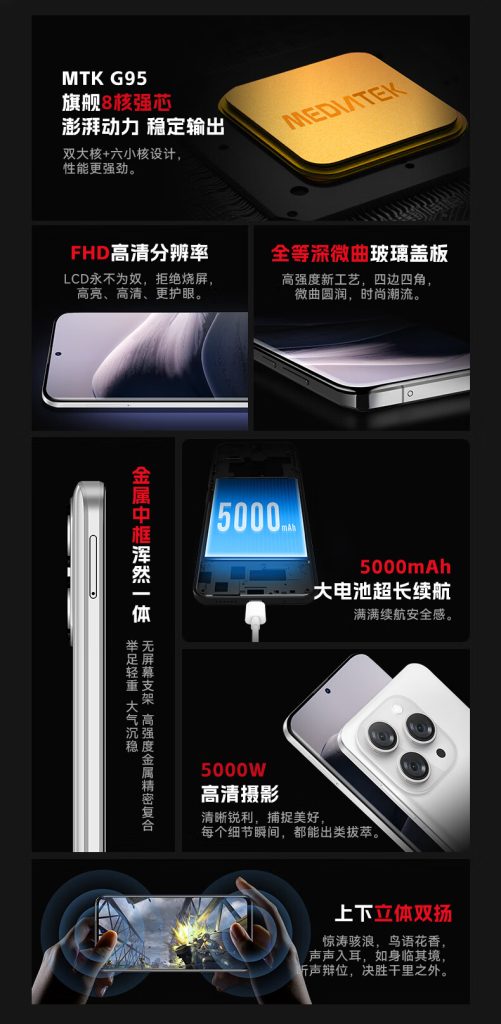
Similar to the iPhone lineup’s camera arrangement, the Letv S2 Pro featured a design. The S3 Pro continues this tradition, boasting a 6.7-inch OLED display. Powered by the MediaTek Helio G95 chipset, the phone includes a metal mid-frame for durability.
Letv S3 Pro specs
The Letv S3 Pro is equipped with a 5000 mAh battery supporting 18W charging, along with stereo speakers. Its triple camera array includes a 50 MP main camera, and it’s available in two colors: white and black.
Last month, Sennheiser launched the Accentum TWS earphones in India. Now the brand has introduced a new offering called the MOMENTUM Sport. As the name suggests, they are catered towards fitness and outdoor enthusiasts. Along with audio, the latest device also packs support for various health-tracking metrics. Read on to know what it offers out of the box
Sennheiser MOMENTUM Sport specifications
The Sennheiser MOMENTUM Sport has an in-ear design with interchangeable ear tips and shark fins for a secure fit. They are IP55-certified sweat, dust, and shock-resistant.
In terms of audio, the Sennheiser MOMENTUM Sport are equipped with a 10mm Transducer driver for an impressive bass. The semi-open design minimizes noise caused by the user’s movements. It also allows the user to be aware of their surroundings. The TWS earphones come with hybrid adaptive noise cancellation to eliminate unnecessary noise. There is also anti-wind noise reduction. Each earbud is also equipped with three mics for clear quality on calls.
The USP of the Sennheiser MOMENTUM Sport is that it features built-in tracking sensors including a PPG heart-rate sensor and body temperature along with a 3-axis accelerometer for monitoring critical health data. It is compatible with leading fitness apps and smartwatches. The health tracking guides users on when to reduce effort, hydrate, or take a break.
The Sennheiser MOMENTUM Sport is claimed to be backed by a total 24 hours battery life with each earbud said to offer 6 hours of usage on a single charge.
The Sennheiser MOMENTUM Sport carries a price tag of Rs 34.990. The TWS earphone can be availed in Polar Black, Burned Olive, and Metallic Graphite colors. They are available for purchase starting today. For a limited period, they can be grabbed at Rs 25,990 from the brand’s official website and Amazon.
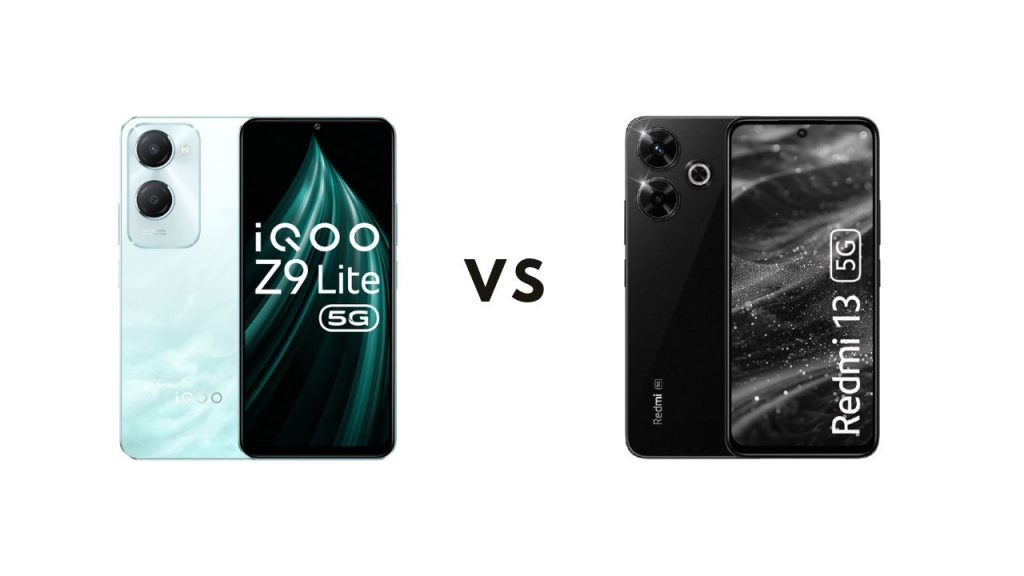
The iQOO Z9 Lite 5G was just announced in the Indian market today as a budget 5G smartphone. With entry level 5G devices being in high demand in the region, how does the Z9 Lite stack up against an alternative from Xiaomi in the same segment? The Redmi 13 5G dropped earlier this month, so let’s see how the two compare.
1. iQOO Z9 Lite 5G vs Redmi 13 5G: Taller & Smoother Display on Redmi
iQOO unveiled the Z9 Lite with a 6.56-inch IPS LCD panel that offers HD+ resolution and a 90Hz refresh rate. This is a decent offering for a budget smartphone model. On the other hand, the Redmi 13 5G arrives with a tall 6.79-inch IPS LCD screen, which offers a higher FHD+ resolution and a 120Hz refresh rate. So you’re getting a taller screen with a higher resolution, making it better for consuming content at a better quality. The 120Hz refresh rate also makes it smoother than the Z9 Lite.
2. Dimensity 6300 against the Snapdragon 4 Gen 2 AE
The Redmi 13 5G is equipped with the Snapdragon 4 Gen 2 AE (Accelerated Edition). It is paired with up to 8GB of RAM and 128GB of internal storage. This chip from Qualcomm has an edge in terms of raw performance compared to the Dimensity 6300, which powers the iQOO Z9 Lite. The MediaTek processor is coupled with just 6GB of RAM and 128GB of internal storage. So you get 2GB more RAM with the Redmi phone (depending on the storage configuration).
3. Camera
For optics, you get a 50-megapixel primary camera along with a 2-megapixel depth sensor on the iQOO Z9 Lite. On the front, there is an 8-megapixel shooter. Meanwhile, the Redmi 13 5G features a 108-megapixel main sensor along with a 2-megapixel macro lens on the rear. For selfies and video calls, there is a 13-megapixel camera on the front.
4. Battery, Fast charging, & More
A large 5,000mAh battery pack powers the Z9 Lite. This model supports a modest 15W wired fast charging. The Redmi 13 5G edges ahead with a marginally larger 5,030mAh cell, although it has a noticeably higher 33W wired fast charging support. One area where the iQOO Z9 Lite is ahead of the Redmi 13 is the water and dust resistance rating. The former comes with an IP64 rating, while the latter has an IP53 rating.
5. Pricing
Both smartphones are available in two storage options. The iQOO Z9 Lite is available in 4GB + 128GB and 6GB + 128GB versions. Redmi’s affordable phone can be purchased in 6GB + 128GB and 8GB + 128GB variants. The Z9 Lite has a starting price tag of 10,499 INR, while the Redmi 13 starts from 13,999 INR.
There isn’t a large price gap between the two, but people on a strict budget of around 10,000 INR would likely choose the iQOO Z9 Lite. However, the Redmi 13 for a slightly higher price tag seems like the better budget phone between the two.
In a surprising move, Huawei has lifted its embargo on chipset information for recently released phones. This means consumers can finally learn what processors power their Mate 60, Mate X5, and Pura 70 series devices.
Previously, Huawei remained tight-lipped about the specific chipsets used in these phones, launched last September and May respectively. On Weibo, tipster “Adak is a wolf” revealed that Huawei’s frontline sales staff are now authorized to disclose processor details.
Huawei Lifts Chip Embargo, Now Discloses Processor Details
Chinese media outlet IT Home then visited a Huawei flagship store and confirmed with staff that the Mate 60 and Mate X5 series run on the Kirin 9000S series processors, while the Pura 70 Pro/Ultra boasts the Kirin 9010 chip.
Interestingly, several of Huawei’s recently launched overseas products, including the MatePad SE 11″, MatePad Pro 13.2″, and Nova Y62/Plus phones, do reveal their processor models on the official website.
The reason behind the earlier secrecy is likely linked to ongoing US sanctions. Huawei faces scrutiny for its advanced chip manufacturing capabilities, and withholding chip details might have been a strategy to lessen pressure.
This newfound transparency suggests a shift in Huawei’s sales approach, potentially leading to clearer communication in future product releases. While specific processor models are now available, details remain limited. In-store staff can only share basic information like the chipset family and generation. Additionally, the phone settings themselves will not display the specific processor model.
Huawei is working on its next flagship model which is touted to compete with the upcoming iPhone 16 series. The Mate 70 series, expected in Q4 2024, will feature an upgraded Kirin chipset with AI-based capabilities, improved imaging, and support for satellite communication. The series will run on the HarmonyOS Next operating system and retain 1.5K resolution displays.
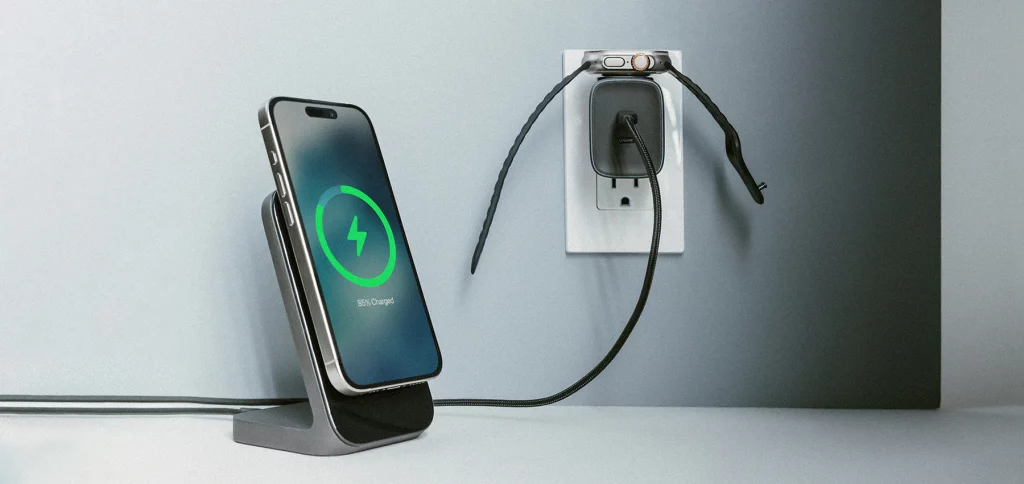
Our smart devices are becoming increasingly sophisticated, making our lives easier in countless ways. However, one major issue persists across most electronics and that is the battery life. Charging the devices regularly might be a hassle, and it’s easy to forget to charge them or leave your charger at home. Nomad’s new 65W Apple Watch Edition Power Adapter addresses this with a sleek and innovative design.
Charging iPhone and Apple Watch simultaneously
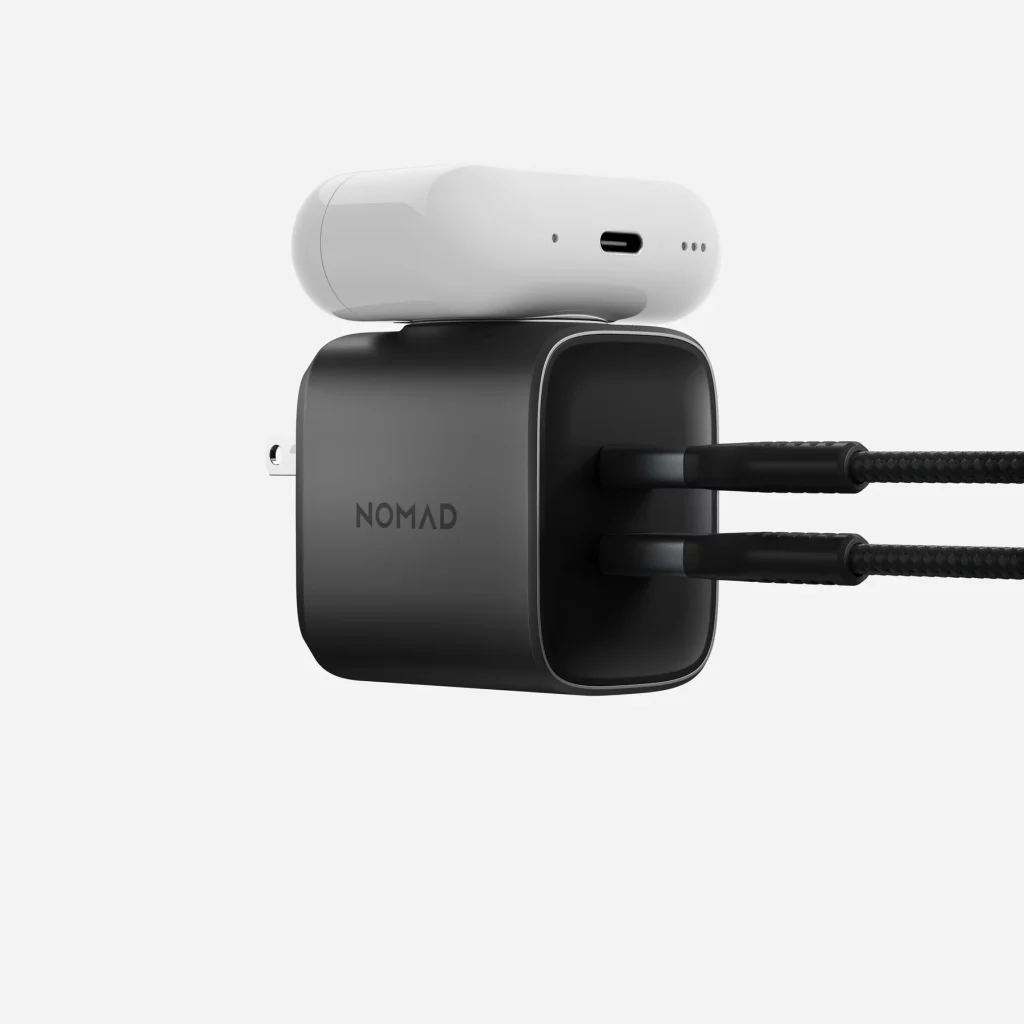
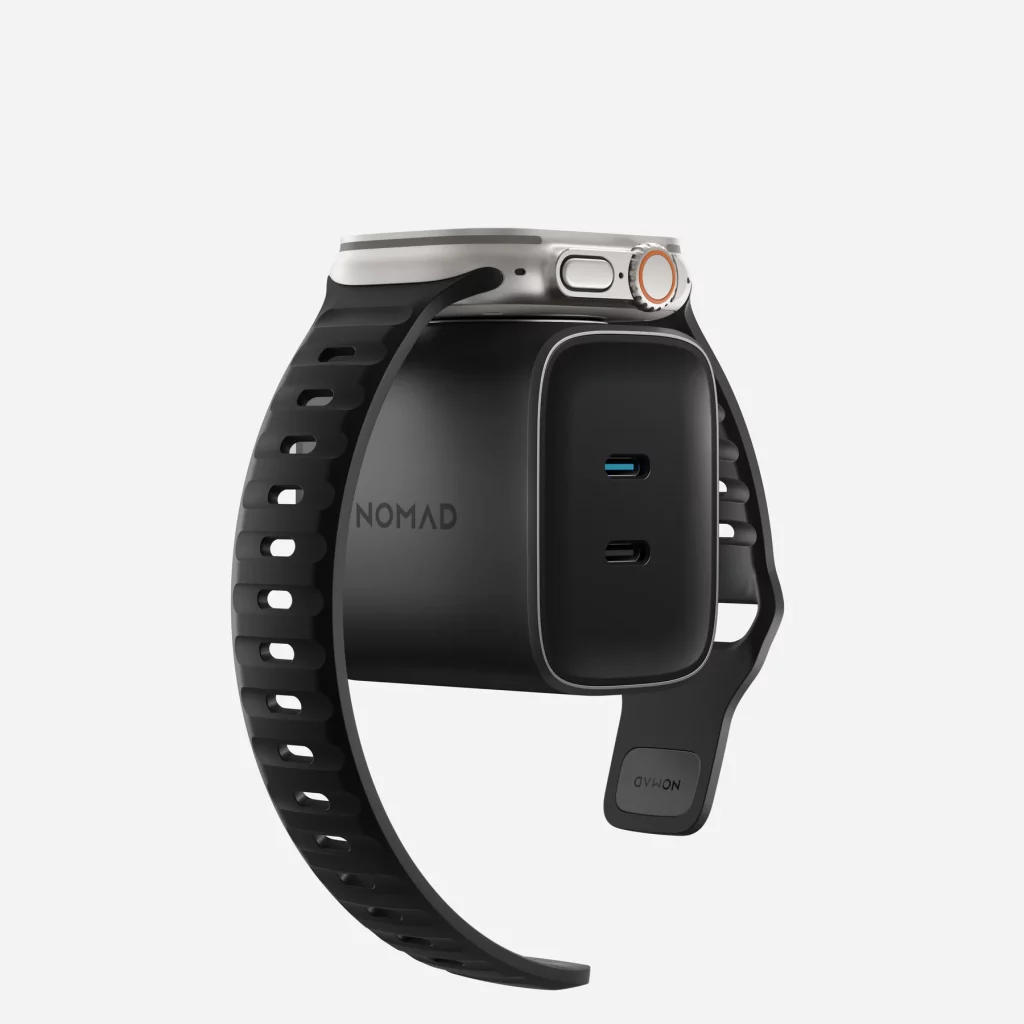
We know many smartwatches don’t support USB Type-C charging and come with a proprietary charging standard. This means that when traveling, you need to pack both your phone’s charging cable and your watch’s cable. Nomad’s new 65W GaN charger rules out this hassle with two USB Type-C ports and a built-in wireless charging pad packed into one single charger. This allows you to charge both an Apple Watch or an AirPods while charging your phone by using a single charger.
Nomad 65W Power Adapter Apple Watch Edition
Nomad’s 65W charger packs all this functionality into an incredibly compact body. It’s even smaller than Apple’s 61W charging adapter that comes with MacBooks. And as mentioned earlier, it can charge multiple devices simultaneously. This new adapter is an effective and compact solution to charge mobile devices. We know all these sound very well but Nomad’s new charger comes at a little costly pricing. The adapter has a pricing tag of 100 USD. Visit Nomad’s official website to learn more.
Wang Hua, the General Manager of Xiaomi‘s Public Relations Department, has officially denied the rumor about Xiaomi SU8. He confirmed that there is no Xiaomi SU8 at present.
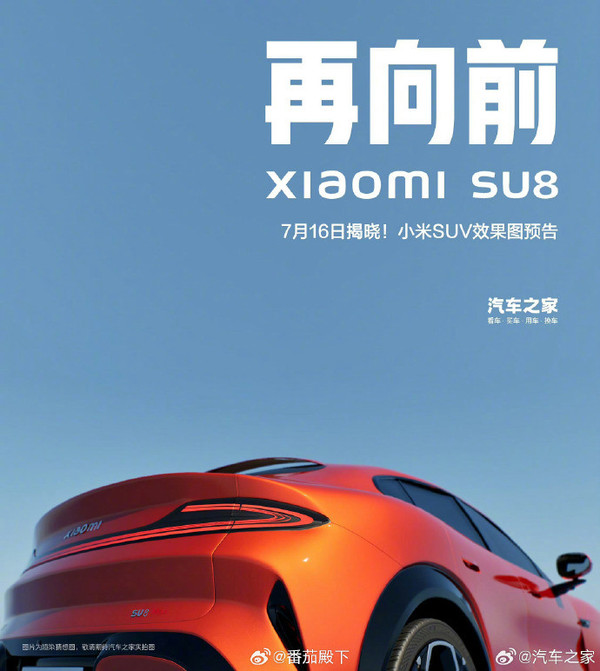
We have already come across numerous rumors about the presence of the Xiaomi SU8. On July 15, an automotive media drew two posters of Xiaomi SU8. One of the posters notes that the “Xiaomi SU8” will be unveiled on July 16. The poster also includes realistic images of the car, which is claimed to be the successor of the Xiaomi SU7.
When the official confirmed that the posters were fake and there was no successor to the SU7 in the works, many people speculated that there could be a Xiaomi SU9. Recently some spy photos surfaced online that were claimed to be Xiaomi’s first SUV. According to a previous report, the car is internally codenamed MX11 and is expected to debut in 2025. The renderings of the SUV made by fans retain many design elements from the Xiaomi SU7. It includes the headlights, door handles, pebble-style laser radar, Saturn ring taillights, and petal-shaped alloy wheels.
According to CNMO, the SUV is likely going to be the company’s second EV. Nonetheless, we are at least one year away from the launch.
That being said, the company sold over 10,000 units of the SU7 in June and is also expected to sell another 10,000 units this month. Xiaomi Auto is reportedly planning to deliver a total of 100,000 EVs this year. The company has ramped up the production of its EVs to fulfill the demand. They started a double-shift production in June to guarantee a monthly delivery target of 10,000 units.
A Tech blogger, Max Jambor has revealed on Twitter that the highly anticipated Galaxy Tab S10 series will launch in October.
In a previous article, Max Jambor claimed that Galaxy Tab S10 series might debut in October, and he didn’t expect it to be part of Samsung’s Unpacked July event. This prediction was actually accurate as the July event brought the Watch 7, Watch Ultra, Galaxy Z Fold 6, Galaxy Buds 3 series, and more but made no mention of the Tab S10.
Galaxy Tab S10 series to debut in October
Samsung is now expected to introduce the Galaxy Tab S10 Plus and Tab S10 Ultra in October. Earlier rumors suggested that a Tab S10 model could feature the MediaTek Dimensity 9300+ chipset, though this remains unconfirmed. For a sneak peek, you can check out the render images of Galaxy Tab S10 series from our previous article.
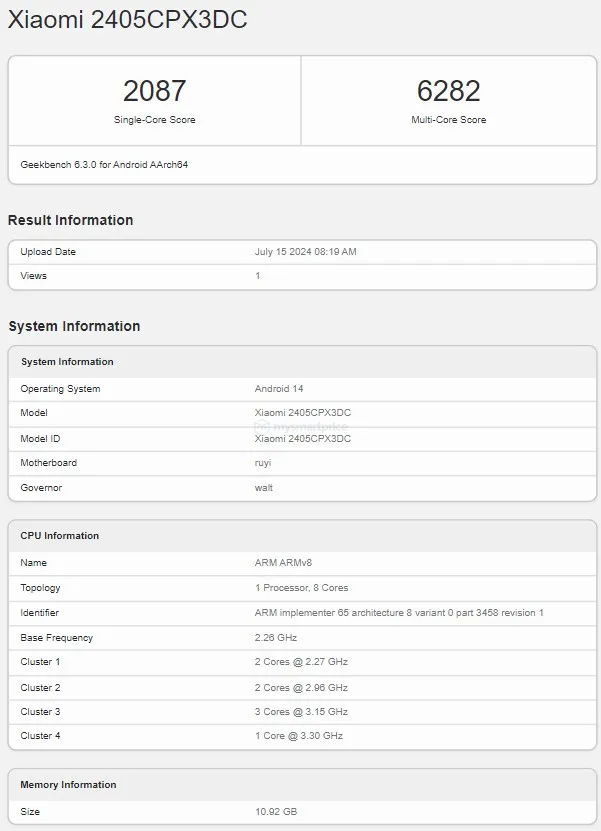
Xiaomi is expected to unveil three new devices in its home country this month. The brand is also expected to launch its first-ever clamshell foldable phone. Plenty of details have leaked about the device in the past. The upcoming offering recently surfaced on the NCC certification site. Now it has appeared on the Geekbench benchmarking platform revealing some key hardware details.
Xiaomi MIX Flip Geekbench
The Xiaomi MIX Flip is listed with model number 2405CPX3DC. It mentions a motherboard codenamed ruyi and it comprises of two cores ticking at 2.27GHz and another two cores at 2.96GHz. There are three cores clocked at 3.15GHz and a primary core at 3.30GHz. As per the database, the device will pack 12GB RAM onboard and we can expect more options at launch.
The Xiaomi MIX Flip scores 2,087 and 6,282 points in Geekbench’s single-core and multi-core test results respectively. Apart from this, the benchmark listing does not reveal any additional details.
As per NCC, the Xiaomi MIX Flip will come with vertically stacked dual camera sensors near the cover display of the back panel. The upcoming offering is said to be backed by a 1,145 + 3,595mAh battery units with support for 67W fast charging. Rumors suggest that the MIX Flip will feature a 50MP main camera along with a 60MP telephoto unit and Leica imaging for enhanced photography. It is tipped to be available in white, purple, and black colors. The top-end variant will reportedly pack 16GB RAM and 1TB storage.
We can expect Xiaomi to share more details in the coming weeks including the official launch date.
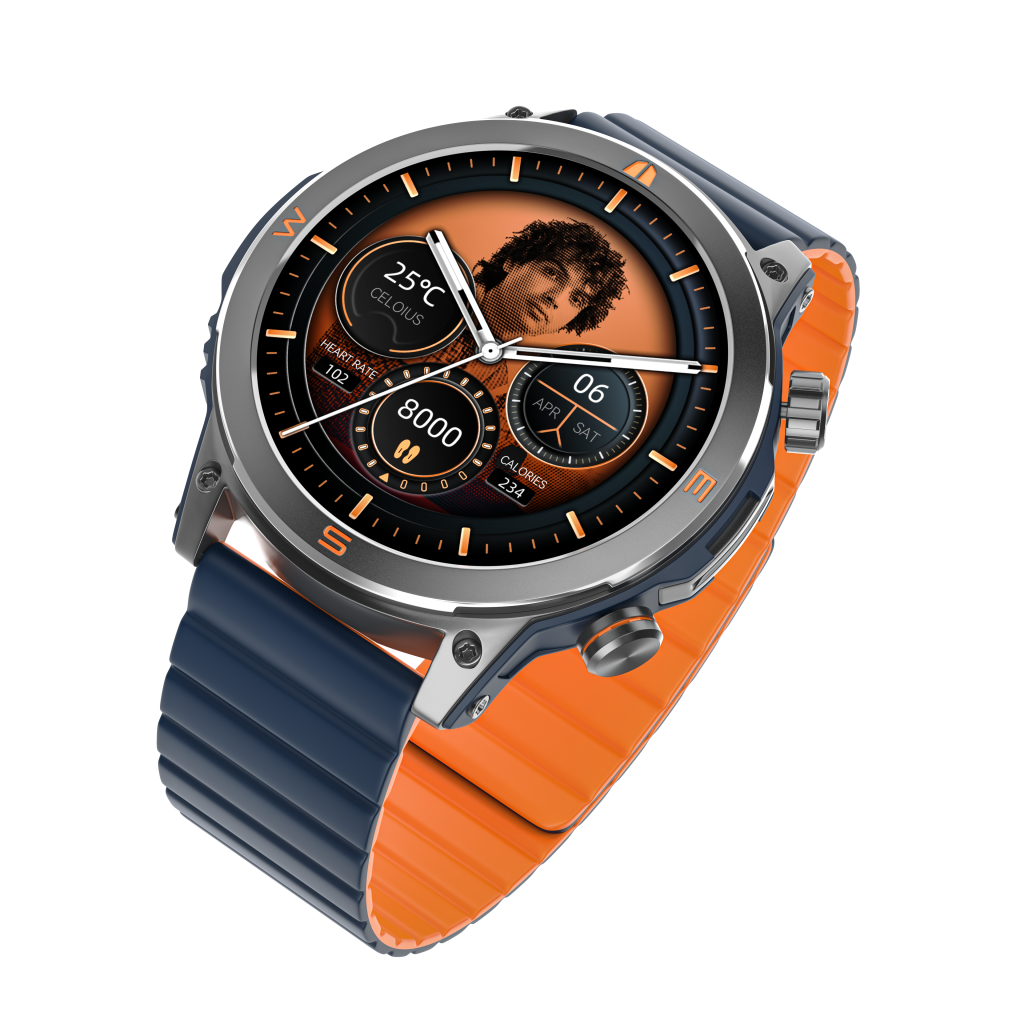
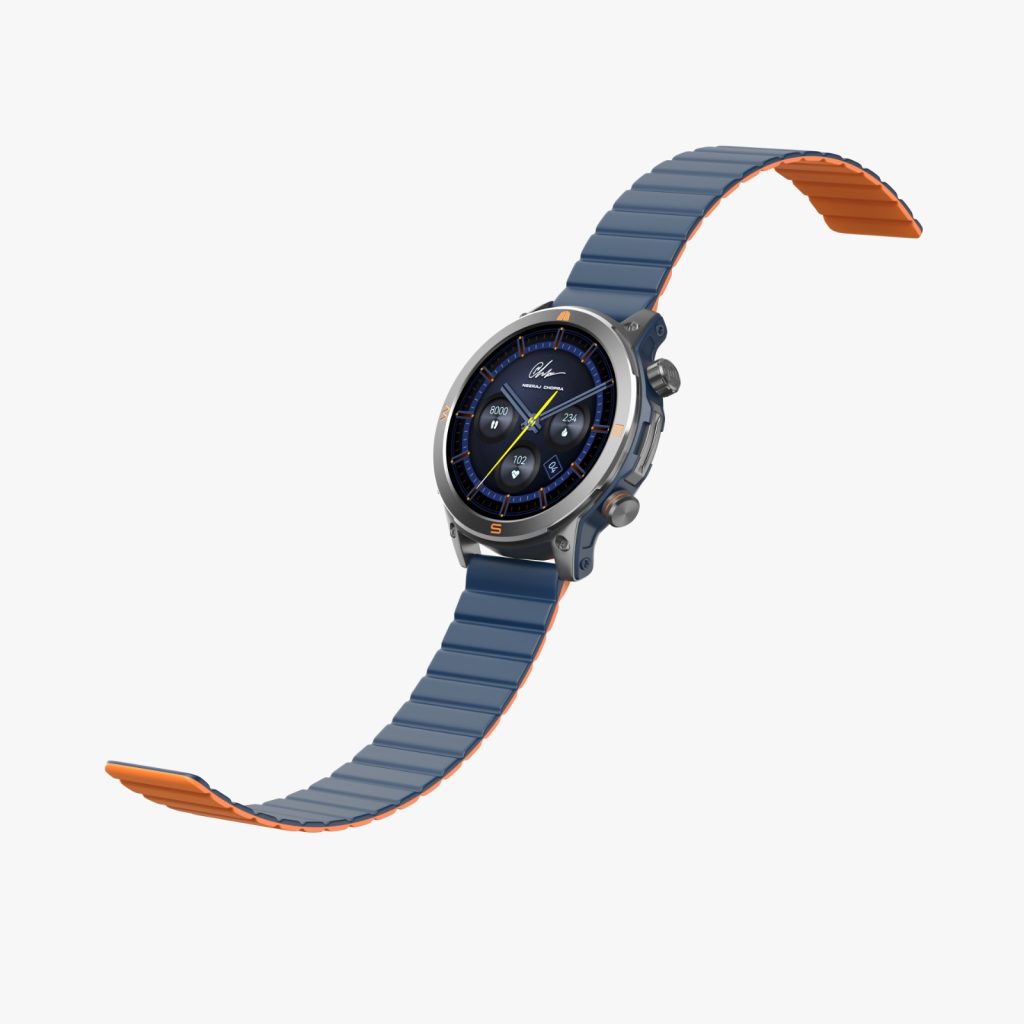
Noise has officially launched a new smartwatch in India that pays tribute to an Indian Olympic gold medalist. The company’s latest wearable is dubbed the NoiseFit Javelin. It is directly inspired by the athlete, who is also the brand ambassador.
NoiseFit Javelin Smartwatch: Specs and Features
NoiseFit Javelin Smartwatch
As the name suggests, the NoiseFit Javelin’s name directly refers to Neeraj Chopra who is an Indian Olympic gold medalist. For the uninitiated, Chopra is an Indian track and field athlete who is also the reigning Olympic champion and World champion in Men’s javelin throw. He is the first Asian athlete to win gold in his event at the World Championship and is also the first track and field athlete to win a gold medal for India at the Olympics.
It sports a 1.46-inch HD AMOLED circular display that has a 466 x 466 resolution. The smartwatch supports Bluetooth Calling, Dial Pad, and Recent Call History. So you can take calls thanks to the built-in microphone and speaker. NoiseFit Javelin supports 24×7 heart rate monitoring, SpO2 blood oxygen mapping, sleep tracking, stress management, menstrual cycle tracking, and more.
On a single full charge, it can last for up to 7 days. The wearable brings support for more than 100 sports modes, an IP68 rating for water and dust resistance, and a NoiseFit partner app. Other notable features include an SOS feature, a DND schedule, a 3 layer build with a screw dial crown, Alarm, Camera control, Music control, Calculator, Reminds, Notification display, and Weather updates.
NoiseFit Javelin Smartwatch: Pricing and Availability
The company has released the NoiseFit Javelin in an Indian Blue color. It has an official price tag of 3,999 INR (roughly 48 US Dollars) and is currently listed for purchase on the brand’s official website, Myntra, and Amazon.
Tesla has postponed its highly anticipated Robotaxi unveiling event, initially scheduled for August, to October. The delay, reported by Bloomberg, was communicated internally to give teams more time to develop additional prototypes.
The design team at Tesla was asked to rework certain car elements. This internal communication highlights the company’s commitment to ensuring the highest quality and readiness of the prototypes before the public reveal.
Initial Announcement and Market Reaction
CEO Elon Musk had set the original date for the event eight months ago. Optimism surrounding the event led to an 11-day streak of gains for Tesla’s stock, adding more than $257 billion to the company’s market capitalization. However, the delay has caused Tesla’s stock to drop by 8.4% on Thursday, marking the largest decline since January. In contrast, shares of competitors Uber Technologies and Lyft surged on the news, with Uber’s stock rising by 6.1% and Lyft’s shares jumping by 4.6%.
What is the significance of the Robotaxi Project?
The concept of an autonomous taxi service dates back to Elon Musk’s second “master plan” for Tesla in 2016. Musk has prioritized this project over developing an affordable electric vehicle. Despite years of promotion, Tesla’s Full Self-Driving (FSD) technology still requires constant supervision and does not render the cars fully autonomous. Nonetheless, Musk and his engineers have been increasingly optimistic about the potential of FSD recently.
Tesla’s Recent Performance and Analyst Perspectives
Tesla delivered 6.6% fewer cars in the first half of the year and produced 14% fewer vehicles in the second quarter than the previous year, aiming to reduce inventory. The addition of the Cybertruck to Tesla’s lineup has also been a recent focus.
Wedbush analyst Dan Ives believes the timing of the Robotaxi showcase is less important than the content and suggests that the delay may result in a more robust and well-prepared event. Ives encourages investors not to worry about the delay, emphasizing that the timing of robotaxis, partnerships, and autonomous technology remains unchanged for Tesla’s bullish thesis.
The initial event date of August 8, set in April, might have been overly optimistic. Tesla is likely to ensure that prototypes meet quality standards before the event. Reports suggest that Tesla uses current vehicle mules fitted with exterior cameras to gather data for the Robotaxi development.
Despite the delay, the focus remains on the event’s content and the preparedness of the prototypes. Investors and experts are hopeful that the postponed event in October will offer a more detailed and impressive showcase of Tesla’s Robotaxi initiative.
The success of the event and the eventual launch of the Robotaxi service are crucial for Tesla’s positioning in the autonomous vehicle market and its future as a technology leader.
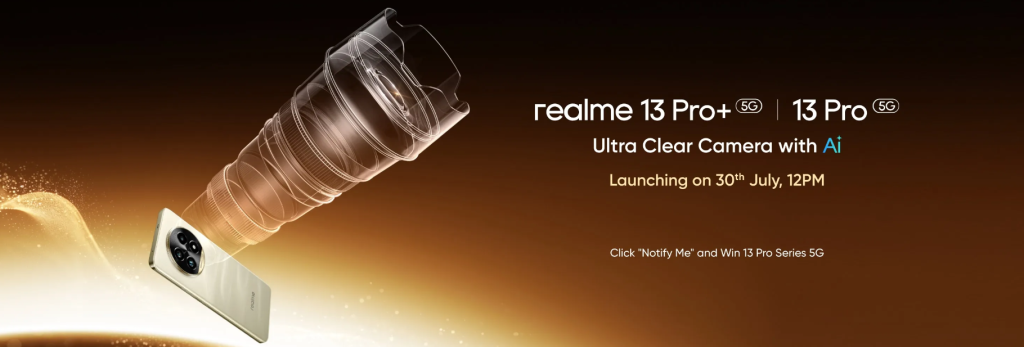
The launch date of Realme 13 Pro series had been leaked previously. Now, Realme has officially confirmed the India launch date for Realme 13 Pro series. You can watch the realme’s launch event on July 30 from the provided link.
realme 13 Pro official launch date
Realme is set to introduce two different phones in India: Realme 13 Pro and Realme 13 Pro+. These phones will debut on July 30, and the announcement will be live-streamed at 12 PM. Realme has revealed on its official website that the Realme 13 Pro series will be the first in the world to feature the Sony LYT-701 image sensor.
Color options
Additionally, the phones will use the Sony LYT-600 sensor in the periscope camera, offering 3x optical zoom with the telephoto camera. Previously, it was revealed that the phones will have a large circular camera array on the back and will be available in three colors: Monet Purple and Monet Gold. Additionally, an Emerald Green color option will also be available.
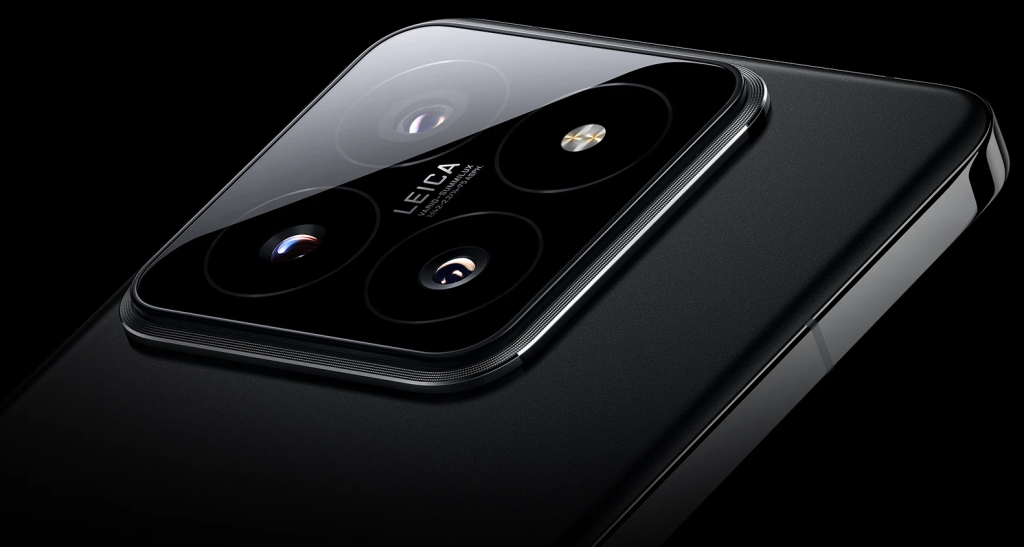
The Xiaomi 15 series is expected to be launched in October this year in China. Ahead of the launch, numerous rumors have revealed the design and specifications of the device. The latest one reaffirms the camera specifications of the Xiaomi 15 Pro.
A periscope telephoto and a slightly different aperture value
According to the leak, the phone will come with three 50MP cameras on the back. The main camera will offer a variable aperture of f/1.4-f/2.5, which is different from the f/1.4-f/4.0 variable aperture of the Xiaomi 14 Pro. This means the aperture won’t close as much as it did on the predecessor.
According to previous rumors, the camera system of the pro model will include a periscope telephoto. In addition to that, there will likely be a 50MP ultrawide camera. The light intake of the telephoto lens is reportedly improved compared to its predecessor, which is likely to enhance the image quality of the telephoto lens.
Xiaomi 15 Pro will reportedly use the OV50K as its main sensor. This is said to be the most powerful image sensor from OmniVision and has a reasonably good dynamic range. The OV50K image sensor offers a pixel size of 1.2-micron and a sensor size of 1/1.3″. It also boasts high gain and correlated multi-sampling (CMS) functions, which are likely to help in low-light conditions. It supports 120 fps output and 60 fps in HDR. The phone also supports a variable aperture, which gives it the ability to adjust the light intake based on the situation.
The periscope telephoto is reported to use a Sony IMX8 series sensor and supports 5x optical zoom. It is worth noting that the Xiaomi 15 Pro is also equipped with a Leica Summilux lens. This optical solution is expected to contribute to the clarity of the final output.
OnePlus is gearing up for its Summer Launch Event on July 16th, where the company is confirmed to unveil four new products — the OnePlus Nord 4, OnePlus Watch 2R, OnePlus Pad 2, and OnePlus Nord Buds 3 Pro. The event will be live-streamed across various platforms. So here’s a breakdown of how to watch the event live and what to expect from the new OnePlus devices.
1. How to Watch the OnePlus Summer Launch Event Live
The OnePlus Summer Launch Event will kick off at 6:30 PM IST on July 16th. You can watch the event live on the following platforms:
Official OnePlus YouTube Channel: The live stream will be broadcast on the official OnePlus YouTube channel. You can click on the “Notify Me” button to ensure you receive a notification when the stream goes live.
OnePlus Social Media Handles: OnePlus is also expected to stream the event live on its social media platforms, including Facebook, Twitter, and Instagram.
2. Expected Products at the OnePlus Summer Launch Event
The confirmed lineup for the event includes four new devices:
OnePlus Nord 4: The smartphone is expected to be powered by the Snapdragon 7+ Gen 3 chipset and boasts a 6.74-inch 1.5K curved AMOLED display with a 120Hz refresh rate. Rumors suggest a dual rear camera setup with a 50MP primary sensor and an 8MP ultra-wide sensor. The phone is also confirmed to receive the longest software support ever offered by OnePlus, with 4 years of Android updates and 6 years of security patches.
OnePlus Pad 2: The tablet is speculated to be a rebranded version of the OnePlus Pad Pro launched in China. It is expected to feature a 12.1-inch display, a Snapdragon 8 Gen 3 chipset, and a 9,510 mAh battery with 67W fast charging. The camera setup might include a 13MP rear sensor and an 8MP front-facing sensor.
OnePlus Watch 2R: The smartwatch will come with a Snapdragon Wear W5 processor and a 1.43-inch AMOLED display with 1,000 nits peak brightness. It might offer 2GB RAM, 32GB storage, and a claimed battery life of 100 hours. Additional features could include fast VOOC charging, dual-frequency GPS, and over 100 sports modes.
OnePlus Nord Buds 3 Pro: These wireless earbuds are confirmed to offer 49dB Active Noise Cancellation and a total battery life of up to 44 hours with the charging case.
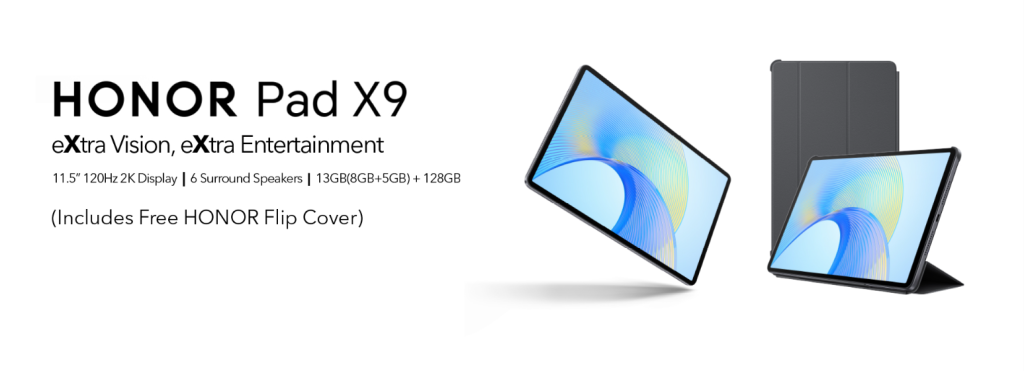
Honor’s recently released Honor Pad X9 tablet is set to come with a new variant in India. The Pad X9, which was previously introduced, will now be available with an upgraded 8 GB RAM version alongside the original 4GB+128GB model. This mirrors a similar move by iQOO, which recently unveiled a 16GB+1TB variant of iQOO Pad2 Pro.
The upcoming variant of Honor Pad X9 was revealed through new images on the Amazon India page. In today’s market, an Android device should ideally come with a minimum of 8GB RAM to ensure a smooth user experience. The new 8GB RAM variant of Honor Pad X9 will be working much smoother than the 4GB RAM variant. Additionally, Honor is promoting that the new tablet will feature 5GB of expandable RAM.
Honor Pad X9
Currently, the 4GB RAM variant of Honor Pad X9 is available on Amazon India for a price tag of INR 14,999. The tablet is powered by a Snapdragon 685 processor and boasts an 11.5-inch 2K 120 Hz display with a maximum brightness of 400 nits. It also features a 7250 mAh battery, making it actually powerful enough for everyday simple tasks. The new 8GB RAM variant further enhances the Pad X9 as a highly reasonable option. The price for the 8GB RAM variant has yet to be announced.
Sony has officially announced a new pair of soundbar speakers in India. The audio products are a part of the brand’s popular BRAVIA lineup and include the new Theatre Bar 8 and Theatre Bar 9 soundbar speakers. These are designed to elevate your home entertainment experience with a ton of noteworthy features.
Sony BRAVIA Theatre Bar 9 and Bar 8: Specs
Sony BRAVIA Theatre Bar 8
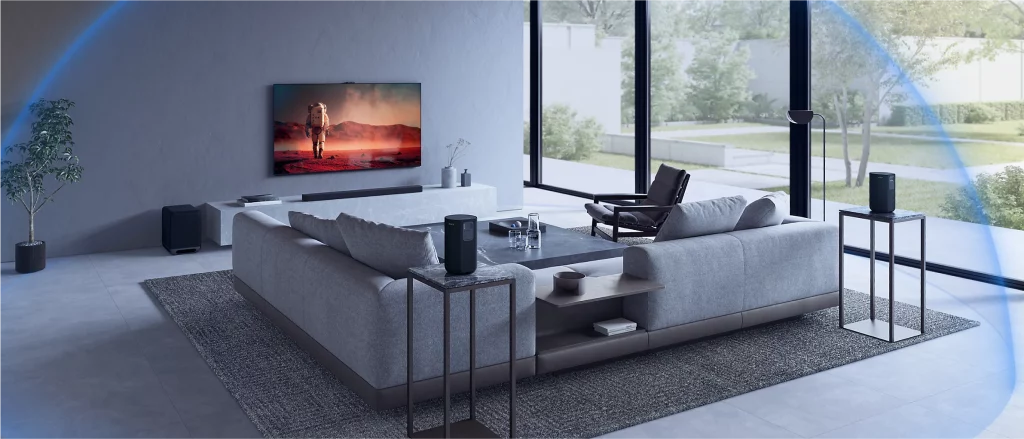
The BRAVIA Theatre Bar 9 is equipped with 13 speaker units and the Bar 8 packs 11 speaker units. Both models feature 360 Spatial Sound via Sony’s proprietary Sound Mapping technology. In simple terms, the speakers can create phantom speakers for a wide sound field to offer a cinematic experience even if you don’t have extra speakers. So the soundbars alone are capable of 360 Spatial Sound Mapping. Although, you can pair these with optional subwoofers and rear speakers.
The BRAVIA Theatre Bar 9 and Bar 8 support gaming optimizations for a more immersive experience. Connectivity options include HDMI ARC and Optical Input. Sony also has the BRAVIA Connect app to allow for mobile control from your smartphone. It comes with IMAX Enhanced optimizations as well with a 5.0.2 channel on the Bar 8 and 7.0.2 channel support on Bar 9. This release also arrived a week after the company unveiled the new BRAVIA 4K HDR display in India.
Sony BRAVIA Theatre Bar 8
Pricing and Availability
The new Sony BRAVIA Theatre Bar 8 and Theatre Bar 9 via official retail stores, major electronic chains, and online platforms as well. These are currently on sale with the Bar 8 having a 89,990 INR price tag, while the higher end Bar 9 costing 129,990 INR. Customers can also avail an additional 8,000 INR cashback on the Bar 8 and a 10,000 INR cashback on the Bar 9 through select credit cards. This deal is valid for online and offline purchases. Sony is also bringing a special combo that offers an 8,000 INR discount on select BRAVIA televisions with two soundbar speakers.
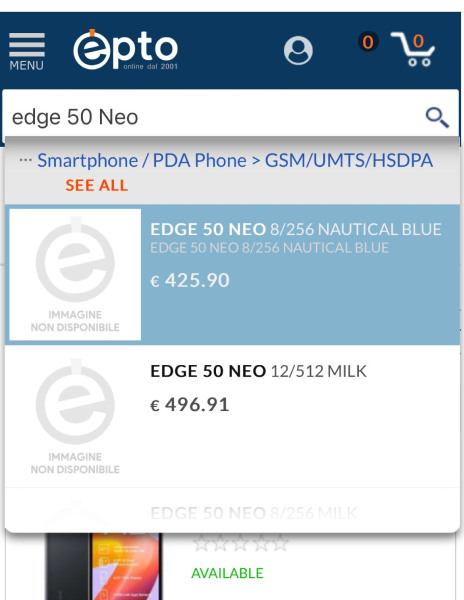
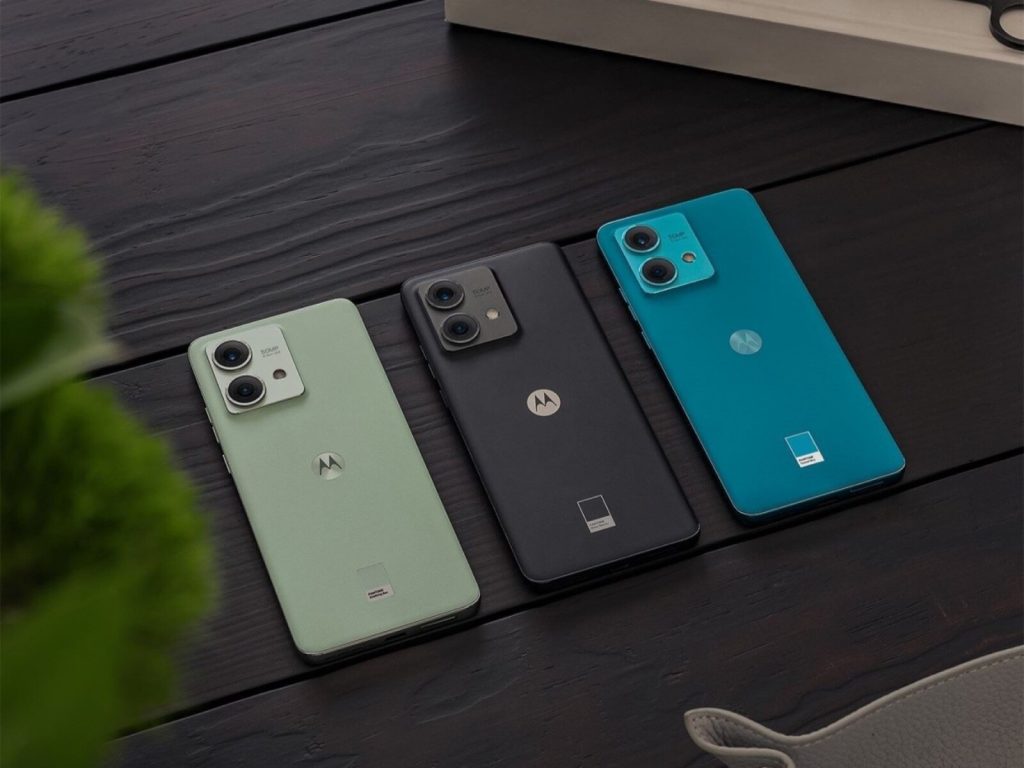
Motorola‘s Edge series is expected to gain a new member soon, the Edge 50 Neo. While the phone hasn’t been officially announced, a premature listing by an Italian retailer has shed light on its price and color options.
Tipster Paras Guglani discovered the Edge 50 Neo listed in two storage configurations: 8GB RAM with 256GB storage and 12GB RAM with 512GB storage. The base model carries a price tag of EUR 425.90 (approximately USD 465), while the higher-end variant is listed at EUR 496.91 (approximately USD 542).
The listing also reveals two color options – Milk (presumably white) and Nautical Blue. An earlier report this week hinted at two additional color options – Gray and Poincana – bringing the total to four. It’s also speculated that some of these colors might be Pantone-certified, a recurring theme for Motorola devices these days.
While the color options seem confirmed, details regarding the phone’s design and specifications are completely under wraps. There are no renders available yet, and the leak offers no hints about its hardware.
However, considering it’s a successor, it’s reasonable to expect the Edge 50 Neo to share some characteristics with its predecessor, the Edge 40 Neo.
Motorola Edge 40 Neo Specifications
For reference, the Edge 40 Neo featured a 6.55-inch pOLED display with a smooth 144Hz refresh rate. It was powered by the mid-range MediaTek Dimensity 7030 processor and offered up to 12GB of RAM and 256GB of storage, aligning with the leaked storage options for the Edge 50 Neo.
On the software side, the Edge 40 Neo ran Android 13 with a guarantee of two more Android version updates. The rear camera setup includes a 50MP main sensor with OIS and a 13MP ultra-wide. The front camera is a 32MP lens.
The battery side of things is handled by a 5500mAh cell with 68W charging support and the Edge 40 Neo also has an IP68 rating for dust and water resistance.
Xiaomi brought its new camera powerhouse to India this year, and now it has received an update brings a new portrait effect and camera optimizations. This update is 272 MB in size, and it is currently in roll-out phase.
Sandeep Sarma, a Xiaomi India‘s PR announced the new update on Twitter, highlighting the new portrait effect. With this update, users can now shoot in portrait mode using a 120mm lens. Additionally, you can change your default focal length as well.
Portrait mode on 5x camera – 120mm lens
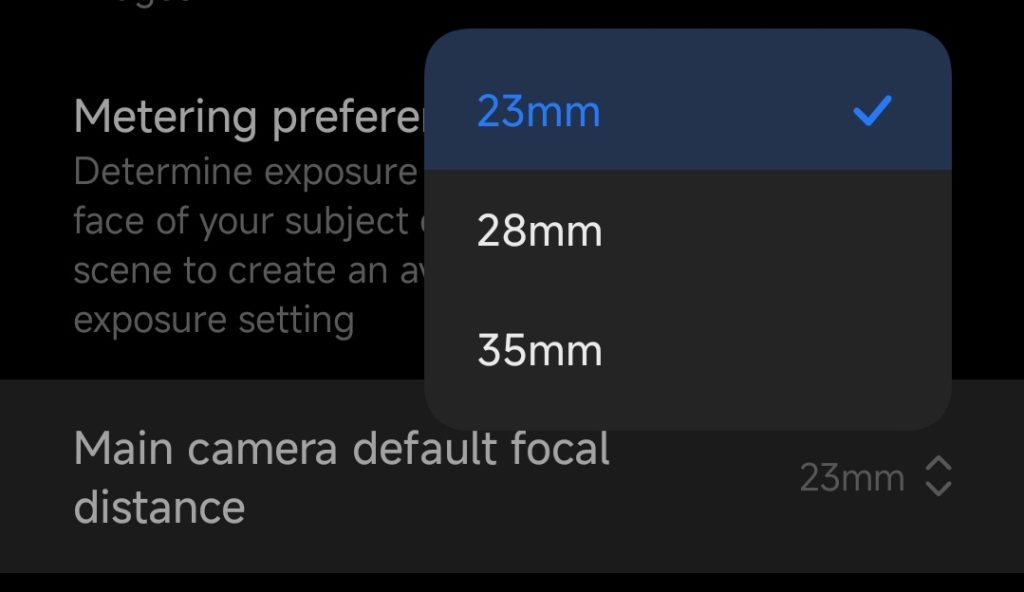
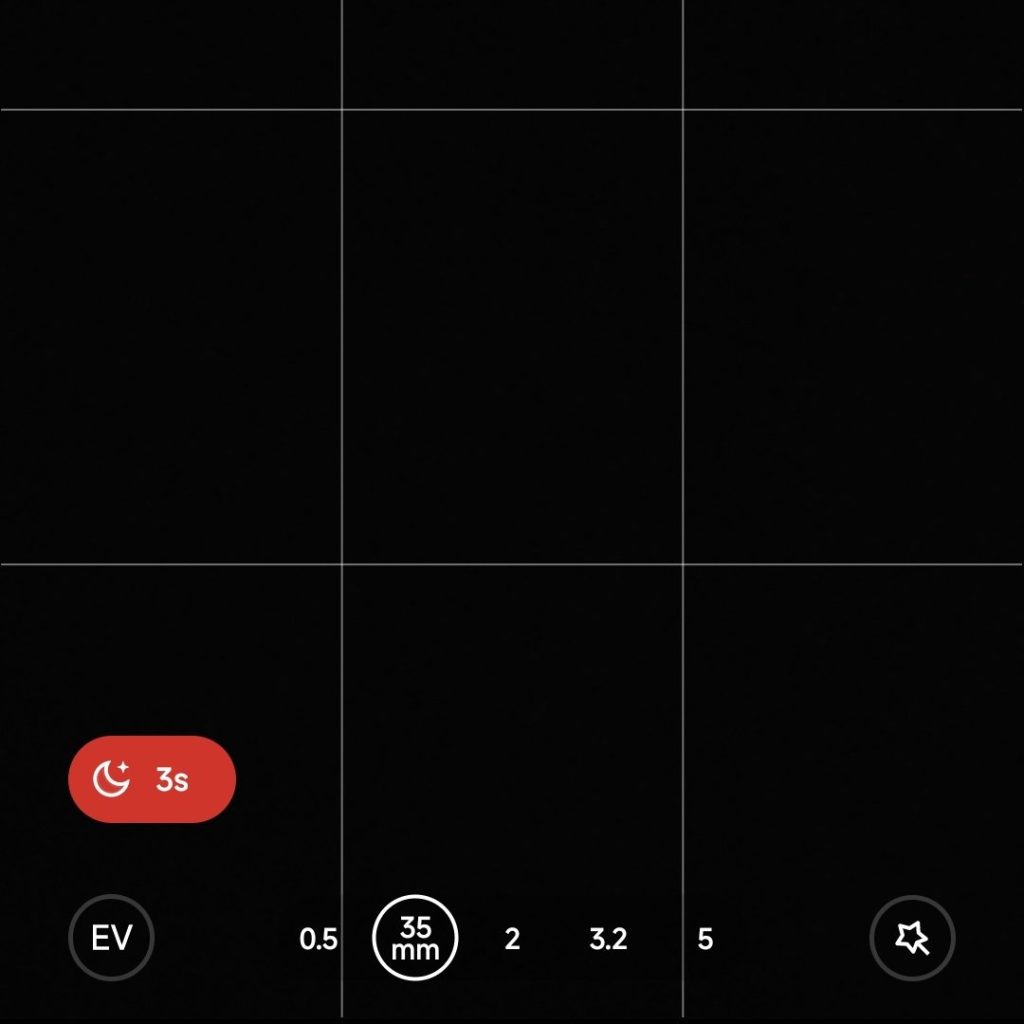
The main camera has a 23mm focal length, but with this new update, you can set your default focal length to 28mm or 35mm as well. If you think this is just a gimmick, think again. Many smartphone cameras actually struggle with image distortion at the edges, but with the 35mm focal length, even you need to move slightly away from your subject, you can achieve a new look without compromising too much quality. There are also improvements in portrait mode, offering two distinct options: Master Portrait and Leica Portrait.
1x main camera acts like a 35mm lens depending on your preference & Portrait modes
The update comes with version number 1.0.7.0.UNAINXM and is currently in the rollout phase. If you haven’t received it on your device yet, be patient as the update is being released gradually.
Xiaomi 14 Ultra 1.0.7.0.UNAINXM changelog
Improved system resource recovery strategy when switching apps to enhance app smoothness.
New startup animation strategy reduces app launch delays.
Improved app preloading to enhance app startup speed.
Fix: Having too many notifications could cause the system to restart.
Update the security patch to June 2024.
Increased system security.
Updated optimization score calculation rules to improve accuracy.
We use cookies on our website to give you the most relevant experience by remembering your preferences and repeat visits. By clicking “Accept”, you consent to the use of ALL the cookies.
This website uses cookies to improve your experience while you navigate through the website. Out of these, the cookies that are categorized as necessary are stored on your browser as they are essential for the working of basic functionalities of the website. We also use third-party cookies that help us analyze and understand how you use this website. These cookies will be stored in your browser only with your consent. You also have the option to opt-out of these cookies. But opting out of some of these cookies may affect your browsing experience.
Necessary cookies are absolutely essential for the website to function properly. This category only includes cookies that ensures basic functionalities and security features of the website. These cookies do not store any personal information.
Any cookies that may not be particularly necessary for the website to function and is used specifically to collect user personal data via analytics, ads, other embedded contents are termed as non-necessary cookies. It is mandatory to procure user consent prior to running these cookies on your website.