Add GIZMOCHINA as Preferred Source on Google
Google today officially released Android 16 Beta 1 for Pixel smartphones, two months after the developer preview was released in November. This means that if you have a Pixel phone ranging from the Pixel 6 to the Pixel 9 series (and even the Pixel Fold and Pixel Tablet!), you can now sign up for the beta program and get an early look at the features that will be coming to the next major version of Android.
There are a bunch of new features Google introduced within the first Android 16 beta. Let’s go through them here.
What’s new in Android 16 Beta 1
1. Android 16 makes apps more adaptable to any screen
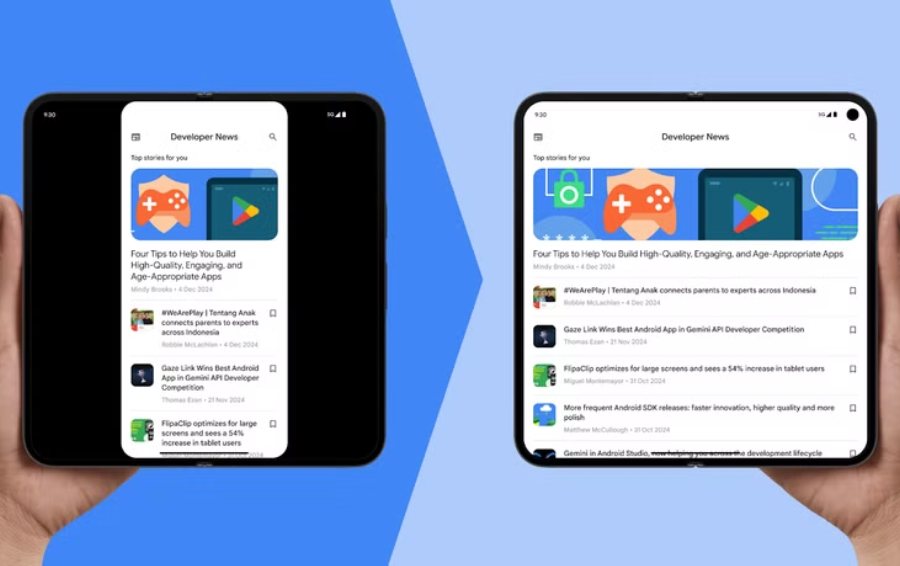
It’s no surprise that Google is focusing on screen adaptability in Android 16, especially as foldable phones gain traction and Android tablets see a partial resurgence. The latest update introduces major optimizations to improve how apps scale across large-format screens.
Google acknowledges that many developers cut corners by releasing apps without optimizing them for tablets, often leading to an inconsistent and even frustrating experience. To address this, Android 16 will phase out an app’s ability to lock screen orientation between portrait and landscape, as well as restrictions on aspect ratios when resizing on larger displays.
Samsung and other manufacturers have been ahead of the curve for years, with their custom Android versions allowing apps to run in any window size. Still, Google is urging developers to test their interfaces across different screen sizes and implement responsive layouts where possible. The only exception is games, which will retain the ability to define aspect ratios based on the developer’s preferences.
2. Live Updates bring iOS-style persistent notifications to Android
Another major addition in Android 16 Beta 1 is Live Updates, a feature similar to Apple’s Live Activities on iOS. These high-priority notifications stay visible on the lock screen, ensuring users don’t miss important updates like upcoming flights, food deliveries, or navigation directions.
The goal is to cut through the clutter of endless notifications—an area where Apple has historically done better than Android. Some manufacturers, like Samsung with its Now Bar and OnePlus with Live Alerts, have already introduced similar features, but Android 16 now bakes it in at the system level.
Developers will be able to integrate Live Updates more easily using a standardized template that supports custom colors, icons, and real-time progress tracking.
3. Android 16 natively supports Samsung’s Advanced Professional Video (APV) codec
Google and Samsung’s deep collaboration continues with Android 16’s native support for Advanced Professional Video (APV), a high-end video codec originally developed by Samsung.
The APV 422-10 profile in Android 16 brings YUV 4:2:2 color sampling, 10-bit encoding, and a target bit rate of up to 2 Gbps, enabling professional-grade video recording and editing. Samsung first introduced this at its 2024 annual conference, and now Google is integrating it directly into Android.
4. Predictive animations now extend to apps
Predictive animations were introduced in Android 15, but they only applied to system navigation. Now, in Android 16, these fluid animations extend across all apps. This should improve transitions when returning to the home screen, switching to multitasking, or using multi-window mode.
5. Smarter 3-button navigation with previews
For those who prefer 3-button navigation over gestures, Android 16 Beta 1 brings a new preview system that shows where each button will take you before the action is completed. For example, long-pressing the Back button will display a preview of the screen you’re about to return to.
6. More Gemini AI integrations coming
Google is also expanding Gemini AI extensions, which were first announced alongside Samsung’s Galaxy S25. While Gemini already integrates with some Samsung apps, Google now says it’s working on broader compatibility with more manufacturers and deeper app-level integrations.
It’s likely that Android 16 will introduce new APIs that allow Gemini to interact more seamlessly with apps, but details on this are still scarce.
How to install Android 16 beta 1
The Android 16 public beta is now available for all Google Pixel devices, with the stable release expected in Q2 of this year.
If you own a Pixel phone or tablet, you can enroll in the Android Beta Program by visiting Google’s official website and checking your account for an eligible device.
Compatible Pixel Phones:
- Pixel 6 / 6 Pro
- Pixel 6a
- Pixel 7 / 7 Pro
- Pixel 7a
- Pixel Fold
- Pixel Tablet
- Pixel 8 / 8 Pro
- Pixel 8a
- Pixel 9 / 9 Pro / 9 Pro XL / 9 Pro Fold
For more daily updates, please visit our News Section.
Don’t miss a thing! Join our Telegram community for instant updates and grab our free daily newsletter for the best tech stories!