
Add GIZMOCHINA as Preferred Source on Google
Samsung has introduced the Galaxy S25 Ultra, alongside the S25 and S25+, focusing on advancing photography and video creation tools. Samsung has recently shared details of all the improvements it has made with the camera system and software of the Galaxy S25 Ultra and other devices in the series in a blog post.

Upgraded Camera System
The Galaxy S25 Ultra now features a 50MP ultra-wide sensor that’s four times bigger than before. This means you can capture fine details in close-up shots and get clear images of subjects far away. It’s also designed to handle fast-moving objects, so even quick moments come out sharp.
When it comes to video, the Galaxy S25 supports 8K resolution at 30fps and includes a 0.6x ultra-wide angle option. Switching between zoom levels is now much smoother thanks to an instant slow-motion engine, and the Pro Video Mode’s new Zoom Rocker UI lets you adjust zoom speed with ease.
Improved Video Features
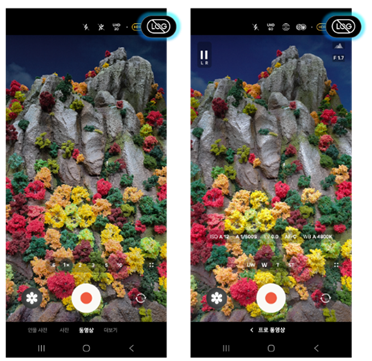
The camera now comes with six new film-style filters to help you create visuals that feel like they came straight out of an old-school film camera. You can also tweak contrast, saturation, and color temperature to suit your style. For more serious video creators, the Log Video feature provides a wider dynamic range for editing. You can even download LUTs (Look-Up Tables) from Samsung to work on your footage in software like DaVinci Resolve or Adobe Premiere Pro.
The 10-bit HDR feature is now standard, which helps produce videos with richer colors and more depth. You can also grab snapshots from HDR videos, and the photos are processed for better color and detail accuracy.
Creative Photo and Depth Control
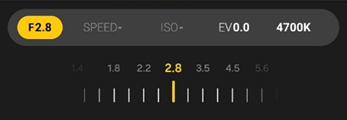
The Expert RAW app introduces a virtual aperture feature that lets you control how much of your photo is in focus. You can adjust it from F1.4 to F16, giving you DSLR-like control over depth of field. Digital ND filters are also included, making it possible to take long exposure shots even in bright daylight.
Motion Photo has been updated to capture 1.5 seconds of video before and after you take a picture, with an option to extend it to three seconds. You can stitch these clips together into a video, and the AI can optimize faces for better results when multiple people are in the frame.
Smarter Gallery and Editing Tools

The Gallery app has been redesigned to make finding photos easier. Thanks to better natural language processing and broader recognition categories, you can quickly search for pictures of objects, events, people, or pets.
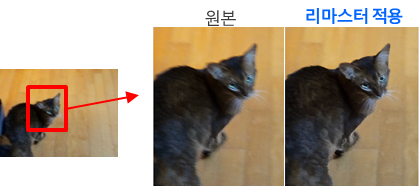
Photo editing is more user-friendly, too. The Photo Remaster feature uses AI to sharpen blurry pictures, brighten dark areas, and clean up noise for clearer images. For videos, the new audio eraser tool can remove unwanted sounds like wind or background noise. The auto-trim tool picks out the key parts of your video, making editing quicker.
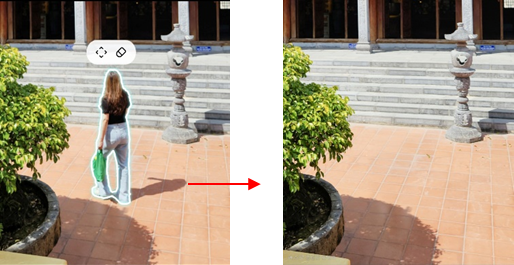
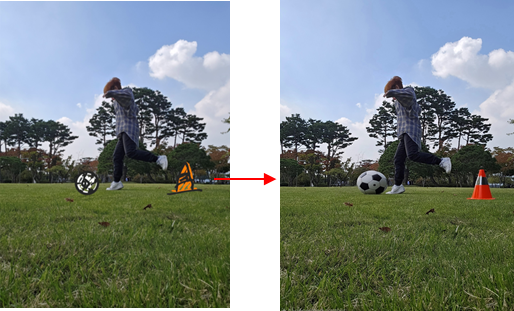
Advanced generative AI editing has been added as well, offering tools to remove shadows from objects and make them blend naturally with the background. The sketch conversion feature allows you to create multiple sketch variations from a single photo.
RAW Editing for Professionals
If you like working with RAW photos, the Galaxy S25’s RAW Image Editor has been expanded to include eight adjustment options for precise edits. It keeps all the details from the original file, so you have plenty of flexibility. Once you’re done with RAW edits, you can switch to the standard photo editor for further tweaks.
For more daily updates, please visit our News Section.
Stay ahead in tech! Join our Telegram community and sign up for our daily newsletter of top stories!
(Source)




Comments