
Add GIZMOCHINA as Preferred Source on Google

The One UI 7 rollout has been a complete mess so far. The brand has managed to upgrade only a few Galaxy devices to the Android 15-based update. However, that hasn’t stopped Samsung from going ahead with the development of its next iteration — One UI 8. This will be based on Android 16.
We already know what One UI 8 looks like and what changes are coming. In addition to that, we’ll detail the One UI 8 rollout plan and eligible devices list.
Samsung One UI 8 (Android 16) release date
One UI 8 will be the first major upgrade that won’t be preceded by incremental updates. What I mean by that is Samsung won’t release One UI 7.1 or 7.1.1. Instead, it will directly jump to One UI 8.0 from One UI 7. This is perhaps due to a sluggish One UI 7 rollout, which left Samsung no time to prepare for incremental updates. Anytime, a timely One UI 8 release makes a lot of sense, given the current scenario.
Regarding One UI 8, Samsung hasn’t made any official announcement. However, from a recent leak, we know that the upcoming Galaxy Z Fold 7 and Galaxy Z Flip 7 will boot One UI 8 (Android 16) out of the box. While the official launch date isn’t out yet, Samsung usually releases the latest foldables in July or early August. We also expect the Galaxy Z Fold 7 and Galaxy Z Flip 7 to be released around the same time this year.
Google has already confirmed Android 16 release for the second quarter, which means by June 2025. So, we are most likely to see the One UI 8 beta program go live as early as July.
Samsung One UI 8 (Android 16) eligible devices
The brand hasn’t published a One UI 8 update list, so, we had to use the company’s software update policy and a bit of guesswork to prepare the list.
Galaxy S series
- Galaxy S25
- Galaxy S25+
- Galaxy S25 Ultra
- Galaxy S24
- Galaxy S24+
- Galaxy S24 Ultra
- Galaxy S24 FE
- Galaxy S23
- Galaxy S23+
- Galaxy S23 Ultra
- Galaxy S23 FE
- Galaxy S22
- Galaxy S22+
- Galaxy S22 Ultra
- Galaxy S21 FE
Galaxy Z series
- Galaxy Z Fold Special Edition
- Galaxy Z Fold 6
- Galaxy Z Fold 5
- Galaxy Z Flip 6
- Galaxy Z Flip 5
- Galaxy Z Fold 4
- Galaxy Z Flip 4
Galaxy Tab series
- Galaxy Tab S10+
- Galaxy Tab S10 Ultra
- Galaxy Tab S10 FE
- Galaxy Tab S10 FE+
- Galaxy Tab S9 FE
- Galaxy Tab S9 FE+
- Galaxy Tab S9 (Wi-Fi/5G)
- Galaxy Tab S9+ (Wi-Fi/5G)
- Galaxy Tab S9 Ultra (Wi-Fi/5G)
- Galaxy Tab S8 (Wi-Fi/5G)
- Galaxy Tab S8+ (Wi-Fi/5G)
- Galaxy Tab S8 Ultra (Wi-Fi/5G)
- Galaxy Tab A9
- Galaxy Tab A9+
Galaxy A series
- Galaxy A73
- Galaxy A56
- Galaxy A55
- Galaxy A54
- Galaxy A53
- Galaxy A36
- Galaxy A35
- Galaxy A34
- Galaxy A33
- Galaxy A25
- Galaxy A24
- Galaxy A23
- Galaxy A15 (LTE/5G)
- Galaxy A14 (LTE/5G)
- Galaxy A16 (LTE/5G)
- Galaxy A06
Galaxy M series
- Galaxy M56
- Galaxy M55s
- Galaxy M55
- Galaxy M54
- Galaxy M34
- Galaxy M53
- Galaxy M33
- Galaxy M16
- Galaxy M15
- Galaxy M06
Galaxy F series
- Galaxy F55
- Galaxy F54
- Galaxy F34
- Galaxy F16
- Galaxy F15
- Galaxy F06
Galaxy XCover series
- Galaxy XCover 7
- Galaxy XCover 7 Pro
Also read: Android 16 beta is now available for these devices
Samsung One UI 8 update: new features
One UI 8 will not surprise you with groundbreaking features and tweaks. It’s rather a minor upgrade that refines everything Samsung introduced with One UI 7, as shown in a hands-on video. However, that doesn’t translate to a boring update. It’s still under development, so exciting features could be on the way. On top of this, there will be new features as a part of Android 16.
What’s new in One UI 8 (known so far)
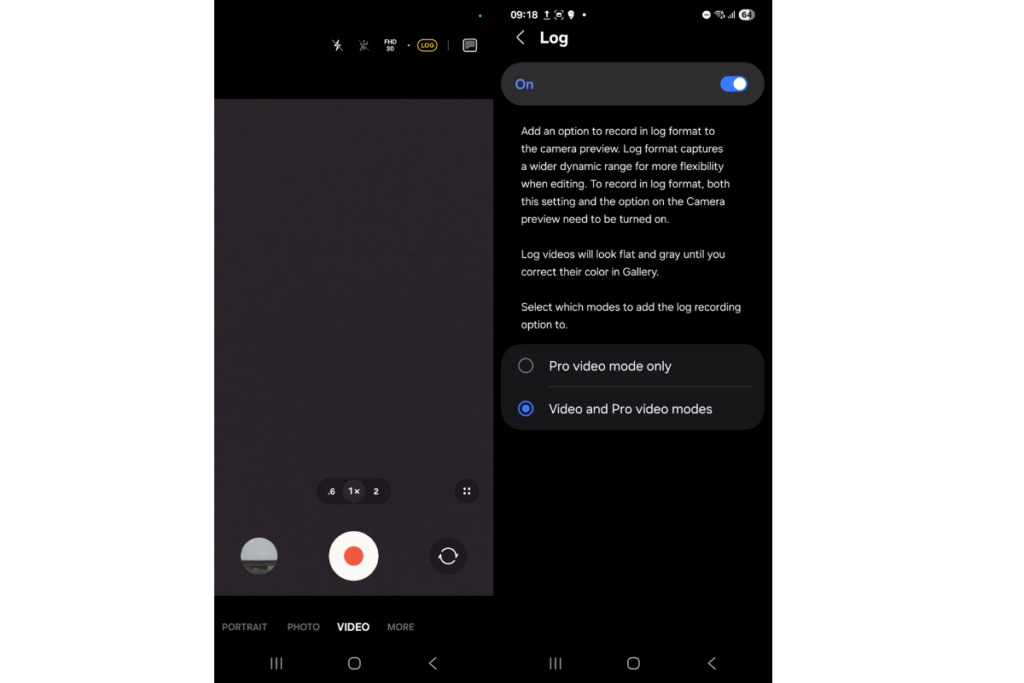
Samsung has added log video recording support to the camera app in One UI 8. This feature was introduced with the Galaxy S25 series earlier this year, and it later expanded to the Galaxy S24 series with the One UI 7 update. The upcoming One UI 8 update will bring it to even more devices.
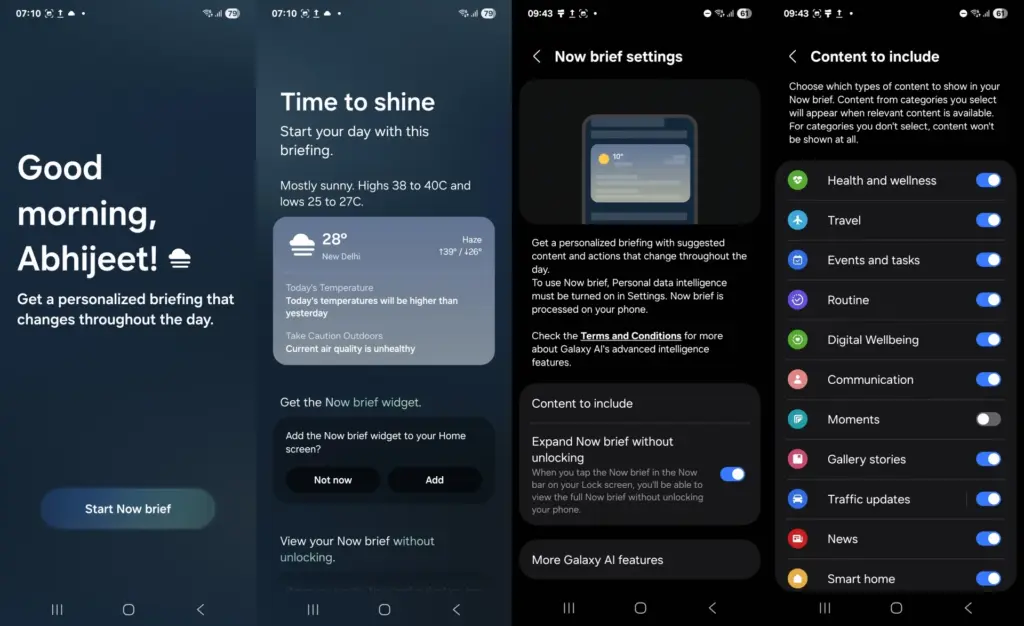
One UI 8 will bring Now Brief to older Galaxy flagships launched in 2024. The One UI 8 build tested on the Galaxy Z Fold 6 has this feature. If this device can run this feature, why did Samsung not include it in the One UI 7 update? We don’t know the exact reason, but it’s good to see more devices getting this feature, even though there’s a delay involved.
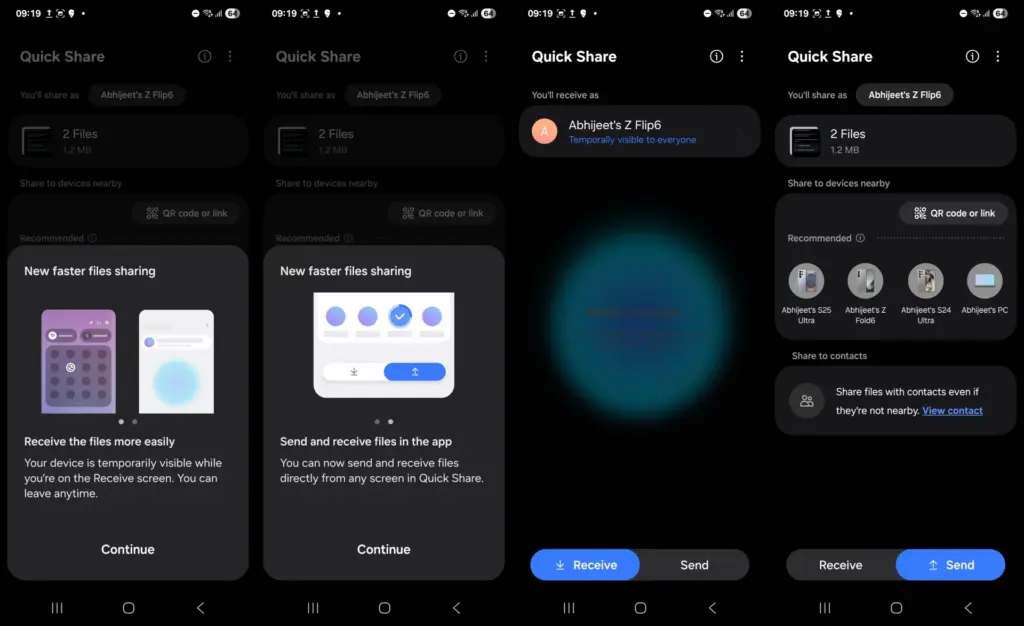
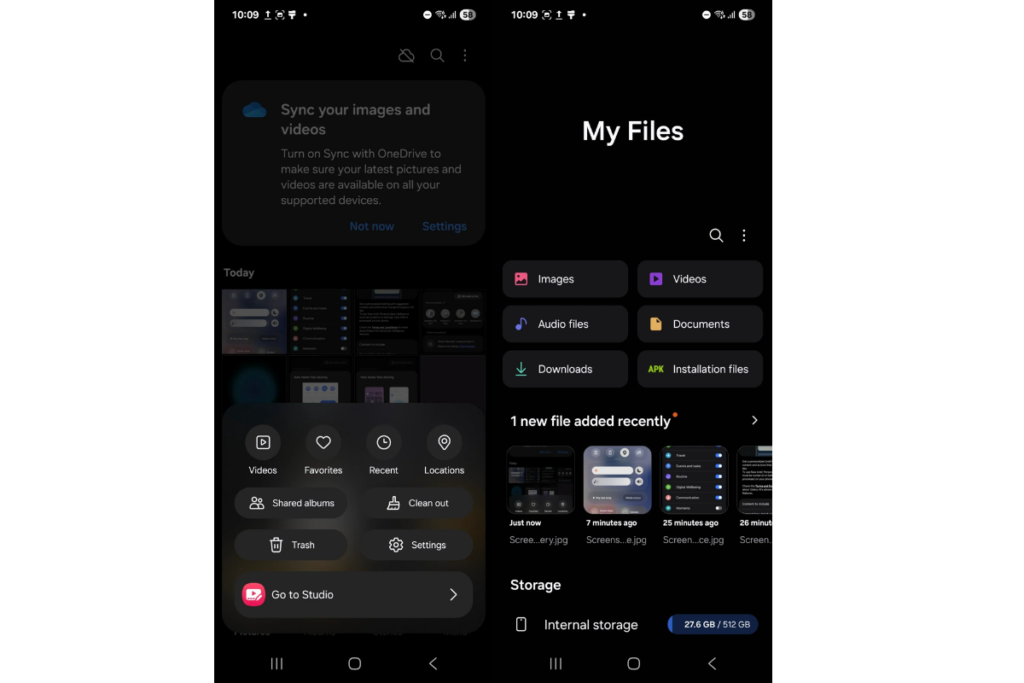
The Quick Share menu in One UI 8 is divided into two sections: Receive and Send. The overall user interface looks similar. Samsung has made minor UI changes to apps. For instance, the Gallery app now has all the options encircled, making them visually appealing.
Again, One UI 8 is still in development. So, we might see more changes and several new features when the final version is out. Stick with us and regularly scroll through our One UI section for the latest updates.


Comments