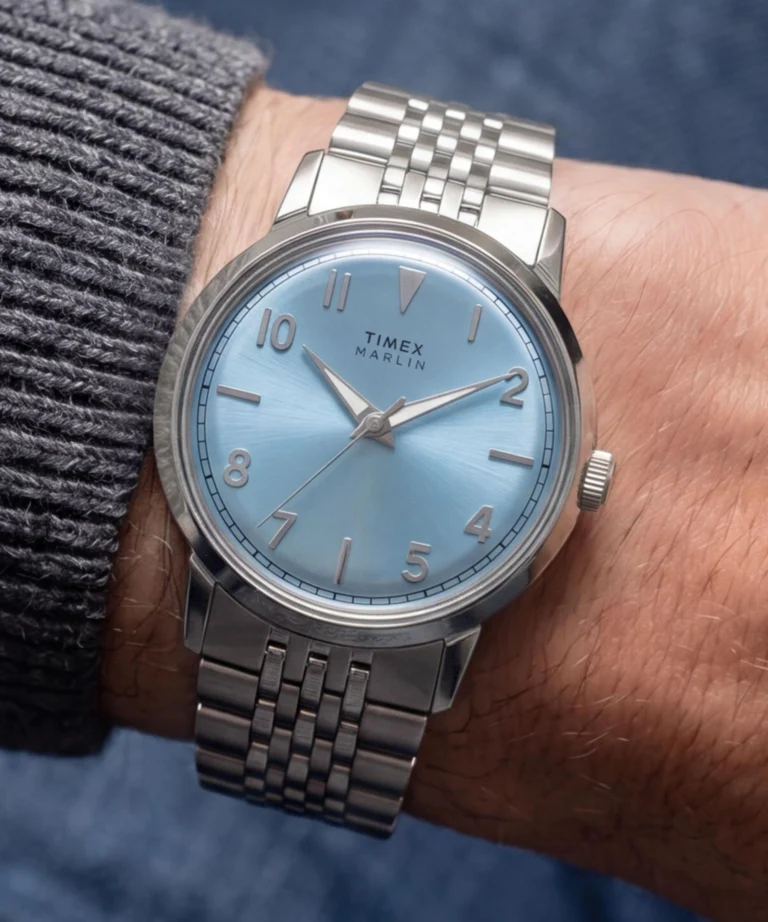
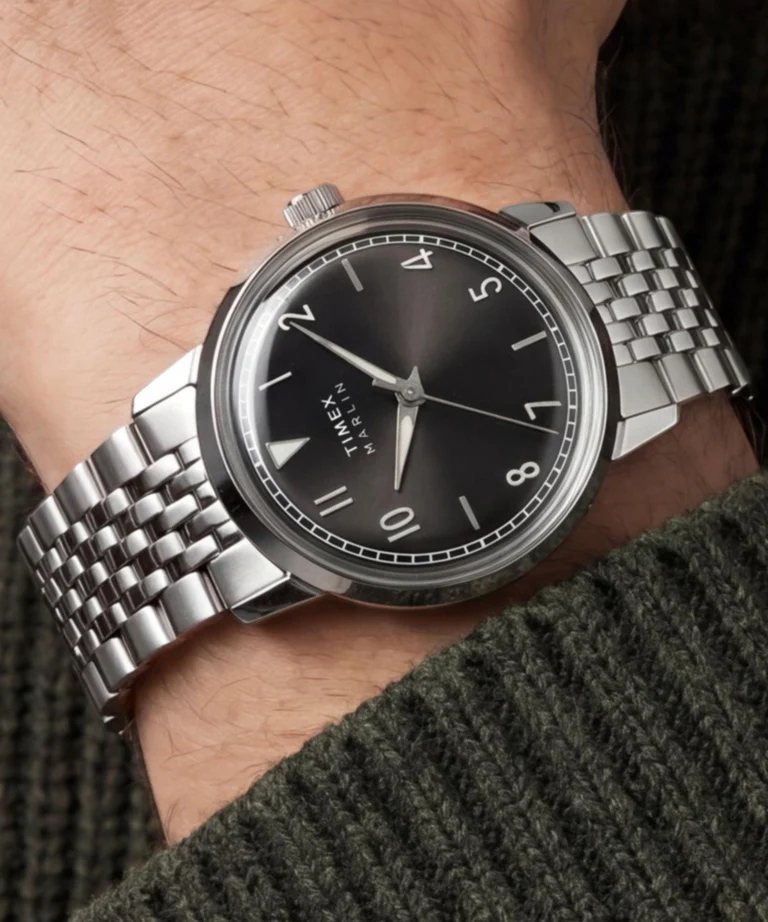
Timex has expanded its Marlin lineup in the US with four new quartz-powered watches. These additions feature matching stainless steel bracelets and a smaller case size that reflects the industry’s ongoing trend toward more compact watch dimensions.
The release includes four distinct colorways. Three of the models feature silver-tone stainless steel cases and bracelets, priced at $219: a black sunray dial (TW6A04200), a pink sunray dial (TW6A03900), and an ice blue dial (TW6A03800).
The fourth model (TW6A04000) opts for a champagne sunray dial paired with a gold-tone stainless steel finish, which brings the price up slightly to $239.
Internally, these models bypass the mechanical movements found in some of the more expensive Marlin reissues. Instead, they rely on standard SR626SW battery-powered quartz analog movements.
The hardware dimensions include the 34mm case diameter, a 41mm lug-to-lug distance, and a 10.5mm thickness. Each watch weighs just under 70 grams.
For the crystal, Timex is using a vintage-style domed acrylic rather than sapphire or mineral glass. While acrylic is more susceptible to daily scuffs, it maintains the 1960s aesthetic and can be polished at home to remove minor scratches.
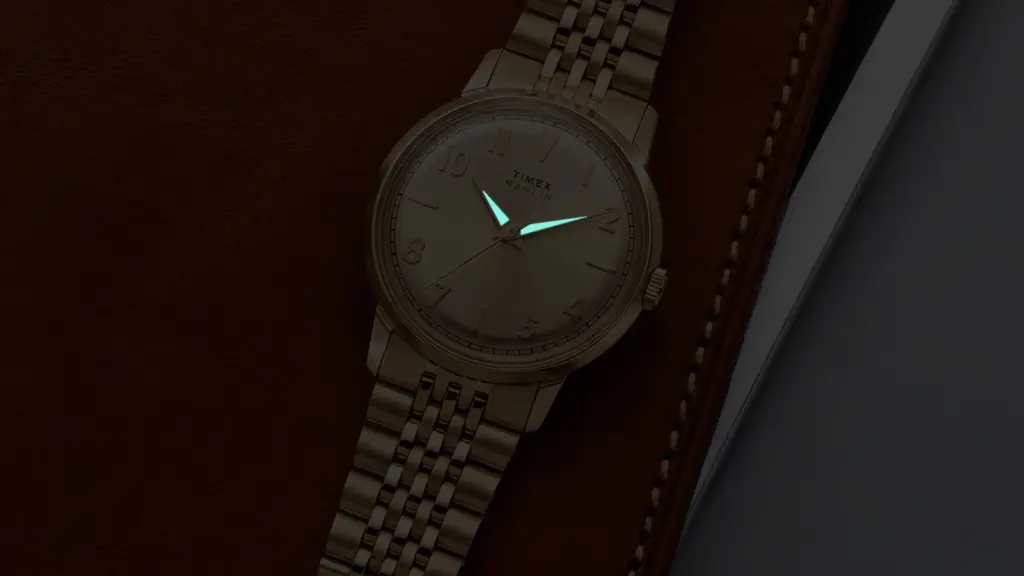
The dials feature applied metallic indices, a mix of Arabic numerals and partial markers, and luminous in-fill on the hands for basic visibility in low-light conditions.
The watches ship with an 18mm brushed and polished stainless steel bracelet secured by a deployant clasp, designed to fit wrist circumferences between 5.6 and 8.1 inches. Water resistance is capped at 30 meters, meaning the watches can handle hand-washing or light splashes, but they are not built for swimming or submersion.
Availability
The new 34mm Marlin Quartz collection is available now directly through the Timex US website. At the time of writing, the black dial version is listed as a pre-order, while others are up for purchase.
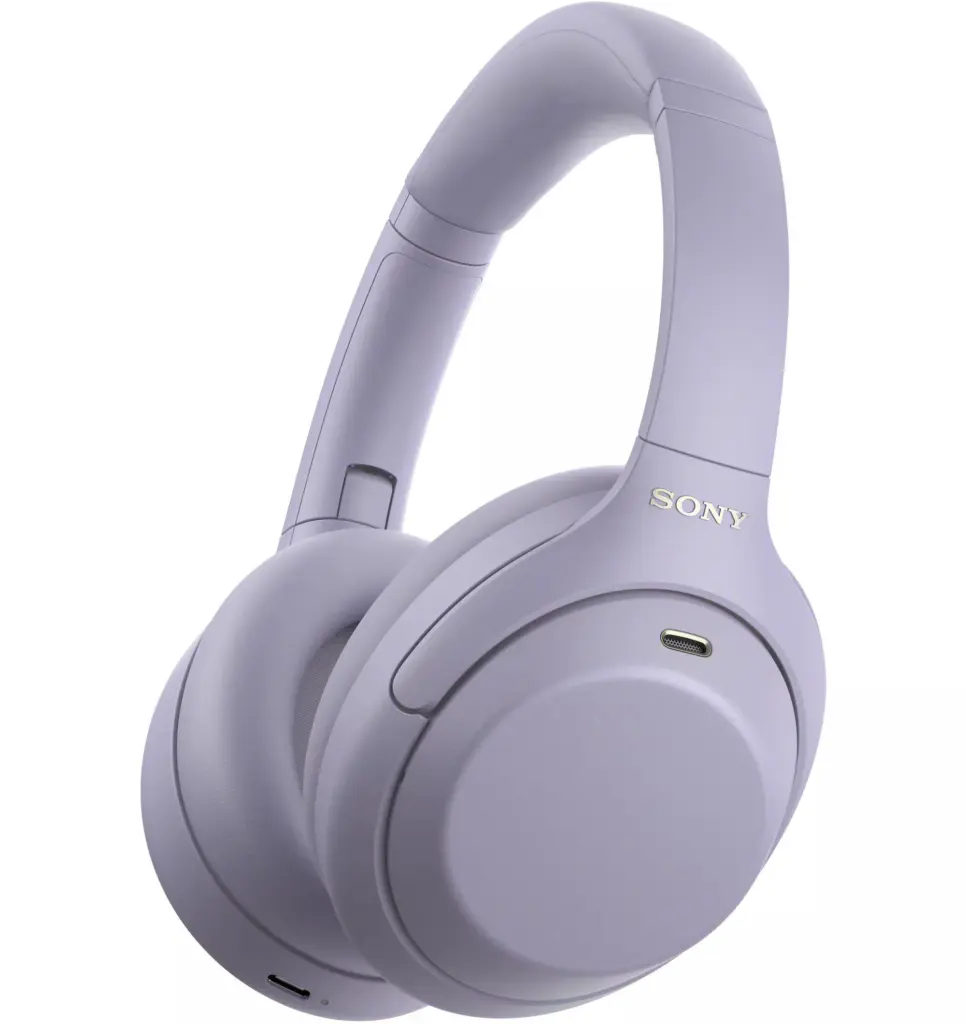
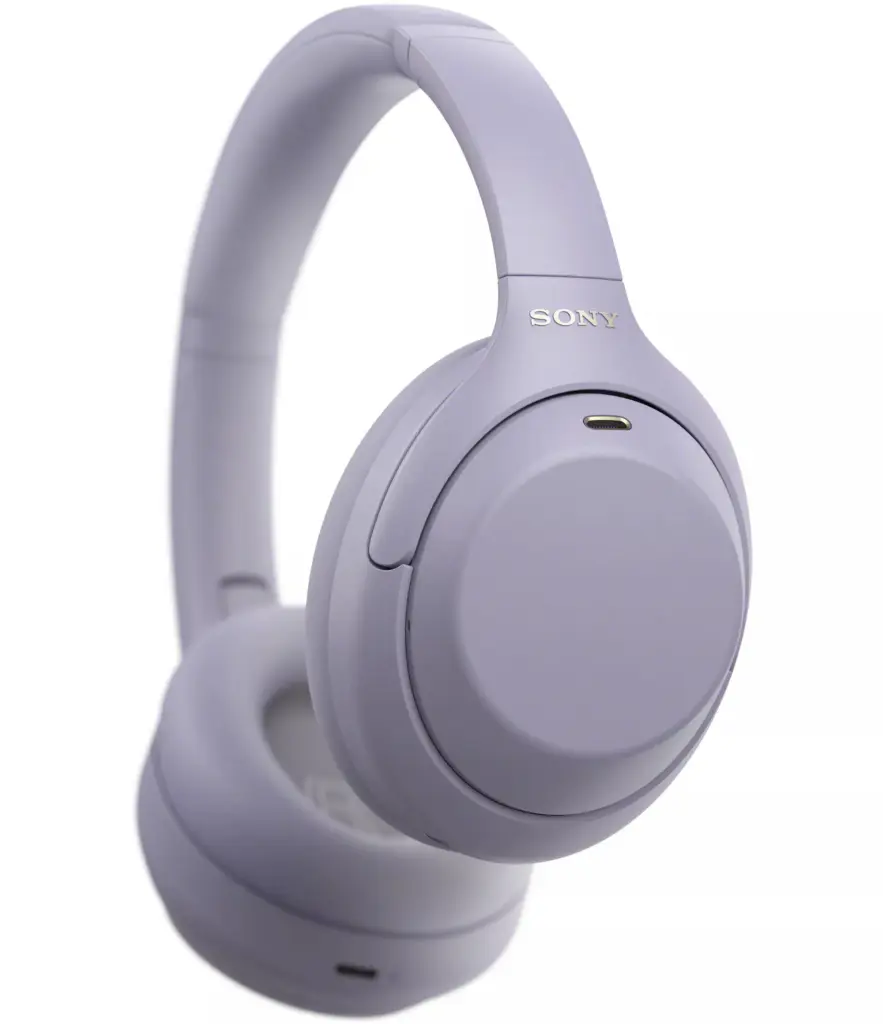
Sony looks to be prepping a more affordable take on its still-popular WH-1000XM4 headphones, complete with a new colour and a few small modern updates.
Reliable tipster Roland Quandt has shared fresh renders and details of the upcoming WH-1000XM4C. It’s essentially a derivative of the 2020 XM4, aimed at bringing that proven noise-cancelling performance down to a lower price.
Expected pricing sits at €249 in the Eurozone and £219 in the UK, roughly €130 and £130 less than the original XM4 launched at. Packaging should be simpler too, with a basic grey carrying case and the essentials rather than the fuller accessory set of the earlier model.
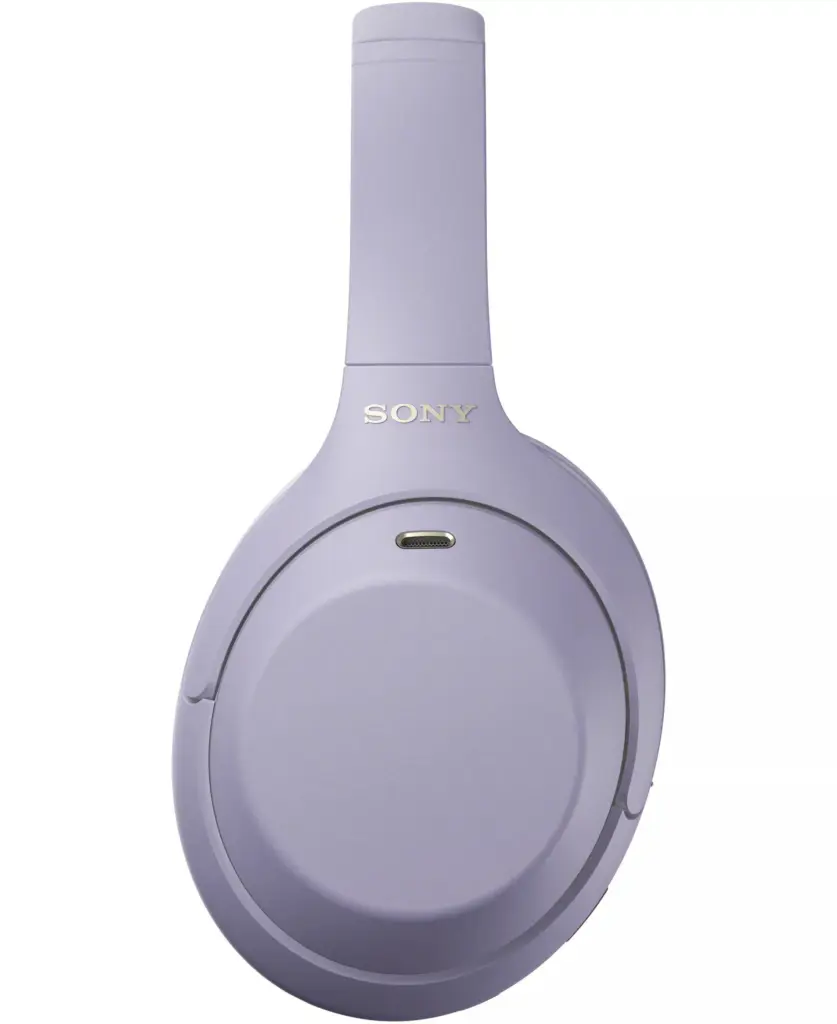
Design-wise it sticks close to the familiar foldable XM4 shape. You’ll get the classic black and platinum silver, plus a new lavender finish that wasn’t part of the original lineup. The renders also show no NFC logo on the left earcup, so quick NFC pairing is out.
Practical connections stay the same: the 3.5 mm jack and USB-C port are both still there for wired listening and charging. Wireless side moves up to Bluetooth 6.0 (the original was on 5.0), while the core audio hardware, 40 mm drivers and a 4 Hz to 40 kHz frequency response, looks unchanged. Battery life is said to be a touch lower than the 2020 model: up to 27 hours with ANC on and 34 hours without.
Sony hasn’t officially confirmed the WH-1000XM4C yet, but multiple reports point to a September 7 reveal. A proven design, a modest Bluetooth bump, a new colour and a more accessible price make this an interesting option if you want strong ANC without paying current flagship money. Official details should fill in the rest of the picture and global availability in the next few days.
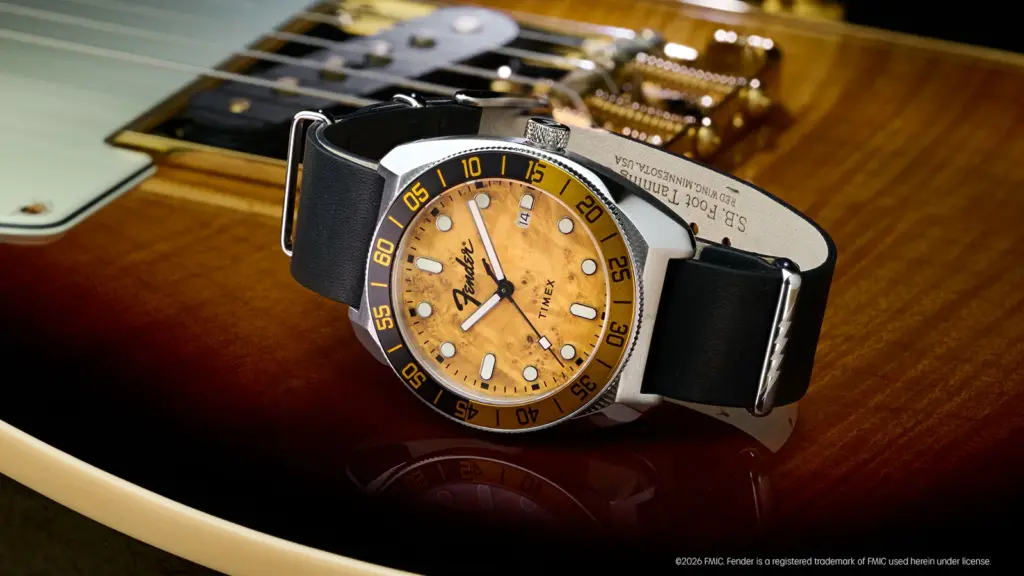
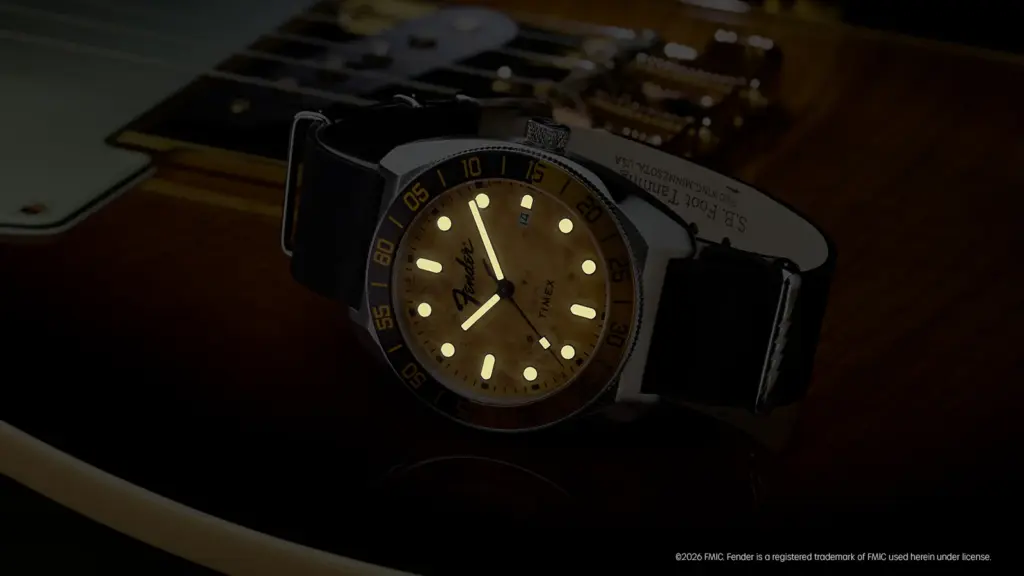
Timex has released a new automatic watch (model TW6A14600) in collaboration with guitar manufacturer Fender, priced at $499. The release is timed to coincide with Fender’s 80th anniversary as a company, as well as the 75th anniversary of the Telecaster guitar.
The Fender x Timex Automatic is available now on the Timex US website. It launches alongside two less expensive quartz models, though the automatic version is the primary focus of the new lineup.
Design Details
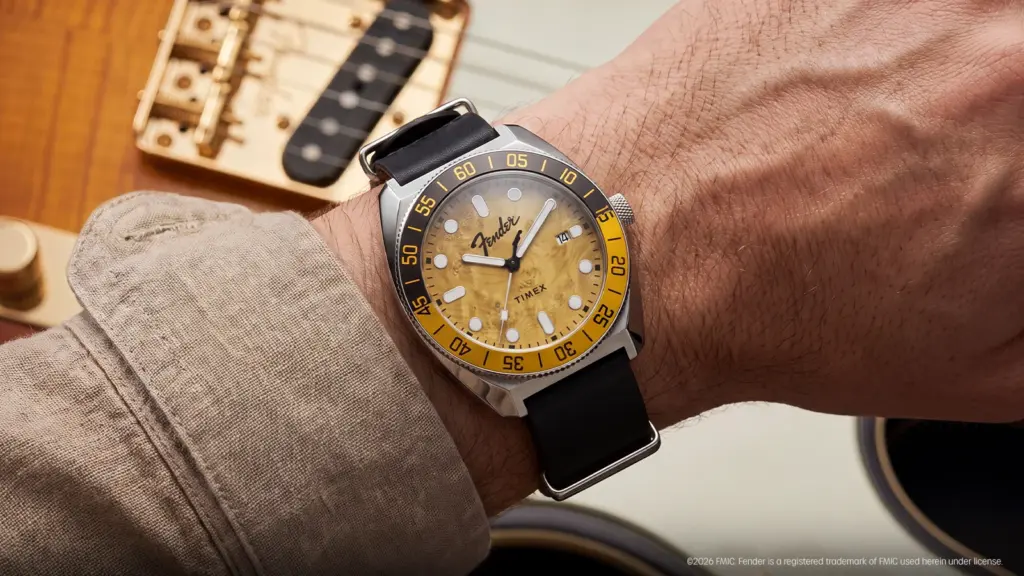
The design of the watch takes direct visual cues from the Telecaster. The dial features a wood-grain pattern in a butterscotch blonde color, matching the specific finish commonly associated with early versions of the guitar.
Instead of a standard straight pointer, the second hand is molded into the shape of a Telecaster headstock. The crown is also stamped with the Fender logo. Surrounding the dial is a two-tone black and gold unidirectional ratcheting bezel, which is a standard hardware feature used for tracking elapsed time.
The watch is built around a 41mm brushed stainless steel case. It measures 14mm thick with a 46.5mm lug-to-lug distance, and the watch weighs 95.6 grams. Timex ships the device with a standard 20mm black leather strap that has been oiled and waxed to resist water and soften over time.
Inside the case, the watch is powered by a Miyota 8215 automatic movement. This is a standard, battery-free mechanical movement that winds itself using the natural motion of the wearer’s wrist, and it includes a date complication. The mechanical parts are visible through an exhibition window on the caseback, which is printed with a specific Telecaster 75th Anniversary logo.
For the front glass, Timex opted for a sapphire crystal with an anti-reflective coating. This is a practical material choice, as sapphire is significantly more scratch-resistant than the mineral glass Timex typically uses on its lower-priced watches. The hands and hour markers are filled with luminescent material to make the dial readable in low-light environments.
Additionally, the case is rated for 200 meters of water resistance, meaning it can handle swimming and recreational diving without issue. Timex also includes a co-branded tortoiseshell guitar pick in the box with the watch.
In related news, Timex has recently launched its retro Rotary Phone Dial watch with a distinctive 1970s-inspired face, along with the new MK1 Anchor watch featuring a vintage-style dial and fabric straps.
For more daily updates, please visit our News Section.
Samsung’s next budget 4G phone, the Galaxy A18, is starting to take shape thanks to a fresh leak from reliable tipster Roland Quandt. He’s shared the colour options and storage configs, and it looks like a solid but evolutionary update rather than anything dramatic.
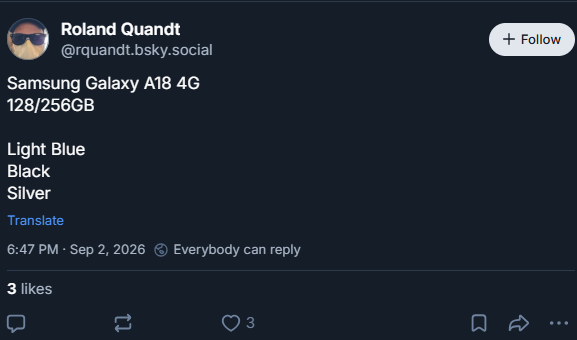
According to Quandt’s post on Bluesky, the Galaxy A18 4G will come in three colours: light blue, black and silver. Storage choices will be 128 GB and 256 GB. Exact RAM options beyond the 4 GB unit already spotted in testing still aren’t confirmed.
CAD-based dimensions put the phone at roughly 164.4 × 77.8 × 7.84 mm, or 9.74 mm if you include the camera bump. That makes it just a touch thicker (about 0.34 mm) than the Galaxy A17, while keeping almost the same overall footprint. The front should stick with a 6.7″ 90 Hz Super AMOLED display and the familiar Infinity-U (waterdrop) notch for the selfie camera.
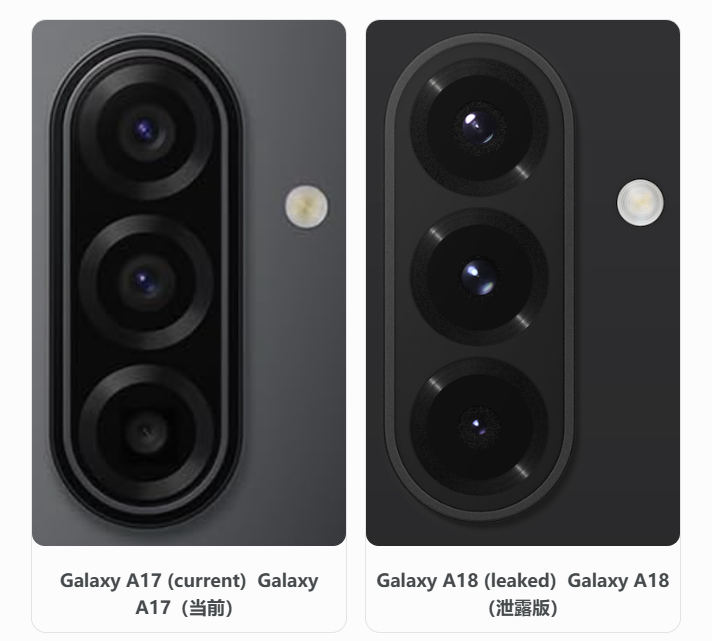
Around the back, the triple-camera setup is very similar to the A17, though the pill-shaped housing sits a bit more flush with the panel. Speculative camera hardware points to a 50 MP main sensor, 5 MP ultrawide and 2 MP macro, plus a 13 MP front camera, basically matching the previous generation. A 5,000 mAh battery is also widely expected.
Under the hood, the 4G version is expected to use MediaTek’s 6nm-based Helio G99, the same processor Samsung has used in its affordable A-series 4G phones since 2023, after moving on from the 12nm Helio G80 used in the Galaxy A14. A Geekbench listing for the upcoming 4G model showed the octa-core chip (two 2.2 GHz cores and six 2.0 GHz cores) paired with 4 GB of RAM, scoring around 744 single-core and 2,064 multi-core. This is pretty much identical to the Galaxy A17 4G. The same listing also showed Android 17 with One UI 9.
A separate 5G model is expected later and may switch to a Qualcomm chipset, replacing the Exynos 1330 used in the A17 5G, but the 4G version looks set to arrive first. Overall, the Galaxy A18 4G seems focused on continuity, offering the basic functionality you’d expect from an Android phone with a large display, including video streaming, some social media, basic web browsing, and online payments. It may not be particularly capable, but it should be reliable. Official confirmation and pricing should arrive in the coming weeks.
For years, Samsung’s flagship phones have been limited to 45W fast charging, with the company sticking to the same charging speed across several generations. That finally changed with the Galaxy S26 Ultra, which introduced support for faster 60W charging. Now, a new certification suggests that Samsung could retain the 60W charging support on the upcoming Galaxy S27 Ultra. Interestingly, another S27 series model is also expected to offer the same 60W charging speed.
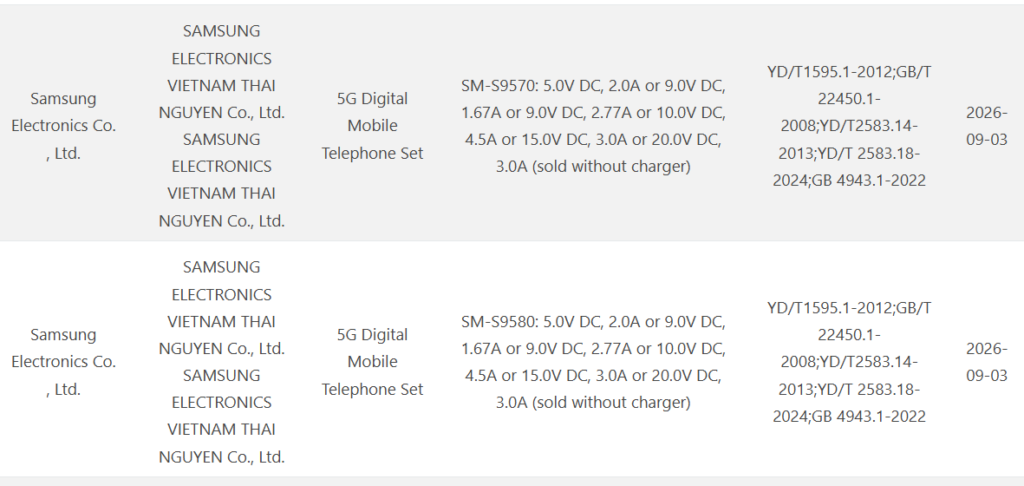
As can be seen above, two new Samsung phones with model numbers SM-S9570 and SM-S9580 have emerged in the database of China’s 3C certification platform. As per the GSMA IMEI database listings, these devices will be called the Galaxy S27 Pro and S27 Ultra when they arrive in the market. This will be the first time Samsung launches a Pro-branded S-series flagship.
Coming back to the 3C listing, the certification reveals that both devices will support 60W charging. However, like other Samsung flagships, the retail boxes of these devices will not include a charger.
Earlier this week, the Galaxy S27 (SM-S9520) and S27 Plus (SM-S9650) were spotted at 3C certification. The former was found to support 45W charging, whereas the latter would offer 27W charging. The entire lineup is expected to support wireless charging and reverse wireless charging.
With this, all four Galaxy S27 series phones have bagged China’s 3C certification. This is much earlier than the S26 series, which appeared in 3C’s database in January 2026 and debuted in March. The early certification of the S27 lineup suggests that these devices could be in line for a launch as early as January 2027.
Reliable tipster Digital Chat Station has been consistently sharing details about the upcoming iQOO16. Recently, he revealed that the phone could feature one of the industry’s best displays. Now, his latest leak has revealed the device’s massive battery capacity.
The tipster previously claimed that the iQOO 16 may pack a battery with a capacity of around 8,500mAh. Now, his latest Weibo post confirms that the device will have an 8,400mAh battery. Rumors surrounding the device have also revealed that it may support 100W wired and 40W wireless charging, similar to the previous generation.
iQOO 16 specifications (rumored)
As per other reports, the iQOO 16 will feature Samsung’s M16 LEAD AMOLED screen. It will be a 6.85-inch panel offering a 2K resolution and a 165Hz refresh rate. The device will have an ultrasonic in-screen fingerprint sensor and run on OriginOS 7-based Android 17.
On the front, the iQOO 16 may feature a 32-megapixel camera, while its back panel could be equipped with triple 50-megapixel setup in a redesigned module. It is expected to include a 1/1.3-inch primary sensor with an f/1.68 aperture, while the other two cameras are expected to include an ultrawide and periscope telephoto sensor.
Under the hood, the iQOO 16 will have the Snapdragon 8 Elite Gen 6 Pro chip and iQOO’s self-developed Q4 chip for enhanced ray tracing. The device is also expected to pack other specifications, such as USB 3.2, dual speakers, and IP68/IP69 ratings.
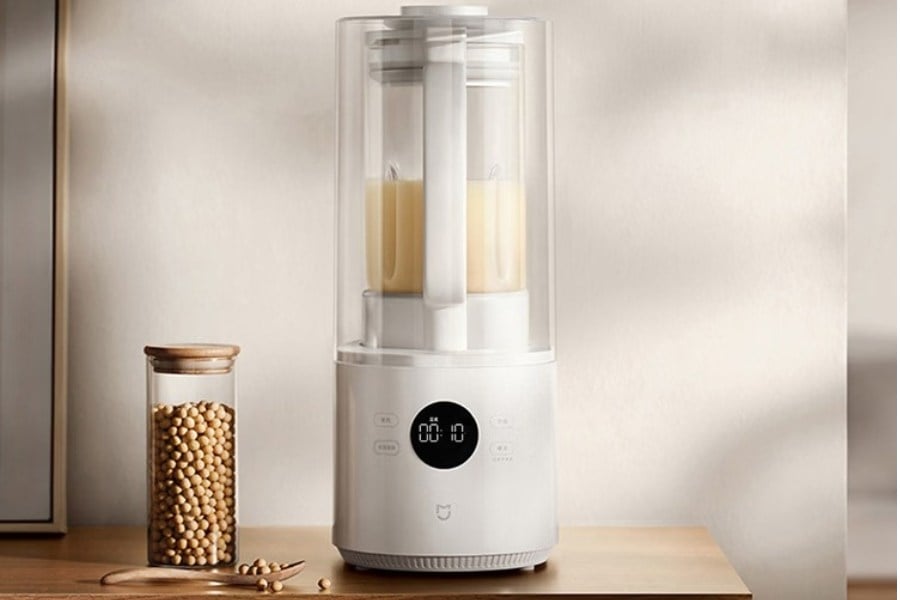
Xiaomi has launched the Mijia Blender 3, a new model that builds on the Mijia Smart Blender P1. It comes with a new gravity-locking blade system, a quieter design, and several upgrades aimed at making soy milk smoother. The blender will be available on JD.com for 389 yuan (around $57) from September 8.
The blade assembly can be removed without tools, while the gravity-locking design keeps it securely in place during use. The assembly is also rated IPX9, so you can rinse it directly under running water. Xiaomi has added 13 layers of noise reduction, bringing the operating noise down to 45 dB(A) and blending noise to 51 dB(A). That’s an 8% reduction compared with the previous model.
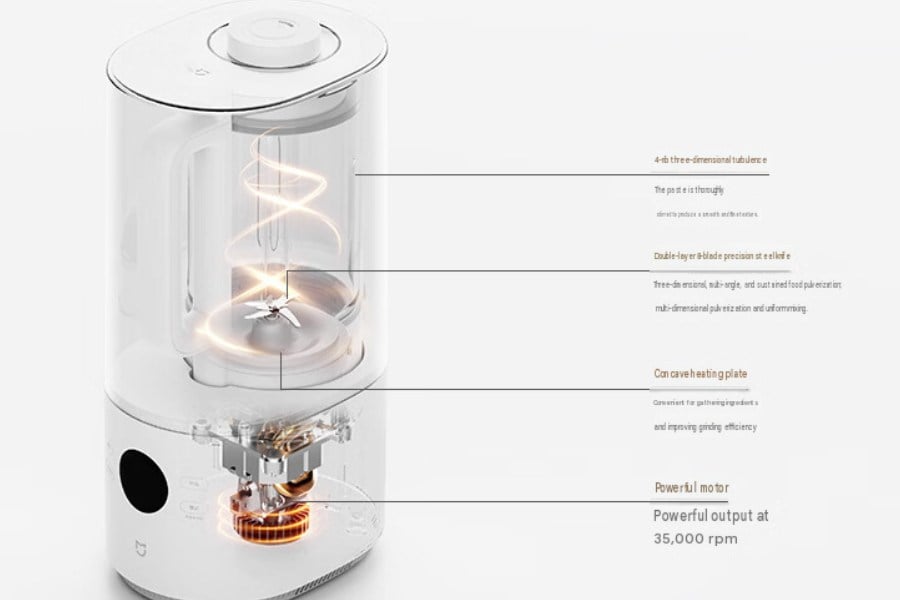
Inside, the blender uses a 35,000 rpm motor with a double-layer, eight-blade stainless steel cutter. It also features a 4-rib 3D airflow system and a concave heating plate. Xiaomi says the combination can grind soy milk particles down to 100μm, improving smoothness by 21% over the previous model.
The cooking program uses a segmented heating curve that adjusts during the process. Xiaomi says this helps produce soy milk with a visible skin on top, while increasing the solids content by 10% and protein content by 4%.
Faster blending and smoother soy milk
For faster preparation, the 18-minute quick-milk mode lets you add water above 90°C and start the process with a single button press. The blender also has timed pasteurization, with Xiaomi claiming a 99.99% sterilization rate during the soaking stage. It supports up to 12 hours of delayed cooking and can keep drinks warm for up to 12 hours at 55°C.
Moreover, the Mijia Blender 3 offers eight hot and cold drink modes, along with dual hot-and-cold blending. An LED display shows the cooking progress in real time, and you can manually adjust the blending fineness.
Cleaning is handled through three modes: manual quick cleaning, high-temperature cleaning, and hot-drying sterilization. Xiaomi claims the hot-drying mode provides a 99.99% sterilization rate. The blender also uses a ceramic non-stick heating plate to make cleaning easier.
The blender has a 1.5-liter total capacity, with a 1,000mL limit for hot drinks and 1,500mL for cold drinks. Xiaomi says that’s enough for two to four people, similar to the capacity of the Mijia Blender N1.
Safety features include lid anti-theft protection, lid-opening protection, motor overheat protection, cup-lifting protection, and dry-burn protection. The cup can also be detached from the base, making it easier to lift and handle.
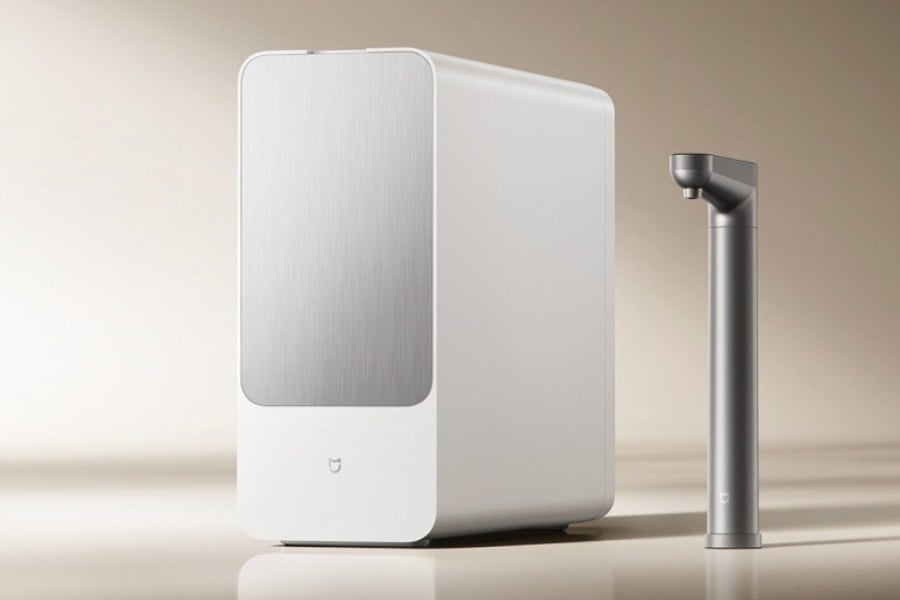
Xiaomi has opened pre-orders for the Mijia Rich Mineral Water Purifier 2, a follow-up to the Mijia Mineral-Rich Water Purifier 1200G that it launched last year. You’ll pay 2199 yuan (~ $327) at the list price, and sales are set to open on September 15 at 20:00.
The headline feature here is what Xiaomi calls its exclusive Bama mineral spring formula. The company says it recreates the water chemistry of Bama, a region in China known for longevity, using patented slow-release mineralization tech.
As water passes through, the system releases six minerals: strontium, zinc, calcium, magnesium, potassium, and bicarbonate ions, with strontium maintained at 0.2 mg/L or above to meet mineral water standards. Xiaomi adds no artificial chemicals to hit that number. You get zinc for bone development and immunity, and strontium for bone and teeth health, according to the company.
The Mijia Rich Mineral Water Purifier 2 uses a dual-core, nine-stage filtration system with a 0.0001 μm rating. Xiaomi says it removes impurities, chlorine, bacteria, viruses, and heavy metals, with removal rates exceeding 99% for several contaminants, including viruses, E. coli, antibiotics, microplastics, and PFAS.
Its RO membrane has a 98.5% desalination rate and is designed to resist fouling. This should help maintain filtration performance even when water quality varies.
The purifier can deliver water at up to 3.38 liters per minute. Xiaomi says it can fill a cup in about 3 seconds or a 2-liter pot in less than 36 seconds. The RO filter is rated to last up to eight years, with Xiaomi estimating running costs at around 0.30 yuan per day. The PPC filter needs to be replaced every two years and costs 299 yuan.
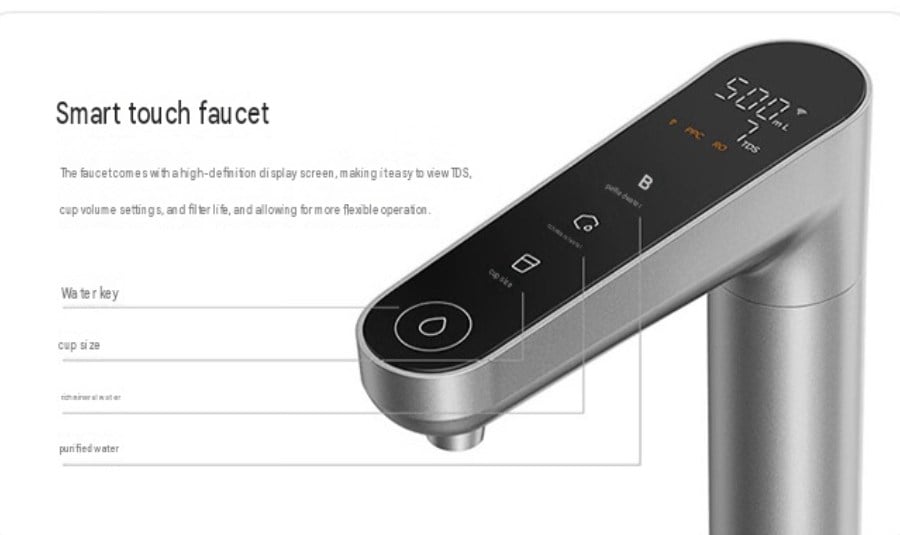
You can choose between purified and mineral-rich water, while the touch faucet has a built-in display for TDS levels and filter life. The purifier also uses a zero-stagnant-water circulation system, which means you don’t need to let the tap run before drinking water in the morning.
Xiaomi says the purifier has a 77.8% water production rate, putting it in China’s top water-efficiency tier.
The purifier connects to the Xiaomi Home app, where you can check filter life, TDS levels, and daily water usage. Xiaomi also offers a three-year warranty for the full machine and five years of coverage for core components. Free installation and repairs are included during the warranty period.
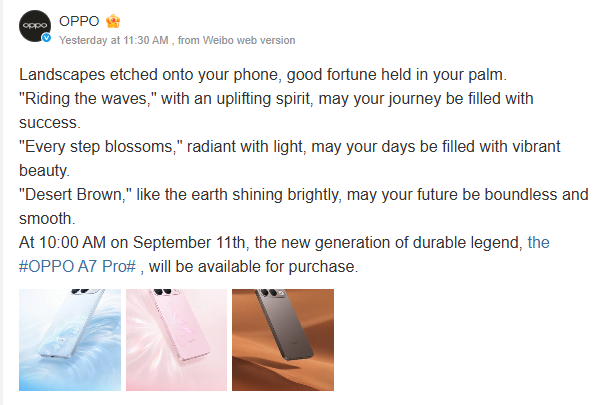
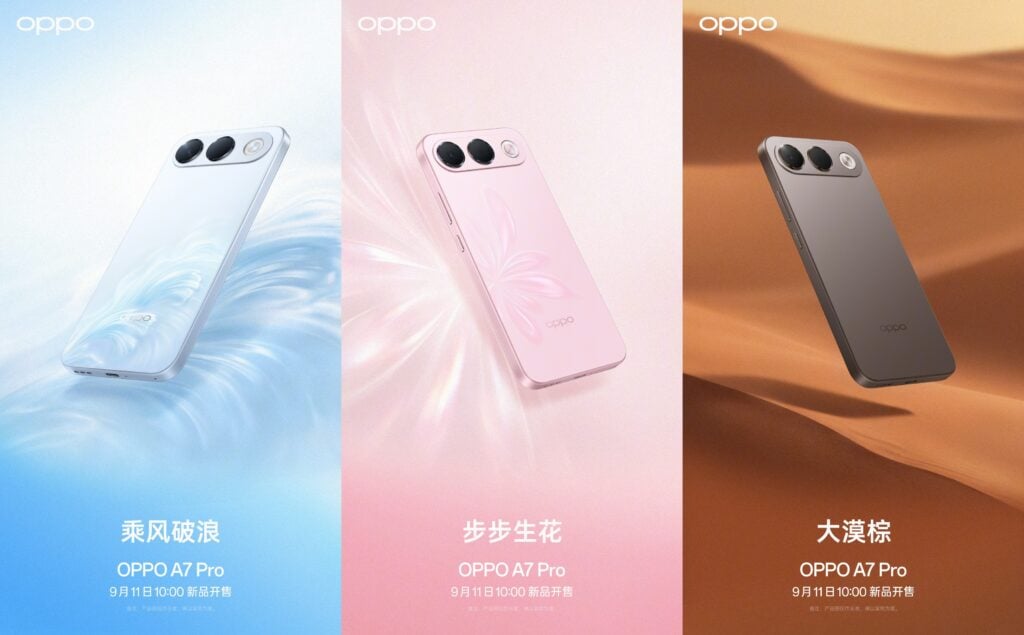
The colors are “Riding the Waves” (translated from Chinese), which is essentially light blue. The second, “Every Step Blossoms,” is a light grayish pink. The third, “Desert Brown,” is the darkest and looks the most premium.
The big selling point is an 8,000 mAh battery that Oppo says can still hold at least 80% capacity after the equivalent of roughly seven years of normal use in lab tests. It’s a single-cell design paired with an IP69K rating for high-pressure water and dust resistance, plus a reinforced “diamond architecture” that uses stronger corners, impact beams and cushioning around key parts to improve drop protection.
Rumors suggest AI anti-fraud tools, a 6.57″ 1080p OLED display, and Android 16-based ColorOS 16. For performance, it’s expected to use Qualcomm’s 4nm based Snapdragon 4 Gen 5 chip. The phone is expected to sit below the recently launched A7 Pro Max.
For reference, the higher-end model is 8.57 mm thick and weighs about 224g. It has a 6.78″ 1.5K 120 Hz OLED flat display, a 50 MP front camera, a 50 MP main rear camera plus 2 MP auxiliary lens, the same Snapdragon 4 Gen 5 chip, a massive 10,000 mAh battery and 80 W wired charging.
The A7 Pro keeps Oppo’s recent focus on long-lasting batteries and toughness in the more affordable A-series. If you’re after solid battery life, decent protection and some colourful, optimistic design, September 11 is the date to watch.
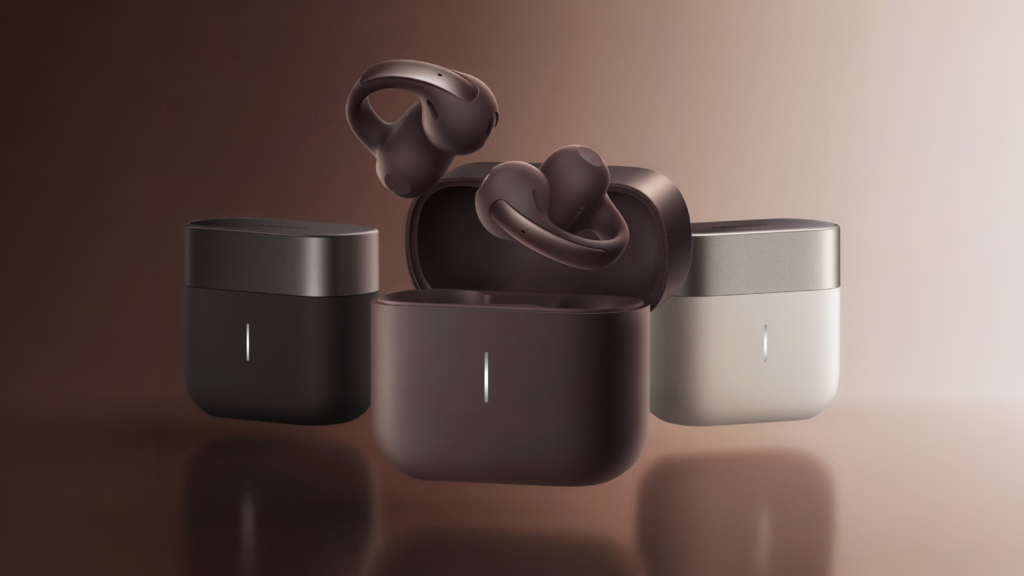
Anker just dropped the AeroClip 2, their latest open-ear clip earbuds, and they’re leaning hard into comfort, call quality, and compatibility with Apple devices.
The high-elasticity silicone C-bridge is supposedly 35% softer than the last generation and can handle more than 10,000 stretches without losing shape. They come in four colours: Hot Red, Moonlight White, Sunny Blue and Obsidian Black. Each bud is pretty compact at about 26.4 × 21.2 × 24.8 mm. The case is small too (roughly 51 × 27 × 44 mm), and the whole package (buds + case) weighs just 53.2 g.
Sound comes from a 12 mm dual-magnetic-circuit driver in an open acoustic setup. You get LDAC support alongside the usual AAC and SBC. Connectivity is Bluetooth 6.0 with dual-point, so switching between two devices is smooth.
Inside sits Anker’s own Thus AI chip, which they claim offers 150 times the peak computing power of the previous generation. A six-mic and sensor array focuses on isolating your voice rather than just filtering noise, which should help with clearer calls in busy places.
Battery life is solid: about 8 hours on the buds themselves and up to 32 hours total with the case. A quick 10-minute charge gets you around 4 hours of listening. The case supports wireless charging plus USB-C, and the buds are rated IP57 for dust and water resistance.
Because of the MFi certification, you also get real-time translation features when paired with an iPhone, plus Siri support and more reliable switching across iPhone, iPad and Mac.
In China they’re priced at 1,199 yuan, with a limited-time drop to 999 yuan. Internationally, the AeroClip 2 is expected around 22 September at roughly $170 / €180. A higher-spec AeroClip 2 Pro (with on-device recording and AI note-taking) is planned for later.
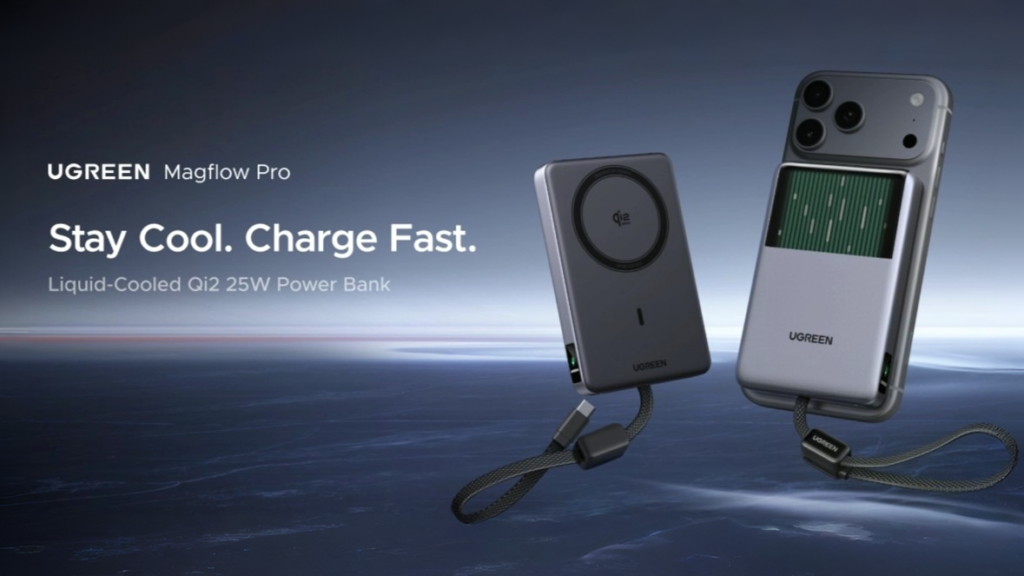
Ugreen is trying to solve one of the biggest annoyances with wireless power banks: they get hot. The company has started selling the MagFlow Pro in overseas markets and is calling it the world’s first portable power bank with a built-in liquid-cooled micro-pump system.
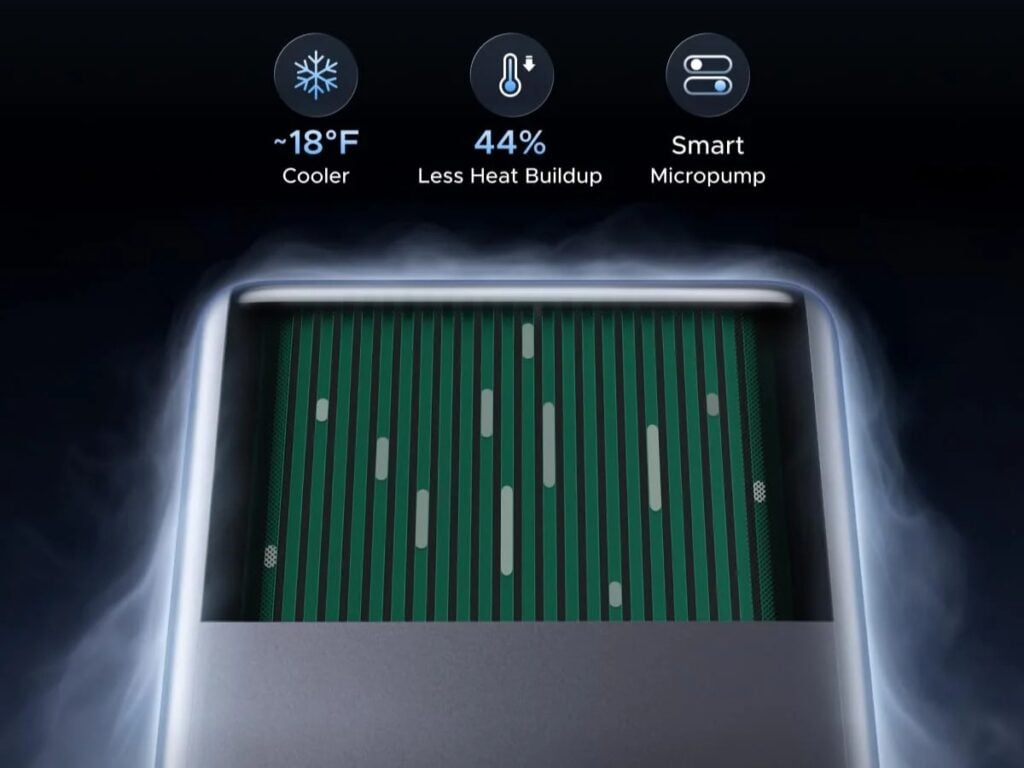
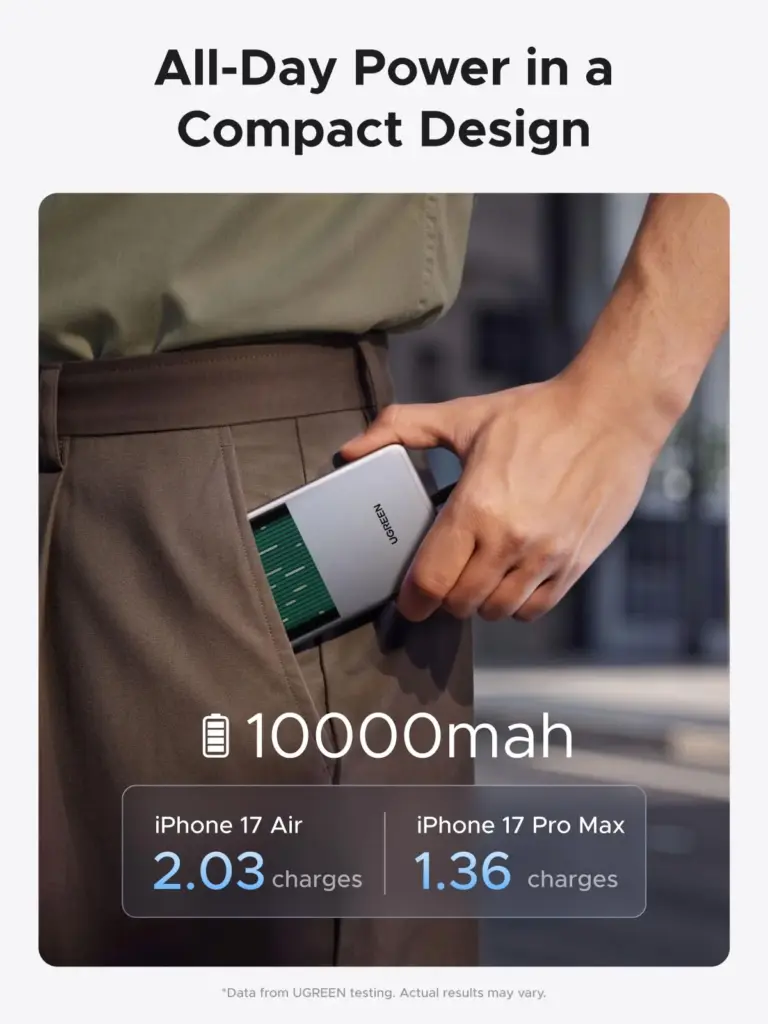
The MagFlow Pro has a 10,000mAh capacity and a 2C design. It’s priced at $149.99. The main innovation is a combination of phase-change thermal storage material and a liquid-cooled micro-pump. The phase-change material soaks up heat while the power bank is working, which helps slow down how quickly both the bank and your phone warm up. When things start getting hotter, the internal micro-pump kicks in and circulates coolant to pull heat away from the warmest areas.
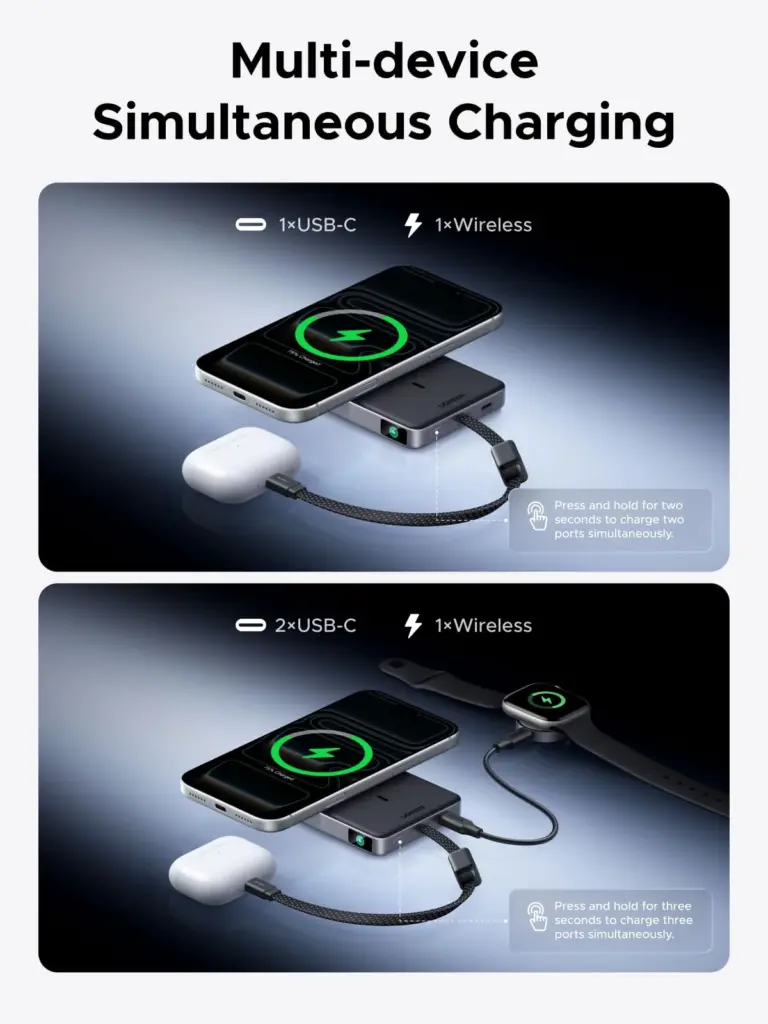
On the charging side, it supports up to 25W wireless charging through Qi2 magnetic technology. There’s also a built-in USB-C cable rated at 45W, plus an extra USB-C port that can also do 45W. It works with the usual protocols like PD 3.0, QC 4.0, and PPS, so it should handle a wide range of devices for wired charging.
The idea behind the active cooling is to keep temperatures lower than regular power banks, which should help maintain more consistent charging speeds during longer sessions. The power bank even has a transparent section so you can actually see the coolant moving around.
With magnetic wireless charging, dual wired options, and this more advanced heat management system, the MagFlow Pro is clearly aimed at people who use wireless charging a lot on the go and want something that doesn’t overheat as easily. It’s now available through Ugreen’s official channels and select retailers.
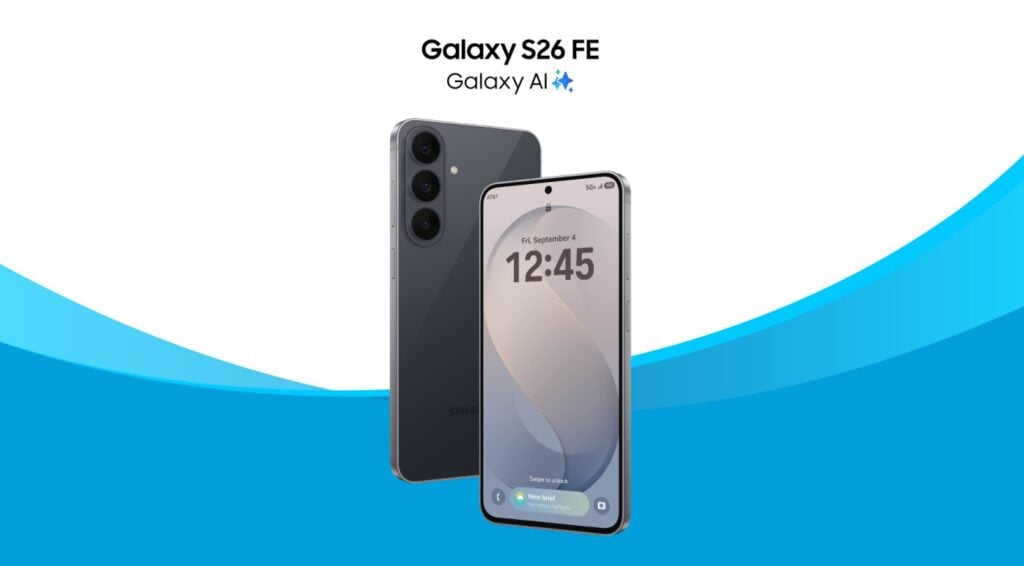
Last week, Samsung unveiled the Galaxy S26 FE across the world, and in the US it starts at $699.99 for the 8GB+128GB variant, while the 8GB+256GB model costs $799.99. The new value-focused Galaxy S26 FE is now getting special offers from AT&T for both new and existing customers. These deals significantly lower the monthly cost of the phone, although the terms vary depending on whether you are adding a new line or upgrading an existing one.
AT&T offers make the Galaxy S26 FE cheaper
Samsung Galaxy S26 FE
Starting today (September 4), new and existing AT&T customers can get the Galaxy S26 FE for under $3 per month when they add a line and place the order through the AT&T app, with no trade-in required.
New customers who purchase the phone in an AT&T store and activate a line can get it for $7.99 per month, also without a trade-in. Existing customers who want to upgrade can get the Galaxy S26 FE for $12.99 per month without trading in their current phone.
AT&T is also offering an incentive for customers switching from another carrier. New customers can have AT&T pay off an existing phone balance of up to $800 per line, covering as many as 10 lines. The Galaxy S26 FE offers are available through the AT&T app, website and stores, with separate promotions also planned for AT&T Business customers.
Samsung Galaxy S26 FE specifications
The Galaxy S26 FE features a 6.7-inch Dynamic LTPO AMOLED 2X display with a 2,340 x 1,080-pixel resolution, 120Hz refresh rate and up to 1,900 nits peak brightness. It is powered by Samsung’s Exynos 2500 chipset, paired with 8GB of RAM and either 128GB or 256GB of storage.
For photography, the phone has a 50-megapixel main camera with OIS, a 12-megapixel ultrawide camera and an 8-megapixel telephoto camera with 3x optical zoom. A 12-megapixel front camera handles selfies and video calls. The rear camera supports 8K video recording at 30fps, while the front camera can record up to 4K at 60fps.
The Galaxy S26 FE runs One UI 9 based on Android 17 and is promised seven years of Android OS and security updates. It packs a 4,900mAh battery with 45W wired charging, while other features include an IP68 rating, dual-SIM support, eSIM, Wi-Fi 6, Bluetooth 5.4, NFC and USB-C. The phone measures 7.4mm thick and weighs 193g.
Noise has brought a new pair of wireless earbuds to IFA 2026, giving its premium audio lineup a different form factor. The Master Buds Open arrives with an open-ear design aimed at listeners who want music without completely blocking outside sounds. The company has also confirmed that the earbuds will reach India later this month, although several key details are still under wraps.
Noise Master Buds Open brings Bose technology to open-ear audio
Noise Master Buds Open
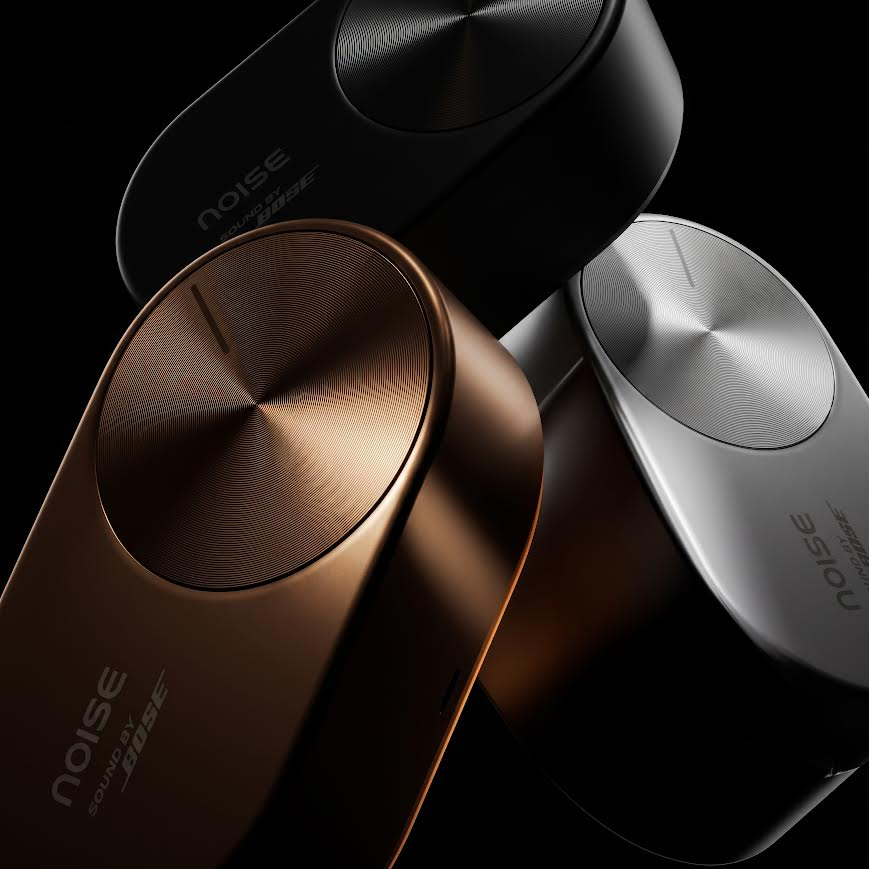
The Noise Master Buds Open uses an open-ear architecture that keeps the ear canal unobstructed while playing audio. This allows users to remain more aware of surrounding sounds during activities such as commuting, exercising outdoors, working in public spaces, and taking calls. The earbuds feature a clip-on style design, with a circular acoustic section positioned close to the ear and a stem-like structure extending downward.
Sound tuning has been developed with Bose, with the earbuds carrying Sound by Bose technology. Noise has not yet revealed details such as the driver configuration, battery capacity, playback time, connectivity standards or any additional audio features. The company is positioning the model as a premium addition to its Master Series, which already covers different personal audio form factors.
Noise has showcased the Master Buds Open in black, bronze, and gold finishes at IFA, although the official color names have not been confirmed. The outer section carries Noise branding alongside the Sound by Bose branding, while the overall design is focused on keeping the earbuds securely positioned without sealing the ears.
The Master Buds Open will go on sale in India in late September through Noise’s website, major e-commerce platforms and retail stores. Pricing, detailed specifications, and other market availability information are expected to be announced closer to the commercial launch. The company says the new model completes its premium audio offering across in-ear, over-ear, and open-ear categories.
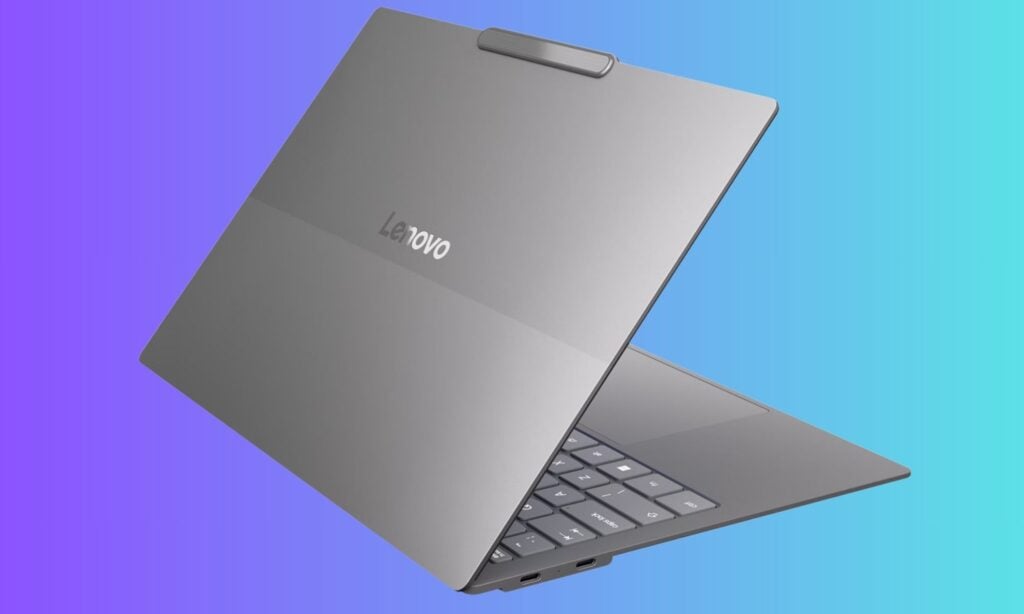
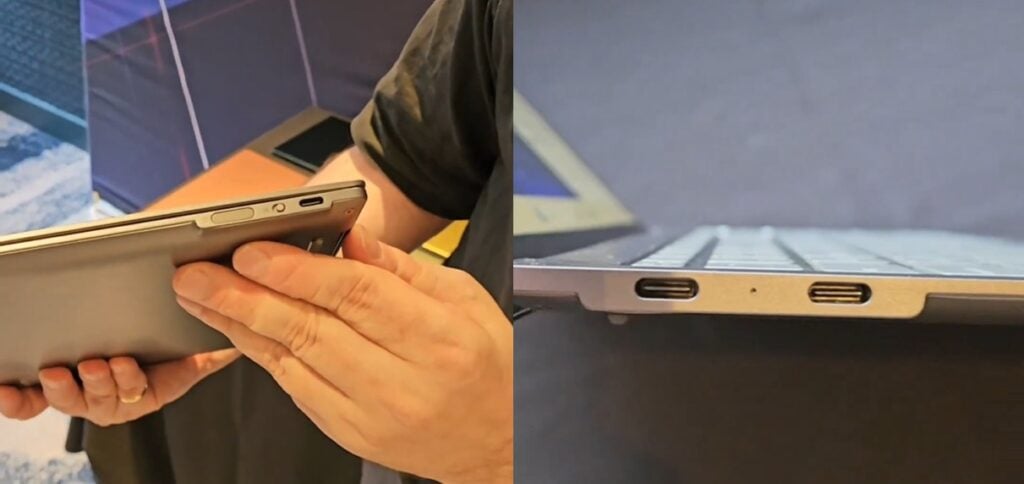
Lenovo is experimenting with how thin a laptop can actually get. At IFA 2026 in Berlin, the company unveiled Project AeroBlade, a 14″ concept machine that focuses on extreme thinness and quiet operation.
The laptop measures less than 10mm thick and weighs under 830 grams. For comparison, most current 14″ laptops sit between 14mm and 17mm thick and usually weigh around 1.3 kg. Lenovo says the concept can deliver performance similar to its ThinkPad X1 Carbon series with Intel processors, though it hasn’t shared exact chip or memory details yet.
The real highlight is the cooling system. Developed with Frore Systems, it uses something called Active Flow architecture built around AirJet solid-state cooling modules. Instead of regular spinning fans, these modules create high-speed pulsed airflow with vibrating diaphragms to move heat away.
The AirJet Mini Slim modules are only 2.65mm thick, use a maximum of 1 watt of power, and can each dissipate up to 5.25 watts of heat. Multiple modules can be placed around the chassis, which gives designers more freedom with the motherboard layout.
This design also pushes airflow toward the rear of the laptop, which helps keep the overall look cleaner and frees up internal space. The system is also said to run quieter than traditional fan-based cooling and pick up less dust over time.
Project AeroBlade is still just a concept, not a product you can buy. But it shows how solid-state cooling could help create a new wave of ultra-portable laptops that stay thin without giving up sustained performance. Lenovo’s demo at IFA is another sign that companies are still looking for better ways to handle heat in thinner and lighter machines.
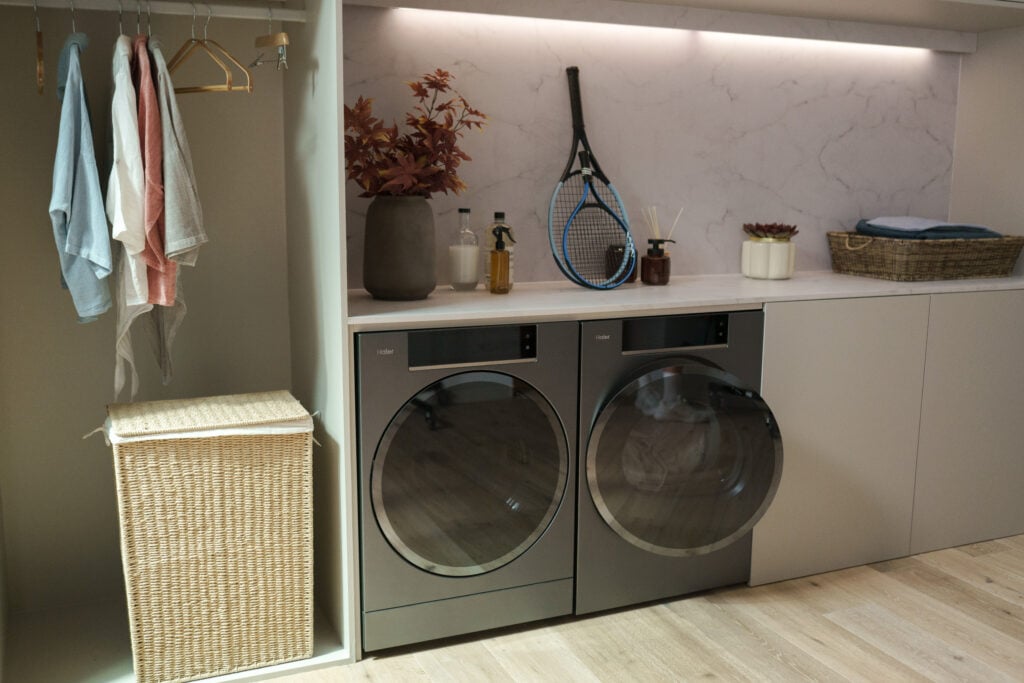
Haier Europe is bringing its latest smart-home technologies to IFA 2026 under the theme “Home of Intelligent Possibilities.” The company says its focus is on making AI, connected technology and design work in ways that are useful in everyday life. Haier will showcase products across laundry, refrigeration, cooking, dishwashing, TVs and floorcare.
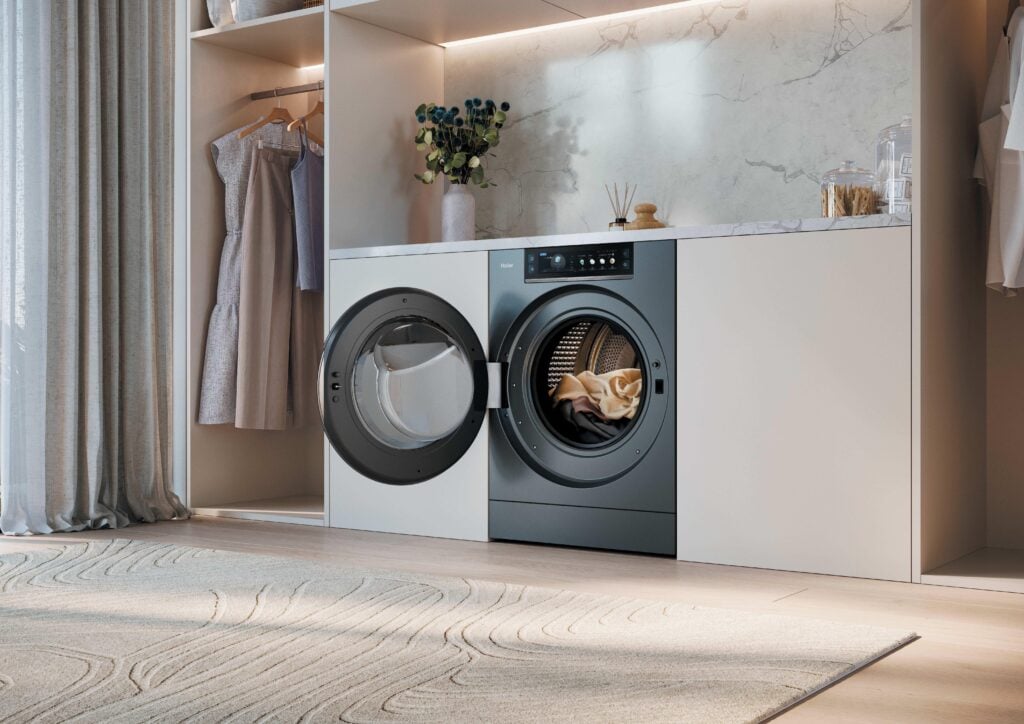
One of Haier’s key highlights is the Vision 15 Collection, which brings cameras and AI into washing machines. Its AI Vision Sense camera monitors the washing process, detects the amount of laundry and suggests a suitable programme. It can also identify mixed colours, monitor foam levels and check whether clothes are trapped or left inside the drum.
The system works with Haier’s AI Power Sense System, which uses nine sensors and algorithms to monitor factors such as load weight, balance, water level, temperature, detergent dosing and drum movement. The machine can also learn a user’s habits through AI Memory.
Haier has also added AI Smart Dosing for detergent management, while Ultra Mix Pro mixes detergent, water and air before washing. Ultra Fresh Air Pro uses air circulation, gentle movement and UV treatment to keep laundry fresh and hygienic for up to 12 hours after a cycle.
A Dryer That Can Detect Moisture Inside Clothes
The Vision 15 Tumble Dryer takes sensing further with Ultra Sense technology, which performs a three-dimensional scan of the load and detects residual moisture even within the inner layers of padded and multi-layered items.
The system continuously adjusts the drying process until clothes are completely dry, both inside and out. The dryer also uses the Ultra Reverse Drum system, with bidirectional rotation, to reduce tangles, creases and the so-called “balling” effect.
Four Drums in One Laundry System
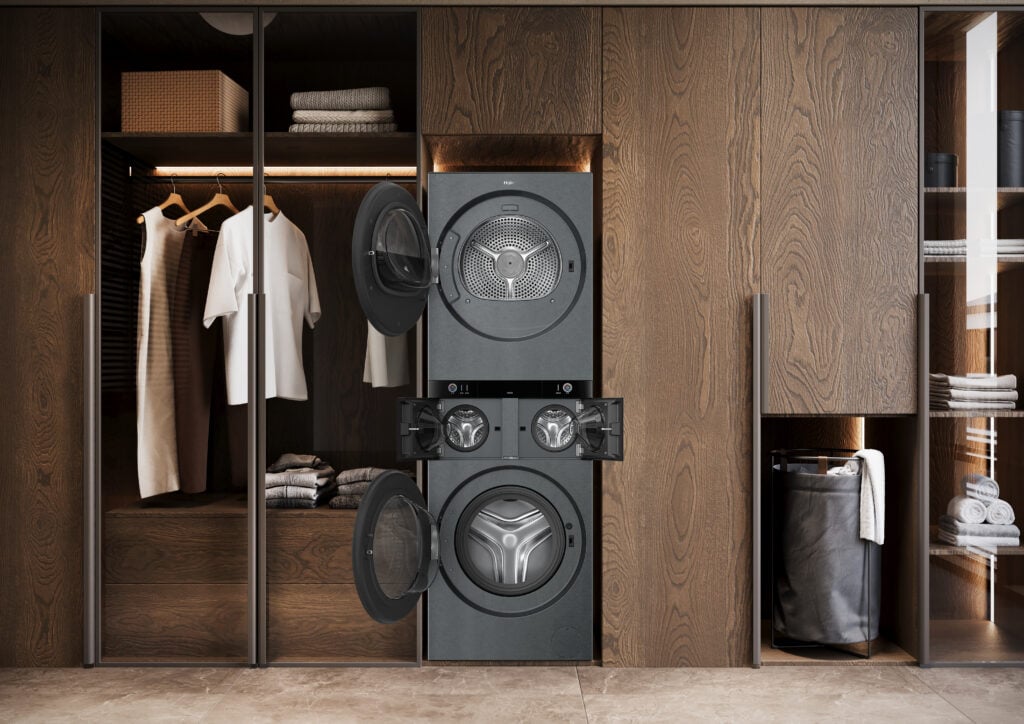
Another interesting product is Haier’s Multi Care Laundry Studio. Instead of using one drum at a time, it combines four independent drums in one appliance.
The setup includes a 10kg washing drum, two 1kg drums and an 8kg dryer. Despite this multi-drum design, the system is only 598mm deep and requires just one plug, one water connection and one drainage connection. The machine also supports different forms of interaction. AI Sense activates the display when a user approaches, Knock Sense allows the upper drum to be opened with a tap, and Wave Sense uses gestures for the lower drum.
Refrigerators That Understand Your Food
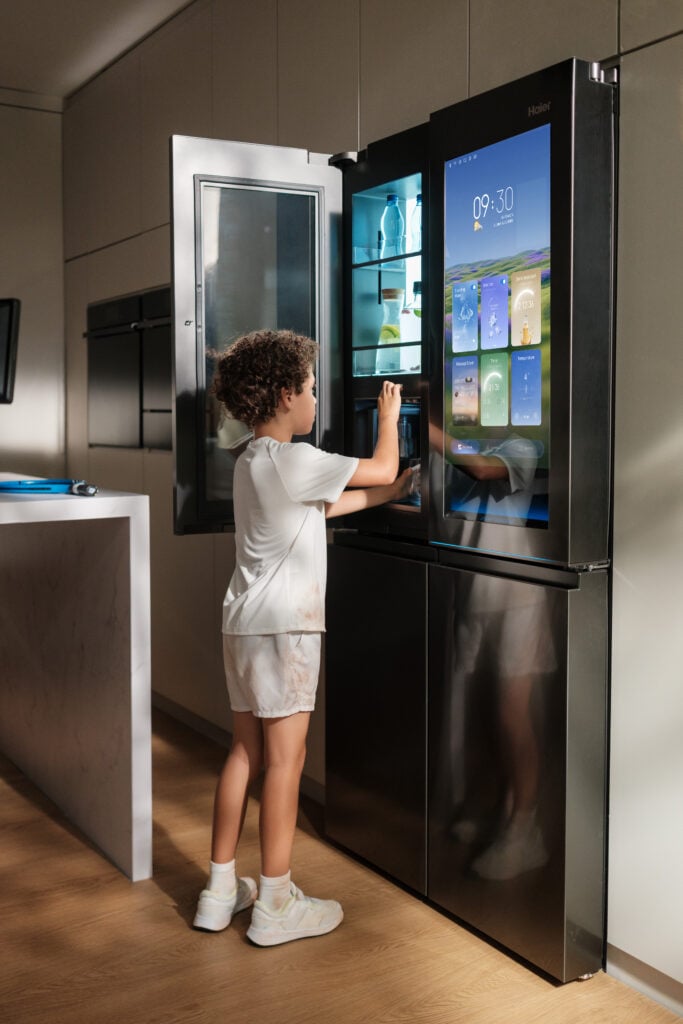
Haier is also applying AI to food storage. Its Horizon Collection can reach 700 litres and includes the Hydro Hub, which combines cameras, AI and a food database to recognise food, estimate shelf life and recommend where it should be stored.
The refrigerator also includes a rapid-chill area, an automatically refilling carafe and an integrated sparkling-water system with three carbonation levels. An Active Fresh Zone is designed to maintain up to 90% humidity for fruit and vegetables.
Haier’s Maestro prototype takes the concept further. Its AI Defrost Zone uses intelligent sensors and Haier’s proprietary technology to defrost food gently, helping to prevent juice loss while preserving texture and nutritional value. Its AI Food Care System 2.0 can recognise stored food, recommend the most appropriate preservation conditions and support more informed stock management.
Smarter Cooking and Dishwashing
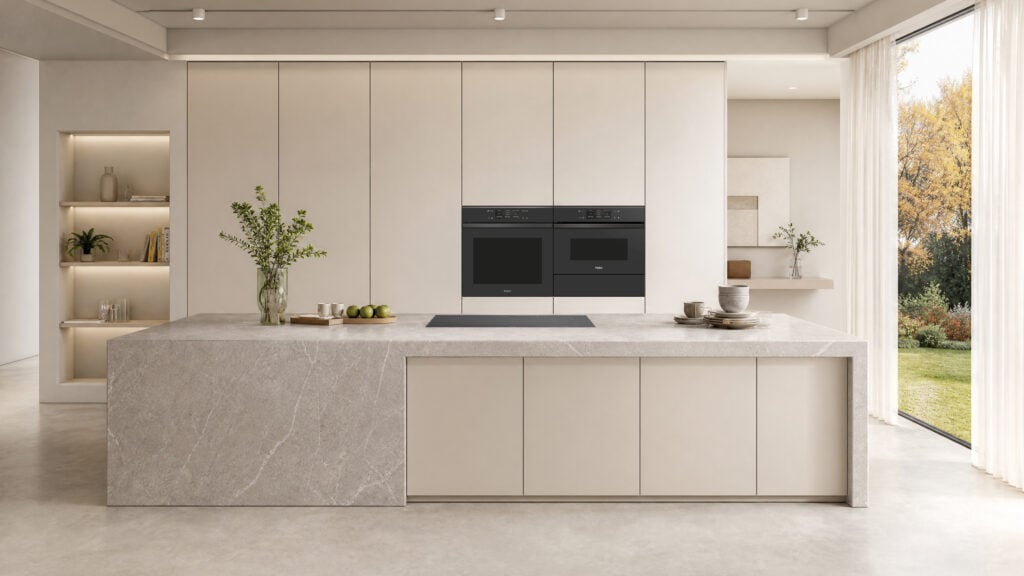
The ID Series 6 brings AI into the kitchen through a connected oven, hob and hood.
The ID Ultimate Series 6 oven uses AI Vision to recognise food, monitor cooking progress and automatically stop the programme once the desired result has been achieved. It also features electronic temperature control, a wireless probe and a 78-litre cavity with seven shelf levels. Within the ID Series 6 range, the Pure Flavour Steam model offers 100% steam cooking, combined modes and a dedicated sous-vide programme.
The matching induction hob can recognise pan positions and automatically direct power to them. The connected hood adds gesture controls and automatic lighting.
Haier’s I-Pro Shine dishwashers use sensors and algorithms to analyse the load and adjust water, temperature, cycle duration and energy use. The range achieves energy efficiency up to class A-70%, with a noise level of 36 dB.
AI Comes to Haier TVs and Floorcare
Haier is extending its AI strategy to televisions through its UltraSense AI platform. The Haier SR UltraSense processor analyses images and sound in real time and adjusts the picture and audio.
The system includes four areas: AI Cinema, AI Sound, AI Game and AI Eye Caring. Gaming features include adaptive refresh rates and reduced lag and tearing, with Gaming Accelerator support of up to 240Hz DLG at 2K on compatible models.
Haier is also showcasing QD-Mini LED, QLED Mini LED Ultra, OLED, RGB Mini LED and SQD technologies, with screen sizes reaching 115 inches. A 163-inch Micro LED technology showcase will demonstrate pixel-level control and a modular display surface.
In floorcare, the I-Pro Clean Series 5 uses Haier’s Double Roller system, with two motorised rollers working together to improve dirt pickup.
The Z5 floor washer offers up to 25,000Pa of suction and up to 50 minutes of runtime. The M5 cordless vacuum reaches 250 Air Watts and up to 100 minutes of runtime, while the R5 robot vacuum combines LDS navigation, cameras and AI for obstacle and dirt recognition. It offers up to 22,000Pa of suction.
Haier’s I-Pro Shine dishwashers use sensors and algorithms to analyse the load and adjust water, temperature, cycle duration and energy use. The range achieves energy efficiency up to class A-70%, with a noise level of 36 dB.
This is how Haier is presenting its vision of the intelligent home: technology that works quietly in the background to make everyday tasks simpler, more efficient and more personalised.
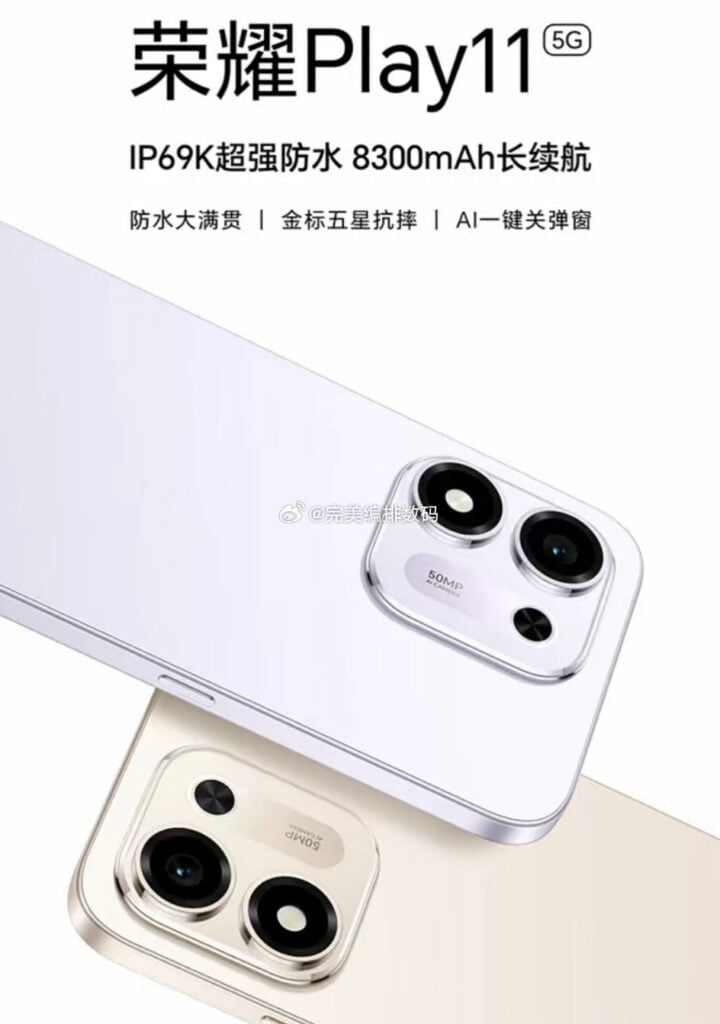
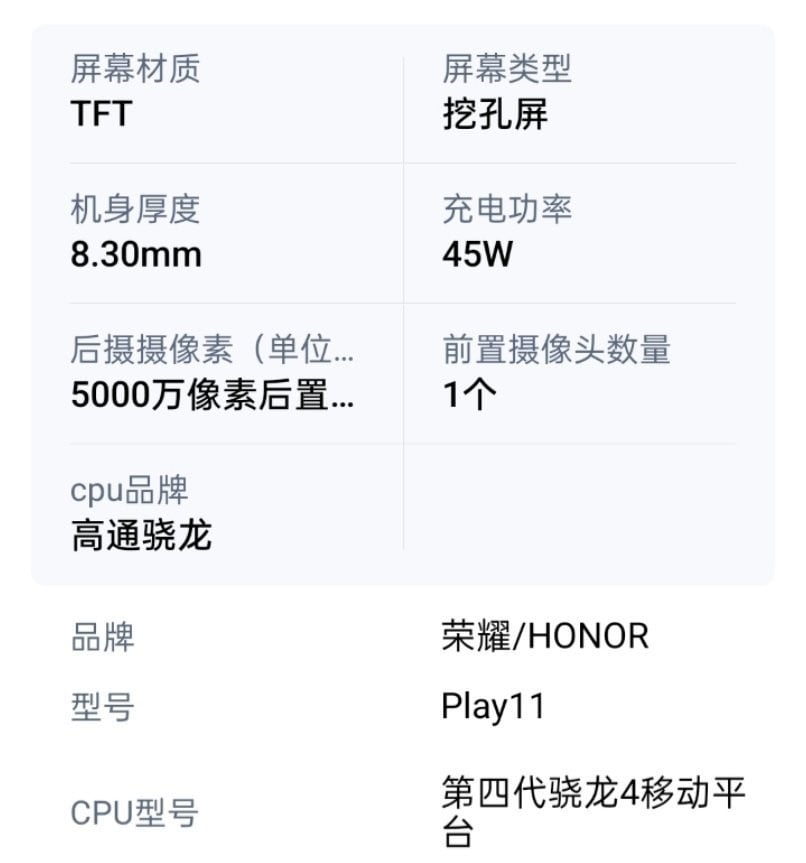
Honor is getting ready to launch another practical entry-level phone, and the latest leaks show it’s focused more on battery life than raw performance. A Chinese tipster has shared a poster and specification sheet that give a pretty clear look at the upcoming Honor Play11, which is expected to arrive later this month.
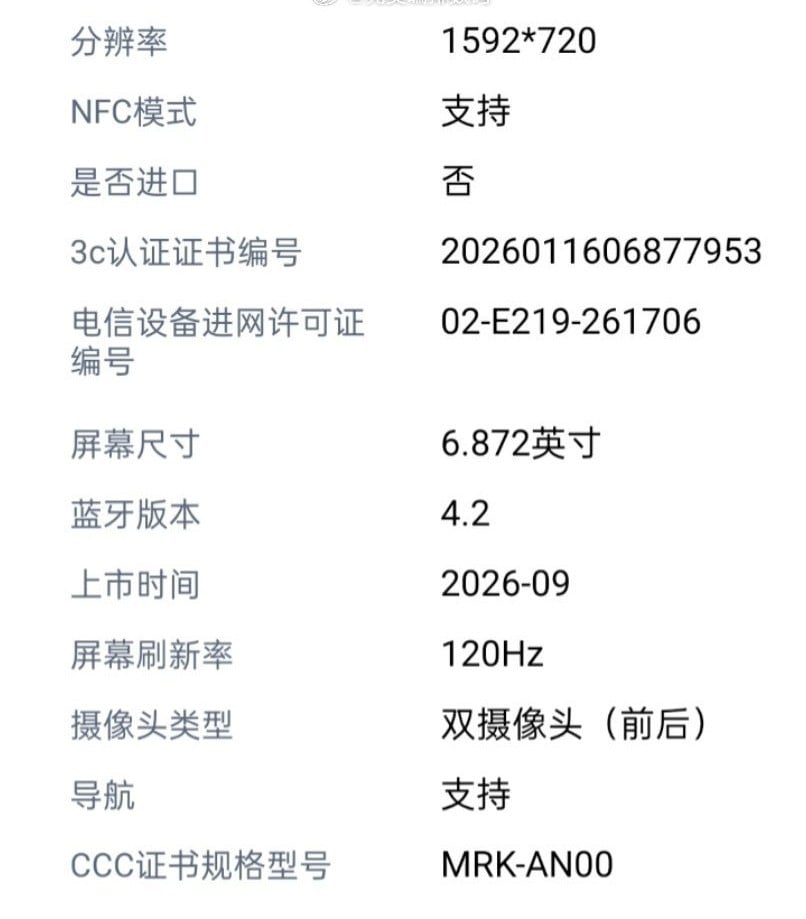
The Honor Play11 (model MRK-AN00) will come with IP69K water and dust resistance and a large 8,300mAh battery. At 8.3mm thick, it packs a 6.87″ LCD screen with 1592×720 resolution and a 120Hz refresh rate. On the back sits a 50MP main camera, and power comes from Qualcomm’s Snapdragon 4 Gen 4 processor.
Charging is rated at 45W wired. Other details from the leak confirm it’s a punch-hole TFT LCD panel, Bluetooth 4.2, and NFC support. The phone has also reportedly picked up the usual Chinese certifications (3C and network access license), with an expected launch in September 2026.
The promotional material leans into the practical side: IP69K protection, long battery life, SGS five-star drop resistance, and an AI one-key button. These points line up with how Honor has been positioning the more affordable Play series lately: durability and big batteries as the main selling points.
For context, the previous Honor Play 10 5G (launched earlier this year) already leaned into the same practical formula. It offered a 7,000mAh battery, 45W charging, a 6.8″ 120Hz LCD, Snapdragon 6s Gen 3 processor, 50MP main camera, and IP65 rating with 2-meter drop resistance. The upcoming Play 11 appears to push further in the areas Honor is emphasizing most, with battery capacity climbing to 8,300mAh and durability jumping to IP69K, while keeping a similar screen size, camera resolution, and budget-friendly/entry-level positioning.
For those wondering, the Snapdragon 4 Gen 4 delivers similar benchmark scores to the Snapdragon 6s Gen 3 across tests such as Geekbench and AnTuTu. Full official confirmation, pricing, and exact memory options still aren’t out yet.
The new Tensor G6 chipset is out, and many of you may be wondering how it compares with Qualcomm’s high-end Snapdragon chips. We recently compared it to the latest Snapdragon 8 Elite Gen 5, and the latter was significantly ahead in raw performance. So, we decided to give it another shot, but this time with the Snapdragon 8 Elite.
The Tensor G6 brings significant upgrades to on-device AI processing efficiency, computational photography, and core power management. The CPU gets a unique 7-core architecture featuring newer ARM cores, and the switch to the 3nm node delivers much better power efficiency.
In short, the Tensor G6 isn’t a yearly release with incremental upgrades, but it actually brings significant changes. But the real question here is: can it beat the Snapdragon 8 Elite? Let’s find out.
Let’s begin with the spec sheet.
Tensor G6
Snapdragon 8 Elite
Announced
August 2026
October 2024
Process node
3nm (TSMC)
3nm (TSMC)
CPU
1 x 4.11 GHz (C1-Ultra) 4 x 3.38 GHz (C1-Pro) 2 x 2.65 GHz (C1-Pro)
2 x 4.32 GHz (Oryon 2nd Gen) 6 x 3.53 GHz (Oryon 2nd Gen)
GPU
PowerVR CXTP-48-1536
Adreno 830 Ray tracing support
NPU
5th-gen Tensor Processing Unit (TPU)
Qualcomm Hexagon NPU
Memory
LPDDR5X up to 4.2 GHz
LPDDR5X up to 5.3 GHz
Storage
UFS 4.0, UFS 4.1
UFS 4.0, UFS 4.1
Camera
up to 200MP single camera 4K portrait video support up to 8K video recording at 30fps up to 4K video recording at 120fps 120x Pro Zoom support real-time semantic segmentation
Quacomm Spectra ISP (Triple AI-ISPs, 18-bit) up to 320MP single camera up to 8K video recording at 60fps up to 4K video recording at 120fps real-time semantic segmentation (limitless)
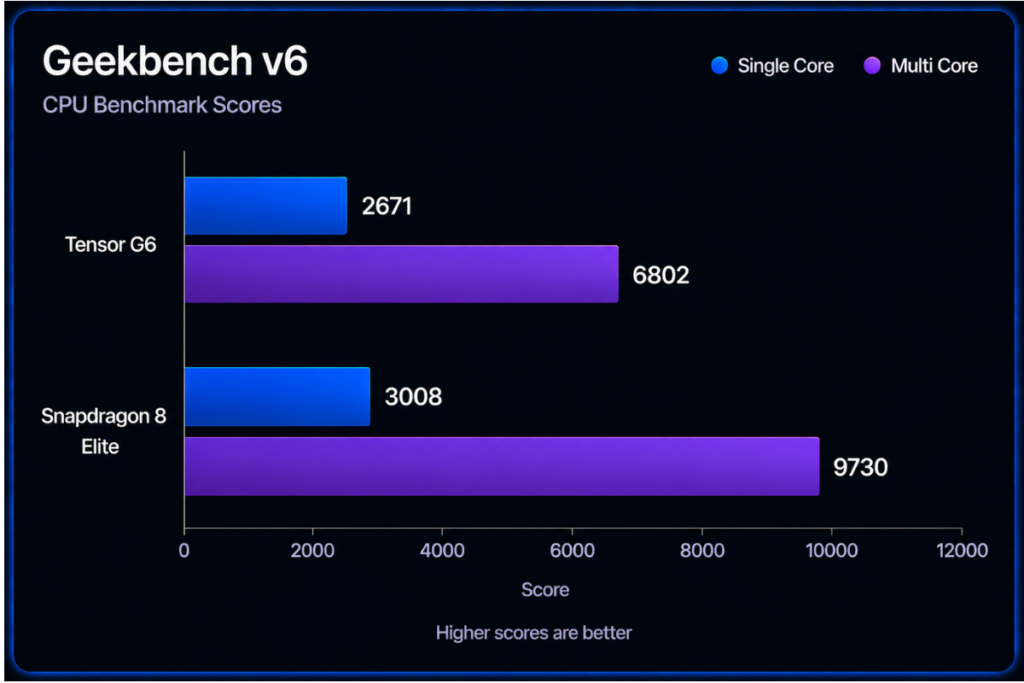
On Geekbench 6, the Pixel 11 Pro XL, powered by Tensor G6, achieves a 2,671 score in the single-core test and 6,802 in the multi-core test. In comparison, the Snapdragon 8 Elite-powered Galaxy S25 Plus gets 3008 single-core points, a 12% increase, but the gap becomes a lot wider in the multi-core performance.
The Snapdragon chip gets 9730 multi-core points, a massive 43% higher score than Tensor G6. This means devices powered by the Snapdragon 8 Elite should perform much better during heavy workloads, such as processing complex data and handling multiple apps, compared to Tensor G6-powered Pixel 11 series.
Tensor G6
Snapdragon 8 Elite
Single core
2671
3008
Multi core
6802
9730
AnTuTu score
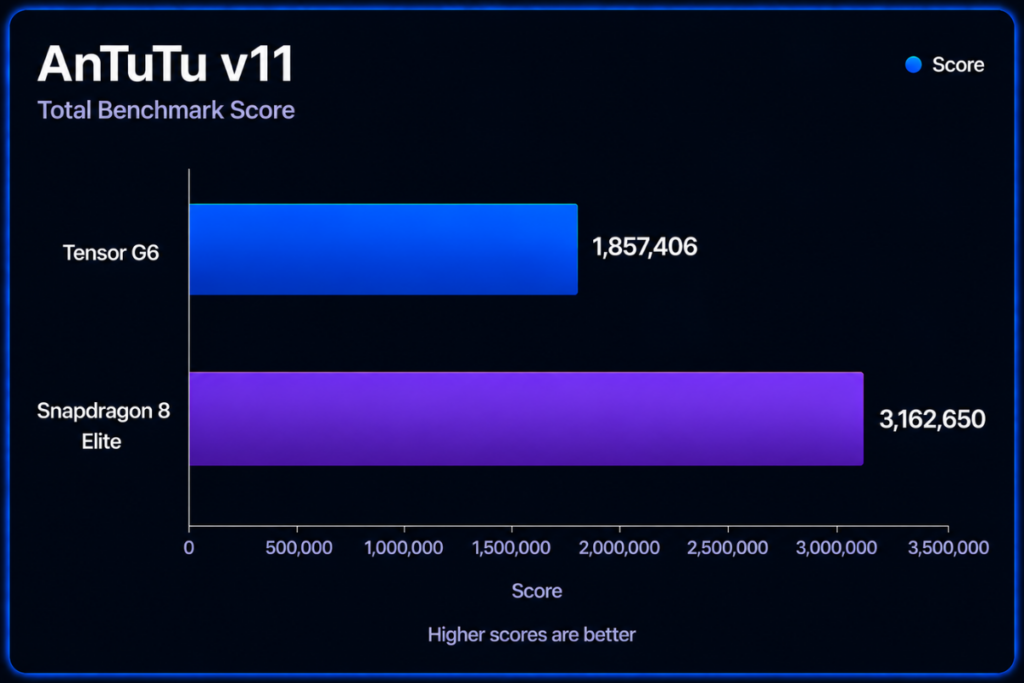
The AnTuTu benchmark (v11) also shows much stronger numbers for the Snapdragon 8 Elite compared to Tensor G6. The total score is up by over 70% (3.16 million vs 1.85 million). Its breakdown reveals a clearer, more interesting picture.
Tensor G6
Snapdragon 8 Elite
AnTuTu score
1,857,406
3,162,650
CPU
787,728
967,505
GPU
432,908
1,200,291
Memory
279,312
381,416
UX
357,458
613,438
The Snapdragon 8 Elite gets a 22% higher CPU score, but the GPU score is up by a massive 177% compared to the Tensor G6. That makes one thing absolutely clear: the Snapdragon 8 Elite is a far superior choice for high-end gaming than Tensor G6. The 3DMark test also proves this.
The chip also benefits from 36% higher memory performance and 71% better UX performance, as suggested by the AnTuTu benchmark.
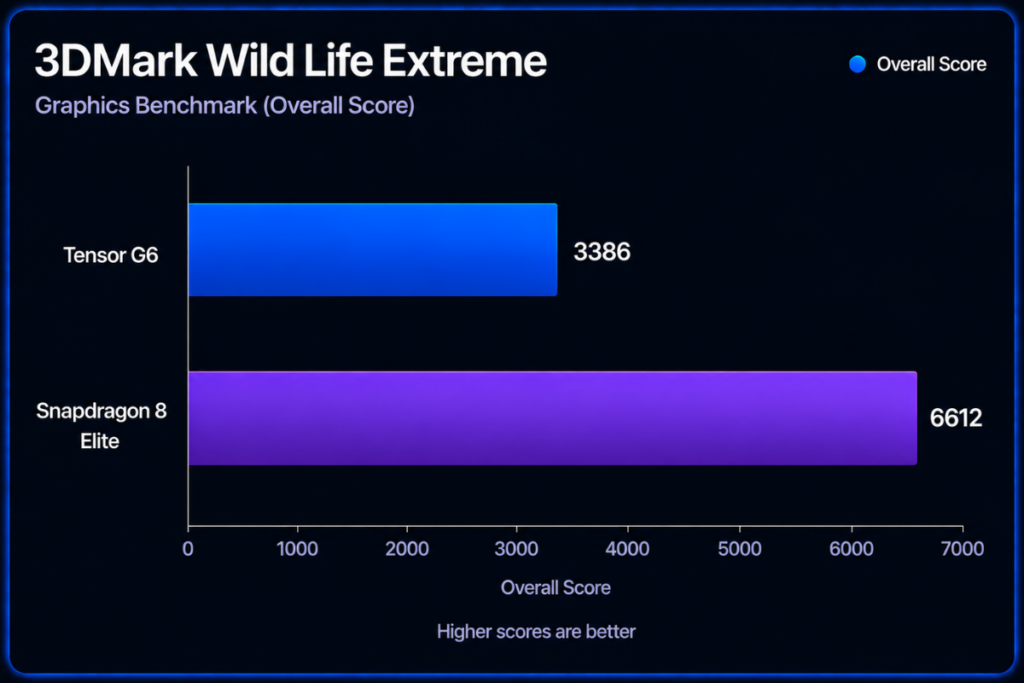
3DMark score
Wild Life Extreme Stress Test
The test measures how well a device maintains its graphical performance and manages heat over an extensive period of demanding 3D sequences. This is a much more precise gaming test than AnTuTu’s GPU test.
On the benchmark, the Tensor G6 achieves an overall score of 3386, while the Snapdragon 8 Elite is far ahead with a score of 6612. That’s a 95% difference, which is massive. The Snapdragon chip also delivers a much higher average FPS (39.48 vs 20.31).
Tensor G6
Snapdragon 8 Elite
Overall score
3386
6612
Average FPS
20.31
39.48
The Snapdragon 8 Elite absolutely outclasses the Tensor G6 across multiple benchmarks. That highlights fundamentally different design philosophies between Google and Qualcomm.
The Snapdragon 8 Elite prioritizes peak performance, heavy sustained loads, and long gaming sessions at a high frame rate. On the other hand, Tensor chips, including the Tensor G4, use a conservative CPU/GPU configuration to keep thermal output and power draw low, and allocate silicon area and power budgets to TPU and ISP for on-device AI workloads and real-time computational photography.
Tensor G6 vs Snapdragon 8 Elite: Differences that matter
One of the major changes to Tensor G6 is the switch to a 7-core CPU. All previous tensor chips have an 8-core CPU. While this may sound like a CPU downgrade, it actually isn’t. The latest chip uses ARM’s newer C1-Ultra and C1-Pro series, which deliver better performance and power efficiency. Plus, increased clock speeds help the Tensor G6 achieve 20% faster web browsing and 15% faster app launches than the Tensor G5.
Despite the increased performance, the Snapdragon 8 Elite still remains a superior choice in CPU performance. It has an 8-core CPU featuring custom Oryon cores running at higher clock speeds.
Google hasn’t commented on why the Tensor G6 has a 7-core CPU. However, industry experts believe it was done to accommodate the massive fifth-generation TPU, which powers the upgraded Gemini Nano on-device AI models on the Pixel 11 series. The Snapdragon 8 Elite relies on a Hexagon NPU, which enables multimodal Gen AI capabilities.
The Tensor G6 features a PowerVR CXTP-48-1536 GPU, which isn’t as powerful as the Adreno 840 on the Snapdragon 8 Elite. The Adreno GPU also utilizes various software enhancements and gaming optimizations to deliver a far superior gaming experience.
Both chips come with a modern, future-proof connectivity stack to offer reliable connectivity, even in crowded areas. In terms of peak 5G download speed, the Tensor G6 is slightly ahead. It offers up to 12 Gbps of peak speed (vs. 10 Gbps on the Snapdragon 8 Elite).
Tensor G6 vs Snapdragon 8 Elite: Which is better for you?
The choice is pretty straightforward.
Choose Snapdragon 8 Elite: if you prioritize raw power and top-tier gaming performance at higher frame rates.
Choose Tensor G6: if you prioritize personal AI agents, and Google’s AI-powered features like Magic Eraser, real-time Live Translate, and Google’s computational photography magic.
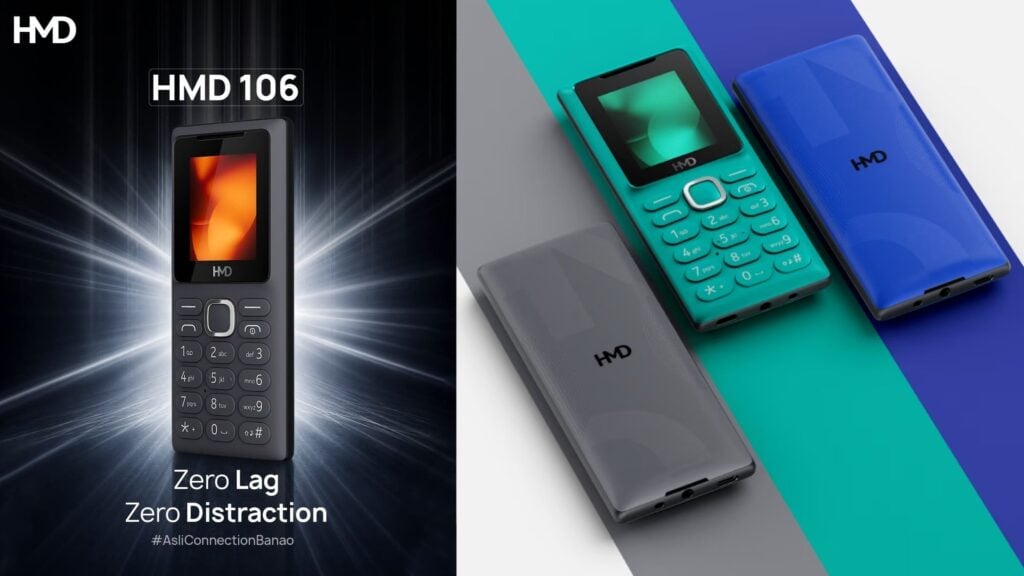
While most phone makers are chasing more cameras, faster chips, and brighter screens, HMD is going the other way. The company has introduced the HMD 106 2G, a no-frills feature phone built purely for people who just need to make calls and send texts.
As the name suggests, it only works on 2G networks. That makes it a solid option for regions where 2G is still the main network, or for anyone who wants a simple backup phone without modern data features getting in the way. One thing worth noting: not every carrier still supports 2G in 2026 (Jio in India, for example), so it’s a good idea to check compatibility before buying. If 2G isn’t an option where you are, HMD also has several 4G feature phones as alternatives.
The 106 2G will come in three colors and has an IP52 rating, so it can handle a bit of dust and light water exposure. The front is taken up by a small 1.8″ LCD screen. Inside you’ll find a Unisoc 6533G processor, 4MB of RAM, and 8MB of storage. It runs the lightweight S30+ operating system, which is designed specifically for basic feature-phone tasks. Power comes from a 1,000mAh battery, which should deliver the kind of long standby and talk times these phones are known for.
Connectivity stays simple: Bluetooth 4.2, a MicroUSB port for charging, dual SIM support, and a 3.5mm headphone jack.
HMD 106 2G – LCD 1.8" – 4MB RAM / 8MB ROM – Support 32GB microSD – Unisoc 6533G – S30+ OS – 1000mAh, removable – IP52, BT4.2, FM Radio, Snake, Micro USB, Dual SIM, 3.5mm. audio. pic.twitter.com/qStIa7cT03
This phone fits into HMD’s ongoing push to serve people who want something straightforward. Whether it’s for digital detox, a reliable backup, or markets where advanced smartphones still aren’t the priority, the HMD 106 2G keeps things focused on durability, decent battery life for its size, and core functions. Full pricing and availability details haven’t been shared yet, but more info should come as it gets closer to launch.
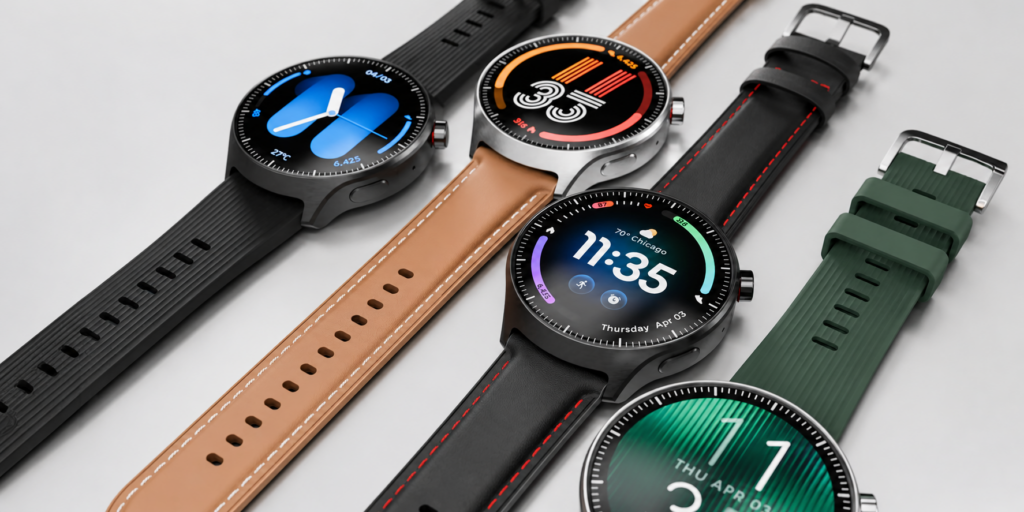
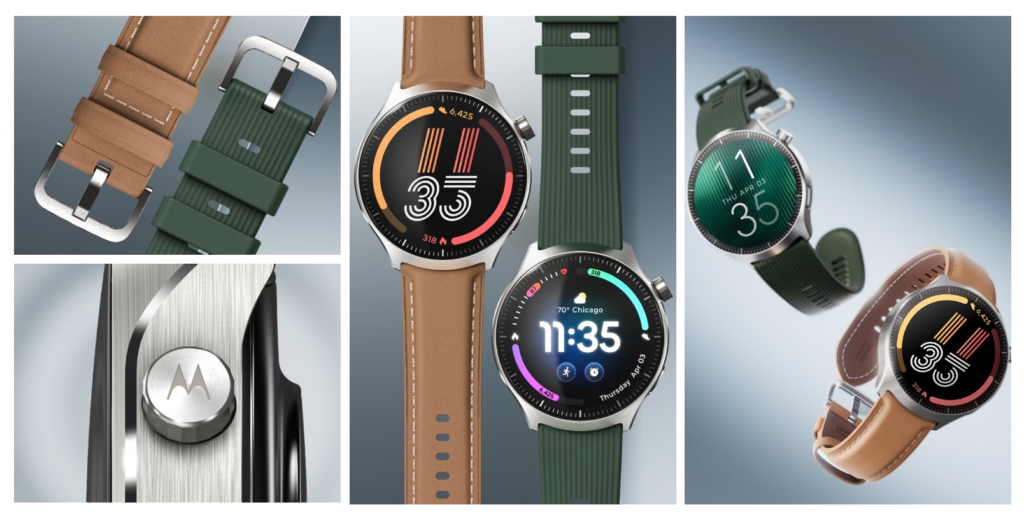
The smartwatch market is getting another premium option as Moto expands its wearable lineup with a feature-packed model. The Moto Watch Ultra combines a curved display with cellular connectivity and advanced health tracking. It also brings several software features designed to make the watch more useful beyond basic notifications and activity tracking.
The Moto Watch Ultra features a 1.5-inch 2.5D curved pOLED display with a 466 x 466-pixel resolution, a variable 1-60Hz refresh rate and up to 2,700 nits of peak brightness. It supports an always-on display and is protected by Corning Gorilla Glass 3. The watch has a 46.26mm stainless steel body that is 12.1mm thick and weighs 51 grams. It also comes with IP68 and 5ATM protection for water and dust resistance.
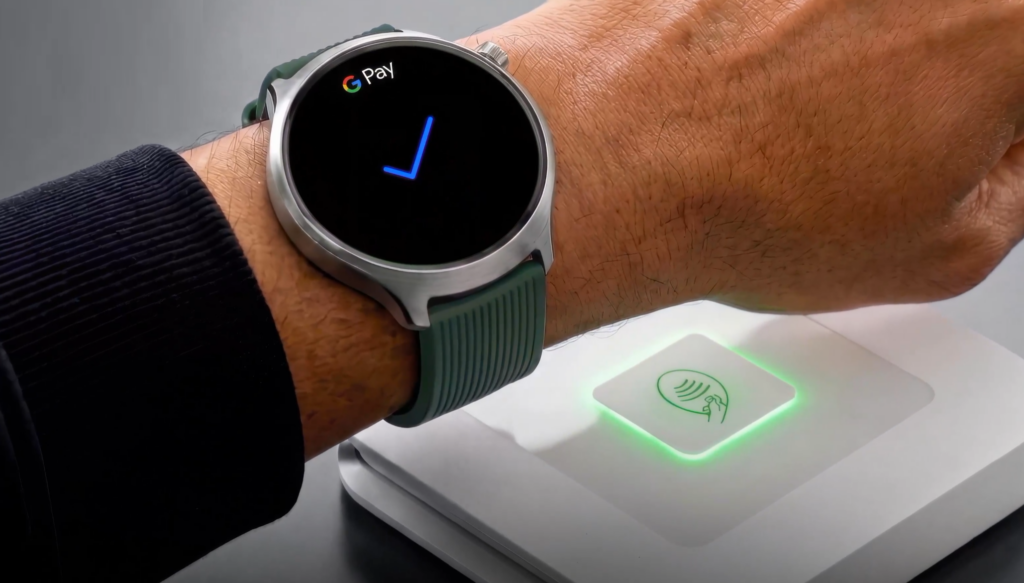
Powering the smartwatch is the Snapdragon W5+ Gen 1 platform, while Wear OS 6 handles the software experience. Moto promises two major OS upgrades, and users can download apps through the Google Play Store, including Google Maps, Google Messages and YouTube Music. The watch also supports Google Gemini, Google Wallet for payments, and Motorola Qira on compatible Moto and Lenovo devices.
Moto Watch Ultra
The Moto Watch Ultra is the brand’s first Moto Watch with LTE and eSIM support, allowing users to make and receive calls, send messages and manage notifications without relying entirely on a connected phone. Dual-band GPS is also included for navigation and location tracking. Health and fitness tracking is handled using Polar algorithms, covering sleep, activity, recovery and running, alongside features such as Serene, Nightly Recharge and Sleep Plus Stages.
Moto Watch Ultra
The 22mm-compatible watch has a battery rated for up to two days of active use with the always-on display disabled. A 15-minute charge can provide up to 24 hours of active use.
The Moto Watch Ultra starts at €429 (~$500). Moto says it will roll out across selected markets in Europe, the Middle East, Latin America, North America and Asia-Pacific in the coming weeks.
You’ve probably seen the headlines about the flash floods that hit Nepal after a Himalayan glacier gave way on August 26, sending water and debris through the Bhote Koshi and Trishuli river basins. The damage from this is huge—the flood swept away villages, roads, bridges, and hydropower plants across Rasuwa, Nuwakot, and Dhading districts of Nepal.
At the time of writing, the death toll has climbed past 1,300, and thousands are still unaccounted for. Among the companies and people stepping in to help at this time are some of the biggest names in tech.
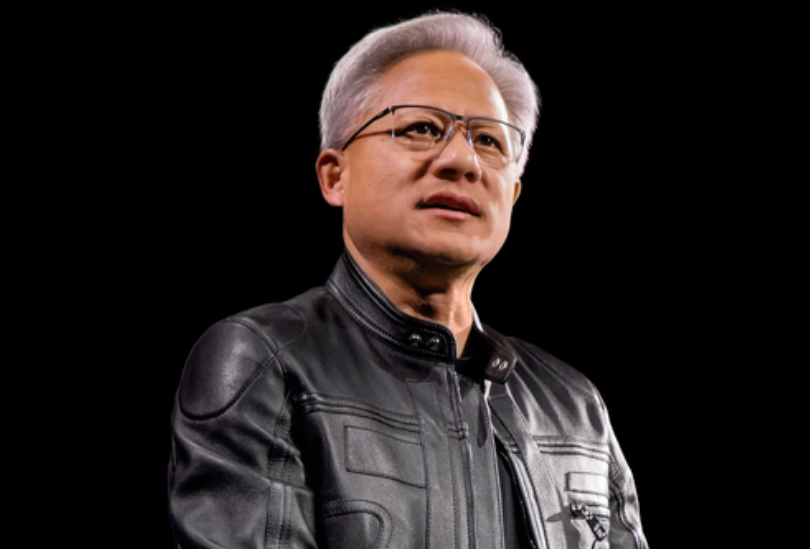
Nvidia CEO Jensen Huang personally donated $10 million to Nepal’s Prime Minister Disaster Relief Fund. It is reportedly the largest single contribution the fund has received from an individual or company.
Apple is also contributing to the response. CEO Tim Cook confirmed that the company would donate to relief and rebuilding efforts, although he did not disclose the amount or name the organizations that would receive the money. Cook made the announcement just days before stepping down as CEO and handing the role to John Ternus on September 1.
SecurityPal AI, a Bay Area startup led by Nepal-born founder Pukar Hamal, matched donations dollar-for-dollar up to $20,000, with everything going straight to the Nepali government. Joining the effort, blockchain technology company Ripple pledged $300,000, split between World Central Kitchen and Mercy Corps for food, water, and sanitation work on the ground.
Meanwhile, blockchain platform Solana took a more unusual approach. Instead of just writing a check, the network auctioned off nine zones of its own logo on X, letting bidders slap their branding on Solana’s profile picture and pinned post for a week. The 24-hour auction pulled in nearly $167,000 in USDC, with crypto platform Rollbit alone dropping $50,000 for the most visible spot. All of it routes through a US nonprofit called Engage Nepal before landing with the government’s relief fund.
If you want to send something yourself, Nepal’s Prime Minister Disaster Relief Fund accepts donations from around the world. Card payments are available, while larger contributions can also be sent through SWIFT transfers.
We use cookies on our website to give you the most relevant experience by remembering your preferences and repeat visits. By clicking “Accept”, you consent to the use of ALL the cookies.
This website uses cookies to improve your experience while you navigate through the website. Out of these, the cookies that are categorized as necessary are stored on your browser as they are essential for the working of basic functionalities of the website. We also use third-party cookies that help us analyze and understand how you use this website. These cookies will be stored in your browser only with your consent. You also have the option to opt-out of these cookies. But opting out of some of these cookies may affect your browsing experience.
Necessary cookies are absolutely essential for the website to function properly. This category only includes cookies that ensures basic functionalities and security features of the website. These cookies do not store any personal information.
Any cookies that may not be particularly necessary for the website to function and is used specifically to collect user personal data via analytics, ads, other embedded contents are termed as non-necessary cookies. It is mandatory to procure user consent prior to running these cookies on your website.