Advertisement

Hisense M2 Pro Projector with 200-Inch 4K Display and Dolby Vision Now Up for Pre-Order

Hisense has opened pre-orders for the M2 Pro 4K UHD Triple Laser Smart Mini Projector, which was unveiled earlier this month. The compact projector delivers true 4K resolution and is designed for both home and portable use.

Hisense M2 Pro mini

It uses AI 4K Clarity features, including an AI Upscaler to sharpen lower-resolution content, AI Noise Reduction for cleaner visuals, and AI HDR Upscaler to enhance contrast and brightness. A DLP system with 2.07 million micromirrors enables projection of detailed 4K images on screens up to 200 inches.

The projector includes Pure Triple Color Laser technology, using separate red, green, and blue lasers to deliver vibrant, accurate colors. This setup makes true 4K laser projection possible in a smaller form factor.

One key feature is the optical zoom with a 1.0 to 1.3 throw ratio. Unlike digital zoom, this allows resizing the image without compromising sharpness. The projector supports screen sizes between 65 and 200 inches for flexible indoor and outdoor use.

Hisense M2 Pro mini

It is easy to set up with auto focus, auto keystone correction, and a 7-mode wall color adaptation system that adjusts the image to maintain color accuracy even on non-white walls.

Audio is handled by built-in Dolby Audio and DTS Virtual:X, delivering clear and spacious sound without needing external speakers. The projector runs on VIDAA Smart OS and includes streaming apps like Netflix, YouTube, and Disney+, accessible via a voice-enabled remote. It also supports Dolby Vision and other HDR formats.

Pricing & availability

In the US, it is available for pre-order at $1,299.99, with a free Anker Solix C300 Portable Power Station included for orders placed before July 31. In Australia, JB Hi-Fi is offering it for A$1,695, reduced from the A$2,495 retail price. In Germany, it is listed on Amazon for €1,299, with deliveries expected from July 4.

For more daily updates, please visit our News Section.

Stay ahead in tech! Join our Telegram community and sign up for our daily newsletter of top stories.

Galaxy S25 Ultra’s One UI 8 stable build signals imminent release

Samsung’s Galaxy S25 series may be on the cusp of a major software milestone, with a stable One UI 8 build spotted in the wild. This unexpected leap from beta suggests a polished Android 16 experience is nearly ready. Will it reach the S25 series soon after its debut with the 7th-generation foldables?

Galaxy S25 Ultra
Galaxy S25 Ultra

A stable One UI 8 build for the Galaxy S25 Ultra, sporting firmware version BYFB, has surfaced. Unlike beta builds marked with a “Z,” the “B” prefix indicates a release candidate, hinting that Samsung is close to rolling out the official update, possibly shortly after the Unpacked event on July 9. While not guaranteed for public release, this build’s stability suggests One UI 8, based on Android 16, is nearly finalized.

Testing on an S25 Ultra reveals no major new features but confirms polished functionality, including a dynamic lock screen clock that adapts to wallpapers, AI-driven wallpaper suggestions from the gallery, and live call captions. These align with One UI 8’s focus on subtle enhancements like smoother animations and refined Galaxy AI tools. The beta program, launched in May 2025 for the S25 series, has been notably smooth, making an early stable release plausible. The update will also extend to the S24, S23, and S22 series post-launch, following Samsung’s beta roadmap.

The Galaxy S25 Ultra’s stable One UI 8 build marks a significant step toward an official Android 16 release. With refined features like adaptive lock screen clocks and live captions, it promises an enhanced user experience.

That said, it might be wise to hold off for a week or two before installing it — especially after the recent display issues that hit multiple S series flagships.

Don’t miss a thing! Join our Telegram community for instant updates and grab our free daily newsletter for the best tech stories!

For more daily updates, please visit our News Section.

(Source)

AOC launches new 2K 260Hz Fast IPS gaming monitor for just $150

AOC has launched a new 27-inch gaming monitor in China under the model name “Q27G41ZE.” The monitor is now available on JD.com at a launch price of 1099 yuan (approximately $150). It targets gamers who want high refresh rates, fast response times, and solid color accuracy without paying a premium.

AOC Q27G41ZE Monitor

AOC Q27G41ZE Monitor Specifications

The AOC Q27G41ZE features a 27-inch Fast IPS panel with a native resolution of 2560×1440 pixels. The display supports a 240Hz refresh rate, which can be overclocked to 260Hz through the DisplayPort connection. AOC has issued a note stating that users should revert to 240Hz if any instability occurs while running the panel at 260Hz.

The monitor supports a 1ms grey-to-grey (GtG) response time and a 0.3ms MPRT response time. It supports Adaptive-Sync to reduce screen tearing and is compatible with both Nvidia G-Sync and AMD FreeSync. AOC has rated the display for HDR10, with a peak brightness of 300 nits.

In terms of colors, the panel covers 94% of the DCI-P3 color gamut and 99.9% of the sRGB color space. The factory calibration achieves a Delta E value under 2. AOC includes six-axis color adjustment controls for hue and saturation. The monitor also supports 10-bit color depth via 8-bit + FRC.

The Q27G41ZE includes several eye comfort features. It supports hardware-level low blue light filtering and flicker-free DC dimming. AOC has also included preset modes for reading, office work, web browsing, and multimedia use.

The monitor features AOC’s custom MBR Sync technology for motion blur reduction without significantly dimming the screen. It also includes a dynamic crosshair and an AI-powered sniper zoom that magnifies the center of the display up to 3x for enhanced targeting. Additionally, users can customize profiles and settings through AOC’s G-Menu software.

For connectivity, the Q27G41ZE includes one HDMI 2.0 port, one DisplayPort 1.4, and a 3.5mm audio output. The monitor supports 100x100mm VESA wall mounting. AOC uses a minimalist design with red accents. The stand supports height adjustment, tilt between -5° and 23°, and rotation. The monitor weighs 3.84kg with the stand and 3.45kg without it.

In related news, AOC launches the Graphic Pro 5K monitor featuring CalmanReady color calibration, 96W USB-C charging, PBP, and KVM support. TCL also unveils a massive 57-inch dual 4K curved monitor with 1ms response time, 120Hz refresh rate, and USB-C docking.

For more daily updates, please visit our News Section.

Stay ahead in tech! Join our Telegram community and sign up for our daily newsletter of top stories! 💡

(Source)

Baseus Bowie MC1 Pro Review: The Open-Ear Earbuds I Didn’t Expect to Like This Much

I’ve reviewed a lot of earbuds in the past few years, from mainstream noise-canceling champs to niche fitness-focused models, but very few have surprised me quite like the Baseus Bowie MC1 Pro. If you told me a year ago that a pair of open-ear clip-on earbuds would become my go-to daily drivers for everything from meetings to music, I probably would’ve laughed.

But here we are. After putting them through weeks of real-world use, these $89 buds have won me over, and not because they’re packed with buzzwords like “LDAC,” “AI,” or “360° sound.” They’ve earned their spot simply by being practical, comfortable, and just plain reliable.

Let’s break this down.

Baseus Bowie MC1 Pro Review

What’s Inside the Box?

Unboxing the Baseus MC1 Pro feels clean and straightforward. Inside, you get the two earbuds clipped into their case, a short USB-C charging cable, a quick start guide, a sticker sheet, and that’s about it.

The case itself is compact and fits easily into a jeans pocket. It has a satisfying magnetic lid and a subtle LED indicator up front. The finish sits somewhere between matte and glossy; it has a soft sheen that reflects light just enough to look refined without being flashy. It also does a great job of resisting fingerprints and smudges, which helps keep the case looking clean over time.

Baseus Bowie MC1 Pro Review

I got to try all three colors: Titanium, Black, and White. All the variants have a subtle shimmer, while the White looks the cleanest and handles wear the best. The Black model feels the most sleek, but it shows fingerprints more easily. Each version brings its own vibe, but they all follow the same understated, minimalist design language that stays low-key without trying too hard to stand out.

Design & Build Quality

This is where the MC1 Pro really begins to stand out.

I used the original MC1 for a good few weeks when it launched. While I appreciated the concept, an open-ear design that doesn’t clog your ear canals, I found the comfort slightly lacking during long sessions. After about 2-3 hours, I’d feel pressure where the plastic loop hugged around my ear. Not enough to take them off immediately, but enough to notice.

Baseus Bowie MC1 Pro Review

The MC1 Pro fixes that. The updated “Cloud Airbag” silicone padding on the inner arch is a subtle but significant upgrade. It cushions the ear with soft, breathable material that feels more forgiving on the skin. I’ve worn these earbuds for over six hours at a stretch, during long workdays and editing sessions, and never once felt the need to take them off out of discomfort.

At just 5 grams per bud, they’re lightweight, and thanks to the C-shaped titanium frame, they stay in place even during workouts. I’ve used them while running, lifting weights, even shaking my head vigorously to test stability. They didn’t budge. Bonus points: they don’t clash with glasses or sunglasses, which is something most over-ear or stemmed buds tend to mess up.

They’re IP67 rated too, meaning they can handle sweat, rain, and even a splash of water during post-gym hand washes. For a pair of clip-ons, that’s reassuring.

Connectivity

Connectivity has been smooth sailing. The MC1 Pro uses Bluetooth 6.0, which means lower power draw, better bandwidth, and more stable connections than older models. Pairing is quick, and multi-point connection works well across my phone and laptop, unless you switch on LDAC. Once LDAC is enabled, you lose multi-point pairing, so you’ll need to choose between higher resolution audio and convenience.

Baseus Bowie MC1 Pro Review

That trade-off aside, I’ve had zero dropouts or weird stuttering, even when walking into crowded areas like metro stations or gyms full of Bluetooth interference. Latency is also well-handled. I’ve used these for Zoom calls, YouTube videos, and even some casual mobile gaming. There’s a dedicated low-latency mode that helps, but more on that in the sound section.

App and Customization

The Baseus app is where you unlock the MC1 Pro’s full potential.

Inside, you can remap controls, toggle LDAC, activate spatial audio, and play with EQ presets or create your own using a basic 8-band EQ. The app isn’t the most polished interface I’ve seen; translation oddities still pop up here and there, but it’s functional. Everything works, and it saves your settings without a hitch.

Baseus Bowie MC1 Pro Review

What I really appreciated was the ability to switch to Bass Boost mode and immediately hear the change. The app also includes a “Find My Earbuds” feature (which pings the earbuds with a loud chirp), firmware updates, and Smart Connect for handling multi-device pairing.

In terms of usability, I vastly prefer physical buttons to touch panels. The MC1 Pro sticks with mechanical controls, and I’m thankful for it. No accidental pauses when adjusting my hair or pulling on a hoodie. You get play/pause, skip, volume, voice assistant, and long-press functions, all of which can be customized in the app, except for the single tap.

Sound Quality

This is where the MC1 Pro surprised me the most.

Let’s be clear: these are open-ear earbuds. That means by design, you’re not getting airtight seals or thumping sub bass like you would from IEMs. But Baseus pulled off some impressive tuning here.

By default, the sound profile is a little flat but clean. Mids are natural, vocals come through with clarity, and highs are present without being harsh. If you’re someone who listens to podcasts or instrumental music, this tuning is great out of the box.

Once you switch on Bass Boost, things get way more exciting. Bass becomes punchy, the soundstage opens up, and the overall signature feels fuller. With LDAC enabled, you can genuinely hear the difference in resolution, especially in well-mixed tracks with lots of detail. Treble remains controlled, never sibilant, and stereo separation is solid.

Baseus Bowie MC1 Pro Review

There’s no real sub bass, which is expected, but mid bass and upper lows are handled well. I tried them with The Weeknd, Kendrick Lamar, Hans Zimmer, and even some AR Rahman compositions. Especially with Rahman’s music or other layered Indian tracks, you can really hear those intricate background details like faint vocal harmonies, subtle tabla rolls, or ambient strings that typically get lost on cheaper earbuds.

The earphones support AI spatial audio using Baseus’ own BISA (Baseus Immersive Spatial Algorithm), which creates a 360-degree sound field for a more immersive experience. Although other Baseus earbuds I’ve used, like the cheaper BC1, which I’ll get into later, let you toggle spatial audio modes from within the app, the MC1 Pro simply delivers it by default. There’s no on/off switch, no cinema or music presets, just spatial sound baked right in. And honestly, it sounds awesome. The effect adds a surprising sense of depth and space to whatever you’re listening to, without feeling artificial or over-processed.

Baseus Bowie MC1 Pro Review

Gaming-wise, latency was impressively low using the low-latency mode. Footstep positioning in PUBG Mobile, however, was where the MC1 Pro slightly faltered. It was hard to determine left vs right directionality clearly, so while casual gaming was fine, competitive shooter play isn’t where these shine.

Call quality, on the other hand, worked perfectly in my experience. On voice calls, people on the other end said I sounded clear, without distortion or drops. One caller did mention my voice sounded slightly flat. For daily calls and meetings, it’s more than adequate.

Battery Life

Battery life is stellar. I routinely got about 8.5-9 hours on a full charge with LDAC off. With LDAC enabled and Bass Boost on, it dipped closer to 6.5-7 hours, but that’s still excellent for something this compact.

The case adds another 30+ hours, taking the total to about 40. Fast charging is supported, too: 10 minutes plugged in gives around 2 hours of playback. There’s no wireless charging, but for the price, I’m not complaining. USB-C is fast and reliable.

The LED indicator on the case isn’t overly bright, and it gives a quick status update on battery without needing to open the app.

Baseus Bowie MC1 Pro Review

Final Thoughts

After weeks of using the Baseus Bowie MC1 Pro, here’s where I land: these are easily some of the best clip-on earbuds I’ve used, not just for sound, but for their thoughtfulness in design, comfort, and real-world usability.

They fix the comfort issues I had with the original MC1, sound legitimately good for open earbuds, and have the right balance of smart features without being overbearing. They’re not perfect, no earbuds are, but they come damn close for the price.

If you’re looking for something that lets you stay aware of your surroundings, doesn’t feel fatiguing after hours of use, and still delivers solid audio with customization, these should be high on your list. They’re also ideal for remote work, workouts, or just vibing to your playlists while keeping an ear on the world around you.

At $89, or $69 right now with a $20 discount on Baseus’s official website and Amazon, they’re more than worth it. And if you’re someone like me, who wasn’t initially sold on clip-on earbuds, the MC1 Pro might just be the pair that changes your mind.

Now, if you’ve read this far, we have a bonus review for you.

Baseus Bass BC1 Review

I also got to test the cheaper sibling of the MC1 Pro, the Baseus Bass BC1, and honestly, it holds its own surprisingly well for the price. It may lack some of the premium refinements found on the Pro model, but it retains most of the essential features, making it a great budget-friendly alternative in the clip-on, open-ear segment.

Baseus Bass BC1 Review

The BC1 shares the same open-ear, clip-on design language as the MC1 Pro, but with a slightly different finish. The case has a glossy top and matte base that doesn’t attract fingerprints easily, especially in the white color variant. The earbuds themselves feel lighter and slightly more flexible, which might be why I found them more comfortable than the MC1 Pro during extended sessions. While both stay secure during workouts or commutes, the BC1 felt just a little softer on the ears, especially around the hook.

Baseus Bass BC1 Review

In terms of features, the BC1 doesn’t stray far from its more expensive counterpart. It still gets Bluetooth 6.0, physical button controls, multi-point connectivity, low latency mode, and support for the Baseus app where you can remap controls, tweak EQ presets, activate “Find My Earbuds,” and toggle spatial audio. Yes, this budget model even includes spatial sound, which you can manually turn on through the app. That’s something the Pro version doesn’t allow you to toggle, despite sounding better overall.

Audio-wise, the BC1 is tuned for a warmer, bass-heavy sound. It uses a single 12mm dynamic driver with what Baseus calls “Superbass” tuning. While it doesn’t support LDAC, it still manages to deliver a satisfying low-end punch and full-bodied mids. Treble is noticeably softer though, and you do lose some of the fine detail and separation that the MC1 Pro offers. With the Pro, I can easily pick out tiny layers in music like subtle hi-hats or background instruments, but with the BC1, I had to really focus to catch those same details, and sometimes they’d get lost in the mix altogether.

Please Note: When you buy something using the links in our articles, we may earn a small commission at no cost to you.

Still, at around $39 and often discounted to as low as $29, the BC1 is kind of a steal. It’s not trying to compete with high-end wireless buds, and that’s fine. It nails the basics, sounds better than you’d expect at this price point, and feels super comfortable to wear all day. If you’re on a budget and want something open, light, and full of bass, the BC1 is a solid choice.

For more daily updates, please visit our News Section.

Stay ahead in tech! Join our Telegram community and sign up for our daily newsletter of top stories! 💡

Asus Vivobook S14 Flip review: A budget-friendly 2-in-1 gem

As a professional balancing work, casual gaming, and streaming, I was thrilled when Asus sent me the Vivobook S14 Flip in Cool Silver for review. Priced at Rs 65,990 on Flipkart in India, this 2-in-1 convertible promised flexibility and performance. After weeks of using it for productivity, occasional video calls, and entertainment, here’s my experience with this sleek device.

5Verdict

Asus Vivobook S14 Flip

The Asus Vivobook S14 Flip is quite a good 2-in-1 at Rs 65,990 on Flipkart. Its stylish design, vivid OLED touchscreen, and strong performance excel for productivity, casual gaming, and entertainment. The speakers and 60Hz refresh rate could improve, but the 50Whr battery (5–6 hours for mixed use) and 65W fast charging make it a reliable choice. If you seek a versatile, budget-friendly convertible, this is a top pick.

Next

What makes Xiaomi Smart Band 10 special?

The Xiaomi Smart Band series has long served as a gateway into the wearables ecosystem, offering a surprisingly deep set of features for a fraction of the cost of full-fledged smartwatches. But with the new Smart Band 10, Xiaomi is no longer content with just being “good for the price.” Instead, it’s pushing boundaries on design, tracking intelligence, and platform integration in a way that signals how far budget fitness bands have come.

Xiaomi Smart Band 10

1. Bigger, Brighter Display That Feels Premium

At first glance, the Smart Band 10 doesn’t radically depart from its predecessor, the Band 9. But the changes, while subtle, are meaningful. The AMOLED display gets a bump to 1.72 inches, now with thinner bezels and a 60Hz refresh rate that makes animations feel smoother. Peak brightness climbs to a retina-searing 1500 nits, making it perfectly readable outdoors. For something that still sits on the slim side of 11mm thick and weighs just 15.95g (without strap), this is about as immersive a screen as you can ask for on a sub $40 fitness tracker.

The upgrade extends to aesthetics too. Xiaomi now offers the Smart Band 10 in not just metal finishes like black, silver, rose gold, and green, but also a high-gloss ceramic edition in pearl white, purple, and grey. The ceramic version is heavier at 23.05g but adds a touch of luxury that’s rarely seen at this tier. While the Band 9 had a limited ceramic special edition and remained exclusive to China, the Band 10 brings more color options and makes ceramic a regular variant. It is also expected to launch globally as well.

2. Smarter Tracking Backed by Sensors and AI

Xiaomi has outfitted the Band 10 with a new 9-axis motion sensor, up from the 6-axis system on the Band 9, allowing for more nuanced detection of activity and posture. This means your running form, strokes while swimming, or even minor shifts during sleep are tracked more accurately. And yes, it still covers over 150 workout modes and supports swimming with 5ATM water resistance and 96% accurate AI stroke recognition.

The band goes deep into fitness metrics like VO₂ max, training load, recovery time, and real-time pace. You also get 10 running programs preloaded for guided workouts. For cyclists, the ability to broadcast heart rate data to other Bluetooth devices makes it a surprisingly capable companion for more serious training setups.

Sleep tracking has seen a rework too. Beyond the typical breakdown of sleep stages, the Band 10 now includes a 21-day sleep improvement plan developed with sleep experts. Combined with continuous heart rate, SpO₂, and stress tracking, it begins to feel more like a holistic health assistant than a step counter.

3. HyperOS and the Growing Xiaomi Ecosystem

The integration with Xiaomi’s HyperOS 2 platform is another area where the Smart Band 10 starts to punch above its weight. It connects not just to Xiaomi smartphones but also to tablets, earbuds, TVs, smart home devices, and even EVs. You can control media, adjust volume, snap pictures remotely, find your phone or tablet, and respond to calls with quick replies, all from your wrist.

An upgraded vibration motor brings customizable feedback, and there are fun extras like mini games for killing time and watch faces that feel more dynamic. While Wear OS devices still rule in terms of depth, Xiaomi’s lightweight platform is getting smarter in the ways that matter day to day.

4. Still Affordable, Still Lasts Weeks

Battery life is another stronghold for Xiaomi’s bands. Despite the larger screen and faster refresh rate, the 233mAh battery still delivers up to 21 days on a single charge or 9 days if you enable Always On Display. Charging takes about an hour via the same magnetic dock as before.

Pricing remains characteristically aggressive: 269 yuan (about $38) for the standard edition, 319 yuan ($45) for the NFC version, and 379 yuan ($53) for the ceramic model.

For more daily updates, please visit our News Section.

Stay ahead in tech! Join our Telegram community and sign up for our daily newsletter of top stories! 💡

OnePlus 13 or Poco F7 – Which Phone Deserves Your Money?

The Poco F7 and OnePlus 13 are two powerful Android phones that target very different price segments while offering flagship-level performance. With the Poco F7 pushing aggressive value under $400 and the OnePlus 13 delivering a top-tier experience at over double the price, this comparison is important to understand what each phone offers and whether the premium features of the OnePlus 13 are worth the extra cost, or if the Poco F7 gives you enough for far less.

1. Design and Display

OnePlus 13

Build and Feel:
The Poco F7 features a solid build with Gorilla Glass 7i on both sides and an aluminum frame. It’s IP68 rated, ensuring water and dust resistance. The OnePlus 13 steps up with a Ceramic Guard front, options for a premium glass or eco-leather back, and also includes IP69 certification, which provides even higher resistance against water and pressure. OnePlus also supports eSIM, which adds modern flexibility. Overall, the OnePlus 13 delivers a more premium, versatile feel with higher-grade durability.

Display Quality:
The Poco F7’s 6.83-inch AMOLED panel supports Dolby Vision, HDR10+, and reaches up to 3200 nits peak brightness, which is excellent for its price. However, the OnePlus 13’s LTPO 4.1 AMOLED takes a clear lead with a sharper QHD+ resolution, 1 billion colors, and an astonishing 4500 nits peak brightness. It supports Ultra HDR, Dolby Vision, HDR Vivid, and more advanced color and contrast management, offering a richer visual experience.

Verdict:
While Poco F7 has an excellent display for the price, the OnePlus 13 feels more refined in both construction and viewing quality. For those wanting top-tier design and display tech, OnePlus 13 is a better-built and better-looking device.

Please Note: When you buy something using the links in our articles, we may earn a small commission at no cost to you.

2. Specifications 

POCO F7

Performance:
The Poco F7 runs the Snapdragon 8s Gen 4 with an Adreno 825 GPU, a solid performer for gaming and multitasking. But the OnePlus 13 uses the superior Snapdragon 8 Elite chip built on a 3nm process, featuring higher clock speeds and the Adreno 830 GPU. With advanced CPU architecture and better thermals, the OnePlus 13 offers faster processing, smoother multitasking, and higher sustained performance in demanding apps.

Battery and Charging:
Poco F7 impresses with a massive 7550 mAh battery (India) and 90W wired charging. It also supports reverse-wired charging at 22.5W. The OnePlus 13 features a smaller 6000 mAh battery but compensates with 100W wired, 50W wireless, and both wired/wireless reverse charging. Despite the smaller size, its charging speed and wireless support make it more versatile and convenient for fast-paced users.

Verdict:
The Poco F7 provides excellent battery endurance, especially in the India variant, but the OnePlus 13 delivers better overall performance and more charging options. For power users, OnePlus 13 is the more capable flagship.

3. Camera

OnePlus 13

Main and Secondary Lenses:
Poco F7 has a capable 50MP main shooter and 8MP ultrawide, but it lacks a telephoto lens. The OnePlus 13, in contrast, offers a triple 50MP setup: wide, ultrawide, and a 3x telephoto. It adds laser focus, a color spectrum sensor, and Hasselblad color tuning, making it far superior for versatility and pro-level photography. It also supports 8K video, which the Poco lacks.

Selfie Camera:
The Poco F7’s 20MP selfie cam is functional, capturing good detail and 1080p video. The OnePlus 13 ups the game with a 32MP front camera capable of 4K recording, providing better detail, dynamic range, and higher video quality, ideal for vloggers or video calls.

Verdict:
OnePlus 13 clearly outperforms Poco F7 in photography across the board. With more lenses, superior software, and higher-end video capabilities, it’s the obvious choice for camera enthusiasts.

4. Pricing

The Poco F7 is priced around $400, offering exceptional value with a flagship-tier chipset, AMOLED display, massive battery, and strong core features. In contrast, the OnePlus 13 sits at a premium $900, reflecting its elite build, class-leading display, top-tier chip, versatile cameras, and advanced charging options. 

While OnePlus 13 justifies its price with a superior all-round experience, the Poco F7 delivers unbeatable value for money. For budget-conscious users, the Poco F7 is the smarter choice, but the OnePlus 13 offers more for those willing to invest in the best.

5. Conclusion

Poco-F7-Specifications-and-Renders-leak

The Poco F7 stands out for its large battery (especially the 7550 mAh variant), solid AMOLED display with Dolby Vision, and aggressive pricing. It’s aimed at users who want flagship essentials at half the cost. On the other hand, the OnePlus 13 brings exclusive features like a QHD+ LTPO AMOLED panel with 4500 nits brightness, 8K video, periscope zoom, eSIM, wireless charging, and advanced Snapdragon 8 Elite performance. It also benefits from Hasselblad’s imaging partnership and IP69 durability, rarely seen in phones.

Verdict:
Choose the Poco F7 for flagship performance on a budget and long battery life. Go for the OnePlus 13 if you want a premium flagship with cutting-edge features across display, performance, cameras, and charging.

Asus Chromebook CX14 launched with durable build, ChromeOS, starts at Rs 18,990

Asus has quietly unveiled a new Chromebook in India, aimed at enhancing digital learning and productivity for students and teachers. Built with a minimal yet durable design featuring a wear-resistant finish and U.S. military-grade toughness, the Chromebook CX14 is crafted for everyday reliability. As it runs on ChromeOS, it promises seamless integration with Google Workspace, automatic updates, and built-in security to support a smooth and secure digital experience.

Asus Chromebook CX14 specifications and features

Asus Chromebook CX14

The Asus Chromebook CX14 (CX1405CKA) features a 14-inch full HD display with either TN or VIPS panel options, anti-glare coating, and brightness levels up to 300 nits. It runs on an Intel Celeron N4500 processor paired with Intel UHD Graphics and up to 8GB LPDDR4X RAM.

Users can choose between 64GB or 128GB eMMC storage, complemented by 100GB of Google Cloud storage. It offers a full HD webcam with a privacy shutter, stereo speakers, and dual microphones that support Google Assistant.

Asus Chromebook CX14

Connectivity includes Wi-Fi 6, Bluetooth 5.4, USB Type-C, USB Type-A, HDMI, and a Kensington lock. Security is strengthened with a Titan C chip, while the 42Wh battery ensures reliable performance throughout the day.

Weighing only 1.39 kg, the Chromebook CX14 sports a rugged build, which includes U.S. military-grade durability, a 180-degree hinge, a wear-resistant paint finish, and reinforcement with diamond and stone powder for improved abrasion resistance.

Asus Chromebook CX14 price in India, availability

The Asus Chromebook CX14 is now available in two variants via Flipkart. The CX1405CKA-NK0154 is priced at Rs 18,990, while the CX1405CKA-NK0155 is listed at Rs 20,990. A third variant, CX1405CKA-S60394, will soon be available on Amazon. Buyers can visit the Asus e-shop for more details.

For more daily updates, please visit our News Section.

Stay ahead in tech! Join our Telegram community and sign up for our daily newsletter of top stories.

Samsung’s tri-fold leak: titanium frame, Snapdragon chip — but no under-display camera

Expected to debut later this year, Samsung‘s first tri-fold phone could feature a titanium frame and a Snapdragon flagship in all markets, though one commonly expected feature might be missing.

According to leaker @PandaFlashPro on X, the tri-fold phone will use a combination of titanium and aluminum for its frame and chassis. This blend should improve durability, a key concern for large foldable devices. The use of titanium, already seen in the recent Galaxy S Ultra flagships, suggests Samsung is looking to give its new foldable a premium, durable build.

Under the hood, the device is expected to be powered by Qualcomm’s Snapdragon 8 Elite, the same flagship chip found in the Galaxy S25 series. That’ll reportedly be paired with 16GB of LPDDR5X RAM, helping the phone handle multitasking, gaming, and AI features with ease.

However, one feature users may notice missing is an under-display camera (UDC). Instead, the phone is expected to stick with a punch-hole camera, likely with a 12MP sensor. This aligns with rumors that Samsung is backing away from UDC tech due to its limitations — something also reflected in leaks around the upcoming Galaxy Z Fold7.

Battery specs are still under wraps, but early chatter suggests Samsung may use a conventional battery rather than a newer silicon-carbon cell, or its solid-state battery that’s still under development. The battery capacity is expected to be around 4,400 mAh.

There’s speculation that the tri-fold might make a brief appearance during Samsung’s Galaxy Unpacked event on July 9 in New York, alongside the Z Fold7 and Z Flip7. A full launch is rumored for October, at least in select markets like China and South Korea.

With a rumored price tag of around $2,800, the Galaxy tri-fold is shaping up to be a strong contender in the ultra-premium foldable market, potentially taking on rivals like Huawei’s Mate XT with its innovative software features.

Tech enthusiast? Get the latest news first! Follow our Telegram channel and subscribe to our free newsletter for your daily tech fix!

For more daily updates, please visit our News Section.

Galaxy S26 Ultra’s new S Pen may finally fix a long standing issue: interference with magnets

Samsung’s upcoming Galaxy S26 Ultra is already in the news—this time, with talk of a long-awaited S Pen upgrade. Following Samsung’s decision to drop Bluetooth and Air Actions from the S25 Ultra‘s built-in S Pen, a fresh leak suggests the tech giant is finally fixing a problem that’s plagued S Pen users for years—magnetic interference from accessories.

Galaxy S25 Ultra with S Pen

According to tipster @PandaFlashPro on X, Samsung is reportedly working on new S Pen or digitizer technology designed to overcome interference caused by magnetic cases and accessories. For over a decade, users of Galaxy Note and Ultra models have dealt with stylus input issues—like dead zones or inconsistent sensitivity—whenever magnetic wallets, cases, or even Qi2 wireless chargers were involved. Despite the Galaxy S25 Ultra supporting Qi2 through third-party accessories, warnings about potential interference still appear when magnets are detected near the stylus area.

The current flagship doesn’t include built-in magnets, likely to avoid interference, forcing users to rely on magnetic cases instead. If Samsung can overcome this issue, the next flagship could include integrated magnets—eliminating the need for specific accessories and giving users more freedom in terms of design and budget.

Some speculation suggests this may involve a more advanced tracking system or changes to the digitizer itself. Interestingly, similar technology could first appear in the Galaxy Z Fold 7, which is expected to be unveiled at Samsung’s Galaxy Unpacked event on July 9, 2025, in New York. While the Fold 7 doesn’t feature a built-in S Pen slot, the Ultra does—potentially giving the S26 Ultra an edge in leveraging this upgrade fully.

There’s also talk of deeper integration with Qi2’s magnetic ring for improved wireless charging and compatibility. The device is also expected to pack a 2nm Exynos 2600 chip, 16GB of RAM, and a battery capacity “under 5400mAh“.

That said, details are still scarce, and it remains unclear whether the stylus redesign will fully resolve all interference issues. The Galaxy S26 Ultra is expected to launch in early 2026. With fans hoping for meaningful hardware updates, the potential S Pen fix could be one of its most welcome improvements yet.

Don’t miss a thing! Join our Telegram community for instant updates and grab our free daily newsletter for the best tech stories!

For more daily updates, please visit our News Section.

Galaxy Tab S11 Ultra spotted on Geekbench: won’t feature a Snapdragon flagship

A new Geekbench listing has revealed key specs of the upcoming Galaxy Tab S11 Ultra—and it looks like Samsung is going all in on performance with MediaTek’s latest chip.

Galaxy-Tab-S10-Ultra

Spotted under the model number SM-X936B, the Tab S11 Ultra appears to be powered by the MediaTek Dimensity 9400+ chipset. This aligns with a recent listing for the Tab S11+ as well, hinting at a shift away from Qualcomm’s Snapdragon chips in favor of MediaTek’s top-tier offerings—something Samsung started experimenting with in the Tab S10 series.

The Dimensity 9400+ features a 1+3+4 core setup, led by a powerful Cortex-X925 core running at 3.73GHz, backed by three 3.3GHz cores and four efficiency cores at 2.4GHz. It also packs a 12-core Immortalis-G925 GPU and supports up to 59 TOPS of AI performance, making it a serious contender for on-device AI and multitasking.

As for the CPU scores, the Tab S11 Ultra hit 2,675 points in single-core and 8,039 in multi-core tests, a noticeable jump over the Tab S10 Ultra’s scores, which were around 2,200 for single-core and 7,500 for multi-core. The device is expected to ship with 12GB of LPDDR5X RAM, with possible higher configurations up to 16GB, and will run Android 16 with Samsung’s One UI 8—marking the first time a Galaxy Tab ships with that combo out of the box.

Leaked details also point to a 14.8-inch AMOLED display with a 2.9K resolution and 120Hz refresh rate, as well as a slightly larger 11,374mAh battery, up from the 11,200mAh unit in last year’s model. While Samsung is currently focused on its July 9 Unpacked event for the Z Fold7 and Z Flip7, the Tab S11 series is expected to launch a bit later, likely around September or October, following last year’s timeline.

With its powerful chip, upgraded specs, and the latest Android version, the Galaxy Tab S11 Ultra is shaping up to be a strong rival to Apple’s iPad Pro and other flagship tablets. Whether Samsung can raise the bar for Android tablets again remains to be seen—but the early signs are promising.

Don’t miss a thing! Join our Telegram community for instant updates and grab our free daily newsletter for the best tech stories!

For more daily updates, please visit our News Section.

(Source)

Insta360 Launches Mic Air Wireless Mic and X5 Creator Bundle for Content Creators

Insta360 has released the Mic Air, its first wireless microphone, along with the Ultimate Creator Bundle for the Insta360 X5 camera. The Mic Air is designed for creators who need simple, portable audio tools for vlogging, streaming, and content creation.

Insta360 Mic Air

The Mic Air weighs 7.9 grams and connects directly to the Insta360 X5 without any adapters. It uses a magnetic clip to attach to clothing and includes a remote control for recording, muting, and enabling noise filtering. It records 48kHz 24-bit audio and has built-in noise reduction. A removable windshield is included for outdoor use.

Insta360 Mic Air

The Mic Air works with the Insta360 X5, Ace Pro 2, Flow Series, and most smartphones and USB-C devices. Insta360 also offers a 1 Transmitter + 1 Receiver bundle that supports smartphones, tablets, computers, and the Flow Series for wider compatibility.

The Ultimate Creator Bundle includes the Mic Air, Bullet Time Selfie Stick 2.0, and Quick Reader. The Bullet Time Selfie Stick 2.0 extends up to 120 cm and supports 65, 75, and 90-degree angles. It combines Bullet Time effects with invisible selfie stick shots. The Quick Reader lets users shoot and transfer data at the same time. It supports USB-C and Lightning connections and allows pass-through charging.

The Insta360 app supports both 360 and standard video editing. Features like FlashCut and Shot Lab use AI to create quick edits with manual or automatic options.

Insta360 plans firmware updates to expand Mic Air compatibility with more devices and is working on an iOS Lightning version.

Pricing & availability

The Mic Air is priced at US$49. The 1 TX + 1 RX bundle costs US$69. The X5 Ultimate Creator Bundle is priced at US$669. All products are available now on Insta360.com and Amazon.

For more daily updates, please visit our News Section.

Stay ahead in tech! Join our Telegram community and sign up for our daily newsletter of top stories.
(Source)

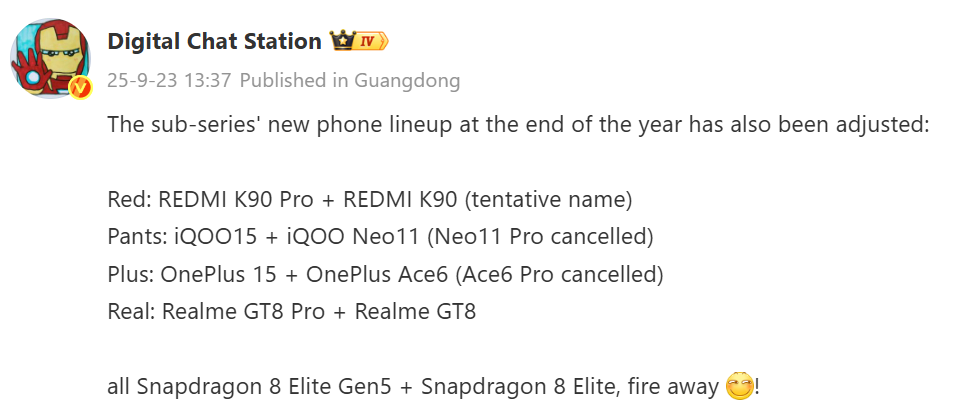
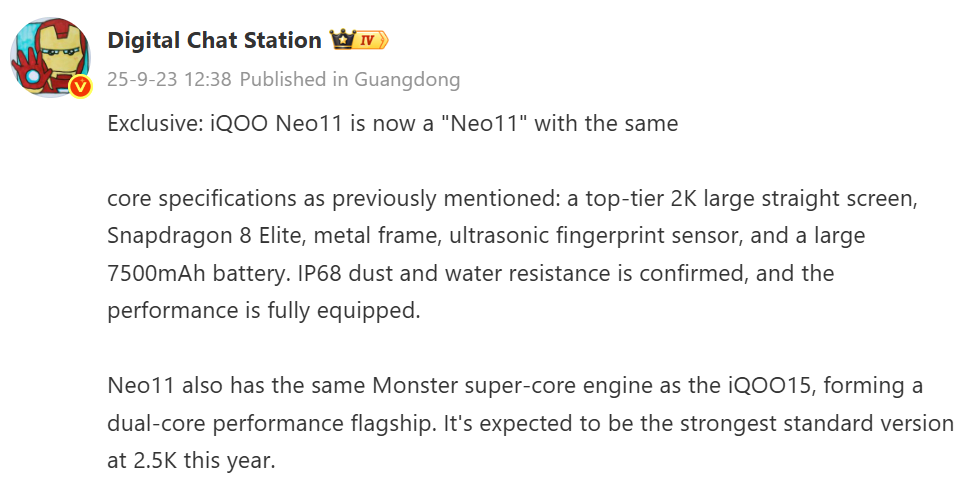
Four flagship chips will launch in late 2025, including one from Huawei

According to a recent leak from tipster Digital Chat Station, the second half of 2025 will see new flagship chips from all major players in the mobile silicon market. This not only includes Apple, Qualcomm, and MediaTek, but also Huawei. 

DCS claims that Apple’s A19 Pro chip will debut in September, continuing the company’s yearly cadence. Qualcomm is expected to follow shortly after with its next flagship SoC, Snapdragon 8 Elite 2, internally known as SM8850.

Both Apple and Qualcomm are said to be utilizing TSMC’s N3P node, a refinement of the foundry’s current 3nm process. The tipster says these upcoming chips will hit a new high in frequency (i.e., clock speed) and will have improved energy efficiency over the previous generation.

Huawei Kirin 9030 is a surprise

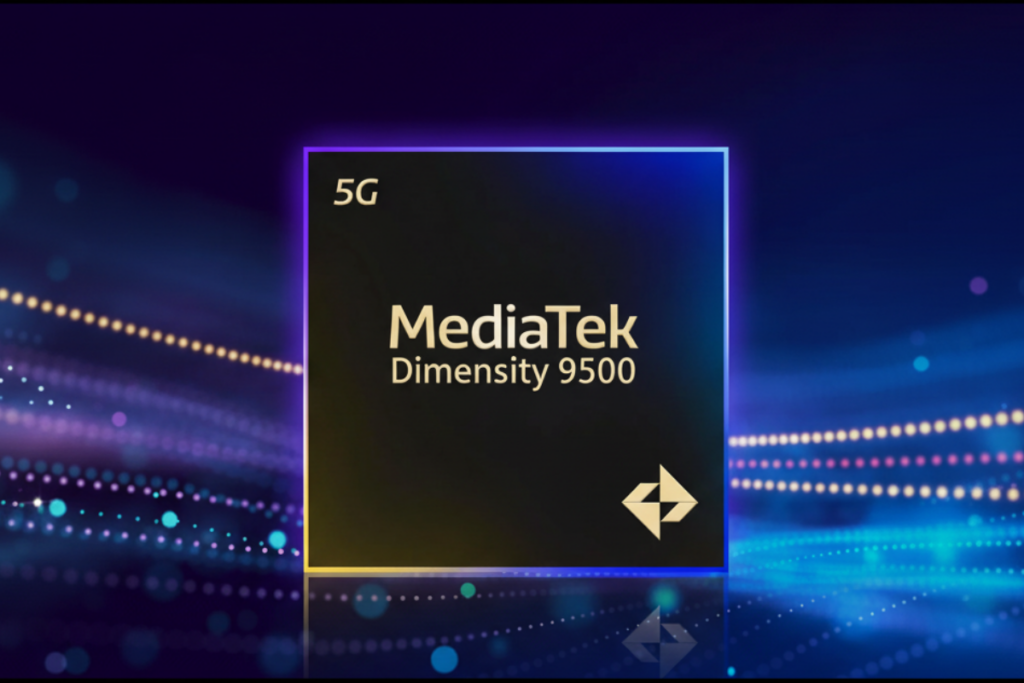
MediaTek’s high-end chip, possibly named Dimensity 9500, will also launch by September end. Meanwhile, Huawei’s Kirin 9030 is reportedly scheduled for release toward the end of the year. 

We’re sure to learn more about the Dimensity 9500 or any chip, for that matter, in detail when it launches. But Huawei, as in the past, might keep the specifics of the Kirin 9030 under wraps. If timelines hold, all four flagship processors will enter the market between late 2025 and early 2026.

Elsewhere in the comments section of the leak, discussion emerged about Xiaomi’s in-house XRING processor. DCS says Xiaomi CEO Lei Jun did not expect the first-generation XRING O1 to perform so well, so there were no plans for its successor. However, DCS claims the XRING O2 will be even “more popular.”

Separately, a report from IT Home this morning suggests that Apple is preparing to launch M5 chips this fall in new versions of the iPad Pro and MacBook Pro. The update is likely to be limited to the processor itself, with little else changing in the hardware design or features.

For more daily updates, please visit our News Section.

Stay ahead in tech! Join our Telegram community and sign up for our daily newsletter of top stories! 💡

(Source)

Portronics NOVA Bluetooth Speaker Launches in India at ₹2,599 with TWS and RGB Lights

Portronics has released the NOVA portable speaker in India. The speaker has a round design with a textured surface that makes it easier to hold and more durable. It’s compact and splash-resistant, so you can use it indoors or outdoors.

Portronics NOVA 40W portable Bluetooth speaker

The NOVA puts out 40W of sound using HD speakers and dual passive radiators. This setup creates deep bass, cuts down distortion, and gives you clear vocals with balanced sound. There’s an RGB LED strip around the body that lights up with your music.

For connections, it has Bluetooth 5.3 for wireless pairing, plus AUX-IN and USB-IN ports if you want to plug in directly. You can pair two NOVA speakers together using True Wireless Stereo (TWS) to get stereo sound. There’s also a built-in microphone for hands-free calls.

Portronics NOVA 40W portable Bluetooth speaker

You can control volume, skip tracks, and manage playback right from the speaker. It charges through a Type-C port and gives you up to 5 hours of music on one charge.

The speaker comes in black with a 1-year warranty. The regular price is ₹2,799, but it’s available now for ₹2,599 on Amazon.in. You can also buy it from the Portronics website and their authorized stores across India starting today.

Please Note: When you buy something using the links in our articles, we may earn a small commission at no cost to you.

In other news, Xiaomi has recently introduced the Sound Party portable speaker globally. It features 50W output (15W tweeter + 35W woofer), Bass Boost mode, Harman AudioEFX tuning, and up to 26 hours of battery life (at 50% volume without lighting/bass).

For more daily updates, please visit our News Section.

Stay ahead in tech! Join our Telegram community and sign up for our daily newsletter of top stories.

Minisforum launches UM690L Slim Mini PC with Ryzen 9 6900HX, LPDDR5 RAM & triple 4K output

Minisforum has introduced a new ultra-compact mini PC called the UM690L Slim. The device has a volume of just 0.8 liters and weighs 0.67 kilograms. The 16GB RAM and 1TB SSD version is priced at 2499 yuan ($348) in China.

Minisforum UM690L Slim

Minisforum UM690L Slim Specifications

The UM690L Slim features an 8-core, 16-thread Ryzen 9 6900HX CPU with a maximum boost clock of 4.9GHz. The processor has a configurable TDP of 65W and is paired with integrated Radeon 680M graphics. According to the company, the chip scores around 2621 points in 3DMark TimeSpy, putting its GPU performance close to a GTX 1050.

The mini PC uses LPDDR5 memory running at 6400MT/s, with options for either 16GB or 32GB configurations. It supports dual M.2 2280 PCIe 4.0 SSDs for storage, allowing a combined capacity of up to 4TB. According to Minisforum, the system can achieve read speeds as high as 7000MB/s, making it ideal for quick boot times and managing large file transfers efficiently.

The company has designed a dual-fan cooling system for this model. The system uses phase-change thermal materials and adds dedicated cooling for memory and storage components. Under full load, the noise levels remain under 35dB, based on internal lab tests.

In terms of connectivity, the UM690L Slim includes a 2.5G Ethernet port, Wi-Fi 6E, and Bluetooth 5.3. The device supports triple 4K display output through USB4, HDMI 2.1, and DisplayPort 1.4. The USB4 port also supports up to 40Gbps data transfer and Power Delivery charging input between 65W and 100W. It also allows 15W output for reverse charging.

The I/O layout includes two front-facing USB 3.2 Gen2 Type-A ports, two USB 2.0 ports at the rear, one USB4 port, a DP 1.4 port, an HDMI 2.1 port, and a 3.5mm audio combo jack. The UM690L Slim runs Windows 11 Pro out of the box and measures 130 × 126.5 × 50.4mm.

In related news, Gmktec recently introduced the EVO-T1 Mini PC featuring a Core Ultra 9-285H processor, 64GB RAM, and support for quad 4K display output. Meanwhile, Geekom has launched the IT15 Mini PC with a desktop-grade Core Ultra processor, 64GB RAM, a 4TB SSD, and quad 4K output support.

For more daily updates, please visit our News Section.

Stay ahead in tech! Join our Telegram community and sign up for our daily newsletter of top stories! 💡

Xiaomi YU7 SUV Launched in China with Luxury Design, Long Range, and High Safety Standards

Xiaomi has officially launched its first SUV, the Xiaomi YU7, in China. The vehicle is available in three variants: Standard (RWD), Pro (AWD), and Max (high-performance AWD). Pre-orders are now open through the Xiaomi EV app and WeChat Mini Program.

Xiaomi YU7

The YU7 features a sleek, low-slung design with balanced proportions and a wide stance. It comes in nine color options, including Basalt Gray, Lava Orange, Titanium Silver, Emerald Green, Pearl White, Dusk Purple, Dawn Pink, and more. Wheel choices range from 19 to 21 inches with multiple designs and tire types. The Max variant offers a CLTC range of up to 760 km with long-range tires, or 670 km with performance-focused Michelin Pilot Sport EV tires.
Inside, the YU7 offers four interior color schemes and uses soft-touch materials certified to OEKO-TEX® Class 1 standards. Seats are wrapped in Nappa leather, and optional zero-gravity front seats include recline and massage features. Rear seats recline up to 135°, fold flat to form a 1.8m bed, and offer heating. Storage includes a 141L front trunk, a 687L rear trunk, and a maximum of 1,758L with the rear seats folded.
Smart features include dual 80W wireless charging pads, a 4.6L refrigerator, a 25-speaker Dolby Atmos system, and a HEPA-certified 2.2m² cabin filter. The Max version adds double-laminated glass, more insulation, and a smart-dimming panoramic roof. Sound insulation is applied across all trims, reducing cabin noise significantly.

The YU7 Max uses Xiaomi’s HyperEngine V6s Plus and accelerates from 0 to 100 km/h in 3.23 seconds. It supports a top speed of 253 km/h. The Standard variant offers an 835 km CLTC range, while AWD variants offer up to 770 km. Charging is fast, with 10–80% reached in 12 minutes and up to 620 km range added in 15 minutes, thanks to its 800V platform.

Xiaomi Smart Chassis comes standard across all versions, with adaptive suspension, Smart Ride Control, and Motion Sickness Relief Mode. The SUV also features variable steering, Brembo brakes, and a short 100–0 km/h braking distance of 33.9 meters.

The cabin runs on Xiaomi’s HyperVision Panoramic Display using a triple Mini LED screen system. It includes Xiaomi’s upgraded Hyper XiaoAI voice assistant, five-zone voice control, and support for voice commands from outside the car. Other highlights include animated pet copilots, mic-free karaoke, and integration with the broader Xiaomi ecosystem.

The system is powered by a four-in-one domain controller and the NVIDIA DRIVE AGX Thor platform with 700 TOPS computing power. Apple users get CarPlay with multi-screen support, remote unlocking, and Apple Watch integration.

All YU7 models come with advanced driver assistance hardware, including LiDAR, 4D millimeter-wave radar, 11 HD cameras, and 12 ultrasonic sensors. The system is trained on 10 million driving clips to provide smoother, safer driving behavior.

For safety, the YU7 uses 2200 MPa ultra-high-strength steel in key areas and a hybrid steel-aluminum body structure with 47,610 N·m/deg torsional stiffness. The battery is protected with a reinforced underbody coating. The vehicle passed 50+ crash tests and has been validated through 6.49 million km of road testing across extreme conditions in China. Xiaomi also set a new 24-hour EV endurance record with the YU7 Max, covering 3,944 km in one day under official supervision, showcasing its powertrain, battery, and durability.

Pricing & availability

The Xiaomi YU7 starts at RMB 253,500 for the Standard version, RMB 279,900 for the Pro, and RMB 329,900 for the Max.

(Source)

AOC launches Graphic Pro 5K monitor with CalmanReady color calibration, USB-C (96W) & PBP/KVM

AOC has launched a new 27-inch 5K monitor called the U3 Graphic Pro. The display is now available on JD.com in China with a price tag of 6999 yuan (approximately $975). It is aimed at professionals working in color-sensitive fields such as photography, video editing, and design.

AOC U3 Graphic Pro

AOC U3 Graphic Pro Specifications

The monitor features a 27-inch IPS panel with a native resolution of 5120×2880 pixels and a refresh rate of 70Hz. It delivers a pixel density of 218 PPI and supports 10-bit color depth. AOC has rated the contrast ratio at 2000:1, while the panel is certified for DisplayHDR 600. The display can reach a peak brightness of up to 600 nits and supports wide 178° viewing angles.

AOC has integrated CalmanReady hardware-level calibration into the U3 Graphic Pro. Each unit undergoes factory calibration and ships with a report. The monitor supports 99% DCI-P3, 99% Adobe RGB, and 100% sRGB color gamuts. The average DeltaE value is under 1 for accurate color reproduction. The display also supports 6-axis color calibration.

The U3 Graphic Pro includes a variety of connectivity options. It has two USB-C upstream ports, one that supports 96W power delivery and video/data transmission, and another for data. It also includes a USB-C downstream port with 15W output, one HDMI 2.1 port, one DisplayPort 1.4, four USB-A ports, and a headphone output. The USB-C input supports DSC for full-resolution 5K output with 10-bit color.

AOC has included productivity-focused features such as Picture-by-Picture (PBP), Picture-in-Picture (PIP), and an integrated KVM switch for users working with multiple systems. The monitor also supports automatic screen rotation and OSD adjustment via a built-in gravity sensor.

The ergonomic stand offers 150mm height adjustment, ±30° swivel, -6.5° to 23° tilt, and ±90° pivot support. AOC has certified the monitor for low blue light emission through TÜV Rheinland and added dual 3W stereo speakers for audio output.

In terms of design, the monitor comes in a silver finish with a minimalist aesthetic. It weighs 6.91kg with the stand and 5.88kg without it. The total package weight is about 10.81kg. The monitor supports VESA 100×100mm wall mounting.

In related news, TCL recently launched a massive 57-inch curved monitor with dual 4K resolution, 1ms response time, 120Hz refresh rate, and USB-C docking. Meanwhile, Samsung has rolled out its new M9, M8, and M7 Smart Monitors globally, featuring 4K displays, built-in smart OS, and gaming support.

For more daily updates, please visit our News Section.

Stay ahead in tech! Join our Telegram community and sign up for our daily newsletter of top stories! 💡

(Source)

Oppo Reno 14 vs Vivo T4 Ultra: Flagship Features, Mid-Range Price, Difficult Choice

The Oppo Reno 14 and Vivo T4 Ultra are two powerful mid-range smartphones that offer flagship-level features at competitive prices. With both running Android 15, sporting AMOLED displays and packing impressive cameras and fast charging, they target users seeking high-end performance without the premium cost. This comparison is important because it highlights how each brand balances performance, design, and value, helping buyers decide which phone better suits their needs, whether for gaming, photography, or everyday use.

1. Design and Display

OPPO Reno 14
OPPO Reno 14

Build and Feel:
The Oppo Reno 14 brings a premium aluminum alloy frame paired with Gorilla Glass 7i protection and IP68/IP69 certification, offering superior resistance to both dust and water, including full immersion. This makes it a better pick for durability. In contrast, the Vivo T4 Ultra sticks to a glass build with IP64, which is good for splash resistance but doesn’t offer the same level of ruggedness. Both feel high-end in hand, but Reno 14’s design is built for tougher use.

Display Quality:
Both phones offer AMOLED panels with 1B colors, 120Hz refresh rate, and high PWM dimming. Reno 14 has a slightly smaller 6.59″ screen with HDR10+ and 3840Hz PWM, ensuring smoother visuals and reduced flicker. Meanwhile, Vivo T4 Ultra boasts a 6.67″ panel with 5000 nits peak brightness, great for outdoor visibility, and sharper PWM at 2160Hz. While Reno’s screen may feel more natural and eye-friendly, Vivo’s brighter, vibrant display gives it the edge for media consumption in bright environments.

Verdict:
Reno 14 wins in build quality and durability, but Vivo T4 Ultra edges ahead in display brightness and visual appeal. For rugged use, choose Reno; for immersive visuals, pick the Vivo.

2. Specifications 

Vivo T4 Ultra
Vivo T4 Ultra

Performance:
Reno 14 runs on the MediaTek Dimensity 8350 with Mali-G615 GPU, which delivers solid upper mid-range performance. However, the Vivo T4 Ultra steps up with the Dimensity 9300+ and Immortalis-G720 MC12 GPU, a flagship-grade setup offering better gaming and multitasking capability. This makes Vivo the more future-proof option, especially for power users and gamers who need more headroom.

Battery and Charging:
Reno 14 offers a massive 6000 mAh battery, ideal for long endurance. It supports 80W wired charging, 13.5W PD, and 33W PPS, along with reverse charging. On the other hand, Vivo T4 Ultra uses a slightly smaller 5500 mAh Si/C battery but supports faster 90W wired charging, delivering a full charge in under 50 minutes. Vivo has the speed, while Oppo has the stamina. For those prioritizing all-day use, Reno stands out.

Verdict:
Vivo T4 Ultra leads in raw performance and charging speed, making it ideal for demanding users. Reno 14 shines in battery longevity, better for extended use on a single charge.

3. Camera

OPPO Reno 14
OPPO Reno 14

Main and Secondary Lenses:
Reno 14 packs a versatile triple camera setup with dual 50 MP sensors (wide + telephoto 3.5x) and an 8 MP ultrawide. The inclusion of a color spectrum sensor and higher-end OIS support aids in clarity and consistency, even in low light. Vivo T4 Ultra counters with a 50 MP wide, a 50 MP periscope telephoto (3x), and an 8 MP ultrawide. Vivo’s periscope zoom adds flexibility, especially for portrait and distant shots, though it lacks Oppo’s sensor enhancements. Both deliver great results, but Reno’s camera system is more feature-rich overall.

Selfie Camera:
Oppo Reno 14 features a 50 MP front camera with autofocus and 4K video, which significantly outshines the 32 MP fixed-focus unit on the Vivo T4 Ultra. Reno’s front camera offers sharper detail, better dynamic range, and superior video capabilities, making it ideal for content creators and selfie enthusiasts.

Verdict:
Oppo Reno 14 has a more advanced rear camera setup with better sensor integration and a superior selfie camera. For versatile photography and video, Reno is the better camera phone overall.

4. Pricing

The Oppo Reno 14 is priced at around $550, while the Vivo T4 Ultra comes in at approximately $450. For $100 less, Vivo offers a flagship-level chipset and ultra-bright display, making it an excellent value. However, the Reno 14 justifies its higher price with a larger battery, rugged IP68/IP69 protection, superior selfie camera, and more advanced camera features overall. The choice depends on what matters more, value and performance (Vivo) or durability and imaging (Oppo).

Disclaimer:
Prices are approximate and may vary based on country, region, and applicable taxes.

5. Conclusion

Vivo T4 Ultra
Vivo T4 Ultra

The Oppo Reno 14 stands out with its IP69 rating, Gorilla Glass 7i, advanced selfie camera, and massive 6000 mAh battery, making it a great choice for users who need durability, battery life, and better cameras. Meanwhile, the Vivo T4 Ultra brings flagship-level performance with the Dimensity 9300+, rapid 90W charging, and an extremely bright 5000-nit AMOLED display, making it ideal for gamers, multitaskers, and outdoor use.

Verdict:
Choose Oppo Reno 14 if you prioritize camera quality, durability, and battery life. Go for the Vivo T4 Ultra if performance, fast charging, and display brightness are your main needs.

Read More:

Xiaomi launches Mijia Kettle 3 with 1.7L capacity, 1800W heating & 4-level heat control

Xiaomi has launched the Mijia Constant Temperature Electric Kettle 3 in China. The new smart kettle is priced at 169 yuan ($24) and is now available on JD.com. It features a 1.7-liter capacity and supports four preset temperature levels, aimed at meeting different daily hot water needs.

Xiaomi Mijia Electric Kettle 3

Xiaomi Mijia Electric Kettle 3 Specifications

The kettle uses 316L food-grade stainless steel for its inner liner. Xiaomi claims this material improves durability and corrosion resistance. The inner chamber has a seamless one-piece design, which prevents buildup and makes cleaning easier.

The exterior design follows Mijia’s typical minimalist approach and includes a dual-layer structure for safety. The inner layer uses stainless steel, while the outer layer is made of high-temperature-resistant PP plastic. This design ensures that the exterior remains cool to the touch, even when the water inside is boiling.

Xiaomi has equipped the kettle with an 1800W energy-concentrating circular heating base. This allows for faster and more even heating. The kettle includes four temperature presets: 45°C, 60°C, 70°C, and 85°C. These settings cater to different use cases such as baby formula, green tea, or coffee preparation. The appliance also supports 24-hour quiet heat preservation, maintaining the selected temperature without generating noticeable noise.

The Mijia Electric Kettle 3 supports two water modes. Users can select between tap water mode and purified water mode, depending on their source of water. Xiaomi says this feature optimizes the heating process and enhances water taste.

The kettle includes a real-time digital temperature display on the handle. It also comes with a single-button lid release mechanism, allowing for one-handed operation. The lid opens in two stages, which helps reduce steam exposure and prevents hot water splashes. Xiaomi has used a high-quality thermostat for this model and claims it has passed internal durability tests for over 10,000 uses.

In terms of safety, the kettle is equipped with multiple protection features. It includes automatic shutoff when the water reaches boiling point, dry-boil protection, and lid-lock safety to prevent accidental spills.

In related news, Xiaomi recently introduced a new 400L refrigerator featuring a slim profile, HyperOS integration, and quiet operation. The company has also launched a 271L three-door model with a space-saving design and flexible cooling zones.

For more daily updates, please visit our News Section.

Stay ahead in tech! Join our Telegram community and sign up for our daily newsletter of top stories! 💡

(Source)

Oppo Reno 14 vs Reno 13: What’s Really New and Better?

The Oppo Reno 14 and Reno 13 may look similar at first glance, but several key upgrades in hardware and features make this comparison significant. With both phones targeting the premium mid-range segment, buyers are curious to know whether the Reno 14 justifies its higher price or if the Reno 13 still holds strong value. This comparison breaks down what’s improved and whether those changes matter for everyday use.

1. Design and Display

OPPO Reno 14
OPPO Reno 14

Build and Feel:
Both the Reno 14 and Reno 13 maintain Oppo’s sleek design language with a premium glass front and back and an aluminum frame. Water and dust resistance remain the same at IP68/IP69. However, the Reno 14 feels marginally sturdier due to the slight bump in weight, which often suggests a more reinforced chassis. It may feel more solid in hand, while the Reno 13 is a touch lighter, which could appeal to those preferring a lighter daily device.

Display Quality:
Both phones share an identical AMOLED panel size, resolution, refresh rate (120Hz), and PWM dimming at 3840Hz, offering great eye comfort. However, Reno 14 introduces Crystal Shield Glass as an optional protection alongside Gorilla Glass 7i and slightly improves high brightness mode (HBM), potentially providing better outdoor readability. Additionally, HDR10+ support is maintained, but the Reno 14 appears to offer more consistent color accuracy in bright environments.

Verdict:
While the display experience is largely similar, the Reno 14 edges ahead with better durability options and slightly enhanced brightness performance. The build quality is also subtly refined, giving it a more premium feel over the Reno 13.

Please Note: When you buy something using the links in our articles, we may earn a small commission at no cost to you.

2. Specifications 

OPPO Reno 13
OPPO Reno 13

Performance:
Both devices use the MediaTek Dimensity 8350 chipset paired with Mali-G615 MC6 GPU, ensuring flagship-level performance. However, the Reno 14 starts with 12GB RAM as the base configuration (and up to 1TB), while the Reno 13 begins at 8GB. This means Reno 14 users benefit from higher base RAM and slightly more optimized multitasking. Thermal efficiency and UI fluidity are nearly identical due to the same software base (Android 15 + ColorOS 15), but storage speeds remain UFS 3.1 across the board.

Battery and Charging:
The Reno 14 packs a larger 6000mAh battery, compared to the 5600mAh in the Reno 13. While both offer 80W wired charging and similar support for PPS and PD protocols, Reno 14 offers marginally better endurance for heavy users. The additional 400mAh makes a noticeable difference for screen-on time and gaming sessions.

Verdict:
While performance is nearly identical in raw specs, Reno 14 wins with its higher base RAM and bigger battery, making it a more future-ready device for power users or gamers needing longer sessions without charging.

3. Camera

OPPO Reno 14
OPPO Reno 14

Main and Secondary Lenses:
Reno 14 upgrades the camera hardware by adding a 50MP telephoto lens with 3.5x optical zoom, which is missing on the Reno 13. The ultrawide sensor is very similar, though the Reno 13’s primary sensor is marginally larger. However, the presence of a dedicated telephoto on the Reno 14 greatly improves versatility, especially for portrait and zoom photography. Meanwhile, the 2MP depth sensor on the Reno 13 offers minimal utility in real-world use.

Selfie Camera:
Both phones carry a 50MP front-facing camera with autofocus and similar video capabilities, including 4K at 60fps. Image sharpness and skin tone reproduction are consistent. However, Reno 14 seems to process selfies with better HDR handling in mixed lighting, making it slightly better in more varied conditions.

Verdict:
Reno 14 clearly advances in rear camera flexibility with its telephoto sensor, giving users more framing options. The selfie camera is equally competent on both, but Reno 14 performs better in high-contrast scenes, making it a more versatile shooter overall.

4. Pricing

OPPO Reno 13
OPPO Reno 13

The Oppo Reno 14 is priced at approximately $550, while the Reno 13 is available for around $450. The $100 difference is justifiable considering the inclusion of a telephoto lens, a larger battery, and an improved default RAM configuration in the Reno 14. For budget-conscious users, the Reno 13 still offers flagship performance. However, for buyers wanting enhanced battery life, camera range, and RAM from the start, the Reno 14 gives better long-term value.

5. Conclusion

OPPO Reno 13
OPPO Reno 14

The Reno 14 adds a dedicated telephoto lens, and a larger battery, and introduces a sturdier design feel. These enhancements make it a clear upgrade in terms of practical everyday use. Both phones offer flagship-grade displays, build quality and fluid performance. However, Reno 14’s improvements focus on real-world gains, especially in multitasking, zoom photography, and endurance.

Verdict:
The Oppo Reno 14 is the better all-rounder and worth the extra money for users prioritizing battery life, zoom photography, and future-proof specs. Reno 13 remains a solid buy for users who want similar core performance at a lower price but can compromise on camera flexibility and battery size.

Read More: