Advertisement

This smart ring gets lighter, smarter and more connected with its latest upgrade

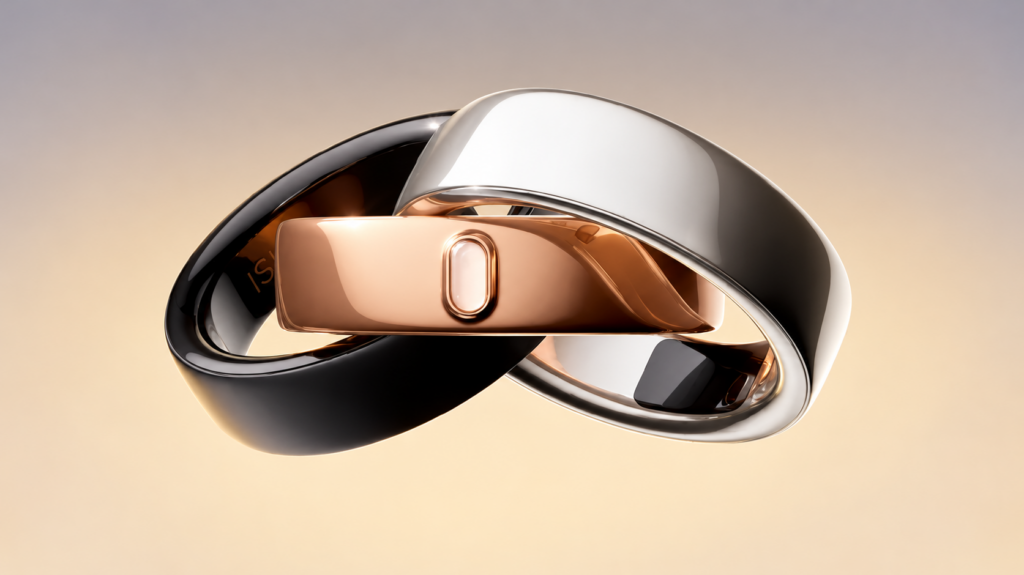
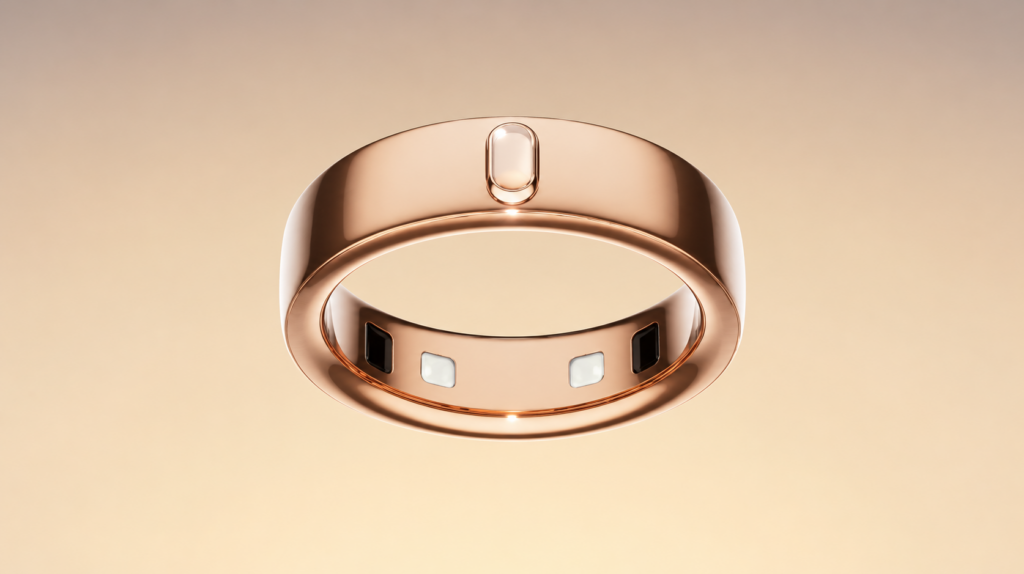
The smart ring segment continues to evolve beyond basic health tracking, with brands now focusing on convenience and smarter interactions. Qringstore has introduced its latest wearable, dubbed the Titan 2, bringing a lighter design, new wellness features and gesture-based controls. The announcement also reveals improvements to sizing options, app integration and overall user experience.

Titan 2 brings several new upgrades

Titan 2 smart ring
Titan 2 smart ring

The newly announced Titan 2 arrives as the successor to the original Titan smart ring. One of the key changes is its lighter construction, with the ring starting at just 2.6g. The company claims this makes it around 35 per cent lighter than its predecessor, potentially improving comfort during extended wear. Buyers can also choose from a wider range of sizes, including new Size 12 and Size 13 variants. A new silver finish has also been added alongside existing colour options.

The wearable retains a stainless-steel body with a titanium alloy coating and carries an IP68 rating for protection against water and dust. Alongside the hardware changes, the accompanying RWfit application now supports synchronization with both Apple Health and Google Fit, allowing users to manage health data across different ecosystems without requiring a subscription.

Titan 2 smart ring
Titan 2 smart ring

Health monitoring remains a major focus for the device. In addition to tracking sleep, heart rate, steps and daily activity, the new model introduces Heart Rate Variability (HRV) monitoring and stress tracking. These additions are intended to provide a broader view of recovery, wellbeing and day-to-day health trends.

Another notable addition is gesture control support. Users can remotely turn pages while reading, navigate short-form videos and trigger smartphone photos with a simple hand movement. The company says these features are designed to reduce the need for direct interaction with a phone during everyday tasks.

Titan 2 is currently available at an introductory price of $99, while the original Titan has been discounted to $79 for a limited period.

For more daily updates, please visit our News Section.

Stay ahead in tech! Join our Telegram community and sign up for our daily newsletter of top stories.

Xiaomi TV FX Mini LED Series set to launch with Xiaomi 17T next week

Xiaomi recently unveiled the Xiaomi 17T and 17T Pro for the global market. Now, the brand is all set to launch the Xiaomi 17T in India on June 4. Alongside the smartphone, Xiaomi will also introduce the Xiaomi TV FX Mini LED Series in the country. Ahead of the launch, the dedicated microsite has gone live on Xiaomi India’s website, revealing several key details about the upcoming television lineup.

Xiaomi TV FX Mini LED Series: What the microsite reveals

Xiaomi TV FX Mini LED Series is launching on June 4

The Xiaomi TV FX Mini LED Series is being positioned as a premium entertainment offering centred around Full-Array Mini LED technology. According to the teaser, the televisions will feature independently controlled dimming zones, allowing bright and dark areas of a scene to be managed more precisely. This is expected to improve contrast levels, deliver deeper blacks and enhance overall picture quality across the screen.

The company has also highlighted Quantum Dot technology, suggesting support for a wide colour gamut with more accurate and lifelike colours. Xiaomi says the TVs are designed to maintain visibility and colour performance even in brightly lit rooms, making them suitable for daytime as well as evening viewing. The teaser further hints at smooth motion handling and low input latency, indicating that sports fans and gamers could benefit from a more responsive viewing experience.

On the audio side, the FX Mini LED Series is expected to feature a four-speaker setup with dedicated tweeters for clearer dialogue and fuller sound output. The TVs will also ship with Fire TV built-in, giving users access to thousands of streaming apps and Alexa voice controls for content search, playback and smart home commands.

Xiaomi 17T: What to expect?

The Xiaomi 17T is expected to arrive as a premium upper mid-range smartphone and could be priced between Rs 40,000 and Rs 50,000 in India. Globally, the device features a 6.67-inch AMOLED display with a 144Hz refresh rate, the MediaTek Dimensity 8500 Ultra chipset, up to 12GB RAM and up to 512GB storage. It packs a 5,240mAh battery with 67W fast charging support.

For photography, the device offers a 50-megapixel main camera, a 50-megapixel telephoto camera and a 12-megapixel ultra-wide lens. On the front, it includes a 32-megapixel selfie camera. The phone runs HyperOS 3 based on Android 16 and includes several AI-powered features.

With Xiaomi preparing to launch both a new smartphone and a premium Mini LED TV range on June 4, it will be interesting to see which product generates more excitement among buyers.

For more daily updates, please visit our News Section.

Stay ahead in tech! Join our Telegram community and sign up for our daily newsletter of top stories.

Xiaomi 17T price leaks ahead of India launch

Xiaomi is set to launch the Xiaomi 17T in India on June 4. Ahead of the launch, a new leak from tipster Abhishek Yadav has revealed the smartphone’s expected price in the country.

According to the leak, the Xiaomi 17T will launch in India in 12GB+256GB and 12GB+512GB storage variants. The base model is expected to retail for Rs 65,999. This will be Xiaomi’s first T-series smartphone in India since the Xiaomi 11T Pro, which launched in 2022. As a result, there is no direct predecessor available for a price comparison.

Xiaomi 17T specifications

For the price, the Xiaomi 17T is expected to feature a 6.59-inch 1.5K LTPS display with a 120Hz refresh rate. The display reportedly supports up to 3,500 nits of peak brightness and 2,000 nits of HBM brightness. It will also offer Dolby Vision support, dual stereo speakers, and Dolby Atmos for an enhanced multimedia experience.

Under the hood, the smartphone is powered by the MediaTek Dimensity 8500 Ultra chipset. The device may also come with LPDDR5X Ultra RAM and UFS 4.1 storage.

Xiaomi 17T

On the camera front, Xiaomi is expected to offer a 50MP Leica Light Fusion 800 primary sensor, a 50MP periscope telephoto camera with 5x optical zoom and up to 120x AI zoom, and a 12MP ultra-wide camera with a 120-degree field of view. For selfies and video calls, the phone is said to feature a 32MP front-facing camera.

The rear camera supports 4K video recording at 60fps, while the front camera supports 4K recording at 30fps.

The Xiaomi 17T is expected to pack a 6,500mAh battery with 67W wired charging and 22.5W reverse wired charging. The phone is also said to feature an IP68 rating for dust and water resistance, Bluetooth 6.0, NFC, and Wi-Fi 7 connectivity, along with an in-display fingerprint scanner for biometric authentication.

For more daily updates, please visit our News Section.

Stay ahead in tech! Join our Telegram community and sign up for our daily newsletter of top stories! 💡

(Source)

Xiaomi launches new floor-standing air conditioner that cools rooms in just 15 seconds

Xiaomi has released a new high-capacity climate control unit in China: the Mijia Powerful Wind Floor-Standing Air Conditioner Ultra 3HP. The appliance is priced at 5,999 yuan ($886). It is available now through Xiaomi’s standard retail channels and major online platforms.

Xiaomi Mijia Powerful Wind Ultra 3HP floor-standing AC

Mijia Powerful Wind Ultra 3HP AC Specs

The new Mijia unit is a 3-horsepower system built specifically for large living rooms and open floor plans. Inside, it uses a 25.1 cc dual-cylinder compressor, which Xiaomi says is a 19% increase in displacement over its standard configurations. This is paired with dual-row pure-copper evaporators and condensers, which have also seen increases in their overall heat-exchange surface area.

In terms of output, the air conditioner has a maximum cooling capacity of 11,000W and a heating capacity of 16,000W. Xiaomi claims that when using the unit’s 140Hz high-frequency mode, it can begin cooling a space in 15 seconds and provide heat in 30 seconds.

To distribute the air, the system relies on dual sine-wave motors that generate an airflow volume of 1,800 cubic meters per hour. It features a 115-degree wide-angle sweep and can push air up to 16 meters away. Xiaomi has also included directional settings like Sky Curtain Wind to route cold air across the ceiling and Carpet Wind to direct heat along the floor, preventing direct drafts.

Xiaomi Mijia Powerful Wind Ultra 3HP floor-standing AC

Despite the high output, the air conditioner carries an Annual Performance Factor (APF) rating of 4.90, meeting China’s Super Level 1 energy efficiency standard. Xiaomi estimates that its built-in energy-saving algorithms can reduce electricity consumption by roughly 660kWh per year.

The unit is also designed to handle extreme weather, with an operating range spanning from -35°C to 65°C, maintaining stable performance even in severe freezing or heatwave conditions.

As expected from a modern Xiaomi appliance, the Ultra 3HP integrates closely with the company’s smart home ecosystem. It runs on HyperOS Connect, allowing for vehicle-to-home automation and voice control via the Xiao AI assistant. It also features an onboard AI module that handles real-time temperature and airflow adjustments, while cloud connectivity enables full OTA updates and remote diagnostics to automatically alert users about dirty filters or low refrigerant levels.

The physical design is relatively understated for its size, featuring matte exterior panels, an ITO touch display, and a sliding air outlet that hides away when the unit is powered down.

In related news, Xiaomi has recently unveiled a new 13kg washer dryer featuring electrolytic cleaning and HyperOS integration, alongside an instant hot water dispenser with a built-in ice maker.

For more daily updates, please visit our News Section.

Stay ahead in tech! Join our Telegram community and sign up for our daily newsletter of top stories! 💡

(JD)

Acer launches new 4K laser projector with Google TV, 4,000 ANSI lumens & 240Hz gaming

Acer has added a new model to its home theater lineup. The HL6820GTV is a 4K laser projector that includes built-in Google TV and gaming features like a 144Hz variable refresh rate. It will be available in the EMEA region in the third quarter of 2026, with a starting price of €1,399.

Acer HL6820GTV projector

Acer HL6820GTV Specifications

The projector uses a 0.47-inch DMD panel to display a 4K UHD (3,840 x 2,160) resolution. Instead of a traditional lamp, it uses a laser light source. Acer states this allows the unit to reach a brightness of 4,000 ANSI lumens in standard mode, which makes it usable in rooms with ambient daylight.

There is also an Eco mode that reduces the brightness to 3,200 lumens, lowers the fan noise to 29 dBA, and extends the expected lifespan of the laser from 20,000 to 30,000 hours. According to the company, this laser setup consumes 35% less power than lamp-based projectors operating at the same brightness.

For media playback, the projector covers the Rec. 709 color standard and has a dynamic contrast ratio of 3,500,000:1. It includes a built-in Google TV dongle, meaning you can access streaming apps directly from the interface and use voice search through the remote without needing to plug in a separate streaming stick.

For connectivity, it includes two HDMI 2.1 ports. While it outputs at 4K for standard viewing, it has specific modes for gaming. If you lower the resolution to 1080p, the projector supports a 240Hz refresh rate and a 1ms input lag. It also supports Variable Refresh Rate (VRR) up to 144Hz, which helps prevent screen tearing when connected to a PC or a current-generation console.

The unit weighs 3.4 kg and includes a 1.3x manual zoom. With a throw ratio of 1.127 to 1.465, it can project a 100-inch image from 2.5 meters away. For setup, you can align the picture using four-corner adjustment and manual vertical and horizontal keystone correction. It also carries an IP5X rating for dust resistance, supports 360-degree projection, and is rated for 24/7 continuous use, which are features often required for public displays or exhibitions.

In related news, Acer has also launched an affordable 1080p smart projector with built-in Netflix and YouTube support.

For more daily updates, please visit our News Section.

Stay ahead in tech! Join our Telegram community and sign up for our daily newsletter of top stories! 💡

(Acer)

Casio’s GDG-B100 could be the first MUDMAN watch with a MIP display

Casio seems to be working on a new mid-range G-Shock called the GDG-B100, and thanks to an insider leak, we’re getting our first real look at it before any official word from the company.

The watch has surfaced in three color variants: an all-black version, one with a green strap, and another with a sand-colored strap.

What’s interesting about the GDG-B100 is that it could be the first Mudman watch with an MIP display. Since the word “MUDMAN” is visible on the front, it’s confirmed that the watch is part of the Mudman family. 

Casio G-SHOCK GDG-B100 MUDMAN Leak

Unlike the LCD found on the classic Casio Mudman line, the GDG-B100 uses a memory-in-pixel (MIP) screen, a technology that has gradually expanded across Casio’s smartwatch-inspired and fitness-oriented models.

Compared to traditional LCD panels, MIP displays generally offer better readability, improved contrast, and the ability to show more information at once while using less power.

The overall design also follows the familiar formula of Casio’s larger outdoor-focused watches, featuring a bulky case, prominent protective structures around the display, and a thick resin strap designed for demanding environments.

Casio GDG-B100 Specifications

While full specifications have not leaked, the display layout hints at several activity-tracking features. The watch is likely to include step counting, Bluetooth connectivity, activity logs through a smartphone app, and workout-related metrics such as distance, pace, and calorie tracking.

Standard G-Shock features like world time, alarms, a stopwatch, a timer, LED illumination, and 200-meter water resistance are also likely to be included.

Casio G-SHOCK GDG-B100 — MUDMAN

There are still plenty of unanswered questions, though. It’s unclear whether the GDG-B100 will include environmental sensors such as a compass or thermometer, and there’s no confirmation yet that it will support Casio’s Tough Solar charging technology.

According to the leak, Casio could launch the GDG-B100 sometime this summer. Pricing is rumored to fall between $200 and $250.

For more daily updates, please visit our News Section.

Stay ahead in tech! Join our Telegram community and sign up for our daily newsletter of top stories! 💡

(Source)

OnePlus Pad 4 vs Galaxy Tab S11 Ultra: Is Samsung Really Worth Almost Double the Price?

The premium Android tablet market is becoming more competitive, with OnePlus and Samsung targeting different types of power users. The OnePlus Pad 4 focuses on flagship performance, a large high-refresh-rate display, and exceptional battery capacity at a much lower price. Meanwhile, the Galaxy Tab S11 Ultra aims to deliver the ultimate premium tablet experience with an AMOLED screen, IP68 protection, DeX support, and a more versatile ecosystem. Here’s how they compare.

Major Features:

FeatureOnePlus Pad 4Galaxy Tab S11 UltraWinner
Display Size13.2-inch IPS LCD14.6-inch Dynamic AMOLED 2XGalaxy Tab – Larger and more premium AMOLED panel
Refresh Rate144Hz120HzOnePlus – Higher refresh rate for smoother animations
Brightness1000 nits (HBM)1600 nits (Peak)Galaxy Tab – Brighter for HDR content
Resolution2400 × 33921848 × 2960OnePlus – Sharper pixel density
Build QualityAluminum frame & backAluminum frame & back, IP68Galaxy Tab – Added water and dust resistance
ChipsetSnapdragon 8 Elite Gen 5Dimensity 9400+OnePlus – More powerful flagship processor
RAM8GB / 12GB12GB / 16GBGalaxy Tab – Higher memory options
Storage256GB / 512GB128GB–1TBGalaxy Tab – More storage choices
Expandable StorageNomicroSDXCGalaxy Tab – Expandable storage support
Operating SystemAndroid 16, OxygenOS 16Android 16, One UI 8.5Galaxy Tab – Better productivity features
Productivity FeaturesStandard multitaskingSamsung DeXGalaxy Tab – Desktop-like experience
Rear Camera13MP13MP + 8MP UltrawideGalaxy Tab – More versatile camera setup
Front Camera8MP12MP UltrawideGalaxy Tab – Better for video calls
Video Recording4K@30fps4K@30fpsTie – Similar recording capabilities
Speakers8 Speakers4 SpeakersOnePlus – More immersive audio setup
Battery Capacity13,380mAh11,600mAhOnePlus – Larger battery
Charging Speed80W45WOnePlus – Significantly faster charging
Wi-FiWi-Fi 7Wi-Fi 7Tie – Latest wireless standard
Bluetooth6.05.4OnePlus – Newer Bluetooth version
GPSNoGPS, GLONASS, GALILEO, BDSGalaxy Tab – Full navigation support
Cellular OptionNoNano-SIM + eSIMGalaxy Tab – Mobile connectivity available
Water ResistanceNoIP68Galaxy Tab – Better durability
Price~$700 / ₹60,000~$1,200 / ₹111,000OnePlus – Far better value
Disclaimer: Specs are based on available data. Actual performance may vary. Verify details from official sources before buying.

1. Design and Display

Build Quality

Both tablets feature premium aluminum frames and aluminum backs, giving them a flagship feel. The OnePlus Pad 4 is slightly thicker at 5.9mm but remains impressively slim for a tablet with a massive battery. At 672g, it is also a little lighter than Samsung’s offering.

The Galaxy Tab S11 Ultra takes premium design a step further with IP68 dust and water resistance, Enhanced Armor Aluminum construction, and optional cellular connectivity through Nano-SIM and eSIM support. These additions make it feel more versatile for users who frequently work outside the home.

Display & Multimedia

The OnePlus Pad 4 offers a sharp 13.2-inch LCD panel with a 144Hz refresh rate, Dolby Vision support, and up to 1000 nits brightness. It delivers smooth animations and excellent clarity.

Samsung counters with a larger 14.6-inch Dynamic AMOLED 2X display featuring HDR10+, deeper blacks, richer colors, and a higher peak brightness of 1600 nits. While it refreshes at 120Hz instead of 144Hz, the AMOLED technology creates a noticeably more premium viewing experience for movies and content consumption.

Verdict

Samsung wins this round thanks to its larger AMOLED display, HDR10+ support, IP68 durability, and cellular connectivity. However, the OnePlus Pad 4 remains extremely attractive for users who prioritize smoothness and value.

2. Performance and Software

Processor & UI Smoothness

Performance is one of the biggest strengths of the OnePlus Pad 4. Its Snapdragon 8 Elite Gen 5 chipset is among the most powerful mobile processors available, paired with fast UFS 4.1 storage. Combined with the 144Hz panel, everyday navigation feels exceptionally fluid.

The Galaxy Tab S11 Ultra uses the flagship Dimensity 9400+ processor, which also delivers excellent performance for gaming, editing, and multitasking. Real-world differences between the two chips are likely to be small for most users.

Productivity & Multitasking

Samsung’s software advantage remains difficult to ignore. One UI 8.5 includes Wireless DeX, transforming the tablet into a desktop-like workstation. The microSD card slot adds flexibility for creators handling large files, while Samsung’s ecosystem integration remains among the best in Android.

The OnePlus Pad 4 delivers a clean OxygenOS experience with strong multitasking features, but it lacks a direct competitor to DeX. Performance enthusiasts may prefer the raw power, yet productivity-focused buyers may appreciate Samsung’s broader feature set.

Verdict

The OnePlus Pad 4 takes the performance crown thanks to its cutting-edge Snapdragon chipset. However, Samsung wins productivity and professional multitasking, making this section nearly a tie depending on usage priorities.

3. Battery and Accessories

Battery Life

Battery capacity heavily favors the OnePlus Pad 4. Its enormous 13,380mAh battery is one of the largest in the premium tablet segment and should comfortably deliver extended screen time for gaming, streaming, and work sessions.

The Galaxy Tab S11 Ultra still offers a respectable 11,600mAh battery, but the larger AMOLED display can consume more power during intensive use. Battery endurance should remain strong, though likely not at the same level as the OnePlus.

Charging speeds further widen the gap. OnePlus includes 80W wired charging, dramatically reducing downtime. Samsung continues with 45W charging, which is adequate but slower.

Stylus, Keyboard & Ecosystem

Both tablets support stylus input, making them useful for note-taking and creative tasks. Samsung benefits from a mature ecosystem that includes DeX, stronger accessory support, and better integration with other Samsung devices.

OnePlus continues improving its ecosystem, but it still trails Samsung in accessory variety and productivity-focused software tools.

Verdict

OnePlus clearly wins battery life and charging speed, while Samsung holds the advantage in ecosystem integration and productivity accessories. For most users, battery performance gives OnePlus the overall edge in this category.

4. Camera & Media

Rear and Front Camera

Tablet cameras are rarely a primary buying factor, but Samsung provides a more versatile setup. The Galaxy Tab S11 Ultra features a 13MP main camera alongside an 8MP ultrawide lens, offering additional flexibility for scanning documents or capturing wider scenes.

The OnePlus Pad 4 uses a single 13MP rear camera, which is sufficient for occasional photography and document scanning but lacks the versatility of Samsung’s dual-camera arrangement.

On the front, Samsung again leads with a 12MP ultrawide camera capable of fitting more participants into video calls. The OnePlus includes an 8MP selfie camera that performs adequately but is less impressive for conferencing.

Video & Audio Quality

Both tablets support 4K video recording. Audio is where the competition becomes more interesting. Samsung includes four stereo speakers tuned for premium media consumption, while OnePlus packs an impressive eight-speaker setup that can produce greater volume and immersion.

Verdict

Samsung delivers stronger cameras and a superior front-facing video call experience. However, OnePlus counters with a more immersive speaker system. Overall, Samsung secures a narrow victory for media versatility.

5. Pricing

The pricing difference between these tablets is substantial.

  • OnePlus Pad 4: Approximately $700 / ₹60,000
  • Galaxy Tab S11 Ultra: Approximately $1,200 / ₹111,000

Samsung offers several premium features that justify part of the price increase, including AMOLED technology, DeX, IP68 certification, expandable storage, and cellular connectivity options. However, the price premium is enormous.

Verdict 

The OnePlus Pad 4 is the clear winner for value. It delivers flagship-level performance, a large 144Hz display, a huge battery, and ultra-fast charging for nearly half the price of Samsung’s tablet. Unless Samsung’s unique features are essential, OnePlus offers significantly better value per rupee.

Disclaimer:
Prices are approximate and may vary based on country, region, launch timing, and applicable taxes. Always check whether the listed price is for a China unit or a global/international variant when purchasing.

6. Conclusion

The OnePlus Pad 4 stands out with its Snapdragon 8 Elite Gen 5 processor, 13,380mAh battery, 80W charging, eight-speaker system, and aggressive pricing.

The Galaxy Tab S11 Ultra differentiates itself through its massive AMOLED display, IP68 protection, DeX desktop mode, expandable storage, cellular options, and premium ecosystem integration.

Verdict

OnePlus Pad 4 is the better choice for buyers seeking maximum performance, longer battery life, faster charging, and exceptional value. It delivers nearly flagship-ultra tablet capabilities at a much lower price.

Galaxy Tab S11 Ultra remains the premium productivity and entertainment king for users who want the best display, DeX functionality, expandable storage, and Samsung’s ecosystem advantages.

For most buyers, the OnePlus Pad 4 offers the stronger overall value proposition. For professionals and Samsung ecosystem users, the Galaxy Tab S11 Ultra justifies its premium positioning.

Disclaimer: This comparison is based on the specifications provided and is intended for general informational purposes. Actual performance, camera results, battery life, and overall experience may vary depending on real-world usage, software updates, and individual preferences.

Read More:

Xiaomi Pad 8 Pro vs Redmi Pad Pro 2: Which Xiaomi Tablet Offers Better Value?

Choosing between the Xiaomi Pad 8 Pro and Redmi Pad Pro 2 comes down to one simple question: do you want flagship-level performance or the best value for money? While both tablets target productivity, entertainment, and stylus users, they sit in completely different price segments. The Xiaomi Pad 8 Pro focuses on premium performance and cutting-edge hardware, while the Redmi Pad Pro 2 aims to deliver a large-screen experience at a much lower price.

Major Features:

FeatureXiaomi Pad 8 ProRedmi Pad Pro 2Winner
Build QualityAluminum frame & back, 5.8mmAluminum frame & back, 7.5mmXiaomi – Slimmer and more premium feel
Weight485g / 494g600g / 610g / 620gXiaomi – Much lighter
Display Size11.2-inch12.1-inchRedmi – Larger workspace
Display Quality3.2K, 144Hz, HDR10, Dolby Vision, 800 nits2.5K, 120Hz, Dolby Vision, 600 nitsXiaomi – Sharper and smoother
Pixel Density345 ppi249 ppiXiaomi – Crisper visuals
ProtectionStandard glassGorilla Glass 3Redmi – Better durability
ProcessorSnapdragon 8 EliteSnapdragon 7s Gen 4Xiaomi – Flagship-level power
GPUAdreno 830Adreno 810Xiaomi – Stronger graphics
SoftwareAndroid 16, HyperOS 3Android 15, HyperOS 2Xiaomi – Newer software
RAM OptionsUp to 16GBUp to 8GBXiaomi – Better multitasking
Storage TypeUFS 4.1UFS 2.2Xiaomi – Faster storage
Expandable StorageNomicroSD supportRedmi – More flexibility
Rear Camera50MP8MP / 13MPXiaomi – Significantly better camera
Front Camera32MP Ultrawide8MPXiaomi – Better video calls
Video Recording4K 60fps1080p 30fpsXiaomi – Higher-quality recording
SpeakersQuad speakers, Dolby AtmosQuad speakers, Dolby AtmosTie – Excellent on both
Headphone JackNoYesRedmi – Wired audio support
Wi-FiWi-Fi 7Wi-Fi 6Xiaomi – Faster connectivity
USB PortUSB-C 3.2USB-C 2.0Xiaomi – Faster data transfer
Fingerprint ScannerSide-mountedNoXiaomi – Better security
Battery9,200mAh12,000mAhRedmi – Larger battery
Charging67W33WXiaomi – Much faster charging
Reverse Charging22.5W27WRedmi – Faster reverse charging
Cellular OptionNoYes (selected models)Redmi – Mobile connectivity
Water ResistanceNoIP53Redmi – Added protection
Price₹47,000 / $500₹20,000 / $240Redmi – Outstanding value
Disclaimer: Specs are based on available data. Actual performance may vary. Verify details from official sources before buying.

1. Design and Display

Build Quality

The Xiaomi Pad 8 Pro adopts a premium design with a slim 5.8mm aluminum body weighing just 485g. Despite packing powerful hardware, it remains portable and comfortable for long reading or gaming sessions. The Redmi Pad Pro 2 is considerably larger and heavier at around 600g+, making it feel more like a laptop replacement than a portable tablet. However, it adds Gorilla Glass 3 protection, optional matte glass, IP53 protection, and cellular connectivity options that the Pad 8 Pro lacks.

Display & Multimedia

The Xiaomi Pad 8 Pro features an 11.2-inch 3.2K IPS display with a 144Hz refresh rate, HDR10, Dolby Vision, and up to 800 nits brightness. Its sharper 345ppi density makes text and media look noticeably crisper.

The Redmi Pad Pro 2 counters with a larger 12.1-inch display, making it better for split-screen work and document viewing. However, its 120Hz panel, lower resolution, and 249ppi density cannot match the sharpness of the Pad 8 Pro.

Verdict

For overall display quality, portability, and premium construction, the Xiaomi Pad 8 Pro clearly leads. The Redmi Pad Pro 2’s larger screen remains attractive for productivity-focused users, but the flagship panel on the Pad 8 Pro is simply in another league.

2. Performance and Software

Processor & UI Smoothness

This is where the gap becomes enormous. The Xiaomi Pad 8 Pro runs the Snapdragon 8 Elite chipset paired with up to 16GB RAM and UFS 4.1 storage. It is designed for high-end gaming, advanced multitasking, video editing, and AI-powered workloads.

The Redmi Pad Pro 2 uses the Snapdragon 7s Gen 4, which is a capable mid-range chip for streaming, browsing, note-taking, and casual gaming. However, demanding games and heavy multitasking workloads reveal a significant performance difference.

Both tablets use HyperOS, but the Pad 8 Pro ships with newer Android 16-based HyperOS 3, providing a longer software runway.

Productivity & Multitasking

The Pad 8 Pro benefits from faster storage, more RAM options, superior processing power, and USB 3.2 connectivity. Large files transfer faster, apps open quicker, and multitasking feels smoother.

The Redmi Pad Pro 2 remains excellent for students and office users, but power users will quickly appreciate the extra headroom offered by Xiaomi’s flagship tablet.

Verdict

Performance is not a close contest. The Xiaomi Pad 8 Pro dominates in gaming, productivity, multitasking, and future-proofing. The Redmi Pad Pro 2 is sufficient for everyday use, but it cannot compete with flagship-class hardware.

3. Battery and Accessories

Battery Life

Battery capacity favors the Redmi Pad Pro 2 with its massive 12,000mAh cell. Combined with a mid-range processor, it can comfortably deliver extended media consumption and work sessions.

The Xiaomi Pad 8 Pro houses a smaller 9,200mAh battery, but the more efficient Snapdragon 8 Elite helps maintain strong endurance. More importantly, charging is much faster at 67W versus 33W on the Redmi.

A quick top-up on the Pad 8 Pro can save significant time during busy workdays.

Stylus, Keyboard & Ecosystem

Both tablets support magnetic stylus accessories and productivity-focused setups. The Xiaomi Pad 8 Pro benefits from Xiaomi’s premium ecosystem integration and higher-end hardware, making digital note-taking and creative work feel more responsive.

The Redmi Pad Pro 2 still supports accessory-based workflows effectively and offers expandable storage via microSD, something missing from the Pad 8 Pro.

Verdict

The Redmi Pad Pro 2 wins battery capacity and expandability, while the Xiaomi Pad 8 Pro wins charging speed and premium ecosystem performance. Overall, the Pad 8 Pro delivers a more polished accessory experience.

4. Camera & Media

Rear and Front Camera

The Xiaomi Pad 8 Pro includes a 50MP rear camera and a 32MP ultrawide front camera. Video calls look sharper, and document scanning benefits from the higher-resolution sensor.

The Redmi Pad Pro 2 features an 8MP front camera and either an 8MP or 13MP rear camera, depending on the model. These cameras are adequate for occasional calls and scanning but offer less detail overall.

Video & Audio Quality

The Pad 8 Pro supports 4K recording at up to 60fps, making it surprisingly capable for content creation and classroom recordings. The Redmi Pad Pro 2 is limited to 1080p recording.

Both tablets feature quad-speaker Dolby Atmos systems that deliver immersive audio. However, the Redmi includes a 3.5mm headphone jack, which remains useful for wired audio enthusiasts.

Verdict

Camera quality strongly favors the Xiaomi Pad 8 Pro thanks to its superior sensors and 4K video capabilities. Audio is excellent on both devices, though the Redmi gains a small advantage with its headphone jack.

5. Pricing

The Xiaomi Pad 8 Pro starts around $500 (₹47,000), placing it firmly in the premium tablet segment.

The Redmi Pad Pro 2 starts around $240 (₹20,000), costing less than half the price of Xiaomi’s flagship tablet.

Verdict 

The Redmi Pad Pro 2 delivers outstanding value for students, casual users, and media consumers. However, the Xiaomi Pad 8 Pro justifies its premium price through dramatically better performance, cameras, charging, display quality, and software experience.

Disclaimer:
Prices are approximate and may vary based on country, region, launch timing, and applicable taxes. Always check whether the listed price is for a China unit or a global/international variant when purchasing.

6. Conclusion

Xiaomi Pad 8 Pro

  • Snapdragon 8 Elite flagship processor
  • 144Hz 3.2K display
  • 67W fast charging
  • 50MP rear camera
  • 32MP ultrawide selfie camera
  • Android 16 with HyperOS 3
  • USB 3.2 connectivity

Redmi Pad Pro 2

  • Large 12.1-inch display
  • 12,000mAh battery
  • microSD card support
  • 3.5mm headphone jack
  • Optional cellular connectivity
  • IP53 protection
  • Exceptional value pricing

Verdict

The Xiaomi Pad 8 Pro is the better tablet overall. Its display, performance, cameras, charging speed, and software experience place it among the strongest Android tablets available in its class.

The Redmi Pad Pro 2, however, remains one of the most compelling value-focused tablets on the market. For users focused on streaming, studying, reading, and light productivity, it delivers far more than its price suggests.

If budget is the priority, choose the Redmi Pad Pro 2. If the goal is getting the best Android tablet experience Xiaomi currently offers, the Xiaomi Pad 8 Pro is the clear winner.

Disclaimer: This comparison is based on the specifications provided and is intended for general informational purposes. Actual performance, camera results, battery life, and overall experience may vary depending on real-world usage, software updates, and individual preferences.

Read More:

Acer launches affordable 1080p smart projector with built-in Netflix and YouTube

Acer has announced the HD1500, a new portable 1080p smart projector. It is priced at €149 and will be available in the EMEA region in Q3 2026, where it will be sold under the name AOpen QP30t. It is a straightforward budget option for people who want to watch streaming video without setting up a permanent TV or home theater.

Acer HD1500 projector

Acer HD1500 Specifications

The design is built around an integrated swivel stand. You can rotate the projector 360 degrees and tilt it up to 180 degrees. This means you can point it at a standard wall, angle it into a corner, or aim it straight up at the ceiling. It weighs 1.2 kg (about 2.6 lbs) and measures roughly 7.8 by 5.7 inches, making it relatively easy to carry from one room to another.

Inside, the projector uses an LCD panel and an LED light source to display a native 1920 x 1080 image. Acer lists the standard brightness at 350 ANSI lumens. In practical terms, 350 ANSI lumens means you will need a dark room to get a clear picture; it will struggle to compete with daylight or bright overhead lighting. The throw ratio is 1.29, which produces a 70-inch screen if you place the device two meters away from the wall. The LED lamp has an estimated lifespan of up to 30,000 hours.

Acer HD1500 projector

Because it is meant to be moved around frequently, Acer included several automated setup features to cut down on manual adjustments. It has auto-focus and auto keystone correction to square up the image. There is also an obstacle avoidance feature that uses a built-in sensor to detect things like light switches or picture frames on the wall, automatically shrinking and shifting the projection to avoid them.

For software, the HD1500 runs a built-in smart interface that supports standard streaming apps like Netflix and YouTube. If you want to plug in external devices, the physical ports are minimal: one HDMI 1.4 port, one USB-A 2.0 port, and a 3.5mm audio jack. It has two built-in 5W speakers, plus Bluetooth 5.4 if you prefer to connect your own wireless headphones or a soundbar.

In related news, Acer has recently unveiled two AR smart glasses with distinct approaches and introduced new Snapdragon-powered laptops, including a Snapdragon X2 convertible and a budget-friendly Snapdragon C model.

For more daily updates, please visit our News Section.

Stay ahead in tech! Join our Telegram community and sign up for our daily newsletter of top stories! 💡

(Acer)

Third incident in 2026: Galaxy S25 FE reportedly explodes while charging

A Samsung Galaxy S25 FE owner has claimed that their phone exploded while charging overnight, leaving behind a damaged bedroom, minor injuries, and a frightening experience for the family involved.

The incident was detailed in a Reddit post that included several photos of the destroyed device. According to the user, they woke up to a series of loud popping noises that initially sounded like fireworks. Moments later, they realized the phone charging near the bed had entered thermal runaway.

The user says the Galaxy S25 FE was connected to a third-party 20W USB-PD charger using Samsung’s original USB-C cable. The phone was also sitting inside a leather wallet case. According to the account, the device was located close to where both the owner and their 8-year-old son were sleeping.

The user reported suffering a minor burn on the neck and singed hair, while smoke from the fire reportedly spread throughout the room. Firefighters were eventually called to the scene. At the time of writing, Samsung has not publicly commented on the incident.

One aspect of the story that immediately sparked discussion online was the charging setup. Some readers pointed to the mattress and wallet case as possible contributors because both can effectively reduce heat dissipation. However, modern smartphones are specifically designed with these scenarios in mind.

Modern smartphones continuously monitor battery and internal component temperatures while charging. If temperatures rise beyond safe limits, the charging system is expected to reduce power intake, slow charging speeds, or stop charging altogether. Anyone who has monitored charging speeds closely has probably seen this happen firsthand. Phones routinely throttle charging long before temperatures reach dangerous levels.

What makes the report particularly notable is that it is not the first such claim involving a recent Samsung flagship this year. Earlier in 2026, separate reports surfaced involving a Galaxy S25 Plus and a Galaxy S24 that allegedly experienced similar battery-related failures. There was even a widely reported Galaxy Buds FE incident in which an earbud reportedly exploded while being worn, with the user claiming permanent hearing damage.

Samsung, perhaps more than any other smartphone manufacturer, understands the consequences of battery failures. Following the Galaxy Note 7 crisis in 2016, the company reportedly introduced extensive battery testing procedures and additional safety checks to restore confidence in its products.

These incidents raise a reasonable question: if modern smartphones are packed with sensors and charging protections specifically designed to prevent dangerous overheating, what exactly went wrong here? That is ultimately the question users will want answered, and one that only a detailed investigation can resolve.

(Source | Via)

Xiaomi Pad 8 Pro vs Lenovo Xiaoxin Pad Pro 2025: Which Premium Android Tablet Offers Better Value?

Choosing between the Xiaomi Pad 8 Pro and the Lenovo Xiaoxin Pad Pro 2025 is not as straightforward as comparing specifications. One tablet focuses on flagship-level performance and premium hardware, while the other prioritizes a larger display, productivity features, and aggressive pricing. Both target users who want a capable Android tablet for entertainment, work, and gaming, but they take different approaches to get there.

1. Design and Display

Build Quality

The Xiaomi Pad 8 Pro immediately feels more premium thanks to its slim 5.8mm aluminum unibody construction and lighter weight of around 485g. The refined design makes it easier to carry around and more comfortable during long usage sessions. It also supports a magnetic stylus and features a cleaner flagship-style aesthetic.

The Lenovo Xiaoxin Pad Pro 12.7 2025 is larger and built around productivity. While it is not as compact as Xiaomi’s offering, the bigger chassis allows room for a larger battery and a more expansive display. The side-mounted fingerprint scanner and POGO pin support further strengthen its productivity-focused appeal.

Display & Multimedia

Display quality is excellent on both tablets. Xiaomi offers an 11.2-inch 3.2K IPS panel with Dolby Vision, HDR Vivid, and 800 nits peak brightness. The 144Hz refresh rate makes navigation and gaming exceptionally smooth.

Lenovo counters with a much larger 12.7-inch 2.9K LCD, also running at 144Hz while supporting HDR10+ and Dolby Vision. The extra screen space benefits multitasking, reading, and media consumption.

Verdict

Users prioritizing portability and premium construction may prefer the Xiaomi Pad 8 Pro. However, the Lenovo Xiaoxin Pad Pro’s larger display creates a more immersive experience for productivity and entertainment. The advantage is slightly in Lenovo’s favor for overall display versatility.

2. Performance and Software

Processor & UI Smoothness

This is where Xiaomi creates a significant gap. The Snapdragon 8 Elite is currently one of the most powerful mobile chipsets available, delivering flagship-level CPU and GPU performance. Combined with up to 16GB RAM and UFS 4.1 storage, the tablet is built for demanding gaming, video editing, and heavy multitasking.

The Lenovo Xiaoxin Pad Pro 12.7 2025 uses the MediaTek Dimensity 8300, which remains a strong upper-midrange processor. Daily tasks, content consumption, office work, and casual gaming run smoothly, but it cannot match the raw power available on Xiaomi’s tablet.

Productivity & Multitasking

Lenovo’s larger display naturally benefits split-screen work, document editing, and multitasking. Expandable storage through a microSD card also adds flexibility for users managing large files.

Xiaomi compensates with newer software, Android 16-based HyperOS 3, faster storage standards, and significantly stronger performance reserves that should age better over time.

Verdict

The Xiaomi Pad 8 Pro is clearly the stronger performer. While Lenovo remains highly capable for productivity and everyday use, Xiaomi’s Snapdragon 8 Elite platform places it in a different performance class altogether.

3. Battery and Accessories

Battery Life

Battery endurance should be excellent on both tablets. Xiaomi includes a 9200mAh battery paired with 67W fast charging, allowing users to quickly top up the device when needed. The addition of reverse wired charging is a useful bonus for accessories and small gadgets.

Lenovo offers a larger 10200mAh battery that should deliver longer screen-on times, particularly for video streaming and productivity workloads. While charging speeds are not as aggressive, the larger battery capacity provides an advantage for users who prioritize endurance.

Stylus, Keyboard & Ecosystem

Both tablets support accessories designed for productivity. Xiaomi benefits from the company’s growing HyperOS ecosystem, enabling better integration with smartphones and other connected devices. The magnetic stylus support also feels polished and well integrated.

Lenovo’s POGO pin connector, larger display, and productivity-oriented design make it well-suited for keyboard accessories and workstation-style setups. Expandable storage further enhances its usefulness for students and professionals.

Verdict

Xiaomi wins for charging speed and ecosystem integration, while Lenovo offers stronger endurance and a more productivity-focused approach. For battery life alone, Lenovo holds a slight edge.

4. Camera & Media

Rear and Front Camera

Tablet cameras are rarely a primary buying factor, but Xiaomi provides noticeably stronger hardware. The 50MP rear camera captures more detailed photos and documents, while the 32MP ultrawide front camera is particularly useful for video calls and online meetings.

Lenovo’s 13MP rear camera and 8MP front camera are adequate for scanning documents, video conferencing, and occasional photography. They perform the essentials well without aiming for flagship-quality imaging.

Video & Audio Quality

Xiaomi supports 4K recording at up to 60fps, making it more versatile for content creation and video capture. The tablet also includes Dolby Atmos tuning and high-resolution audio support.

Lenovo answers with a four-speaker JBL setup enhanced by Dolby Atmos. Audio performance is expected to be excellent, especially for movies and music. The larger display further improves the media experience.

Verdict

Xiaomi delivers better camera hardware and video recording capabilities, while Lenovo focuses on audio quality and entertainment. Overall, Xiaomi takes the lead thanks to its stronger imaging package.

5. Pricing

The Xiaomi Pad 8 Pro is expected to cost around $500 (approximately ₹47,000), placing it firmly in the premium Android tablet segment.

The Lenovo Xiaoxin Pad Pro 12.7 2025 generally targets a lower price bracket while still offering a large 144Hz display, solid performance, expandable storage, JBL speakers, and a larger battery.

Verdict 

For users seeking maximum value per rupee, Lenovo presents the more attractive package. Xiaomi justifies its higher price through flagship-level performance, superior cameras, faster charging, and newer software.

Disclaimer:
Prices are approximate and may vary based on country, region, launch timing, and applicable taxes. Always check whether the listed price is for a China unit or a global/international variant when purchasing.

6. Conclusion

Xiaomi Pad 8 Pro

  • Snapdragon 8 Elite processor
  • Android 16 with HyperOS 3
  • 50MP rear and 32MP front cameras
  • 67W fast charging
  • Premium lightweight metal design
  • UFS 4.1 storage

Lenovo Xiaoxin Pad Pro 12.7 2025

  • Large 12.7-inch 144Hz display
  • 10200mAh battery
  • JBL quad-speaker system
  • MicroSD expansion
  • Productivity-focused design
  • Strong value proposition

Verdict

The Xiaomi Pad 8 Pro is the better tablet overall. Its flagship chipset, faster storage, superior cameras, newer software, and premium design make it a stronger long-term investment for power users and gamers.

The Lenovo Xiaoxin Pad Pro 12.7 2025 remains the smarter choice for buyers who prioritize screen size, battery life, productivity, and value. For entertainment and everyday work, it delivers an impressive experience at a more accessible price point. 

However, when pure performance and premium features are considered, the Xiaomi Pad 8 Pro takes the win.

Disclaimer: This comparison is based on the specifications provided and is intended for general informational purposes. Actual performance, camera results, battery life, and overall experience may vary depending on real-world usage, software updates, and individual preferences.

Read More:

Asus Zenbook S14 (UX5406AA) Review: The Ultimate Everyday Premium Laptop

Testing thin-and-light laptops usually involves looking for the compromises the manufacturer had to make. When a device gets thinner, you often lose ports. When it gets lighter, the battery capacity usually shrinks. If it packs a high-end processor, the cooling fans tend to get loud under load.

For the past two weeks, I have been using the new Asus Zenbook S14 (UX5406AA) as my primary work machine. This model comes equipped with Intel’s Panther Lake Core Ultra 9 386H processor, an OLED display, and a chassis made from a material Asus calls Ceraluminum. I received the Antrim Gray variant for this review, which retails in India for Rs. 249,990.

Asus Zenbook S14 UX5406AA Full Review

After spending a significant amount of time working, running benchmarks, and trying to play a few games on it, my takeaway is fairly straightforward. This is a very capable and well-built laptop for professionals who prioritize battery life and portability. However, its reliance on integrated graphics means it won’t be the right fit for everyone, especially at this price point. Here is a detailed breakdown of my experience.

Design and Build Quality

When a new laptop arrives, the first thing I check is whether the lid can be opened with one hand. It is a minor detail, but it shows how well the manufacturer balanced the weight and hinge tension. The Zenbook S14 passes this test easily; the lid opens smoothly without lifting the base off the desk.

Asus Zenbook S14 UX5406AA Full Review

The chassis feels different from the standard aluminum laptops on the market. Asus uses Ceraluminum, which is essentially aluminum that has undergone a ceramization process. The result is a laptop that feels sturdy but has a matte, slightly textured finish. I received the Antrim Gray version for this review, and the texture does a good job of resisting fingerprints, which helps keep the laptop looking clean throughout the workday.

At 1.19 to 1.29 cm thick and weighing 1.20 kg, the Zenbook S14 is very easy to carry. It fits comfortably into a backpack without adding much weight. Despite being so light, the build feels rigid.

Asus Zenbook S14 UX5406AA Full Review

There is no noticeable flex in the keyboard deck, and it carries a MIL-STD 810H military-grade certification for durability. Above the keyboard, there is a geometric CNC-machined grille. While it looks like a speaker setup, it is actually a thermal venting system designed to help with cooling.

Display & Audio

For a laptop in this price range, the display needs to perform well, and the 14-inch 3K (2880 x 1800) Asus Lumina OLED panel delivers. It has a 16:10 aspect ratio, a 120Hz refresh rate, 500-nit SDR brightness, and a peak HDR brightness of 1100 nits.

Asus Zenbook S14 UX5406AA Full Review

During my testing, whether I was looking at spreadsheets, editing photos, or watching videos, the OLED panel provided deep blacks and accurate colors that cover 100% of the DCI-P3 gamut. The 120Hz refresh rate makes scrolling and navigating Windows 11 feel smooth. The touchscreen is also a helpful addition for quickly tapping through menus or zooming in on images.

The main drawback here is the glossy finish on the screen. If you are working in a brightly lit office or sitting next to a window, reflections can be noticeable. You can increase the screen brightness to compensate, but a more effective anti-reflective coating would have been a nice inclusion. The display hinge is also fairly flexible, allowing the screen to recline to roughly 120 to 130 degrees. It doesn’t offer a full 180-degree lay-flat design, but the available range should be sufficient for most everyday use cases.

Asus Zenbook S14 UX5406AA Full Review

For audio, the laptop has a four-speaker system tuned by Harman Kardon, with Dolby Atmos support. The sound quality is good for a laptop of this size. The mids are clear, which makes human voices in videos and online meetings easy to hear. However, if you turn the volume all the way up, the bass starts to sound a bit thin. It is fine for casual listening, but you will still want headphones for a better audio experience.

Ports & Connectivity

The common issue with thin laptops is the lack of ports, but Asus has provided a practical selection here.

On the left side, there is a full-sized HDMI 2.1 port, two Thunderbolt 4 Type-C ports (both support charging and display output), and a 3.5mm audio jack. On the right side, there is a USB 3.2 Gen 2 Type-A port. Having a standard USB-A port and an HDMI port means you can connect older flash drives or external monitors without needing to carry a dongle.

The only omission that stings is the lack of an SD or microSD card slot. If you are a photographer or videographer, you will still need to carry an adapter. For wireless connectivity, the laptop is fully future-proofed with Wi-Fi 7 and Bluetooth 6.0, ensuring rock-solid connections on modern networks.

Keyboard, Trackpad & Biometrics

The keyboard on the Zenbook S14 is comfortable for long typing sessions. It is a backlit chiclet keyboard with 1.1mm of key travel, which is a decent amount of depth for a thin laptop. The keys have a slight 0.1mm indentation that helps guide your fingers. I got used to the layout quickly and had no issues maintaining my normal typing speed.

Asus Zenbook S14 UX5406AA Full Review

The trackpad is large, measuring 127 x 79mm, and has a smooth, anti-fingerprint coating. Tracking and swiping feel accurate. However, it uses a traditional mechanical click rather than a haptic feedback system. While it works fine, the physical click doesn’t feel quite as refined as the haptic trackpads found on some competing laptops in this price range.

Asus Zenbook S14 UX5406AA Full Review

For security, the laptop relies entirely on Windows Hello IR facial recognition because there is no fingerprint sensor. The face unlock works reliably in most lighting conditions, but I generally prefer having a fingerprint reader as a backup option.

The 1080p webcam is adequate for standard video calls, but the image quality can look a bit soft and noisy. Given the price of the laptop, I expected a slightly better camera sensor. If you rely heavily on video meetings and need a clearer picture, you might want to consider an external option like the Obsbot Tiny 3 series, which we recently reviewed.

Benchmarks

Asus Zenbook S14 UX5406AA Full Review

To give you an idea of the laptop’s raw performance, here are the benchmark scores I recorded during my testing:

  • PCMark 10: Overall Score: 8,780 (Essentials: 11,196 | Productivity: 17,000 | Digital Content Creation: 9,651)
  • Cinebench R23: Multi-Core: 11,527 pts | Single-Core: 1,952 pts
  • Cinebench 2024: Multi-Core: 909 pts | Single-Core: 117 pts
  • Geekbench 6 (CPU): Single-Core: 2,801 | Multi-Core: 16,525
  • Geekbench 6 Compute (OpenCL): 23,146
  • Geekbench AI: Quantized Score: 8,112 | Single Precision: 4,476 | Half Precision: 1,521
  • 3DMark Time Spy: Overall Score: 2,760 (Graphics: 2,468 | CPU: 8,426)
  • 3DMark Night Raid: Overall Score: 22,922 (Graphics: 28,600 | CPU: 10,788)
  • 3DMark Steel Nomad Light: 2,051 (15.20 FPS)
  • 3DMark Solar Bay Extreme: 1,541 (10.78 FPS)
  • CrystalDiskMark 9.0.3 (SSD): Sequential Read: 7,064.95 MB/s | Sequential Write: 5,894.06 MB/s

CPU & AI Performance

My review unit came with the Intel Core Ultra 9 386H processor. This chip has 16 cores (4 Performance, 8 Efficiency, 4 Low-Power Efficiency) and is paired with 32GB of LPDDR5X RAM and a 1TB PCIe 4.0 NVMe SSD.

Asus Zenbook S14 UX5406AA Full Review

In daily use, the laptop handles standard tasks easily. Whether I was working with multiple Chrome tabs, editing documents, or doing some light photo editing, the system remained responsive. The single-core Geekbench score of 2,801 reflects this snappy day-to-day performance, and the multi-core score of 16,525 shows it can handle moderate multitasking without slowing down. The boot times are minimal, and transferring large files takes very little time.

As a Copilot+ PC, it includes an NPU rated for up to 50 TOPS. This allows local AI features, like Live Captions and Windows Studio Effects (which handles background blur and auto-framing on video calls), to run directly on the device rather than relying on cloud processing. It also includes a dedicated Copilot key, allowing quick access to the AI assistant with a single click.

GPU Performance

While the CPU performance is strong, the graphics performance is where the Zenbook S14 shows its limitations. Because this laptop uses the Core Ultra 9 386H, it relies on Intel’s integrated Xe3 graphics rather than a dedicated GPU.

Asus Zenbook S14 UX5406AA Full Review

In synthetic graphics tests, the scores reflect this. In 3DMark Time Spy, it scored 2,760 overall. The Night Raid test, which is designed for integrated graphics, yielded a score of 22,922. In the Steel Nomad Light test, it hovered around 1,935 to 2,051 points, outputting roughly 14 to 15 frames per second.

I tested a few games to see how this translates to real-world use. If you play lighter, optimized esports titles like Valorant, the laptop performs well. I was getting between 153 and 200 FPS, making it highly playable.

However, when you move to more demanding games, the integrated graphics struggle. In PUBG, running on DirectX 11, the frame rate hovered around 30 FPS with the GPU usage maxed out at 98%. It is playable if you don’t mind lower frame rates, but you will need to turn the settings and resolution down for a smoother experience. Genshin Impact showed varying results depending on the environment; it hit 60 FPS on low settings but dropped to around 32 FPS on high settings in more complex scenes.

Ultimately, this is not a laptop for serious gamers or professionals who need heavy GPU acceleration for 3D rendering or complex video editing. It can handle basic online multiplayer games, but it has a clear ceiling.

Thermal and Fan Performance

Managing heat in a 1.1 cm thick chassis is difficult, but the cooling system here works reasonably well. It uses a vapor chamber, dual fans, and the venting grille above the keyboard.

Asus Zenbook S14 UX5406AA Full Review

Using the MyAsus app, you can choose between Whisper, Standard, and Performance fan profiles. I left it on Standard for most of my testing, and the laptop stayed quiet during regular work.

The fans only become noticeable (44dB) when running benchmarks or games. Under heavy load, the bottom of the chassis and the area near the exhaust vents do get warm, but the keyboard and palm rests stay cool enough to type comfortably.

Battery Life

Battery life is one of the strongest aspects of the Zenbook S14. While I kept the power cable plugged in during benchmark testing to ensure maximum performance, I used it purely on battery power for my regular daily work.

The laptop is equipped with a 77Wh battery, which is a generous capacity for a 14-inch thin-and-light device. With moderate usage, which for me includes web browsing, writing documents, checking emails, and watching YouTube videos at medium brightness, the laptop consistently lasted around 14 to 16 hours.

Asus Zenbook S14 UX5406AA Full Review

This level of endurance means you can comfortably take the laptop on a business trip or to a coffee shop without needing to bring the charger along. It easily gets through a full workday with power to spare. When you do need to recharge, the included 68W USB-C adapter works fine, though the brick itself is a bit traditional in its design and slightly bulky compared to the sleekness of the laptop.

It is also worth mentioning that the S14 actually supports up to 100W fast charging via its USB-C ports. However, to take advantage of those faster top-up speeds, you will need to purchase and carry your own 100W adapter, as Asus only includes the standard 68W charger in the box.

Final Verdict

After two weeks of testing, the Asus Zenbook S14 (UX5406AA) proves to be a well-executed ultrabook that knows its target audience.

The Ceraluminum build is practical and looks professional, the OLED display is vibrant and sharp, and the keyboard is comfortable for long typing sessions. Most importantly, the combination of the Intel Core Ultra 9 processor and the 77Wh battery provides a great balance of snappy office performance and genuine all-day battery life.

Asus Zenbook S14 UX5406AA Full Review

However, the current pricing in India is quite steep. At Rs. 2,49,990, you are paying a premium for the thin-and-light form factor and the new materials. For that price, the average webcam, the lack of a fingerprint sensor, and the slightly hollow feel of the trackpad click are noticeable drawbacks. Furthermore, the integrated Xe3 graphics mean this laptop is strictly for productivity and media consumption, not for gaming or heavy graphical workloads.

If you are a professional whose daily routine involves documents, web-based applications, and frequent travel, the Zenbook S14 is a reliable, long-lasting companion. But if your work or hobbies require strong GPU performance, you will need to look at other options in this price range.

You can purchase the Asus Zenbook S14 (UX5406AA) from Asus’s official website.
FAQ

Can I charge the laptop with a portable power bank?

Yes, via USB-C. Just make sure your power bank supports 65W Power Delivery (PD) if you want to charge it while actively using the laptop. Standard phone power banks will only charge it slowly when the device is turned off.

Can I upgrade the RAM or storage later?

The RAM is permanently soldered to the motherboard and cannot be upgraded, though the included 32GB is plenty for heavy multitasking. The 1TB SSD, however, is in a standard M.2 2280 slot and can easily be swapped out for a larger drive later.

How many external monitors can I connect?

You can connect up to three external displays at once using the full-sized HDMI 2.1 port and the two Thunderbolt 4 (Type-C) ports.

Is the Ceraluminum finish actually scratch-resistant?

It is much more durable and fingerprint-resistant than standard anodized aluminum, handling daily wear very well. However, it isn’t entirely scratch-proof, so using a protective sleeve for travel is still recommended.

What does the NPU (AI chip) actually do for me right now?

It handles background AI tasks to save your main battery. You’ll notice it most with Windows Studio Effects (background blur and eye tracking on video calls), real-time Live Captions, and when using AI-accelerated tools in apps like Adobe Lightroom or Premiere.

Does the laptop get uncomfortably hot if I use it on my lap?

For everyday tasks like web browsing or watching videos, it stays perfectly cool. However, during heavy workloads or gaming, the thin chassis will get quite warm, so it’s best used on a hard desk for those tasks.

Is this laptop a good choice for programming or running virtual machines?

Absolutely. The fast single-core CPU performance ensures quick compile times, and the 32GB of RAM makes it excellent for running local servers, Docker containers, or virtual machines without lagging.

For more daily updates, please visit our News Section.

Stay ahead in tech! Join our Telegram community and sign up for our daily newsletter of top stories! 💡

Phone 18 Pro dummy units reveal four color options, including “Dark Cherry”

New dummy models of the iPhone 18 Pro have surfaced online, offering what may be the clearest look yet at Apple‘s upcoming color lineup. The images, shared by well-known leaker Sonny Dickson, show four finishes that are expected to be available on the iPhone 18 Pro and Pro Max.

At first glance, the overall design looks very familiar. The phones appear to retain the same general rear layout seen on the iPhone 17 Pro series, including the large camera bar. Most of the visual changes seem to be focused on color rather than hardware design.

The leaked models appear in Silver, Black, Light Blue, and Dark Cherry.

Silver looks largely unchanged from recent generations, while Black makes a return after several years of Apple experimenting with darker gray shades instead of a true black finish. That alone will probably make some long-time iPhone users happy.

Light Blue is perhaps the most recognizable of the new colors. It shares some similarities with the Sierra Blue finish that debuted on the iPhone 13 Pro.

The most unusual option is Dark Cherry. Depending on the lighting, it seems to shift between deep red and purple tones. If the final production version looks similar to these dummies, it could easily become one of the more distinctive colors Apple has offered on a Pro model in recent years.

Of course, these are still dummy units primarily created for accessory manufacturers, so the final colors could end up looking slightly different once Apple begins mass production.

Beyond the colors, previous leaks have pointed to several hardware upgrades for the iPhone 18 Pro lineup. Rumored changes include a smaller Dynamic Island, a new variable-aperture main camera that relies on a more complex and expensive moving lens system, Apple’s A20 Pro chip, and some AI-related enhancements tied to iOS 27.

For now, though, the color options are getting most of the attention. Apple’s industrial design language has remained fairly consistent over the past few generations, so new finishes are often one of the easiest ways to distinguish one year’s Pro models from the next.

As always, it is worth treating dummy-based leaks with some caution. But if these models are accurate, Apple appears to be sticking with a familiar design while introducing a few fresh color choices for 2026.

Don’t miss a thing! Join our Telegram community for instant updates and grab our free daily newsletter for the best tech stories!

For more daily updates, please visit our News Section.

(Source)

Lenovo launches Lecoo Air 14 as Intel’s first Project Firefly-based laptop

Lenovo has launched the new Lecoo Air 14 laptop in China, with the device set to go on sale today at 8:00 PM China time. The laptop has a retail price of 4,499 yuan (~ $664), while the launch price has been set at 3,999 yuan (~ $591). 

The Lecoo Air 14 is a portable machine built around a unibody all-metal chassis that is just 12.95mm thick and weighs only 990 grams. It comes with a 14-inch display offering a 1920 x 1200 resolution, a 60Hz refresh rate, 300 nits of brightness, and 100 percent sRGB color coverage. The screen also supports DC dimming.

Lenovo Lecoo Air 14 Launch Specs Price

The laptop is powered by Intel’s Core 5 315 processor with six cores and six threads. It is paired with 12GB of LPDDR5 memory running at 5600MHz and a 512GB NVMe SSD. The device ships with Windows 11 pre-installed.

Lenovo claims the built-in 50Wh battery can deliver up to 16.8 hours of battery life. The laptop also includes a 65W USB-C PD charger in the box. For connectivity, users get two full-function USB-C ports on the left side, while the right side houses another USB-C 5Gbps port and a 3.5mm headphone jack.

Lenovo Lecoo Air 14 is the first laptop based on Intel’s Project Firefly

The Lecoo Air 14 is also notable for being the first commercial laptop based on Intel’s Project Firefly initiative. The program aims to lower the cost of thin-and-light Windows laptops by standardizing components and using supply-chain practices commonly seen in the smartphone industry.

Lenovo Lecoo Air 14 Design and Specs

According to Intel, more than 70 laptop designs are expected to be developed under Project Firefly. The Lecoo Air 14 is the first product to reach consumers, offering a lightweight design, long battery life, and modern specifications at an affordable price point.

At present, Lenovo has only confirmed the laptop for the Chinese market, with no details about global availability.

Don’t miss a thing! Join our Telegram community for instant updates and grab our free daily newsletter for the best tech stories!

For more daily updates, please visit our News Section.

Xiaomi HyperOS 4 (Android 17) update: Full list of eligible devices

Xiaomi HyperOS 4 eligible devices list

With the stable Android 17 release approaching soon, many Xiaomi users are wondering whether their devices will receive the next major upgrade, which will also bring a new HyperOS 4 skin on top. So, we’ve prepared a list of devices that are likely to receive the update once the rollout begins later this year.

While Xiaomi hasn’t revealed anything about HyperOS 4, early leaks suggest it could be a big upgrade rather than just an incremental yearly update. Hence, we’re really looking forward to this upgrade, which should be released for the devices listed below.

HyperOS 4 update is coming to these Xiaomi, Redmi, and Poco devices

Let me be clear. Xiaomi hasn’t published such a list, so we had to dig through the update policy for every single device to find out if it’s eligible or not. We didn’t include devices we weren’t confident about. So, even though it’s an unofficial list, it will hardly differ much from the official one.

We’ll update the list when Xiaomi announces it.

Xiaomi devices eligible for HyperOS 4 (Android 17) update

  • Xiaomi 17
  • Xiaomi 17 Ultra
  • Xiaomi 17T
  • Xiaomi 17T Pro
  • Xiaomi 15
  • Xiaomi 15 Pro
  • Xiaomi 15 Ultra
  • Xiaomi 15T
  • Xiaomi 15T Pro
  • Xiaomi 14
  • Xiaomi 14 Pro
  • Xiaomi 14 Ultra
  • Xiaomi 14T
  • Xiaomi 14T Pro
  • Xiaomi 14 Civi
  • Xiaomi 13T
  • Xiaomi 13T Pro
  • Xiaomi Mix Flip

Redmi devices eligible for HyperOS 4 update

Redmi Note series

  • Redmi Note 15
  • Redmi Note 15 4G
  • Redmi Note 15 Pro
  • Redmi Note 15 Pro 4G
  • Redmi Note 15 Pro+
  • Redmi Note 15 Special
  • Redmi Note 14 4G
  • Redmi Note 14 Pro
  • Redmi Note 14 Pro+
  • Redmi Note 14S

Redmi Turbo series

  • Redmi Turbo 5

Redmi number series

  • Redmi 15
  • Redmi 15 4G
  • Redmi 15C
  • Redmi 15C 4G
  • Redmi 15A

Redmi A series

  • Redmi A7
  • Redmi A7 Pro
  • Redmi A7 Pro 4G
  • Redmi A5

Redmi Pad series

  • Redmi Pad 2
  • Redmi Pad 2 Pro
  • Redmi Pad 2 9.7

POCO devices eligible for HyperOS 4 update

POCO F series

  • POCO F8 Pro
  • POCO F8 Ultra
  • POCO F7
  • POCO F7 Pro
  • POCO F7 Ultra
  • POCO F6
  • POCO F6 Pro

POCO X series

  • POCO X8 Pro
  • POCO X8 Pro Max
  • POCO X7
  • POCO X7 Pro
  • POCO X6 Pro

POCO M series

  • POCO M8
  • POCO M8s
  • POCO M8 Pro
  • POCO M7 4G
  • POCO M7 Plus

POCO C series

  • POCO C85
  • POCO C85 4G
  • POCO C85x
  • POCO C81
  • POCO C81 Pro
  • POCO C81x
  • POCO C71

POCO Pad series

  • POCO Pad X1
  • POCO Pad M1
  • POCO Pad C1

If your device is on the list, it should receive the HyperOS 4, based on Android 17, which will start rolling out later this year.

It’s important to note that Xiaomi has released a new HyperOS software update with a year-old Android OS in the past. A case in point is HyperOS 3.0, which was released to some devices running on Android 15.

So, even if your device isn’t eligible for Android 17, there’s still a chance that it may receive the latest HyperOS 4 update. However, that build will likely have some missing features.

Also read:
1. HyperOS 4 leak reveals massive UI overhaul and Leica Color integration
2. 8 Android 17 features in development I can’t wait to use

As for the HyperOS 4 release, it has been recently confirmed to happen in July or August. However, the update will start rolling out to older devices around October 2026.

We’ll keep you posted as we receive fresh details. You can visit the Xiaomi section on this website to stay updated, or simply join our Telegram channel to receive instant notifications.

Xiaomi Pad 8 Pro vs Galaxy Tab S10 FE+: Which Tablet Offers Better Value?

Choosing between the Xiaomi Pad 8 Pro and Samsung Galaxy Tab S10 FE+ comes down to priorities. Xiaomi focuses on flagship-level performance and high-refresh-rate entertainment, while Samsung targets productivity users with a larger display, IP68 durability, and stronger ecosystem support. Both tablets serve different audiences despite their relatively close pricing, making this comparison particularly interesting for students, professionals, and multimedia enthusiasts.

Major Features:

FeatureXiaomi Pad 8 ProSamsung Galaxy Tab S10 FE+Winner
DesignAluminum body, 5.8mm, 485gAluminum body, 6mm, 664gXiaomi – Thinner and significantly lighter
DurabilityStandard protectionIP68 water & dust resistanceSamsung – Better durability
Display Size11.2-inch IPS LCD13.1-inch IPS LCDSamsung – Larger workspace
Refresh Rate144Hz90HzXiaomi – Much smoother visuals
Resolution2136 × 32001800 × 2880Xiaomi – Higher sharpness
HDR SupportDolby Vision, HDR10, HDR VividNo HDR certificationXiaomi – Better multimedia experience
ProcessorSnapdragon 8 Elite (3nm)Exynos 1580 (4nm)Xiaomi – Flagship-level performance
GPUAdreno 830Xclipse 540Xiaomi – Stronger gaming performance
RAM OptionsUp to 16GBUp to 12GBXiaomi – Higher maximum RAM
StorageUp to 512GB UFS 4.1Up to 256GBXiaomi – Faster and larger storage
Expandable StorageNomicroSD card supportSamsung – Expandable storage
SoftwareAndroid 16, HyperOS 3Android 15, One UI 8.5Samsung – More refined tablet software
Rear Camera50MP13MPXiaomi – Higher resolution sensor
Front Camera32MP Ultrawide12MP UltrawideXiaomi – Better detail for video calls
Rear Video4K@60fps4K@30fpsXiaomi – Higher frame-rate recording
Selfie Video1080p4KSamsung – Better front video recording
SpeakersQuad speakers, Dolby AtmosStereo speakersXiaomi – Richer audio setup
Wi-FiWi-Fi 7Wi-Fi 6EXiaomi – Newer connectivity standard
Battery9200mAh10090mAhSamsung – Larger battery
Charging67W wired45W wiredXiaomi – Faster charging
Reverse Charging22.5WNoXiaomi – Extra convenience
Cellular OptionNoYes (select models)Samsung – Mobile connectivity
Stylus SupportYesYes (S Pen ecosystem)Samsung – Better stylus experience
Starting Price~$500 / ₹47,000~$700 / ₹48,500Xiaomi – Better hardware value
Disclaimer: Specs are based on available data. Actual performance may vary. Verify details from official sources before buying.

1. Design and Display

Build Quality

The Xiaomi Pad 8 Pro adopts a premium aluminum unibody design with a slim 5.8mm profile and weighs under 500g, making it noticeably lighter and easier to carry. Its compact 11.2-inch form factor feels more comfortable for prolonged handheld use, especially for gaming and media consumption.

Samsung’s Galaxy Tab S10 FE+ is significantly larger with its 13.1-inch display and weighs over 660g. However, it compensates with IP68 water and dust resistance, a feature rarely found in tablets. The inclusion of optional cellular connectivity also adds flexibility for users who work on the move.

Display & Multimedia

Xiaomi clearly prioritizes multimedia. The 11.2-inch IPS panel offers a 144Hz refresh rate, Dolby Vision, HDR10 support, and up to 800 nits brightness. The higher pixel density also produces sharper visuals.

Samsung counters with a much larger 13.1-inch display that is better suited for multitasking and split-screen workflows. However, the 90Hz refresh rate and lower pixel density make it less impressive for gaming and premium content consumption.

Verdict

Users seeking portability and entertainment will likely favor the Xiaomi Pad 8 Pro. Samsung’s larger display remains excellent for productivity, but Xiaomi delivers the more advanced viewing experience overall.

2. Performance and Software

Processor & UI Smoothness

The Xiaomi Pad 8 Pro gains a substantial advantage with the Snapdragon 8 Elite chipset. Built on a cutting-edge 3nm process and paired with the Adreno 830 GPU, it delivers flagship smartphone-class performance. Demanding games, creative applications, and AI-driven tasks run effortlessly.

Samsung’s Exynos 1580 is a capable upper-midrange processor, but it cannot compete with the raw power offered by the Snapdragon 8 Elite. Everyday performance remains smooth, though heavy multitasking and gaming workloads favor Xiaomi.

Productivity & Multitasking

Samsung leverages its software ecosystem exceptionally well. One UI is mature, optimized for large-screen usage, and works seamlessly with Samsung’s productivity features. The microSD card slot is another practical advantage for students and professionals handling large files.

Xiaomi offers faster storage options, including UFS 4.1, and supports up to 16GB RAM. Multitasking performance is excellent, but Samsung’s software refinement and ecosystem integration create a more desktop-like experience.

Verdict

For pure performance, the Xiaomi Pad 8 Pro wins comfortably. For productivity-focused users invested in Samsung’s ecosystem, the Galaxy Tab S10 FE+ remains a compelling alternative despite its slower hardware.

3. Battery and Accessories

Battery Life

Samsung packs a larger 10,090mAh battery, while Xiaomi includes a slightly smaller 9,200mAh cell. Real-world endurance is expected to be competitive between the two, although Samsung’s less demanding 90Hz panel could help offset its larger display size.

Charging speed is where Xiaomi pulls far ahead. Its 67W wired charging can dramatically reduce downtime, while Samsung remains limited to 45W charging. Xiaomi also supports reverse wired charging, adding extra versatility.

Stylus, Keyboard & Ecosystem

Both tablets support stylus input, making them suitable for note-taking and creative work. Samsung’s S Pen experience is highly regarded thanks to years of software refinement and seamless integration across Galaxy devices.

Xiaomi continues to improve its accessory ecosystem and productivity features under HyperOS, but Samsung maintains the advantage in accessory support, ecosystem connectivity, and long-term workflow integration.

Verdict

Battery life is likely close, but Xiaomi wins on charging technology. Samsung takes the lead for stylus functionality, accessories, and ecosystem maturity, making this category surprisingly balanced.

4. Camera & Media

Rear and Front Camera

Tablet cameras are rarely a purchasing priority, yet Xiaomi still offers stronger hardware. Its 50MP rear camera captures more detail than Samsung’s 13MP sensor and provides greater flexibility for document scanning and casual photography.

On the front, Xiaomi includes a 32MP ultrawide camera that is particularly useful for video conferencing and group calls. Samsung’s 12MP ultrawide camera remains capable but lacks the same level of detail.

Video & Audio Quality

Both tablets support 4K video recording from the rear camera, while Samsung also enables 4K recording through the selfie camera. For content creators and remote professionals, this may prove beneficial.

Audio performance slightly favors Xiaomi thanks to Dolby Atmos-tuned quad speakers, Dolby Vision support, and Hi-Res audio certification. The multimedia package feels more premium and immersive during movie watching and gaming sessions.

Verdict

Samsung offers useful front-camera video capabilities, but Xiaomi delivers stronger camera hardware and a richer multimedia experience. Entertainment-focused users will likely appreciate Xiaomi’s advantages more.

5. Pricing

Xiaomi positions the Pad 8 Pro at approximately $500 (₹47,000), while Samsung prices the Galaxy Tab S10 FE+ around $700 (₹48,500).

Verdict

The pricing difference is surprisingly small in Indian pricing estimates, yet Xiaomi delivers a flagship Snapdragon 8 Elite processor, 144Hz display, faster charging, and stronger multimedia capabilities. Samsung justifies its premium with IP68 protection, microSD expansion, a larger display, cellular options, and a refined ecosystem.

For buyers focused on hardware value, Xiaomi offers significantly more performance per rupee.

Disclaimer:
Prices are approximate and may vary based on country, region, launch timing, and applicable taxes. Always check whether the listed price is for a China unit or a global/international variant when purchasing.

6. Conclusion

Xiaomi Pad 8 Pro

  • Snapdragon 8 Elite flagship chipset
  • 144Hz Dolby Vision display
  • 67W fast charging
  • Quad Dolby Atmos speakers
  • Lighter and more portable design

Samsung Galaxy Tab S10 FE+

  • Large 13.1-inch display
  • IP68 water and dust resistance
  • microSD expansion
  • Optional cellular connectivity
  • Strong Samsung ecosystem and S Pen experience

Verdict

Xiaomi Pad 8 Pro emerges as the better overall tablet for most users. Its flagship processor, superior display technology, faster charging, stronger multimedia package, and lower price create an exceptional value proposition.

Galaxy Tab S10 FE+ remains the better choice for users who prioritize productivity, Samsung ecosystem integration, expandable storage, and durability. However, when considering performance, entertainment, and overall value, the Xiaomi Pad 8 Pro delivers the more compelling package.

Disclaimer: This comparison is based on the specifications provided and is intended for general informational purposes. Actual performance, camera results, battery life, and overall experience may vary depending on real-world usage, software updates, and individual preferences.

Read More:

OnePlus Nord CE 6 Lite vs Moto G37 Power: Which One Gives More for Your Money?

OnePlus Nord CE 6 Lite and Moto G37 Power take two very different approaches to the budget smartphone market. One focuses on delivering stronger performance, a smoother display, and faster charging, while the other aims to maximize value with a lower price tag and practical everyday features. With both phones packing huge 7000mAh batteries and modern hardware, this comparison breaks down which device offers the better overall experience and which one deserves your money.

Major Features:

FeatureOnePlus Nord CE 6 LiteMoto G37 PowerWinner
Display6.72-inch IPS LCD, 144Hz, FHD+6.67-inch IPS LCD, 120Hz, HD+OnePlus – Sharper resolution and higher refresh rate.
Peak Brightness1000 nits (HBM)1050 nits (peak)Moto – Slightly brighter on paper.
ProcessorMediaTek Dimensity 7400 ApexDimensity 6300/6400OnePlus – Significantly more powerful chipset.
GPUMali-G615Mali-G57 MC2OnePlus – Better gaming and graphics performance.
Storage TypeUFS 3.1UFS 2.2OnePlus – Faster app loading and file transfers.
RAM & StorageUp to 8GB + 256GBUp to 8GB + 256GBTie – Similar memory options.
microSD SupportShared SIM slotDedicated slotMoto – More convenient expansion.
Rear Camera50MP Dual Camera50MP CameraOnePlus – More versatile camera setup.
Rear Video Recording4K@30fps2K@30fpsOnePlus – Higher video resolution.
Selfie Camera8MP8MPTie – Similar hardware.
Selfie Video1080p with gyro-EIS2K videoMoto – Higher selfie video resolution.
Stereo SpeakersYesYesTie – Both offer stereo sound.
3.5mm Headphone JackNoYesMoto – Better for wired audio users.
NFCNoYes (region dependent)Moto – Extra connectivity feature.
Bluetooth5.4 with aptX HD, LHDC 5Bluetooth 5.4OnePlus – Better audio codec support.
Battery Capacity7000mAh7000mAhTie – Identical battery size.
Charging Speed45W wired30W wiredOnePlus – Faster charging.
Reverse Charging10W6WOnePlus – Faster reverse charging.
Bypass ChargingYesNoOnePlus – Better for gaming sessions.
ProtectionIP64, MIL-STD-810HIP64, MIL-STD-810H, Gorilla Glass 7iMoto – Stronger screen protection.
SoftwareAndroid 16Android 16Tie – Same Android version.
PriceAround ₹23,000Around ₹15,000Moto – Much more affordable.
Disclaimer: Specs are based on available data. Actual performance may vary. Verify details from official sources before buying.

1. Design and Display

Build and Feel

The OnePlus Nord CE 6 Lite and Moto G37 Power target different priorities despite sharing large batteries and durable designs. Both devices feature IP64 protection and MIL-STD-810H certification, making them suitable for everyday use. However, Motorola adds Gorilla Glass 7i protection and an eco-leather rear panel, giving it a slightly more premium and distinctive feel in hand. The OnePlus model takes a cleaner and more performance-focused approach, emphasizing practicality over styling.

Display Quality

Display quality is where the OnePlus Nord CE 6 Lite gains a significant advantage. It offers a Full HD+ panel with a 144Hz refresh rate, resulting in sharper visuals, smoother scrolling, and a noticeably better experience for gaming and media consumption. The Moto G37 Power uses a 120Hz panel, which still feels fluid, but its HD+ resolution reduces image sharpness and text clarity. For users who spend hours watching videos or browsing content, the difference is easy to notice.

Verdict

The Moto G37 Power delivers a more premium physical design, but the OnePlus Nord CE 6 Lite wins overall thanks to its much better display quality and higher refresh rate. For everyday viewing, the OnePlus experience feels more complete.

2. Specifications Including Battery

Performance

Performance is one of the biggest differentiators between these smartphones. The OnePlus Nord CE 6 Lite is powered by the MediaTek Dimensity 7400 Apex chipset paired with UFS 3.1 storage, delivering stronger CPU and GPU performance. Apps load faster, multitasking feels smoother, and demanding games run with greater consistency. The Moto G37 Power uses the Dimensity 6300 or Dimensity 6400, depending on the region, combined with slower UFS 2.2 storage. While it handles daily tasks comfortably, it is not designed for heavier workloads.

Battery and Charging

Both phones feature massive 7000mAh batteries, making multi-day battery life realistic for many users. The difference comes in charging speeds. The OnePlus supports 45W charging, 45W PPS charging, reverse charging, and bypass charging. Motorola offers 30W charging and reverse charging, which is respectable but slower. The charging flexibility on the OnePlus feels more future-ready and practical for power users.

Verdict

The OnePlus Nord CE 6 Lite takes a clear victory in this category. Its stronger processor, faster storage, and superior charging system make it a more capable long-term performer despite both phones offering excellent battery endurance.

3. Camera

Main and Secondary Lenses

The OnePlus Nord CE 6 Lite and Moto G37 Power both rely on a 50MP primary camera, but the overall camera package favors OnePlus. The Nord CE 6 Lite supports 4K video recording and includes gyro-EIS stabilization, helping create steadier footage and more detailed videos. Motorola’s camera captures good daylight shots and offers reliable color reproduction, but its video capabilities are more limited, with support topping out at 2K resolution. Casual users may be satisfied with either device, but content creators will appreciate the additional flexibility provided by OnePlus.

Selfie Camera

Both devices feature an 8MP front-facing camera. Selfies are generally comparable in daylight conditions, but the OnePlus again benefits from gyro-EIS during video recording, producing smoother clips for video calls and social media content. The difference is not dramatic, yet it adds value for users who frequently record with the front camera.

Verdict

The OnePlus Nord CE 6 Lite delivers a more versatile camera experience thanks to better video capabilities and stabilization features. Motorola remains adequate for everyday photography, but OnePlus offers more room for creative use.

4. Pricing

The Moto G37 Power is priced around ₹15,000 ($180), while the OnePlus Nord CE 6 Lite is priced around ₹23,000 ($240). This creates a noticeable gap between the two devices and places them in slightly different value segments. Motorola focuses on affordability and essential features, whereas OnePlus positions itself as a more performance-oriented option.

Is the Price Justified? Is It Value for the Money?

The Moto G37 Power offers impressive value considering its large battery, stereo speakers, premium materials, and modern software experience. For budget-conscious buyers, it covers most essentials without demanding a high investment. The OnePlus Nord CE 6 Lite justifies its higher price through a substantially better display, faster chipset, improved storage technology, stronger charging system, and superior video capabilities. The extra spending translates into meaningful everyday benefits rather than minor upgrades.

Verdict

The Moto G37 Power wins on pure affordability, but the OnePlus Nord CE 6 Lite provides better overall value for users seeking stronger performance and a richer smartphone experience.

Disclaimer:
Prices are approximate and may vary based on country, region, launch timing, and applicable taxes. Always check whether the listed price is for a China unit or a global/international variant when purchasing.

5. Conclusion

The OnePlus Nord CE 6 Lite stands out with its 144Hz Full HD+ display, Dimensity 7400 Apex processor, UFS 3.1 storage, 45W charging, bypass charging support, and 4K video recording. These features make it particularly attractive for gamers, power users, and anyone planning to keep a phone for several years.

The Moto G37 Power counters with a much lower price, Gorilla Glass 7i protection, eco-leather design, dedicated microSD slot, headphone jack, NFC support in select regions, and dependable battery life. It focuses on delivering practical features while maintaining affordability. That balance makes it appealing for users who prioritize value over raw specifications.

Verdict

OnePlus Nord CE 6 Lite is the better smartphone overall. Its display, performance, charging, and camera advantages create a noticeably superior daily experience. However, the Moto G37 Power remains one of the stronger value-focused options in its price range. Buyers prioritizing budget should choose Motorola, while those seeking the best all-around package should opt for OnePlus.

Disclaimer: This comparison is based on the specifications provided and is intended for general informational purposes. Actual performance, camera results, battery life, and overall experience may vary depending on real-world usage, software updates, and individual preferences.

Read More:

Motorola reveals everything about the Edge 70 Pro+, except the price, before launch

Motorola is set to launch the Motorola Edge 70 Pro+ in India on June 4th. Ahead of next week’s launch, a full product page for the Edge 70 Pro+ is now live on the official site, revealing almost everything about the phone. 

Motorola Edge 70 Pro Plus Specifications

The listing confirms that the Edge 70 Pro+ runs on a MediaTek Dimensity 8500 Extreme chip paired with 12GB of LPDDR5X RAM and 256GB of UFS 4.1 storage. It ships with Android 16 out of the box, and Motorola is promising three years of OS updates alongside five years of security patches.

Motorola Edge 70 Pro+ colors

The screen is a 6.8-inch AMOLED panel with a 144Hz refresh rate, a 96.8 % screen-to-body ratio, and a peak brightness of 5,200 nits. The screen also covers HDR10+ and 100% DCI-P3 support and has an in-display fingerprint scanner for biometric authentication. 

Keeping lights on is a 6,500mAh silicon-carbon cell with 90W wired charging, plus wireless charging and reverse wireless charging support. 

The camera setup is an all-50MP affair, a LYTIA 710 main sensor with OIS, an ultrawide with autofocus, and a periscope telephoto with 3.5x optical zoom. The front camera is also 50MP.

As for durability, the Edge 70 Pro+ carries both IP68 and IP69 ratings along with MIL-STD-810H certification, so it should handle the occasional drop or splash just fine. It also features dual stereo speakers with Dolby Atmos support.

Motorola Edge 70 Pro+ Stormy Sea

The phone measures just 7.34mm at its thinnest and weighs 190 grams. Likewise, its color options include Pantone Chicory Coffee, Pantone Zinfandel, and Pantone Stormy Sea. 

Of course, the one detail the listing left out is the price. That’s coming June 4th.

Don’t miss a thing! Join our Telegram community for instant updates and grab our free daily newsletter for the best tech stories!

For more daily updates, please visit our News Section.

OnePlus Nord CE 6 Lite vs Realme Narzo 90: Full Specs, Camera, Battery & Price Compared

The budget smartphone segment is getting more competitive than ever, and the OnePlus Nord CE 6 Lite and Realme Narzo 90 are perfect examples. One focuses on raw performance and gaming power, while the other delivers premium features like an AMOLED display, stronger durability, and faster charging at a lower price. On paper, both look like compelling options, but their strengths target very different types of users. Here’s a detailed comparison to see which smartphone offers the better overall experience and value for your money. 

Major Features:

FeatureOnePlus Nord CE 6 LiteRealme Narzo 90Winner
Display6.72-inch IPS LCD, 144Hz, 1000 nits6.57-inch AMOLED, 120Hz, 4000 nits peakRealme – AMOLED panel offers better colors, contrast, and brightness
Resolution1080 × 2400, 392 ppi1080 × 2372, 397 ppiRealme – Slightly sharper display
DurabilityIP64, MIL-STD-810HIP68/IP69Realme – Much stronger water and dust resistance
ProcessorDimensity 7400 Apex (4nm)Dimensity 6400 Max (6nm)OnePlus – Faster and more powerful chipset
GPUMali-G615Mali-G57 MC2OnePlus – Better gaming performance
Storage TypeUFS 3.1UFS 2.2OnePlus – Faster app loading and file transfers
RAM & StorageUp to 8GB + 256GBUp to 8GB + 128GBOnePlus – More storage option available
Main Camera50MP Dual50MP DualTie – Similar primary camera hardware
Video Recording4K@30fps1080p@60fpsOnePlus – Supports 4K recording
Selfie Camera8MP50MPRealme – Significantly better selfies
SpeakersStereo SpeakersStereo SpeakersTie – Both offer stereo sound
Fingerprint ScannerSide-mountedIn-display opticalRealme – More premium implementation
Battery7000mAh7000mAhTie – Same battery capacity
Charging45W60WRealme – Faster charging speeds
Reverse Charging10W10WTie – Equal capability
Bypass ChargingYesYesTie – Available on both devices
Bluetooth5.45.3OnePlus – Newer Bluetooth version
Infrared PortNoYesRealme – Extra convenience feature
PriceAround ₹23,000Around ₹17,000Realme – Much better value for money
Disclaimer: Specs are based on available data. Actual performance may vary. Verify details from official sources before buying.

1. Design and Display

Build and Feel

The OnePlus Nord CE 6 Lite focuses on practicality with an IP64 rating, MIL-STD-810H certification, and a sturdy build that feels ready for daily wear and tear. It is designed for users who prioritize durability and reliability over premium aesthetics. The side-mounted fingerprint scanner is fast and familiar, making everyday use straightforward.

The Realme Narzo 90 takes a more premium approach. Its IP68/IP69 protection offers a significantly higher level of water and dust resistance, while the optical in-display fingerprint scanner adds a more modern touch. The overall design feels more refined and aimed at users who want a flagship-inspired experience at a budget price.

Display Quality

Display quality is where the Narzo 90 creates a noticeable gap. Its AMOLED panel delivers richer colors, deeper blacks, higher brightness levels, and better contrast. The Nord CE 6 Lite counters with a smoother 144Hz refresh rate, but the LCD technology cannot match AMOLED vibrancy.

Verdict

The Realme Narzo 90 wins this section. The superior AMOLED display and stronger durability rating make it feel like a more premium device despite its lower price.

2. Specifications Including Battery

Performance

The OnePlus Nord CE 6 Lite has a clear advantage in raw performance. Its MediaTek Dimensity 7400 Apex chipset, paired with UFS 3.1 storage, provides faster app launches, smoother multitasking, and stronger gaming performance. The newer CPU architecture and more capable Mali-G615 GPU help it stay ahead during demanding tasks.

The Realme Narzo 90 uses the Dimensity 6400 Max and UFS 2.2 storage. While everyday performance remains smooth for social media, browsing, and casual gaming, it cannot match the speed offered by the OnePlus device. Users who frequently multitask or play graphics-intensive games will likely notice the difference.

Battery and Charging

Both phones feature large 7000mAh batteries with bypass charging and reverse charging support. However, the Narzo 90 gains an edge with 60W charging, compared to 45W on the Nord CE 6 Lite. Faster top-ups make a large battery even more convenient.

Verdict

The OnePlus Nord CE 6 Lite wins overall thanks to its significantly stronger processor and faster storage, although the Narzo 90 deserves credit for superior charging speeds.

3. Camera

Main and Secondary Lenses

Both smartphones feature a 50MP primary camera, but their overall imaging capabilities differ. The OnePlus Nord CE 6 Lite supports 4K video recording, giving it a notable advantage for users who create content or frequently record videos. Video stabilization and high-frame-rate recording options also add flexibility.

The Realme Narzo 90 delivers good image quality in daylight and benefits from features such as a color spectrum sensor. Photos are generally vibrant and social-media ready, but the lack of 4K recording limits its versatility. For users focused mainly on photography, the difference is smaller than the specifications suggest.

Selfie Camera

The biggest gap appears at the front. The Narzo 90 features a 50MP selfie camera that captures significantly more detail than the Nord CE 6 Lite’s 8MP sensor. Selfies, video calls, and social content look noticeably sharper.

Verdict

The Realme Narzo 90 takes the camera crown overall because of its exceptional selfie camera, though the Nord CE 6 Lite remains the better option for video enthusiasts thanks to 4K recording support.

4. Pricing

The OnePlus Nord CE 6 Lite is priced around ₹23,000 ($240), while the Realme Narzo 90 is priced around ₹17,000 ($200). This creates a substantial price difference that immediately affects the value equation.

At its price point, the Nord CE 6 Lite justifies its premium through a more powerful chipset, faster storage technology, and 4K video recording. Users seeking performance-focused hardware may find the additional cost worthwhile. However, the gap is large enough that expectations naturally increase.

The Narzo 90 offers a premium AMOLED display, stronger water resistance, faster charging, and a much better selfie camera while costing considerably less. It delivers several features normally associated with more expensive devices, making its value proposition extremely compelling.

Verdict

The Realme Narzo 90 is the stronger value-for-money option. It delivers a more complete feature set at a significantly lower price, making it one of the better deals in this segment.

Disclaimer:
Prices are approximate and may vary based on country, region, launch timing, and applicable taxes. Always check whether the listed price is for a China unit or a global/international variant when purchasing.

5. Conclusion

The OnePlus Nord CE 6 Lite stands out with its Dimensity 7400 Apex processor, UFS 3.1 storage, 144Hz display, and 4K video recording capabilities. These upgrades make it attractive for gamers, power users, and those who prioritize long-term performance.

The Realme Narzo 90 differentiates itself through its AMOLED display, IP68/IP69 protection, 50MP selfie camera, 60W charging, infrared port, and aggressive pricing. It focuses on delivering premium everyday features rather than maximum processing power.

For many buyers, the Narzo 90 simply feels more balanced. The display, charging speed, and camera improvements are features that can be appreciated every day. Meanwhile, the Nord CE 6 Lite appeals to users who place performance above everything else.

Verdict

Realme Narzo 90 is the better overall smartphone for most users thanks to its excellent display, stronger durability, better selfie camera, faster charging, and outstanding value. The OnePlus Nord CE 6 Lite remains the better choice for those who prioritize performance, gaming, and 4K video recording.

Disclaimer: This comparison is based on the specifications provided and is intended for general informational purposes. Actual performance, camera results, battery life, and overall experience may vary depending on real-world usage, software updates, and individual preferences.

Read More:

Acer jumps into AR smart glasses with two very different devices

Acer is the latest company to bet on smart eyewear with two new glasses. And unlike the Meta Ray-Bans, they take opposite approaches to what “smart” even means on your face.

The first is the Acer AR Vision GR0, a pair of AR glasses built around a high-quality visual experience. The second is the GI0, a lighter, wireless pair focused almost entirely on Google Gemini AI and a built-in camera. They share a product category in name only.

Acer GR0 and GI0 launched

The GR0 Is All About the Screen

The AR Vision GR0 packs dual Micro OLED displays, each running at 1920×1080 resolution with a 60Hz refresh rate. Acer claims the combined effect feels like watching a 172-inch screen from about six meters away. The color coverage hits 95% of the DCI-P3 gamut, and the contrast ratio reaches 50,000:1.

Acer GR0 specs launch price

Like most AR glasses in this space, the GR0 doesn’t have its own processor. It needs to be plugged into your phone, laptop, or PC to work; that’s how Acer kept the weight down to just 69 grams. 

The trade-off, however, is the wired tether, which won’t suit everyone. On the bright side, it works across Android, iOS, and Windows, includes near-ear speakers, 3DoF head tracking, and supports magnetic prescription lenses for those who need them.

The GI0 Keeps Things Light and Wireless

At 46 grams, the GI0 is noticeably lighter and cuts the cord entirely. It connects to your phone over Wi-Fi 5 or Bluetooth 5.0 and runs Google Gemini as its core AI feature. This includes hands-free voice queries, real-time translation, and AI-generated captions wherever you go.

Acer GI0 Specs Launch Price

There’s also a 12MP camera onboard capable of shooting 4032×3024 stills and recording 1080p video at 30fps, along with three microphones and 32GB of internal storage. A companion app called Acer AspireSync handles setup and settings. The battery is a modest 217mAh, so don’t expect all-day endurance.

Pricing and Availability

Both devices are heading to North America, Europe, and Australia in late 2026. The AR Vision GR0 starts at $499.99 in the US (€599 in Europe, AUD 999 in Australia), with most markets seeing it in Q4 2026. The GI0 is cheaper at $299.99 in the US (€399 in Europe, AUD 599 in Australia) and is also targeting Q4, though Australia gets both devices a quarter earlier.

Don’t miss a thing! Join our Telegram community for instant updates and grab our free daily newsletter for the best tech stories!

For more daily updates, please visit our News Section.