Vivo has announced its latest custom skin, OriginOS 7, in India. The Android 17-based software brings upgrades across the user interface, animations, productivity, connectivity, and security. Alongside that, the company has revealed the OriginOS 7 rollout plan in India, which kicks off later this month.
OriginOS 7 eligible devices and rollout timeline
Vivo will begin rolling out OriginOS 7 in India towards the end of October, starting with high-end flagships like the Vivo X Fold 5 and Vivo X300 series.
More Vivo X series phones will receive the update in November, while the V series phones will join the party in mid December. Vivo is aiming to conclude the rollout by February 2026.
End of October 2026
- Vivo X Fold 5
- Vivo X300 Ultra
- Vivo X300 Pro
- Vivo X300
- Vivo X300 FE
Mid November 2026
- Vivo X200 Pro
- Vivo X200
- Vivo X200 FE
- Vivo X200T
Mid December 2026
- Vivo X Fold 3 Pro
- Vivo X100 Pro
- Vivo X100
- Vivo V70 Elite
- Vivo V70
- Vivo V70 FE
- Vivo V60
- Vivo V60e
End of December 2026
- Vivo V50
- Vivo V50e
End of January 2027
- Vivo V40 Pro
- Vivo V40
- Vivo S2
- Vivo S2 FE
- Vivo T5 Pro 5G
- Vivo T5 5G
- Vivo T5x 5G
- Vivo T4 Ultra
- Vivo T4 Pro
- Vivo T4 5G
- Vivo T4R 5G
- Vivo T3 Ultra
- Vivo Y51 Pro 5G
End of February 2027
- Vivo V40e
- Vivo V30 Pro
- Vivo V30
- Vivo V30e
- Vivo Y400 Pro 5G
- Vivo Y400 5G
- Vivo Y31 Pro 5G
- Vivo T4x 5G
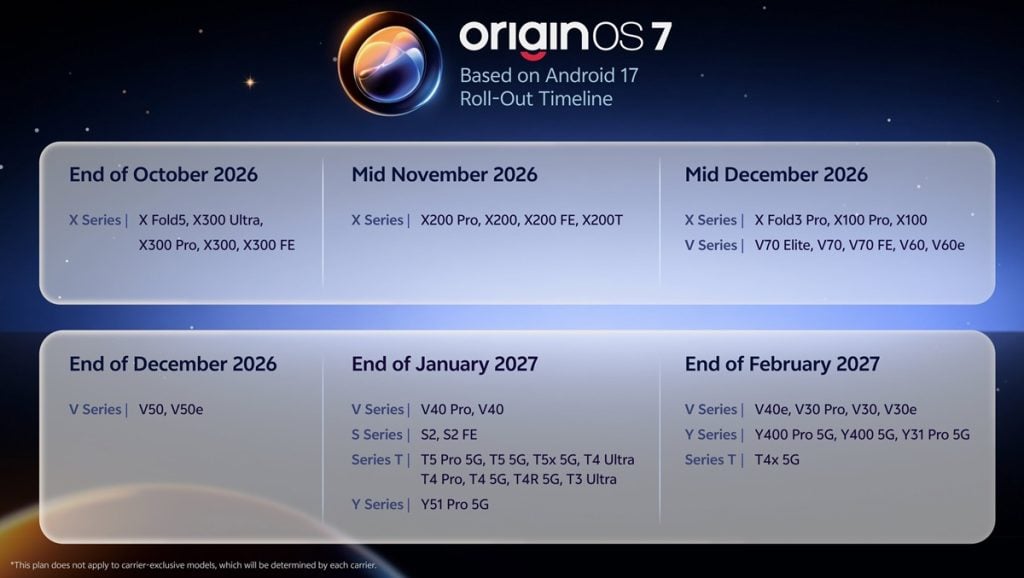
Surprisingly, there are no iQOO models on the list. Vivo usually includes them alongside Vivo devices in the timeline, but not this time. So, we can expect a separate timeline for iQOO devices pretty soon.
This rollout timeline is applicable to the Indian market, but other markets are likely to receive the update around the same time.
OriginOS 7: All the new features and major upgrades
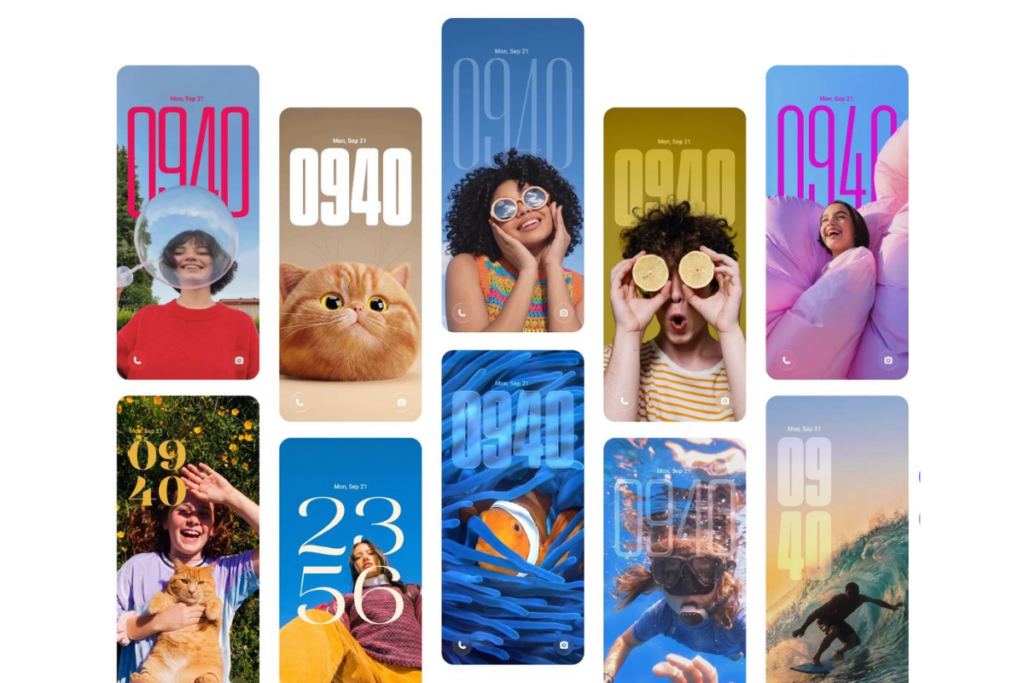
Design and personalisation
OriginOS 7 introduces Fluid Motion to make interface interactions feel elastic, tactile, and natural. The UI elements stretch, deform, and spring back with gestures across more than 200 scenarios, while Spring Animation dictates how the interface reacts dynamically to physical touch gestures. The update also brings Seamless Interaction that improves transitions between horizontal scrolling and vertical scrolling.
In terms of personalisation, OriginOS 7 adds Dynamic Glow that responds to interactions with lighting effects, promising to deliver an interface that feels alive. Dynamic Translucent Material adapts to the background in three styles: Realistic, Natural, and Soft. Immersive Home makes changes to icons and widgets between daytime and nighttime.
Vivo has added several new features to make the lock screen more fun and engaging. The Wiggle Theme feature enables wallpapers to wobble, spring, or ripple when the phone is shaken, and the AOD screen now displays information such as deliveries and flights.
Pat Pals Theme adds interactive companions, and Glint Theme changes iridescence, glitter, patterns, and light effects according to the viewing angle. OriginOS 7 also adds system-level stickers across supported experiences.
Essential AI upgrades
OriginOS 7 brings a powerful AI assistant, Jovi, for compatible Vivo phones and PCs. It can help you find information, read files, and distill key points. You can give commands on your phone to perform a task on your PC. It can also gather relevant news, compile reports on schedule, and save them to Notes.
Jovi has skills for document handling, content creation, and office assistance, which you can enable or disable anytime. You can also add custom skills and use the API of your preferred provider such as OpenAI or Anthropic.
Here’s a list of other AI upgrades to OriginOS 7:
- AI Recorder: Separates each speaker, generates highlights, provides AI insights, and multi-template summaries.
- Snap Note: Converts photos of whiteboard, paper notes, slides, and mind maps into editable notes. It can also help you arrange multiple captured pages in the correct sequence.
- Smart Call Assistant: It includes AI Call Answering that can answer calls and convert conversations into text, while Call Overview provides an AI-generated summary in the call log.
- AI Reader Mode: Makes text auto-fit your screen with more comfortable sizing and page transitions.
- AI Search: Searches across File Manager and Origin Notes using natural text description instead of exact file names.
- Snap & Go: Screenshot a flight, train, or bus details to add them to Google Calendar through Origin Island.
Performance, multitasking, and battery
OriginOS 7 adds a Snap-Up Engine that detects ticket-grabbing scenarios and tunes network and performance resources, so critical actions like tapping and paying run smoother to help you grab the ticket faster.
Vivo has adopted a new memory allocation and reclamation strategy, targeted optimisation for high-frequency scenarios in daily use, system-wide aging management, and reduced fragmentation. The company has validated sustained smoothness through a 72-month anti-aging test.
Key performance upgrades include:
- 10% shorter app cold start time
- 11% faster app page switching
- 60% faster memory reclamation
- 14.4% improved rendering efficiency
Origin Workbench enables seamless multi-tasking, allowing you to open multiple windows at once, with the ability to switch between tasks in a tap. The feature will be available on specific models with 12GB RAM or more, while compatibility depends on the app.
OriginOs 7 adds Battery Life Estimate that shows remaining usage time and estimated charging time. BlueVolt Smart Engine reduces power consumption by up to 25% during high-resolution Microsoft Teams video calls, while AI-based usage learning can extend battery life by up to 4% in the same scenarios.
When the device is standby and connected to a network, the device automatically switches to a more power-efficient mode to offer up to 26% longer connected standby. For gamers, Heterogeneous Computing reduces the graphics rendering power consumption by up to 20%.
Cross-ecosystem connectivity
OriginOS 7 integrates deeper support for select Apple products. For instance, select Apple Watch can display notifications and messages, with fitness and health data available through Origin Health. AirPods can now use Vivo’s Spatial Audio, while battery and connection status now appear on Origin Island. iCloud for web can now be accessed through Vivo File Manager.
Shake & Share supports one-to-many and cross-brand transfers of high-resolution, lossless photos without mobile data. And the Office Kit now supports Camera Sharing, Task Handoff, notes, file transfer, and cross-system file access.