Despite Samsung‘s negligible presence in China’s smartphone market, the South Korean tech giant has emerged as a key player in supplying memory chips to the country. A recent report reveals that Samsung exported $44.6 billion worth of chips to China in 2023, surpassing its exports to the United States, which stood at $42.1 billion. This marks a significant 53.9% year-over-year increase, driven by China’s economic stimulus policies aimed at boosting demand for newer devices.
China’s aggressive economic measures, which injected over $20 billion into the market, have spurred the replacement of older smartphones and home appliances with newer models. This has created a surge in demand for memory chips, which benefits suppliers like Samsung and SK Hynix.
It’s not Exynos—mostly memory chips and image sensors
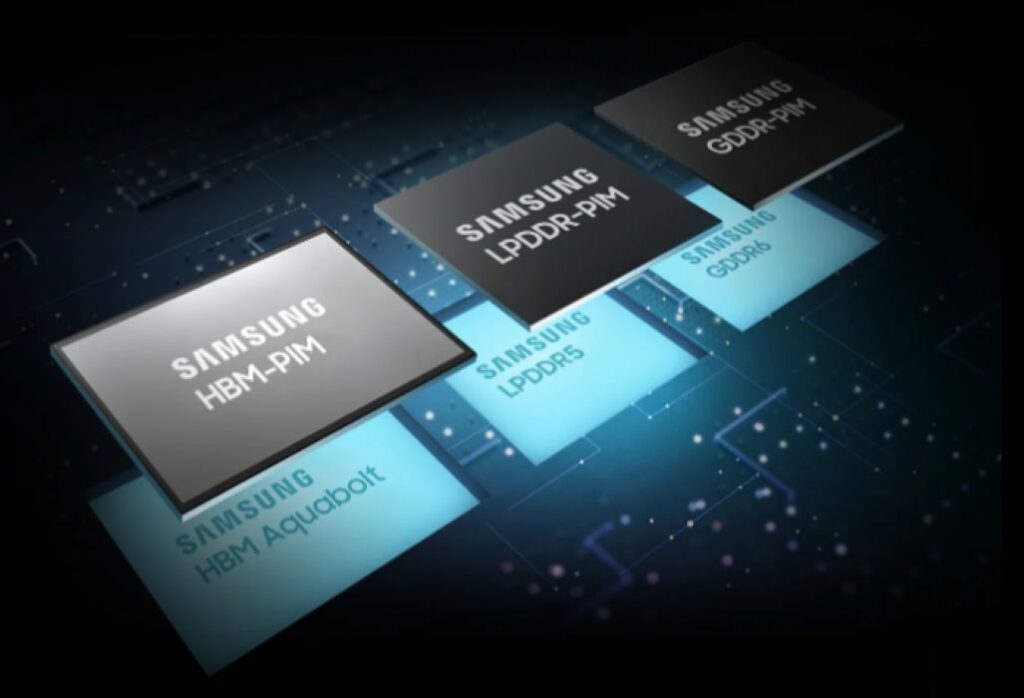
Samsung primarily supplies NAND flash, LPDDR memory, image sensors, and display driver ICs to China, along with some high-bandwidth memory (HBM) modules. The company has adopted a dual-track strategy, where it sells legacy memory products in China and advanced HBM modules in Western markets like the US.
Nonetheless, with Samsung making this information public, its growth in China could soon hit hurdles due to the ongoing US-imposed chip sanctions. These restrictions may prevent the company from selling some of its most advanced and lucrative memory products in China in the near future.
As the trade war between the US and China continues, industry analysts warn that these sanctions could expand, which will force Samsung and other memory manufacturers to navigate a delicate balance between the two economic superpowers. For now, Samsung remains a critical player in China’s tech supply chain, but the company’s future success will depend on how it adapts to the evolving geopolitical landscape.
Google is replacing Google Assistant with Gemini, an AI-powered assistant designed to enhance productivity and interactivity. The shift, driven by advancements in generative AI, aims to provide users with a more capable and adaptable assistant.
Over the coming months, the legacy Google Assistant will no longer be available on most mobile devices, with tablets, cars, wearables, and smart home gadgets (speakers, TVs) transitioning to Gemini later this year. The update follows positive feedback from users who have adopted Gemini’s upgraded features, including music playback, timer settings, and lock-screen controls—core Assistant functions now backed by generative AI.
Since its launch, Gemini has expanded to over 40 languages in more than 200 countries. Google is refining its functionality to match and exceed Google Assistant’s core features, including music playback, timers, and lock screen actions.
Beyond these basic functions, Gemini introduces AI-driven features such as Gemini Live for interactive, multimodal conversations and Deep Research for advanced information gathering. These tools extend Gemini’s capabilities beyond traditional virtual assistants.
Google is positioning Gemini as an evolution of digital assistance, integrating generative AI to improve user experience across devices. As the transition progresses, Google Assistant will continue to operate on supported devices until Gemini is fully implemented.
For more daily updates, please visit our News Section.
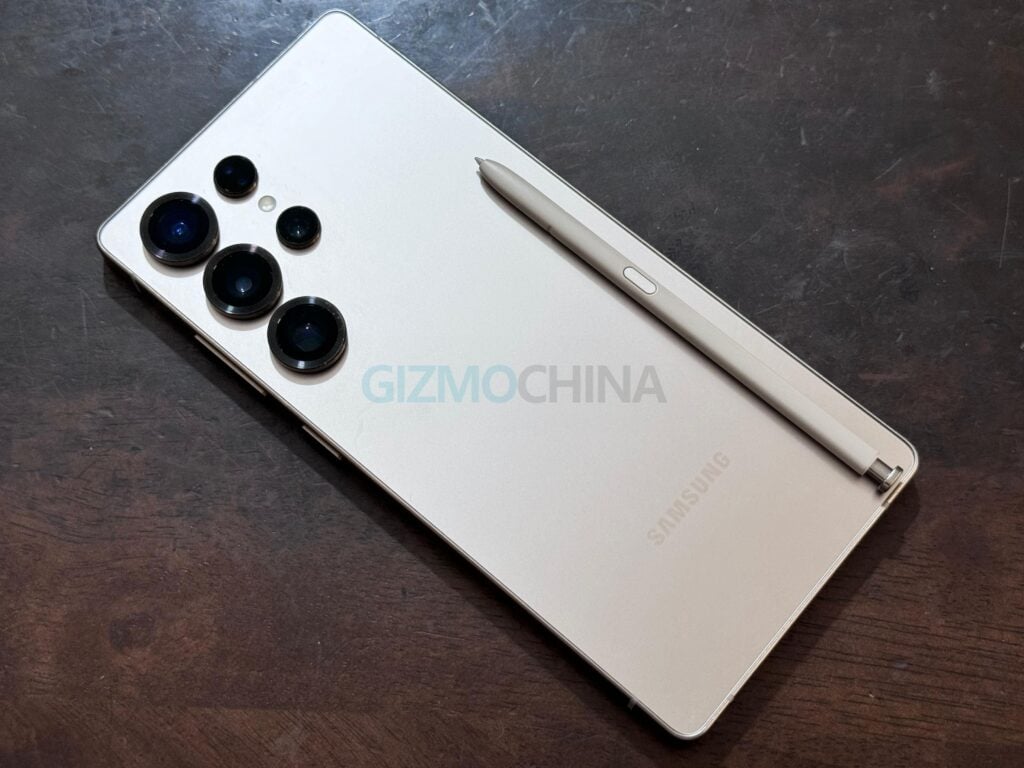
Samsung has a history of introducing innovative features in its smartphones, only to discontinue them later. However, one such feature—variable aperture—might be making a comeback with the upcoming Galaxy S26 Ultra.
Huawei Mate 50 Pro variable aperture
According to prolific leaker Ice Universe, Samsung is considering adding a variable aperture mechanism to the main camera of the S26 Ultra. For those unfamiliar, it adjusts the light intake based on the environment for optimal quality. As a biproduct, it also lets you control the background blur, while the brightness can be managed by adjusting the ISO. So for the users, it is a good thing to have as it adds some flexibility that helps in certain conditions.
Is Samsung finally prioritizing innovation again?
The Galaxy S9 and S9+ were one of the first smartphones to pack this feature, where the main camera could switch between two different aperture values – f/1.5 and f/2.4. The f/1.5 setting was ideal for low-light conditions, which allows more light into the sensor for brighter and less noisy images. On the other hand, the f/2.4 aperture was better suited for well-lit scenarios, which offers a wider field of focus. The f/2.4 or a similar setting is beneficial when you want to capture a closeup shot of a relatively larger object and you want the entire object to be in focus.
Samsung Galaxy S25 Ultra – S Pen
Although this variable aperture mechanism was carried over to the Galaxy S10 series, Samsung removed this feature starting with the Galaxy S20 series.
Later on, Huawei has adopted and improved the technology. The Mate 50 Pro, for instance, can adjust between f/1.4 to f/4.0 with a total of 10-stop range.
Now, rumors suggest that Samsung is planning to reintroduce it with the Galaxy S26 Ultra. But it remains unclear whether it will be a true variable aperture system (with multiple settings) or a dual-aperture setup like the one seen on the Galaxy S9.
In addition to the camera upgrades, the Galaxy S26 Ultra is expected to feature a couple improvements in other areas as well. The device is rumored to include a 50MP sensor for its 3x zoom telephoto camera, which builds on the 50MP telephoto and ultrawide cameras introduced in the Galaxy S24 Ultra and S25 Ultra, respectively.
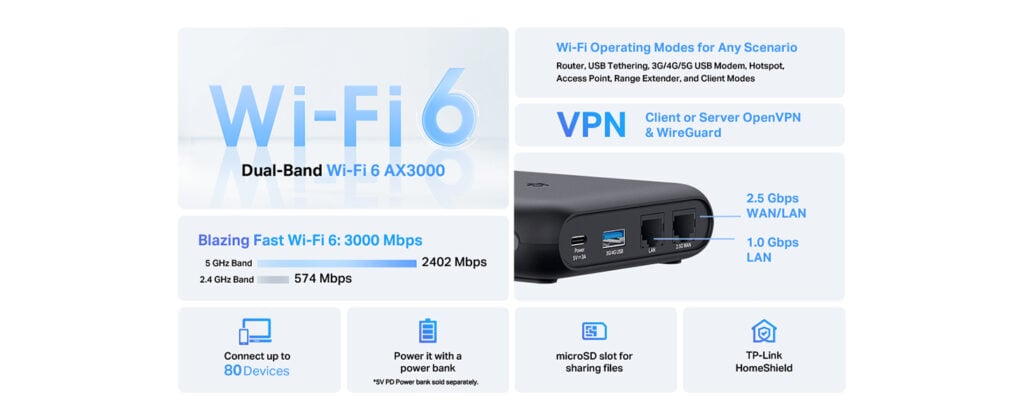
TP-Link has introduced the TL-WR3002X, its fastest Wi-Fi 6 travel router, designed for travelers and remote workers needing reliable, portable connectivity.
The dual-band router offers speeds up to 2402 Mbps (5 GHz) and 574 Mbps (2.4 GHz), optimizing streaming, gaming, and downloads. A 2.5 Gbps WAN port and 1 Gbps LAN port provide fast wired connections, while USB 3.0 and a 512GB microSD slot support file sharing and backups.
Security features include OpenVPN, WireGuard, PPTP, and L2TP VPN support, ensuring encrypted connections on public networks. The router also simplifies captive portal authentication through TP-Link’s Tether app, making logins at hotels, airports, and cafes more secure.
Designed for travel, the TL-WR3002X has a USB-C port compatible with power banks, laptops (PD/QC), or its included adapter. Its compact, durable build makes it suitable for frequent use, and Mesh support extends coverage when needed.
The Tether app allows quick setup, network management, and parental controls. TP-Link highlights its usefulness not just for travel but also for smart homes that require stable, high-speed connections.
Pricing & availability
The TL-WR3002X is now available on Amazon for $99.99, with a discounted price of $79.99 using the code 20WA3002.
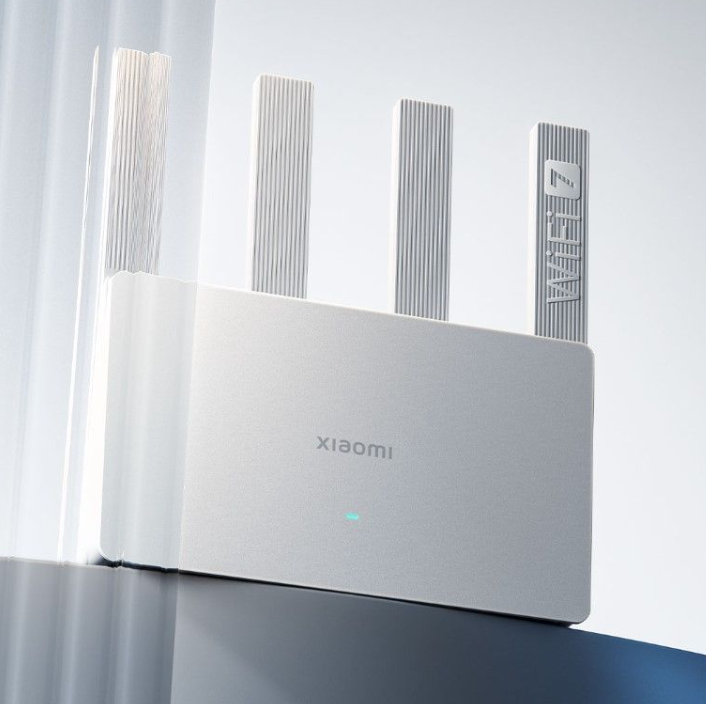
In other news, Xiaomi has launched the BE3600 WiFi 7 router in Europe for €64.99/PLN 299, available in Germany and Poland. It features dual-band WiFi 7 with up to 3.6 Gbps speeds, MLO dual-channel integration, and a 2.5 Gbps WAN/LAN port.
For more daily updates, please visit our News Section.
Xiaomi has officially introduced the BE3600 WiFi 7 router in Europe. Previously available in China and listed on Xiaomi’s global store, the router is now on sale in countries like Germany and Poland for €64.99/PLN 299. It is also listed on the Mi UK store but is not yet available for purchase there.
The BE3600 offers dual-band WiFi 7 with speeds up to 3.6 Gbps, supporting high-bandwidth activities such as 4K/8K streaming, AR/VR gaming, and large file downloads. The MLO dual-channel integration allows devices to connect to both 2.4G and 5G bands simultaneously, optimizing performance in high-interference environments.
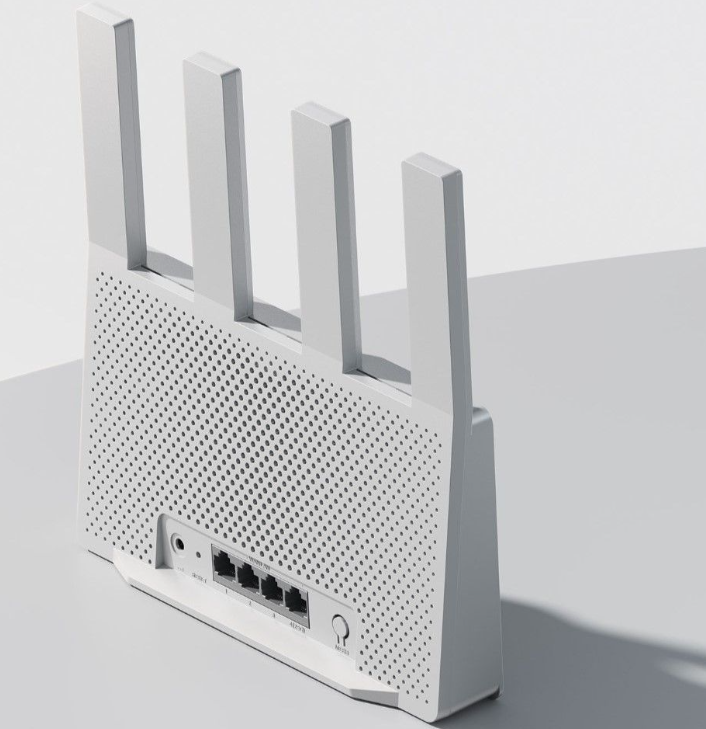
Connectivity includes a 2.5 Gbps WAN/LAN port and three 1 Gbps WAN/LAN ports, ensuring high-speed data transmission for multiple devices. Four external antennas with Beamforming technology enhance coverage and signal strength throughout the home.
Powered by a Qualcomm 4-core 1.1GHz processor, the router supports up to 128 devices simultaneously, maintaining stable performance for smart homes and heavy internet usage. Mesh support allows up to 10 Xiaomi/Redmi routers to form an extended network, ensuring seamless coverage across large spaces.
The BE3600 also integrates with Xiaomi’s smart home ecosystem, providing one-click networking for smart devices. Security features include parental controls, URL filtering, and protection against cyber threats, all managed via the Mijia App.
For more daily updates, please visit our News Section.
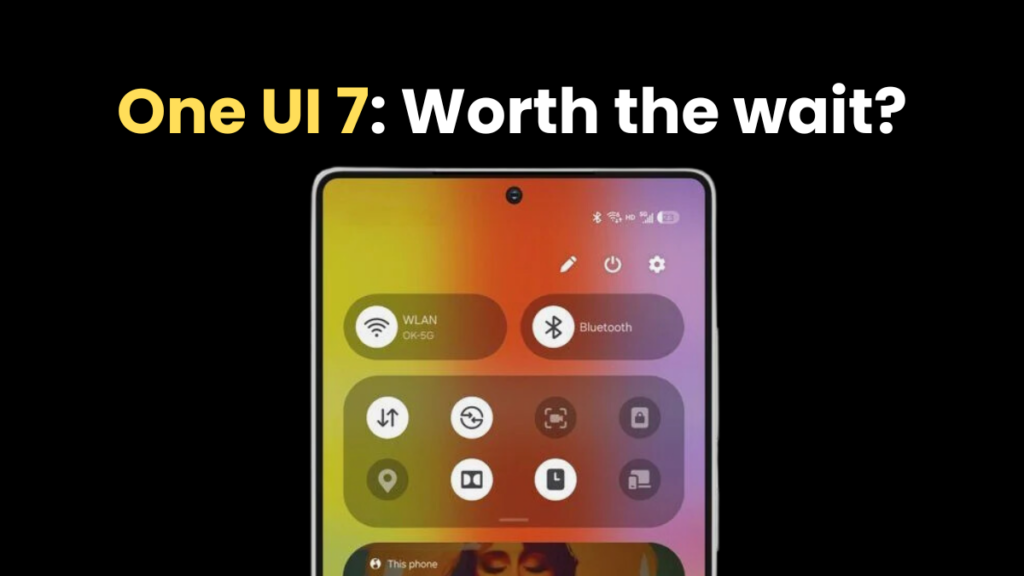
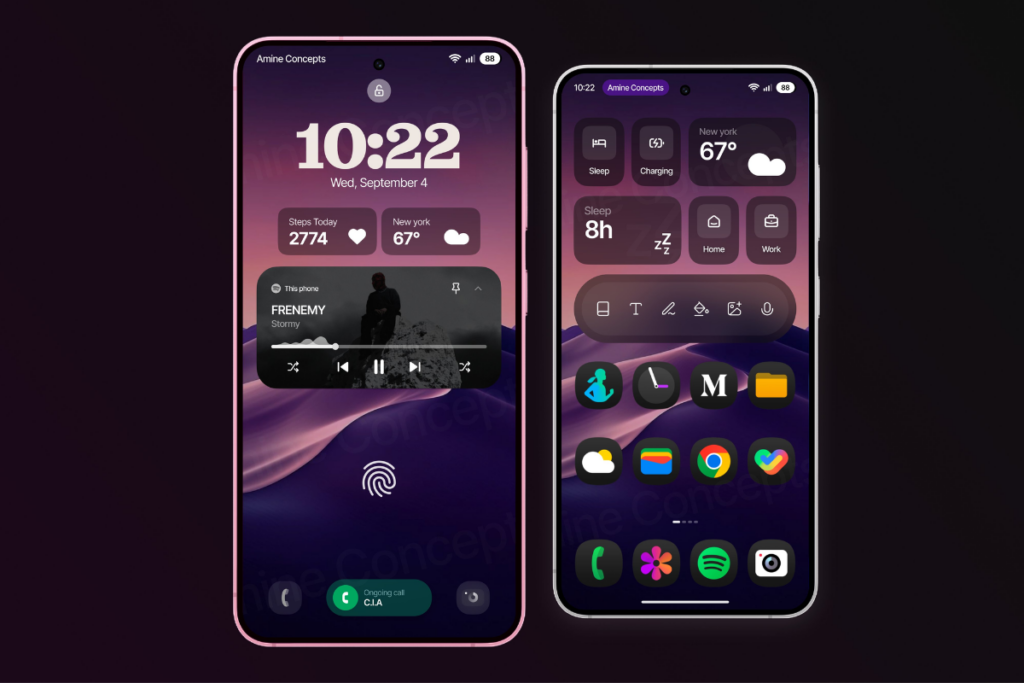
Samsung’s One UI is one of the most popular custom Android skins, offering a clean and smooth software experience with plenty of customization. Every new version brings a new set of features and improvements. However, the last few releases felt almost the same, as there weren’t significant visual upgrades. However, One UI 7 promises a major visual refresh, as well as many new features and dozens of improvements.
The One UI 7 software took longer than usual to cook in the oven. Samsung says it took more than two years on planning and development. However, the rollout has been sluggish so far. Not even a single Galaxy device has received the stable One UI 7 update yet. The stable rollout will begin in April. This significant delay makes people question if waiting for the One UI 7 update makes sense. Is One UI 7 just another upgrade with minor tweaks, or are there significant changes? The answer seems to be a yes because of these five reasons.
1. Significant visual redesign
One UI 7 is Samsung’s biggest visual redesign in recent years, giving users a fresh feel. The update brings bold aesthetics with vibrant, colorful app icons that look visually appealing. The animations feel smoother throughout the interface, creating a fluid experience when switching apps and multitasking.
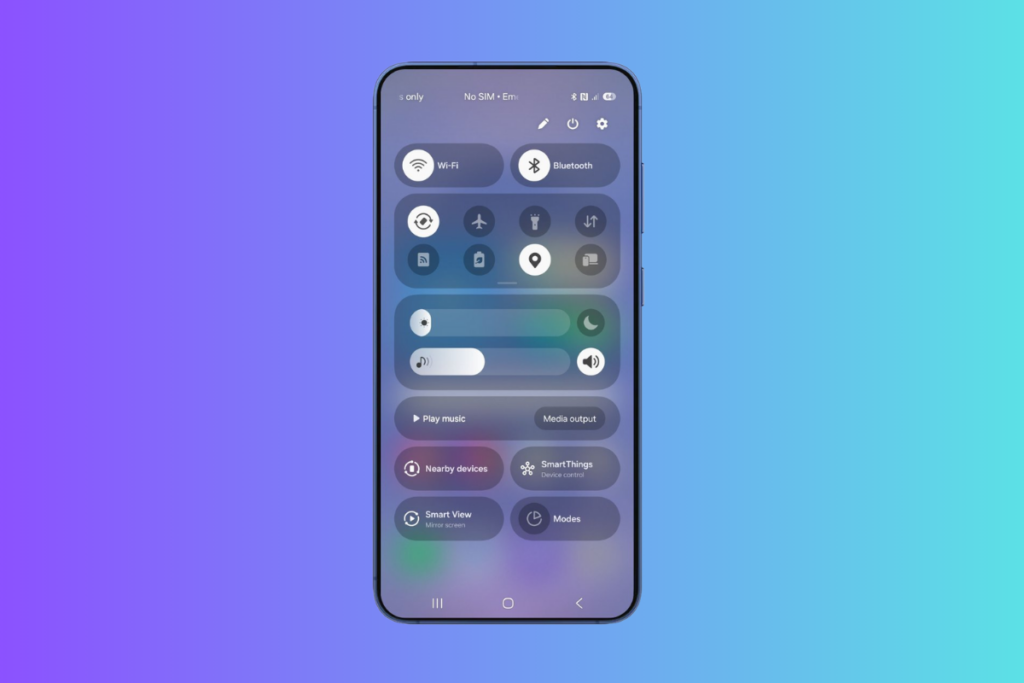
Samsung has separated the notification panel and Quick Settings for easier access—swiping down from the left reveals the notification panel, and the other side opens the Quick Settings. You can reverse the change at any point, though. The notifications themselves have been upgraded to a pill-shaped design and increased size, making them easier to look at and interact with.
Perhaps the most innovative addition is the new “Now Bar” — a pill-shared dynamic element that appears at the bottom of the lock screen and provides quick access to ongoing activities, such as music playback, timers, and navigation updates. This interactive element reduces the need to switch between apps for common tasks.
One UI 7 also brings new charging animations that look cool and enhance the visual experience. In an unlocked state, the device uses the Now Bar to display the charging status and battery level, and when it’s locked, the battery icon turns green and shows a “Charging” text when connecting the charger.
There are many more visual changes that contribute to a more interactive and enjoyable software experience.
One UI 7 takes customizations to new heights with new options and improvements throughout the interface. It brings many new widgets that can be customized in many ways to give your home screen a new look.
Speaking of the home screen, it now includes the Home Up options for additional customizations without the need for a separate app. The latest One UI skin lets you add stickers on the home screen and supports free-form layouts, breaking away from grid layouts.
The lock screen has also been updated for improved personalization. There are new clock designs with more control over their placement and sizing. The update also brings new widgets for the lock screen for a more personalized experience. You can also customize the two shortcuts at the bottom.
You can also rearrange the different segments and widgets any way you want. Just hit the pencil icon at the top to go into the editing mode. The brightness and volume slider position can’t be changed, though.
3. Advanced Galaxy AI integration
One UI 7 expands AI capabilities that make Galaxy devices smarter and more helpful than before. The Writing Assist now works across the UI and with any keyboard (previously restricted to Samsung Keyboard). This enables seamless text improvisation on the go without needing to switch the keyboard or the app.
With One UI 7, Samsung has introduced automatic call transcripts in 20 different languages. When call recording is enabled, the device automatically creates a transcript of the conversation, so you don’t need to manually note important details from the conversation.
There’s also an AI audio eraser that improves the audio quality of videos by removing unwanted background sounds. The object eraser tool now also works with videos. It lets users select and remove unwanted objects from video frames.
One UI 7 also introduces Now Brief, which can analyze your habits to present relevant information and suggest helpful actions. Since it requires extensive on-device processing, Samsung might not bring it to less-powerful devices.
4. Cleaner Camera UI
The Camera app in One UI 7 looks less cluttered and provides easier access to controls. The top menu now has fewer options, while the remaining controls are hidden inside an expandable button.
The camera modes have moved below the shutter button, making switching between photo, video, and other modes easier. Another essential addition is a zoom slider in the Pro Video mode.
Samsung has also added an “Audio playback” feature that lets users record videos while playing music in the background. This could be particularly useful for creating dance or lip-sync videos.
5. Essential improvements
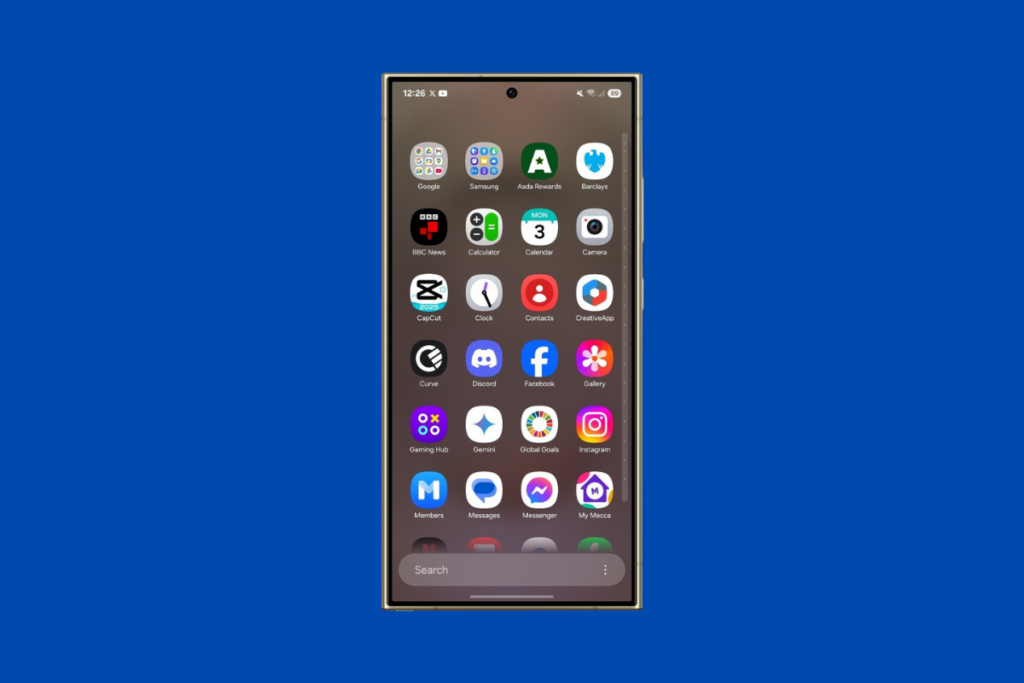
One UI 7 brings plenty of other changes, but there are some you should know about. First is the vertical app drawer — yes, it’s here, finally. You can now scroll in a single motion with a sidebar that lets you jump directly to specific letters to find apps even faster.
You can go back to the old horizontal layout anytime, but with how intuitive and effortless the new design feels, I doubt many will want to. Samsung has also improved the existing multitasking feature for better productivity.
One UI 7 brings new battery protection modes to optimize battery health. Samsung phones also get the app archiving feature to save some storage by uninstalling the app while keeping the user data around. Although it’s an Android 15 feature, it can be a reason to upgrade to the newest software.
Whether you like visual upgrades, personalizing your phone with new customizations, or using AI to make things easier, there are a host of new features and improvements to look forward to. Which One UI 7 feature are you excited for the most? Share your thoughts in the comments below.
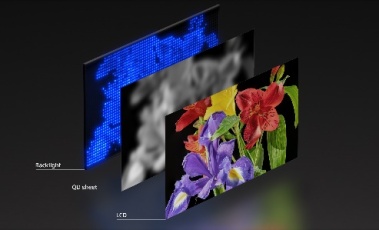
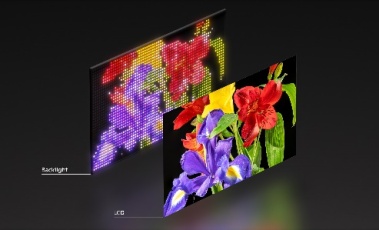
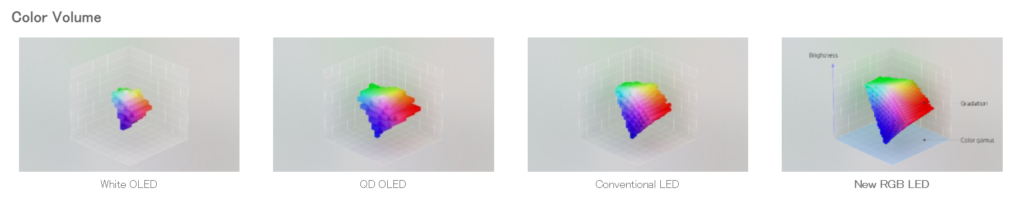
Sony has introduced a new display system with an independent RGB LED backlight, allowing separate control of red, green, and blue light. This enhances color accuracy and vibrancy, making it suitable for both film production and home entertainment. The technology, designed for large screens, uses high-density LEDs and proprietary backlight algorithms to achieve precise color gradations.
Conventional LED backlight systemNew independent drive RGB LED system
Mass production is set for 2025, with plans to integrate the system into consumer TVs and professional monitors. It builds on Sony’s RGB LED innovations dating back to 2004 and features a 99% DCI-P3 and 90% BT.2020 color gamut coverage. Peak brightness exceeds 4,000 cd/m², matching Sony’s professional-grade displays. It also has a 96-bit signal processor that ensures deep blacks, bright whites, and improved mid-tone saturation compared to OLED technology.
A key feature is scene-specific dynamic power allocation, which adjusts luminance for each RGB channel without overemphasizing highlights. This helps maintain smooth color transitions in uniform scenes like skies or foliage. A dense backlight structure and a dedicated control processor—twice as powerful as standard systems—prevent details from being lost in bright highlights or dark shadows.
Sony partnered with MediaTek for the control processor, ROHM for LED drive ICs, and Sanan Optoelectronics for LED components. This technology is designed for professionals who need precise color grading and for everyday users who want theater-quality visuals at home. It fits within Sony’s dual focus on high-end production tools, like BRAVIA reference monitors, and mainstream entertainment.
For more daily updates, please visit our News Section.
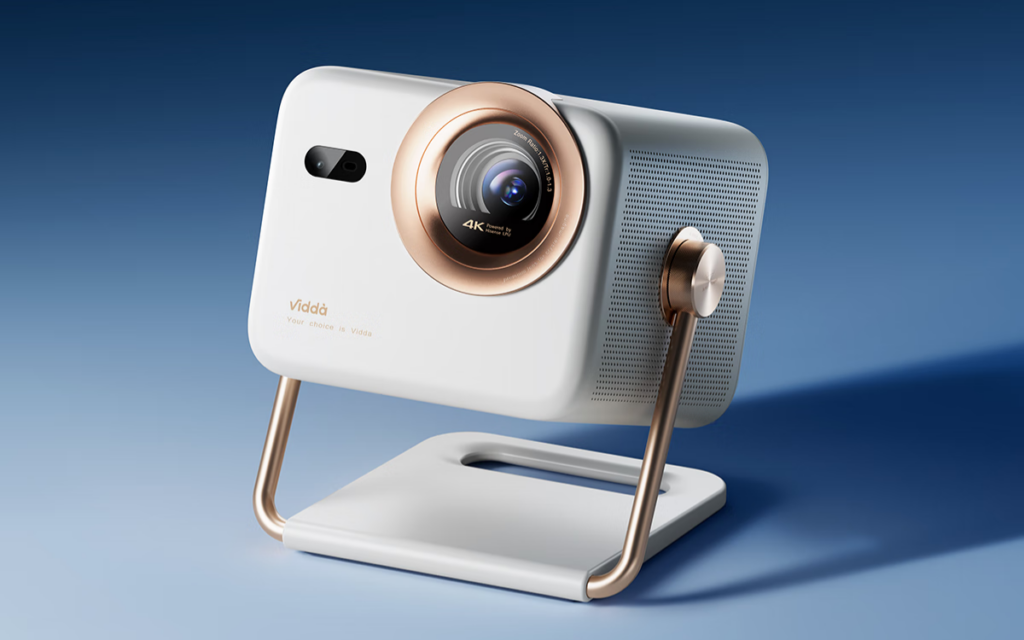
Vidda, a sub-brand of Hisense, just dropped its latest smart projector, the M2 Pro, and it’s packing some impressive tech. The big claim? It’s the first 4K tri-color laser projector with 1.3x optical zoom, meaning you get true 4K visuals without the usual pixel shifting or quality loss. Priced at 4,599 yuan (around $635), it’s now up for pre-sale on JD.com.
Hisense Vidda M2 Pro Specifications
The M2 Pro is built around the Hubble optical zoom lens, featuring a 1.0-1.3:1 throw ratio, which means you can get a 100-inch screen from just 2.2 meters away without sacrificing resolution. It features a 10,000:1 contrast ratio and 110% BT.2020 color gamut that promise deep blacks and accurate colors, making it a solid pick for home theaters.
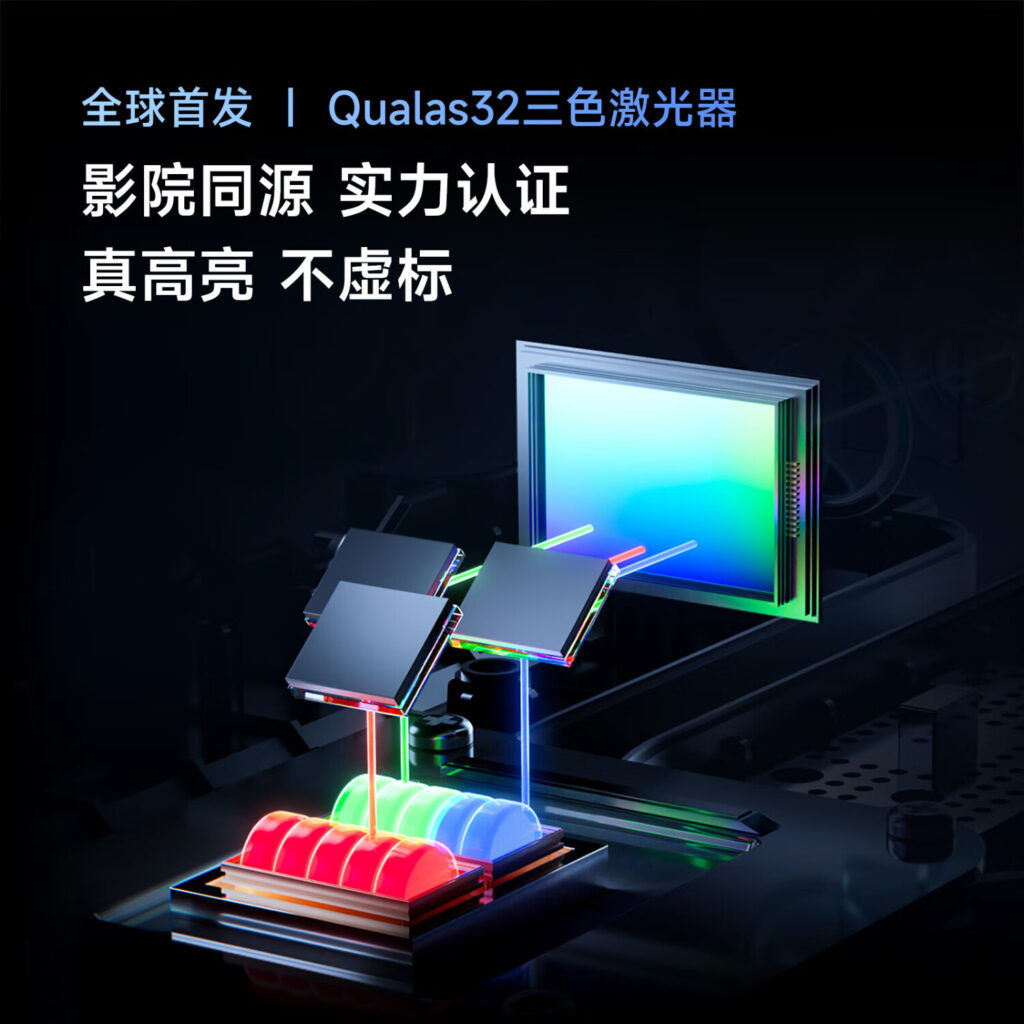
Under the hood, Vidda is using its Qualas32 tri-color laser engine, which it claims outperforms LED and hybrid laser projectors in brightness and efficiency. It also features a 0.47-inch DMD chip for smooth visuals and 1200 CVIA lumens brightness, which should hold up well even in well-lit rooms.
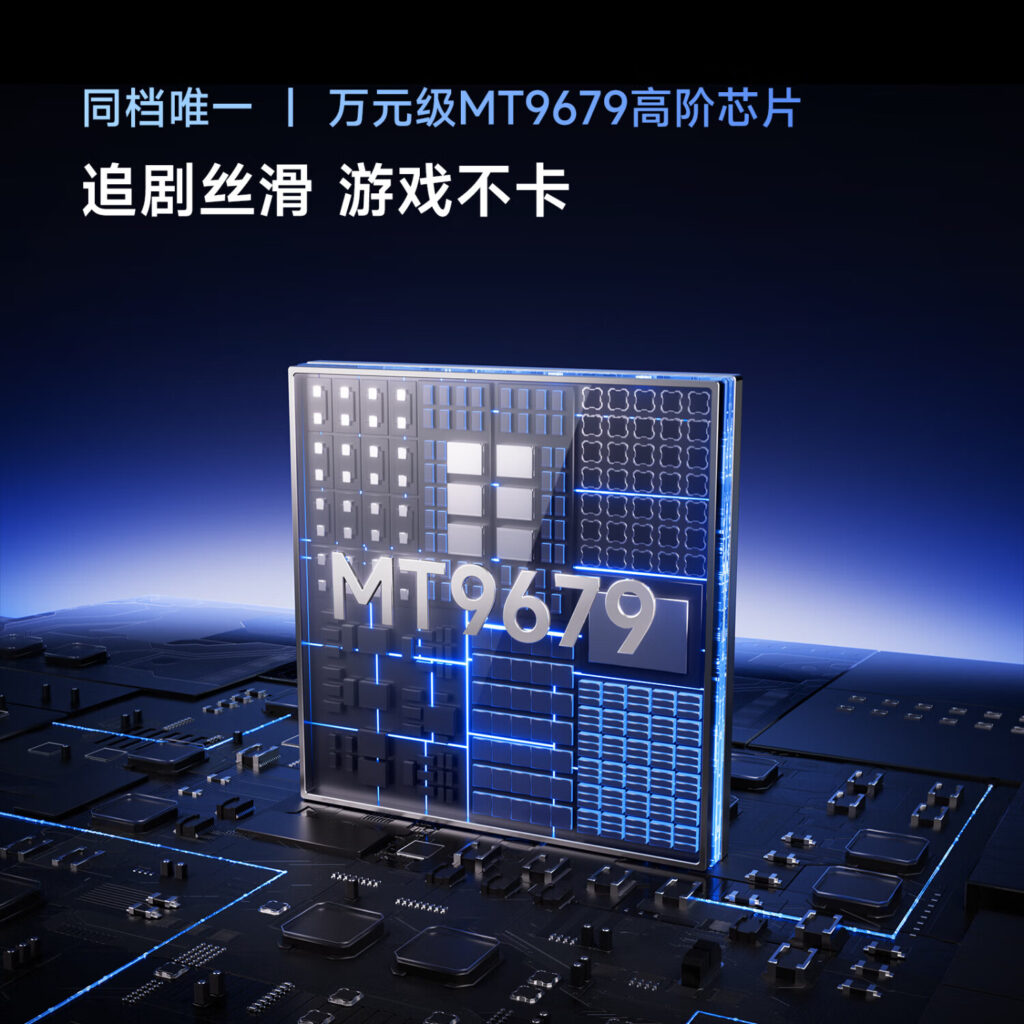
Powering the M2 Pro is MediaTek’s MT9679 chipset, paired with 4GB of RAM and 32GB of storage, ensuring smooth performance across apps and media. But where this projector really stands out is gaming. It has an HDMI 2.1 port that supports a 240Hz refresh rate, ALLM (Auto Low Latency Mode), and low input lag, making it one of the better options for console or PC gaming on a big screen. There’s also a USB 3.0 port for fast data transfer and external storage support.
Vidda isn’t skimping on audio either. The M2 Pro comes with a four-unit dual-frequency Hi-Fi speaker system with dedicated high and low-frequency separation, supporting Dolby and DTS audio formats for an immersive surround sound experience. It’s also TÜV Rheinland-certified for “Zero Harmful Blue Light”, which should make long movie nights a little easier on your eyes.
For smart functionality, it’s got an AI-powered DeepSeek assistant for voice control, auto keystone correction, and real-time content recommendations. It even has a 360° cloud-based gimbal system for flexible placement, plus a wall color adaptive feature to tweak color accuracy based on your projection surface.
The M2 Pro isn’t just a stay-at-home projector, it’s designed for easy transport, featuring a built-in handle and an EPP storage case. It also supports Android and Apple screen mirroring, along with TV pushcasting for seamless connectivity.
For movie lovers, it’s got Filmmaker Mode, HDR10+, and HLG support, plus AI-SR upscaling to boost lower-resolution content to near-4K quality. It also features an AI Game Mode that tweaks settings like color temperature and response times based on the game you’re playing.
For more daily updates, please visit our News Section.
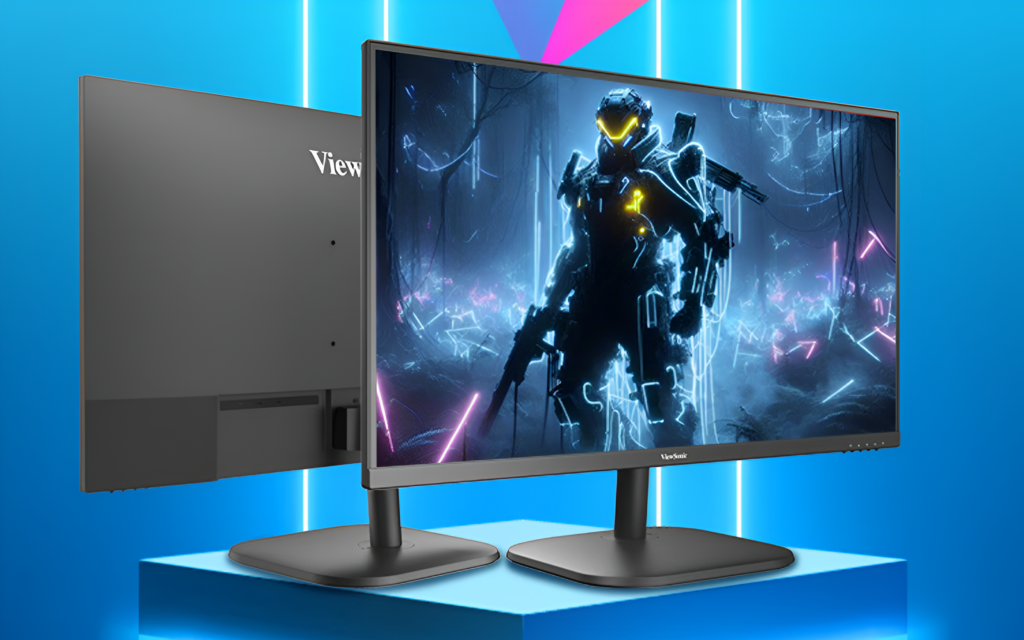
ViewSonic has launched a new 144Hz gaming monitor called VA27G25 in the Chinese market. The monitor is priced at 549 yuan ($75) and is now available on JD.com. Let’s check out its key specs.
ViewSonic VA27G25 Specifications
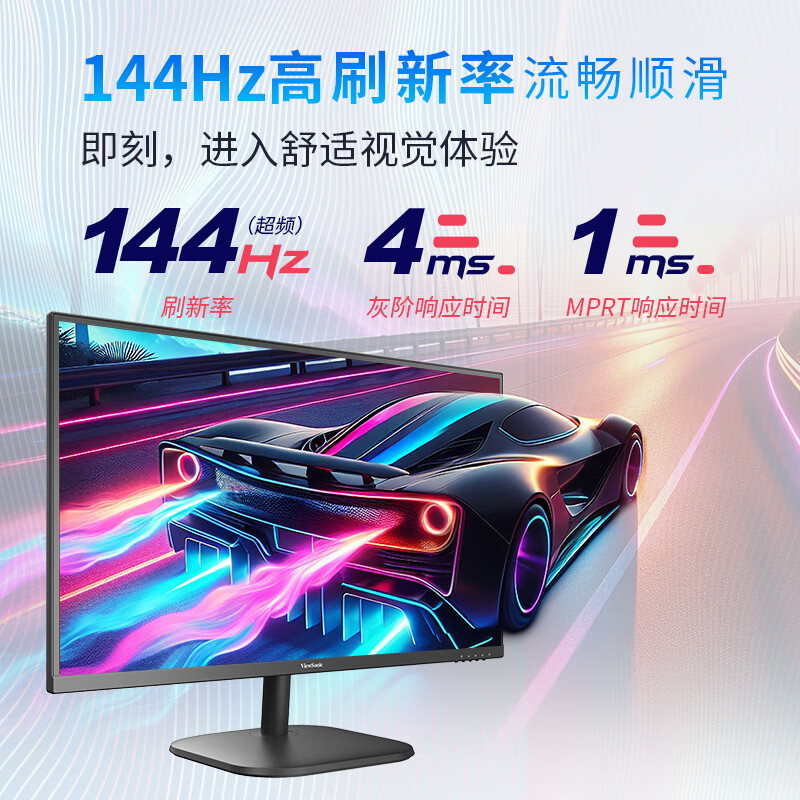
The monitor comes with a 27-inch IPS panel with a resolution of 1920×1080 pixels, ensuring crisp and clear visuals. The display supports a native refresh rate of 120Hz, which can be overclocked to 144Hz for even smoother motion. This high refresh rate significantly reduces motion blur, screen tearing, and lag, making it an excellent choice for gamers and professionals who require a fluid display.
The monitor comes equipped with a 4ms GtG and 1ms MPRT response time, ensuring fast pixel transitions that eliminate ghosting and motion artifacts. Additionally, it sports a high static contrast ratio of 1500:1, enhancing depth and detail in images.
The display also offers 400 nits of peak brightness and 99% sRGB coverage, providing vibrant colors and clear visibility, making it ideal for content creation and media consumption.
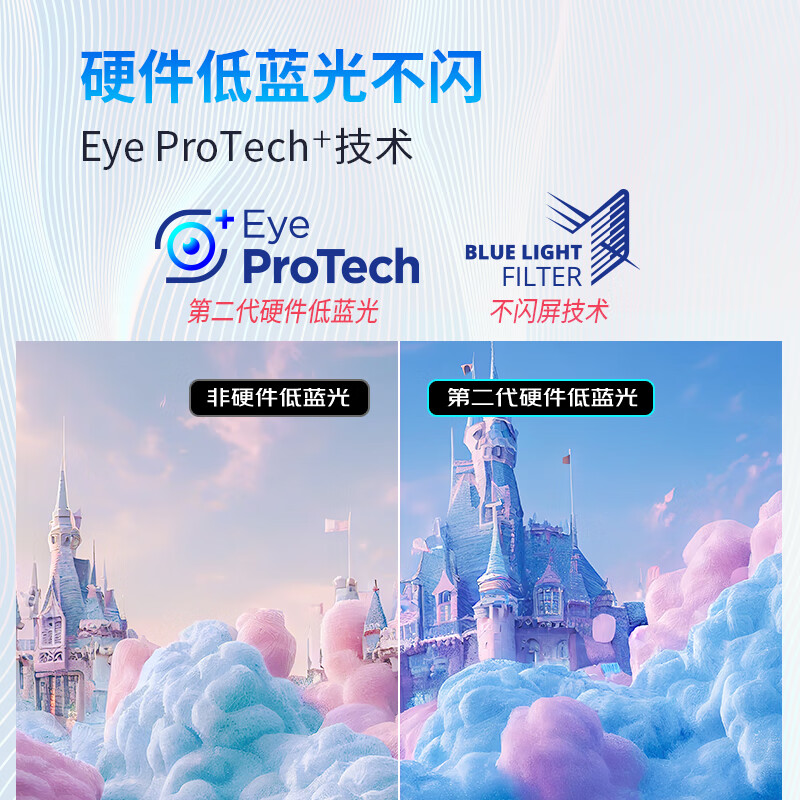
To protect users’ eyes during extended usage, the VA27G25 is equipped with second-generation hardware-level low blue light technology. Unlike traditional software-based solutions, this feature reduces harmful blue light exposure by keeping it below 40% while maintaining natural color accuracy.
The monitor also incorporates flicker-free technology, replacing traditional PWM dimming with DC-controlled brightness adjustments to minimize screen flicker, reducing eye strain and fatigue.
The monitor sports a modern design with a slim bezel, allowing for seamless multi-monitor setups. It supports VESA mounting (100mm x 100mm), making it easy to wall-mount or attach to monitor arms for ergonomic flexibility.
It also offers multiple connectivity options, including one VGA port (supporting FHD at 75Hz) and one HDMI 1.4 port (supporting FHD at 144Hz in overclocked mode).
In related news, we reviewed the Mobile Pixels Duex Float, a 15.6-inch stacked touchscreen monitor that enhances productivity with its vertical design. While versatile, its weight and display quality may not be ideal for frequent travelers. Read our full review here.
For more daily updates, please visit our News Section.
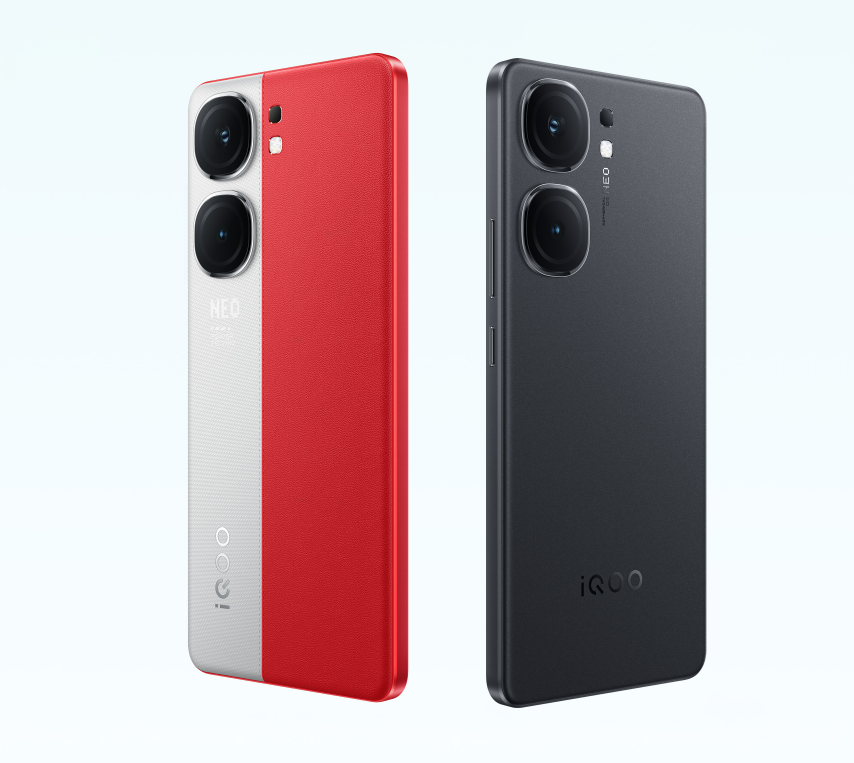
iQOO is a known brand that makes smartphones with cutting edge hardware at a reasonable price tag. Two great examples of this are the iQOO Neo 10R and iQOO Neo 9 Pro. But which one is a better affordable flagship and which offers better value? Read on to find out.
Considering both of these devices are affordable flagships, the Chinese brand skips a metal frame in favor of a plastic one for the design. But for those looking for a more premium build quality, the Neo 9 Pro features a glass or vegan leather rear panel. Meanwhile, the Neo 10R has a plastic back. However, the iQOO Neo 10R fires back with an IP64 rating for protection against dust and low pressure water jets. The iQOO Neo 9 Pro only offers an IP54 rating for dust and splash resistance.
On the front, both models sport a tall 6.78-inch AMOLED display (LTPO on the Neo 9 Pro) with an FHD+ resolution, a 144Hz refresh rate and HDR10+. The Neo 10R has a brighter peak brightness of 4500 nits, while the Neo 9 Pro maxes out at 3000 nits. So you can expect a similar visual experience on both models for the most part.
2. Specifications
iQOO Neo 10R
There are plenty of differences between the iQOO Neo 10R and Neo 9 Pro in terms of specs and features. One of these is the chipset with the iQOO Neo 9 Pro packing the Snapdragon 8 Gen 2 SoC. While the Neo 10R has a newer Snapdragon 8s Gen 3 chipset, the performance on the Snapdragon 8 Gen 2 matches if not slightly surpasses the 8s Gen 3.
A sizeable 5,160mAh battery pack powers the Neo 9 Pro, which supports an impressive 120W wired fast charging. However, the iQOO Neo 10R offers a major upgrade with a massive 6,400mAh cell, although it only supports 80W wired fast charging. The duo feature a 50MP (Main) + 8MP (Ultra Wide) dual camera setup on the rear. For selfies and video calls, the Neo 10R has a 32MP shooter and the Neo 9 Pro packs a 16MP sensor. It is worth noting that iQOO’s Neo 9 Pro offers 8K recording at 30fps (Neo 10R maxes out at 4K recording).
3. Pricing & Verdict
The iQOO Neo 10R is a newer smartphone from the brand, which debuted in India with a ₹26,999 starting price tag for the 8GB+128GB variant. On the other hand, the iQOO Neo 9 Pro is currently selling for ₹31,998 for the 8GB + 128GB option. It typically sells for ₹34,999, but the device is currently on sale.
So depending on your preferences, you won’t go wrong with either model. The iQOO Neo 9 Pro is a more rounded option with a better design and capable performance. However, the iQOO Neo 10R is more affordable and will offer longer software support.
For more daily updates, please visit our News Section.
An upcoming Samsung flagship phone might have just confirmed its Indian launch. The model in question is the Galaxy S25 Edge, which is expected to feature premium specs with an ultra slim and sleek design. Now, a possible certification sighting might have confirmed its Indian release.
Samsung Galaxy S25 Edge India Launch Near
The South Korean tech giant’s Galaxy S25 Edge may have just surfaced on the BIS database (Bureau of Indian Standards). Samsung’s upcoming smartphone was seen carrying the SM-S937B/DS model number. While the exact moniker wasn’t revealed, it might be the upcoming Galaxy S25 Edge (Via 91Mobiles). Furthermore, the DS at the end confirms the dual SIM support as well. Since the actual name has yet to be confirmed, take this report with a pinch of salt for now.
Samsung Galaxy S25 Edge
Just a couple of days ago, the Galaxy S25 Edge had its pricing and dimensions leaked. The device may measure just 5.84mm in thickness and weigh around 162 grams, while its pricing could start from 999 US Dollars. Basedon earlier reports, Samsung may launch this smartphone sometime in April 2025. The Galaxy S25 Edge is rumored to feature a 6.6-inch AMOLED display with a 120Hz refresh rate and a peak brightness of 1,600 nits. Under the hood, it could pack the Snapdragon 8 Elite for Galaxy.
For photography, the phone is said to house a dual-camera setup that includes a 200-megapixel primary sensor and a 12-megapixel ultra-wide lens. On the front, it may pack a 12-megapixel shooter for selfies and video calls. A 3,900mAh battery pack could power this model, which may support 25W wired fast charging.
For more daily updates, please visit our News Section.
Tecno could be gearing up to launch the Spark 40 series of smartphones soon. The new models surfaced on a certification platform ahead of any official announcement from the company. The Tecno Camon 40 series just made its global debut earlier this month, so here’s what we know about the upcoming Spark 40 series.
Tecno Spark 40 Series Spotted on EEC
The smartphone maker’s Tecno Spark 40, Spark 40 Pro, and Spark 40 Pro+ were seen on the EEC database, carrying the KM5, KM6, and KM7 model numbers respectively (Via TheTechOutlook). Unfortunately, the listing on EEC does not reveal any finer details regarding the upcoming Spark 40 series like their specs, pricing, or design. However, it does hint that Tecno could release these devices in the market soon.
Tecno Spark 30 Series
The certification also confirms the new Spark 40, Spark 40 Pro, and Spark 40 Pro+ moniker. As the name suggests, the Spark 40 lineup is the direct successor to the Spark 30 series, which includes the Spark 30, Spark 30 Pro, Spark 30 5G, and Spark 30C 5G. While the first two models are returning on the Spark 40 lineup, the Spark 40 Pro+ is a new high end variant.
This is all the information we have at the moment, so stick around for more. In related news, the Camon 40 series was unveiled alongside a bunch of new products. This includes the new Megabook S14, Megabook K15S, and Megabook T14 Air laptop models. There is also the Tecno Watch GT 1 smartwatch and Tecno true 2 TWS earbuds as well.
For more daily updates, please visit our News Section.
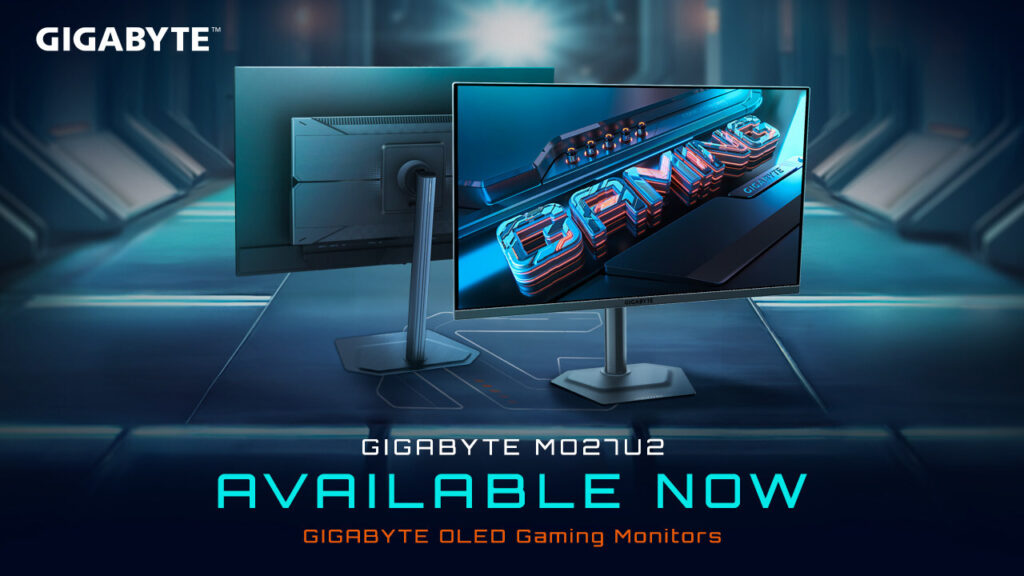
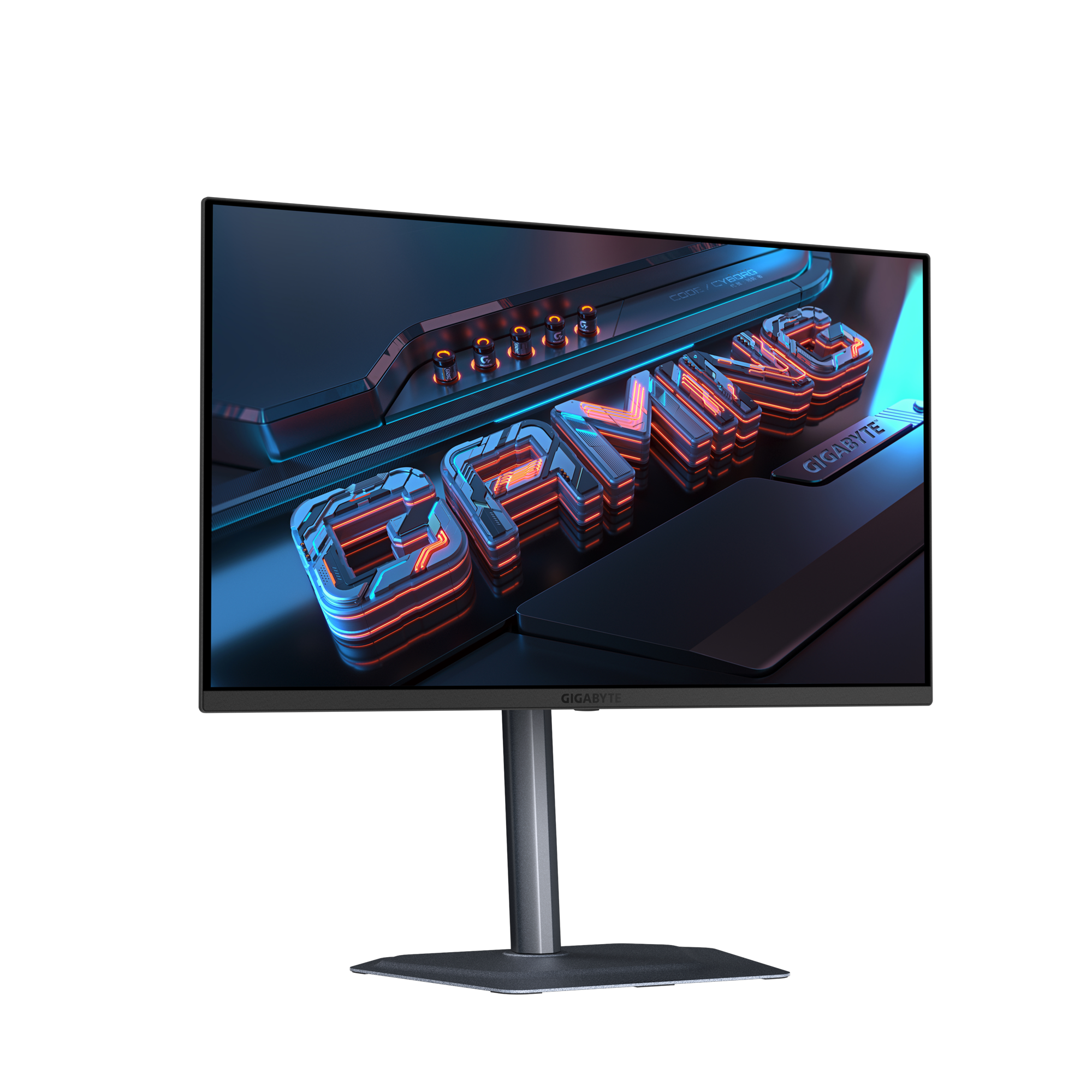
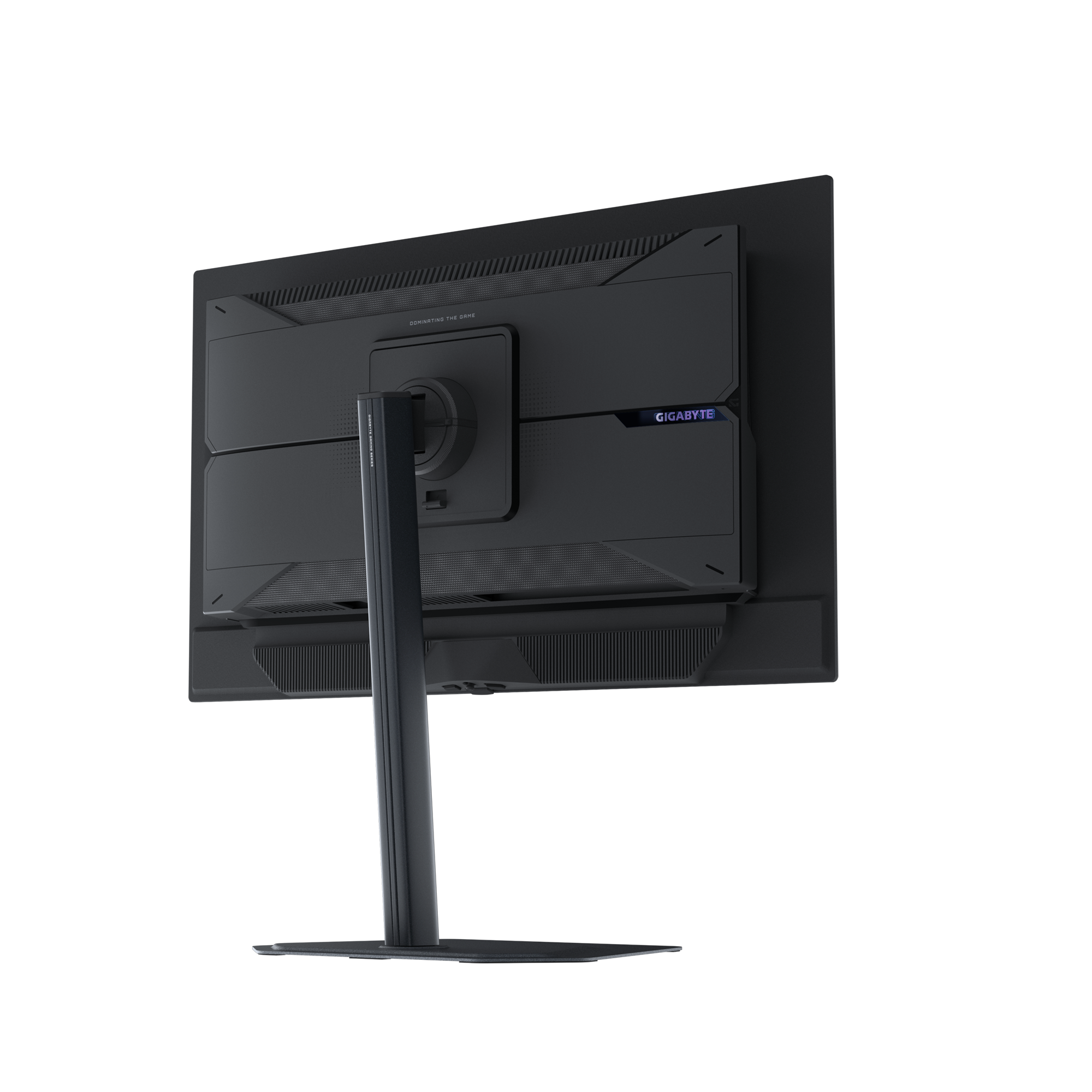
GIGABYTE has released the MO27U2 QD-OLED gaming monitor, a 27-inch 4K 240Hz display designed for gaming and general use. It features Tandem OLED panel technology, 166 PPI resolution, and Graphene Thermal Film to help with heat management and durability.
GIGABYTE MO27U2 4K 240Hz QD-OLED Gaming Monitor Hits the Market
The monitor supports NVIDIA G-Sync and works with GeForce RTX 50 Series GPUs featuring DLSS4. It has a 0.03ms GTG response time for minimal input lag. Its color accuracy is validated with Pantone certification, a delta E≤2 rating, and 99% DCI-P3 color gamut coverage. The VESA DisplayHDR True Black 400 rating enhances contrast and deep blacks.
GIGABYTE includes several features to improve gameplay. Tactical Switch 2.0 allows quick resolution adjustments, Ultra Clear reduces motion blur, and Black Equalizer 2.0 enhances visibility in dark scenes. VRR Anti-Flicker helps stabilize refresh rates to minimize flickering.
To maintain performance over time, the MO27U2 uses Graphene Thermal Film and a four-way airflow design. The built-in GIGABYTE OLED Care system helps prevent burn-in.
For connectivity, the monitor offers two HDMI 2.1 ports, a DisplayPort 1.4, a USB Type-C with power delivery, USB 3.2 ports, and a 3.5mm headphone jack. It also includes built-in 5W speakers. The ergonomic stand supports tilt, swivel, pivot, and height adjustments, with VESA compatibility for mounting.
The MO27U2 is designed for gamers, streamers, and creatives who require both high performance and color accuracy. It is available for purchase in the US and EU through multiple retailers, including Amazon, with a price of $682.56 in the US and €614.10 in Germany.
For more daily updates, please visit our News Section.
Samsung seems to be planning a new color variant for its Galaxy S25 Ultra. The company just teased that it is working on a new dark color option for this top flagship model on its official X (formerly Twitter) in India. So here’s what we know.
Samsung Galaxy S25 Ultra Arriving in a New Color Soon
The South Korean tech giant’s tweet shared a collage of products with a glossy look and a black color scheme. The tweet reads “Get ready to embrace a while new shade of style!” Samsung already sells the Galax S25 Ultra in a Titanium Black color option, but this Dark option could have a darker hue and possibly a glossy finish on the rear. To recall, the premium device also comes in Titanium Silver, Titanium Gray, Titanium Silver Blue, Titanium Jet Black, Titanium Jade Green, Titanium Pink Gold, and Titanium White Silver.
Unfortunately, it is still unclear what the color could look like or what it’s called. But we can expect new teasers or an official announcement to surface in the region soon. Talking about the smartphone itself, Samsung is likely launching this new Galaxy S25 Ultra variant with the same specs as the other color versions. So the device would still sport a tall 6.9-inch Dynamic LTPO AMOLED 2X display with a 2K+ resolution, a 120Hz refresh rate, and 2600 nits of peak brightness.
Under the hood, the Galaxy S25 Ultra is equipped with the Snapdragon 8 Elite SoC. For photography, the rear has a 200MP (Main) + 10MP (Telephoto) + 50MP (Periscope Telephoto) + 50MP (Ultra Wide) quad camera setup while the front has a 12MP selfie shooter. A large 5,000mAh battery pack powers this model, which supports 45W wired fast charging and 15W wireless charging.
For more daily updates, please visit our News Section.
I’ve always been a big fan of dual-screen setups. Whether I’m writing, researching, or just keeping X (formerly Twitter) open on the side while I work, an extra screen makes life so much easier. But when I’m working from a coffee shop or traveling, carrying around an extra monitor just isn’t practical.
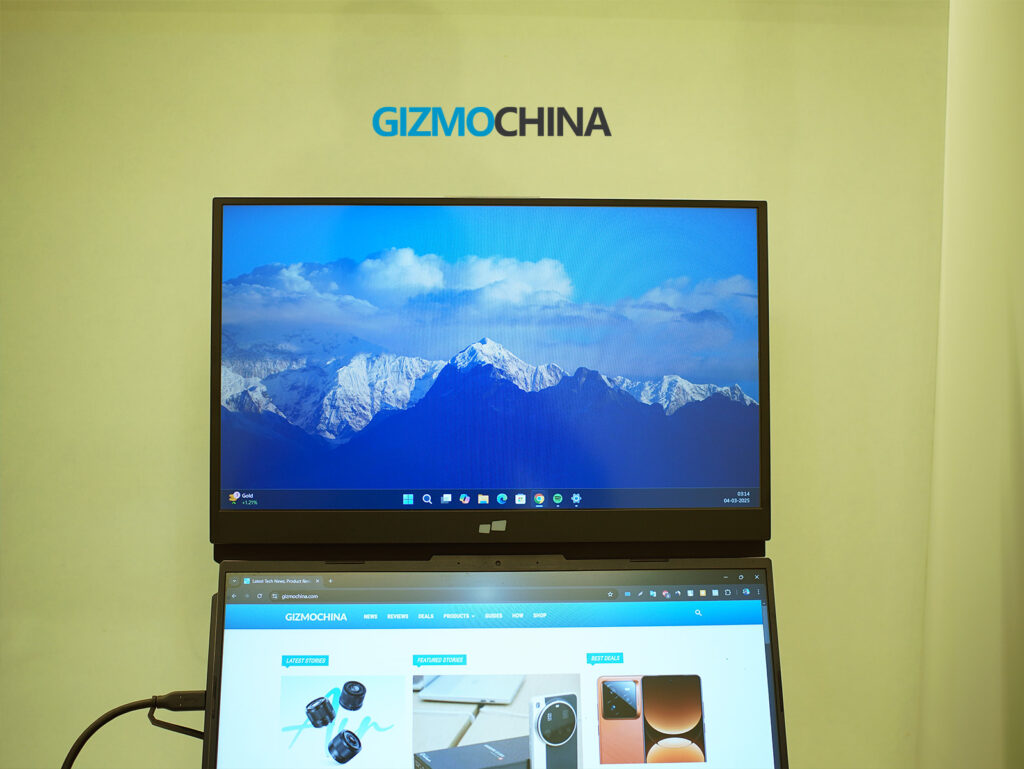
That’s why the Mobile Pixels Duex Float caught my attention, a stacked 15.6-inch 1080p touchscreen monitor that attaches directly to my laptop. It promises extra screen space without taking up more desk space, which is exactly what I needed.
Unboxing Experience
Mobile Pixels keeps things pretty straightforward with the packaging, which I appreciate. Inside the box, I found:
The Duex Float monitor itself
A USB-C to USB-C cable with a USB-A adapter
A mini HDMI to HDMI cable
Four magnetic plates for attaching the monitor to my laptop
A built-in kickstand
A setup template for aligning the magnets
A user guide
The base package doesn’t include a carrying case or protective sleeve, which would have been useful for portability. However, those can be purchased separately.
Design & Build Quality
The Duex Float has a sleek, modern design that blends well with most laptops. It’s made from a mix of ABS plastic and aluminum alloy, giving it a sturdy yet lightweight feel. While it’s not as premium as an all-metal build, the materials make sense for a portable monitor, keeping it durable without adding unnecessary weight. That said, at 4 lbs (1.8 kg), it’s a bit heavier than I expected for something marketed as ultra-portable. It’s not a dealbreaker, but I definitely feel the added weight when carrying it around.
One of the biggest design wins is the stacked screen layout, where the monitor sits above my laptop screen instead of beside it. This vertical setup is a game-changer for working in tight spaces, like coffee shops or small desks, since it doesn’t take up extra horizontal room. It also helps with ergonomics, reducing the need to constantly tilt my head from side to side like I would with a traditional side-by-side monitor. Instead, my gaze moves up and down, which feels more natural for multitasking.
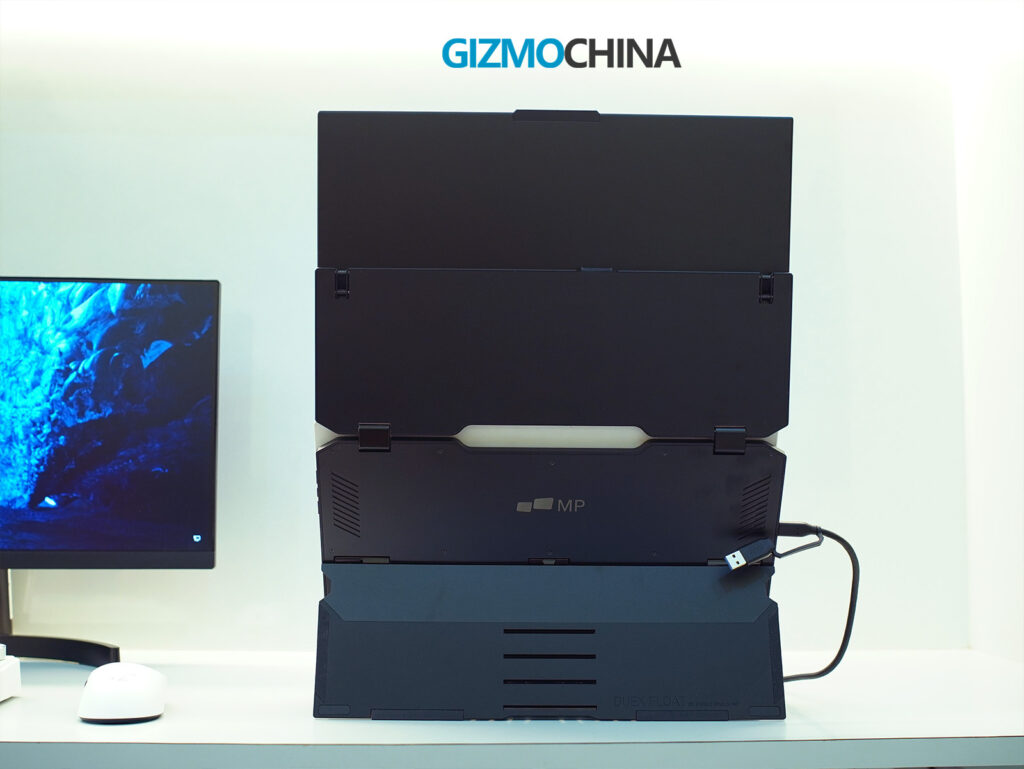
The built-in kickstand is another smart addition. If I don’t want to attach the Duex Float directly to my laptop, I can pop out the kickstand and use it as a freestanding display. The hinge mechanism feels solid, holding the screen at various angles without slipping. However, if I’m using it in stacked mode, the magnetic attachment system provides better stability.
Speaking of magnets, the four included magnetic plates stick to the back of my laptop, allowing the Duex Float to snap on and off easily. It’s a great concept, but there’s a small catch, removing the magnets can leave some sticky residue. If I plan to keep them on permanently, it’s not an issue, but if I frequently switch between different devices, cleaning off the adhesive can be a hassle.
At 0.87 inches thick, the monitor is relatively slim for a portable dual-screen setup. It folds down compactly, making it easy to slip into my laptop bag alongside my main device. However, I do wish it came with a protective case or sleeve for better portability.
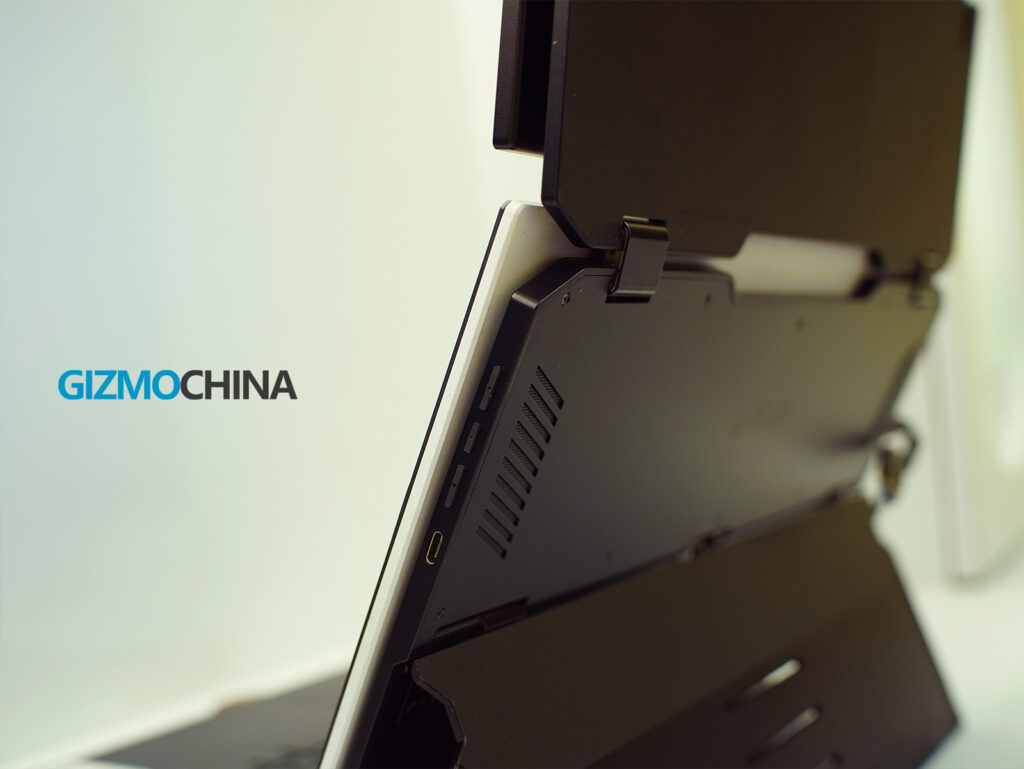
On the left side of the monitor, there’s a USB-C port and a mini HDMI port for connectivity, while the right side has another USB-C port and function buttons for adjusting brightness, contrast, and other display settings. The buttons are small but tactile, and the menu system is simple enough to navigate.
Connectivity and Setup
Setting up the Duex Float was pretty straightforward. It offers multiple connection options, making it compatible with a wide range of devices, but there are a few things worth noting.
The primary way to connect the Duex Float is via USB-C, which supports both power and video transmission in a single cable. If my laptop has a full-featured USB-C port, all I have to do is plug in the cable, and I’m ready to go—no external power needed. However, if I’m using a device without a USB-C video output, I need to use the mini HDMI port instead, which also requires the monitor to be powered separately via USB-C.
The dual USB-C ports serve a practical purpose. They feature pass-through charging, meaning I can charge my laptop while using the monitor with just one power source. This is particularly useful for laptop users who have limited USB-C ports.
If I’m setting up the stacked display mode, I can either attach the monitor magnetically to my laptop or use the built-in kickstand for a freestanding setup. If I choose the magnetic attachment, the included template helps align the magnets properly. Once in place, the monitor snaps on securely, and despite the extra weight, it doesn’t feel unstable. But if I don’t want to attach magnets permanently, the kickstand is a reliable alternative.
For Mac users, touchscreen functionality requires downloading and installing a driver, while Windows users get plug-and-play support. If I plan to use the monitor with Samsung DeX or an M-series iPad (via Stage Manager), the setup is simple, just plug in a USB-C cable, and the device automatically recognizes the screen.
Display & Performance
The Duex Float has a 15.6-inch Full HD (1920 x 1080) touchscreen display with a 60Hz refresh rate. It’s great for productivity and general multitasking, but if I were expecting high-end color accuracy or deep contrast, I’d be disappointed.
Since it uses a TFT LCD panel, colors aren’t as vibrant as an IPS or OLED display. They look slightly washed out, and contrast is on the lower side, making it less ideal for photo or video editing. However, for office work, spreadsheets, coding, and presentations, it gets the job done.
Brightness is rated at 250 nits, which is fine for indoor use but struggles in bright environments or direct sunlight. If plugged into external power, brightness can boost up to 300 nits, but it’s still not on par with premium laptop displays. Viewing angles are decent but not as wide as IPS panels.
The touchscreen functionality is smooth and responsive. The 10-point multi-touch support allows for pinch-to-zoom, scrolling, and swipe gestures, which feel natural, especially on Windows devices. As previously mentioned, Mac users need to install a driver for touch support, which is a slight inconvenience, but once set up, it works well.
Final Thoughts
The Duex Float is a unique take on portable monitors, and it definitely delivers on its core promise of expanding screen space vertically rather than horizontally. The stacked design is ergonomic, making it great for productivity-focused users like me who need a second screen without cluttering their desk. The touchscreen functionality, multiple viewing modes, and broad compatibility make it a versatile choice for remote workers and even casual gamers.
That said, it’s not perfect. The extra weight and bulk make it less ideal for frequent travelers. The display quality is also decent but not exceptional.
At $269.99 (down from $399.99), it’s not cheap, but if ergonomic productivity is a priority, it’s a solid investment. If I just needed a basic second screen, I might consider a cheaper, lighter alternative. But for a stacked portable monitor with touchscreen support, this is one of the few options available, and overall, it does a great job.
Huawei has a big event lined up for March 20 in China, where it’s expected to unveil its first smartphone powered by the stable version of HarmonyOS NEXT. But ahead of that, the company has something to celebrate.
HarmonyOS powers more devices than iOS in China
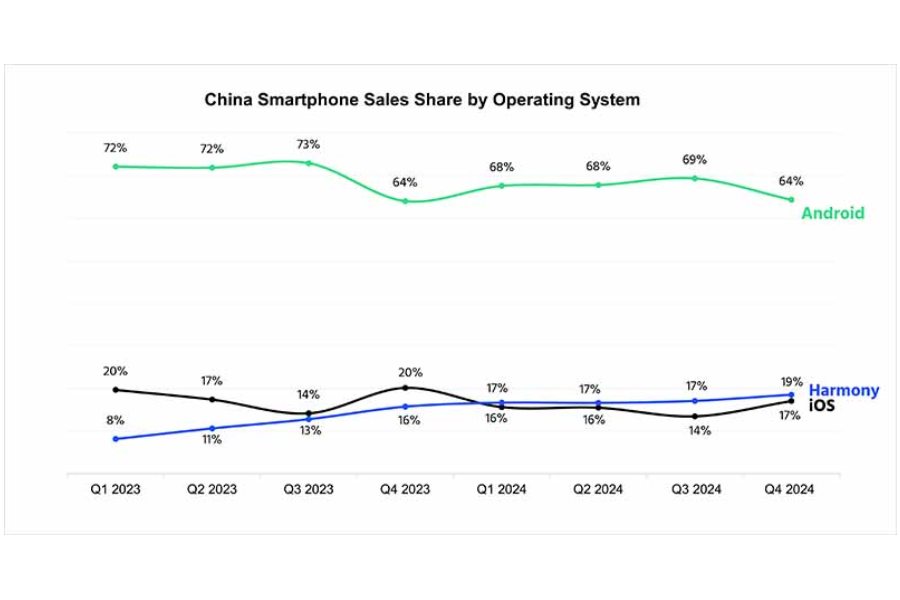
According to new data from Counterpoint Research, HarmonyOS has now overtaken iOS in mainland China. Android remains the dominant player, holding 64% of the market in Q4 2024, while HarmonyOS has a 19% share—edging past iOS by two percentage points. In fact, Huawei maintained its lead over Apple in software throughout 2024.
It’s a major milestone for Huawei, a company that once struggled to keep its smartphone business afloat after U.S. sanctions. Now not only has it surpassed Apple in the software front, the Chinese tech giant is also leading over Apple in both smartphone and tablet market share in the mainland.
According to Counterpoint’s smartphone sales data, Huawei claimed the top spot in China’s smartphone market during Q4 2024, securing an 18.1% share. This marks the first time the company has regained a strong foothold in its home market since the U.S. ban five years ago. Huawei’s smartphone sales surged 15.5% year-over-year, driven by the success of the Nova 13 and Mate 70 series.
Counterpoint also predicts that HarmonyOS adoption will continue to rise, thanks in part to government-backed subsidies. In an effort to stimulate the economy, the Chinese government is offering a CNY 500 ($70) subsidy on smartphones priced under CNY 6,000 (just over $800).
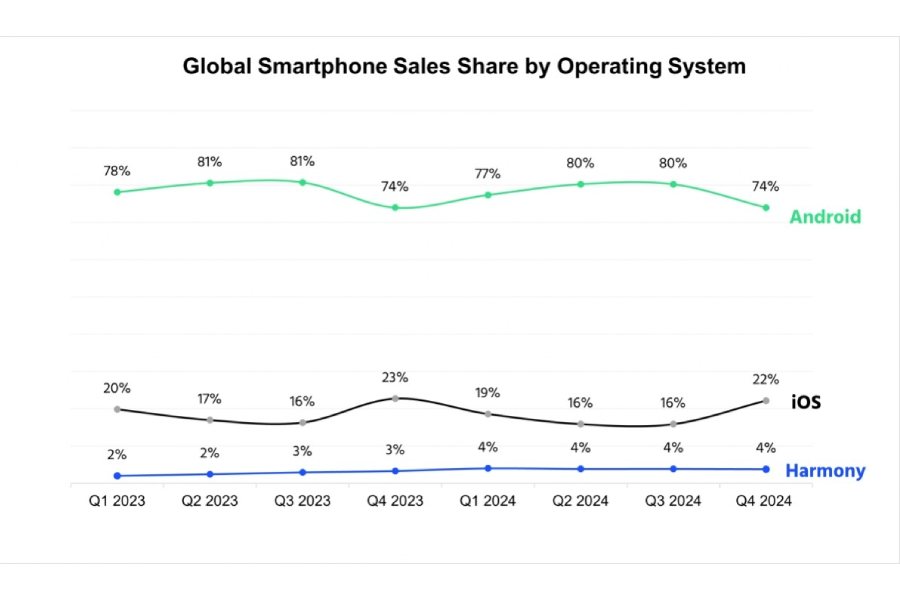
Globally, however, the landscape looks different. Android still leads with a 74% market share, though that’s down from 80% in Q3 2024. Apple, meanwhile, has increased its share from 16% to 22% over the same period. Huawei’s global share has remained steady at 4% since early 2024.
Lenovo has officially launched the Idea Tab Pro in India. First announced at CES 2025 in January, the tablet has now made its way to the Indian market, slotting into the price range of the Xiaomi Pad 7. So, how does it stack up in terms of specs? Let’s take a look.
Lenovo Idea Tab Pro Specifications
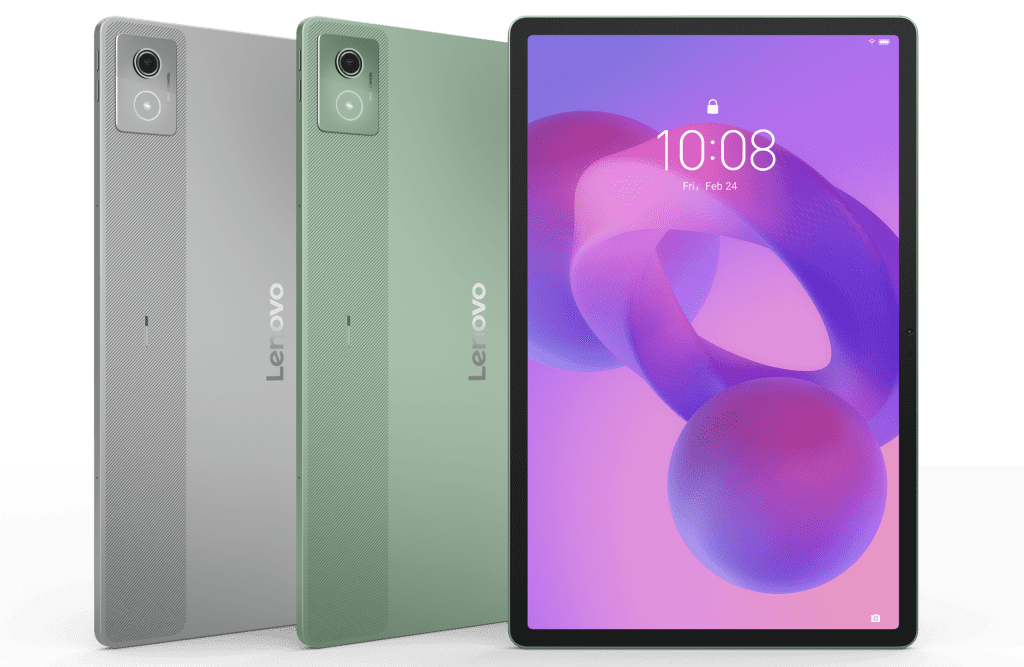
The Idea Tab Pro packs a 12.7-inch LCD with a sharp 2,944 x 1,840 resolution and a buttery smooth 144Hz refresh rate. It sports an all-metal build, measures just 6.9mm thick, and weighs 615 grams—keeping it both sleek and portable.
Under the hood, Lenovo has equipped the tablet with MediaTek’s Dimensity 8300 chipset, paired with 8GB of RAM. Storage options include 128GB and 256GB, and thankfully, there’s a microSD slot for expansion.
Software-wise, the Idea Tab Pro ships with Android 14, though Lenovo is only promising updates up to Android 16, along with four years of security patches. The Android is packed underneath Lenovo’s ZUI 16 UI which includes Google’s Gemini AI tools, including Circle to Search.
Lenovo has also baked in its own productivity tools, such as Share Hub for cross-device file sharing, App Streaming to mirror tablet apps to a PC, and Smart Clipboard for seamless copy-pasting between devices.
For productivity, Lenovo offers a stylus and a 2-in-1 keyboard case, though both are sold separately. Powering the device is a sizable 10,200mAh battery with support for 45W fast charging.
One of the standout features of the Idea Tab Pro is its audio setup. It has a quad-speaker system tuned by JBL with Dolby Atmos support. Other notable specs include a microSD card slot, WiFi 6E, Bluetooth 5.3, and a USB-C 3.2 Gen 1 port.
Price and availability
The Lenovo Idea Tab Pro is available in a single Luna Grey color. Pricing starts at INR 27,999 for the 8GB/128GB variant, while the 12GB/256GB model costs INR 30,999. The tablet is already on open sale via Lenovo India and Amazon.
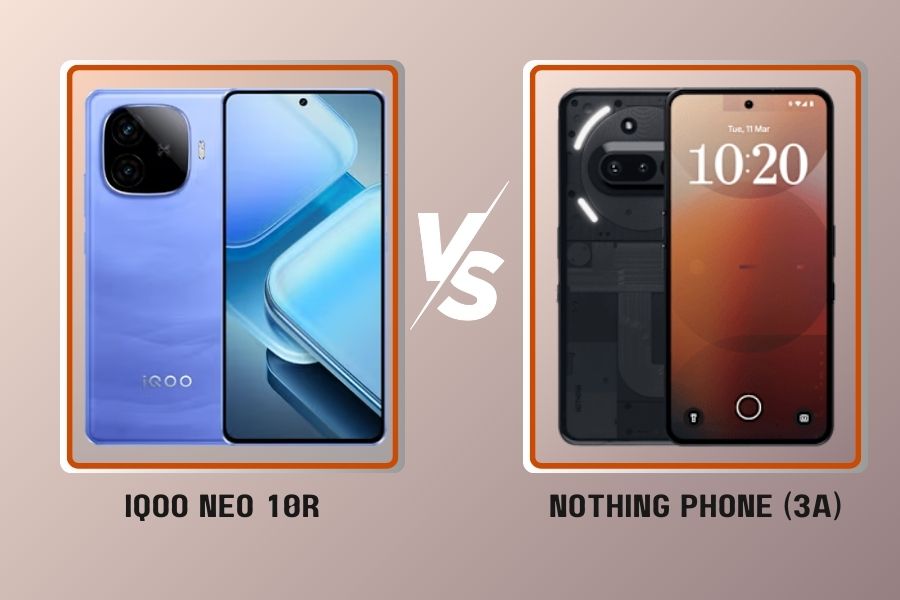
The iQOO Neo 10R and Nothing Phone 3a are two of the latest mid-range contenders, each with their own different approach. iQOO prioritizes raw performance, while Nothing focuses on a more balanced experience with clean software and a design-centric identity, complete with the Glyph interface.
But when it comes to everyday use, which one actually offers the better deal?
Both phones have distinct design choices that set them apart. The iQOO Neo 10R uses a glass front with Schott Xensation Up for protection but opts for a plastic back and frame, which is standard for its price range. It does, however, come with IP65 water and dust resistance, meaning it’s protected against dust and low-pressure water jets.
The Nothing Phone 3a takes a different route. It continues the brand’s signature transparent back design but now features three LED light strips for notifications, a camera fill light, and customization options. However, it only has IP64 protection, which means it can handle splashes but isn’t as resistant as the iQOO Neo 10R.
In terms of size, they are nearly identical, but the Nothing Phone 3a is slightly heavier at 201g, compared to the 196g iQOO Neo 10R. This weight difference is minor but could be noticeable if you prefer lighter devices.
Please Note: When you buy something using the links in our articles, we may earn a small commission at no cost to you.
2. Display
The iQOO Neo 10R has a clear advantage when it comes to display specs. It features a 6.78-inch AMOLED panel with a 144Hz refresh rate and a peak brightness of 4500 nits. These numbers put it in flagship territory, at least in terms of smoothness and outdoor visibility. The resolution is 1260 x 2800 pixels, making it sharper than the Nothing Phone 3a’s 1080 x 2392 display.
Nothing’s approach is different. The 6.77-inch AMOLED panel maxes out at 120Hz and peaks at 3000 nits, which is still plenty bright. However, it lacks the extreme refresh rate of iQOO’s phone, which could be a deciding factor for those who prioritize smooth scrolling or gaming.
3. Performance and Software
This is where the iQOO Neo 10R takes a clear lead. It comes with the Snapdragon 8s Gen 3, a toned-down version of Qualcomm’s top-tier chipset. It features a 3.0 GHz Cortex-X4 core, which should ensure high-end performance for demanding tasks like gaming and multitasking.
The Nothing Phone 3a, in comparison, runs on the Snapdragon 7s Gen 3. While it’s a solid mid-range chip, it lacks the firepower of the 8s Gen 3, especially in GPU-heavy tasks. The Adreno 735 in the iQOO Neo 10R is significantly more powerful than the Adreno 710 in the Nothing Phone 3a.
Both phones run Android 15 out of the box with their skins on top. Funtouch OS 15 on the iQOO Neo 10R leans towards feature-packed customization, while Nothing OS 3.1 maintains a cleaner, near-stock Android experience.
If you prefer minimalism, the Nothing Phone 3a may be the better pick. Software support could be the another deciding factor—Nothing promises six years of Android updates and security patches, whereas iQOO offers three years of OS upgrades and four years of security updates for the Neo 10R.
4. Cameras
The Nothing Phone 3a wins on sheer versatility for cameras. It packs a 50MP main sensor with OIS, a 50MP telephoto lens with 2x optical zoom, and an 8MP ultrawide camera. The inclusion of a telephoto lens immediately makes it more flexible for different shooting conditions. The phone also supports 4K video recording at 30fps with gyro-EIS stabilization.
Meanwhile, the iQOO Neo 10R sticks to a dual-camera setup—a 50MP main sensor with OIS and an 8MP ultrawide. While its main sensor is solid, the lack of a telephoto lens limits its zoom capabilities. On the selfie side, both phones offer a 32MP camera, though the Nothing Phone 3a is limited to 1080p video recording, whereas the iQOO Neo 10R can record at 4K 60fps.
For those who rely heavily on zoom and portrait shots, the Nothing Phone 3a has the better setup. But if you’re only concerned with the main and front cameras, the differences might not be drastic.
5. Battery and Charging
The iQOO Neo 10R takes the lead here with a 6400mAh battery, compared to the 5000mAh battery in the Nothing Phone 3a. That’s a significant difference, which should translate into longer endurance, especially with the more efficient Snapdragon 8s Gen 3.
Both phones support fast charging, but with slightly different speeds:
iQOO Neo 10R: 80W wired charging, reaching 50% in 26 minutes and 100% in 55 minutes
Nothing Phone 3a: 50W wired charging, reaching 50% in 19 minutes and 100% in 56 minutes
Nothing’s faster initial charge speed is useful for quick top-ups, but iQOO’s larger battery should make up for it in endurance. Additionally, the iQOO Neo 10R supports reverse wired charging, which is missing on the Nothing Phone 3a.
6. Verdict
Both phones cater to different audiences. If performance and battery life are your main priorities, the iQOO Neo 10R is the better pick, thanks to the Snapdragon 8s Gen 3, 144Hz display, and 6400mAh battery. It’s a practical choice for power users and gamers.
On the other hand, the Nothing Phone 3a focuses on design, camera versatility, and a cleaner software experience. The LED Glyph lights make it stand out, while the 50MP telephoto camera adds shooting flexibility. It’s a better option if you prioritize aesthetics and a balanced camera setup.
Ultimately, it comes down to whether you value raw performance or a more refined software and camera experience.
Google has rolled out Android 16 Beta 3. According to Google’s timeline, the stable version of Android 16 could be released as early as May or June, with Pixel devices likely being one of the the first to receive the update by the end of the month. But before the stable release, Google may release one more beta update in April to address any remaining bugs.
Android 16 Beta 3 introduces several notable features and improvements
Enhanced Bluetooth Auracast support now includes standardized QR codes for joining audio broadcasts and compatibility with hearing aid equipment, which makes it more accessible for users with hearing impairments. In addition to that, the update introduces outline text support, which caters to users with vision impairments.
Another key feature is Local Network Protection, which gives users greater control over which apps can access devices on their local network. This feature is expected to be part of a major Android release in the future. It’s good to see Google continuing to improve the privacy and security of the system.
Android 16 has reached platform stability, and Samsung is already testing its Android 16-based custom skin, One UI 8, internally. However, readers shouldn’t expect a public beta release any time soon, as suggested by a Samsung Community moderator. Samsung could potentially jump straight to One UI 8.0 after completing the stable rollout of Android 15-based One UI 7, skipping One UI 7.1. But the focus currently remains on ironing out One UI 7. We will need to see whether Samsung returns to its previous form in rolling out the latest android version in time, starting with Android 16.
As for other Android smartphone makers, information about their Android 16-based custom skin remain scarce. For now, Google’s progress with Android 16 Beta 3 signals a promising step toward a stable and feature-rich release.
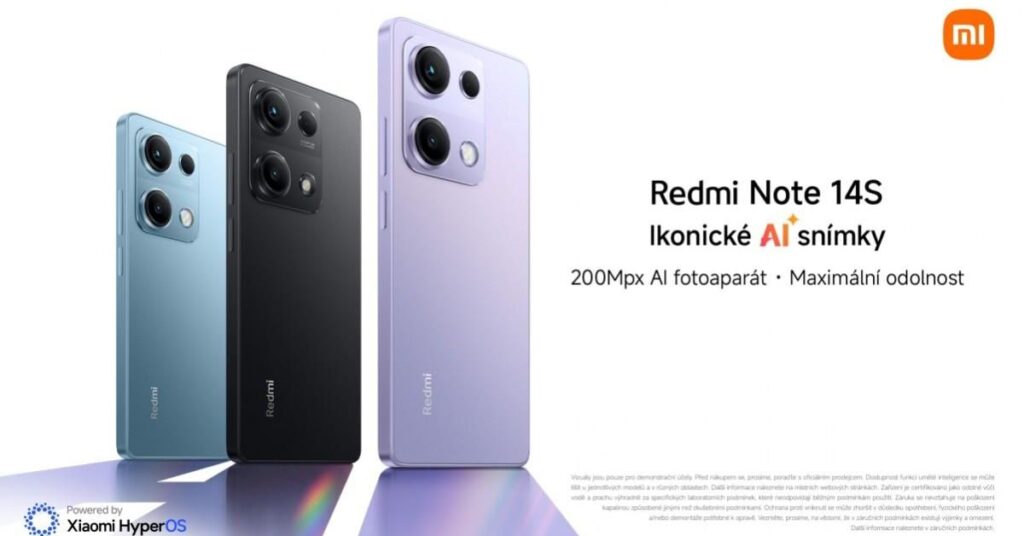
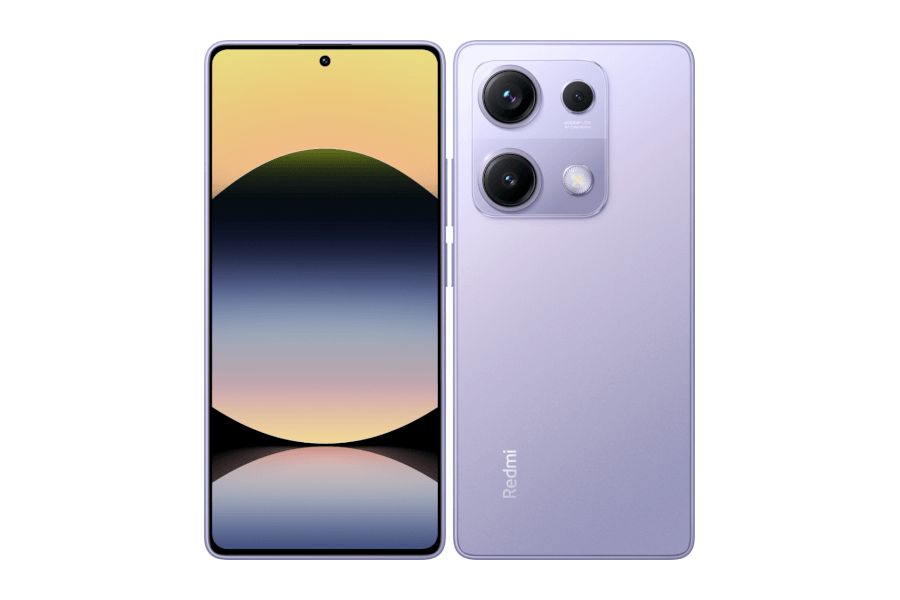
Xiaomi’s sub-brand Redmi has quietly launched the Redmi Note 14S without any fanfare. The device is now listed on the company’s official Czech Republic website, confirming all the details.
At first glance, you might think this is a brand-new model, but in reality, we’ve seen it before. The Redmi Note 14S is essentially a rebranded Redmi Note 13 Pro 4G, which originally launched in January last year.
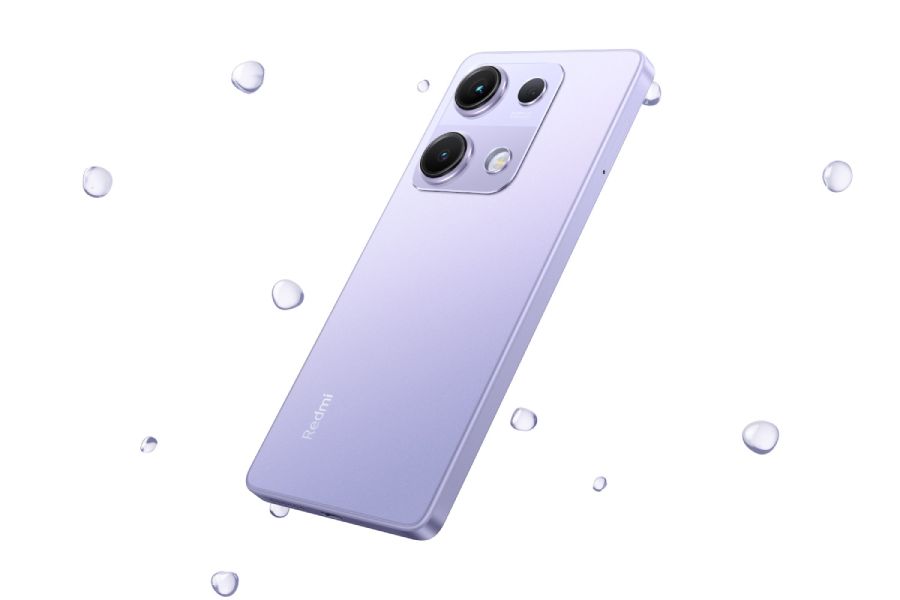
The only noticeable change is a slightly tweaked back design. Beyond that, the specs remain identical, except for one minor detail—the 14S is slightly lighter at 179 grams compared to its predecessor’s 188 grams.
Redmi Note 14S specs: déjà vu?
The phone features a 6.67-inch AMOLED display with an FHD+ resolution, a 120Hz refresh rate, and Corning Gorilla Glass protection. Powering everything is MediaTek’s Helio G99 Ultra, paired with 8GB of RAM and 256GB of storage.
That Helio G99 is a 4G-only chipset, meaning you’re out of luck if you were hoping for 5G connectivity. Oddly enough, Xiaomi hasn’t even specified which version of its HyperOS software the phone is running.
On the back, there’s a 200MP main camera, an 8MP ultrawide lens, and a practically useless 2MP macro sensor. Up front, you get a 16MP selfie camera.
Keeping the lights on is a 5,000mAh battery with support for 67W wired charging. For biometrics, Redmi has included an optical under-display fingerprint scanner. One small but notable upgrade is the improved ingress protection—bumped up from IP54 to IP64 for better dust and water resistance.
Still, for the most part, this is the same phone as last year’s Redmi Note 13 Pro 4G.
Price and availability
The Redmi Note 14S is available in three color options: blue, black, and purple. And it is priced at 5,999 CZK (roughly $260) for the sole 8/256GB model in the country.
We use cookies on our website to give you the most relevant experience by remembering your preferences and repeat visits. By clicking “Accept”, you consent to the use of ALL the cookies.
This website uses cookies to improve your experience while you navigate through the website. Out of these, the cookies that are categorized as necessary are stored on your browser as they are essential for the working of basic functionalities of the website. We also use third-party cookies that help us analyze and understand how you use this website. These cookies will be stored in your browser only with your consent. You also have the option to opt-out of these cookies. But opting out of some of these cookies may affect your browsing experience.
Necessary cookies are absolutely essential for the website to function properly. This category only includes cookies that ensures basic functionalities and security features of the website. These cookies do not store any personal information.
Any cookies that may not be particularly necessary for the website to function and is used specifically to collect user personal data via analytics, ads, other embedded contents are termed as non-necessary cookies. It is mandatory to procure user consent prior to running these cookies on your website.