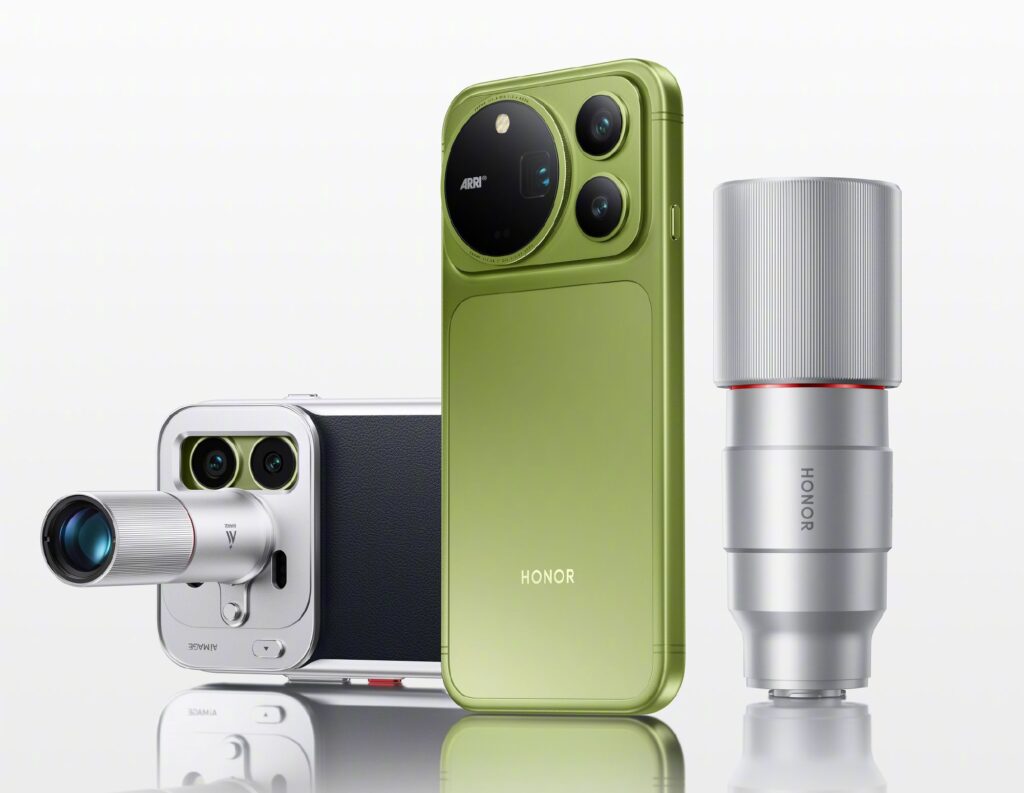
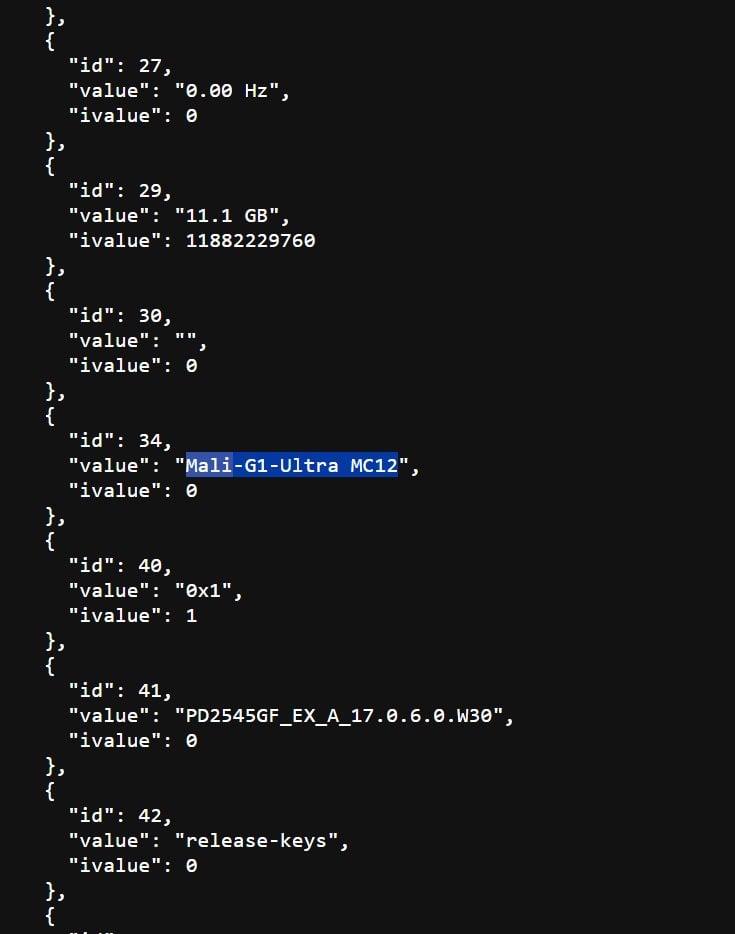
Honor is preparing to unveil its next flagship smartphone family in China later this month. The Magic 9 series has already started drawing attention with its camera-focused features and new hardware. However, the exact device lineup has remained unclear, with a new leak now shedding more light on the models expected to debut.
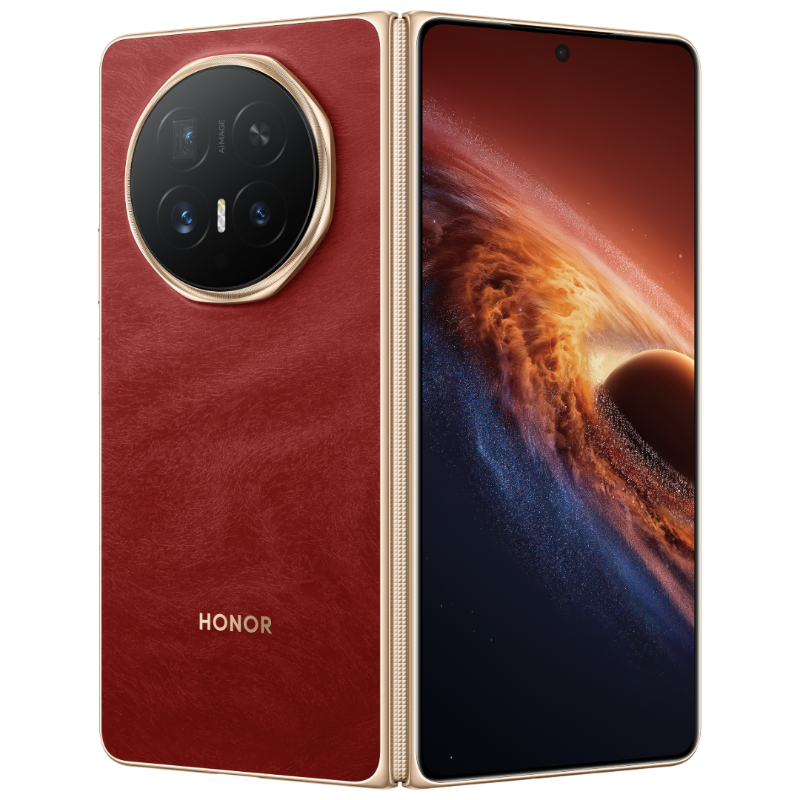
Honor Magic 9
Honor Magic 9 series
Tipster Smart Pikachu claims the Magic 9 family will include the Magic 9, Magic 9 Pro Max, and a Magic 9 Super Edition. According to the leak, the standard Magic 9 will feature a 6.37-inch display, an 8,000mAh battery, dual 200-megapixel ARRI cameras, a single 3D facial recognition system, and last year’s Snapdragon 8 Elite Gen 5 chipset.
According to tipster Digital Chat Station, the camera setup will include a 50-megapixel ultra-wide camera, and one of the 200-megapixel cameras will be a 1/1.56-inch periscope telephoto sensor. For security, it will have an ultrasonic in-screen fingerprint sensor.
According to another tipster, the Magic 9’s screen bezels are said to be slightly narrower than those of the Pro Max, which has 0.98mm bezels. In terms of build, it will have a unibody cold-carved glass design.
Honor Magic 9 Pro Max
The Magic 9 Pro Max is tipped to step things up with a 6.8-inch display, an 8,800mAh battery, and dual 200-megapixel ARRI cameras. It could also feature dual 3D facial recognition sensors arranged in a 1:1 layout, while the all-new Snapdragon 8 Elite Gen 6 is expected to handle processing.
In terms of design, the Magic 9 Pro Max has a unibody metal design, and the screen bezels are quite narrow at 0.98mm. Being a Pro Max edition, it will have a Black Diamond screen, which offers deeper blacks and a brighter, clearer viewing experience, while the standard Magic 9 does not have this display technology.
Honor Magic 9 Super Edition
The Honor Magic 9 Super Edition is aimed more heavily at performance. It could come with a 6.8-inch glass-fiber body, an 11,000mAh battery, a 165Hz display, and active cooling. Its camera setup is said to include a 50-megapixel sensor alongside a 12-megapixel and another 50-megapixel camera, while the Snapdragon 8 Elite Gen 5 could power the phone.
The Magic 9 Super Edition is different from the gaming and performance-focused Win series, as it comes with a telephoto lens and a larger battery than the Win series.
The iQOO 16 is getting closer to its official launch later this month, and the company has started revealing more about its design. A new ‘Chasing Light’ color has now been shown off, bringing a distinctive visual treatment to the upcoming flagship. iQOO has also revealed some details about the camera module and the technology behind its new finish.
A holographic finish built to change with the light
iQOO 16
The iQOO 16’s Chasing Light variant uses a holographic rear panel developed around what iQOO describes as an industry-first laser holographic imaging technology. The finish combines four precision processes to create a three-dimensional light effect that remains visible from different viewing angles. As the phone moves, red holographic patterns interact with blue flowing light, giving the rear panel a changing appearance rather than a static colour.
The camera design follows the same futuristic theme. iQOO says the module takes inspiration from a spacecraft porthole, with three cameras connected through a mechanical structure. Together, they form a visual element resembling a navigation marker. The camera island also sits above a hexagonal technical pattern and uses transparent glass as part of the overall design. Apart from Chasing Light, the iQOO 16 will also come in Track and Legend.
The iQOO 16 is expected to arrive as one of the first smartphones powered by Qualcomm’s next-generation Snapdragon 8 Elite Gen 6 Pro (tentative name). The chip is reportedly built using TSMC’s 2nm process and features a 2+3+3 CPU cluster with peak clock speeds of up to 5.01GHz, alongside an Adreno 850 GPU.
Other expected specifications include a 6.85-inch 2K Samsung display with a 165Hz refresh rate, a dedicated Q4 gaming chip and an 8,400mAh battery. The rear camera setup is expected to include a 50-megapixel main camera with a 1/1.3-inch sensor, a 50-megapixel ultra-wide camera and a 50-megapixel periscope telephoto camera.
The phone is also expected to carry IP68 and IP69 ratings for dust and water resistance. Storage options are tipped to include 12GB+256GB, 12GB+512GB, 16GB+512GB, and 16GB+1TB configurations, with the launch expected by the end of September.
I spent an afternoon with PrimeBOT at a small showcase in Berlin, and I walked away with a thought I didn’t expect: personal robots might finally be ready for the family. Because different from industrial-level robots, PrimeBOT is coming at this from a completely different angle. Their tagline isn’t “Your Most Efficient Worker.” It’s “Your First Personal Robot.” And after seeing both the Q1 and T1 up close, I think that distinction actually matters.
PrimeBOT Q1: He Is Intelligent
Let’s start with the Q1. It’s a humanoid robot, but it’s small, as tall as 88cm, ultra-miniaturized is the word they use, and it’s accurate, because it can be tucked away in a backpack, to be with you anywhere. The team told me that the size makes the robot less aggressive, and should be more acceptable to the whole family. It’s also light enough that I can carry it under one arm, and designed with what the company calls “consumer CMF”, basically, it looks and feels like a consumer gadget, not lab equipment.
The Q1 is being pitched as the world’s first consumer-grade personal humanoid robot. The keyword is “consumer-grade”, so it’s meant to sit on your desk, hang out in your living room, or travel with you. The team emphasized that it’s a “portable research tool for embodied intelligence,” which sounds nerdy, but what it means in practice is that makers and developers can actually tinker with it.
I watched the Q1 stand in a relaxed pose, arms slightly bent, wearing what looked like tiny sneakers. There’s something intentionally approachable about the design. The lines are smooth, the proportions are human-like but not unsettling, and there is a hidden cooling system and a patented metal frame that keeps it from feeling fragile. It comes in white and a darker variant, and honestly, it looks more like a high-end collectible figure that happens to be alive somehow.
For the Q1, you can hold his hand like you hold a kid’s hand, then walk with him. The steps are stable, and the pace is adjustable. You can talk to him, in about 9 languages now. You can ask for basic information like the weather or anything else, then get a response from the speaker. It also has AI intelligence inside, the brand told me that he can help kids with some life questions. I asked him a question: If another kid hit me at school, can I hit back? Then Q1 told me not to, and advised me to record the evidence, and report it to the teacher. This is the meaning of a companion robot, it helps the kid in the right way.
The Q1 is about safe multi-scenario interaction and embodied intelligence—meaning it learns by being in the world. It’s the kind of device you might set up next to your laptop while you code, or place on a shelf where it observes, responds, and becomes part of your environment. The company talks about “breaking size, scenario, and accessibility barriers,” and after seeing it in person, I get it. The Q1 is small enough not to dominate your space, smart enough to be interesting, and open enough that you can actually make it yours. So this one can truly be your first Personal Robot.
PrimeBOT T1: The One That Transforms
Then there’s the T1, it is described as “Your First Transformable Personal Robot,” it actually changes shape. In its default mode, the T1 looks like a compact humanoid, but it can reconfigure itself into a kind of robot dog. But there is one thing different, the front are not with wheels, rather “hands”. so it walks like a dog or cat, not rolling like a car.
The T1 is designed to solve what PrimeBOT calls the “core drawbacks of traditional consumer robots.” According to them, those drawbacks are fixed single-form structures, poor cross-scenario adaptability, passive functional interaction, and most interestingly, the absence of emotional and creative capabilities. What this means is that, you can interact with T1 like any other intelligent robot, T1 will respond with sound, and the screen will show the contexts. Then in the rolling mode, it can carry things on the back, so if you are shopping or buying grocery, T1 can help. With the special shaped hand, it can also hold the camera and follow you, shoot the video for you, this might be just the perfect Vlog companion.
It’s aimed at tech enthusiasts or modern families. Basically, people who want a robot that can hang out in different places without being useless outside of its one programmed task. When I see the T1 transform between a standing humanoid and a rolling mode, I start to understand the logic. A robot that can stand at your desk while you work, then lower itself and roll into the kitchen when you move, then stand back up when your kid wants to interact with it.
Where These Robots Actually Fit
So who are these robots for? After spending time with both concepts, the use cases became clearer than I expected.
The Q1 is good enough for creators, developers, and anyone who wants a hands-on relationship with AI. Because it’s an open platform, you can program it, modify its behaviors, and use it as a physical testbed for embodied intelligence experiments. It is also good for the household, because it’s small enough to live besides you, which makes it ideal for homes, dorms. I could see it in education too, universities or high schools teaching robotics and AI could hand these to students without needing a massive lab budget. And because it’s portable, it’s the kind of robot you bring to a friend’s house. This is indeed the idea of being your first personal robot.
The T1 is also good for families and social spaces. Its transformable design means it can navigate a home more naturally. It can roll across open floors, stand up to interact at a table, and adapt its posture depending on whether it’s “working” or “hanging out.” For modern families , the T1 fills a gap that static smart speakers and stationary screens simply can’t. It’s also a natural fit for hospitality or retail environments where a robot needs to move around but still feel approachable and human-like.
Looking Ahead
PrimeBOT‘s vision is pretty ambitious: they want to bring personal robots into every home and define what they call the “Personal Robot Era.” Right now, both the Q1 and T1 feel mature enough to do many things. The Q1’s open platform approach means the community will likely push its capabilities further. And the T1’s transformable design suggests a future where robots won’t be stuck with one body or one function, they’ll shape-shift depending on what we need from them. And once people start living with robots that respond, adapt, and feel present in their daily lives, we will be enjoying the company of robots like these.
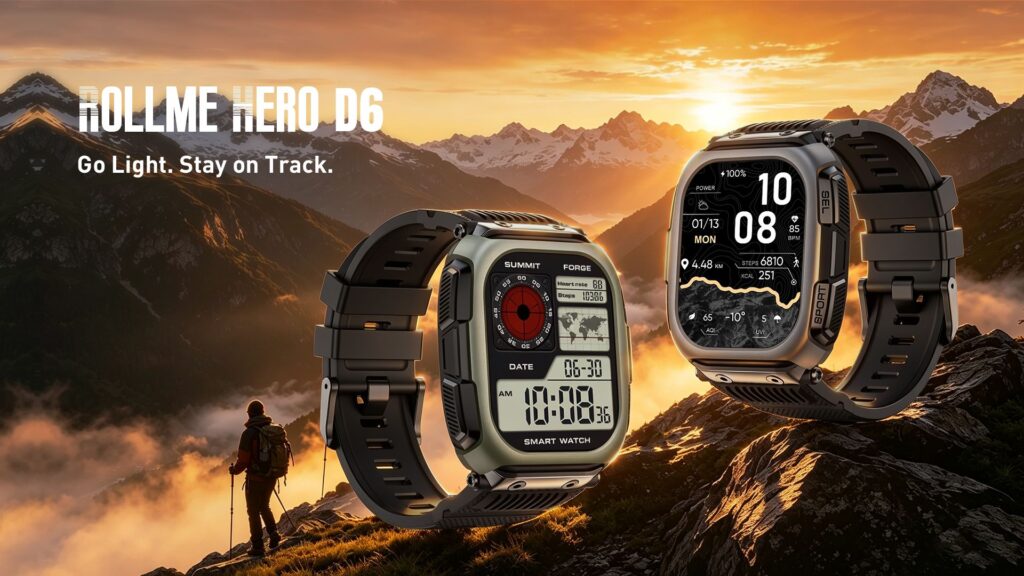
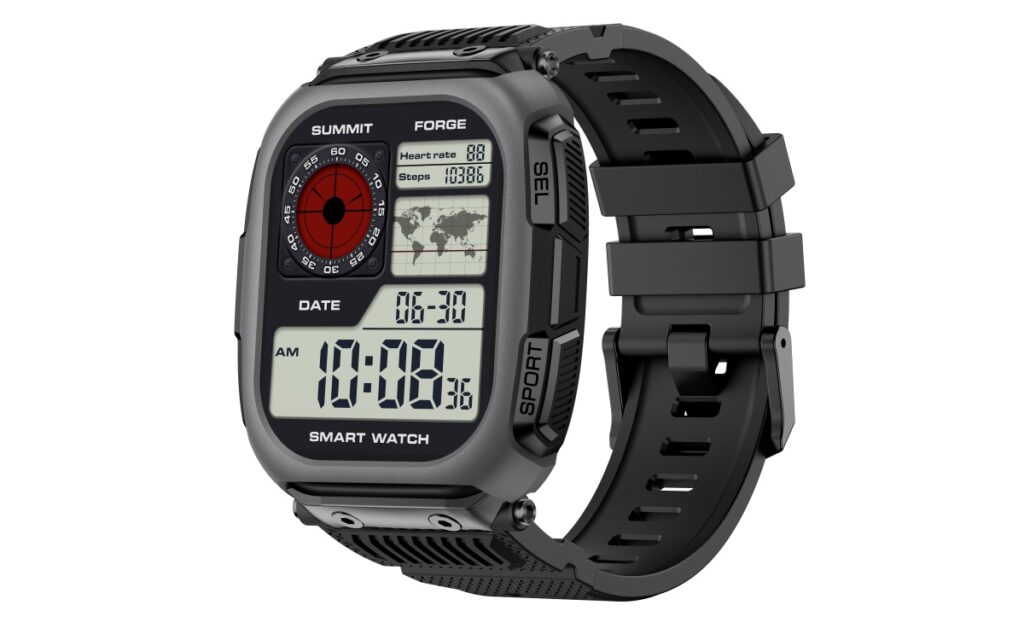
Rollme has released the Hero D6, a new smartwatch aimed at outdoor use. It includes practical features like full-color offline maps and an 850mAh battery, while keeping the overall build relatively lightweight.
The watch is built with a polycarbonate and TPU plastic chassis featuring reinforced edges and protective corners. This material choice keeps it light enough for everyday wear while still meeting MIL-STD-810H testing standards for shock, vibration, and environmental resistance.
On the front, it has a 2.13-inch rectangular AMOLED screen with a 410 x 502 resolution. The display uses On-Cell touch technology, which is designed to help with general responsiveness and outdoor sunlight visibility.
In terms of navigation, the Hero D6 supports L1 and L5 dual-band GPS, which can provide more accurate positioning under heavy tree cover or across challenging terrain.
You can also download full-color topographic maps directly to the watch, making it possible to check routes and use the track-back feature without a nearby phone or active cellular connection. The watch also includes a built-in compass and barometric altimeter for outdoor activities.
Inside, the device runs on an ATS3085S chip with a dual-core architecture designed to reduce power consumption while handling the display and GPS. It packs an 850mAh battery, which is relatively large for a smartwatch of this size. Rollme claims the watch can deliver 12 to 15 days of battery life with normal use, up to 37 hours with continuous GPS tracking, and as much as 70 days on standby.
For daily tracking, it covers the standard health metrics with an optical sensor for heart rate, blood oxygen, sleep, and stress monitoring. The software includes over 170 sports modes and customizable watch faces.
It is also 5ATM water-resistant, meaning it can handle swimming and basic water activities. Additionally, it features Bluetooth 5.3 for phone calls, using basic environmental noise cancellation to block out background sound.
The Rollme Hero D6 is now available for purchase through the company’s official website for $79.99. It comes in two color options: Trail Green and Storm Gray.
In related news, Rollme has recently launched affordable AI smart glasses featuring a 12MP Sony camera, AI object recognition, and live translation, alongside the AirCam open-ear headset with an 8MP camera, AI translation, and object recognition.
For more daily updates, please visit our News Section.
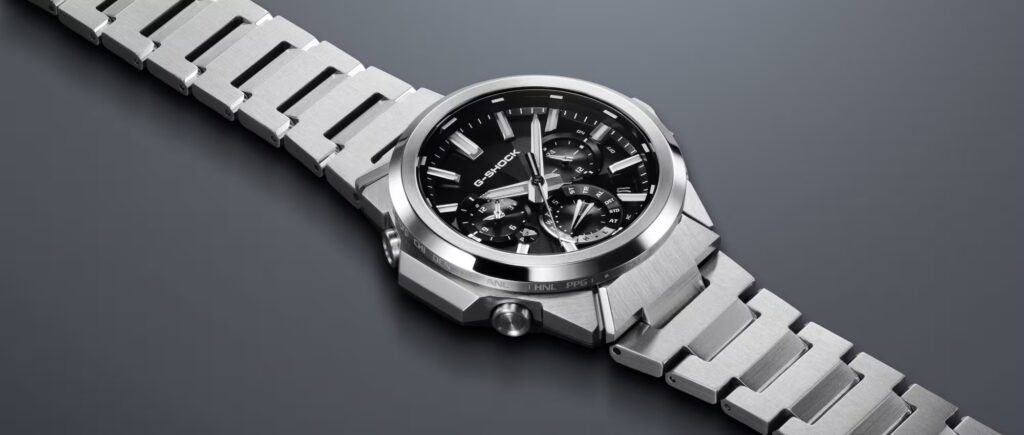
Casio is updating its G-Steel lineup this October with the GST-W1000 series, a trio of new watches launching initially in Japan. The release includes three models, the GST-W1000AD-2A, GST-W1000D-1A, and GST-W1000D-3A, that step away from the traditional, bulky G-Shock aesthetic in favor of a more integrated stainless steel design.
Design Details
The new watches measure 50 x 45.5 x 13.2 mm and weigh 138 grams. To make the watch wear smaller than its 45.5mm diameter suggests, Casio shortened the bezel lugs and integrated them directly into the bracelet’s end pieces. The mounting screws are hidden, which cleans up the sides of the case.
The exterior steel uses a mix of mirror, circular hairline, straight hairline, and honing finishes to break up the visual mass of the metal. Inside, the watch relies on a carbon core guard structure made from bio-based resin to protect the internal components without adding unnecessary weight. The dial is covered by sapphire crystal with an anti-reflective coating.
The watch features the new Tough MVT.2 movement, which is designed to protect the analog hands from misalignment caused by strong impacts and magnetic fields. Its shock detection system detects hard impacts and automatically realigns the hands when necessary.
There is also a built-in magnetic field sensor that temporarily stops the hands when strong magnetism is detected, preventing them from shifting away from their reference positions. Once the watch is moved away from the magnetic field, the hands automatically return to the correct time and resume normal operation.
For timekeeping and power, the GST-W1000 relies on the Tough Solar charging system. It syncs the time automatically via Bluetooth using the Casio Watches smartphone app, and falls back on Multiband 6 radio-wave reception if a phone isn’t nearby.
The watches also include standard G-Shock specifications, such as 200-meter water resistance, a Super Illuminator LED for visibility in the dark, a countdown timer, daily alarms, and a 1-second stopwatch.
Pricing and Availability
The GST-W1000 series will be available in Japan starting in October 2026. The standard GST-W1000D-1AJF and GST-W1000D-3AJF models are priced at ¥110,000 ($712), while the GST-W1000AD-2AJF will cost ¥115,500 ($748).
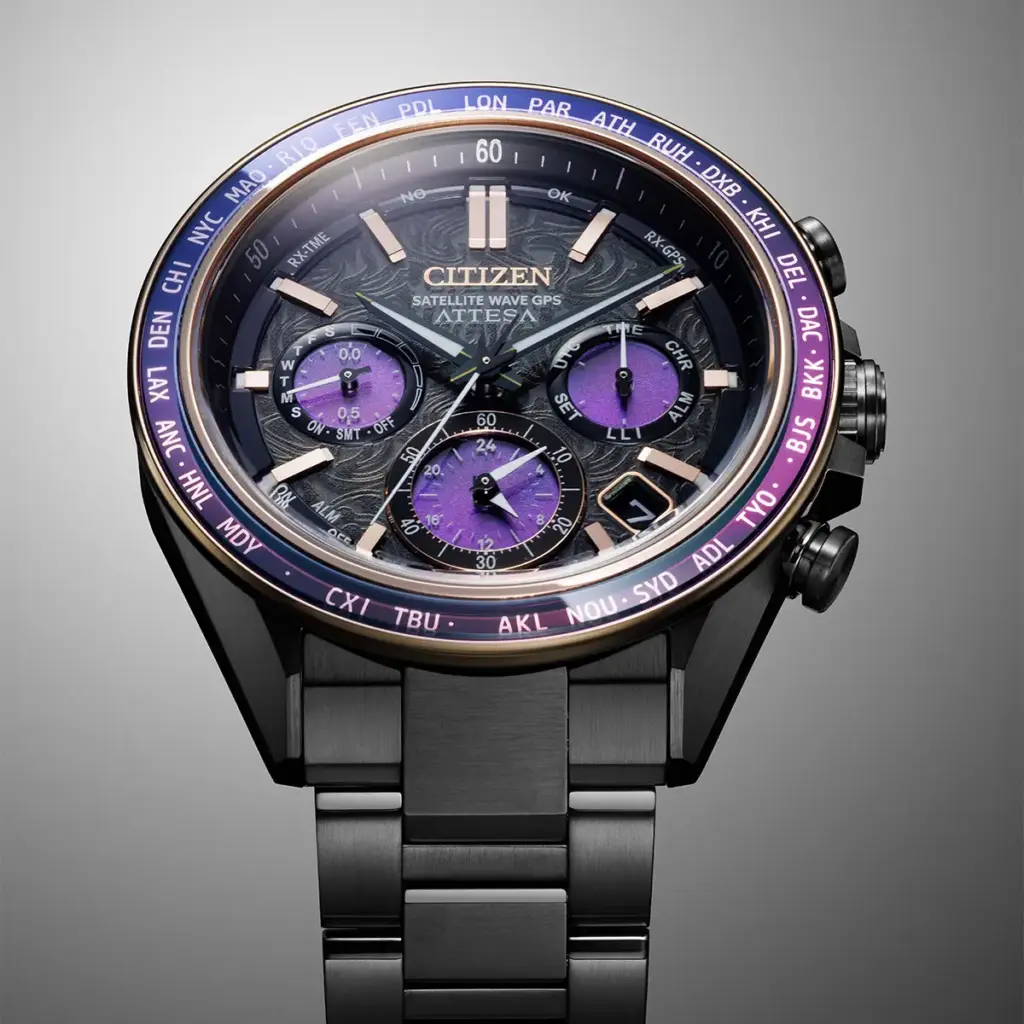
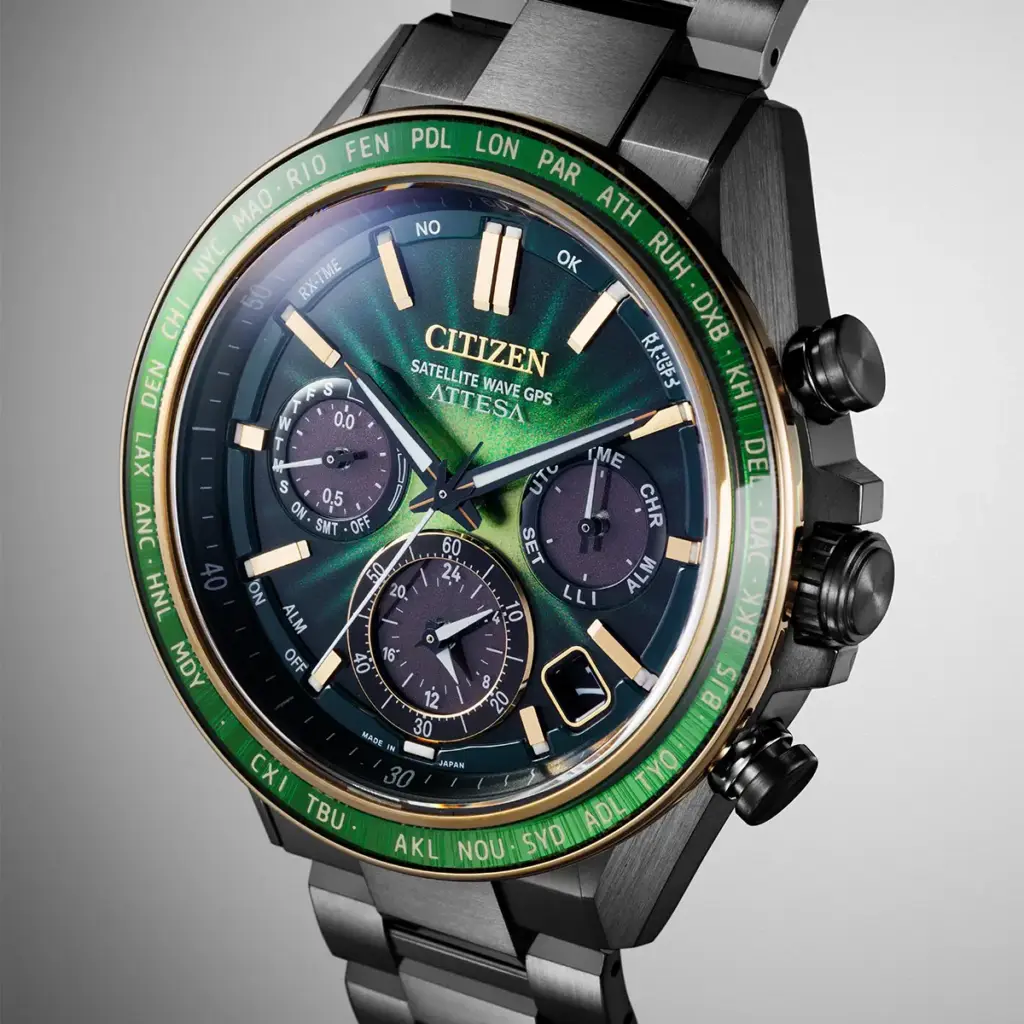
Citizen has released two new limited-edition watches in its Attesa lineup: the CC4085-81Z and the CC4084-83Z. Both models are currently available in the UK for £1,595. In the US, only the CC4085-81Z is listed so far, priced at $2,295.
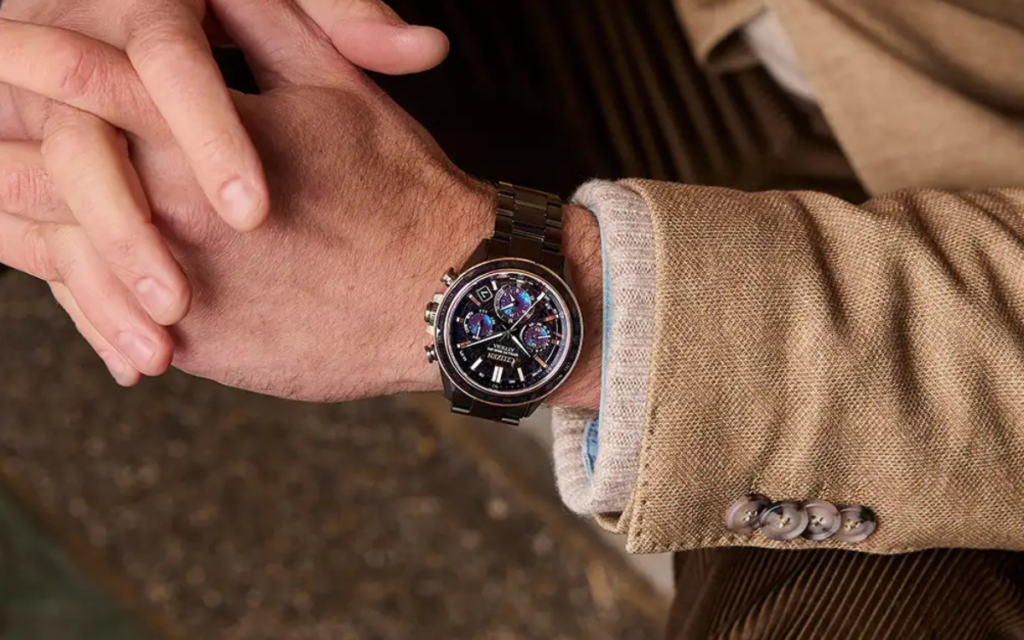
Both watches share the same physical dimensions and internal hardware. They feature a 44.6mm case made from Citizen’s Super Titanium, which is treated with a black diamond-like carbon (DLC) coating to improve scratch resistance.
The matching black titanium bracelet uses a standard safety fold-over clasp with push buttons. The dials are covered by sapphire crystal, and both watches are rated for 100 meters of water resistance, meaning they are perfectly fine to wear while swimming or showering.
Inside, the watches run on Citizen’s Calibre F950 movement. This uses the company’s long-standing Eco-Drive technology, which charges the watch using ambient light rather than relying on replaceable batteries. The main technical feature here is the Satellite Wave GPS.
Rather than pairing with a smartphone app via Bluetooth to keep the time accurate, the watch connects directly to GPS satellites. This allows it to automatically update the time and date based on your current location anywhere in the world. The movement also handles a perpetual calendar, world time tracking, and basic chronograph functions.
The differences between the two models are entirely cosmetic. The CC4085-81Z has a purple and black design, featuring a dark dial with violet accents, rose gold-tone markers, and purple ink tones in the subdials. The CC4084-83Z uses a green color scheme, combining a black dial with a green center gradient and a green insert on the world time bezel.
Citizen is capping production at 1,500 units for each model globally. The watches are unnumbered, but the limited production run applies to both the purple and green variants.
Casio has officially released two new variations of its Baby-G BG-169 watch in the United States. The two models, the black BG-169GD-1 and the white BG-169GD-7, originally debuted in the Japanese market last month and are now available through Casio’s US storefront for $99.
The design of these new models leans heavily into a 1990s and early 2000s aesthetic. Casio describes the styling as a nod to the grunge rock scene of that era, which translates practically to a muted, matte finish across the resin bands and bezels. Both watches retain the familiar compact, round case shape of the standard BG-169 series, complete with the signature metal front protectors over the display.
In terms of dimensions, the watches measure 45.9 x 42.6 x 16.4 mm and weigh just 43 grams. They are designed to fit wrist sizes ranging from 135 to 200 mm. The hardware is standard for the Baby-G line, featuring a shock-resistant resin construction and a mineral glass display. They also offer 200 meters of water resistance, making them suitable for swimming and basic water activities.
Internally, the watches run on a standard CR1616 battery, which Casio estimates will last for about three years before needing a replacement. The feature set includes the usual digital watch staples: a 1/100-second stopwatch, a countdown timer, five daily alarms, and a white LED backlight with an afterglow function. It also supports world time across 29 time zones and 30 cities.
Both models include a Telememo function, a pre-smartphone feature that allows users to manually store up to 25 contacts directly on the watch, with each entry holding an eight-character name and a 12-digit phone number. There is also a built-in Day Counter that can be programmed to count down to a specific target date, supporting dates all the way up to December 31, 2049.
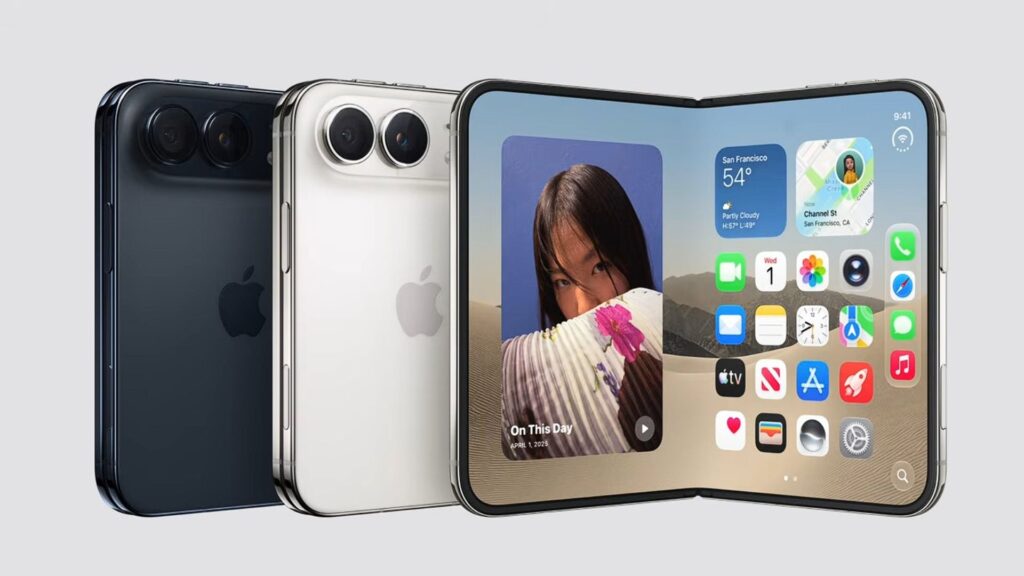
Apple has announced the iPhone Duo, its first-ever foldable iPhone, and the device could have a major influence on the next phase of the foldable market. Several brands, including Oppo, Honor and Vivo, are also expected to explore wider foldable designs as this passport-style form factor gains momentum.
The iPhone Duo features a 5.4-inch outer display and a 7.6-inch inner screen, with both designed around a wider aspect ratio. It is powered by Apple’s A20 Pro chip and features a titanium frame, while Apple has also focused heavily on reducing the visibility of the inner display crease. Starting at $1,999, the iPhone Duo will sit firmly in the ultra-premium segment when it goes on sale on October 23. Its combination of a wide foldable design, a near-crease-free inner display and Apple’s software ecosystem could make it one of the most influential foldables yet.
Apple iPhone Duo
There are still not many wide foldables on the market, although more brands are expected to join the bandwagon next year. Here are five alternatives to the iPhone Duo, including three wide foldables and two more conventional book-style models.
5Honor Magic V6
honor Magic V6
The Honor Magic V6 is another conventional book-style foldable that makes this list because of its focus on portability, battery life and durability. At just 8.75mm thick when folded and weighing 219 grams, it is designed to reduce some of the bulk traditionally associated with foldable smartphones.
Honor has also equipped it with a 6,660mAh silicon-carbon battery, Snapdragon 8 Elite Gen 5, IP68 and IP69 protection and a 64-megapixel periscope telephoto camera. The phone also has a particularly interesting advantage for potential iPhone Duo buyers: Honor says it can integrate with Apple devices, including the iPhone, iPad, AirPods, Apple Watch and Mac.
The Magic V6 is included because it represents another direction the foldable market can take while Apple focuses on the wide passport-style design. Honor has confirmed availability in select international markets, although it is not coming to every region, with local pricing and availability varying by market.
Final thoughts
Apple may be entering the foldable market later than Samsung, Huawei, Xiaomi and Oppo, but the iPhone Duo could still change the category significantly. Its wide design is no longer unique, but Apple’s influence could encourage more manufacturers to move away from the tall book-style format and make wider foldables a more common sight in the coming years.
For now, the Galaxy Z Fold 8 is the easiest alternative to recommend for buyers who want broad availability, while the Huawei Pura X Max and Xiaomi 18 Fold offer some of the closest designs to Apple’s approach through third-party imports. The Oppo Find N6 and Honor Magic V6, meanwhile, show that the more established book-style format still has plenty of room to improve.
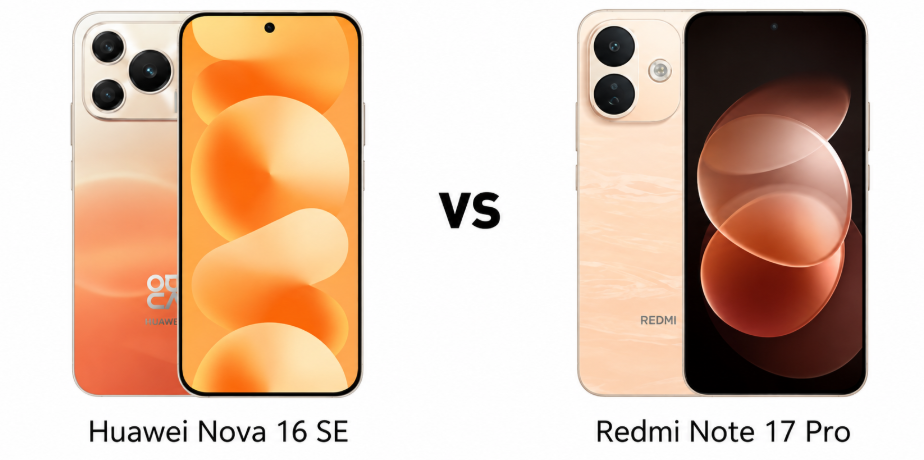
Huawei Nova 16 SE and Redmi Note 17 Pro target buyers who want large displays, big batteries, and strong everyday hardware without flagship pricing. The comparison is especially interesting because Huawei brings a massive OLED panel and an 8500mAh battery, while Redmi counters with tougher protection, newer Android software, and a more versatile camera setup.
Major Features:
Category
Huawei Nova 16 SE
Redmi Note 17 Pro
Winner
Display
6.84-inch OLED, 120Hz, 8,000 nits peak
6.83-inch AMOLED, 120Hz, 3,500 nits peak
Huawei — Brighter display
Display Protection
Aluminosilicate glass
Gorilla Glass Victus 2
Redmi — Tougher protection
Build Protection
IP65
IP68/IP69K
Redmi — Better durability
Processor
Kirin 8020
Snapdragon 6s Gen 4
Redmi — Newer platform
RAM
8GB
Up to 12GB
Redmi — More RAM options
Storage
Up to 512GB
Up to 512GB
Huawei — 8GB RAM standard
Storage Technology
Not specified
UFS 3.1
Redmi — Faster storage
Main Camera
50MP, 1/1.56-inch, PDAF
50MP, OIS
Huawei — Larger sensor
Secondary Camera
Auxiliary lens
8MP ultrawide
Redmi — More versatile
Selfie Camera
32MP, 4K video
16MP, 1080p video
Huawei — Better selfie specs
Rear Video
Up to 4K@30fps
Up to 1080p@30fps
Huawei — Higher resolution
Battery
8,500mAh
8,340mAh
Huawei — Larger capacity
Charging
66W wired, 5W reverse
67W wired, 22.5W reverse
Redmi — Better charging
Software
HarmonyOS 6.1
Android 16, HyperOS 3
Redmi — Broader compatibility
Speakers
Stereo
Stereo with Dolby Atmos
Redmi — Dolby Atmos
Fingerprint Sensor
Side-mounted
Under-display optical
Redmi — More premium placement
Connectivity
Wi-Fi 7, Bluetooth 6.0
Wi-Fi 5, Bluetooth 5.1
Huawei — Newer connectivity
NFC
Yes
Yes, region dependent
Huawei — Broader availability
Price
Priced around $300 / ₹30,000
Priced around $235 / ₹22,690
Redmi — Better value
Overall
Strong battery and selfie hardware
More balanced hardware and lower price
Redmi — Better overall package
Disclaimer: Specs are based on available data. Actual performance may vary. Verify details from official sources before buying.
The Huawei Nova 16 SE combines a glass front, plastic frame, and aluminum back with IP65 protection. It also features stereo speakers, NFC, an infrared port, and a side-mounted fingerprint scanner. Its design feels practical, but the protection rating is modest compared with Redmi’s much stronger water and drop resistance.
The Redmi Note 17 Pro uses Gorilla Glass Victus 2, a plastic frame and back, plus IP68/IP69K protection in many markets. It also adds an under-display fingerprint sensor and stereo speakers with Dolby Atmos. Overall, Redmi feels more reassuring for demanding everyday use, particularly for users who prioritize durability and stronger protection.
Display Quality
Both phones offer large 120Hz OLED-class displays with similarly sharp resolutions. Huawei stands out with an advertised 8,000-nit peak brightness figure, although its measurement is based on an isolated spot during video playback. It also supports 2,160Hz PWM dimming, making the display particularly interesting for sensitive eyes.
Redmi uses a 120Hz AMOLED panel with 3,840Hz PWM dimming and up to 3,500 nits peak brightness. Its Gorilla Glass Victus 2 protection adds practical value. Huawei has the more eye-catching brightness specification, but Redmi offers the more convincing overall display package for everyday use.
Verdict
Redmi wins the design and display section for stronger protection, tougher glass, and higher-frequency PWM dimming. Huawei remains appealing for its exceptionally large OLED panel and impressive advertised peak brightness.
2. Specifications Including Battery
Performance
The Huawei Nova 16 SE runs HarmonyOS 6.1 with the Kirin 8020 and Maleoon 920 GPU. It comes with 8GB RAM and storage options reaching 512GB, giving buyers plenty of room for apps and media. Its hardware should handle everyday tasks comfortably, although software ecosystem considerations remain important.
The Redmi Note 17 Pro runs Android 16 with HyperOS 3 and uses the Snapdragon 6s Gen 4. It offers configurations up to 12GB RAM and 512GB storage, with UFS 3.1 on higher-capacity versions. Redmi’s newer Android platform and broader app compatibility make it the safer performance choice for most international buyers.
Battery and Charging
Huawei packs an enormous 8,500mAh battery, paired with 66W wired charging and 5W reverse wired charging. That capacity is one of the phone’s biggest selling points and should comfortably support extended usage. For travelers and heavy users, the extra endurance could be more valuable than incremental performance gains.
Redmi carries an 8,340mAh silicon-carbon battery with slightly faster 67W charging, PD3.0 support, and 22.5W reverse wired charging. Its charging system is considerably more flexible. Huawei has the larger battery, but Redmi offers a better balance of capacity, charging compatibility, and reverse charging power.
Verdict
Redmi takes this section thanks to newer software, stronger memory options, UFS 3.1 storage, and faster, more versatile charging. Huawei counters with a slightly larger battery, making it compelling for maximum endurance.
3. Camera
Main and Secondary Lenses
Huawei uses a 50MP main camera with a large 1/1.56-inch sensor, dual-pixel PDAF, and 4K video recording. That combination gives it a potentially strong foundation for detailed everyday photography and better low-light capture. However, the listed setup lacks a clearly specified secondary camera, limiting versatility.
Redmi pairs its 50MP main camera with OIS and an 8MP ultrawide sensor. The main sensor is smaller, but optical stabilization should help with handheld photography and video. The ultrawide camera also gives Redmi greater compositional flexibility. For general photography, Redmi’s more complete camera system feels more practical.
Selfie Camera
Huawei takes a clear lead for selfies with a 32MP front camera capable of 4K video recording and gyro-EIS. That combination should appeal to creators who frequently record themselves, especially when higher-resolution front-facing video matters. It is one of the Nova 16 SE’s strongest advantages over its rival.
The Redmi Note 17 Pro uses a 16MP selfie camera with 1080p video recording. It supports HDR and panorama, but its specifications are considerably more modest. Huawei therefore looks substantially better for selfie photography and front-camera video, particularly for social content and video calls where detail matters.
Verdict
Huawei wins for selfie capability and its larger main-camera sensor, while Redmi offers the more versatile rear setup with OIS and ultrawide photography. For overall camera flexibility, Redmi has the practical advantage.
4. Pricing
The Huawei Nova 16 SE is priced around $300 or ₹30,000, placing it significantly above the Redmi Note 17 Pro. Huawei justifies some of that premium with an 8,500mAh battery, 8GB RAM across storage variants, a 32MP selfie camera, and its large OLED display.
The Redmi Note 17 Pro is priced around $235 or ₹22,690. Despite the lower price, it offers Gorilla Glass Victus 2, stronger water resistance, Android 16, HyperOS 3, OIS, an ultrawide camera, and configurations reaching 12GB RAM. That makes its hardware-to-price ratio particularly compelling.
Is the price justified?
Huawei’s premium makes sense if battery endurance, selfie quality, and HarmonyOS are the priorities. Its 512GB option and enormous battery give it a distinctive appeal, but the higher price becomes harder to justify when Redmi offers more comprehensive hardware for considerably less money.
Redmi delivers stronger value because its lower price does not require major compromises in core hardware. Buyers receive better protection, OIS, ultrawide photography, newer Android software, and more powerful reverse charging. For most users, it is the more sensible purchase.
Verdict
Redmi is the clear value winner. Its lower price combined with stronger protection, broader camera hardware, newer software, and versatile charging makes the premium paid for Huawei difficult to justify.
Disclaimer: Prices are approximate and may vary based on country, region, launch timing, and applicable taxes. Always check whether the listed price is for a China unit or a global/international variant when purchasing.
5. Conclusion
The Huawei Nova 16 SE stands out with its 8,500mAh battery, 32MP selfie camera with 4K recording, 2,160Hz PWM OLED display, and 512GB storage paired with 8GB RAM. Its aluminum-backed construction and HarmonyOS 6.1 also give it a distinctive identity.
The Redmi Note 17 Pro counters with Gorilla Glass Victus 2, IP68/IP69K protection, a silicon-carbon battery, 22.5W reverse charging, OIS, an ultrawide camera, UFS 3.1 storage, and Android 16 with HyperOS 3. These features make it the more balanced package overall.
Verdict
Redmi Note 17 Pro is the overall winner. It combines stronger durability, more versatile cameras, newer software, better charging flexibility, and significantly lower pricing, making it the smarter choice for most buyers.
FAQs
1. Which phone is better for everyday use? The Redmi Note 17 Pro offers a more balanced experience with newer software, stronger protection, and versatile hardware.
2. Which phone takes better photos? The Huawei Nova 16 SE has a larger main sensor, while Redmi offers OIS and an ultrawide camera.
3. Which phone performs better for gaming? The Redmi Note 17 Pro is the safer choice, especially in higher-RAM configurations and with UFS 3.1 storage.
4. Which phone has better battery life? The Huawei Nova 16 SE has a slightly larger battery, making it better suited to extended usage between charges.
5. Which phone offers better value for money? The Redmi Note 17 Pro offers stronger overall value thanks to its lower price and more comprehensive hardware.
Disclaimer: Prices, specifications, and availability may vary by region and retailer. Recommendations in this article are based on editorial opinion, feature-based value, and market positioning at the time of writing. Readers are advised to do their own research before making a purchase.
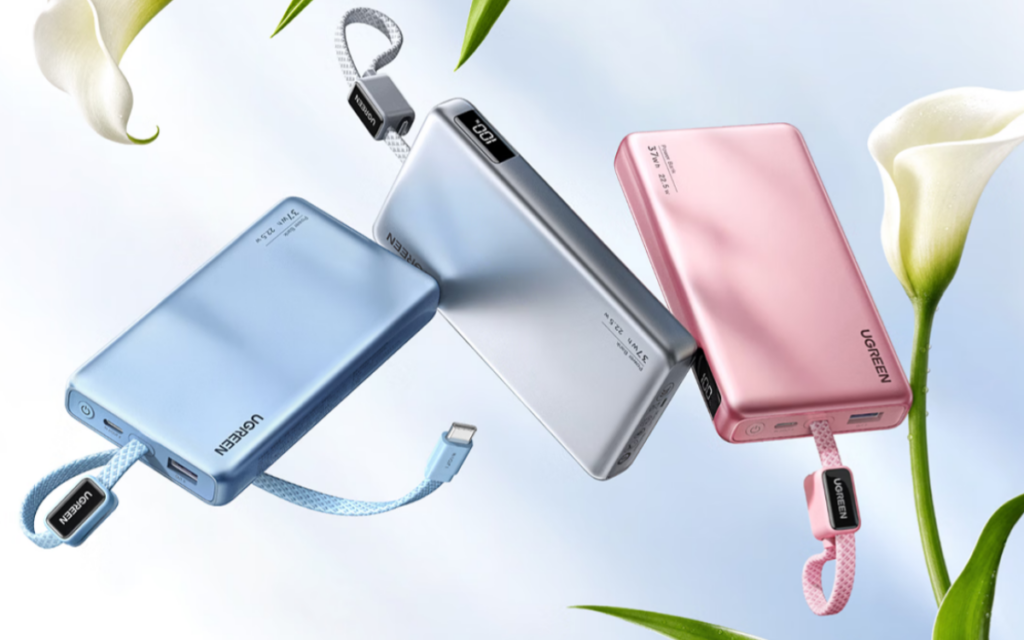
Ugreen has launched a new 10,000mAh power bank in China called the P5. It is priced at 119 yuan ($18) and will go on sale on September 16. The power bank meets China’s updated 2026 national safety standards.
The Ugreen P5 features a compact design, measuring 117.8 x 72 x 16.8mm and weighing around 203.4g. Ugreen says it is about 25% lighter than the older PB203 model. It also comes with a built-in 18.5cm USB-C cable that doubles as a carrying loop when not in use.
The built-in cable can withstand around 10,000 bends. In addition to the integrated cable, the power bank features a USB-C port and a USB-A port, allowing you to charge up to three devices simultaneously. It also sports a digital display on the front that shows the remaining battery percentage.
For charging, the P5 supports up to 22.5W output and 20W input. When charging multiple devices simultaneously, the total output is limited to 15W (5V/3A). Ugreen claims the power bank can charge an iPhone 17 to around 58% in 30 minutes.
During the same period, it can charge a Huawei Mate 80 to around 37% and a Xiaomi 17 to around 21%. The P5 takes approximately 3.1 hours to fully recharge and supports several fast-charging protocols, including PD, QC, AFC, and SCP.
The P5 also focuses heavily on battery safety and longevity. It features a 37Wh polymer lithium-ion cell supplied by EVE Energy, which Ugreen claims can retain more than 90% of its original capacity after 500 charge cycles.
It also equips a built-in battery management system that monitors parameters such as temperature, voltage, and cycle count. You can check this battery information through Ugreen’s mobile app or desktop software.
To pass the upcoming 2026 safety regulations and receive China’s mandatory 3C certification, the P5 features flame-retardant materials and a dual-NTC temperature monitoring system. Ugreen says it operates at or below 48°C and has passed nail puncture, compression, and high-temperature safety tests without catching fire or exploding.
In related news, Portronics has recently launched a camera-style 20,000mAh power bank with 15W Qi2 charging and a built-in cable, while Cuktech has introduced a new 25,000mAh power bank globally with 100W charging and an integrated USB-C cable.
For more daily updates, please visit our News Section.
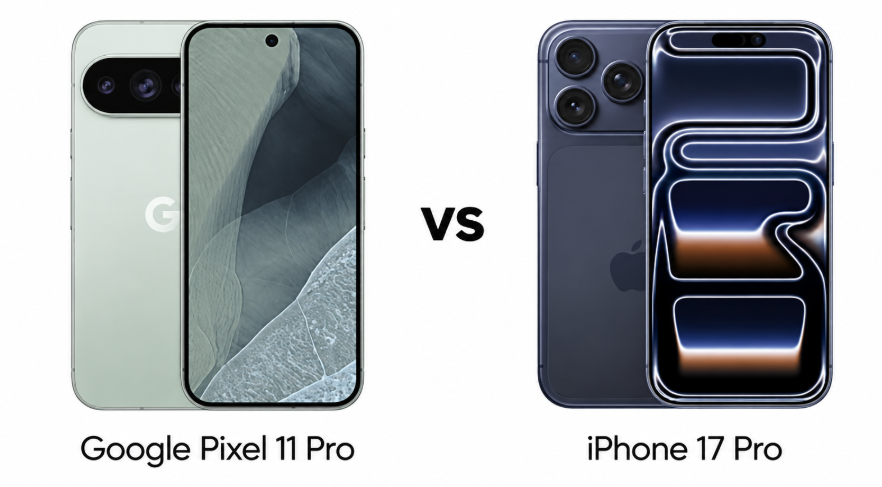
Google Pixel 11 Pro and iPhone 17 Pro represent two different approaches to the premium smartphone experience. Both offer 6.3-inch 120Hz OLED displays, flagship processors, versatile triple-camera systems, and long-term software support. The Pixel leans into AI, computational photography, and Android flexibility, while the iPhone emphasizes performance, video capabilities, and a tightly integrated ecosystem.
Major Features:
Category
Google Pixel 11 Pro
iPhone 17 Pro
Winner
Display
6.3-inch LTPO OLED, 120Hz, 3600 nits peak
6.3-inch LTPO OLED, 120Hz, 3000 nits peak
Google — Brighter display
Build
Gorilla Glass Victus 2, aluminum frame, IP68
Ceramic Shield 2, aluminum frame, IP68
Apple — Stronger protection
Performance
Tensor G6, up to 16GB RAM
A19 Pro, 12GB RAM
Apple — Faster performance
Storage
256GB, 512GB, 1TB
256GB, 512GB, 1TB
Google — More RAM
Main Camera
50MP main, 48MP ultrawide, 48MP 5x telephoto
48MP main, 48MP ultrawide, 48MP 4x telephoto
Google — Better zoom
Video
Up to 8K, 10-bit HDR
Up to 4K 120fps, Dolby Vision, ProRes RAW
Apple — Better pro video
Selfie Camera
42MP ultrawide, PDAF, 4K video
18MP multi-aspect, PDAF, 4K video
Google — Higher resolution
Battery
4850mAh
Up to 4252mAh
Google — Larger battery
Wireless Charging
25W Qi2.2 magnetic
25W MagSafe/Qi2
Tie — Similar speeds
Unique Features
Ultrasonic fingerprint, bypass charging, Pixel AI
Face ID, LiDAR, MagSafe, spatial video
Google — More practical extras
Price
Priced around $1,100 / ₹120,000
Priced around $1,100 / ₹135,000
Google — Better value
Disclaimer: Specs are based on available data. Actual performance may vary. Verify details from official sources before buying.
The Pixel 11 Pro combines Gorilla Glass Victus 2 with an aluminum frame and carries an IP68 rating. The iPhone 17 Pro uses Ceramic Shield 2 on the front, an aluminum frame, and improved water resistance up to 6 meters. Both feel suitably premium, but the iPhone’s construction feels more refined. The Pixel’s ultrasonic fingerprint sensor is a practical advantage, especially for users who prefer quick biometric unlocking.
Both phones also support advanced connectivity features, including Wi-Fi 7, Bluetooth 6.0, NFC, UWB, and USB-C. The Pixel offers a more conventional Android experience, while the iPhone benefits from Apple’s broader hardware and software integration. For everyday usability, the Pixel’s fingerprint authentication feels more convenient, while the iPhone remains the more cohesive ecosystem choice.
Both phones use 6.3-inch LTPO OLED panels with 120Hz refresh rates. The Pixel reaches a claimed 3,600-nit peak brightness and offers HDR10+, while the iPhone reaches 3,000 nits and adds Dolby Vision alongside HDR10. The Pixel has the sharper panel on paper, but Apple’s anti-reflective coating improves outdoor visibility.
Verdict
The Pixel 11 Pro wins narrowly for display brightness and biometric convenience, while the iPhone 17 Pro counters with excellent protection and stronger ecosystem integration.
2. Specifications Including Battery
Performance
The Pixel 11 Pro uses Google’s Tensor G6 built on a 3nm process, paired with up to 16GB RAM. The iPhone 17 Pro uses Apple’s A19 Pro chip with 12GB RAM. Raw performance should favor the iPhone, particularly for demanding gaming and sustained workloads, while the Pixel’s hardware is optimized heavily around Google’s AI features and Android software.
The Pixel offers 256GB, 512GB, and 1TB storage options with UFS 4.x, while the iPhone provides the same capacities using NVMe storage. Both support seven major OS updates or extensive software support, but their priorities differ. The iPhone is the stronger choice for maximum processing performance, while Pixel hardware feels more purpose-built around AI-powered features.
Battery and Charging
The Pixel packs a 4,850mAh battery with 30W wired charging and 25W magnetic Qi2.2 wireless charging. The iPhone’s battery capacity varies by SIM configuration, while wired charging reaches 50% in 20 minutes and wireless charging supports up to 25W through MagSafe or Qi2. The Pixel has the larger battery, but Apple’s efficiency could narrow the practical gap.
The Pixel also supports reverse wired charging and bypass charging, giving it useful flexibility for accessories and sustained gaming. The iPhone responds with a more mature charging ecosystem. For charging versatility, the Pixel feels more practical, although neither phone offers class-leading wired charging speeds.
Verdict
The iPhone 17 Pro wins performance, while the Pixel 11 Pro takes the battery and charging versatility advantage. For power users, Apple’s chip is the stronger overall package.
3. Camera
Main and Secondary Lenses
The Pixel 11 Pro features a 50MP main camera, 48MP ultrawide, and 48MP periscope telephoto with 5x optical zoom. The iPhone 17 Pro uses 48MP sensors across its main, ultrawide, and telephoto cameras, with 4x optical zoom. Pixel’s 5x telephoto gives it an advantage for distant subjects, while Google’s computational photography tools add features such as Best Take, Zoom Enhance, Pixel Shift, and Ultra-HDR.
The iPhone counters with a much stronger professional video toolkit. It supports 4K recording at up to 120fps, Dolby Vision HDR, ProRes, ProRes RAW, Apple Log 2, and spatial video. The Pixel can record 8K video and offers 10-bit HDR, making it highly capable for everyday shooting. Still, the iPhone is the more compelling option for serious mobile videography.
Selfie Camera
Google equips the Pixel with a 42MP ultrawide selfie camera supporting PDAF and 4K video at 60fps. The iPhone uses an 18MP multi-aspect camera with PDAF, alongside its SL 3D sensor system for Face ID and depth features. Pixel offers substantially higher resolution, while Apple’s system provides sophisticated biometric and video capabilities.
Verdict
The Pixel 11 Pro looks stronger for computational photography and zoom, but the iPhone 17 Pro is the better all-round camera phone, particularly for professional-quality video.
4. Pricing
The Google Pixel 11 Pro is priced around $1,100 / ₹120,000, while the iPhone 17 Pro is priced around $1,100 / ₹135,000. That makes the Pixel considerably more attractive in the Indian market, despite both sitting in the same premium flagship class internationally.
Both phones provide 256GB as the starting storage option and offer larger 512GB and 1TB configurations. The Pixel also brings 16GB RAM at higher capacities, while the iPhone stays at 12GB. However, Apple’s hardware-software optimization means RAM figures alone do not determine real-world performance.
Is the price justified?
The Pixel’s lower Indian pricing makes its combination of a bright LTPO display, large battery, 5x telephoto camera, 16GB RAM, and extensive AI features particularly compelling. It delivers a lot of flagship hardware without pushing the price as aggressively.
The iPhone 17 Pro justifies its premium through the A19 Pro chip, advanced video recording, Face ID, MagSafe, and Apple’s wider ecosystem. For buyers already invested in Apple devices, the additional cost can make more sense. For most buyers comparing hardware directly, however, the Pixel offers better value.
Verdict
The Pixel 11 Pro is the clear value winner. Its lower price, larger battery, stronger telephoto specification, and generous memory make the overall package easier to recommend.
Disclaimer: Prices are approximate and may vary based on country, region, launch timing, and applicable taxes. Always check whether the listed price is for a China unit or a global/international variant when purchasing.
5. Conclusion
The Pixel 11 Pro stands out with its 3,600-nit display, 4,850mAh battery, 5x optical telephoto camera, ultrasonic fingerprint reader, 16GB RAM options, and Google-focused AI features. Its bypass charging and 25W Qi2.2 magnetic wireless charging add practical advantages that appeal to power users.
The iPhone 17 Pro counters with the A19 Pro chip, Face ID, LiDAR, MagSafe, Dolby Vision video, ProRes RAW, Apple Log 2, and spatial video capabilities. These features make it particularly attractive for creators and users already inside Apple’s ecosystem. However, the Pixel delivers a broader mix of hardware advantages for the money.
Verdict
Overall winner: Google Pixel 11 Pro. It offers the better combination of display, battery, zoom photography, AI features, charging flexibility, and value. The iPhone 17 Pro remains the better pick for performance, video, and Apple ecosystem users.
1. Which phone is better for gaming, Pixel 11 Pro or iPhone 17 Pro? The iPhone 17 Pro is better for gaming, thanks to the A19 Pro chip and stronger graphics performance.
2. Which phone takes better zoom photos? The Pixel 11 Pro offers better zoom flexibility with its 5x optical periscope telephoto camera.
3. Which phone charges faster? The iPhone 17 Pro reaches 50% in about 20 minutes with compatible wired charging.
4. Which phone is better for battery-heavy users? The Pixel 11 Pro is better suited to heavy users, thanks to its larger battery and bypass charging support.
5. Which phone is better for long-term value? The Pixel 11 Pro offers stronger hardware value, while the iPhone can be more valuable within Apple’s ecosystem.
Disclaimer: Prices, specifications, and availability may vary by region and retailer. Recommendations in this article are based on editorial opinion, feature-based value, and market positioning at the time of writing. Readers are advised to do their own research before making a purchase.
Xiaomi Pad 9 Pro Max is a large-screen tablet built for entertainment, productivity, gaming, and everyday use. It features a 13.3-inch 3.4K LCD display, Xiaomi’s Xring O3 processor, up to 16GB of RAM, and a 12,000mAh battery with 120W fast charging. The tablet runs Xiaomi HyperOS 4 based on Android 17.
Price and Availability
The Xiaomi Pad 9 Pro Max is now available at Giztop, with prices starting at $899. Global and express shipping options are available for international buyers.
The Xiaomi Pad 9 Pro Max features a 13.3-inch 3.4K LCD display with a 144Hz refresh rate. The screen can reach up to 1000 nits of brightness and supports the P3 color gamut and HDR10+. The high refresh rate is designed to provide smoother scrolling, gaming, and general navigation.
Under the hood, the tablet is powered by a Xiaomi Xring O3 10-core chipset paired with a 16-core G2-Ultra NX GPU. It is available with 8GB, 12GB, or 16GB of RAM, with LPDDR5X and LPDDR5T memory options. Storage comes in 256GB and 512GB UFS 4.1 configurations.
Cameras and Connectivity
For photography, the tablet has a 50MP rear camera, while a 32MP front camera is available for selfies, video calls, and other front-facing tasks. Connectivity options include Wi-Fi 802.11 a/b/g/n/ac/ax and Bluetooth for wireless connections and compatible accessories.
Battery and Audio
The Xiaomi Pad 9 Pro Max packs a 12,000mAh dual-cell battery with support for 120W fast charging. It also supports 27W wired reverse charging and 45W POGO wired car charging.
For audio, the tablet features an eight-speaker setup along with a six-microphone array for improved voice capture and noise cancellation.
Software
The tablet runs Xiaomi HyperOS 4 based on Android 17, providing Xiaomi’s latest software interface and features.
With its large display, multiple memory and storage options, powerful processor, large battery, and fast charging, the Xiaomi Pad 9 Pro Max is designed for a range of everyday and demanding tablet tasks.
Vivo is stepping further into the affordable audio segment in India with a new pair of truly wireless earbuds. The Vivo Buds focus on long battery life, customisable audio and low-latency connectivity. They also bring a few ecosystem-focused features for users with compatible Vivo and iQOO smartphones.
Vivo Buds features and specifications
The Vivo Buds feature 10mm high-resolution dynamic drivers with a PU and PEEK diaphragm. Vivo includes DeepX 4.0 sound effects such as Mega Bass, Clear Voice, Clear High Pitch and Audiobook mode, along with a 10-band equalizer for manual tuning. Spatial Audio is also supported on compatible Vivo and iQOO smartphones, with Theatre, Concert Hall, Studio and Live Concert modes.
Call quality is handled by four microphones, with Dual-Mic AI Call Noise Cancellation designed to reduce background sounds. A dedicated wind-noise reduction design is also included. The earbuds support Bluetooth 6.1, multipoint connectivity for two devices and a 42ms low-latency mode for gaming on supported Vivo and iQOO phones.
Each earbud weighs around 3.8g and carries an IP54 rating for dust and water resistance. The earbuds support Google Fast Pair, Find My Vivo Buds, customisable touch controls and Remote Camera Control on compatible Vivo devices. Opening the case near supported Vivo phones can also trigger a pet-themed pairing animation.
Battery life is one of the biggest selling points, with the 53mAh batteries in the earbuds rated for up to 12 hours of music playback. The 525mAh charging case takes total playback time to up to 50 hours. A 10-minute charge can provide up to four hours of playback, while calling is rated for up to seven hours on a single charge.
The Vivo Buds are priced at Rs 1,999 (~$20) in India and are available through the Vivo India e-store, Flipkart and leading retail outlets. They come in Basalt Black and Nilgiri Green colour options, giving buyers two understated finishes to choose from.
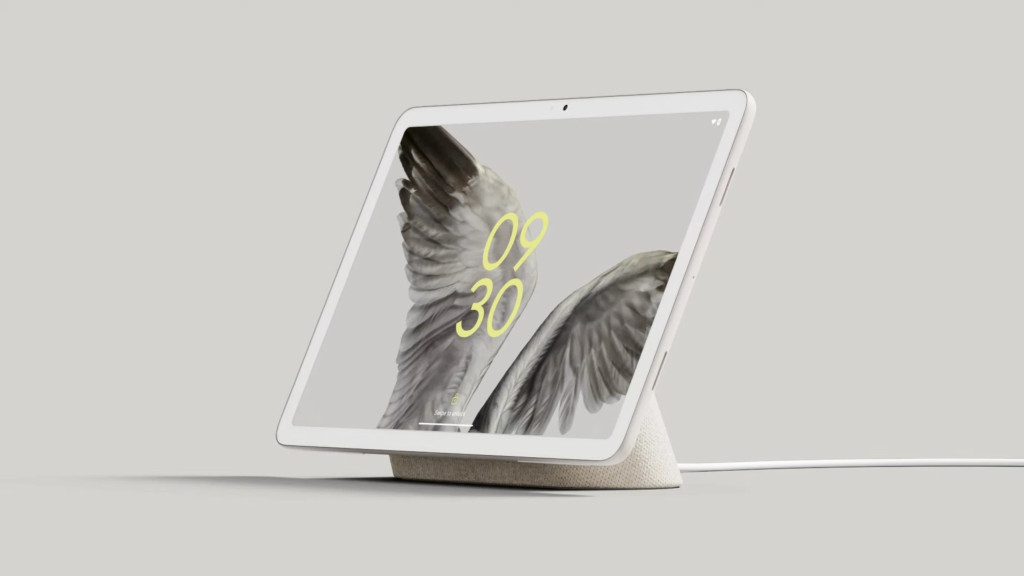
Google’s Pixel Tablet may have reached the end of its short run. The three-year-old device has started disappearing from Google’s online presence, with some key signs pointing towards its discontinuation. The changes also raise fresh questions about whether Google plans to return to the tablet market with another Pixel-branded device.
The Pixel Tablet has been removed from the Google Store, while Google has also taken down the Tablet category from its main navigation menu. A direct link to the tablet’s product page now redirects to the Google Store homepage, making it difficult to find any official trace of the device.
The tablet was already marked out of stock before Google removed its listing completely. Its dedicated accessories remain visible, including the Pixel Tablet Case and Charging Speaker Dock, although most are unavailable. Third-party availability also appears to have dried up, with Amazon showing no stock and Best Buy listing the device as no longer available in new condition.
Google introduced the Pixel Tablet in 2023 as a hybrid device that could work as a conventional Android tablet and a smart home display when placed on its charging speaker dock. It launched at $499 in the US, with the dock sold separately, and became the only tablet in Google’s current hardware lineup.
A successor was reportedly considered, with the Pixel Tablet 2 said to have been planned with upgrades such as a 120Hz display and 4K external display support. However, Google reportedly cancelled those plans over profitability concerns. A possible third-generation model was also said to have been shelved.
Interestingly, Google had promised software updates for the Pixel Tablet through June 2028. While the company has not clearly stated whether that support commitment will change, the removal from its store makes a second-generation model look increasingly unlikely for now. For existing owners, the bigger question is how Google handles support after ending sales.
Vivo has a busy schedule ahead across multiple markets. While the company is preparing to launch the X500 series in China on September 21, it is also expected to bring models such as the Vivo V80 series and X Fold 6 to the global market. The arrival of the foldable now seems to be getting closer, as the global variant has surfaced on Geekbench, suggesting that Vivo could be conducting final testing ahead of its international debut.
Vivo X Fold 6 Geekbench listing
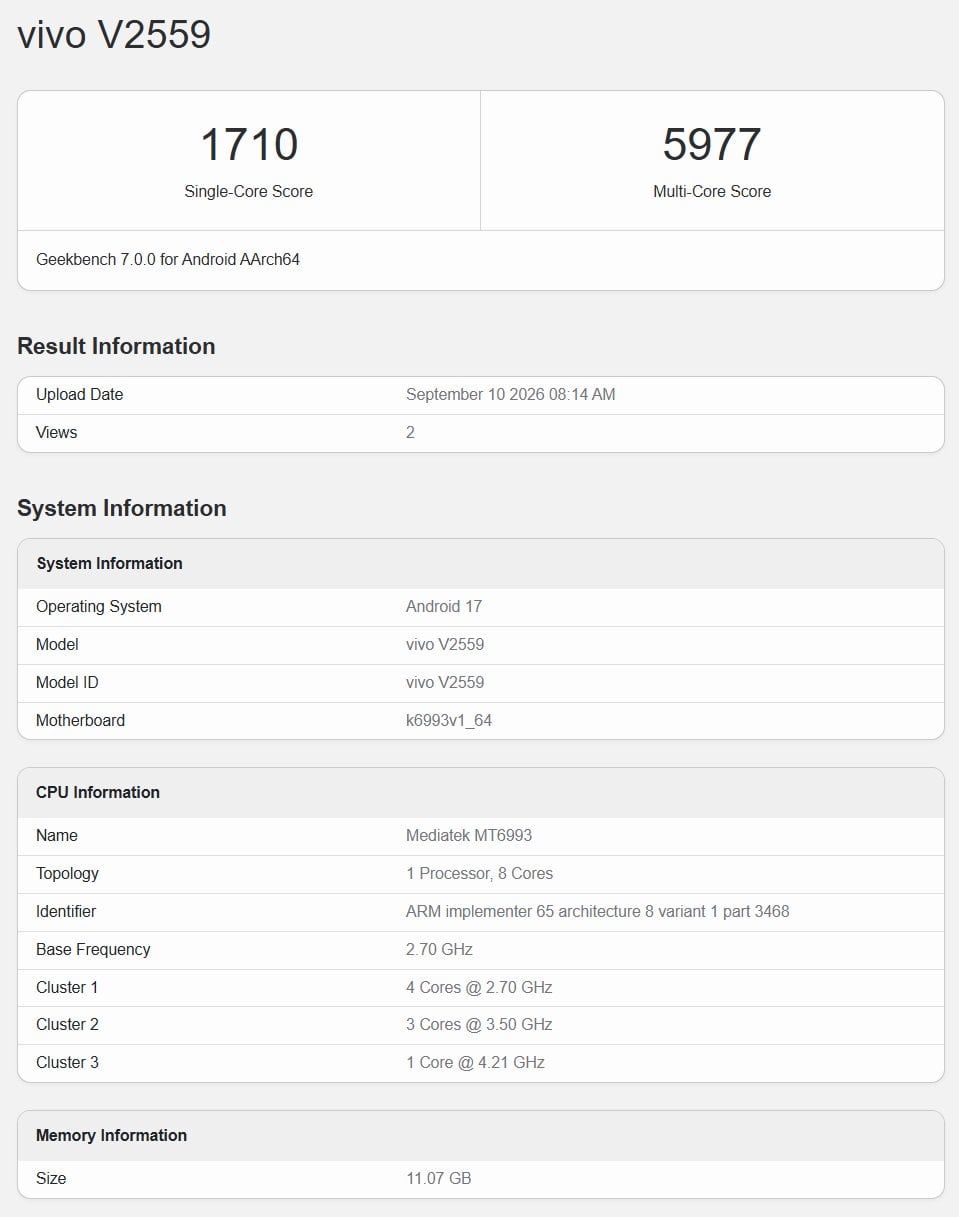
Certification listings such as SDPPI in Indonesia, SIRIM in Malaysia, and NBTC in Thailand have previously revealed that the global version of the Vivo X Fold 6 carries the model number V2559. The same model has now appeared on Geekbench 7, offering the first look at its performance and some key software and memory details.
The Geekbench listing shows the Vivo X Fold 6 scoring 1,710 points in the single-core test and 5,977 points in the multi-core test. The device is powered by the MediaTek Dimensity 9500 chipset, identified by the MT6993 model number, and comes with 12GB of RAM.
Interestingly, the listing also shows Android 17, which would make the global version one of the first Vivo phones to appear with the latest Android version. The Chinese model, meanwhile, launched with Android 16-based OriginOS 6 Fold.
Vivo X Fold 6 specifications
The Vivo X Fold 6 features an 8.02-inch LTPO AMOLED inner display with a 2504 × 2312-pixel resolution and a 6.51-inch LTPO AMOLED cover display with a 2528 × 1120-pixel resolution.
Both screens support a 120Hz refresh rate, while the displays can reach up to 5,000 nits of peak brightness. The foldable is powered by the Dimensity 9500 Super Edition, paired with up to 16GB of LPDDR5X Ultra RAM and 1TB of UFS 4.1 storage.
The X Fold 6 packs a 200-megapixel primary camera, a 50-megapixel ZEISS APO periscope telephoto camera, and a 50 ultra-wide camera on the rear. It also has 20-megapixel cameras on both the inner and outer displays.
Other highlights include a 7,000mAh battery, 80W wired charging, 40W wireless charging, and IP58/IP59-rated dust and water resistance. The Chinese version runs OriginOS 6 Fold based on Android 16, although the Geekbench listing indicates that the global model could arrive with Android 17.
Vivo may not launch the X Fold 6 globally this month, however, as the company’s X500 series is currently expected to take centre stage with its Sept. 21 China debut. The foldable could instead be lined up for an October launch, although Vivo has yet to announce an official global release date.
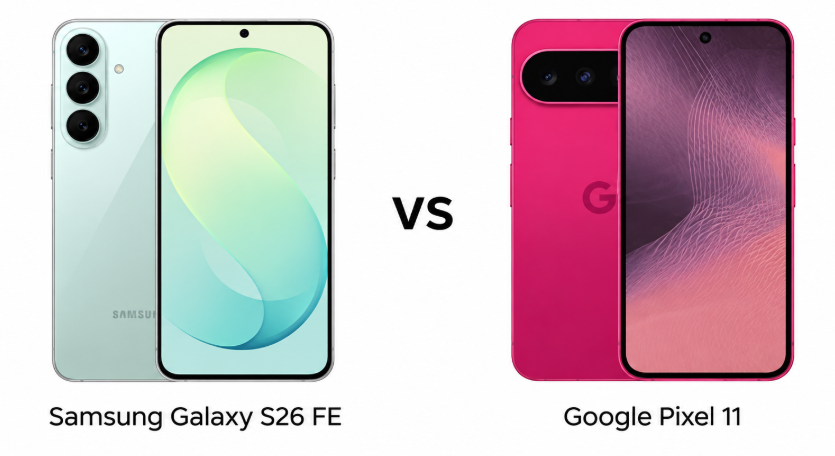
Samsung Galaxy S26 FE and Google Pixel 11 take different approaches to the premium Android experience. Samsung focuses on strong all-round hardware and value, while Google leans into cameras and smart features. But with a significant price gap between them, which phone actually offers the better package ?
Major Features:
Category
Samsung Galaxy S26 FE
Google Pixel 11
Winner & Reason
Build
Gorilla Glass Victus+ and aluminum frame
Gorilla Glass Victus 2 and aluminum frame
Google — newer glass protection
Display
Dynamic AMOLED 2X, 120Hz, 1900 nits HBM
OLED, 120Hz, 2000 nits HBM
Google — higher brightness
Chipset
Exynos 2500
Tensor G6
Google — higher-end overall configuration
RAM
8GB
12GB
Google — more RAM
Main Camera
50MP with OIS
48MP with OIS
Samsung — higher resolution
Telephoto
8MP, 3x optical zoom
10.8MP, 5x optical zoom
Google — longer optical zoom
Ultrawide
12MP
13MP with PDAF
Google — higher resolution and autofocus
Selfie Camera
12MP
10.5MP ultrawide with PDAF
Samsung — higher resolution
Video
Up to 8K at 30fps
Up to 4K at 60fps
Samsung — higher video resolution
Battery
4900mAh
4985mAh
Google — slightly larger battery
Wired Charging
45W
30W
Samsung — faster wired charging
Wireless Charging
15W, Qi2
25W magnetic, Qi2.2
Google — faster and newer standard
Unique Features
Samsung DeX, Wireless DeX
Satellite SOS, bypass charging
Samsung — DeX adds more versatility
Price
Priced around $700 / ₹70,000
Priced around $900 / ₹90,000
Samsung — significantly better value
Disclaimer: Specs are based on available data. Actual performance may vary. Verify details from official sources before buying.
The Samsung Galaxy S26 FE uses a glass front and back with Gorilla Glass Victus+ and an aluminum frame, giving it a familiar premium Galaxy feel. The Pixel 11 also combines glass panels with an aluminum frame, but upgrades to Gorilla Glass Victus 2. Both phones carry IP68 protection, making either suitable for everyday exposure to dust and water.
Display Quality
Samsung uses a Dynamic AMOLED 2X panel with a 120Hz refresh rate, HDR10+, and up to 1900 nits HBM brightness. The Pixel 11 counters with a 120Hz OLED display supporting HDR10+ and up to 2000 nits HBM brightness, with a higher peak brightness figure. The Pixel feels slightly more compelling for outdoor visibility, while Samsung offers a larger viewing canvas.
The Pixel 11 wins narrowly for display brightness and newer glass protection, but the Galaxy S26 FE remains attractive for users who prefer a larger screen. Samsung’s AMOLED technology also makes it a particularly strong choice for multimedia and everyday scrolling.
2. Specifications Including Battery
Performance
The Galaxy S26 FE runs Android 17 with Samsung’s Exynos 2500 chipset, Xclipse 950 graphics, and 8GB RAM across its storage options. The Pixel 11 uses Google’s Tensor G6 with 12GB RAM and UFS 4.x storage. Both promise modern flagship-class hardware, but the Pixel’s larger memory allocation gives it a more comfortable specification sheet for multitasking and long-term use.
Battery and Charging
Samsung packs a 4900mAh battery with 45W wired charging, 15W wireless charging, Qi2 compatibility, and reverse wireless charging. The Pixel 11 has a slightly larger 4985mAh battery, although wired charging drops to 30W. It adds 25W magnetic wireless charging, Qi2.2, reverse wired charging, and bypass charging. Samsung feels better for conventional charging speed, while Pixel offers more modern charging flexibility.
Verdict
The Pixel 11 takes the specification advantage with more RAM and a slightly larger battery, while Samsung wins on wired charging speed. For overall flexibility, Pixel’s broader charging features make it the more interesting package.
3. Camera
Main and Secondary Lenses
The Galaxy S26 FE features a 50MP main camera with OIS, an 8MP telephoto with 3x optical zoom, and a 12MP ultrawide. The Pixel 11 uses a 48MP main camera, a 10.8MP telephoto with 5x optical zoom, and a 13MP ultrawide with autofocus. Samsung offers a strong all-round setup, but Pixel’s longer optical zoom gives it a clear advantage for distant subjects.
Selfie Camera
Samsung equips the Galaxy S26 FE with a 12MP front camera supporting 4K video at up to 60fps, along with gyro-EIS and HDR10+. The Pixel 11 has a 10.5MP ultrawide selfie camera with autofocus and similar 4K recording support. Samsung’s higher resolution looks appealing on paper, while Pixel’s wider perspective and autofocus make it more versatile for group selfies and video calls.
Verdict
The Pixel 11 is the stronger camera phone overall, mainly because of its 5x optical telephoto and more advanced imaging features. Samsung remains competitive, especially with its 8K recording capability and higher-resolution selfie camera.
4. Pricing
The Samsung Galaxy S26 FE is priced around $700 / ₹70,000, while the Google Pixel 11 is priced around $900 / ₹90,000. That puts the Pixel in a notably higher price bracket, making the Samsung considerably more accessible for buyers who want a premium Android phone without stretching the budget as far.
The Pixel 11 justifies part of its premium with 12GB RAM, a more capable telephoto camera, newer wireless charging support, and several distinctive software and hardware features. However, Samsung delivers a 120Hz AMOLED display, 45W charging, versatile cameras, and DeX support for substantially less. For value-focused buyers, the Galaxy feels easier to recommend.
Samsung wins on value, offering a more affordable route to premium features. Pixel’s higher price makes sense mainly for buyers who specifically want its camera capabilities, extra RAM, and Google-focused feature set.
Disclaimer: Prices are approximate and may vary based on country, region, launch timing, and applicable taxes. Always check whether the listed price is for a China unit or a global/international variant when purchasing.
5. Conclusion
The Galaxy S26 FE stands out with Samsung DeX, wireless DeX support, 45W wired charging, 8K video recording, and a balanced triple-camera system. The Pixel 11 counters with satellite SOS, 5x optical zoom, a 12GB RAM configuration, magnetic Qi2.2 charging, bypass charging, and a more advanced connectivity package.
The two phones therefore target slightly different buyers. Samsung feels more practical for users who want strong hardware, faster wired charging, desktop-style DeX functionality, and better value. Pixel is more appealing to photography-focused users and those who value Google’s distinctive software-driven features. The choice ultimately depends on whether price or specialized capabilities matter more.
The Samsung Galaxy S26 FE is the overall winner because it delivers a stronger value proposition, faster wired charging, versatile hardware, and useful extras at a substantially lower price. The Pixel 11 is better for camera-focused buyers, but Samsung offers the more complete package for most users.
FAQs
Which phone is better for everyday use? The Samsung Galaxy S26 FE offers the better balance of features, charging, and price for most everyday users.
Which phone has the better camera? The Google Pixel 11 has the stronger camera setup, particularly for zoom photography and versatile shooting.
Which phone offers better performance? The Google Pixel 11 has 12GB RAM and the Tensor G6, giving it a stronger overall hardware configuration.
Which phone has better battery and charging? The Samsung Galaxy S26 FE supports faster 45W wired charging, while the Pixel 11 offers more advanced wireless charging.
Which phone is better value for money? The Samsung Galaxy S26 FE is better value, offering premium features at a significantly lower starting price.
Disclaimer: Prices, specifications, and availability may vary by region and retailer. Recommendations in this article are based on editorial opinion, feature-based value, and market positioning at the time of writing. Readers are advised to do their own research before making a purchase.
The ColorOS 17 update will soon start rolling out to Oppo devices, bringing new features, visual upgrades, and improved AI capabilities. The Android 17-based software is currently available to select Oppo devices via the closed beta program, while the stable rollout could begin in the coming weeks.
If you have an Oppo device, you may be looking forward to the ColorOS 17 update. So, we’ve curated this post to include everything we know about Oppo’s next big upgrade, including the list of eligible devices, possible release timeline, and the major upgrades.
Oppo has yet to publish a list of its devices that will be upgraded to ColorOS 17. So, our team reviewed the update policy for each device and came up with the following list.
Oppo Find N series
Oppo Find N6
Oppo Find N5
Oppo Find N3, N3 Flip
Oppo Find N2, N2 Flip
Oppo Find X series
Oppo Find X9, X9 Pro, X9 Ultra, X9s
Oppo Find X8, X8 Pro, X8 Ultra
Oppo Find X7, X7 Ultra
Oppo Find X6, X6 Pro
Oppo Reno series
Oppo Reno 16, 16 Pro, 16c, 16 F, 16 FS
Oppo Reno 15, 15 Pro, 15 Pro Mini, 15 Pro Max, 15 F, 15 FS
Oppo Reno 14, 14 Pro, 14 F
Oppo Reno 13, 13 Pro, 13 F, 13 F 4G
Oppo Reno 12, 12 Pro
Oppo Reno 11, 11 Pro
Oppo F series
Oppo F33, F33 Pro
Oppo F31, F31 Pro, F31 Pro+
Oppo F29, F29 Pro
Oppo K series
Oppo K15, K15 Pro, K15 Pro+
Oppo K14, K14 Turbo, K14 Turbo Pro, K14x
Oppo K13, K13 Turbo, K13 Turbo Pro, K13x
Oppo Pad series
Oppo Pad 6
Oppo Pad 5, 5 Pro
Oppo Pad 3
Oppo Pad Mini
Oppo Pad SE
While it’s an unofficial list, it should closely resemble the official one when it’s announced, as it’s been prepared in accordance with the official update policy.
It won’t take long to notice that there are no Oppo A-series phones on the list. The reason is that most A-series phones do not have an official update policy. So, we decided to exclude that for now to keep the list accurate.
We’ll update the list when Oppo announces ColorOS 17, which is scheduled for September 17.
When will Oppo roll out the ColorOS 17 update?
Oppo hasn’t announced the ColorOS 17 rollout schedule yet, but it appears the rollout could begin earlier than last year’s ColorOS 16. The company announced ColorOS 16 in China in mid-October, while the ColorOS 17 launch is happening a month earlier, on September 16.
As always, the rollout will begin in China first, likely starting early October, while the global rollout could begin later that month. We’ll have more clarity on this when Oppo reveals the timeline at the ColorOS 17 launch event on September 17.
The brand hasn’t announced a global launch date yet. We’ll likely hear about it soon after ColorOS 17 launches in China.
Oppo ColorOS 17 update: Here’s what to expect
Beta testers and leaks have revealed almost all the major visual changes coming to ColorOS 17. The new software brings a stronger translucent frosted-glass appearance across the UI. It features an updated Control Center with fully circular controls and redesigned settings and edit buttons.
The updated Quick Settings panel uses a translucent frosted-glass appearance with contour glow, and swiping between the Control Panel and Notification Center produces a bouncy animation with visible layer separation. It features expanded volume and brightness sliders for finer controls.
The volume slider now features a quick mute button at the bottom and a percentage display at the top. When earbuds are connected, the volume slider shows an earbud icon.
ColorOS 17 replaces the traditional navigation bar with a transparent capsule-style navigation bar that works across most system apps, including Phone, Notes, and Recorder. Users can swipe left or right to switch sections.
The Flux Themes get new interactive effects and smoother animations. The vertical clock on the lock screen now offers three font styles and uses a frosted-glass treatment with a contour glow. Oppo brings iOS 26-inspired flashlight interface, allowing brightness adjustments by swiping up or down on the screen.
The Phone app now features a redesigned call interface with a larger end call button and more customization options. The Media Player has also been updated to feature a stronger frosted-glass effect, a comet-like animated seek bar, and a light-field aesthetic for added depth. The new software also adds a new “Live Alert” charging animation with a glow effect, paired with a more spacious charging tone.
Besides visual upgrades, ColorOS 17 is reported to have better RAM management and thermal efficiency. The Photos app is expected to bring new AI-assisted editing tools.
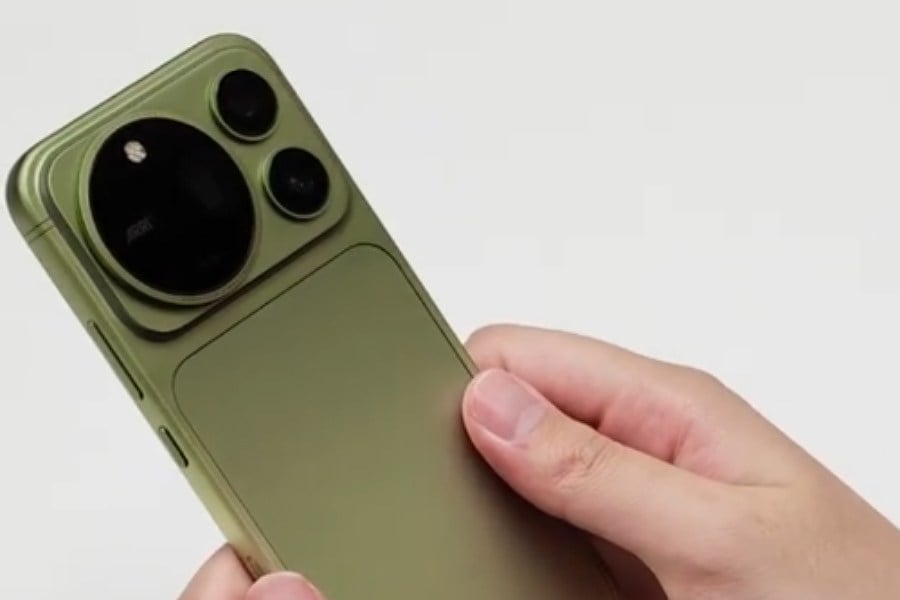
A new video is giving us the clearest look yet at the Honor Magic9 Pro Max ahead of its debut. Honor confirmed the Magic 9 series will land on September 28, and the lineup will reportedly split into three phones: the Magic 9, the Magic 9 Pro, and this Pro Max variant, which showed up on Weibo in an unboxing and hands-on clip wearing the Moss Green finish we’d already spotted in teasers.
The biggest change is on the back. Honor has moved away from the circular camera module used on the Magic 8 series. Instead, the Magic 9 Pro Max combines round camera rings with a large rectangular housing that stretches across the back.
Honor Magic 9 Pro Max cameras
The rear camera is a 200MP sensor at 1/1.28 inches with an f/1.57 aperture and OIS rated to correct up to 3 degrees of shake. Sitting behind the periscope lens is a second 200MP sensor, this one at 1/1.4 inches. Honor is also bringing its ARRI partnership to the Magic 9 Pro Max, after debuting it on the Honor Robot Phone. Honor has also been sharing camera samples from the Magic9 Pro Max as it gets closer to launch.
Up front, you still get the wide pill-shaped cutout housing the selfie camera and a 3D depth sensor, carried over from the Magic 8. What’s new is the sensor behind it: these are said to be the first Android phones with a square selfie camera sensor.
Around the rest of the phone, the screen bezels come in at a slim 1mm, and you get symmetrical stereo speaker grilles running along the top and bottom edges. On the right side sits Honor’s AI button, now in its latest form, continuing a feature the brand has kept across recent Magic generations.
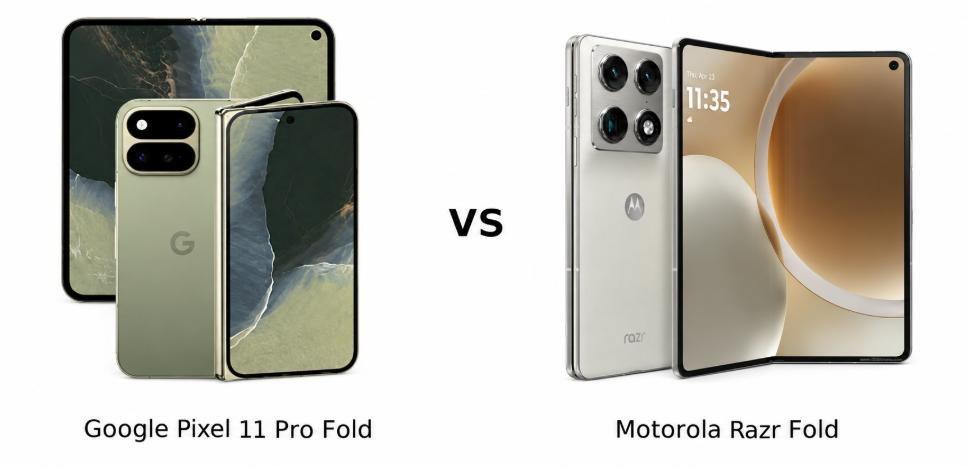
Foldables are no longer just about having a bigger screen in your pocket. The Google Pixel 11 Pro Fold and Motorola Razr Fold take different approaches to the premium foldable experience, with Google focusing on software and smart features while Motorola pushes performance, cameras, charging, and versatility. Here’s how the two compare.
Major Features:
Category
Google Pixel 11 Pro Fold
Motorola Razr Fold
Winner
Build
Glass-ceramic front, Gorilla Glass Victus 2 back, aluminum frame, IP68
The Google Pixel 11 Pro Fold combines a glass-ceramic front, Gorilla Glass Victus 2 back, and aluminum frame with IP68 protection. Motorola Razr Fold uses a similarly premium construction and offers IP48/IP49 water resistance, plus stylus support. Motorola’s added stylus compatibility makes it more versatile for productivity, while Pixel’s higher dust and water protection inspires greater confidence for everyday use.
Display Quality
Pixel 11 Pro Fold features an 8-inch foldable LTPO OLED panel with a 120Hz refresh rate, HDR10+, and up to 3,600 nits peak brightness. Its 6.5-inch cover display also reaches 3,600 nits. Razr Fold counters with an 8.1-inch LTPO P-OLED panel, 120Hz refresh rate, Dolby Vision, HDR10+, and an impressive 6,200 nits peak brightness. Its 6.6-inch cover screen adds 165Hz.
Motorola wins on brightness, cover-screen smoothness, and stylus support, while Pixel offers stronger protection. For a more feature-rich display experience, Razr Fold feels like the better overall choice.
2. Specifications Including Battery
Performance
The Pixel 11 Pro Fold runs Android 17 with Google’s Tensor G6 built on a 3nm process, paired with 16GB RAM and up to 1TB storage. Motorola uses the Snapdragon 8 Gen 5, with up to 16GB RAM and 1TB UFS 4.1 storage. The Snapdragon platform gives Razr Fold a more performance-focused edge, particularly for demanding workloads and gaming.
Battery and Charging
Pixel packs a 4,806mAh battery with 30W wired charging, 25W magnetic wireless charging through Qi2.2, PPS support, and bypass charging. Razr Fold has a larger 6,000mAh silicon-carbon lithium-ion battery, 80W wired charging, 50W wireless charging, and reverse wireless charging. Motorola’s charging hardware is clearly more aggressive and better suited to users who frequently need quick top-ups.
Razr Fold takes the performance and charging lead with Snapdragon power, a larger battery, and faster charging. Pixel’s newer software and bypass charging remain useful, but Motorola offers the stronger hardware package.
3. Camera
Main and Secondary Lenses
Pixel 11 Pro Fold uses a 48MP main camera with OIS, a 10.8MP 5x optical telephoto camera, and a 10.5MP ultrawide lens with a 127-degree field of view. Features include Best Take, Zoom Enhance, Pixel Shift, Ultra-HDR, and laser autofocus. Razr Fold instead offers three 50MP cameras, including a 3x periscope telephoto and 122-degree ultrawide. Its 8K Dolby Vision recording gives it a major video advantage.
Selfie Camera
Pixel includes 10MP selfie and cover cameras, both supporting 4K video. Razr Fold steps up to a 32MP internal selfie camera and 20MP cover camera, with 4K recording. Motorola therefore offers higher-resolution selfie hardware, while Pixel’s camera processing features can be more appealing for computational photography.
Verdict
Razr Fold delivers stronger camera hardware and more advanced video recording, while Pixel brings useful computational photography tools. For overall versatility, Motorola’s triple-50MP setup feels more compelling.
4. Pricing
The Google Pixel 11 Pro Fold is priced around $1,900 / ₹1,87,000, while the Motorola Razr Fold is priced around $1,900 / ₹1,50,000. That makes Motorola considerably cheaper in the Indian market despite offering a Snapdragon 8 Gen 5 chipset, larger battery, faster charging, and a powerful triple-50MP camera system.
Pixel’s premium is easier to understand for buyers prioritizing Google’s software experience, Android 17, long-term updates, Qi2.2 magnetic charging, and IP68 protection. However, Motorola provides more hardware value for the money, particularly with its brighter displays, stylus support, faster charging, and larger battery.
Verdict
At similar US pricing but a substantially lower Indian price, Razr Fold offers stronger value. Pixel remains attractive for Google’s software ecosystem, but Motorola provides more hardware for the asking price.
5. Conclusion
The Pixel 11 Pro Fold stands out with Android 17, seven major OS updates, IP68 protection, Tensor G6, Qi2.2 magnetic wireless charging, bypass charging, UWB, Satellite SOS, and Google-focused camera features such as Best Take and Zoom Enhance. Razr Fold counters with stylus support, Dolby Vision displays, a 165Hz cover screen, Snapdragon 8 Gen 5, 8K Dolby Vision video, and 80W wired charging.
Motorola Razr Fold is the better overall choice, offering stronger performance, cameras, battery life, faster charging, brighter displays, and better value for money. The Pixel 11 Pro Fold makes more sense for buyers who prioritize Google’s software experience and long-term ecosystem features.
FAQs
1. Which phone is better for photography? Motorola offers more versatile camera hardware, while Google’s computational photography features can improve everyday shots.
2. Which foldable has better performance? Motorola delivers stronger raw performance and is better suited for gaming and demanding apps.
3. Which phone has better battery life? Motorola’s larger battery should provide better endurance, especially for heavy daily use.
4. Which foldable offers better value for money? Motorola offers better value, particularly with its faster charging, larger battery, and higher-end hardware.
5. Which phone should you buy overall? Motorola is the stronger all-rounder for buyers prioritizing performance, cameras, charging, and hardware value.
Disclaimer: Prices, specifications, and availability may vary by region and retailer. Recommendations in this article are based on editorial opinion, feature-based value, and market positioning at the time of writing. Readers are advised to do their own research before making a purchase.
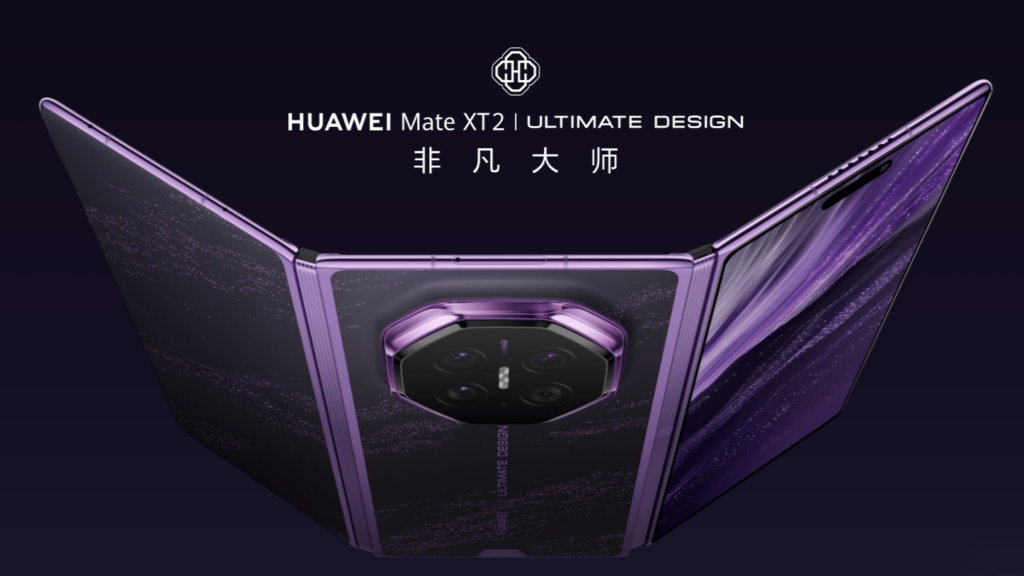
Huawei’s new tri-fold, the Mate XT 2, only launched on September 7, 2026, and they’ve already put the official spare-parts pricing up on their site. Spoiler: fixing this thing won’t be cheap.
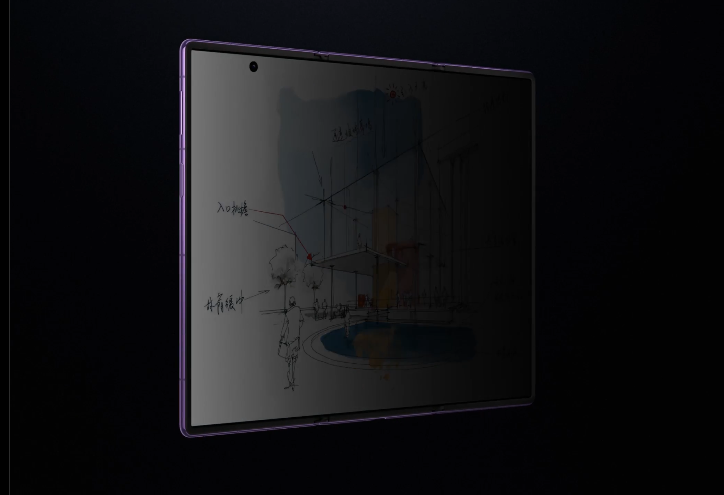
The phone itself starts at 19,999 yuan (~$2,980) for the 16GB + 256GB model. From there it climbs pretty quick: 21,999 yuan (~$3,278) for 512GB, 23,999 yuan (~$3,576) for 1TB, 24,999 yuan (~$3,725) if you want the privacy screen version, and a cool 29,999 yuan (~$4,470) for the top-spec 16GB + 2TB stylus kit (also with the privacy screen). The full parts list for the 2TB stylus version still isn’t up yet, but everything else is already listed.
The real eye-waterers are the displays. A flexible screen main body alone will set you back 5,499 yuan (~$819). Go for the privacy screen version and that jumps to 6,499 yuan (~$968). Full screen assemblies (screen + mid-frame + battery) start at 6,999 yuan for the “special offer” ones that still work fine but have some cosmetic marks, or 7,999 yuan for the privacy-screen equivalent. The regular full assemblies kick off at 7,999 yuan and hit 8,999 yuan for the privacy model. The external screen is a bit more reasonable at 1,599 yuan, and a battery swap is 499 yuan.
Motherboards aren’t exactly cheap either, and the price scales with storage: 6,099 yuan (~$908) for the 256GB version, 7,699 yuan for 512GB, and 9,299 yuan for the 1TB one. Camera modules sit somewhere in the middle — the rear Red Maple original-color camera is 299 yuan, the main rear camera is 949 yuan, with the wide-angle, telephoto, and front cameras landing in between.
Smaller bits are more down-to-earth: fingerprint sensor is 93 yuan (~$14), battery cover is 399 yuan (~$60) or 1,399 yuan (~$208) if it includes the camera lens, data cable 129 yuan, and a protective film 249 yuan.
Basically, this is what happens when you build a premium tri-fold with a massive inward-folding display. Outside of warranty, any serious repair is going to sting. If you’re buying one of these, treating it carefully (or grabbing an extended service plan) suddenly looks like a pretty smart move.
We use cookies on our website to give you the most relevant experience by remembering your preferences and repeat visits. By clicking “Accept”, you consent to the use of ALL the cookies.
This website uses cookies to improve your experience while you navigate through the website. Out of these, the cookies that are categorized as necessary are stored on your browser as they are essential for the working of basic functionalities of the website. We also use third-party cookies that help us analyze and understand how you use this website. These cookies will be stored in your browser only with your consent. You also have the option to opt-out of these cookies. But opting out of some of these cookies may affect your browsing experience.
Necessary cookies are absolutely essential for the website to function properly. This category only includes cookies that ensures basic functionalities and security features of the website. These cookies do not store any personal information.
Any cookies that may not be particularly necessary for the website to function and is used specifically to collect user personal data via analytics, ads, other embedded contents are termed as non-necessary cookies. It is mandatory to procure user consent prior to running these cookies on your website.