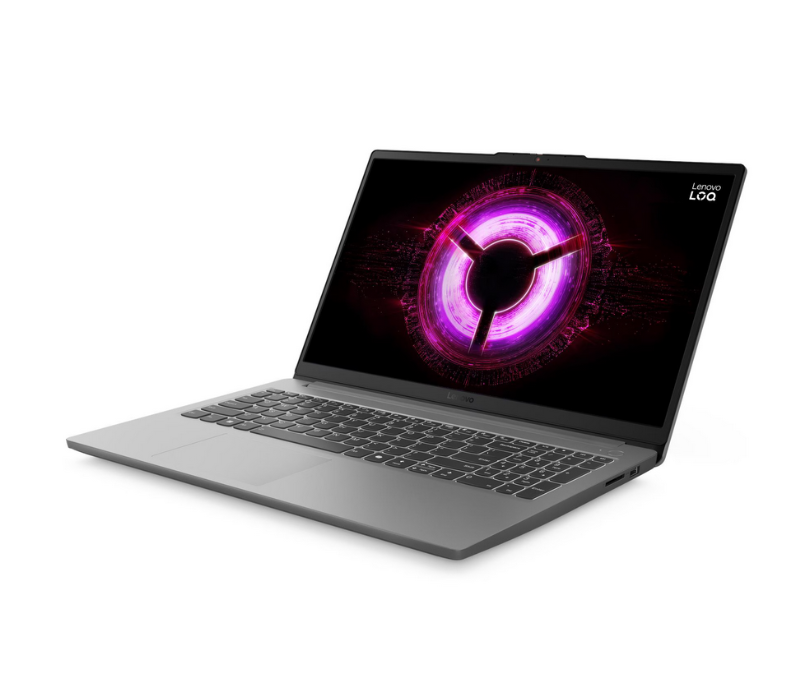
Lenovo has just unveiled a new entry in its LOQ lineup, dubbed the LOQ Essential 15ARP10. This model is aimed squarely at gamers who need capable performance without breaking the bank, bringing a Ryzen CPU and up to an Nvidia GeForce RTX 4000 series graphics card.
New Budget Lenovo LOQ Gaming Laptop Drops with RTX 4050 Power
The Chinese PC giant’s LOQ Essential 15ARP10 model has just been announced as an affordable gaming machine. To recall, the Lenovo LOQ lineup includes budget models that are positioned below its Legion series. While we’ve seen plenty of thin and light laptops with impressive power, the LOQ Essential 15ARP10 is a typical full sized model. It sports a 15.6-inch display with an FHD resolution, 100 percent sRGB color gamut, and a 144Hz refresh rate. Under the hood, Lenovo’s budget gaming laptop is equipped with up to an AMD Ryzen 7 7735HS processor.
Lenovo LOQ Essential 15ARP10
The chipset is based on AMD’s Rembrandt Refresh CPUs, which are the same as the Ryzen 6000 lineup that first debuted in 2022. But this older processor is coupled with the Nvidia GeForce RTX 4050 GPU (6GB VRAM), which has 65W TDP with a 15W Dynamic Boost. Although, there is an entry level model with the RTX 3050 graphics card (6GB VRAM). Alongside this, you get up to 16GB of DDR5 4800MHz RAM and 1TB of SSD storage. Both the memory and RAM are upgradeable thanks to the 2x M.2 SSD and 2x SODIMM slots.
Other notable features include an SD card slot, RJ45-Ethernet port, twin 2W speakers, dual microphones, HD webcam, and a 57.5Wh battery pack that supports Rapid Charge Pro (charge up to 50% in 30 minutes). As of right now, the Lenovo Essential 15ARP10 has just appeared on the brand’s official website, but the pricing details are still unknown. This release also arrives after the company released the LOQ Tower 26ADR10 desktop PC.
For more daily updates, please visit our News Section.
The upcoming OnePlus Ace 6, recently spotted on Geekbench, is shaping up to deliver top-tier performance at a mid-range price. With hardware that mirrors the OnePlus 13, this could be OnePlus’ next big value play.
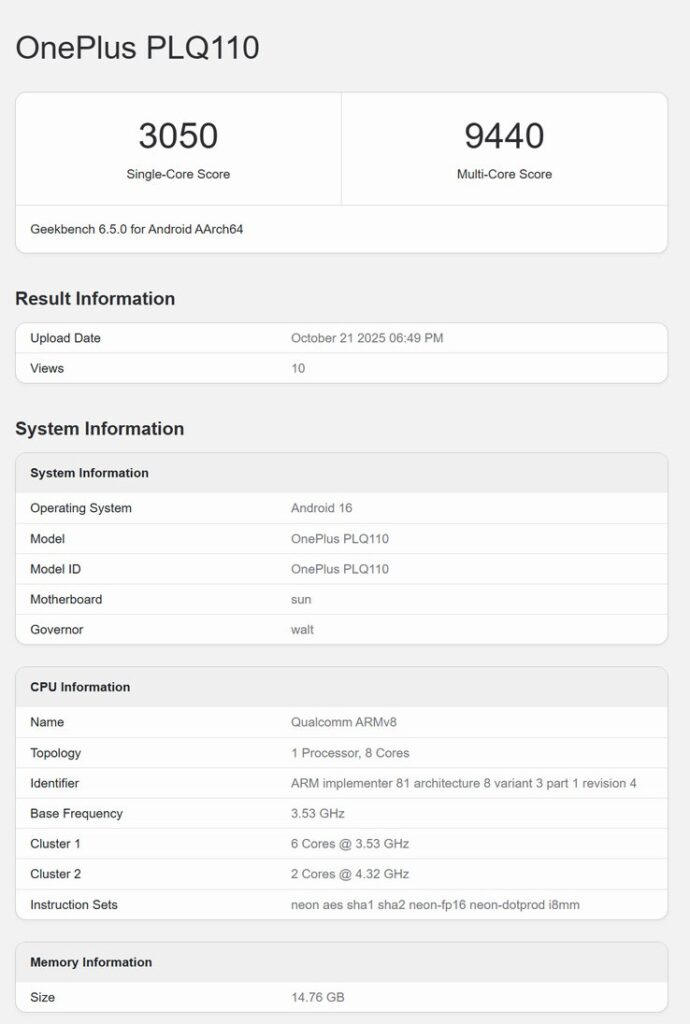
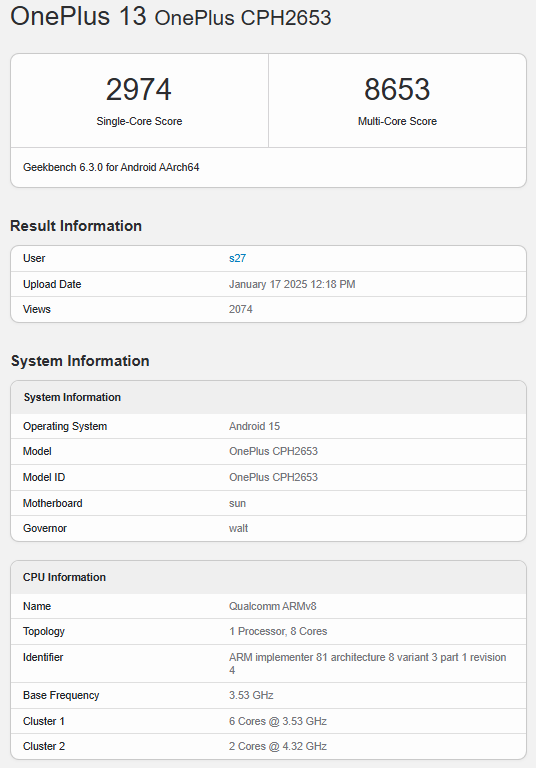
The Ace 6, listed under model number PLQ110, appeared on Geekbench 6 running the Qualcomm Snapdragon 8 Elite chipset—the same processor that powers last year’s flagship, the OnePlus 13. With this chip, the Ace 6 scored 3,050 points in single-core and 9,440 in multi-core tests, which puts it right on the heels of the OnePlus 15, and even slightly ahead of the OnePlus 13’s average multi-core score of 9,369. The small performance difference could also be due to pre-release software, and not necessarily due to any hardware limitations.
OnePlus Ace 6OnePlus 13
When paired with up to 16GB of LPDDR5X RAM, the Ace 6 looks ready to handle anything—whether that’s Genshin Impact at full graphics, or heavy AI-driven workloads.
OnePlus has already confirmed its dual launch event in China on October 27, where both the OnePlus 15 and Ace 6 will debut. The Ace 6 is also expected to launch globally soon after as the OnePlus 15R. Leaks suggest a feature set that includes a 6.83-inch, 1.5K display, a 7,800mAh battery with 120W charging, and a 50MP triple camera system.
While the flagship OnePlus 13 sits around the $900 mark, the Ace 6 is expected to come in at $200–300 less, putting it firmly in premium mid-range territory. With Android 16, OxygenOS’s smooth interface, and the same Snapdragon muscle as much pricier phones, this could easily become one of the most compelling releases of the season.
OnePlus seems to be focusing more and more on performance-centric devices. Even the upcoming flagship, the OnePlus 15, appears to be targeted at raw power more than anything else.
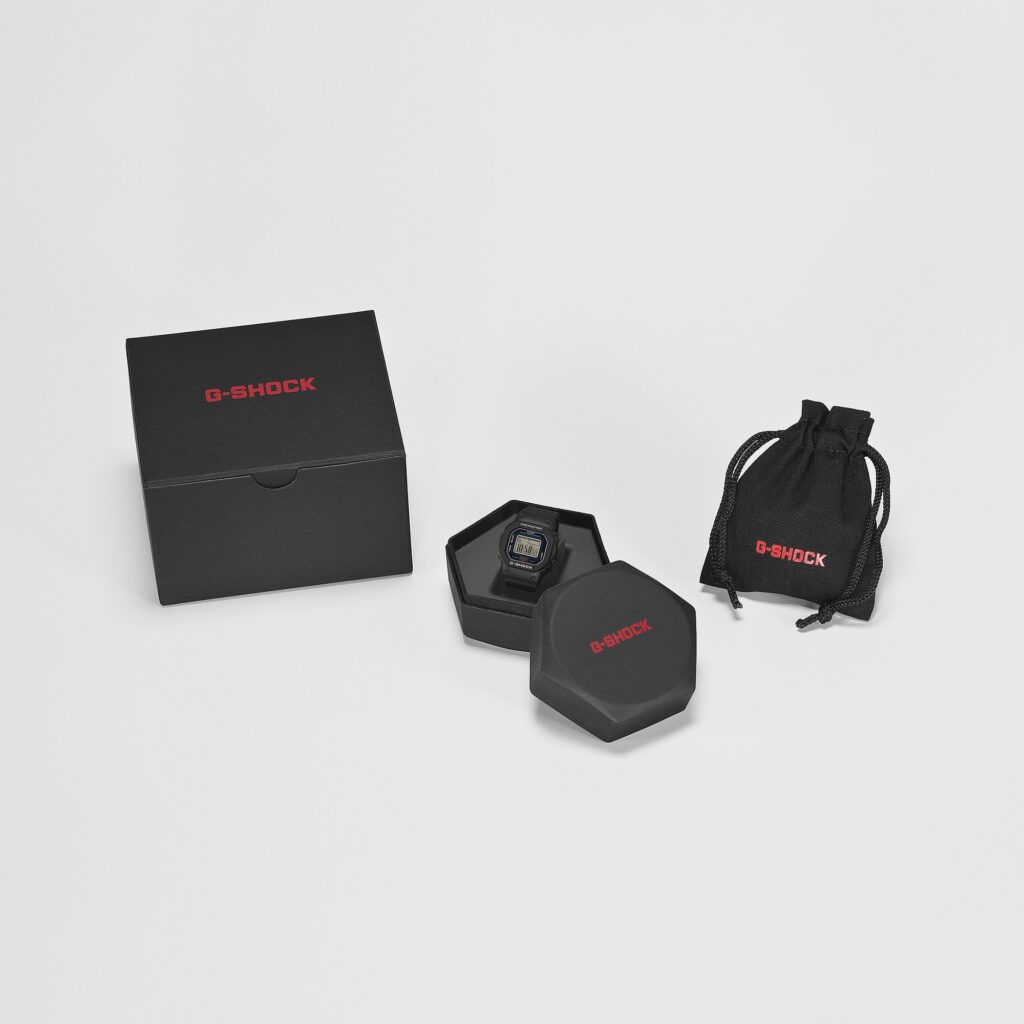
Casio has officially launched the G-Shock Nano DWN-5600, a miniature digital watch that replicates the design of the classic DW-5600 at one-tenth its size. The new model weighs only 6 grams and is small enough to be worn on a finger. Despite its size, the Nano includes full G-Shock features such as 200-meter water resistance, shock protection, and multiple timekeeping functions.
Pricing and Availability
The company has confirmed that the G-Shock Nano will be available in Japan starting November 2025. It will be priced at ¥14,300, which is approximately €99.90 or $95. The watch will also launch in Europe through Casio’s regional websites, where it will be offered exclusively to Casio ID members. Customers in markets like France, the Netherlands, and Germany can register online for early access. Casio has not yet announced a release date or pricing for the U.S. market.
Casio G-Shock Nano Specifications
Casio has designed the Nano with a 23.4 × 20 × 7.5 mm case and an adjustable strap that fits sizes from 48 mm to 82 mm. The case and strap are made from biomass plastic, part of the company’s effort to promote sustainable manufacturing. The bezel design, side buttons, and stainless steel buckle closely mimic the full-sized DW-5600.
The digital display supports dual time zones, a 1/100-second stopwatch, an hourly time signal, and an automatic calendar. The LED backlight provides limited illumination in low-light conditions. Casio has added a flashing light function that activates at preset or hourly intervals. The display shows up to six digits and supports both 12-hour and 24-hour formats. The battery is user-replaceable and is rated for about two years of use.
Casio developed the smallest shock-resistant G-Shock structure by using high-density component placement and a compact battery module. The case uses reinforced resin and inorganic glass to maintain durability. The watch comes in black (DWN-5600-1), red (DWN-5600-4), and yellow (DWN-5600-9), and ships in a collector’s box with a dedicated silicone display stand.
For more daily updates, please visit our News Section.
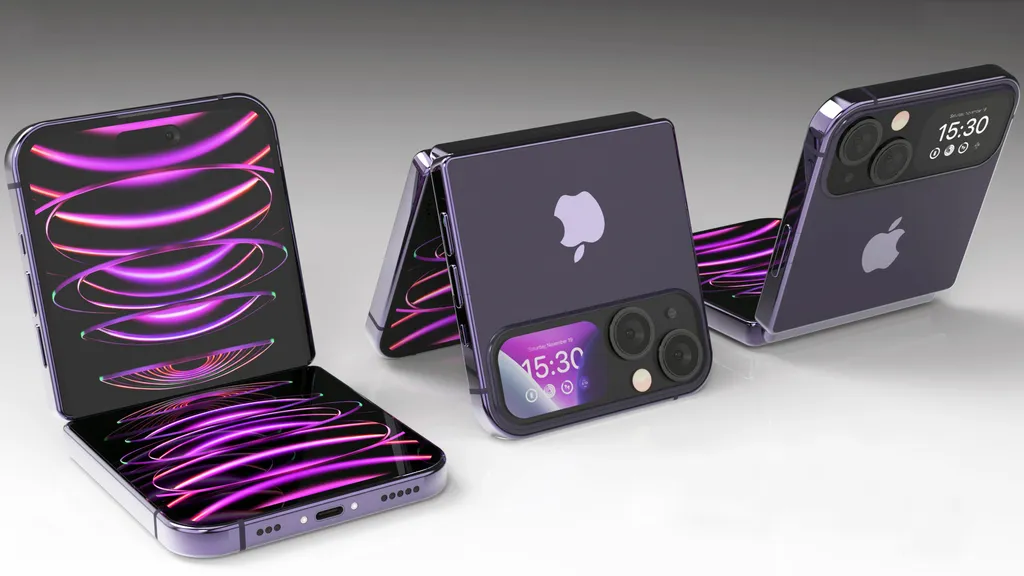
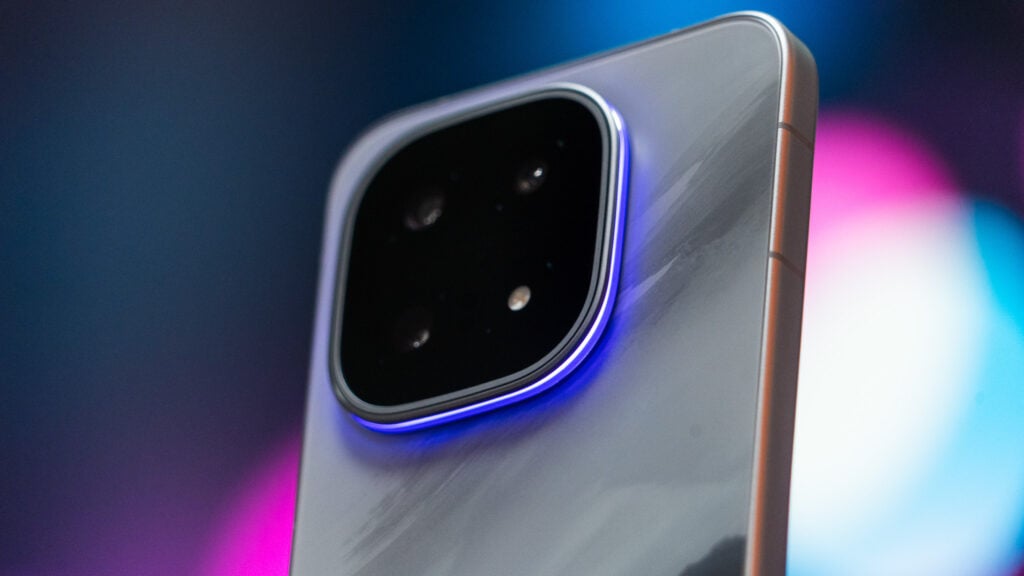
Apple seems to be quietly shifting gears. After months of buzz around the super-slim iPhone Air, reports now suggest the project might not have the smooth future many expected. Instead, the company appears to be putting serious weight behind its long-rumored foldable iPhone lineup — not one, but two models in the pipeline.
Image credit: 4RMD
The iPhone Air, launched with plenty of hype for its ultra-thin build and sleek design, hasn’t quite lived up to expectations. Despite early sellouts in China, sales elsewhere have been softer than Apple hoped. According to Japan’s Mizuho Securities, Apple has now reduced production of the Air by about one million units this year. The rest of the iPhone 17 lineup — the standard, Pro, and Pro Max models — are still performing well, with total output expected to climb to roughly 94 million units in early 2026.
The Air’s smaller 3,149mAh battery and $999 price point — just $100 below the Pro — haven’t helped its case. Buyers seem to prefer paying a bit more for better performance and endurance. Some sources on Weibo even claim the Air could be canceled altogether, echoing Samsung’s recent decision to drop the Galaxy S26 Edge after lackluster sales of the S25 Edge.
If true, Apple’s attention now turns fully toward foldables. A recent ET News report from Korea claims Apple is preparing a book-style foldable iPhone for 2026, followed by a smaller clamshell-style model in 2028. Analyst Kim Ki-hyun of Stone Partners told attendees at ETNews’ Tech Summit that Apple has already lined up key suppliers, signaling that this isn’t just a one-off experiment.
Some forecasts, like one from Mizuho, suggest a possible delay to 2027 as Apple continues to refine the hinge and display materials. Still, insiders agree the company’s foldable ambitions are very real. The prototypes reportedly use advanced display tech — including LTPO panels for power efficiency and color filter-on-encapsulation (COE) to boost brightness — aiming to eliminate the visible crease that plagues current foldables.
The larger model could open up to around 7.8 inches, offering tablet-like productivity, while the clamshell design is expected to target users who want something compact and stylish.
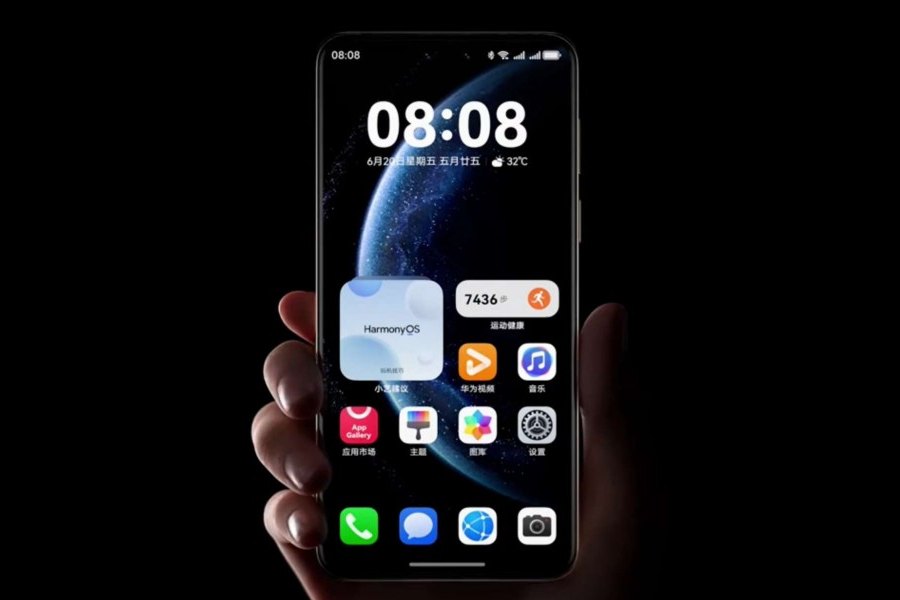
During the Huawei Developers Conference 2025, Huawei officially launched HarmonyOS 6. The next gen platform was first unveiled back in June 2025, and we finally have its official release timeline and all of the smartphones eligible for this major update. So let’s check it out.
One of the first things users will notice in HarmonyOS 6 is its refined visual language. The new design brings responsive animations and a dynamic light-sensing system that adapts to context, like editing photos, activating a voice assistant, or performing other actions.
On the lock screen, Huawei introduces AIGC-based signature customization, where the system analyzes your font style and image, then generates artistic wallpapers and themes tailored to your mood or aesthetic. These aren’t just visual upgrades, as Huawei aims to make the OS feel more fluid and alive for its users, blending both form and function.
2. Performance Gains & Cross-Device Workflows
Huawei HarmonyOS 6
The Chinese tech giant brings various optimizations to deliver a smoother UI. HarmonyOS 6 features measurable performance upgrades thanks to the new Ark Engine. Huawei claims an 11 percent faster app startup, a 21 percent quicker page rendering, and 30 percent faster content loading compared with previous versions. A highlight was the improvement in cross-device performance, with HarmonyOS 6 being 15 percent faster than HarmonyOS 5. Lab tests also revealed that there is around 35 to 51 minutes of battery life gains over the older iterations.
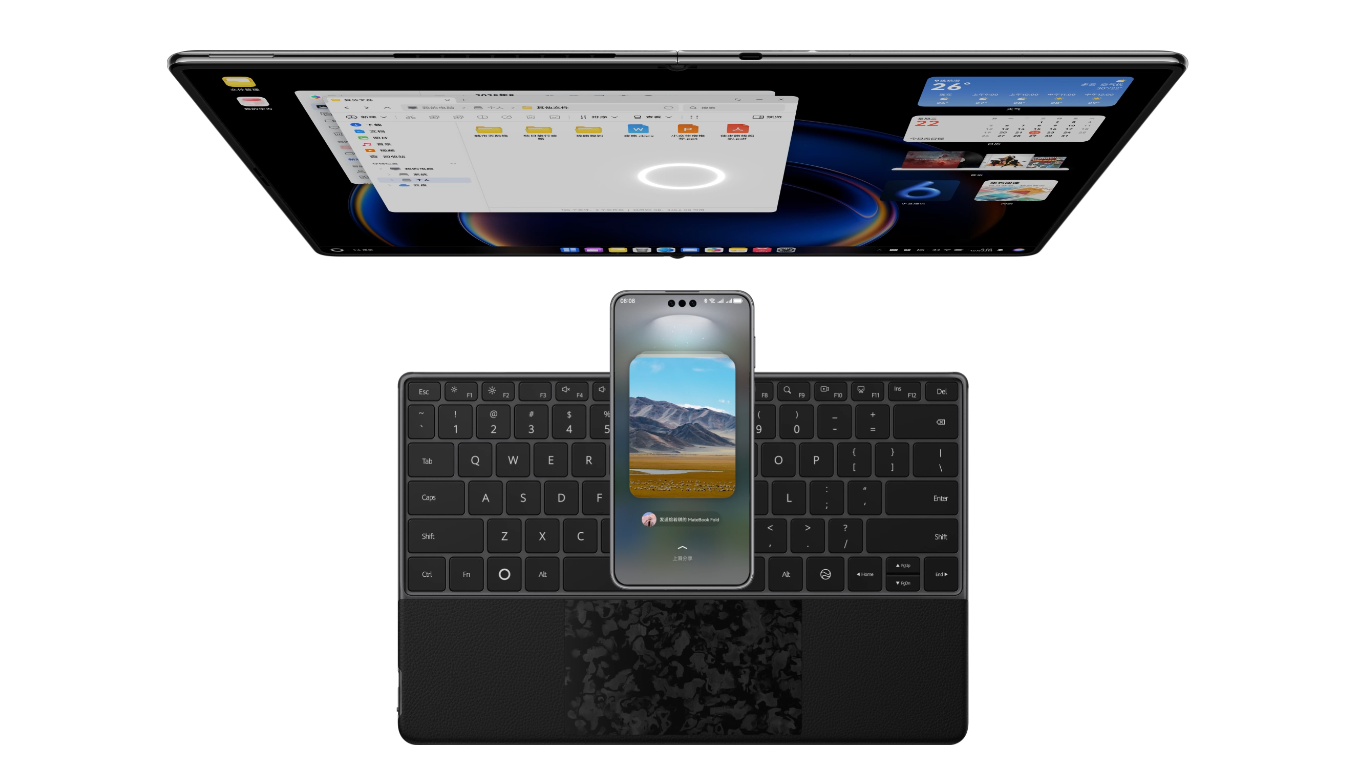
File sharing has been revamped, allowing users to send these files to more than 60 apps with the new tap-to-share feature, and drag and drop content just by looking at a target device. There is even seamless two-way sharing between your smartphone and PC. These cross-device workflows blur the line between phone, tablet, and computer. Huawei states that HarmonyOS 6 can open large PDF files in just 0.6 seconds compared to 55 seconds on Windows 11.
3. AI Tools, Creativity & Health Features
HarmonyOS 6 leans hard into AI. In the camera app you’ll find scene-aware portrait retouching that adjusts lighting, background blur and depth in one tap. There’s also an “AI-one-click filming” tool that instantly turns still photos into animated clips. Huawei’s smart assistant is getting smarter with the Xiaoyi AI 6 update, supporting dialect recognition and multi-step commands.
So taking voice notes, categorizing files, and scheduling appointments can be done with ease. On the health front, the new AI Health Assistant offers voice based consultations, insurance code access, provides hospital navigation, and interprets medical reports via iFLYTEK integration. Apart from the typical AI functions, HarmonyOS 6 brings AI
4. Privacy, Security & Family Controls
Security isn’t an afterthought in HarmonyOS 6, as the operating system introduces the new StarShield Security Architecture that applies AI driven protection from kernel to cloud. New features include Family Anti-Fraud to monitor suspicious calls, AI Anti-Fraud to detect deep-fake attempts in video calls, and Anti-Peek Protection to hide sensitive content when someone glances over your shoulder.
Encrypted sharing ensures files only reach approved recipients, while a View-Once mode limits secondary sharing of photos or videos. For families, there’s added support for screen-time moderation, location tracking of older users and real-time navigation assistance for the visually impaired.
5. Eligible Devices (Public Beta & Rollout)
Huawei is kicking off the HarmonyOS 6 public beta on 22nd October 2025, debuting in China. Meanwhile, a wider release will follow soon. So here are all the eligible models, and when you can expect the update:
Public Beta(October 2025)
Huawei Mate 70
Huawei Mate 60
Huawei Mate X6
Huawei Mate X5 series
Huawei Pura 80
Huawei Pura 70
Huawei Pura X series
Huawei Pocket 2 Series
Huawei Nova 14
Huawei Nova 13
Huawei Nova 122
Huawei Nova Flip
Huawei Nova Flip S
Huawei MatePad Pro 13.2 (2025 & 2023)
Huawei MatePad Pro 12.2 (2024)
Huawei MatePad 11 Pro (2024)
Closed Beta(October 2025)
Huawei Mate XT
Huawei Mate XT Ultimate Design
Huawei MatePad Pro 12.2 (2025)
Huawei MateBook Pro
Huawei Watch 5
Huawei Watch GT 5 Series
Huawei FreeBuds 6
Huawei FreeBuds 7i
Huawei FreeArc
November–December 2025
Huawei Nova 14 Lite (Vitality Edition)
Huawei Enjoy 70X
Huawei MatePad Mini
Huawei MatePad Air (2024 & 2025)
Huawei MatePad 11.5S (2024 & 2025)
Huawei Watch Fit 4 Series
Huawei FreeBuds Pro 4
Huawei FreeClip 2
Huawei FreeClip
For more daily updates, please visit our News Section.
Huawei has announced the Vision Smart Screen 5 SE Enjoy Edition (machine translated) in China. The new model comes in 55-inch, 65-inch, and 75-inch sizes. Let’s check out its key specs and pricing.
Huawei Vision Smart Screen 5 SE Enjoy Edition Specs
The Enjoy Edition features a 4K Ultra HD LCD panel with a 144Hz refresh rate and ultra-narrow 1.5 mm bezels, achieving a 98% screen-to-body ratio. It supports TÜV Rheinland’s low-blue-light and flicker-free certifications for eye comfort.
The panel is powered by Huawei’s self-developed Honghu picture engine, which enhances clarity, color accuracy, and contrast through AI-based technologies such as SR super-resolution, HDR enhancement, MEMC motion compensation, and 3D-LUT color mapping
Inside, it uses the Honghu 868 chipset built on a quad-core CPU architecture. The hardware supports 4K 120 fps decoding and runs HarmonyOS AI. For gaming, the TV includes HDMI 2.1 ports with ALLM and VRR.
The 5 SE Enjoy Edition supports 4K super casting with 50 fps playback, stable performance, and low latency. It also includes far-field voice control, AI Search to find movies or shows, and a built-in assistant that answers general questions.
The 55-inch and 65-inch models include two 20W full-range speakers. The 75-inch variant adds two 20W tweeters, pushing total output to 80W. Huawei’s Histen audio engine enhances vocal clarity and creates a virtual sound field for immersive stereo output.
Huawei also includes family-friendly features such as children’s mode, parental controls for content and screen time, and built-in minor protection software. The TV features a metal frame with a polished finish and includes ambient modes like Smart Frame, which transforms the display into a digital gallery or seasonal landscape when idle.
Pricing and Availability
The Vision Smart Screen 5 SE Enjoy Edition is now available in China. The 55-inch version is priced at 2,199 yuan ($308), the 65-inch at 2,799 yuan ($392), and the 75-inch at 3,999 yuan ($561).
For more daily updates, please visit our News Section.
The holiday shopping season is kicking off early this year, it seems! To begin the sale, Sony is now live with incredible early Black Friday 2025 deals on its select acclaimed line of noise-cancelling headphones. Below is a look at the standout deals on the best Sony headphones.
Sony WH-1000XM5 Premium
Price: $330 $399.99
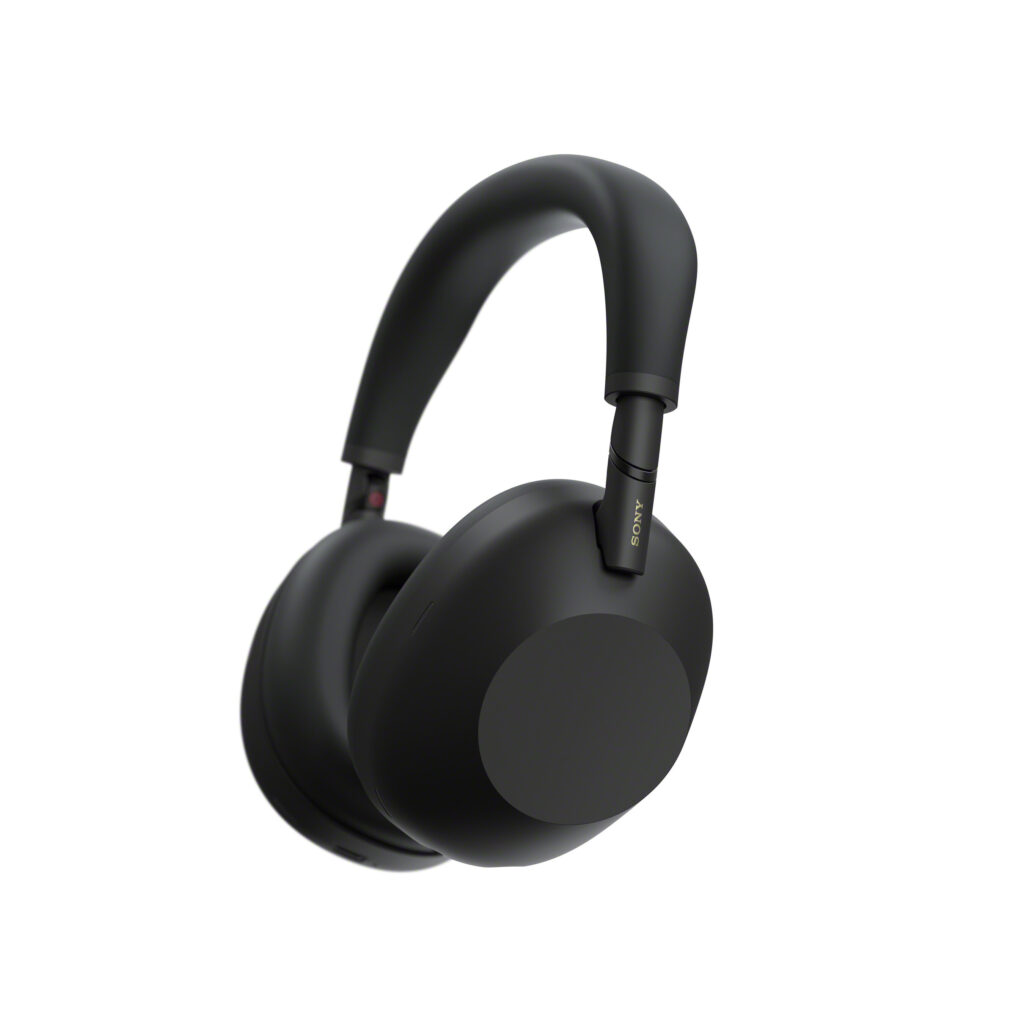
The WH-1000MX5 Premium headphone comes with a complete redesign of Sony’s flagship line. The headphones are offering their most advanced noise cancellation to date. It also features an innovative Auto NC optimiser that automatically adjusts noise cancellation based on the environment.
Powering these premium headphones is an ensemble of two processors and eight microphones. They sport a new lightweight, ‘noiseless design’ and a custom-designed 30mm driver unit promising an exceptional sound clarity.
You may check the deal on Sony’s official website. Also, save $25 if it’s your first purchase from the Sony official page.
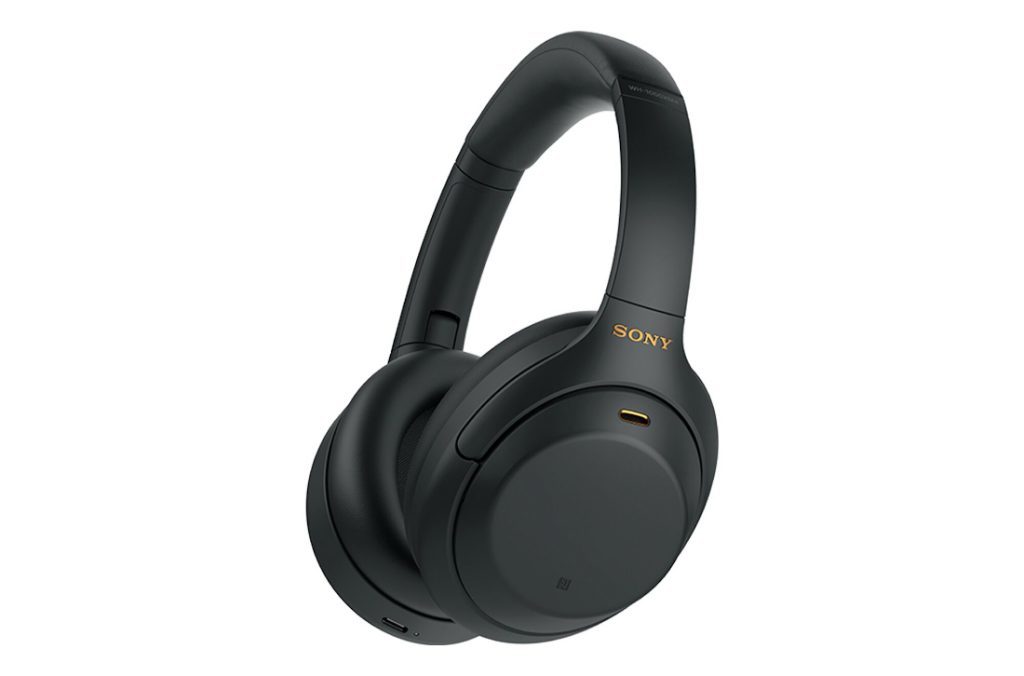
You can save up to $150 with this massive discount on the Sony WH-1000XM4. Placed below the XM5 in the line-up, the Sony WH-1000XM4 also packs world-class quality sound for a relatively lesser price. Powered by the HD Noise Cancelling Processor QN1, these headphones are known for their powerful 40mm drivers, a classic foldable design, and other smart features.
The XM4s support the premium LDAC audio codec and offer a solid 30 hours of battery life with ANC enabled, making them a premium choice at a highly attractive early deal price.
As mentioned earlier, for the first-time purchase, an additional $25 can be saved, leading to an effective price of $175.
The WH-CH720N is Sony’s entry into high-performance, budget-friendly noise-cancelling headphones. Despite being cheaper compared to the XM series, it leverages Sony’s powerful Integrated Process V1 to deliver effective Active Noise Cancellation and improved sound quality through its 30mm driver units.
They are exceptionally light at around 192g for long-lasting comfort and boast an impressive battery life of up to 35 hours with ANC.
Check more about the Sony’s WH-CH720N headphones on the official website. The $25 additional off stays valid for a first-time purchase.
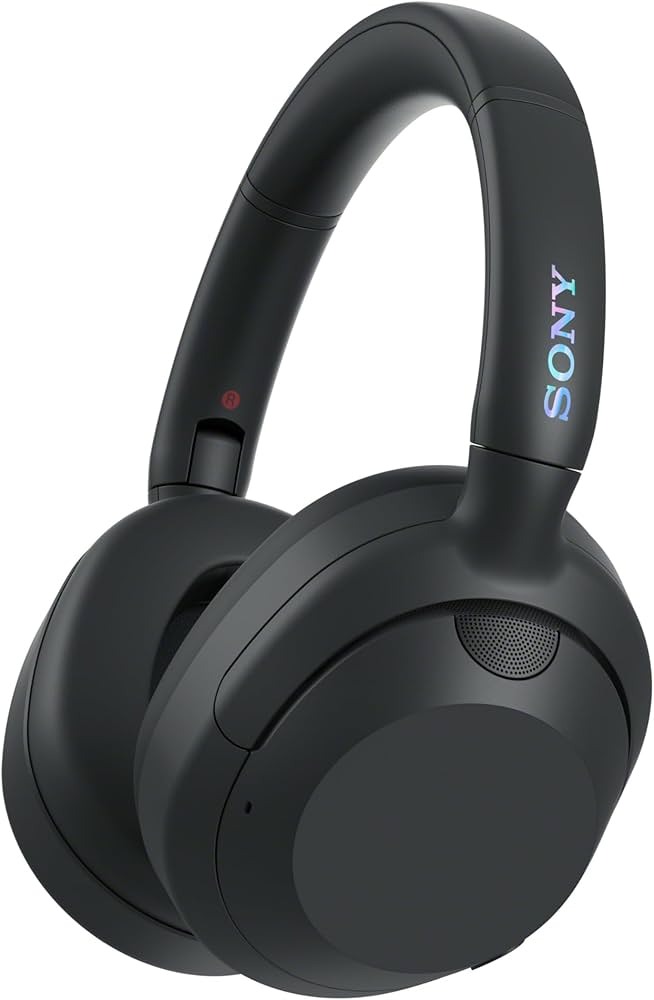
This headphone is specifically designed for bass enthusiasts in mind. The ULT POWER Sound headphones feature a dedicated ULT Button that allows you to boost the bass in two powerful stages. They combine this deep, impactful sound profile with ANC borrowed from the 1000X series.
The headphone is equipped with large 40mm dynamic drivers, supports the high-res LDAC codec, and provides great endurance with up to 30 hours of battery life.
To know more and purchase if interested, head over here.
It’s the latest flagship model from Sony with the cutting-edge HD Noise Cancelling Processor QN3 and a massive array of 12 microphones. It promises to deliver noise cancellation speed up to 7x faster than the older models.
It brings back the classic foldable design and introduces smart features like Scene-based Listening, which automatically adjusts settings based on your activity. Connectivity is future-proofed with support for Bluetooth 5.3 and the new LC3 codec. It offers 30 hours of ANC-enabled listening.
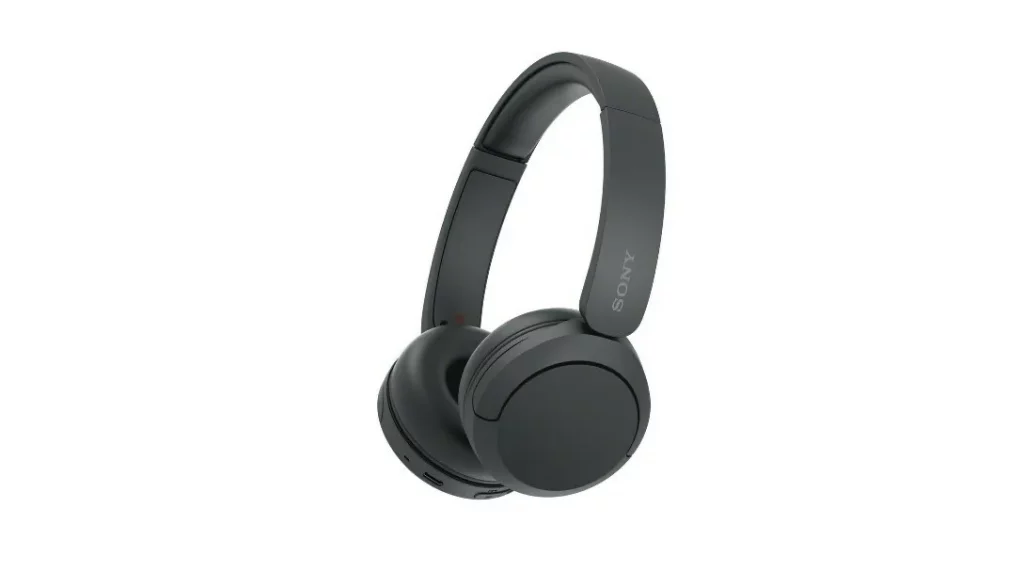
Currently listed at $39.99 (down from $69.99), the Sony WH-CH20 is an entry-level headphone. Delivering ultra-long battery life of up to 50 hours, quick USB-C charging, Bluetooth 5.2 connectivity with AAC/SBC support, multipoint device pairing, and companion app EQ support.
Its on-ear design and form factor make it especially suited for everyday wireless listening though it doesn’t include active noise cancellation or a wired audio input. Being affordable, it’s best suited for buyers on a tight budget.
The Snapdragon 8 Elite Gen 5 is the latest flagship chipset from Qualcomm, promising serious upgrades to performance and power efficiency. It’s already stirring up excitement, but on the other hand, the Snapdragon 8 Elite is still fresh, while the Snapdragon 8 Gen 3 still powers some of today’s flagship phones.
With these three powerhouses in the mix, it might be confusing to pick the correct one based on your needs. So, we compared them to find out how Qualcomm’s Snapdragon flagships have improved over the years. Whether you’re eyeing your next upgrade or just want to know how far Qualcomm has pushed its mobile silicon this year, this comparison should provide more clarity.
Snapdragon 8 Elite Gen 5 vs 8 Elite vs 8 Gen 3: benchmark comparison
Note: For benchmark testing, we used the Xiaomi 17 (Snapdragon 8 Elite Gen 2), Xiaomi 15 (Snapdragon 8 Elite), and Xiaomi 14 (Snapdragon 8 Gen 3).
Geekbench score
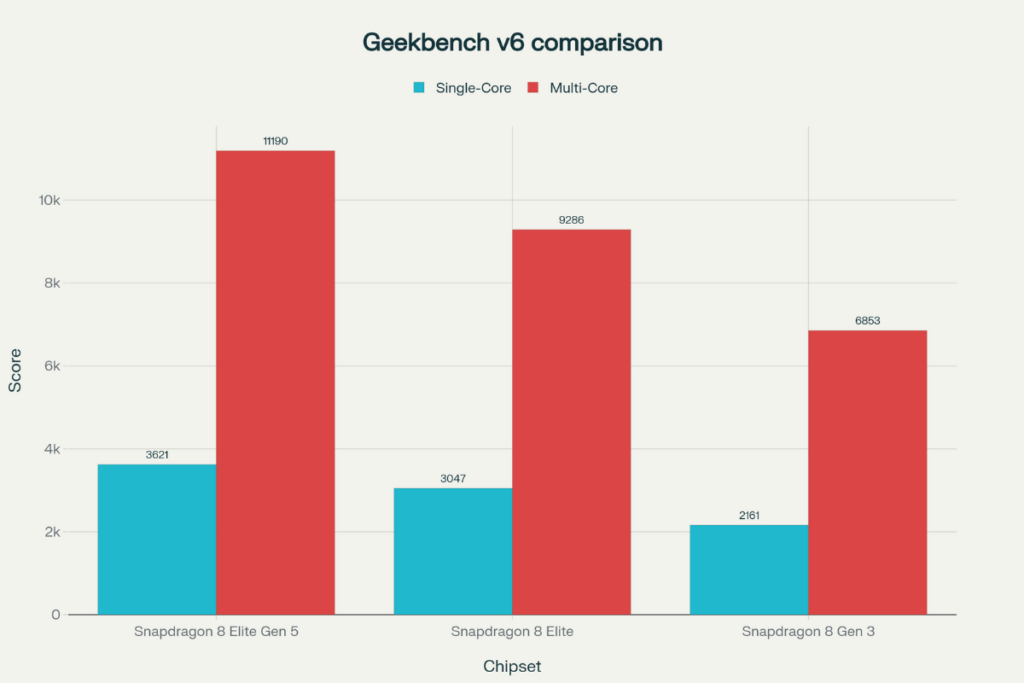
The fifth-gen Elite chipset posts a total of 3,621 single-core points, which is about 19% higher than Snapdragon 8 Elite (3,047 points) and 68% higher than the Snapdragon 8 Gen 3 (2,161 points). The increase over last year’s Elite chipset may seem modest, but that’s a massive leap over 8 Gen 3.
The multi-core performance also tells a similar story. The Snapdragon 8 Elite Gen 5 gets 11,190 multi-core points. In contrast, the Snapdragon 8 Elite gets 9,286 points, and the Snapdragon 8 Gen 3 gets 6,853 points. That’s a solid 19% increase for the latest Elite chip over 8 Elite and a massive 63% increase over 8 Gen 3.
Geekbench 6
SD 8 Elite Gen 5
SD 8 Elite
SD 8 Gen 3
Single core
3,621
3,047
2,161
Multi core
11,190
9,286
6,853
AnTuTu score
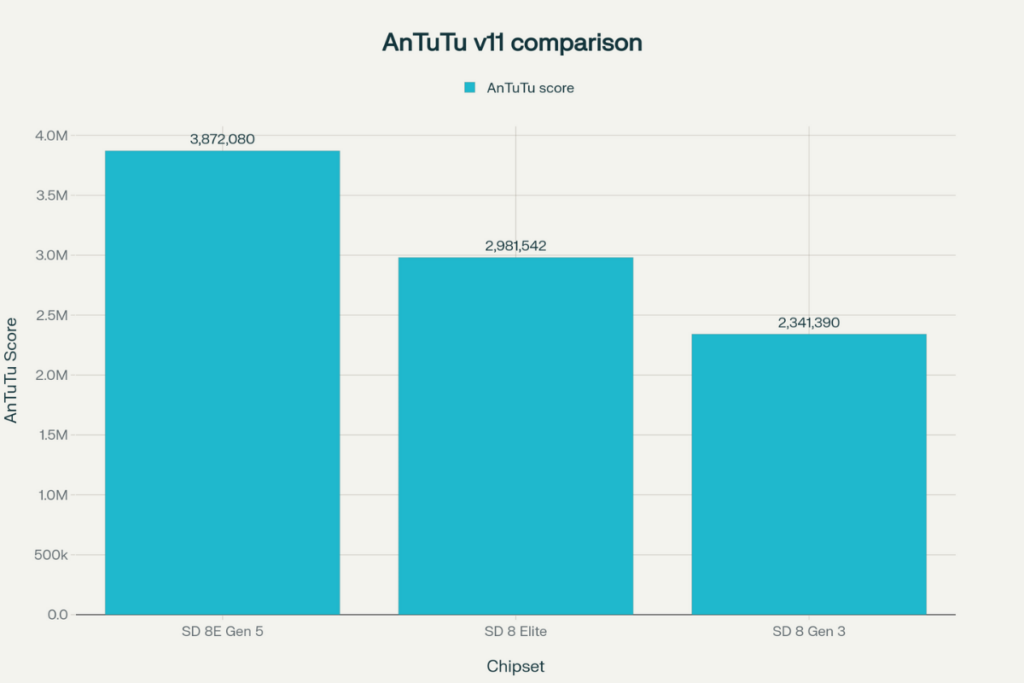
On the AnTuTu v11 benchmarking platform, the Snapdragon 8 Elite Gen 5 gets a total score of 3,872,080 points, which is about 30% higher than Snapdragon 8 Elite (2,981,542 points) and 65% higher than Snapdragon 8 Gen 3 (2,341,390 points).
The breakdown reveals that the newest Snapdragon 8-series chip gets a 21% higher CPU score over the Snapdragon 8 Elite and a 62% higher CPU score over the Snapdragon 8 Gen 3. The GPU gets an even better upgrade, with the 8 Elite Gen 5 posting a 27% boost over the 8 Elite and a 73% boost over the 8 Gen 3.
SD 8 Elite Gen 5
SD 8 Elite
SD 8 Gen 3
AnTuTu score
3,872,080
2,981,542
2,341,390
CPU
1,100,475
909,797
679,594
GPU
1,380,010
1,091,509
798,047
Memory
533,709
392,463
353,832
UX
857,866
587,773
509,917
Snapdragon 8 Elite Gen 5 vs 8 Elite vs 8 Gen 3: spec sheet and key differences
Snapdragon 8 Elite Gen 5
Snapdragon 8 Elite
Snapdragon 8 Gen 3
Announced
September 2025
October 2024
October 2023
Process node
TSMC’s 3nm (N3P)
TSMC’s 3nm (N3E)
TSMC’s 4nm
CPU cores
8-core
8-core
8-core
CPU cores
2 x 4.61 GHz — Oryon (3rd gen) 6 x 3.63 GHz — Oryon (3rd gen)
2 x 4.32 GHz — Oryon (2nd gen) 6 x 3.53 GHz — Oryon (2nd gen)
1 x 3.3 GHz — Cortex-X4 3 x 3.15 GHz — Cortex-A720 2 x 2.96 GHz — Cortex-A720 2 x 2.27 GHz — Cortex-A520
GPU
Adreno 840 Ray tracing support Snapdragon Elite Gaming features
Adreno 830 Ray tacing support Snapdragon Elite Gaming features
Adreno 750 Ray tracing support Snapdragon Elite Gaming features
NPU
Qualcomm Hexagon NPU Agentic AI support
Qualcomm Hexagon NPU
Qualcomm Hexagon NPU
Memory
LPDDR5X, up to 5.3GHz
LPDDR5X, up to 5.3GHz
LPDDR5X, up to 4.8GHz
Storage
UFS 4.1
UFS 4.0
UFS 4.0
Camera
Qualcomm Spectra ISP (20-bit) Up to 320MP single camera up to 108MP single camera (MFNR, ZSL, 30fps) Up to 48MP triple camera (MFNR, ZSL, 30fps) Up to 8K video recording real-time semantic segmentation (limitless) Advanced Professional Video (APV) codec
Qualcomm Spectra ISP (18-bit) Up to 320MP single camera up to 108MP single camera (MFNR, ZSL, 30fps) Up to 48MP triple camera (MFNR, ZSL, 30fps) Up to 8K video recording real-time semantic segmentation (limitless)
Qualcomm Spectra ISP (18-bit) Up to 200MP single camera up to 108MP single camera (MFNR, ZSL, 30fps) Up to 64+36MP dual cameras (MFNR, ZSL, 30fps) up to 36+36+36MP triple camera (MFNR, ZSL, 30fps) Up to 8K video recording real-time semantic segmentation (up to 12 layers)
The Snapdragon 8 Elite Gen 5 uses TSMC’s 3nm (N3P) process node, which offers slightly better performance and power efficiency over TSMC’s 3nm (N3E) process node (used for the Snapdragon 8 Elite). The gap widens with TSMC’s 4nm process, used for 8th Gen 3.
The Snapdragon chips have received significant changes to the CPU. The 8 Gen 3 is the last Snapdragon 8-series chip to feature CPU cores designed by ARM. The Snapdragon 8 Elite introduced Oryon cores for the first time on a mobile chipset, which brought substantial gains to performance and power efficiency, and that got even better with the third-gen Oryon CPU inside the 8 Elite Gen 5.
Gaming has also been greatly improved over the years, thanks to newer Adreno GPUs, featuring higher performance, power efficiency, and improved latency. On top of that, Qualcomm has also improved the gaming features over the years to make Snapdragon flagships a no-brainer choice for smartphone gaming.
All three Snapdragon chips feature hexagon NPUs, but they have been greatly improved over the years to offer better performance and extended AI capabilities. The latest 8 Elite Gen 5 introduces support for Agentic AI.
The camera has also had significant upgrades over the last three generations. The 8 Gen 3 introduced a Cognitive ISP with triple 18-bit ISPs and focused on AI-driven photography. The 8 Elite took it a step ahead by introducing AI ISP. The latest 8 Elite Gen 5 introduces triple 20-bit AI ISPs and Advanced Professional Video (APV) codec for near-lossless video. The real-time semantic segmentation and video recording capabilities have also greatly improved year over year. The same goes for connectivity, as the newer modems feature increased download/upload speed, newer Bluetooth standards, and improved connectivity features.
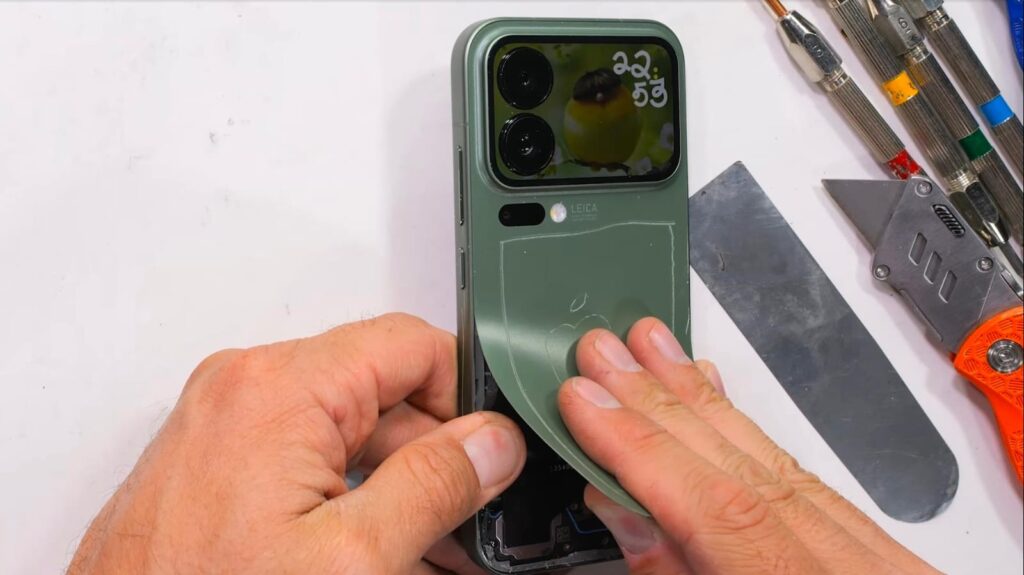
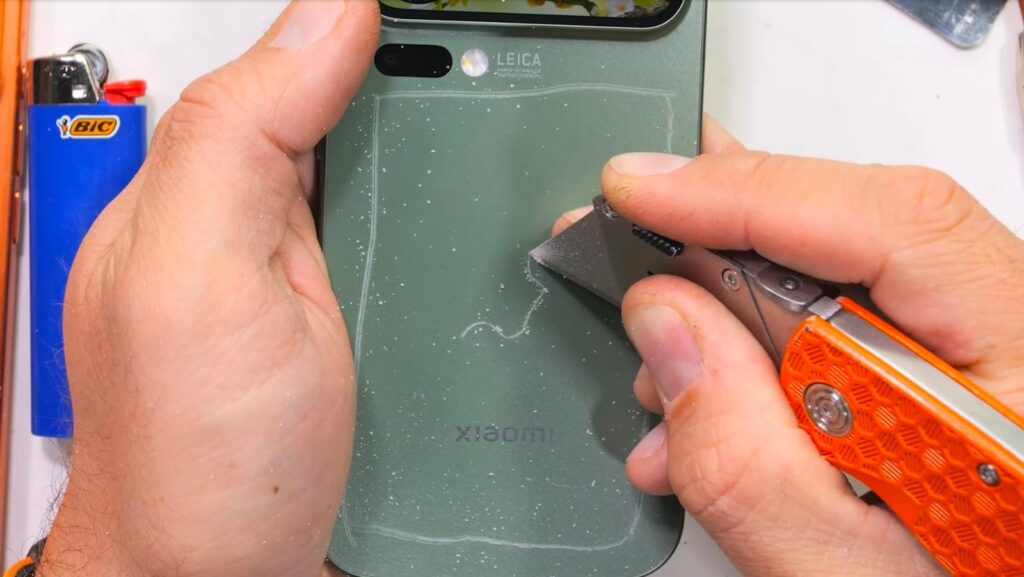
When a China-only flagship lands on JerryRigEverything’s workbench, it’s bound to stir some curiosity. Zack Nelson’s latest durability test takes on the Xiaomi 17 Pro — a compact powerhouse that looks similar to an iPhone 17 Pro at first glance, but hides a few surprises under the hood.
The phone’s standout feature is its rear mini display tucked into the camera module, designed for quick controls or notifications. But the real test was whether Xiaomi’s premium build lives up to its flagship status.
Up front, the 6.3-inch AMOLED display is protected by Xiaomi’s in-house Dragon Glass 3.0, and it performs remarkably well. At level 6, the glass didn’t have any visible scratches, and at level 7, only light scratches showed up. As Zack Nelson pointed out, this is close to Corning’s Ceramic Shield 2 used on the iPhone 17 Pro in terms of scratch resistance. “Dragon Crystal is definitely better than any other Android phone we’ve seen yet,” he concluded. That’s a big achievement for a smartphone maker that’s working to reduce its reliance on outside suppliers for key components.
Not everything is equally impressive, though. Flip the phone over, and you’ll find a plastic back cover instead of glass. It’s a choice more common in mid-range phones, but one that does offer benefits — lighter weight, better drop resistance, and lower repair costs. Still, it’s a bit of a letdown in a phone priced close to $900.
The glass covering the rear display also uses standard material — it began scratching at level 6, just like we’ve seen for years. So, it’s not the same new Dragon Glass 3.0 used on the front.
The aluminum frame holds strong during the bend test, and despite a little flex, the phone survives without cracks or creaks. Even after the classic lighter flame test, the display bounces back quickly with no lasting burn marks.
In short, Xiaomi’s 17 Pro proves tough where it matters most — up front. The plastic core might disappoint purists, but its practicality is hard to argue with. Sometimes, durability trumps the premium feel.
While many Android fans in Europe are still waiting for the latest flagships, iQOO’s latest powerhouse is already slipping through the cracks — just not officially. The iQOO 15, Vivo’s newest performance-focused smartphone, has arrived early via import sites, giving buyers a chance to grab 2025-grade specs before its European debut. But as always with gray-market imports, the deal comes with a few strings attached.
Fresh off record-breaking sales in China, the iQOO 15 is now listed on TradingShenzhen and Giztop, with prices starting around €597 for the base 12GB/256GB model and climbing to about €847 for the 16GB/1TB variant. That’s still far cheaper than flagships like the Galaxy S25 Ultra.
Warranty and after-sales support are the main caveats. TradingShenzhen offers limited EU repair options in Germany, Austria, and Poland, while Giztop’s policies vary by case. Buyers should double-check coverage and shipping terms before ordering.
On the bright side, the iQOO 15 is surprisingly EU-friendly. It supports LTE Band 20, wide 5G coverage, and comes with Android 16 and OriginOS, which supports multiple languages and full Google Play access. There’s no eSIM, but Android Auto and all key Google services work without issue.
Specs are top-tier: a 6.85-inch 2K OLED display with 6,000 nits peak brightness, Snapdragon 8 Elite Gen 5, and up to 16GB LPDDR5X RAM with UFS 4.1 storage. Cameras include a 50MP Zeiss main, 50MP ultrawide, and 50MP 3x periscope, while the 7,000mAh battery supports 100W wired and 40W wireless charging. Check out the full details of the iQOO 15 here.
For those who don’t mind skipping official channels, the iQOO 15 delivers serious flagship value. Just remember — you’re trading price for peace of mind.
The Nubia Z80 Ultra has just been unveiled as the brand’s latest flagship smartphone. This model brings Qualcomm’s latest and greatest, a massive battery pack, an upgraded main camera, and much more. So here’s everything you need to know.
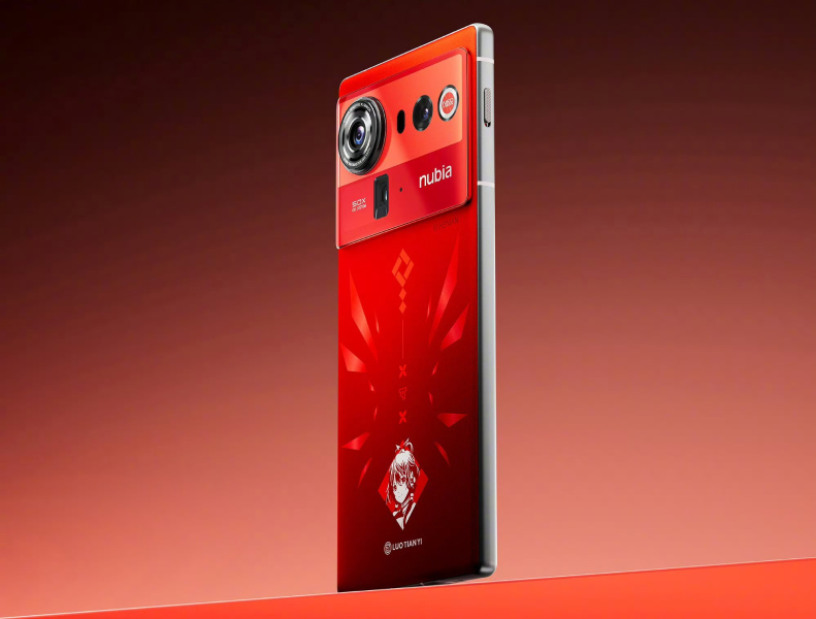
Nubia’s latest premium phone appears quite similar to its predecessor. So you still get a rectangular camera module on the rear with a large cutout for the main sensor. The device has a flat side, front, and rear panel. It measures 8.6mm thick and weighs 227 grams, with an IP68 + IP69 rating for water and dust resistance. Nubia’s Z80 Ultra arrives in multiple color options, namely Phantom Black, Condensed Light White, and Starry Night Collector’s Edition. There is even a Luo Tianyi Limited Edition variant, which features a bright red design.
On the front, the device sports a tall 6.85-inch BOX X10 OLED display with a 1.5K resolution, a 144Hz refresh rate, up to 960Hz touch sampling rate, 10 bit color depth, 100 percent DCI P3 color gamut, DC dimming, 2592Hz PWM dimming, and up to 2000 nits of peak brightness. The panel also houses an in-display fingerprint scanner.
2. Performance
The Nubia Z80 Ultra arrives as the latest Snapdragon 8 Elite Gen 5 powered flagship smartphone, which brings upgrades in performance, graphics, and efficiency. This high end chip is paired with up to 16GB of LPDDR5X RAM and 1TB of UFS 4.1 storage. It runs on the latest Android 16 OS based Nebula AIOS 2 custom skin out of the box. The limited edition model also offers exclusive HD wallpapers and custom boot animations, fingerprint unlocking, charging, and more.
A massive 7,200mAh battery pack powers this model, which supports 90W wired fast charging, 80W wireless fast charging, and reverse wireless charging. Other notable features include WiFi 7, Bluetooth 5.4, NFC, dual speakers, and a USB Type-C 3.2 Gen 1 port.
3. Camera
Nubia Z80 Ultra Luo Tianyi Limited Edition
Nubia is known for offering powerful smartphones with its flagship lineup, but these weren’t known for their photography prowess. Only certain models got the high end camera systems. However, the company aims to improve the camera experience with the Z80 Ultra. One of the biggest improvements is to the main camera. The older Z70 Ultra packed a 1/1.56-inch main camera, which has been upgraded to a larger 50MP 1/1.3-inch OmniVision LightMaster 990 sensor.
This camera supports OIS (Optical Image Stabilization) with a wide f/1.5 aperture. It is coupled with a 50MP 1/1.55-inch ultra wide angle lens with a 120 degree field of view and an f/1.8 aperture, and a 64MP 1/2-inch periscope telephoto shooter with 15cm telephoto macro support, OIS, and an f/2.4 aperture. While the ultra wide camera is getting an upgrade, the telephoto camera appears to be identical to last year’s model.
For those looking to take photography more seriously with this device, Nubia has also introduced a new Professional Photography Kit for this model. It features a leather and titanium build with mechanical operation keys that offer the feel of a real camera. There are also various other controls for finer tuning, a T-mount for external lens support, and a filter adapter ring that lets users attach the 67mm camera filter.
4. Pricing and Availability
The Nubia Z80 Ultra was just unveiled in China in multiple storage configurations. It is already on sale in China, with the global release arriving soon, so here are the pricing details:
Hot on the heels of the iQOO 15 launch, iQOO has confirmed it will introduce another smartphone in China later this month. The iQOO Neo 11 is scheduled to debut on October 30 at 7 PM local time (4:30 PM IST).
In its announcement post on Weibo, the company revealed a few key details about the Neo 11. The phone will ship with a 7,500mAh battery and feature a 2K-resolution display. According to previous reports, it could be an OLED panel with a 144Hz refresh rate.
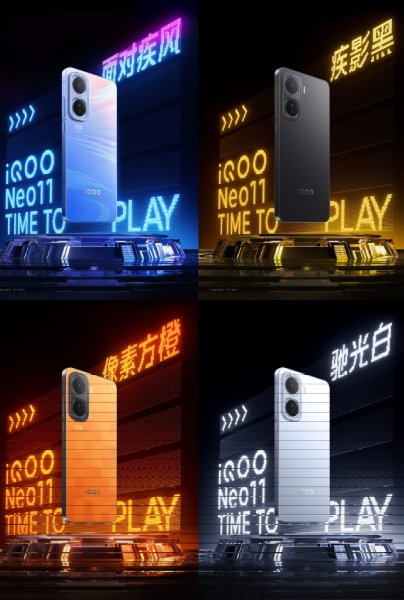
The device is coming in four colors — black, blue, orange, and silver — with each finish adopting a slightly different design language. The black and silver variants feature a cleaner, more minimal look, while the blue and orange models take a more experimental approach.
The blue variant uses what iQOO calls “neon craftsmanship,” which shifts colors depending on how light reflects off the surface. The orange model, on the other hand, features 78 tiny squares that appear and disappear with changes in lighting.
It is also confirmed to have a metal middle frame and an IP68/69 rating for dust and water resistance.
Rumors also suggest that the iQOO Neo 11 will be powered by Qualcomm’s Snapdragon 8 Elite chipset and run OriginOS 6 based on Android 16. On the camera front, it’s expected to sport a 50-megapixel primary sensor with OIS, accompanied by an ultra-wide lens and a depth sensor. As for pricing, one report indicates that the device could launch in the ~2,500 Yuan (~$345) segment. Additionally, there may not be a Neo 11 Pro model this year, according to the same report.
For more daily updates, please visit our News Section.
Sony has recently been expanding its audio gear portfolio that specifically targets gamers. While some of these were meant to be exclusive to the PlayStation, more recent models are universally supported across various platforms. The latest of these announcements includes the brand’s latest Sony Pulse Elevate Wireless Speakers. So here’s what you need to know.
Sony’s Pulse Elevate Wireless Speakers: What Makes Them Special?
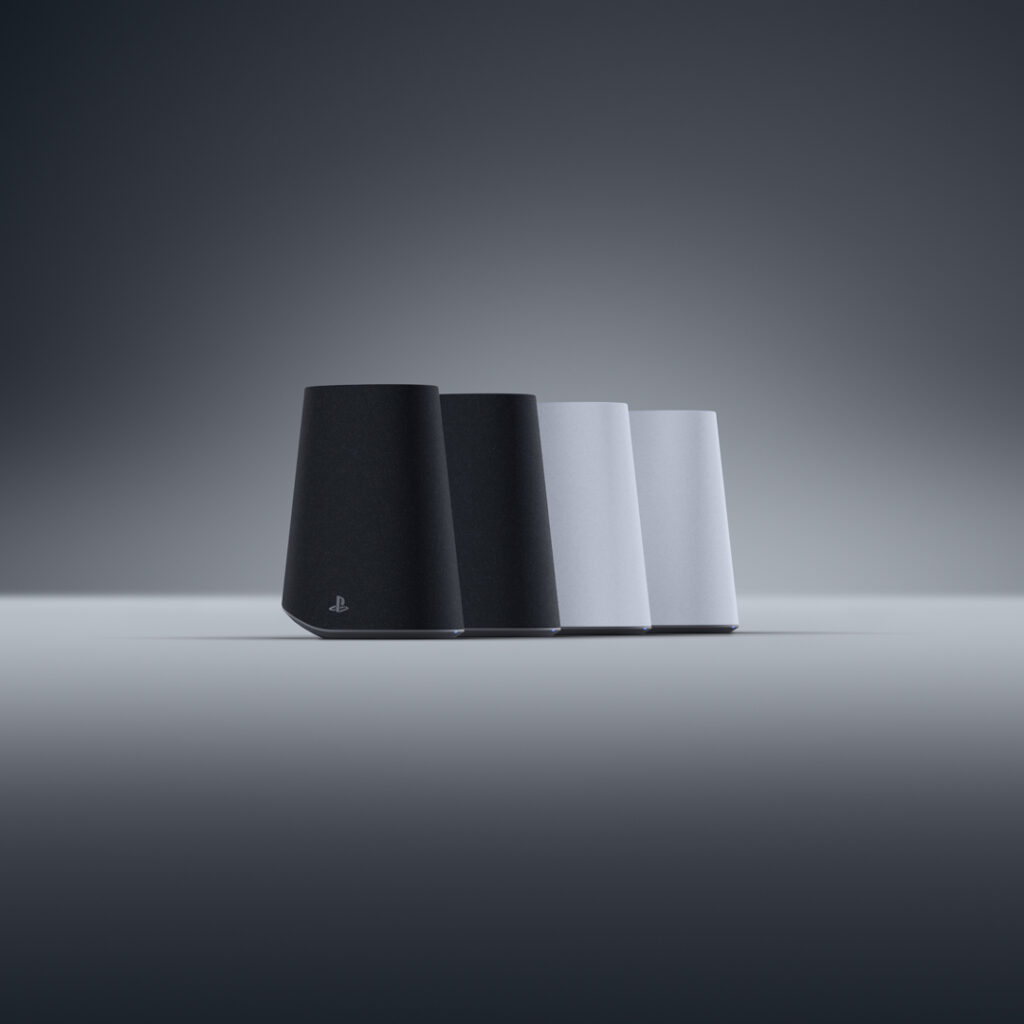
Sony Pulse Elevate Wireless Speakers
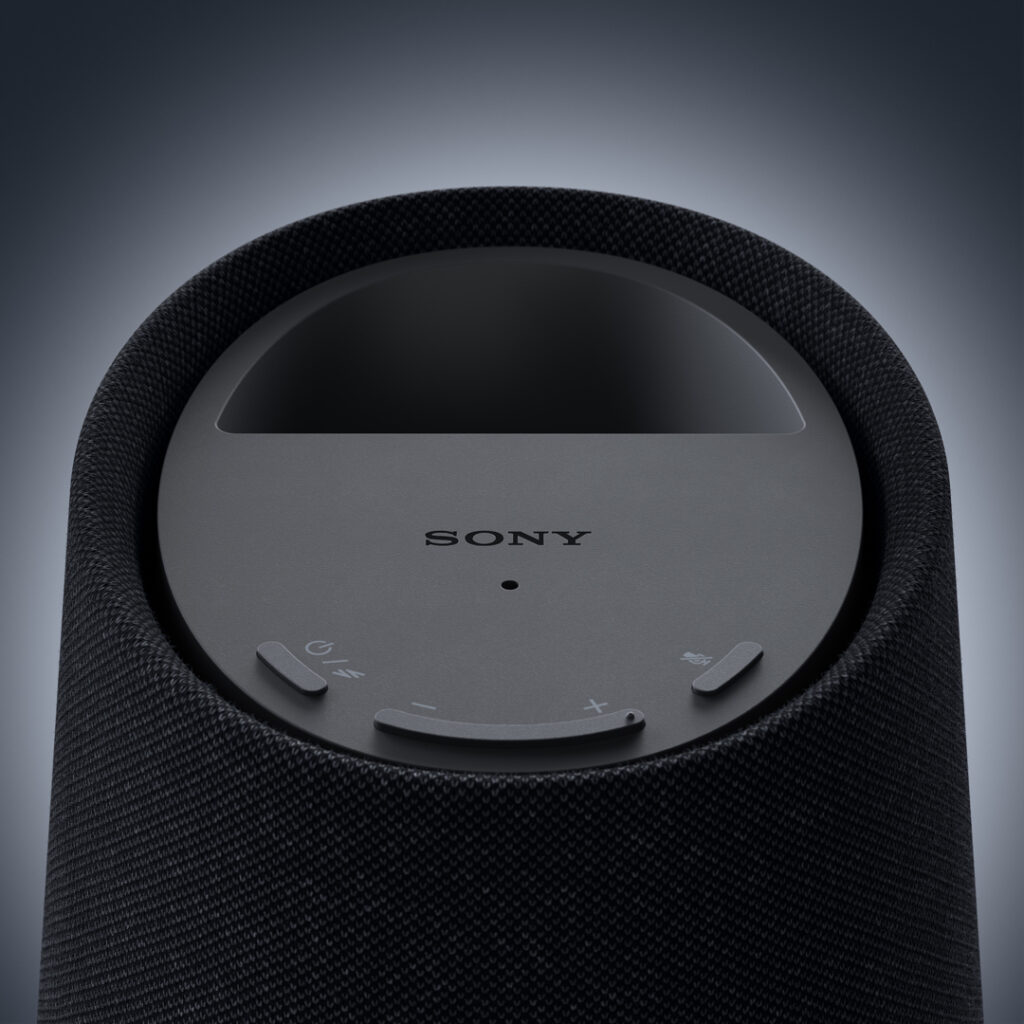
The company’s new Pulse Elevate Wireless Speakers were announced to enhance the immersion during gaming on multiple platforms like PS5, PC, and Mac. It houses studio inspired magnetic drivers for improved sound and built in woofers for punchy bass and a fuller soundscape. But these aren’t just for audio, as the Pulse Elevate packs a microphone that is enhanced by AI, allowing it to detect and remove unwanted background noise for clear communication.
Latency is the bane of any gamer, and having another lag between audio and visual can be disadvantageous for competitive gaming. But Sony deals with this on these wireless speakers with the PlayStation Link technology for ultra low latency and lossless connectivity. These connect to your system via Bluetooth and even a PlayStation Link USB adapter, which is compatible with USB-C ports.
The Sony Pulse Elevate Wireless Speakers bring on-the-go gaming with support for PlayStation Portal remote player or with smartphones and laptops via Bluetooth. Other notable features include built in volume controls and a design that supports both horizontal and vertical orientation, which makes it handy for any desktop setup. Sony is set to unveil these gaming speakers in 2026, arriving in both Midnight Black and White color options.
For more daily updates, please visit our News Section.
OnePlus China President Li Jie has officially announced that the upcoming OnePlus 15 will mark a new chapter in the brand’s camera journey. Through his social media post, Li revealed that the OP15 will debut Oppo’s LUMO imaging system, positioning it as OnePlus’ most advanced photography-focused phone yet. Here’s a look at the details confirmed by the brand.
OnePlus 15 to feature Lumo Imaging technology
OnePlus 15 camera features
According to Li, the Oppo Lumo imaging system represents the highest level of imaging technology within the Oppo Group. He added that the OnePlus 15 will deliver the best photographic performance in the brand’s history, focusing on depth, light, and color authenticity. Although the partnership with Hasselblad has concluded, the signature elements such as color philosophy, aesthetic tone, and key camera modes like Master Mode and wide aspect ratio have been retained, ensuring the signature OnePlus visual experience remains intact.
The OnePlus 15 features a 50- triple camera system, which includes a 3.5x periscope telephoto lens equivalent to an 85mm golden portrait focal length. It supports an advanced image processing setup with Pro XDR, full focal-range high-definition output, 4K 120fps Dolby Vision recording, and ultra-clear live photos.
According to reports, the OnePlus 15 will feature a 50-megapixel Sony LYT-700 primary camera with OIS support. It will be paired with a 50-megapixel OmniVision OV50D ultra-wide snapper and a 50-megapixel Samsung JN5 periscope telephoto camera.
As far as other specs are concerned, the OnePlus 15 sports a 6.78-inch BOE X3 display with 1.5K resolution and 165Hz adaptive refresh rate. Under the hood, it runs on the Snapdragon 8 Elite Gen 5 processor and a redesigned Glacier cooling system featuring dual capillary layers for improved heat dissipation. Powering the device is a massive 7,300mAh battery that supports 120W fast charging and 50W wireless charging.
The phone is expected to launch globally in November. A recent report claims that the device will be priced at 949 pounds sterling (~$1,260) for the 16GB+512GB version.
For more daily updates, please visit our News Section.
The next gen OnePlus flagship is right around the corner, bringing cutting edge specs and the latest OxygenOS 16. While a price hike isn’t uncommon in annual high end devices, a fresh rumor hints at the OnePlus 15 being more affordable than last year’s OnePlus 13 once again.
OnePlus 15 Price Leak: Flagship Performance at Lower Cost?
Over the last couple of weeks, multiple reports claimed that the OnePlus 15 will have a slightly cheaper price tag than its predecessor. Now, known tipster Arsène Lupin has revealed this pricing detail for the UK market. In our previous report, OnePlus was expected to launch the OnePlus 15 for around 3,999 Yuan (roughly 560 US Dollars). This would make it around 500 Yuan/70 US Dollars more affordable than the OnePlus 13, with Lupin’s tweet also hinting at a similar story for the overseas market.
OnePlus 15 in Sand Storm
The OnePlus 15 with 16GB of RAM and 512GB of internal storage will reportedly launch in the UK for 949 Pounds Sterling. In comparison, the same storage configuration for the OnePlus 13 costs 999 Pounds sterling, which roughly brings a 67 US Dollar difference. Unfortunately, the tipster did not reveal the pricing details for the entry level 256GB model. But this modest price cut should help make it more attractive in markets outside of China as well.
OnePlus’ decision to make its flagships more affordable and target gaming is apparently inspired by the success of the iQOO 13 in China. Packing the Snapdragon 8 Elite Gen 5, it will be a powerhouse for everyday and intense gaming. Apart from downgrading the resolution from a 2K panel to a 1.5K display, the camera system is also bringing in the in house DetailMax Engine, which replaces Hasselblad’s tuning. All of this likely allowed OnePlus to achieve a lower price tag.
For more daily updates, please visit our News Section.
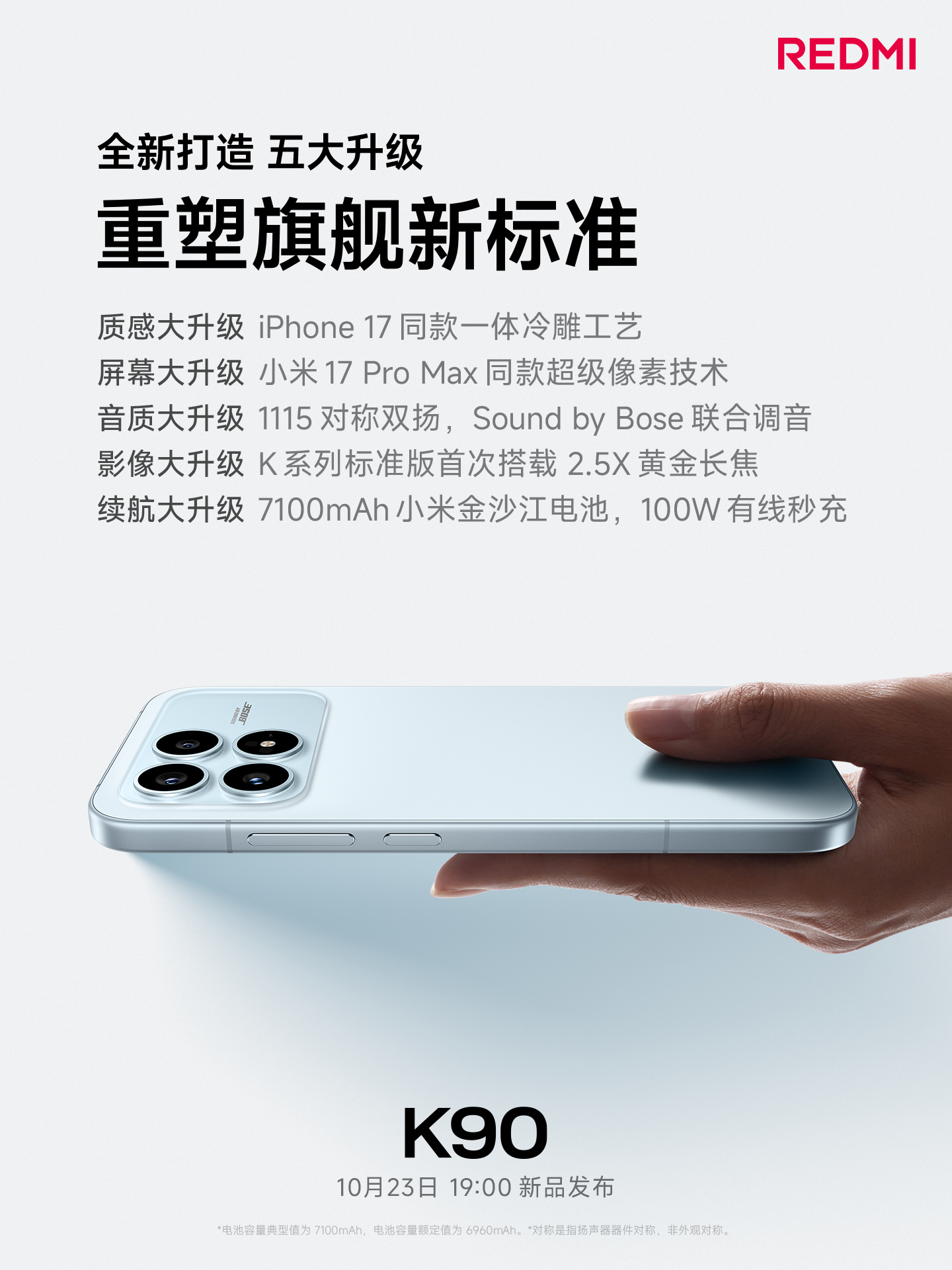
After revealing the key specifications of the Redmi K90 Pro Max yesterday, Redmi released a couple of posters today to share the details of the standard K90. The Snapdragon 8 Elite-powered K90 is designed to rival the Realme GT 8 as well as upcoming phones like the OnePlus Ace 6 and iQOO Neo 11, which are also powered by the same chip. Continue reading ahead to know all the K90 details confirmed by the brand.
Redmi K90 key details confirmed
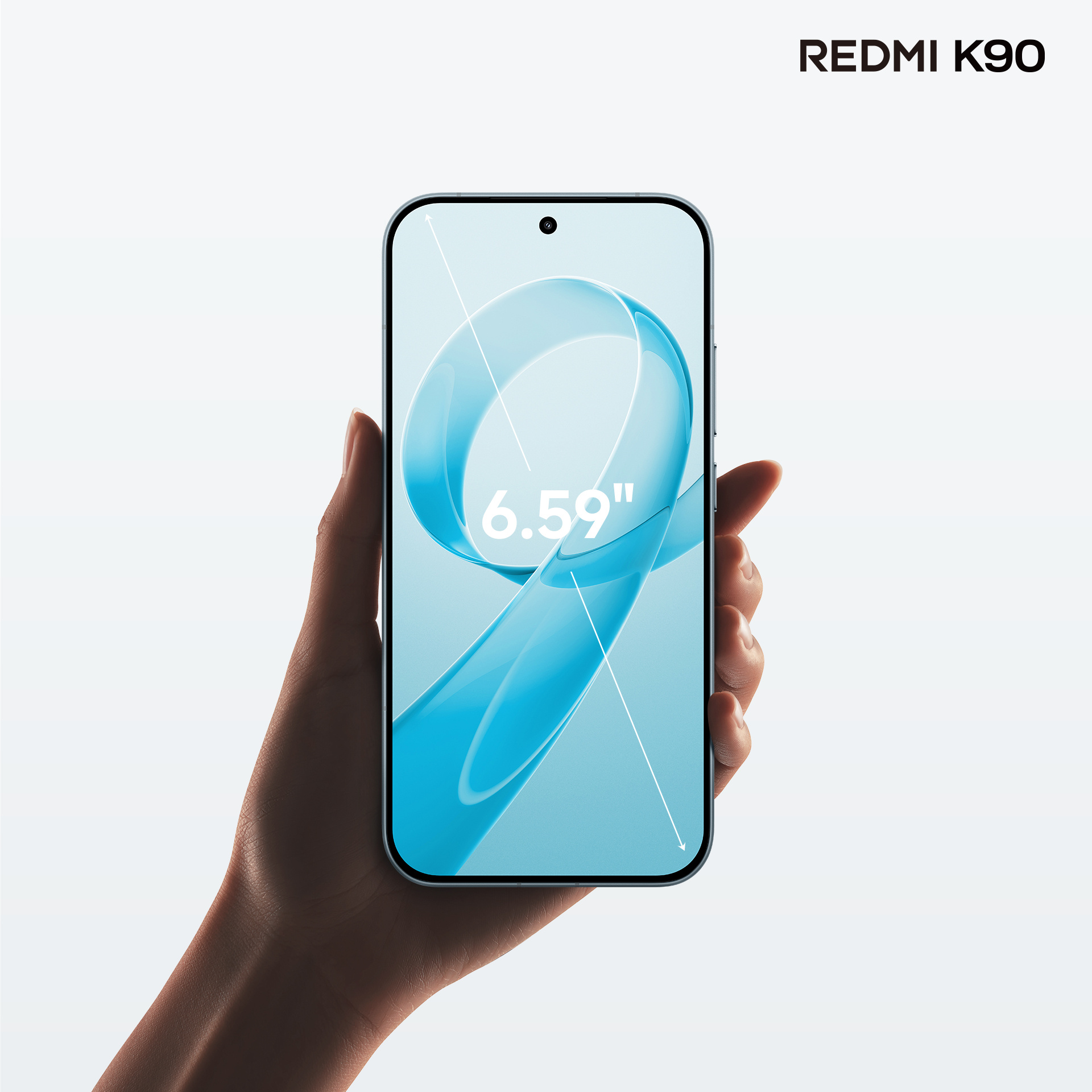
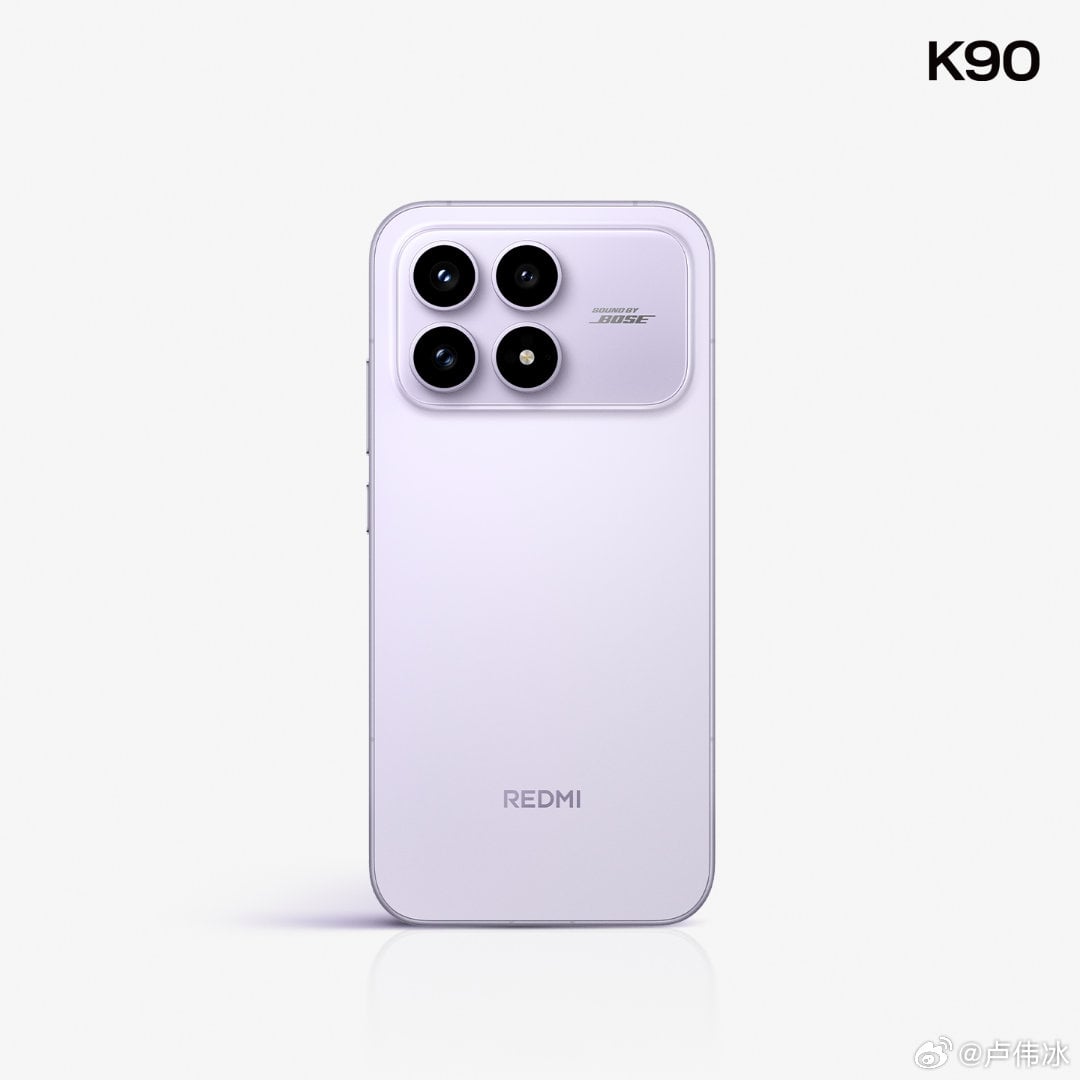
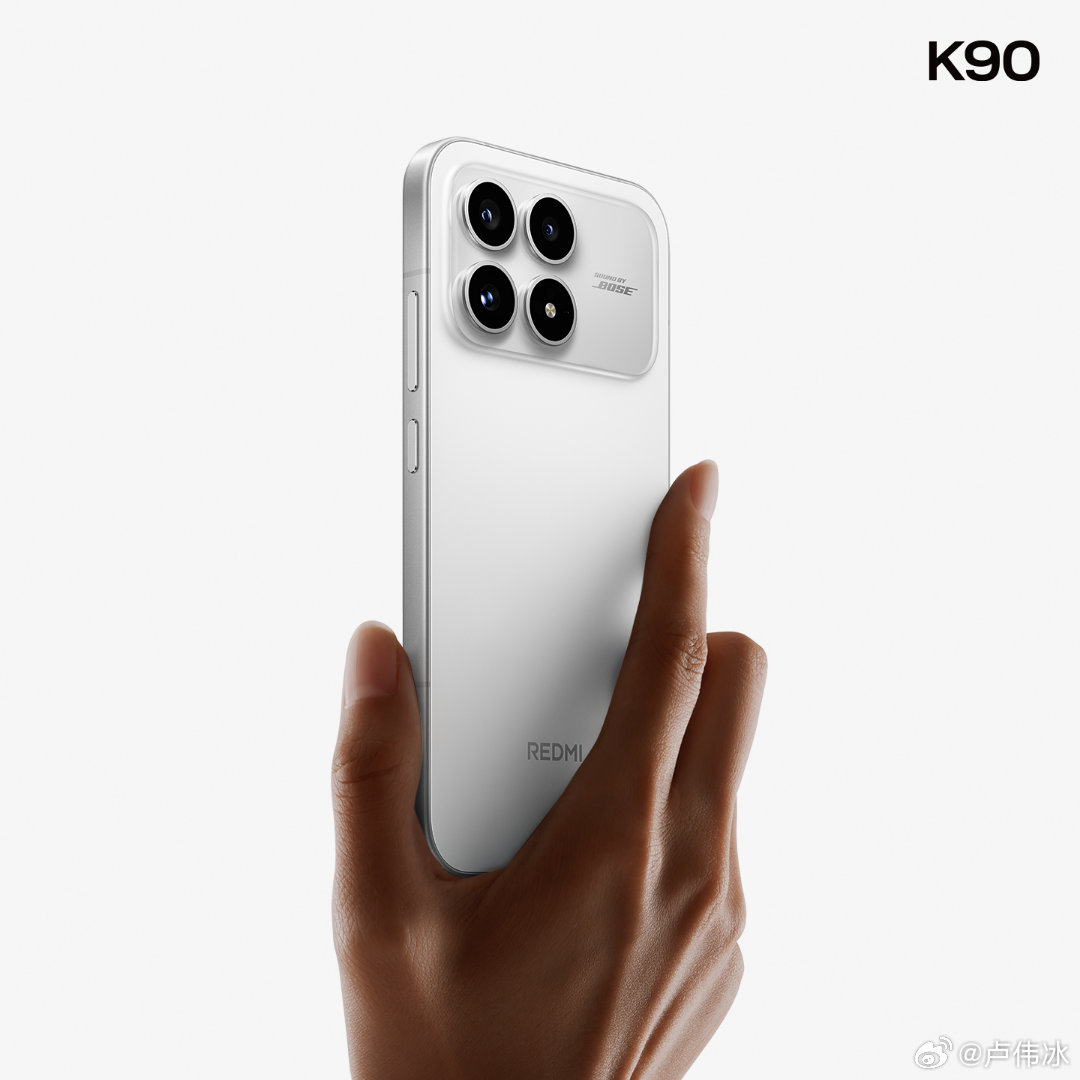
REdmi K90 display Redmi K90 display
Starting with the design, Redmi confirmed that the Redmi K90 has a cold-forging design similar to the iPhone 17. For those unaware, cold forging is a manufacturing process where a metal (usually aluminium or stainless steel) is pressed or stamped into shape under extreme pressure using a die. For durability, it features a metal middle frame.
On the front, it features a 6.59-inch OLED panel with a high screen-to-body ratio of 94 percent, thanks to equal-sized slim bezels on all four sides. The exact screen resolution has not been confirmed, but rumors claim that it supports a 1.5K resolution.
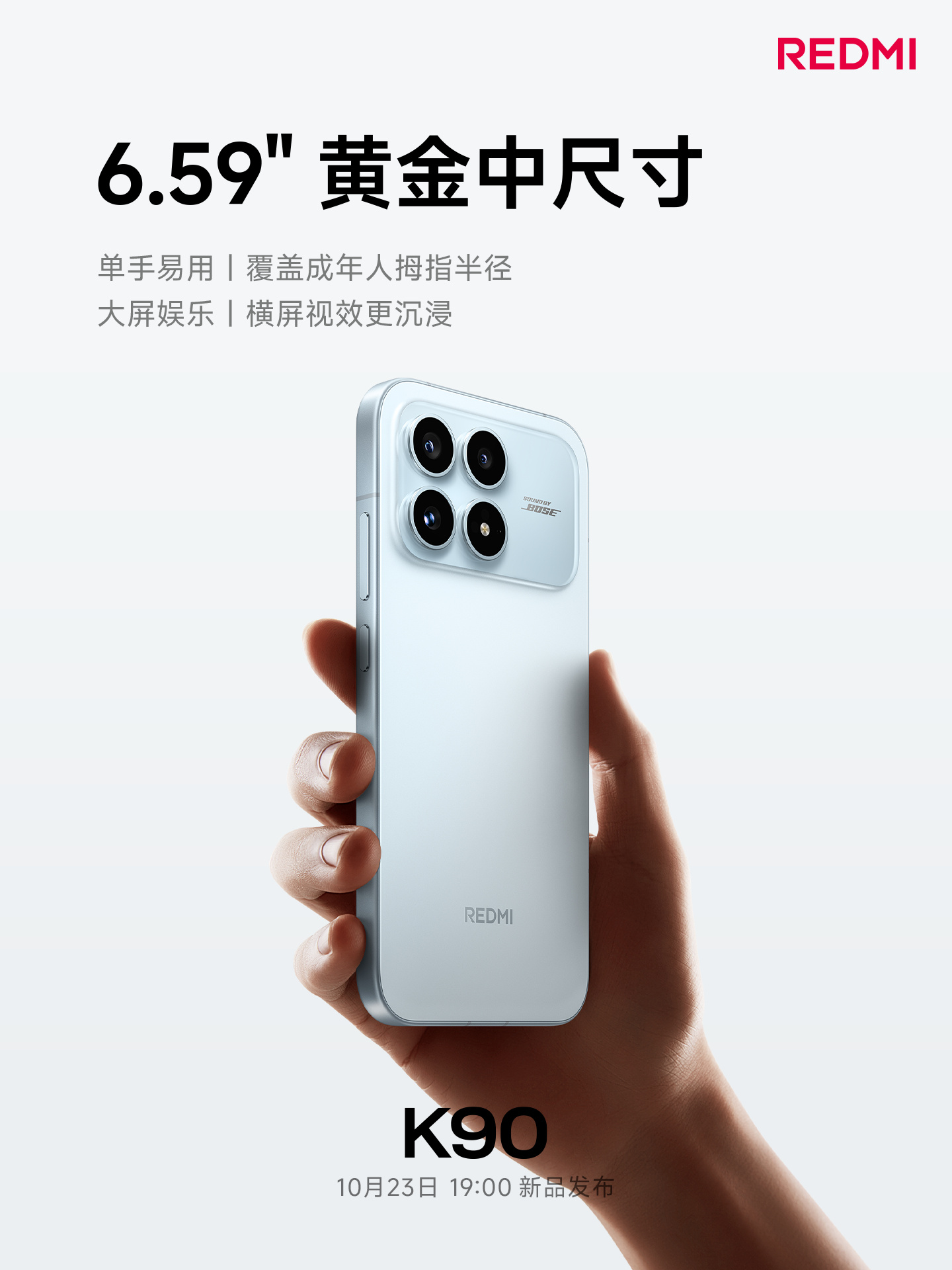
While the Redmi K90 Pro Max has a 2.1 audio system featuring an extra rear-facing Bose speaker, the standard K90 comes with a Bose dual symmetrical speaker system. For photography, the device will be equipped with a 2.5x telephoto lens. However, the brand is yet to confirm the exact camera sensors.
Redmi K90 in purpleRedmi K90 in whiteRedmi K90 key specs
The Redmi K90 is also confirmed to house a massive 7,100mAh battery with 100W wired charging. However, it lacks wireless charging support. The device will come preloaded with Android 16, featuring the HyperOS 3 skin on top. It will be available in three shades, such as white, light blue, and purple.
A recent certification suggests that the Poco F8 Ultra may launch soon as a rebranded version of the Redmi K90 Pro Max in markets outside of China. Likewise, the Redmi K90 could be rebranded as the Poco F8 Pro globally.
For more daily updates, please visit our News Section.
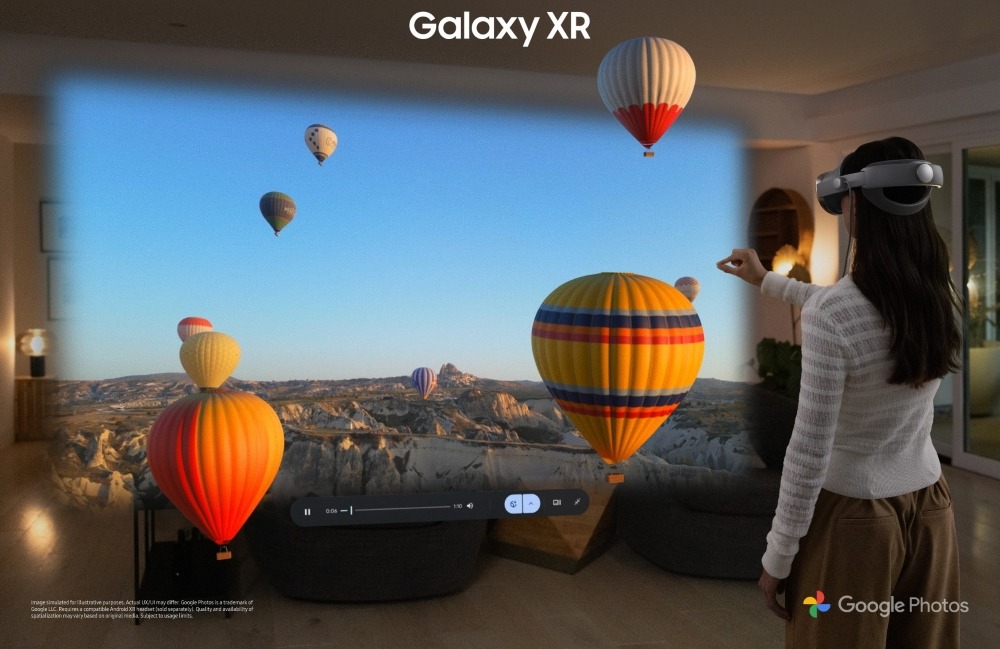
Samsung has announced the Galaxy XR, the company’s first AI-native headset built on the new Android XR platform developed with Google and Qualcomm.
Galaxy XR is the first device to have Google’s Gemini AI built right into the system. It responds through voice, vision, and gestures, understanding what users see and hear to provide natural, real-time assistance. It can help with navigation in Google Maps 3D, suggest nearby places, or search for real-world objects using Circle to Search. The headset can also turn 2D photos and videos into 3D, bringing memories to life.
The AI runs at the system level, making interactions smoother and more intuitive. Instead of simply following commands, Galaxy XR behaves more like a personal assistant that understands context.
The headset runs on Android XR, a new platform that supports multiple XR devices, including future AI glasses. All existing Android apps work on Galaxy XR, so users can access familiar mobile experiences right away. Developers can also build new XR apps easily using OpenXR, WebXR, or Unity, thanks to the platform’s open and scalable design.
Hardware and Specs
Galaxy XR is powered by the Snapdragon XR2+ Gen 2 chip with 16GB RAM and 256GB storage. It features a 3,552 x 3,840 Micro-OLED display with 27 million pixels, 95% DCI-P3 color coverage, and refresh rates of 60Hz, 72Hz (default), and up to 90Hz. The field of view measures 109° horizontal and 100° vertical.
For visuals, it includes a 6.5MP (F2.0, 18mm) camera that supports 3D photo and video capture, along with two pass-through cameras, six tracking cameras, four eye-tracking cameras, five IMUs, a depth sensor, and a flicker sensor. It also supports iris recognition for unlocking and password entry.
Audio is handled by two two-way speakers (woofer and tweeter) and six microphones with beamforming. It supports popular audio formats like MP3, AAC, FLAC, and Dolby Atmos, and can play 8K video at 60fps with HDR10 and HLG support. Connectivity includes Wi-Fi 7 and Bluetooth 5.4.
The headset weighs 545g with the forehead cushion, while the separate battery pack weighs 302g. Battery life is rated for up to 2 hours of general use and 2.5 hours of video playback, and it can be used while charging.
Pricing & availability
Galaxy XR will be available starting October 21 in the U.S. and October 22 in Korea. It has a price tag of US$1,799, while the Galaxy XR Travel Case and Galaxy XR Controller are cost at US$249.99 each.
MagicOS 10 is the latest custom skin from Honor built on top of Android 16. It represents a significant evolution in the company’s software approach, bringing advanced artificial intelligence capabilities, a system-level MCP architecture, a redesigned user interface, and improved cross-device integration.
The Android 16-based software truly transforms the software experience, and therefore, users are eagerly waiting for the update. Thankfully, Honor has already shared the list of eligible devices and rollout timeline. Take a look at it below and find out when it’s your turn to access the latest features and upgrades.
Honor MagicOS 10 eligible devices and rollout timeline
The rollout begins later this month, starting with the Honor Magic V5, and will quickly expand to many more devices in the same month, including the Magic 7 series, Magic 6 series, Honor GT Pro, and Honor 400 series. The Magic V3, Vs3, and Magic 5 models, along with the GT 2 Pro tablet, will join the party in November.
The MagicOS 10 rollout continues to expand to more Magic V-series phones and tablets, while the remaining devices will receive the update in the first quarter of 2026. Here’s the complete schedule:
October 2025
Honor Magic V5
Honor Magic 7 RSR | Porsche Design
Honor Magic 7 Pro
Honor Magic 7
Honor GT Pro
Honor Magic 6 RSR | Porsche Design
Honor Magic 6 Ultimate Edition
Honor Magic 6 Pro
Honor Magic 6
Honor 400 Pro
Honor 400
Honor MagicPad 3
November 2025
Honor Magic V3
Honor Magic Vs3
Honor Magic 5 Ultimate Design
Honor Magic 5 Pro
Honor Magic 5
Honor Tablet GT 2 Pro
December 2025
Honor Magic V2 RSR | Porsche Design
Honor Magic V2 Ultimate Edition
Honor Magic V2
Honor MagicPad 2
Honor Tablet GT Pro
Honor Tablet GT
Honor Tablet V9
First quarter of 2026
Honor Magic V Flip 2
Honor Magic V Flip
Honor Magic Vs2
Honor Magic Vs Ultimate Edition
Honor Magic Vs
Honor 300 Ultra
Honor 300 Pro
Honor 300
Honor GT
Honor 200 Pro
Honor 200
Honor 100 Pro
Honor 100
Honor 90 GT
Honor Power
Honor X70
Honor X70i
Honor X60 GT
Honor Tablet 10
Honor Tablet X9 Pro
Honor Tablet X9
If your Honor device is on the list, you will receive a notification once the update reaches your device. You can also manually check for it from the Software update section inside the Settings app.
You can regularly visit our Android 16 section to get the latest updates. Alternatively, you can join our Telegram channel for instant notification about the latest happenings in tech, including device launches, software updates, and latest breakthroughs.
ASUS has announced the Call of Duty: Black Ops 7 Special Edition of its TUF Gaming Radeon RX 9070 XT graphics card, made in collaboration with AMD and Call of Duty. The card was first shown at the Call of Duty NEXT event in Las Vegas on September 30. It features the Black Ops 7 insignia with orange accents in the signature Black Ops style. This limited-edition model will be available at select retailers worldwide and comes bundled with a digital copy of the standard PC version of the game. The Call of Duty: Black Ops 7 debuts on November 14th, 2025.
The TUF Gaming Radeon RX 9070 XT is built on AMD’s latest RDNA 4 architecture and includes 16GB of VRAM. It supports AMD Software with ML-powered FSR 4 upscaling technology, bringing AI-based performance and sharper visuals to over 85 supported games. It also includes DisplayPort 2.1 outputs that allow for high resolution and high refresh rate displays.
ASUS has focused heavily on cooling and durability. The RX 9070 XT uses three 11-blade Axial-tech fans that push steady airflow through an optimized fin array. The 0dB technology allows the fans to stop completely during light workloads for silent operation. Wide vents on the aluminum backplate help heat exit the card efficiently.
Users can switch between performance and quiet modes with a physical Dual BIOS switch, without using extra software. For more control, ASUS GPU Tweak III software provides easy tuning, fan adjustments, and hardware monitoring.
Instead of regular thermal paste, ASUS uses a phase-change GPU thermal pad that melts with heat to fill gaps and improve heat transfer. This design boosts cooling and lasts longer than traditional materials. The card also includes a metal exoskeleton for rigidity, dual-ball fan bearings for longer life, and a GPU holder to prevent sagging.
On Monday, iQOO unveiled the Snapdragon 8 Elite Gen 5-powered iQOO 15 in China. After the launch, the company announced on Weibo that it had set a new sales record in iQOO’s history, with sales in just 30 minutes surpassing the entire day’s sales of the iQOO 13. Now, in a new Weibo post, the brand has confirmed the total number of iQOO 15 units sold in the first four hours of sale.
iQOO 15 first sale report
iQOO sells 142,000 units in the first four hours of sale
According to the poster above, iQOO sold over 142,000 units of the iQOO 15 within just four hours of its first sale, marking an 87 percent increase compared to the previous generation. The post also highlights that the phone went on sale immediately after launch, without any pre-order period.
iQOO 15 specifications
The iQOO 15 features a 6.85-inch Samsung AMOLED M14 display that supports a 2K+ resolution and a 144Hz refresh rate. It is powered by the Snapdragon 8 Elite Gen 5 chipset, paired with iQOO’s self-developed Q3 chip, and features a 7,000mAh battery that supports 100W wired and 50W wireless charging.
The device ships with up to 16GB of LPDDR5x RAM and up to 1TB of UFS 4.1 storage. It runs on OriginOS 6-based Android 16.
For photography, the iQOO 15 is equipped with a 32-megapixel front camera. On the rear, it has a 50-megapixel OIS-assisted main camera, a 50-megapixel ultra-wide lens with autofocus support, and a 50-megapixel periscope telephoto camera. Other key features include an ultrasonic in-screen fingerprint sensor, dual speakers, a metal middle frame, and an IP68/69-rated body.
We use cookies on our website to give you the most relevant experience by remembering your preferences and repeat visits. By clicking “Accept”, you consent to the use of ALL the cookies.
This website uses cookies to improve your experience while you navigate through the website. Out of these, the cookies that are categorized as necessary are stored on your browser as they are essential for the working of basic functionalities of the website. We also use third-party cookies that help us analyze and understand how you use this website. These cookies will be stored in your browser only with your consent. You also have the option to opt-out of these cookies. But opting out of some of these cookies may affect your browsing experience.
Necessary cookies are absolutely essential for the website to function properly. This category only includes cookies that ensures basic functionalities and security features of the website. These cookies do not store any personal information.
Any cookies that may not be particularly necessary for the website to function and is used specifically to collect user personal data via analytics, ads, other embedded contents are termed as non-necessary cookies. It is mandatory to procure user consent prior to running these cookies on your website.