The Oppo Find X9 Ultra is expected to launch soon in China, and fresh leaked images are beginning to offer a clearer idea of what the device may bring. These images primarily highlight an upgraded teleconverter accessory, suggesting a noticeable improvement over the one available for the Find X9 Pro.
Find X9 Ultra: Bigger teleconverter and long-range photography focus
The leaked images indicate that the Oppo Find X9 Ultra will support a redesigned external teleconverter accessory and show the device being tested outdoors with the attachment fitted, suggesting Oppo is refining real-world performance. Unlike the Find X9 Pro’s optional 3.28x teleconverter, the larger new unit for the X9 Ultra is said to deliver 4.28x optical magnification, translating to an effective 300mm focal length.
The accessory itself looks larger and more complex than before, reportedly featuring additional optical elements. This setup is expected to work in tandem with a 200-megapixel periscope telephoto camera, allowing users to capture detailed shots with true optical depth rather than relying heavily on digital cropping.
Oppo Find X9 Ultra specifications (rumored)
Leaks suggest that the Find X9 Ultra will retain a dual periscope telephoto configuration. Apart from the 200-megapixel OmniVision OV52A periscope telephoto camera, which will offer 3x optical zoom, the second periscope camera is tipped to be a 50-megapixel unit supporting 10x optical zoom.
The rest of the camera setup is expected to include a 200-megapixel Sony LYT-901 main camera, a 50-megapixel Samsung JN5 ultra-wide lens, and a dedicated multispectral sensor for improved color accuracy. Both the main and telephoto cameras are said to support optical image stabilization. For selfies, it may feature a 50-megapixel front camera with autofocus support.
Beyond cameras, the Find X9 Ultra is rumored to feature a 6.82-inch 2K AMOLED flat display, the Snapdragon 8 Elite Gen 5 chipset, ColorOS 16, full-level dust and water resistance, and a battery exceeding 7,000mAh with fast wired and wireless charging. The phone is expected to debut in China around March. It is also likely to launch in other markets.
For more daily updates, please visit our News Section.
iQOO has started teasing its first Ultra-branded smartphone, with early details pointing towards a clear emphasis on performance. In a recent development, tipster Digital Chat Station shared an internal schematic of the iQOO 15 Ultra, while iQOO Product Director Galant V highlighted its gaming capabilities in a Weibo post. Together, these updates suggest the device is being designed with sustained gaming performance in mind, rather than positioning it as a conventional flagship.
iQOO 15 Ultra schematic
iQOO 15 Ultra schematic
According to Digital Chat Station, the shared schematic highlights a hidden active cooling setup inside the iQOO 15 Ultra. The air intake is discreetly placed beneath the rear camera module, while the exhaust vent sits along the side frame. This layout allows the phone to accommodate a large 17 x 17 x 4mm cooling fan, said to be the biggest used in the segment so far, positioned directly next to the main chipset.
The design reportedly creates a wide airflow channel inside the chassis, improving heat dissipation efficiency without altering the external appearance. Despite the inclusion of a fan and independent air duct, the overall industrial design and protection levels are said to remain unaffected. Alongside this, the phone is tipped to feature an extra-large vapour chamber heat spreader, with a surface area said to reach up to 8,000 square millimetres, further strengthening thermal control during long gaming sessions.
On the performance side, Galant V has highlighted iQOO’s focus on real-world gaming stability rather than peak frame rates alone. The iQOO 15 Ultra is claimed to handle one of the most demanding mobile games at the highest visual preset, 60 frames per second, while keeping both average frame rate and 1 percent low frame rate fully stable. Power consumption in this scenario is said to hover just above 7W, indicating tight control over efficiency.
This stability is credited to a combination of iQOO’s in-house Monster Super Core Engine, which works at a deep system level, and the brand’s first active cooling solution branded as the Ice Dome Air Cooling System. With this approach, iQOO positions the 15 Ultra as a performance exploration device aimed squarely at high-end mobile gamers who value consistency under extreme loads.
For more daily updates, please visit our News Section.
Honor has launched a truly eye-catching smartphone: the Honor 500 Pro POPMart Molly Edition, now available on Giztop for $899. This special edition isn’t just about performance; it blends flagship power with collectible art-inspired design.
The phone features a 6.55-inch AMOLED display with FHD+ resolution, a 120Hz refresh rate, and an impressive 5000 nits peak brightness, making it perfect for streaming, gaming, and outdoor use. Powering the device is the Qualcomm Snapdragon 8 Elite SoC, paired with 16GB RAM and 512GB storage, ensuring smooth multitasking and fast performance.
Photography is a major highlight. The triple rear camera setup includes a 200MP main sensor with gimbal OIS, a 50MP telephoto lens with 3x optical zoom, and a 12MP ultra-wide camera. Selfie lovers get a sharp 50MP front camera.
The massive 8000mAh battery supports 80W fast wired charging, 50W wireless charging, and 27W reverse charging, easily lasting more than a day. The phone runs Magic UI 10.0 based on Android 16, offering a clean and fast user experience.
ExclusivePOPMart Molly Collector Box:
What makes this edition special is the box, which includes exclusive Molly-themed accessories, custom art cards, stickers, red envelopes, and even refrigerator magnets, making it a collector’s delight.
If you want a powerful phone with personality, the Honor 500 Pro POPMart Molly Edition stands out.
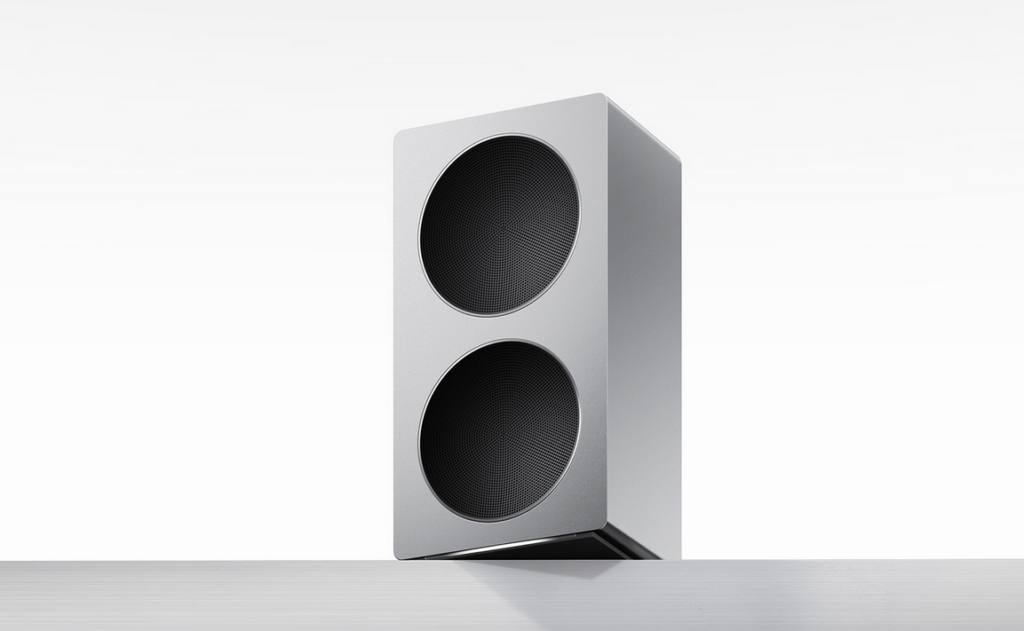
Xiaomi has expanded its home audio lineup with the Sound 2 Pro speaker. This model is designed to offer high fidelity sound and a premium metal body. It is positioned right below the larger Xiaomi Sound 2 Max, but still offers powerful sound, two way audio, a sleek new look, and much more. So here are all the details.
Xiaomi Sound 2 Pro Specifications
The Chinese tech giant’s latest Xiaomi Sound 2 Pro is crafted with a metal enclosure that not only makes it sturdy but also makes it feel premium. Its design is quite similar to the larger Sound 2 Max model, while scaling down in size and output to keep costs accessible for a broader audience. The speaker uses a two-way crossover setup with separate drivers for mid-range and high frequencies, delivering clear highs and substantial bass from its 40W mid-woofer and 20W tweeter configuration.
Xiaomi Sound 2 Pro HiFi Speakers
In other words, you get a total 60W output of balanced audio playback. On the connectivity front, the Sound 2 Pro supports Bluetooth 5.2 for traditional wireless streaming and Wi-Fi 6 for robust home network integration. It also includes RCA and USB-C inputs for analog and digital audio sources, making it flexible enough to connect to TVs, laptops, and other audio equipment. Users can pair up to four Sound 2 Pro speakers simultaneously, allowing for wider sound coverage or synchronized playback.
The speaker also integrates with Xiaomi HyperOS smart home ecosystems. Xiaomi has just announced the Sound 2 Pro for 1,399 Yuan, which is roughly around 201 US Dollars. At the moment, this device has only been released in the brand’s home market of China, and there has been no confirmation of an international release.
For more daily updates, please visit our News Section.
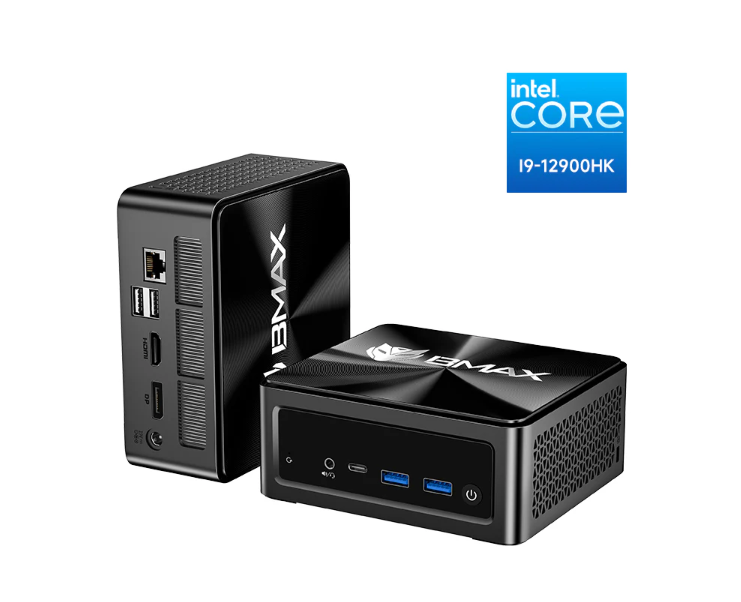
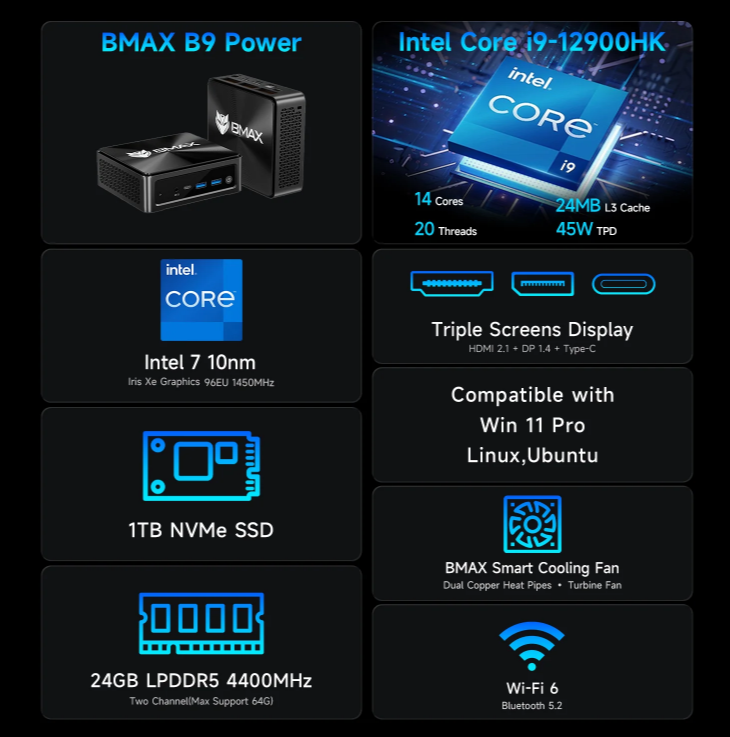
Designed for professionals who want desktop-class performance without the bulk of a traditional tower, the BMAX B9 PowerMini PC stands out as a compact yet powerful computing solution. It is currently available for $499.99, reduced from $999.99, delivering a substantial 50% discount for a limited time.
At its core is Intel’s Core i9-12900HK processor, a high-performance chip built to handle demanding workloads such as software development, data analysis, advanced office multitasking, and creative production. Paired with LPDDR5 memory and a 1TB NVMe SSD, the system offers fast boot times, smooth multitasking, and reliable performance when working with large files or multiple applications simultaneously.
The B9 Power is also designed for productivity-focused setups. Support for triple 4K displays via HDMI, DisplayPort, and USB-C allows users to build efficient multi-screen workstations for trading, content creation, or professional office environments. Modern connectivity options, including Wi-Fi 6 and Bluetooth 5.2, ensure stable wireless performance and compatibility with current peripherals.
Thermal management is another strong point, with an advanced cooling system that helps maintain consistent performance during extended workloads. Added features such as One-Click System Rescue provide extra reliability, allowing quick system recovery when needed.
At half its original price, the BMAX B9 Power Mini PC offers exceptional value for power users, professionals, and businesses looking to upgrade to a compact yet capable system while this limited-time deal is available.
Motorola has been gradually expanding the Android 16 update to its mid-range and lower-end devices, with the Moto G75 getting the latest bite. The update brings some new features and numerous improvements that further enhance the software experience.
The Android 16 update for the Moto G75 has started rolling out a month after the device entered beta testing. This is not unusual, though, as brands take a couple of weeks to refine the update and ensure the build has no critical bugs. The latest update bears the firmware version W1UQ36H.73-6, as shared by users on Reddit (via Ytechb).
Since it’s a major upgrade, users will need to download a large update package of about 1.8 GB. It’s best to download such hefty packages over a Wi-Fi connection. To download the update, go to Settings > System updates > Check for updates.
Note that the updates are usually rolled out in batches. So, it may take a few days or even weeks to reach all the users. Once the update reaches your device, ensure your Moto has sufficient storage and charge it to at least 50% before installing the update.
In terms of changes, you wouldn’t notice significant visual upgrades, but there are several useful upgrades to look forward to. This includes a new Notification cooldown feature that reduces the volume of incoming notifications when receiving too many notifications from the same app within a short time span.
With Android 16, you can connect to another device’s hotspot without a password, provided both devices are logged into the same Google account. Not a big change, but a quality-of-life improvement. The Do Not Disturb, Bedtime, and Driving modes are now in Settings > Modes. Additionally, you can create custom modes as needed. Improvements have also been made to hearing aids, device security, and overall stability.
You can regularly visit the Motorola section on Gizmochina to stay up-to-date with the latest news and developments. Or, if you prefer instant updates, don’t forget to join our Telegram channel.
Xiaomi has released the Electric Scooter 6 Lite, the cheapest model in its new Electric Scooter 6 lineup. It sits below the Scooter 6 and 6 Max and is designed for short city trips.
The scooter uses a Hall-effect brushless motor with 300W continuous power and 500W peak output. Top speed is 25 km/h and it can climb hills up to 15 percent. The 216 Wh ternary lithium battery gives you 25 km range in Standard mode at 15 km/h, or about 20 km in Sport mode at full speed.
For handling rough roads, it has 25 mm dual-spring front suspension and 10-inch pneumatic tires. Braking uses a front drum brake and rear E-ABS system. The front headlight is 2.5W and lights up 15 meters ahead. The rear brake light flashes when you brake.
You get three speed modes: Pedestrian at 6 km/h, Standard at 15 km/h, and Sport at 25 km/h. A display between the handlebars shows your speed, riding mode, and battery level. Connect it to the Xiaomi Home app to check range, battery status, trip history, tire pressure, lock the motor, and adjust energy recovery.
The frame is high-strength carbon structural steel and holds up to 100 kg. The scooter weighs 18.1 kg and works for riders between 140 cm and 200 cm tall, ages 16 to 50. It has IPX4 water resistance for the body and IPX6 for the battery. Folded size is 1140 x 512 x 555 mm. Xiaomi hasn’t announced the price of the Electric Scooter 6 Lite yet.
For more daily updates, please visit our News Section.
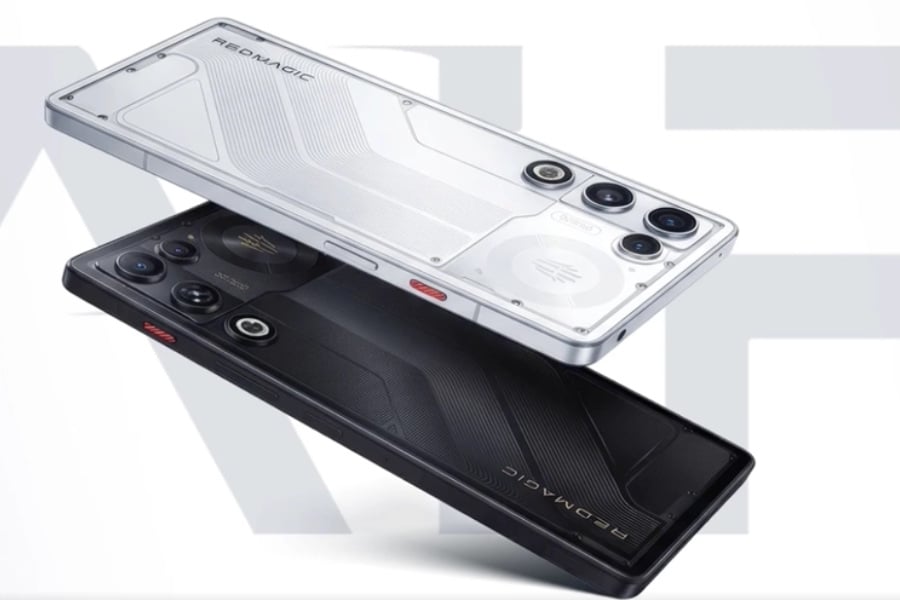
Red Magic has recently launched the Red Magic 11 Air in China, expanding its gaming smartphone lineup with a slimmer and more affordable model. The company has now confirmed early details about the global release of the Red Magic 11 Air.
Red Magic says the international version will use the same hardware as the Chinese variant. This includes Qualcomm’s Snapdragon 8 Elite chipset and a large 7,000 mAh battery. The phone also retains an active cooling system, which is important for gaming performance and helps prevent thermal throttling during long or demanding sessions.
Red Magic lists January 29 at 12:00 UTC as the global launch time. Based on the company’s usual release pattern, this date is unlikely to be the start of direct sales. Instead, it is expected to mark the opening of pre-orders and the announcement of global pricing. Full retail availability typically follows later.
In terms of specifications, the Red Magic 11 Air (Chinese model) features a 6.85-inch OLED display with a 1.5K resolution of 2688 × 1216 pixels. The panel supports a 144 Hz refresh rate and up to a 960 Hz touch sampling rate. It offers 10-bit color depth, 100 percent DCI-P3 color gamut coverage, 2592 Hz PWM dimming, and DC dimming.
The phone is powered by the Snapdragon 8 Elite 3 nm mobile platform with an Adreno 830 GPU. It is available with 12 GB or 16 GB of LPDDR5X Ultra RAM and 256 GB or 512 GB of UFS 4.1 storage. Software is based on Android 16 with RedMagic OS 11, and the device supports dual SIM functionality.
Camera hardware includes a 50 MP main rear camera, an 8 MP ultra-wide camera, and a 16 MP under-display front camera. Other features include an in-display fingerprint sensor, stereo speakers with dual smart power amplifiers, 5G NSA and SA support, dual 4G VoLTE, Wi-Fi 7, Bluetooth 5.4, GPS with L1 and L5 support plus GLONASS, NFC, and a USB Type-C port. The phone measures 163.82 × 76.54 × 7.85 mm, weighs 207 grams, and supports 120 W fast charging for its 7,000 mAh battery.
For more daily updates, please visit our News Section.
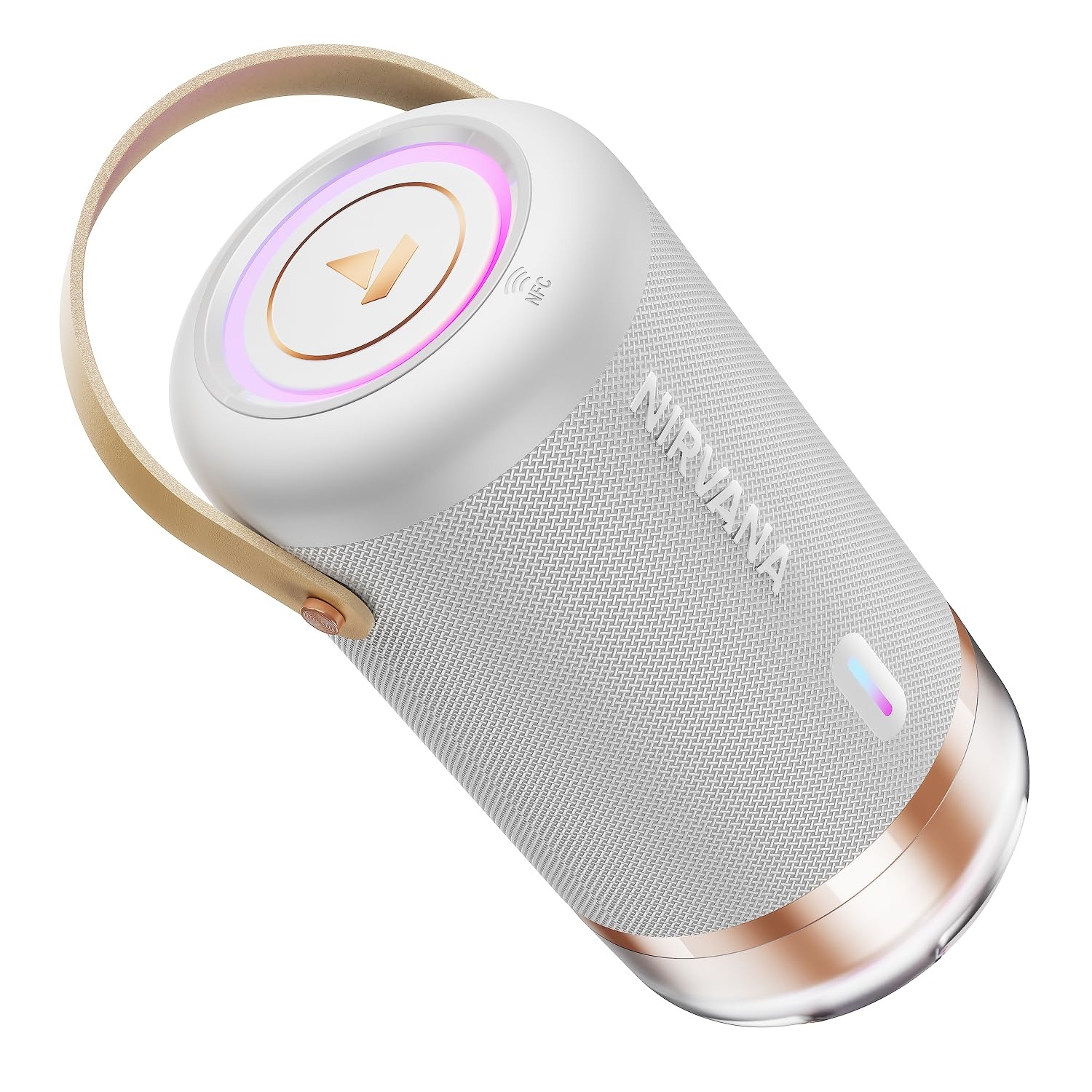
boAt has launched the Nirvana Luxe, a Bluetooth speaker designed for home parties and social gatherings where high volume and strong bass are priorities.
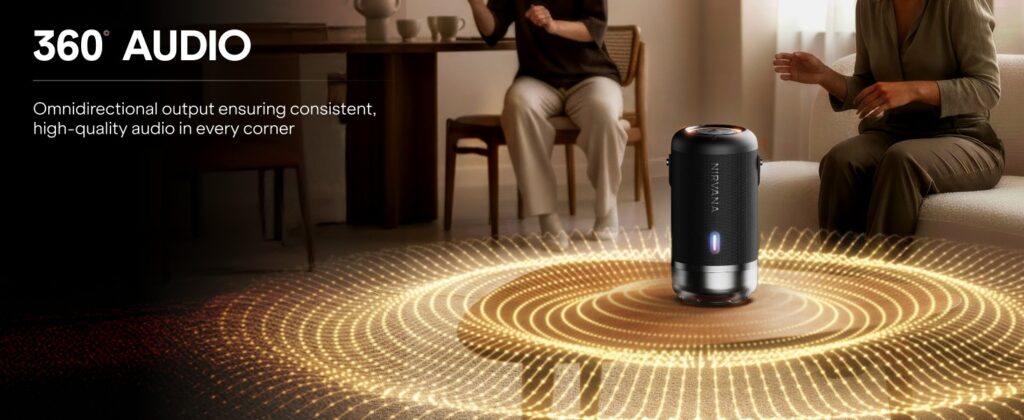
The boAt Nirvana Luxe delivers 100W of boAt Signature Sound using a four-speaker setup. This includes two 1.25-inch tweeters for highs and two 3-inch subwoofers for bass. The speaker supports 360-degree Spatial Audio, allowing sound to spread evenly across the room instead of coming from a single direction. For larger spaces, Broadcast Mode lets users wirelessly connect multiple Nirvana Luxe speakers to play the same audio at the same time, creating a louder and more immersive setup.
For audio streaming, the speaker supports LDAC, which allows high-quality wireless playback from compatible devices. Connectivity options include Bluetooth v5.3 with a range of up to 10 meters, AUX input, USB Type-C, and NFC pairing for supported Android smartphones. A built-in microphone is included for hands-free calling, making it possible to take calls directly through the speaker.
The Nirvana Luxe also focuses on visual appeal. It features dynamic LED lighting with three music-synced modes that react to the audio being played. Both the sound modes and LED effects can be adjusted through the boAt Hearables app, giving users control over how the speaker looks and sounds based on the setting.
In terms of durability, the speaker comes with an IPX6 splash resistance rating. This makes it suitable for use near pools or in outdoor areas where it may be exposed to water splashes. Battery life is rated at up to 15 hours on a single charge, depending on volume levels and lighting usage.
Pricing & availability
The boAt Nirvana Luxe is available in Ivory White and Charcoal Black color options. It is priced at Rs. 9,999. The speaker is available for purchase starting today through the official boAt website and Amazon India.
For more daily updates, please visit our News Section.
In a move that signals a major reshaping of the TV industry, Sony has agreed to spin off its home entertainment division, including its iconic Bravia TV brand, into a new joint venture with Chinese electronics giant TCL. Under the terms of the deal, TCL will hold a controlling 51% stake while Sony retains 49%.
You’ll Still See the Sony Logo
The upcoming venture, expected to begin operations in April 2027, will handle everything from R&D and design to global manufacturing, logistics, and customer service. Despite the ownership shift, products will continue to carry the Sony and Bravia branding, preserving decades of consumer trust and premium image quality.
What is really happening here is Sony stepping back. The Japanese giant, once a dominant force in consumer hardware, has steadily been offloading lower-margin businesses, first PCs, then media players, and now TVs, as it doubles down on entertainment IP like film, gaming, and anime. TCL, meanwhile, is ascending. It gets access to Sony’s image processing know-how, brand prestige, and global channel network, helping fast-track its climb into the premium segment.
This deal could change what it means to buy a Sony TV. TCL will be in the driver’s seat on pricing, display technology, and manufacturing, potentially opening the door to more affordable Bravia models without the traditional Sony markup. It is a best-of-both-worlds play on paper: Sony’s picture quality, TCL’s scale and efficiency.
Still, it marks the end of an era. Bravia was one of the last standing pillars of Japanese TV dominance. Now, with Sony’s exit from day-to-day control, even that legacy will be filtered through a Chinese lens, and only time will tell how this shift affects the future of both brands.
In related news, TCL has recently launched the X11L SQD-Mini LED TV series, featuring up to 20,000 local dimming zones and peak brightness of 10,000 nits.
For more daily updates, please visit our News Section.
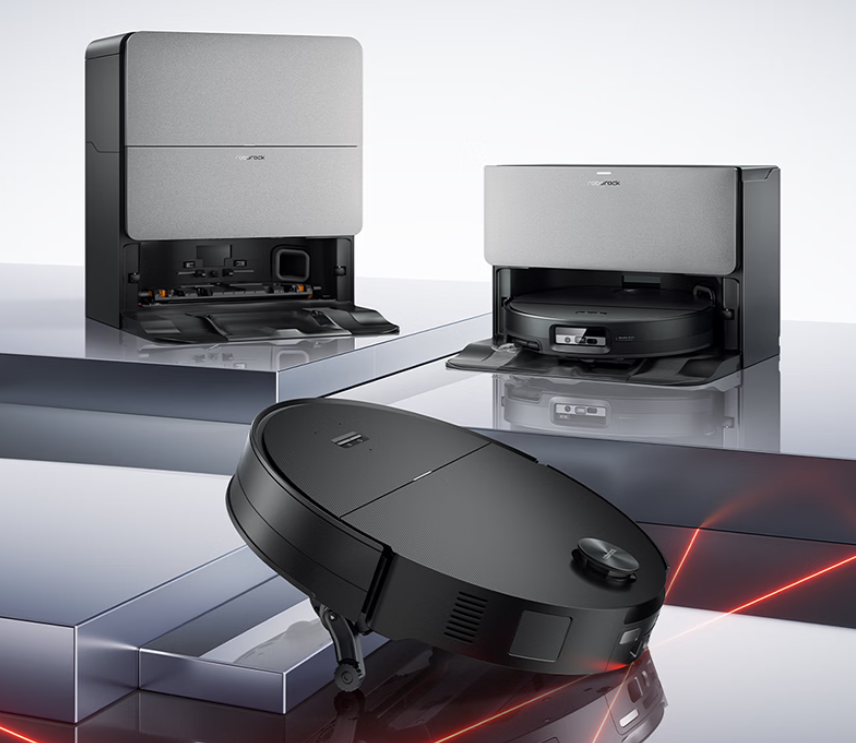
Roborock has launched the G30S Pro, a high-end self-cleaning robot vacuum and mop designed for homes with complex layouts, carpets, and low-clearance furniture. The G30S Pro starts at 5,499 yuan ($790) for the water-tank version, while the plumbed-in variant is priced from 5,999 yuan ($862).
Roborock G30S Pro Specifications
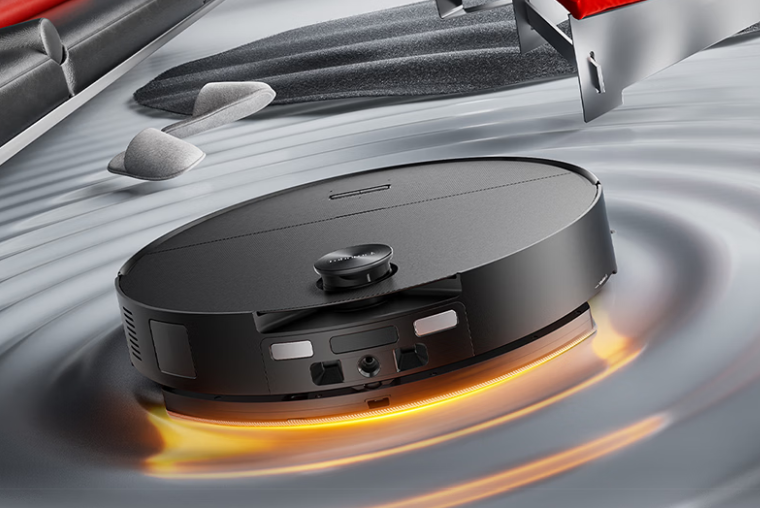
The robot features Roborock’s new Chassis Lift 3.0 system, which uses an AI-powered wheel-leg structure to adjust the robot’s height in real time. It can lower its body to pass through spaces as low as 7.95cm and raise itself to climb obstacles up to 8.8cm, including thresholds, rails, and uneven flooring.
The G30S Pro delivers peak suction power of 35,000Pa, which represents a 38% improvement over the previous generation. Roborock uses a DuoDivide 0-tangle cleaning system that includes a dual-suspended main brush, side brush, mop, and caster wheel. The system is designed to capture long hair up to 40cm without tangling.
Roborock has equipped the robot with a sonic mopping system that supports dual vibration zones and operates at up to 4,000 vibrations per minute. The mop applies 14N of pressure and maintains a consistent 65°C temperature for effective stain removal. It is optimized for hard surfaces such as tile, wood, marble, and micro cement.
The G30S Pro comes with a high-temperature self-cleaning base station. The dock can wash the mop with 100°C boiling water, dry it with 55°C hot air, and automatically manage dust collection, detergent dispensing, water refill, and deodorization. The system supports up to 60 days of hands-free cleaning and includes an E12-grade filter.
The robot uses a hybrid navigation system that combines LDS laser mapping, structured light, RGB vision, and auxiliary lighting. It can detect over 280 types of obstacles and navigate effectively in low-light and low-clearance conditions. The robot also includes pet-friendly features such as pet recognition, avoidance, photography, video calling, and a pet search function.
The G30S Pro supports natural language voice commands, letting users start and manage cleaning tasks by speaking. It also uses SmartPlan 4.0 to recognize different rooms and adjust cleaning behavior automatically. The robot is powered by a 6,400mAh battery with fast charging support, making it suitable for larger home layouts.
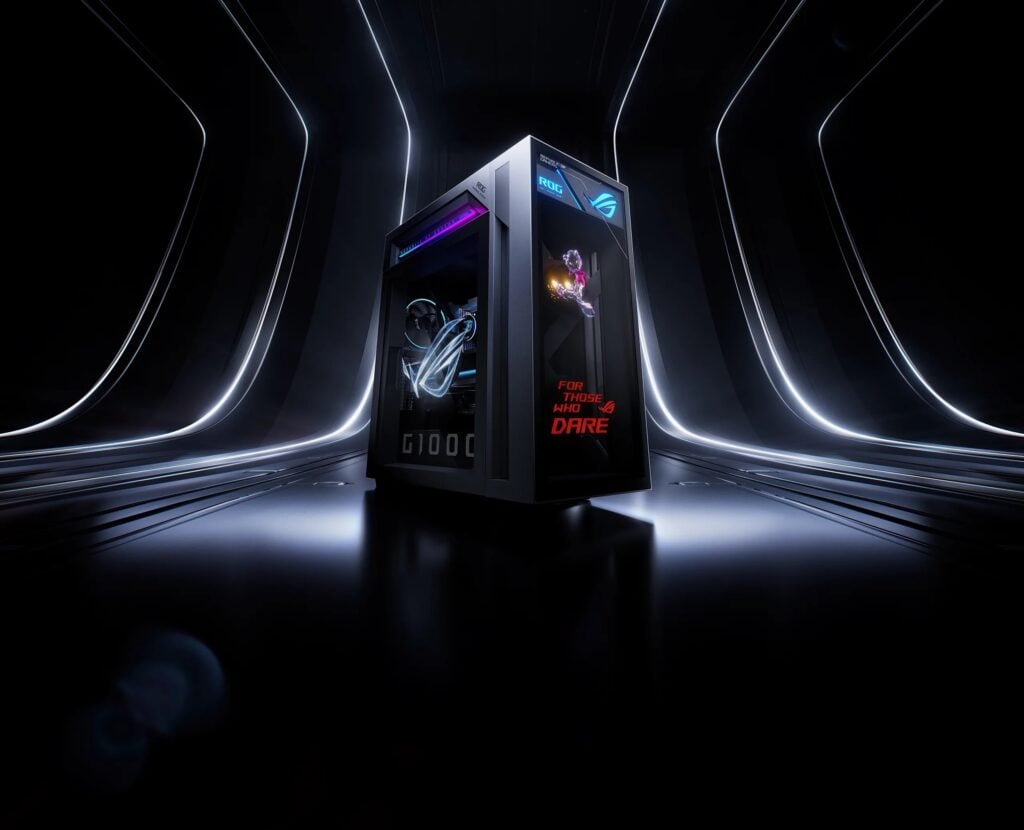
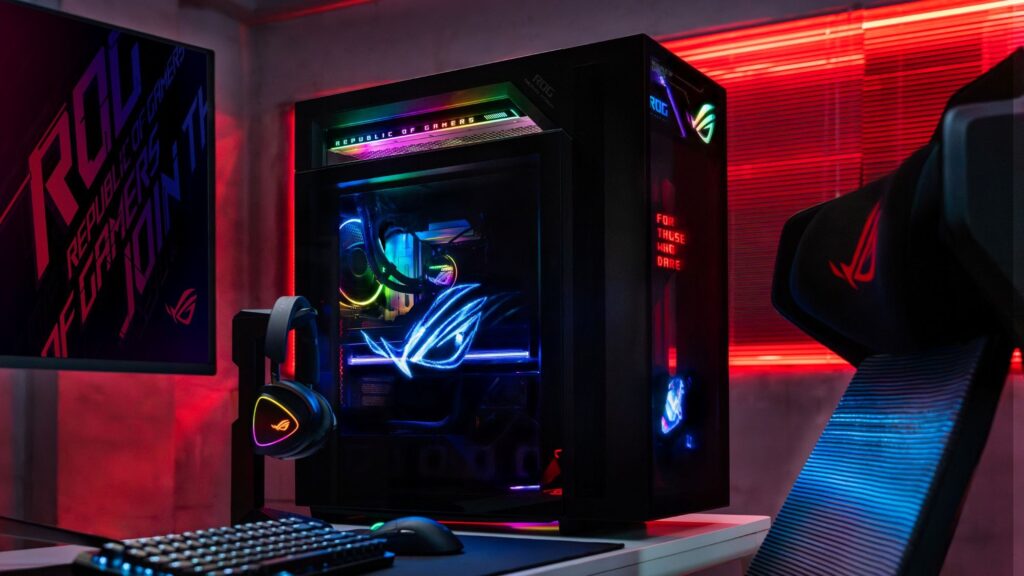
Ongoing RAM and SSD shortages have driven up PC building costs in 2026, with high memory, storage, and GPU prices eroding the value of custom builds. As a result, more gamers are turning to prebuilt systems for predictable pricing, warranties, and high-end hardware. At CES 2026 earlier this month, ASUS unveiled its flagship ROG G1000 gaming desktop, targeting enthusiasts who want top-tier performance without the hassle of sourcing parts.
The ROG G1000 is built around the AMD Ryzen 9 9950X3D processor, featuring 16 cores, 32 threads, a base clock of 4.3GHz, boost speeds up to 5.7GHz, and 128MB of cache. This makes it suitable for demanding AAA games as well as heavy multitasking and productivity workloads. On the graphics side, the system can be configured with up to an NVIDIA GeForce RTX 5090 ROG OC with 32GB of GDDR7 memory and support for DLSS 4 and Frame Generation. AMD Radeon RX 9070 XT options are also available for users who prefer AMD’s software stack.
The supporting hardware matches the system’s flagship positioning. The G1000 uses an X870 motherboard, supports up to 128GB of DDR5 memory across four U-DIMM slots, and ships with two 2TB PCIe 4.0 NVMe M.2 SSDs. Expansion is generous, with four M.2 slots, six SATA ports, three PCIe 4.0 x16 slots, and one PCIe 5.0 x16 slot. Power is supplied by a 1000W 80 Plus Gold power supply rated for up to 2000W peak output.
Cooling is handled by a custom chassis that separates airflow for the CPU, GPU, and power supply. A 420mm liquid cooler sits in a dedicated thermal chamber with three 140mm intake fans, allowing cooler intake air and more stable CPU performance under load.
Visually, the ROG G1000 stands out with the AniMe Holo system. A 380mm side fan with 680 LEDs and two 215mm front fans with 384 LEDs each can display custom images or animations. The system operates at 20.5 dBA and supports 16.77 million colors.
The ROG G1000 runs Windows 11 Pro, weighs 40kg, and includes extensive front and rear I/O, including USB4 and HDMI 2.1b. Pricing details of the ROG G1000 PC are yet to be confirmed, and availability is expected in early 2026.
For more daily updates, please visit our News Section.
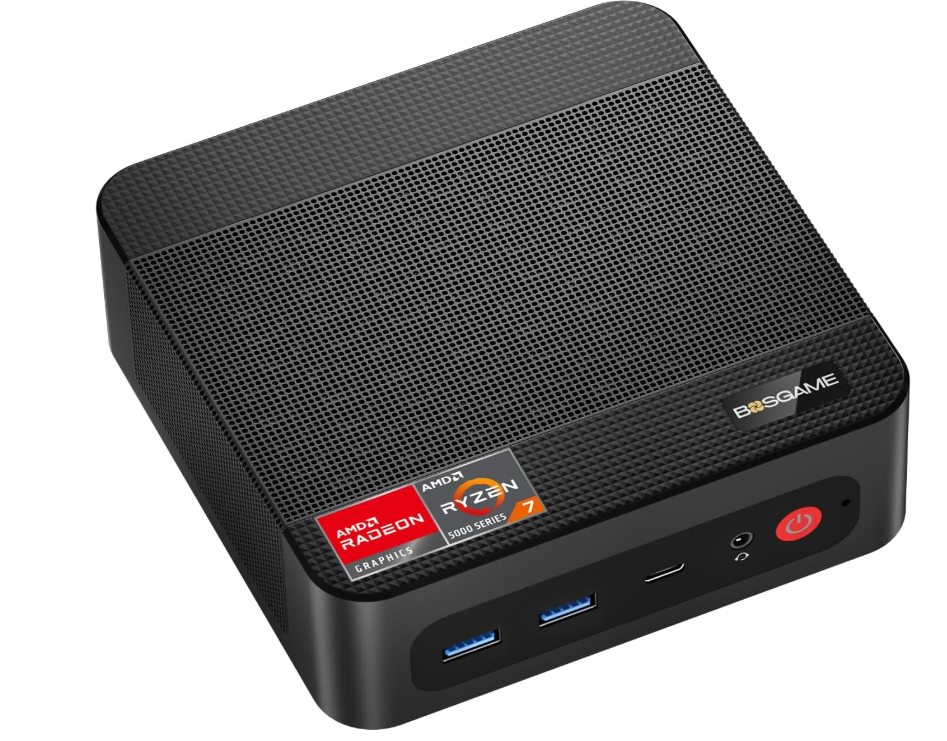
If you’re looking for a powerful mini PC at a steep discount, the BOSGAME P4 Ultra Mini PC is currently one of the best value deals available. Priced at $378, down from $599, this offer delivers a 37% discount on a Ryzen 7–powered desktop. The deal is live on Amazon from January 19 to February 2, 2026, and buyers can use the promo code: 7PWWZW4C at checkout to avail the discount.
At this price point, the P4 Ultra stands out as a compact desktop built for home offices, business users, and multitaskers who want strong performance without paying full desktop prices.
Why This Deal Is Worth It
The mini PC is powered by the AMD Ryzen 7 7730U, featuring 8 cores and 16 threads with boost speeds up to 4.5GHz. BOSGAME claims performance gains of up to 35% over older Ryzen 7 5700U and 5825U chips, making it a solid choice for productivity workloads, office software, coding, and multitasking.
It ships with 16GB DDR4 RAM and a 1TB PCIe 4.0 NVMe SSD, a combination rarely seen at this discounted price. Fast boot times, quick file transfers, and smooth everyday performance come standard, with support for adding a 2.5-inch SSD if you need more storage later.
Triple 4K Displays & Fast Networking
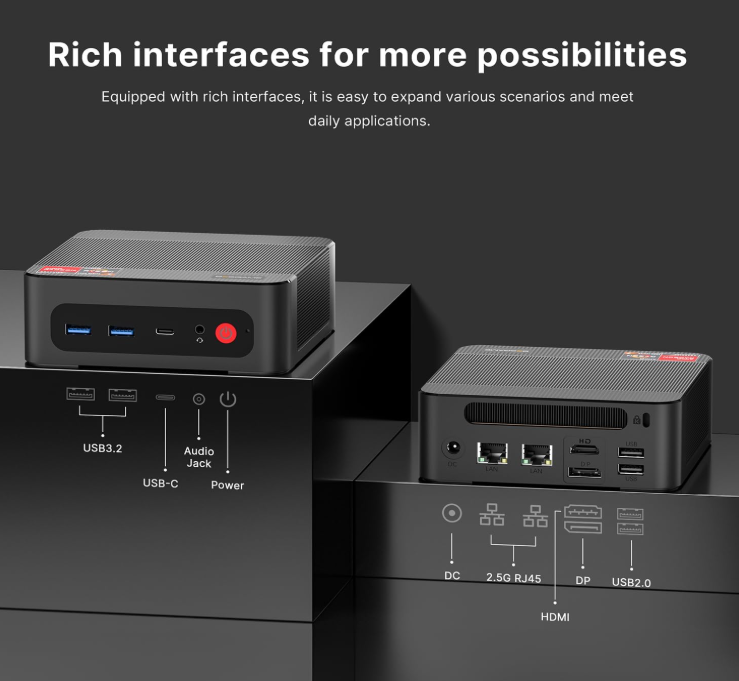
Despite its small size, the BOSGAME P4 Ultra supports triple 4K displays via HDMI, DisplayPort, and USB-C, making it ideal for multi-monitor setups. Integrated AMD Radeon Graphics handle 4K media playback, office visuals, and light gaming with ease.
Connectivity is another highlight, featuring dual 2.5Gb Ethernet ports, Wi-Fi 6E, and Bluetooth 5.2, a rare combo in this price range.
At $378, the BOSGAME P4 Ultra Mini PC delivers flagship-level productivity hardware at a mid-range price. With limited-time availability and more than $200 saving, this is a deal that’s hard to ignore for anyone needing a compact yet capable desktop.
Xiaomi has launched a new smartwatch designed specifically for children. The Xiaomi Kids Watch is priced at 1,399 yuan ($200) and will go on sale starting January 27 via JD.com. The smartwatch focuses on safety, communication, and usability, and comes in two color options: Star River Blue and Nebula Purple.
Xiaomi Kids Watch Specifications
The watch features a distinctive eight-sided frame with a flip-up camera mechanism. This design allows children to easily switch between the front and rear cameras, while animated effects enhance the interaction. The front houses a 5-megapixel camera for video calls and selfies, while the back includes an 8-megapixel camera for capturing daily moments.
The watch features a 1.75-inch AMOLED display with a resolution of 390 x 450 pixels. It includes 1GB of RAM and 16GB of internal storage. It supports fast charging and can reach 50% battery in around 30 minutes. The built-in 740mAh battery is designed for all-day use, with a long-battery mode available to extend runtime when needed. The watch also supports 20-meter water resistance.
For location tracking, the watch supports GPS, BeiDou, GLONASS, Galileo, and QZSS. It adds AI-enhanced floor-level positioning that can identify not just the building but also the specific floor. Xiaomi includes additional safety features such as geofencing, school arrival alerts, location history, and one-touch SOS calling.
The watch supports voice and video calls, voice messages, and child-friendly versions of WeChat and QQ. It includes NFC for transit card support, access cards, and compatible smart door locks. Parents can also link the watch to Xiaomi’s smart home system via the Xiao Ai voice assistant.
Health and fitness features include heart rate and mood tracking, as well as a dedicated sports system with 18 activity modes designed for K12 students. The watch sends automatic alerts if a child enters a water-prone area, enhancing parental oversight.
Xiaomi has added over 170 quality and safety tests to ensure durability and child safety. The watch also supports local data encryption, secure cloud transmission, and privacy-focused controls.
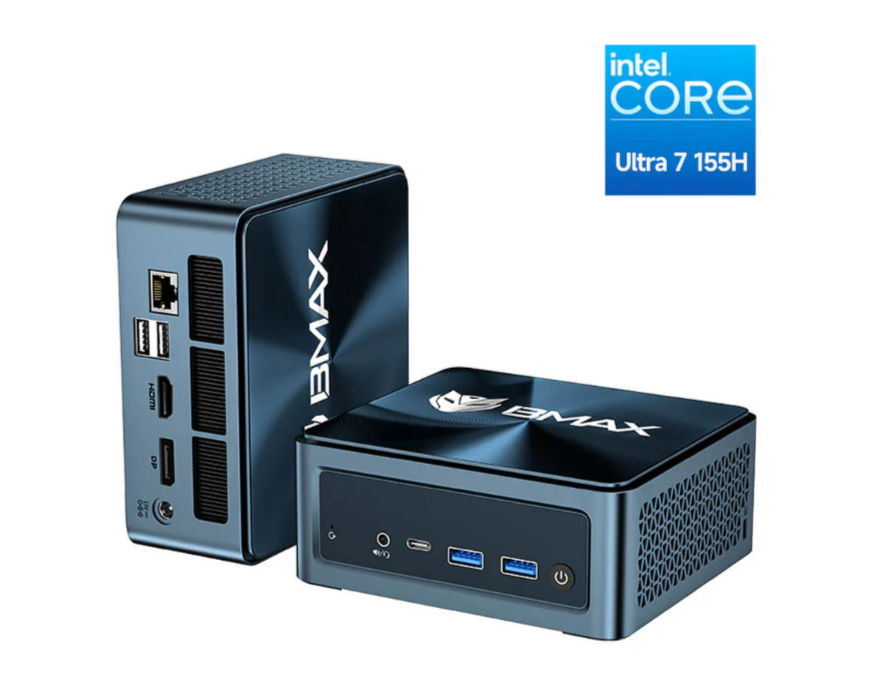
BMAX B11 Power Mini PC packs high-end performance into an ultra-compact and durable design, making it ideal for AI tasks, productivity, and everyday computing. It is now available on the official store at a limited-period discounted price of $599.99, reduced from its regular price of $1,599.99, offering exceptional value for a Mini PC powered by Intel’s latest Core Ultra 7 processor.
BMAX B11 Power Mini PC is built for users who want high performance in an ultra-compact body. Weighing around 400g, it features a slim, lightweight design with waterproof, dustproof, and scratch-resistant protection, making it suitable for desks, studios, or portable setups without worrying about durability.
Powerful Intel Core Ultra 7 Performance
At its core is the Intel Core Ultra 7 155H (14th Gen) processor. With 16 cores and 22 threads, it can boost up to 4.8GHz, delivering strong performance for multitasking, creative work, and demanding applications. Built on Intel’s advanced Intel 4 architecture, it also includes 24MB smart cache and Intel’s latest AI tuning technologies. Compared to the Core Ultra 5 125H, it offers nearly 19% better performance, making everyday tasks faster and smoother.
Built-in AI Acceleration
The BMAX B11 Power comes with a dedicated Intel AI Boost NPU, designed for local AI workloads. It can run AI models with up to 20 billion parameters without needing an internet connection. Tasks like AI image generation are completed in seconds, and AI-based video processing is significantly faster. This makes it a strong choice for developers, creators, and AI enthusiasts who prefer offline processing.
Intel Arc Graphics for Work and Play
Graphics are handled by Intel Arc Graphics, supporting ray tracing, AI-enhanced visuals, and 4K output at 60Hz with Dynamic HDR. The system supports triple displays at the same time, making it ideal for productivity and multi-screen setups. It also delivers smooth performance in popular esports and casual games like League of Legends, Valorant, and CS: GO.
Fast Memory and Storage
The Mini PC includes 24GB LPDDR5 RAM at 4400MHz, offering faster speeds and better multitasking than older memory types. Storage is handled by a 1TB NVMe SSD, delivering quick boot times and fast file transfers. Users can expand storage further with an extra M.2 NVMe slot and a 2.5-inch SATA drive bay.
Cooling, Connectivity, and OS Support
A Space Capsule Cooling System with dual copper heat pipes and a smart turbo fan ensures stable performance under load. For connectivity, it offers Wi-Fi 6, Bluetooth 5.2, multiple USB ports, HDMI, DisplayPort, Type-C display output, and Ethernet. BMAX B11 Power Mini PC comes with Windows 11 Pro pre-installed and also supports Ubuntu Linux, making it a flexible choice for work, development, and entertainment.
Nothing is stirring up chatter on X (formerly Twitter) after sharing a fresh teaser post featuring a new logo, prompting speculation that it might be gearing up for a collaboration with British luxury carmaker Jaguar. The buzz stems from the visual similarities between Nothing’s teaser and a stylistic nod to Jaguar’s recent typography. So here’s what we know.
Is This a Nothing x Jaguar Partnership?
Nothing recently posted a cryptic message on social media featuring its existing logo alongside what might be a refreshed wordmark, accompanied by the caption “GETTING READY TO MAKE HISTORY.” This has sparked debate among fans and industry observers about whether the teaser hints at a brand partnership with Jaguar or something else entirely.
The roots of the speculation go back to late 2024, when Jaguar revealed the divisive rebranding. This included a new typography and marketing slogans like “Copy Nothing”, which became a viral talking point online. Nothing poked fun at Jaguar at the time by adopting a similar font and even changing its own social profile to read “Copy Jaguar.” That playful jab has now resurfaced in the minds of fans, who are connecting the dots between Nothing’s current teaser and that earlier parody.
Nothing also engaged with users in replies to posts about the teaser, once remarking “you had to be there” in response to someone referencing the Jaguar joke. This comment further stirred rumors about a deeper link between the brands. However, this interaction could simply be an inside callback to the earlier meme rather than a confirmation of any formal tie-up. There’s a pattern of auto and tech brands collaborating on limited-edition devices, like Honor’s Porsche Design smartphones and Realme’s Aston Martin-branded models. So the idea of a Nothing Jaguar special edition phone isn’t outside the realm of possibility.
For more daily updates, please visit our News Section.
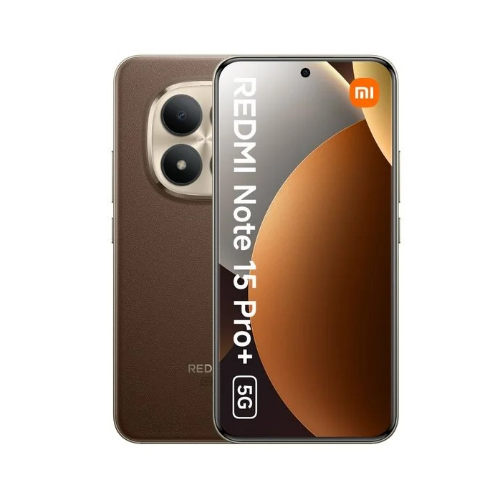
Ahead of its official India announcement, Xiaomi‘s popular mid range smartphones, the Redmi Note 15 Pro and Note 15 Pro+, give a clear picture of what to expect from Redmi’s latest mid-range flagship offerings. According to a big leak shared by tipster Abhishek Yadav, both phones will feature high-brightness AMOLED displays, large batteries, robust camera hardware, and rugged IP-rated protection, highlighting Xiaomi’s continued push to blend performance with value in its popular Note lineup.
Redmi Note 15 Pro Specifications
The Redmi Note 15 Pro is tipped to come with a 6.83-inch flat AMOLED display offering 1.5K resolution, a 120Hz refresh rate, HDR10+ and Dolby Vision support, Corning Gorilla Glass Victus 2 for protection, and up to 1,800 nits of peak brightness. So we can expect vivid visuals and excellent outdoor readability. Under the hood, the Redmi Note 15 Pro model is reportedly equipped with the MediaTek Dimensity 7400 Ultra paired with the Mali-G615 MC2 GPU and Android 15-based HyperOS 2 for smooth everyday performance.
Redmi Note 15 Pro 5G
Storage options include 8GB of RAM and either 128GB or 256GB of internal storage. For photography, the Note 15 Pro may feature a 200MP Samsung HPE primary sensor with OIS (Optical Image Stabilization) and an 8MP ultra wide angle lens. Meanwhile, the front houses a 20MP shooter for selfies and video calls. A massive 6,580mAh battery pack could power this device, which supports 45W wired fast charging and 22.5W reverse wired charging. Other notable features likely include dual stereo speakers with Dolby Atmos, an IP66/IP68/IP69/IP69K rating for water and dust resistance, and SGS 5 Star, TÜV SÜD, and TÜV Rheinland Triple Eye Protection.
Redmi Note 15 Pro+ Specifications
The Redmi Note 15 Pro+ builds on its sibling’s foundation with a 6.83-inch quad-curved AMOLED screen, retaining the 1.5K resolution and 120Hz refresh while also offering HDR10+ and Dolby Vision support and the same durable Gorilla Glass Victus 2 protection. For performance, you get the Qualcomm Snapdragon 7s Gen 4 SoC, which is coupled with the Adreno 810 GPU that should deliver responsive multitasking and gaming performance alongside Android 15-based HyperOS 2 custom skin out of the box.
Redmi Note 15 Pro+ 5G
The camera setup also appears to be the same, with an identical 200MP Samsung HPE primary sensor with OIS and an 8MP ultra wide angle lens. However, the Redmi Note 15 Pro+ upgrades the selfie camera with a 32MP shooter. You can expect full day battery life again, thanks to the large 6,500mAh battery pack with support for 100W wired fast charging and 22.5W reverse wired charging.
Like its counterpart, the Pro+ also includes IP66/IP68/IP69/IP69K water and dust resistance, dual stereo speakers with Dolby Atmos, and the same trio of safety certifications, such as SGS 5 Star, TÜV SÜD, and TÜV Rheinland Triple Eye Protection. Leaked storage configurations suggest 8GB + 256GB, 12GB + 256GB, and 12GB + 512GB variants for buyers who want more memory and space.
Notably, this leak arrives a month after the Chinese tech giant announced the Note 15 series in the global market. While the base Note 15 was priced around 330 US Dollars, the Note 15 Pro and Note 15 Pro+ models were priced at 468 US Dollars and 550 US Dollars, respectively. So we can expect the Indian pricing to carry a similar price tag. On the other hand, Xiaomi had also revealed the Redmi Note 15 5G in India earlier this month. In related news, the brand had also announced the Redmi Note 15 Series Chinese New Year Edition.
For more daily updates, please visit our News Section.
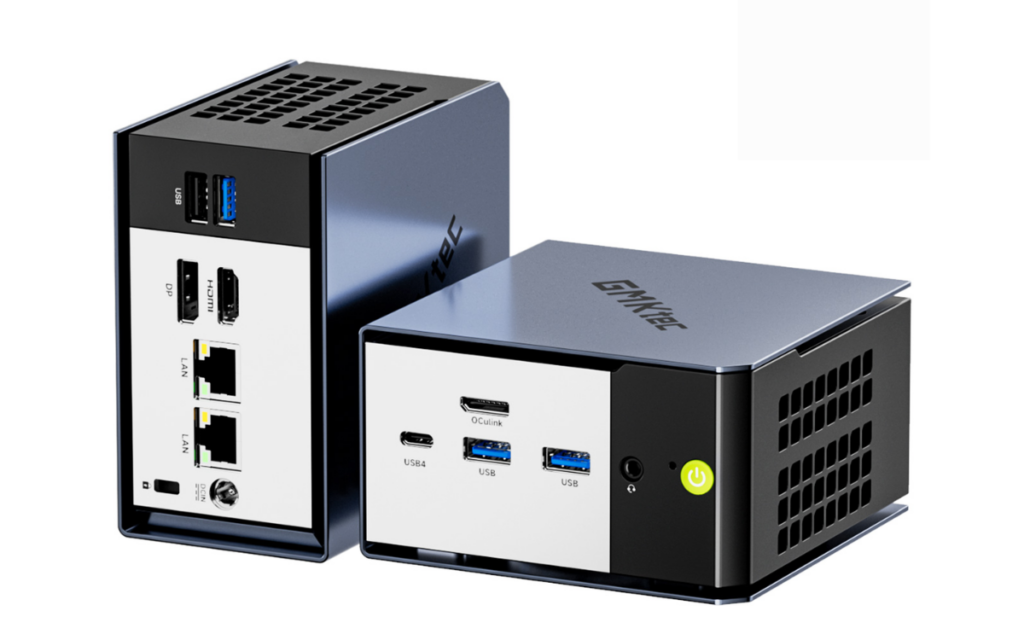
Gmktec has launched its latest high-performance mini PC, the NucBox K16. The device features the AMD Ryzen 7 7735HS processor and targets creators, power users, and gamers looking for desktop-level performance in a compact design.
Gmktec NucBox K16 Specifications
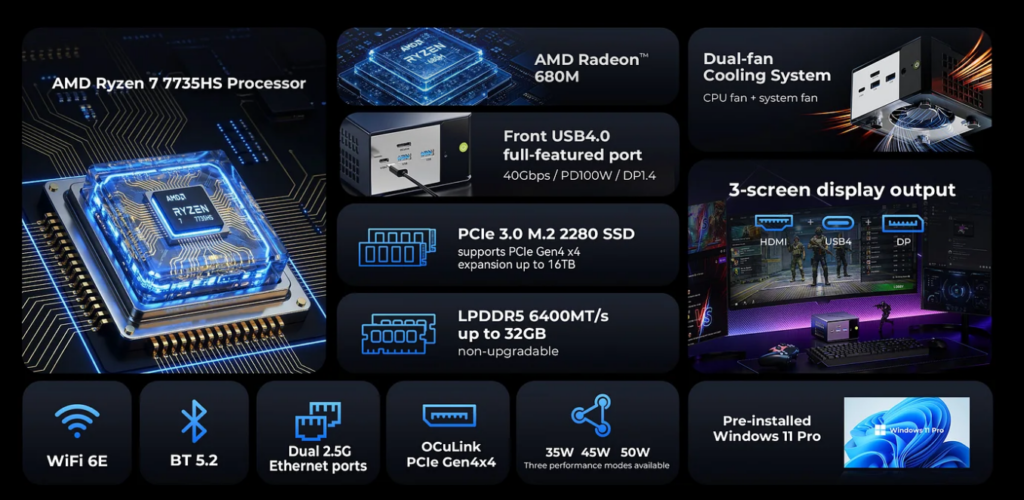
The NucBox K16 uses the Ryzen 7 7735HS chip based on AMD’s Zen 3+ architecture. It comes with 8 cores and 16 threads and reaches clock speeds up to 4.75GHz. The processor is paired with integrated Radeon 680M graphics, which runs at up to 2200MHz and supports light gaming and productivity tasks.
The mini PC includes 32GB of LPDDR5X memory clocked at 6400MT/s. The memory is soldered and not upgradeable. For storage, the NucBox K16 supports two PCIe 4.0 x4 M.2 2280 SSDs with a combined capacity of up to 16TB. It ships with either a 512GB or 1TB PCIe 3.0 SSD by default.
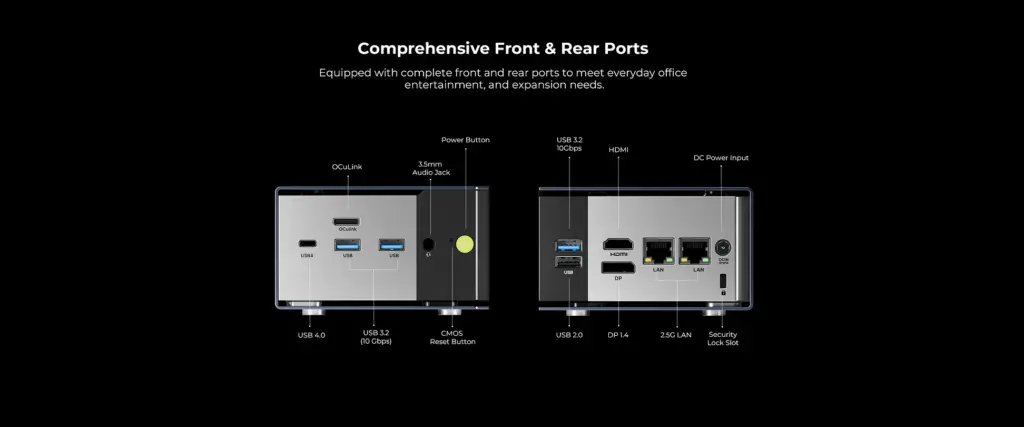
Gmktec has equipped the system with a full-featured USB4 port and an OCuLink interface. The USB4 port supports 40Gbps data transfer, DisplayPort 1.4 output at up to 8K@60Hz, and 100W PD charging. The OCuLink port enables external GPU connectivity with up to 64Gbps of PCIe Gen4 bandwidth.
In terms of port arrangement, the front panel includes the power button, two USB 3.2 Gen 2 ports, a full-featured USB4 Type-C port, a 3.5mm audio jack, and the OCuLink connector. The rear panel includes two more USB 3.2 Gen 2 ports, HDMI, DisplayPort, two 2.5GbE LAN ports, and the DC power input. The NucBox K16 supports up to three simultaneous displays.
The chassis uses CNC-machined aluminum and measures 107 x 111 x 56 mm. It features dual fans, copper heat pipes, and an internal airflow system designed to keep temperatures low.
Pricing and Availability
The GMKtec NucBox K16 officially goes on sale on January 20, 2026. The model with 32GB RAM and 512GB SSD is priced at $679.99, while the 1TB SSD variant costs $729.99. Both configurations launch at discounted prices, down from their respective MSRPs of $899.99 and $949.99.
In related news, Beelink has recently unveiled the SER10 mini PC with 10GbE networking, an AMD Ryzen AI HX 470 processor, and orange and green color options, while ASUS has introduced the ROG GR70, a gaming mini PC powered by a Ryzen 9 CPU and RTX 5070 graphics.
For more daily updates, please visit our News Section.
Tecno has just launched the Spark Go 3 in India, and it seems that the brand may soon unveil a new Pova series phone. A recent X post shared by tipster Mukul Sharma reveals that a Mars Rover-inspired Pova series phone will debut soon. He has also shared the teaser below of the upcoming phone. In all likelihood, the brand could be prepping to launch the Tecno Pova Curve 2.
Tecno Pova Curve 2 could be coming soon
New TECNO POVA series is coming soon to India.
The theme this time is – Out of This World.
The phone has been inspired by the Mars Rover, and will feature a massive battery.
The above X post by Sharma does not specify the Tecno Pova Curve 2 branding. However, considering that this teaser appears similar to the original Pova Curve teaser that was rolled out last year, it could be pointing to the upcoming model.
We had reviewed the Pova Curve and were impressed by its design. Hopefully, the successor edition will continue to stand out in this department. Rumours surrounding it have also suggested that it will have strong specifications onboard.
Tecno Pova Curve 2 specifications: What’s known so far?
Tecno Pova Curve 5G
The Tecno Pova Curve 2 was recently spotted in the Google Play Console database with key specs, such as an FHD+ display, a Dimensity 7100 chip, 12GB of RAM, and Android 16. It is also being speculated that it will pack a massive 8,000mAh battery. Some reports have also claimed that it will have a 144Hz refresh rate, which is not a surprise considering the previous generation also featured it.
It appears that the Pova Curve 2 could be arriving earlier than expected, as the original model was announced in May 2025. To recall, it was priced at Rs 15,999 for the base variant. Therefore, it is likely that the Pova Curve 2 may arrive with a sub-Rs 20,000 price tag.
For more daily updates, please visit our News Section.
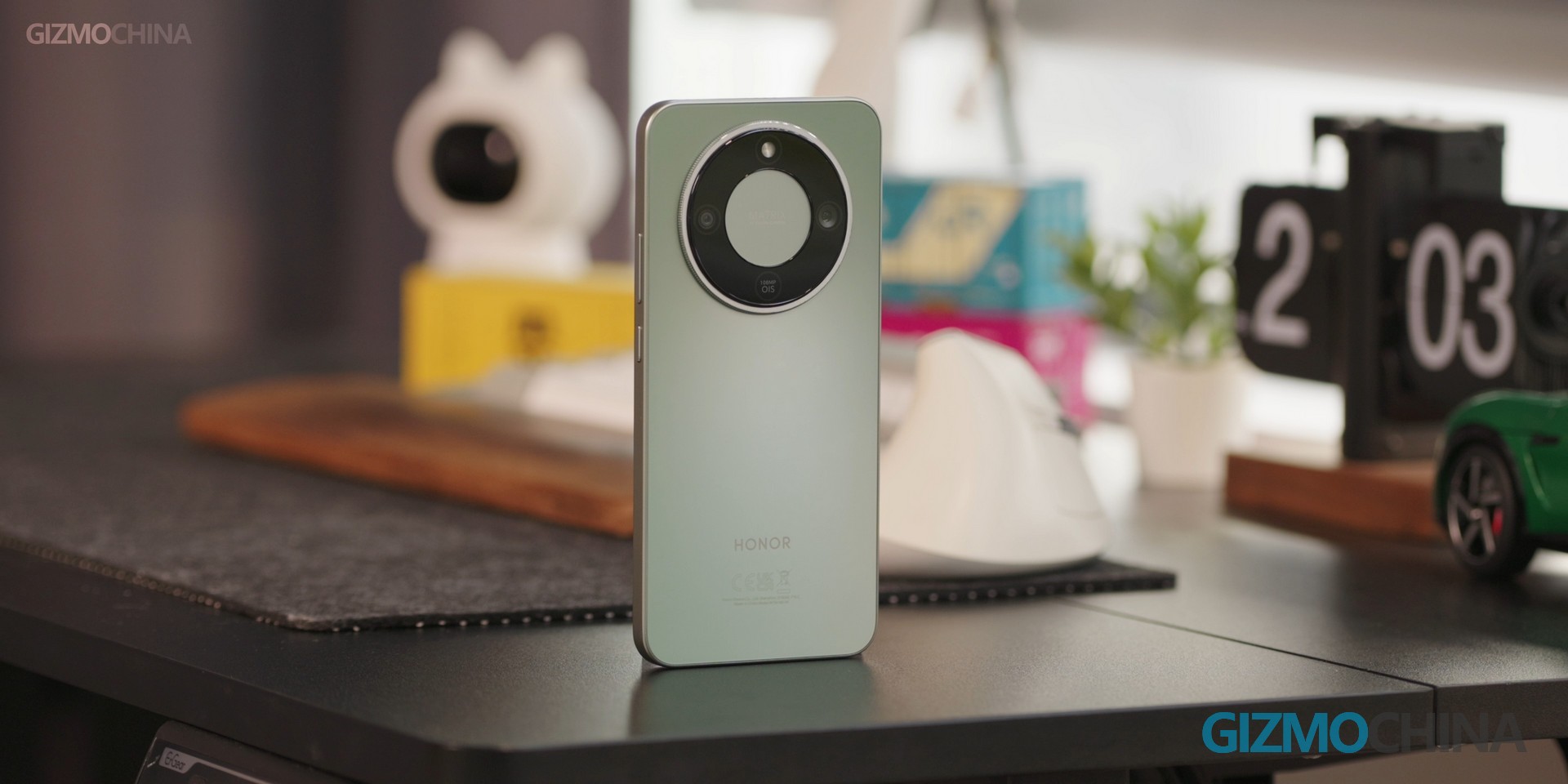
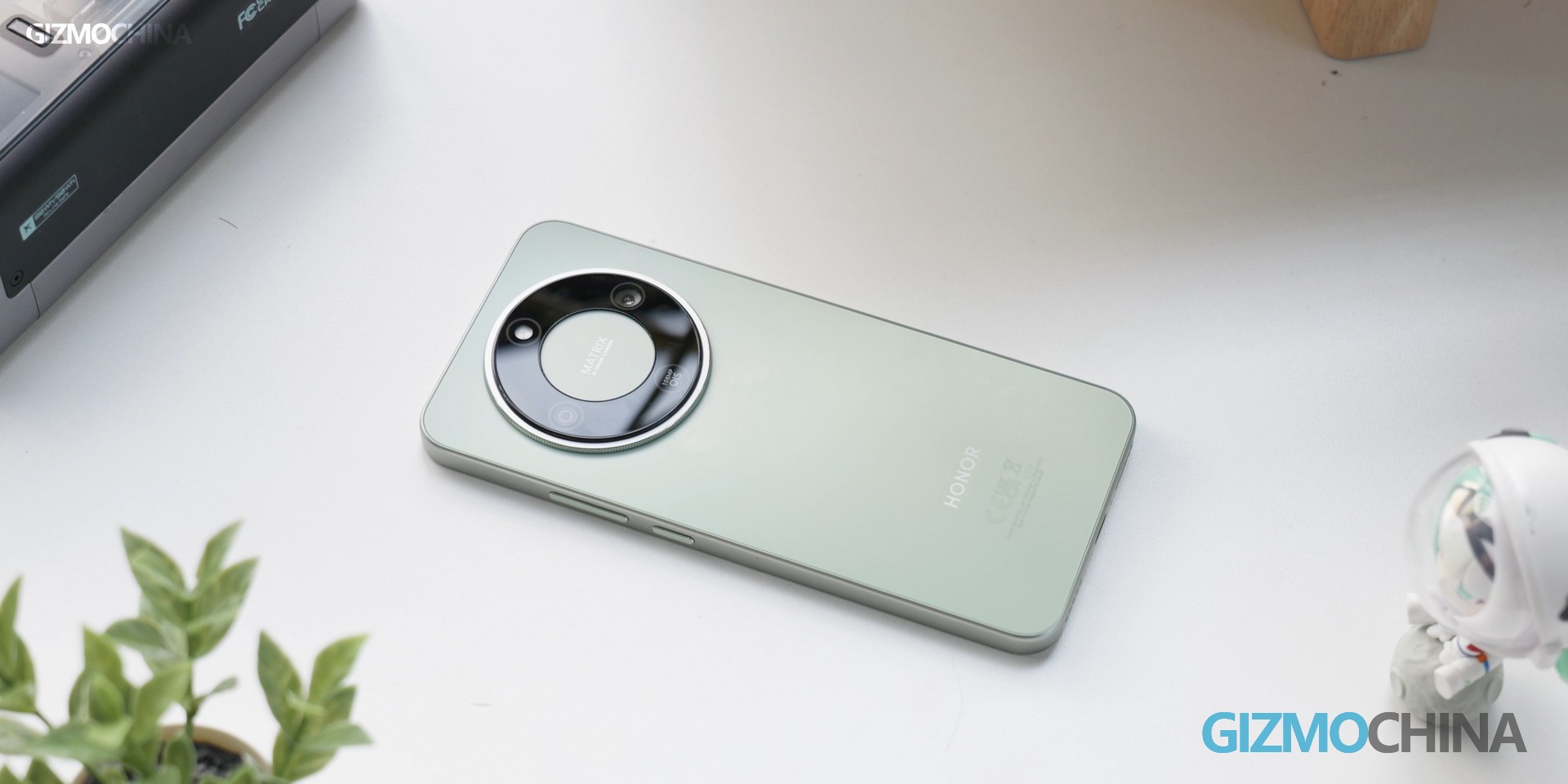
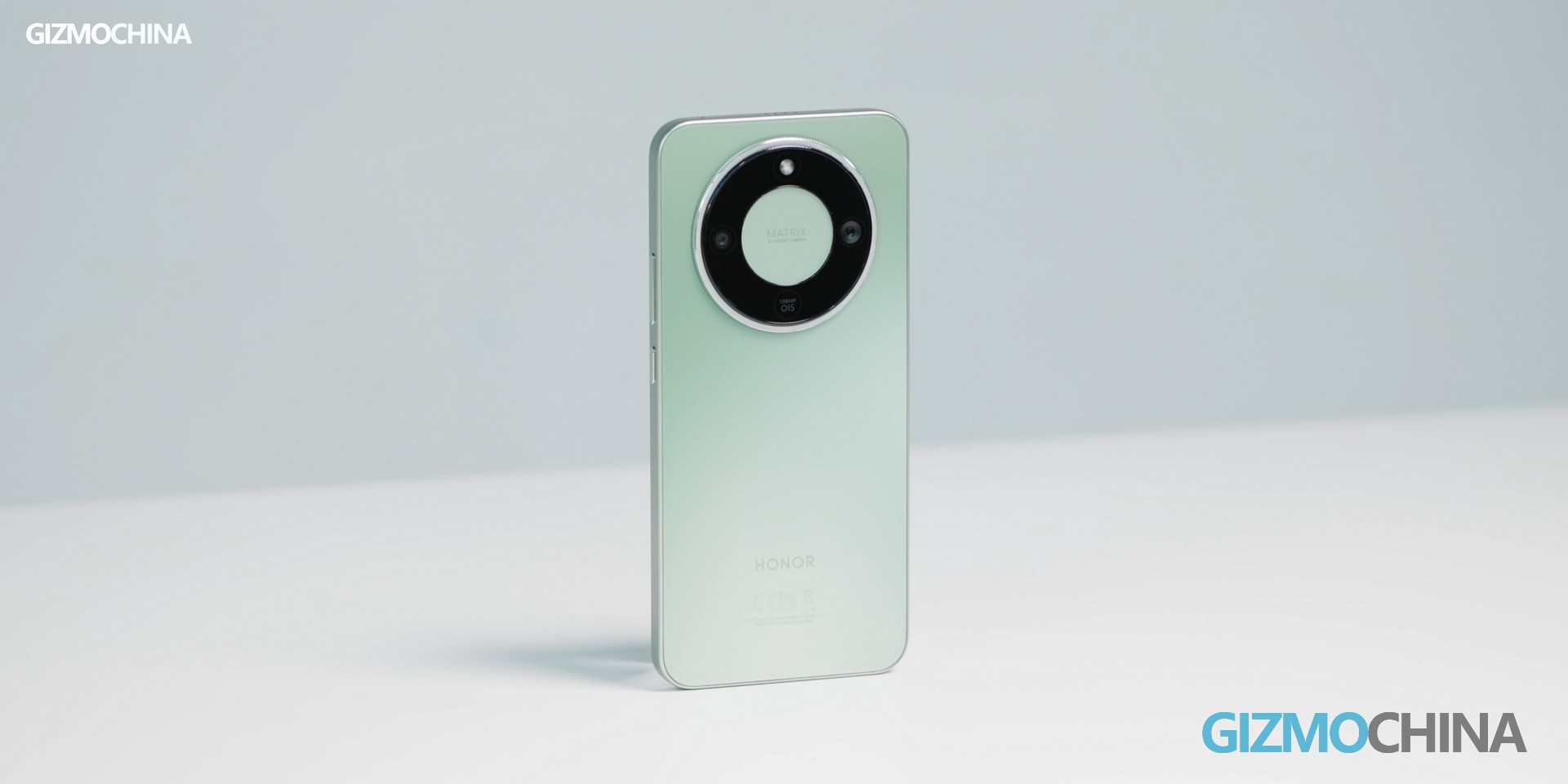
Meet the Honor Magic8 Lite – the entry-level option in the Magic8 lineup with a clear goal: deliver the core Magic8 experience at an affordable price. While it keeps the familiar design language of its higher-end siblings, Honor has made strategic hardware changes to reach that lower price point. The goal? Let users enjoy key Magic8 series features without flagship-level costs. But let’s be honest: when aiming for mid-range affordability, some trade-offs are unavoidable. In this review, we’ll detail what’s kept, what’s scaled back, and whether this budget-friendly Magic8 model is really worth your investment.
Design: Familiar Family DNA with a Budget-Conscious Twist
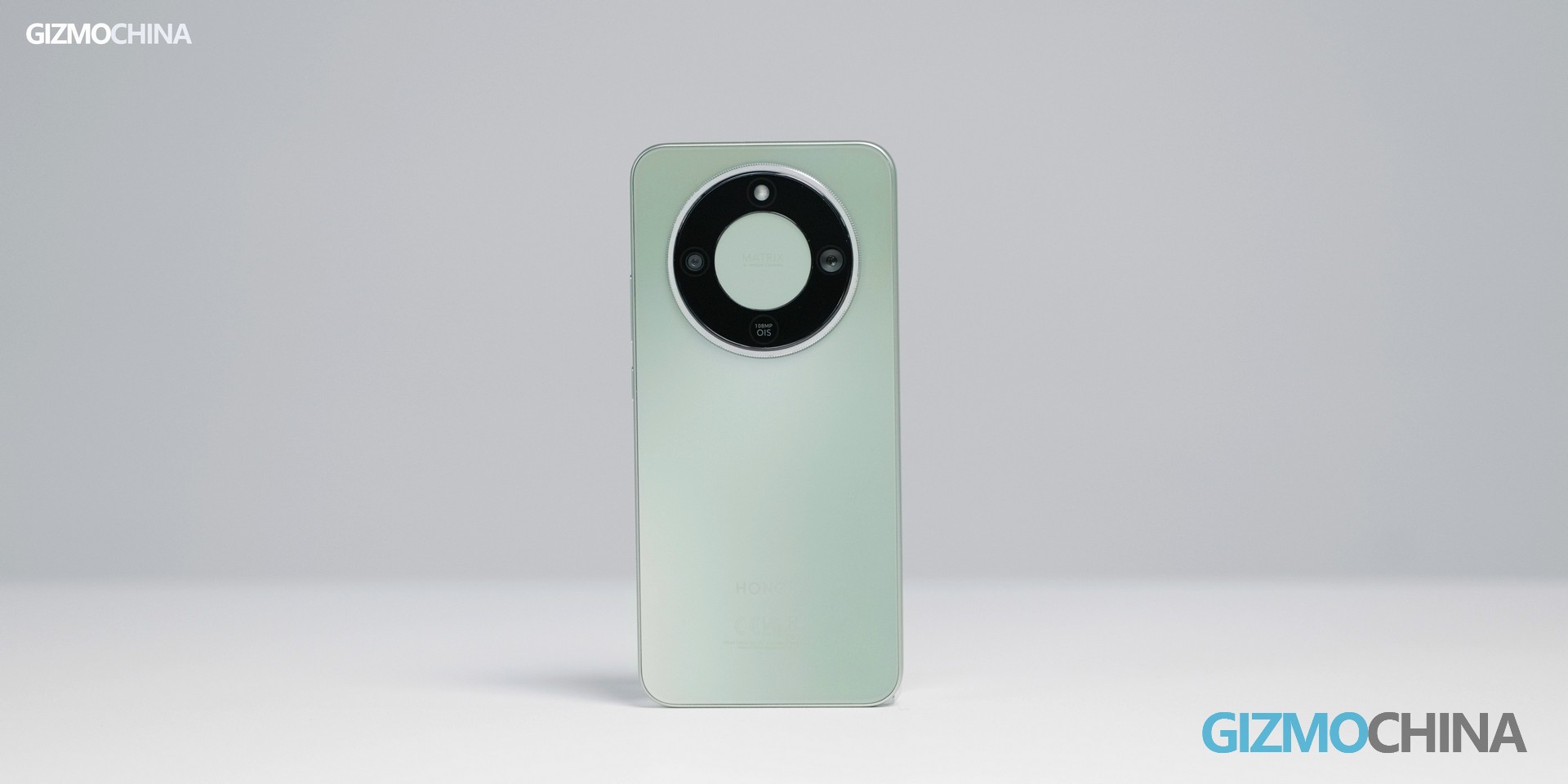
For those who followed our hands-on with the Honor Magic8 Pro last month, the Magic8 Lite’s design continuity will be immediately apparent. It retains the series’ signature straight-edge frame and a rear panel that’s nearly indistinguishable from the flagship model.
However, here’s the first compromise: a plastic frame instead of a metal one. Does this matter? For most users, likely not – the device remains lightweight and comfortable for one-handed use. But for consumers prioritizing premium materials, this is a noticeable difference – and one of the calculated trade-offs Honor made to achieve its budget pricing.
What’s a pleasant surprise, though, is its impressive durability credentials that punch above its price point — it comes with IP68 and IP69K dust and water resistance certifications, plus SGS five-star reliability approval. This means it can withstand immersion in up to 6 meters of water, resist high-pressure water jets, and keep out dust entirely. On top of that, the six-layer cushioning glass and Ultra-Bounce shockproof structure let it survive drops from 2.5 meters onto hard surfaces like marble — a huge plus for anyone prone to accidental slips.
Display: 120Hz AMOLED Retained, Resolution Scaled to 1.5K
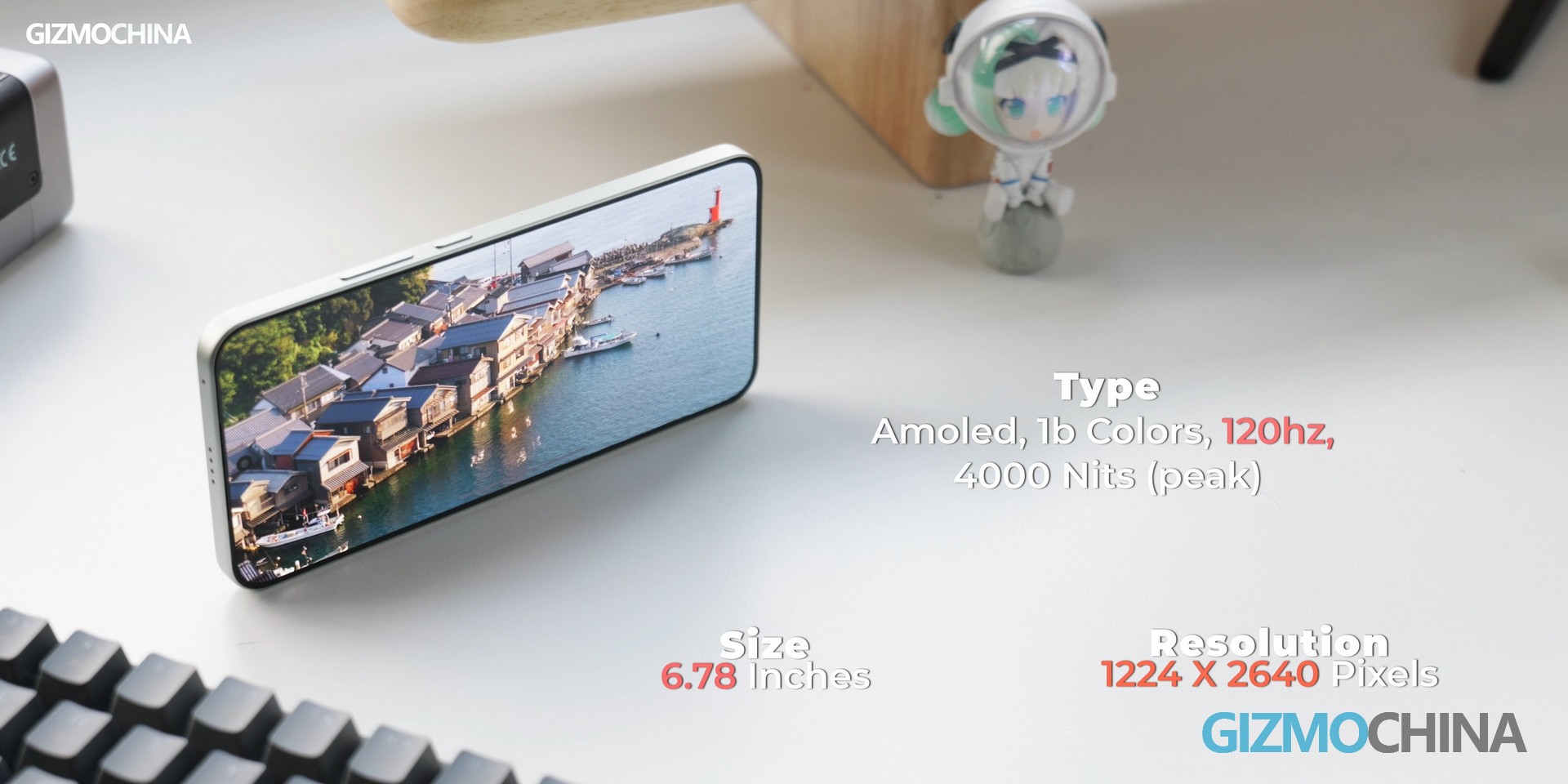
Displays are often where mid-range phones make their most significant concessions – but the Honor Magic8 Lite avoids cutting corners where it counts. Packing a 6.78-inch AMOLED panel with a 120Hz refresh rate, Honor refused to skimp on smoothness.
The trade-off? A 1.5K resolution instead of the flagship’s 2K. Can you spot the difference on a ~6.8-inch screen? For everyday use – including web browsing, social media, streaming, and general navigation – text remains sharp, colors are vibrant, and visibility is uncompromised. The display also boasts impressive outdoor brightness, ensuring clarity even in direct sunlight, while indoor performance is nearly on par with pricier alternatives.
Performance & Battery: Snapdragon 6 Gen 4 + 7500mAh for All-Day Power
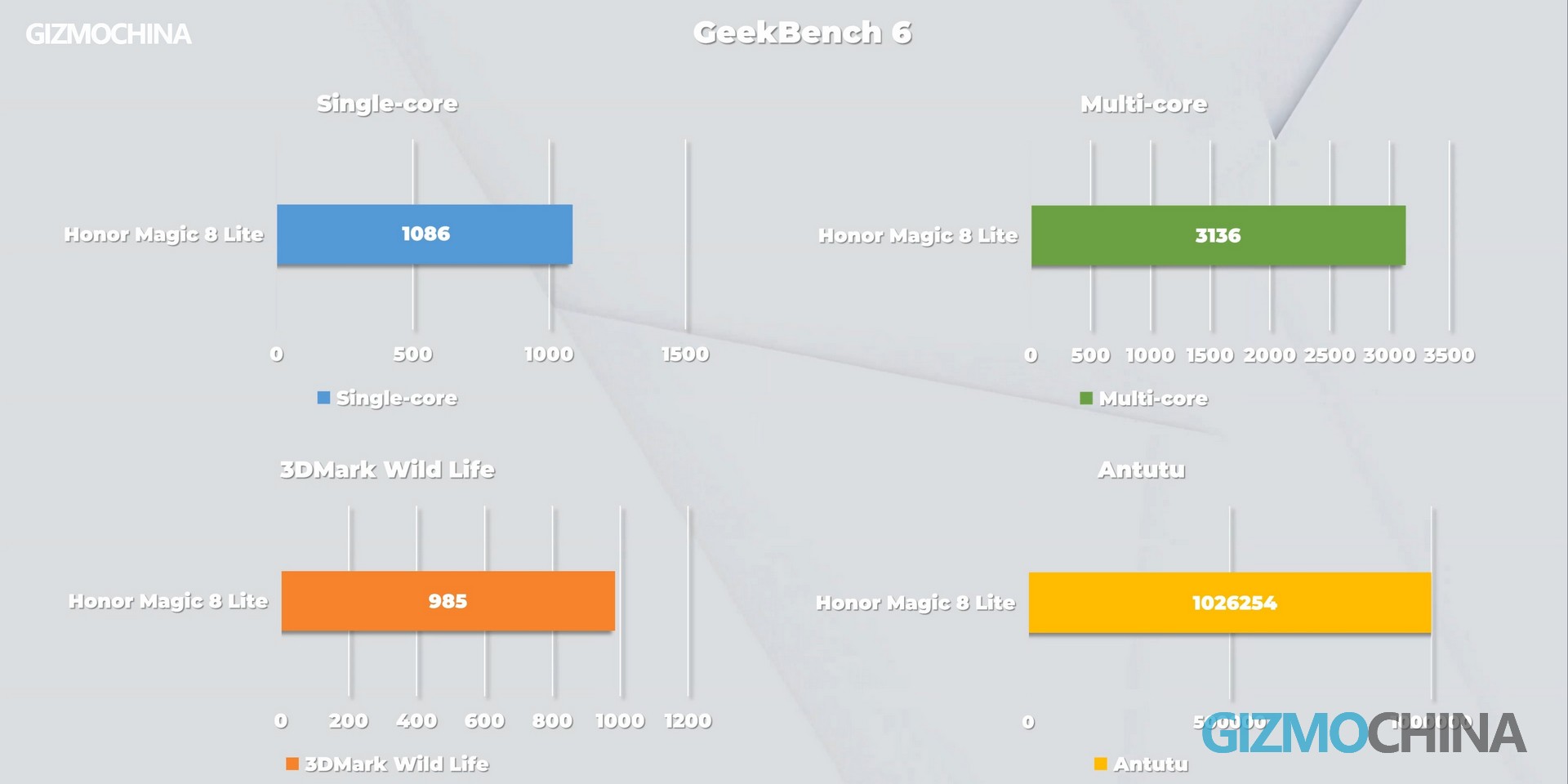
When it comes to performance, the Honor Magic8 Lite is equipped with the Snapdragon 6 Gen 4 – a mid-range chip optimized for daily productivity, not flagship-level gaming. For context, here’s how it stacks up in benchmark tests…
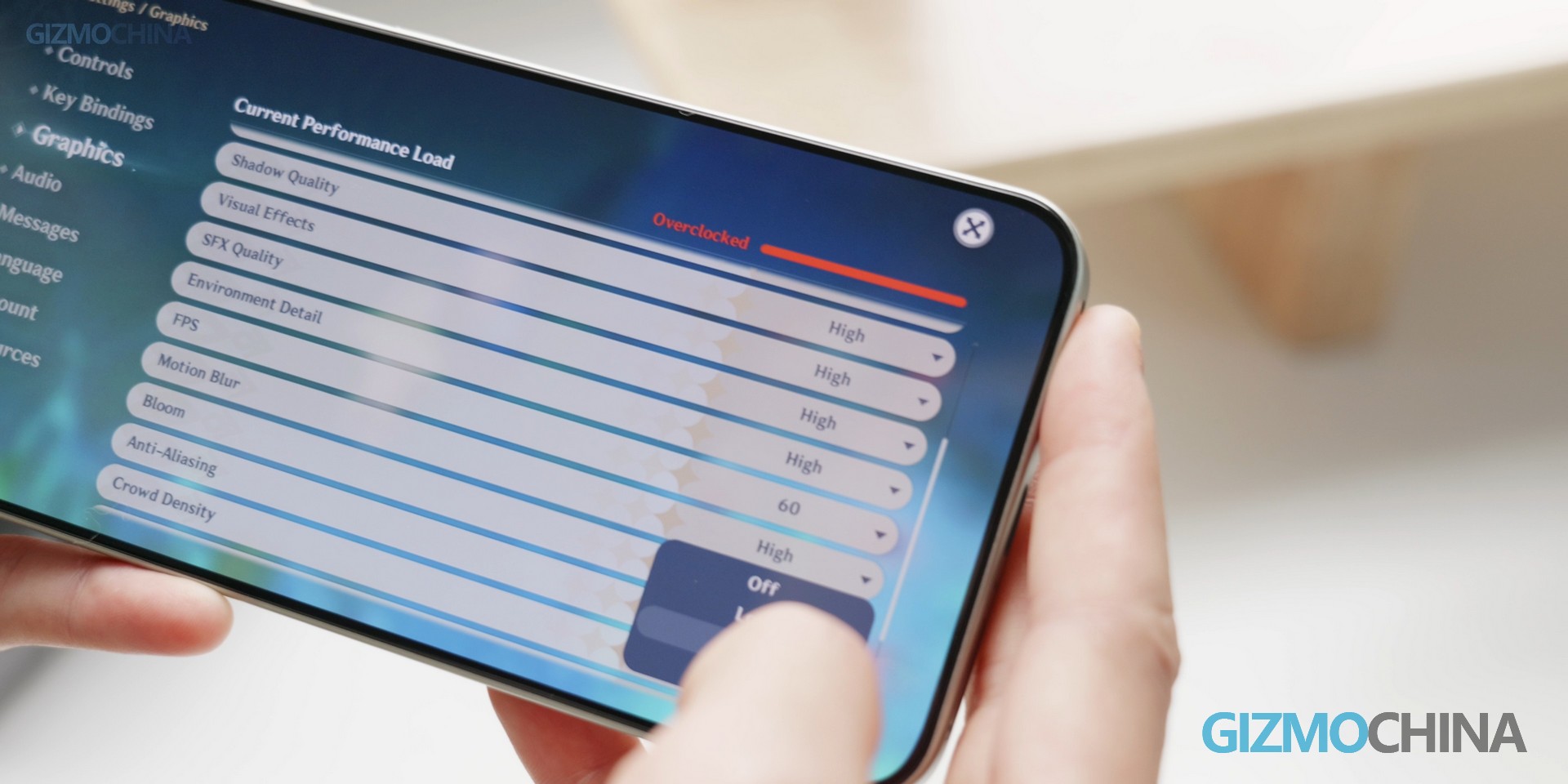
But here’s the caveat: running graphically intensive games like Genshin Impact or Call of Duty at maximum settings will result in lag and noticeable heating. Dial settings down to medium, however, and the device runs flawlessly. Honor’s priority is clear: prioritize daily usability over extreme gaming performance.
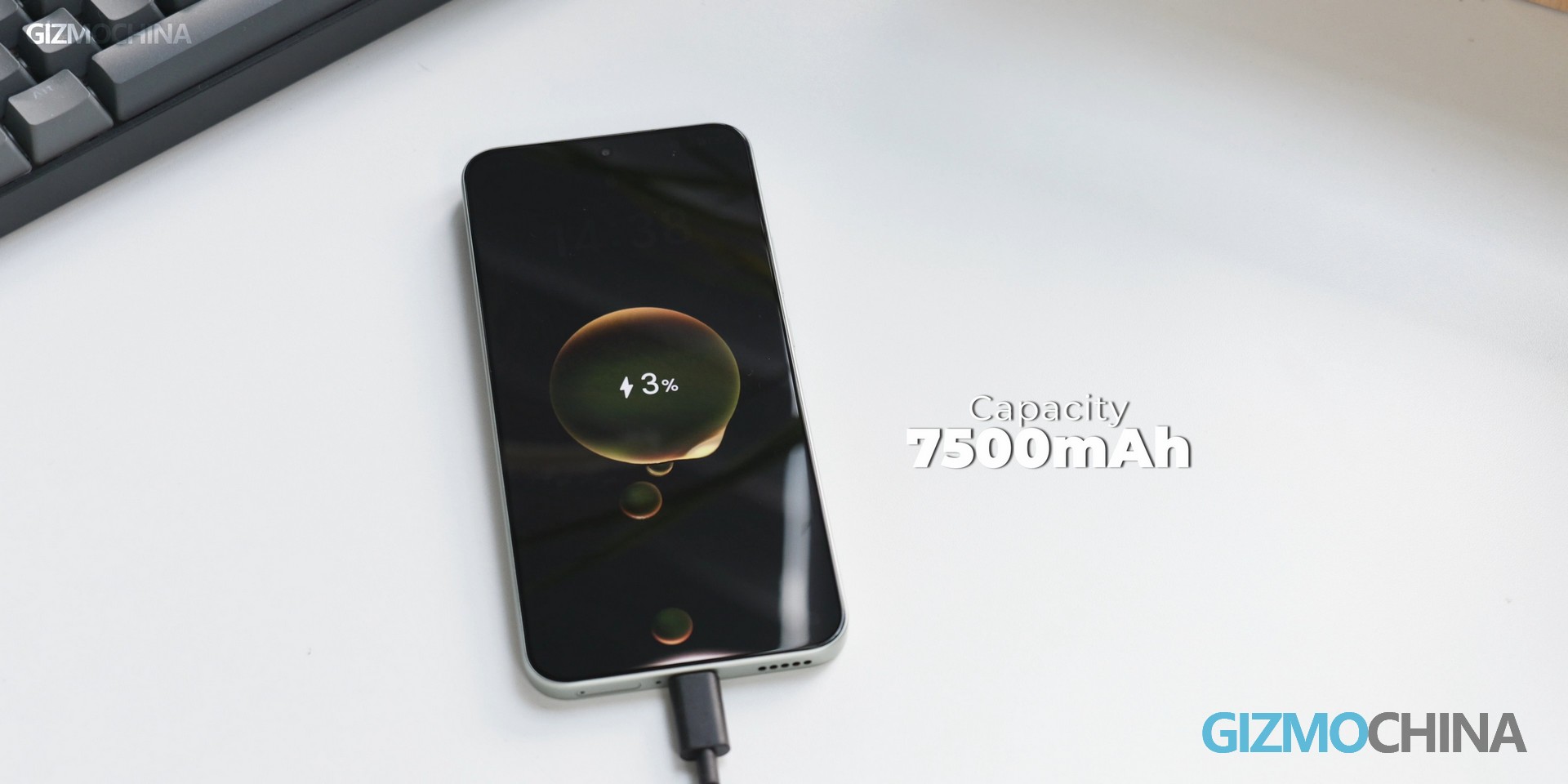
Where the Magic8 Lite truly shines is battery life. It packs a massive 7500mAh battery paired with up to 66W fast charging – a game-changer for users who value all-day power without frequent recharging. In real-world testing, it delivered…
There’s one catch, though: no charger is included in the box. Performance-wise, this is a classic mid-range compromise: perfect for web browsing, app usage, and light gaming, but serious gamers should look to higher-tier models.
Software & Extras: Magic OS 9, Flagship-Grade AI Features
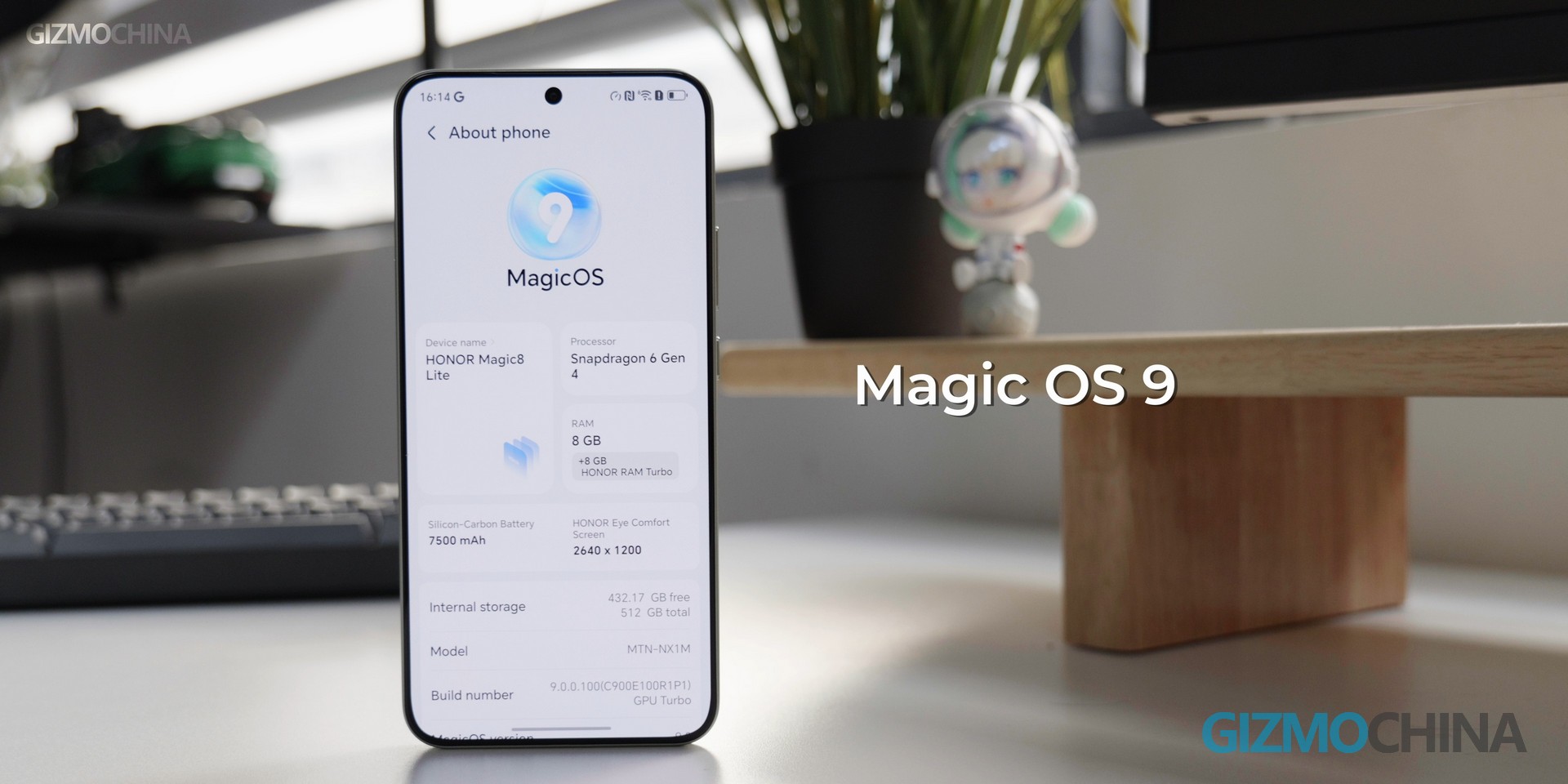
The Honor Magic8 Lite runs Magic OS 9 based on Android 15 – and it’s refreshingly clean. Global variants come preloaded with Google apps, free of intrusive pop-up ads. What’s impressive? It retains flagship-level AI capabilities, including Gemini Assistant, Honor AI, Magic Portal, and Magic Text – features typically reserved for premium devices.
The trade-offs? Niche flagship extras are omitted: no wireless charging, no IP68 water resistance. The silver lining? Honor kept the practical features budget users actually need: NFC for Google Pay, side-mounted fingerprint unlock, face recognition, and an IR blaster for controlling home appliances. It’s a smart prioritization: cut the non-essential frills, preserve the functionality that matters.
Cameras: Led by 108MP Main Cam
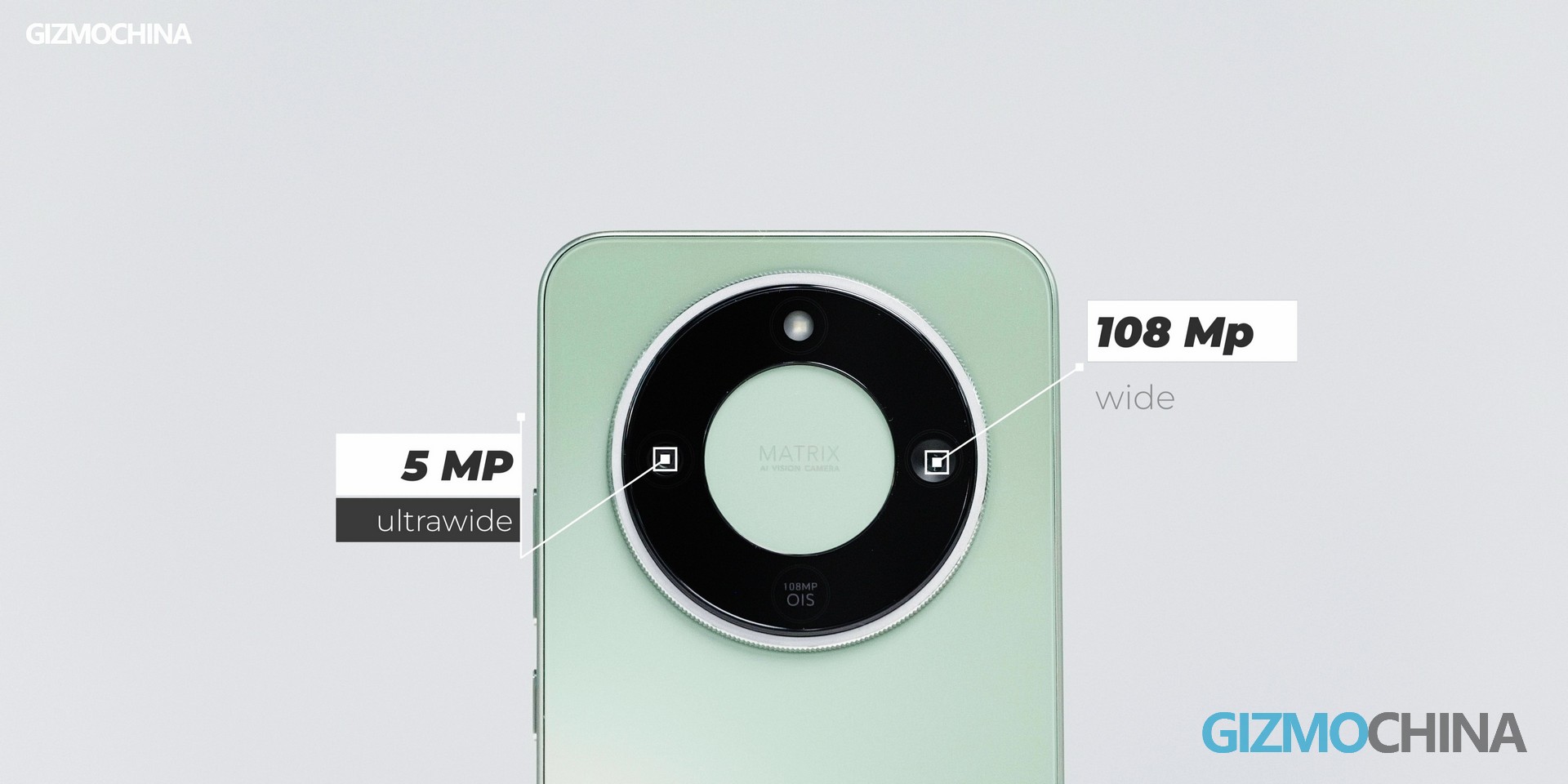
Photography-wise, the Magic8 Lite features a dual-camera system: a 108MP main sensor and a 5MP ultra-wide lens.
Sample shots reveal sharp details, vibrant color reproduction, and accurate exposure – more than enough for 90% of daily scenarios. The ultra-wide lens delivers decent results, though it can’t match the main sensor’s sharpness. Video recording tops out at 4K 30fps, and the front-facing camera excels at video calls and casual selfies.
As expected, cost-cutting impacts certain use cases: low-light performance is modest, macro photography is absent, and video stabilization is basic. For budget shoppers, this is a reasonable trade-off – but if photography is your top priority, you’ll need to upgrade to a higher-priced model.
Conclusion: A Top-Tier Value for Budget-Conscious Users
The Honor Magic8 Lite stands out as an exceptional value proposition for cost-sensitive consumers. It handles daily tasks with ease, retains key Magic8 series strengths, and avoids overcharging for unnecessary features. It’s not designed for heavy gamers or photography enthusiasts – but for students, professionals, or anyone seeking a reliable daily driver, it’s a standout choice.
If you’re looking to maximize value without paying for flagship frills you’ll never use, the Honor Magic8 Lite deserves your consideration. What are your thoughts? Does it check all your boxes? Drop a comment below to share your insights!
We use cookies on our website to give you the most relevant experience by remembering your preferences and repeat visits. By clicking “Accept”, you consent to the use of ALL the cookies.
This website uses cookies to improve your experience while you navigate through the website. Out of these, the cookies that are categorized as necessary are stored on your browser as they are essential for the working of basic functionalities of the website. We also use third-party cookies that help us analyze and understand how you use this website. These cookies will be stored in your browser only with your consent. You also have the option to opt-out of these cookies. But opting out of some of these cookies may affect your browsing experience.
Necessary cookies are absolutely essential for the website to function properly. This category only includes cookies that ensures basic functionalities and security features of the website. These cookies do not store any personal information.
Any cookies that may not be particularly necessary for the website to function and is used specifically to collect user personal data via analytics, ads, other embedded contents are termed as non-necessary cookies. It is mandatory to procure user consent prior to running these cookies on your website.