Huawei recently unveiled its upcoming Pura 70 series, replacing the popular P series. While the excitement builds, a new leak suggests production issues might cause stock shortages, particularly for the Pura 70 Pro.
Pro Version in Short Supply: Huawei Pura 70 Series Hit by Production Issues
On April 15th, Huawei’s official Weibo account started the promotional campaign by posting several teaser videos on the upcoming Pura series. Although the videos don’t tease the device yet but suggest the phones will be beautiful. Huawei’s CEO, Richard Yu, hinted at “good news” coming soon, suggesting an imminent launch.
However, insiders suggest production capacity struggles could lead to limited availability, particularly for the Pro and Ultra models. The information comes from Digital Chat Station claiming a significant mismatch between supply and demand for the Pura 70 lineup.
Offline distributors reportedly expect the standard Pura 70 and Pura 70 Pro+ to have the most stock. These models (deluxe edition) might even come bundled with perks like the FreeBuds 5 earbuds (check out our full review of FreeBuds 5). However, the Pura 70 Pro appears to be in short supply, potentially making it the most difficult to purchase at launch.
The situation gets even trickier for those eyeing the top-of-the-line Pura 70 Ultra. Sources suggest there might not even be an initial pre-order batch available, hinting at extremely limited quantities at launch.
As the launch nears, reports indicate some Huawei-authorized stores in Guangzhou and Shenzhen have begun “blind box reservations.” Distributors are unsure of the exact stocking time for offline stores, adding to the mystery. Leaks suggest a launch before the end of April, possibly as early as April 18th.
While the exact specifications remain under wraps, leaks suggest the Pura 70 series will boast 12GB to 16GB RAM, up to 1TB storage, and a distinct triangular rear camera design. To delve into comprehensive details about the Pura 70 series, explore our explainer article.
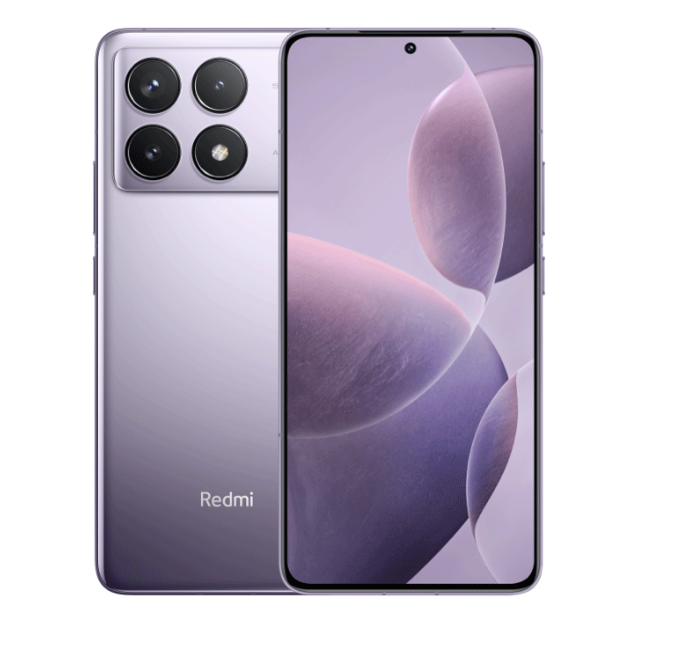
After the recent debut of the Snapdragon 8s Gen 3-powered Redmi Turbo 3 flagship-killer smartphone in China, the Xiaomi sub-brand is now working on a new performance-oriented device called the Redmi K70 Ultra. Unlike the Redmi Turbo 3, this new device is rumored to feature a flagship MediaTek processor.
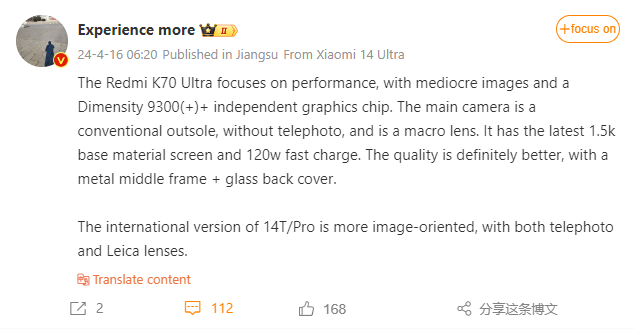
Now, Weibo tipster 体验more has revealed some key details about the device. As per the tipster, the Redmi K70 Ultra will feature a Dimensity 9300+ chipset, an upgraded version of the Dimensity 9300, which made its debut back in November 2023. This new chip is expected to debut on the upcoming Vivo X100s and X100s Pro models, which are rumored to launch in China in May.
Redmi K70
The report also includes that the device will feature a 50-megapixel main camera, along with other camera sensors like an ultra-wide and a macro camera. For the display, it’s said to have an OLED screen with 1.5K resolution with a dedicated graphics chip, which should make for good visuals and gaming. The phone is also expected to come with 120W fast charging, a metal frame with a glass back, and options for up to 24 GB of RAM and 1 TB of storage. It’ll have a 5,500mAh battery too.
While the K70 Ultra will be available in China, the Xiaomi 14T Pro will target global markets and might come with some extra features not found on the K70 Ultra.
Samsung is bringing its AI experience to more Galaxy branded devices. The company’s Galaxy AI was first unveiled back in January 2024, alongside the latest Galaxy S24 series of flagship smartphones. Now, this feature is arriving to the Galaxy S22 series and other Galaxy devices. So let’s check it out.
Here’s every device that will get the Galaxy AI drop
The Galaxy AI feature is arriving on older devices with the One UI 6.1 update. It is set to roll out for Samsung smartphones and tablets that were previously launched. So here’s a list of all the eligible devices:
The brand previously shared this list but it was assumed to be the South Korean release timeframe at the time. But now, we have an official confirmation for its global roll out. The devices mentioned above will get the update in early May 2024, which is in line with our previous report.
For those unaware, the Galaxy AI will be integrated with the One UI 6.1 update and brings a bunch of features like Circle to Search with Google. Samsung also confirmed the arrival of Chat Assist, Interpreter, Live Translate, Note Assist, Browsing Assist, Transcript Assist, Generative Edit, Edit Suggestion, and AI powered wallpapers. So stick around for more as we will be providing updates when additional information is available regarding this matter.
The update carries the version number 1.0.2.0.UKACNXM, and weighs in at a hefty 5.3GB, so make sure you’re on stable Wi-Fi before diving in. Alongside, it also comes bundled with the latest April security patch for added protection.
Most importantly, the update brings Android 14 and not Android 13 which we were expecting for older flagships, along with Xiaomi’s all-new HyperOS skin.
It’s important to note that this isn’t a wider public release. Xiaomi is currently limiting the update to internal testers, which is likely to gauge performance and iron out any bugs before a larger user base gets access.
Here’s the complete changelog of the Xiaomi HyperOS update for Mi 11, 11 Pro, and 11 Ultra (translated from Chinese):
Low-level refactoring:
The bottom layer of Xiaomi's ThePaper OS has been reconstructed to bring out excellent hardware performance;

Key task identification and dyeing technology dynamically controls resource allocation based on task importance, with stronger performance and lower power consumption;

Ultra-low-power rendering framework improves battery life and provides smoother animation effects;

SOC integrated frequency modulation connects the hardware resources of the whole machine in series to respond to changes in computing power requirements faster, with fewer frame drops and smoother performance;

Refresh storage technology to reduce storage fragmentation, allowing you to use it as new for a long time;

The intelligent network selection capability has been upgraded, making the network in weak network environments smoother;

Intelligent signal selection engine dynamically adjusts antenna strategies to improve signal stability.

Cross-terminal intelligent connection
Xiaomi HyperConnect cross-device interconnection framework allows devices to be efficiently connected and achieve ultimate collaboration;

The new integrated device center enables dynamic real-time networking of all devices, and you can view and control surrounding devices in the control center;

The cross-device experience has been fully upgraded, supporting cross-device calls to multiple hardware capabilities such as cameras, screens, and communications;

Applications, audio and video, clipboard and other data and services support free flow between multiple devices and are fully secure;

Security and privacy architecture for device interconnection. Devices verify mutual security through TEE, and data transmission is encrypted at the hardware level;

Cross-end privacy system, including Internet permission management, Internet behavior reminders and Internet behavior records.

Global security
Security and privacy architecture for device interconnection;
Devices verify mutual security through TEE, and data transmission is encrypted at the hardware level;

Cross-end privacy system, including Internet permission management, Internet behavior reminders and Internet behavior records.
Aesthetics of life

The life-sense aesthetics facing globalization creates delicate and comfortable visuals and light and coherent dynamic effects. The diverse fusion of expressions brings a new systematic aesthetic experience;

The new motion language brings a light and coherent global motion experience;

Vitality color system, natural colors full of life, refresh the interface; unified system fonts, designed for the world;

New weather design and real-time weather engine create a surreal visual experience;

The global focus notification system dynamically displays changes in key information and a new artistic lock screen, turning each of your photos into a poster. It also has dynamic glass material, making the screen look exquisite the moment it turns on;

The desktop icon design has been upgraded, and the color and shape have been completely renewed and reconstructed;

Multi-task window management, unified interaction, efficient and easy to use.
Users can head over to Device Settings > About > Software Update > Check for Update to grab the latest firmware. Before upgrading, make sure you have an ample amount of storage and battery left on your smartphone. Otherwise, it may cause issues that may even corrupt data.
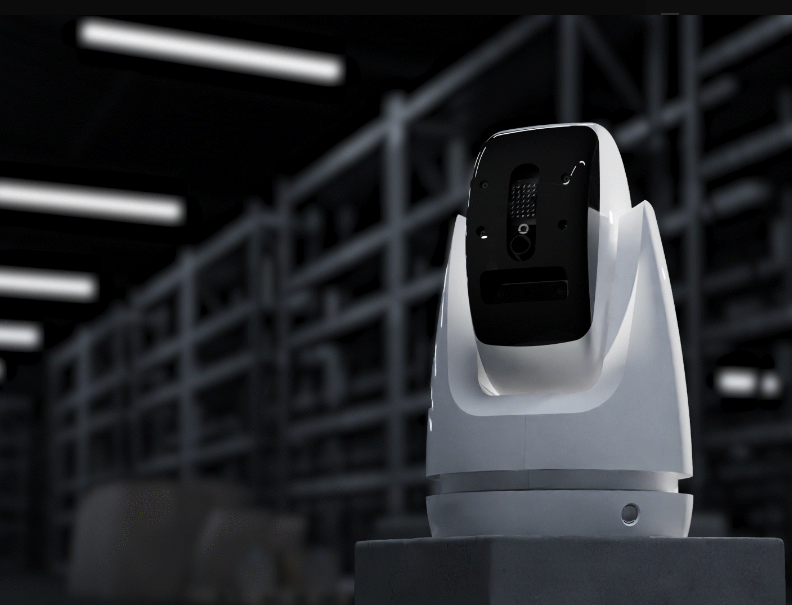
A start-up company from Slovenia called PaintCam has come up with an innovative solution for home security systems. The product, Eve, incorporates artificial intelligence to detect trespassers. But its job isn’t just detecting and notifying you. It fires non-lethal paintballs and tear gas on the intruders.
Eve shows that security systems can be more than just passive observers
The device, Eve, is equipped with advanced computer vision technology to accurately identify people and animals even at night time. And if you’re thinking about visitors, it has a solution for that as well. You can set people as “friends” or “enemies” to avoid unwanted triggering of Eve.
Notably, when Eve detects an unknown person, it warns the person first that it has identified him/her as an intruder. It asks to leave the property within five seconds. If they do not follow the instructions of this device, it starts its unique method marking the intruders with paintballs without harming them or emitting tear gas. And if a stranger appears next to one of its known people, it will ask whether to fire or not. If the unknown person is just a new visitor, you will be able to easily prevent the false triggering of the safety system. However, if you are not present at the scene, then the unknown visitor will have to leave your place.
PaintCam’s Eve appears in three different versions – Eve, Eve+, and Eve Pro. The startup notes that the base model offers turn-on/off control through its app, the Eve+ also detects animals on top of the base features. Speaking of the Eve Pro, it can also detect faces.
Availability
The Eve will launch on April 23 and it will be available on Kickstarter. PaintCam has not revealed the pricing of their new product yet. There’s an option to notify when the product launches on both PaintCam’s official website and the product listing page on Kickstarter.
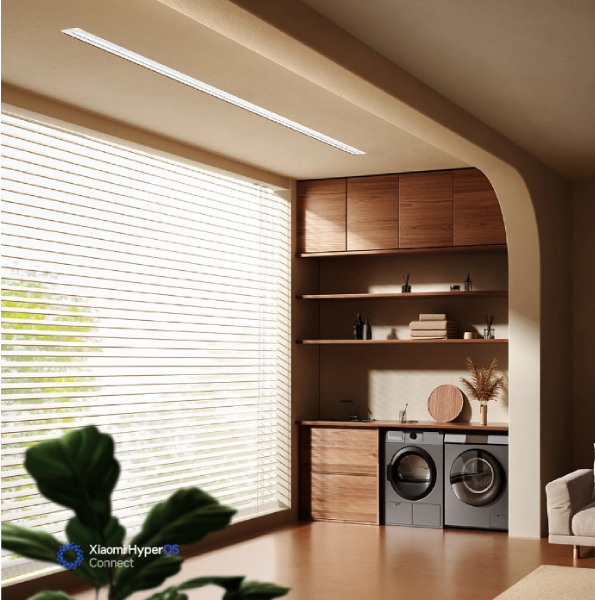
Xiaomi has unveiled its latest smart home appliance — the Mijia Smart Invisible Clothes Dryer. Launched today on Xiaomi Youpin, the dryer takes a unique approach, embedding itself discreetly into the ceiling. Let’s get into its details here.
The Mijia Smart Invisible Clothes Dryer boasts an ultra-thin design measuring just 8cm wide. Its sleekness allows it to seamlessly fit into the ceiling.
Thankfully, Xiaomi hasn’t sacrificed maintenance for aesthetics. The dryer features an access opening, allowing for after-sales service without dismantling the ceiling.
For added functionality, the dryer features a built-in 36W light with adjustable brightness and color temperature. It even provides a night light mode for a gentle glow which you can control via the Mijia app.
Hanging clothes is simplified thanks to the wavy drying rod and open windproof drying hole design, eliminating the need for pre-drilled holes. The dryer also integrates with Xiaomi’s HyperOS ecosystem products, allowing for connections with washing machines, smart curtains, and more.
For safety and convenience, the device includes five intelligent drying systems. These include two-stage rising protection, customizable lifting heights, automatic stop functions when encountering resistance, and a gentle lifting mechanism.
Design-wise, the Mijia Smart Invisible Clothes Dryer uses six series aluminum alloys and national standard 304 steel wire rope. It has reportedly passed a grueling 6,000 lift and lower durability test and can handle a load of 30kg.
The lamp itself has a lifespan of 1,000 hours. Noise levels are also kept low with a DC motor that utilizes new noise-sealing technology, resulting in a maximum noise output of 55 dBA.
Price and Availability
The Mijia Smart Invisible Clothes Dryer comes in two options: a single-pole version and a set. It goes up for crowdfunding on April 17th.
The standalone unit will be available for 999 yuan (around $138 USD) during the crowdfunding period, with a regular retail price of 1,099 yuan (around $151 USD).
The bundled set carries a crowdfunding price of 1,898 yuan (around $262 USD) and a standard retail price of 2,198 yuan (around $303 USD).
Moto G64 5G has been launched in India. The device is the first phone to feature the all-new Dimensity 7025 chipset. It has arrived as the successor to the well-received Moto G54 5G, which was announced last year. The aforementioned chip is an overclocked version of the Dimensity 7020, which powered the Moto G54. Like the predecessor model, the G64 positions itself as a value-for-money device for those looking for an entry-level 5G phone. Here’s a look at what is in store for the buyers of the G64.
Moto G64 5G specifications and features
Moto G64 5G
The Moto G64 features a 6.5-inch IPS LCD panel with a punch-hole design. The screen offers an FHD+ resolution, a 120Hz refresh rate and a 240Hz touch sampling rate. In addition, it will have Gorilla Glass protection. It features an IP52-rated chassis, which measures 8.89mm in thickness and weighs 192 grams.
The Dimensity 7025-powered smartphone ships with 8 GB / 12 GB of RAM. It also packs a 6,000mAh battery, up to 12 GB of RAM, and up to 256 GB of internal storage. For additional storage, it features a microSD card slot. The phone comes with support for 33W fast charging.
Moto G64 5GMoto G64 5G
The rectangular bump at the back of the Moto G64 houses a dual-camera setup. The primary shooter will feature a 50-megapixel image sensor with optical image stabilisation (OIS). An 8-megapixel ultra-wide lens complements the primary shooter, also serving as a macro camera. The centre-aligned punch-hole cutout on the screen houses a 16-megapixel selfie camera on the front.
The Moto G64 5G runs on Android 14 with a MyUX skin on top. Motorola is promising a guaranteed update to Android 15 and three years of security updates. The phone comes with other features, such as support for nine 5G bands, a dual SIM, Wi-Fi 6, Bluetooth 5.2, GPS, a USB-C port, dual stereo speakers with Dolby Atmos, and a 3.5mm audio jack.
Moto G64 5G price in India, availability
The Moto G64 5G has arrived in India in two variants: 8 GB RAM + 128 GB storage priced at Rs 14,999 and 12 GB RAM + 256 GB storage priced at Rs 16,999. It comes in shades, such as Ice Lilac, Pearl Blue, and Mint Green.
Motorola is providing a couple of offers for those interested in availing the G64. The first offer provides up to Rs 1,100 instant bank discount on HDFC Bank Cards. For full swipes using its credit card, customers receive an instant discount of Rs 1,000, making the effective price start at Rs 13,999 for the 8GB+128GB variant and Rs 15,999 for the 12GB+256GB variant.
Similarly, for HDFC Bank Credit Card or Debit Card EMI transactions, customers enjoy a discount of Rs 1,100, resulting in an effective price starting at Rs 13,899 for the 8GB+128GB variant and Rs 15,899 for the 12GB+256GB variant. Alternatively, customers can opt for the second offer, which offers a bump-up of Rs 1,000 on the exchange value on Flipkart, leading to an effective price starting at Rs 13,999 for the 8GB+128GB variant and Rs 15,999 for the 12GB+256GB variant. Flipkart will carry out the first sale of the G64 on April 23.
Lenovo has quietly introduced a new version of the Tab P12 (review) that was announced last year. It is the Lenovo Tab P12 Matte Display. The device was spotted on the Google Play Console certification last month. Now, the latest offering has been listed on Lenovo France’s website with key specifications that indeed confirm it’s announced. Read on to know what the Tab P12 Matte Display offers out of the box.
Lenovo Tab P12 Matte Display specifications
As the name suggests, the Lenovo Tab P12 Matte Display version has a 12.7-inch matte screen that gives a paper-like feel. It bears a 3K resolution and features a customizable colour option, an anti-glare display, and consistent contrast. The display makes it ideal for reading and entertainment usage. There is also a reading mode with background music for an immersive experience. The premium eye care helps reduce eye strain. The tablet also supports a stylus pen with tilt sensing and palm rejection. The writing and drawing feel similar to doing both on a piece of paper.
For audiophiles, the Lenovo Tab P12 Matte Display is equipped with four JBL-powered speakers with Dolby Atmos. There is a 13MP rear camera with an ultra-wide field of view and an 8MP front-facing selfie snapper.
The product listing does not explicitly mention the hardware details powering the Lenovo Tab P12 Matte Display. But we assume it’s the same Dimensity 7050 coupled with 8GB RAM and 256GB storage as the standard variant in the global markets. The tablet is backed by a 10,200mAh battery unit with support for 30W charging. Software-wise, the Lenovo P12 Matte Display runs on Android and has a multitasking feature with up to four split screens and five floating windows.
Lenovo has not revealed the pricing of the Tab P12 Matte Display. It will vary depending on the market region.
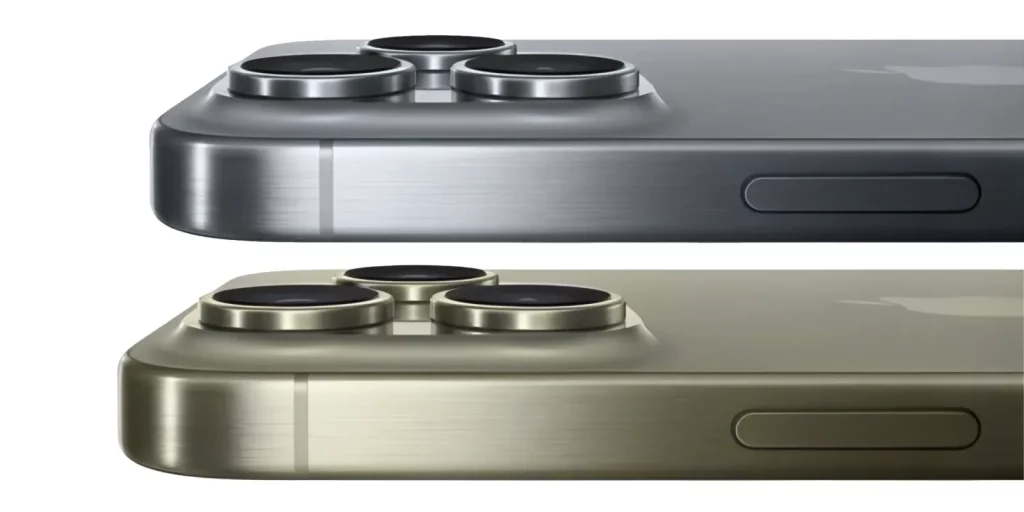
Based on what we know so far, iPhone 16 is going to have only a few notable improvements (one of which is the dedicated capture button) from the iPhone 15 series. The latest revelation is about a lens coating that may improve two key problems of the iPhone’s camera system. If successful, it will be a significant improvement compared to the predecessor in the camera department. So let’s see what it is and how it may work.
iPhone 16 Pro models’ new lens coating may solve lens flare and ghosting
According to tipster Yeux1122 on the Naver platform, the technology Apple is working on is known as ALD which is an abbreviation for atomic layer deposition. It is a method to deposit an extremely thin (just a few nanometers thick) layer of an element onto a surface. Additionally, it covers the entire surface with uniform deposition. These characteristics make this technology a good fit for the intended purpose. But what actually is the problem that Apple is aiming to solve with this layer? Well, mainly lens flare and ghosting in images.
If you are not familiar with the terms, the lens flare is basically a phenomenon where the light gets reflected (unwanted) from the surface of the lenses in front of the sensor. A portion of this reflected light ultimately ends up hitting the sensor. The problem becomes noticeable when you shoot a bright object in a darker background. Ghosting is also another issue that occurs due to the reflection of the light from the lens surface.
The coating Apple is working on, reduces the reflective index of the glass surface, ultimately reducing the haze on the final images. Notably, the tipster claims that this new coating will be limited to the iPhone 16 Pro models. Last year, the company kept the titanium frame exclusive to the Pro iPhone. The Dynamic Island also remained exclusive to the iPhone 14 Pro models.
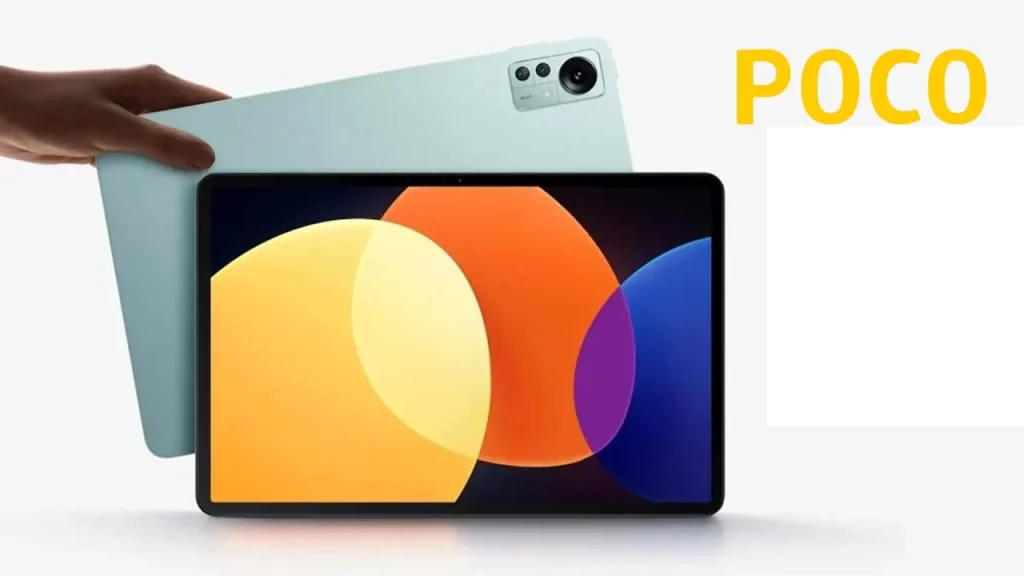
Xiaomi continues to expand its product range through sub-brands. Their latest focus is the first-generation Poco tablet, a device recently revealed through European EEC certification.
This potentially powerful yet affordable tablet has consumers buzzing. Will it meet the hype? Xiaomi hasn’t made any official statements, but leaks and rumors are fueling the anticipation.
Here’s what we might expect from the Poco tablet.
The Expected Technical Specifications of the Upcoming Poco Tablet
We talked about expecting the first-generation Poco tablet to be an affordable product. Luckily, the recent leaks indicate that Xiaomi won’t sacrifice performance to achieve that affordability.
According to reports, the device will be powered by Qualcomm’s Snapdragon 7s Gen 2 processor. Additionally, it will likely come with 8 GB of LPDDR5x RAM and 256 GB UFS 4.0 storage accompanying this SoC.
The Poco tablet is expected to boast a 12.1-inch 2.5K resolution LCD screen, surpassing many competitors in display quality. It should feature a dual rear camera setup with a 50 megapixel main sensor and a 2 megapixel depth sensor. An 8 megapixel front facing camera is also likely.
Also, anticipate impressive battery life with a large 10,000mAh capacity and 65W fast charging support.
Processor: Qualcomm Snapdragon 7s Gen 2 (or possibly Snapdragon 7+ Gen 3)
The most exciting feature of the Poco tablet will undoubtedly be its price. At this point, there’s still no definite information.
However, leaks suggest it will be between $250 and $300. Nonetheless, these details about an unreleased product could vary on the launch day or change with new details over time.
But assuming that the much more powerful flagship Xiaomi Pad 6s Pro is $599, it wouldn’t be too far off to expect this price range.
2. The Availability of the Poco Tablet
The Poco tablet will likely become available worldwide in a short period. However, it’s important to consider that the launch date may vary depending on the region and model.
Additionally, some features may also vary depending on the region.
3. When will the Poco Tablet Launch?
Unfortunately, there isn’t a clear date for the launch of the Poco tablet yet. However, leaks suggest that the upcoming device will be unveiled alongside the Poco F6 and F6 Pro in mid-May.
Nevertheless, it’s worth noting that this information might not be accurate, and there’s a possibility that the tablet could be revealed in the second half of 2024.
4. What Will the Design of the Poco Tablet Be Like?
If we tell you that the design of the Poco tablet will surprise you, we wouldn’t be lying. In fact, some claims suggest that it will be a repackaged Redmi Pad Pro with no real innovations.
Still, whether it’s a brand new product or just a repackaged Redmi Pad, the Poco tablet will consist of a large screen and a layout with two rear cameras. However, considering its price, this is quite normal.
iQOO is gearing up to launch its iQOO Z9 smartphone series in China on April 24. The series is expected to include three models — the iQOO Z9, iQOO Z9x, and the iQOO Z9 Turbo.
Before the launch, Ishan Agarwal, a reputable tipster (via 91mobiles), has spilled the beans on the specifications of these smartphones.
iQOO Z9, Z9x, Z9 Turbo Specficiations (Rumored)
The leak details a clear hierarchy within the Z9 series. The Z9x will position itself as a budget-friendly option with a 6.72-inch 120Hz LCD display, a Snapdragon 6 Gen 1 processor, and a dual rear camera system with a 50MP main sensor.
It also keeps the increasingly rare 3.5mm headphone jack and will have 44W charging support and a side-mounted fingerprint scanner.
Moving up, the Z9 is expected to feature a 6.78-inch 144Hz AMOLED panel and Snapdragon 7 Gen 3 processor. The camera system will remain unchanged with a 50MP main sensor and 2MP portrait combo, as will the storage and memory with UFS 2.2 and LPDDR4X, respectively.
Similarly, both the Z9 and Z9 Turbo will benefit from faster 80W charging and under-display fingerprint sensors.
At the top of the line, the Z9 Turbo will be powered by Qualcomm’s latest Snapdragon 8s Gen 3 processor. It will also have the fastest memory and storage combination, LPDDR5X and UFS 4.0, respectively.
The camera system is expected to receive a slight upgrade with an 8MP ultrawide lens replacing the secondary portrait sensor.
All three phones will come equipped with a substantial 6,000mAh battery. The software side will see all phones running OriginOS 4 based on Android 14. And while the design remains unconfirmed, the leak suggests plastic back covers for all three models.
Yesterday, Huawei made a big move for its smartphone strategy. The company rebranded its 12 year old Huawei P series lineup as the Huawei Pura. The name, pronounced “piu rua”, signifies purity and beauty in Spanish.
The company had been working towards this rebranding for the past 6 years, and had applied for the trademark back in 2019.
The Pura series could feature four new devices with the unique triangular camera design that we’ve been seeing for the past few days.
Huawei Pura 70
Huawei Pura 70 Pro
Huawei Pura 70 Pro+
Huawei Pura 70 Ultra
The Ultra version is speculated to be the successor to the P series’ Art Edition, boasting the same configuration as the Pro+ model but with an enhanced design.
As for the launch, rumors say we could see the devices launch as soon as April 18. But no official word yet.
If you want to know more about the Huawei Pura series and what to expect from the lineup, we have a special story on the same.
Do you guys remember the HMD Fusion concept that we saw back at MWC 2024? Well, during the announcement, the company didn’t reveal much about the concept, except that it was similar to the concept of modules, aka attachments for your smartphone, that’ll add more features to the device.
Now, HMD is hyping things up via social media posts in Australia, Benelux, and France. The company shared a graphic of a smartphone with add-ons in it.
The text on the bottom right shows a “Coming Soon” tagline, hinting that the company may soon debut its first Fusion phones in these regions.
JBL has launched new smart glasses in China, likely based on its Soundgear Frames platform. The new glasses, translated “Yinyue Fan,“ come with a transparent design and feature a custom linear track-type driver unit for clear sound quality. You can listen to music, take calls, and get up to 8 hours of usage time with these glasses. The best part, the glasses automatically turn on when you put them on.
Remember the Huawei Matebook X Pro 2024 laptop with the Core Ultra 9 series chip that I mentioned a few days ago? It boasted of being the lightest Core Ultra 9 laptop on the market, weighing less than 1kg.
US lawmakers, particularly Republican officials, are reportedly not happy with this achievement. They have criticized the Biden government for allowing Huawei access to chips made by an American chip maker, Intel.
How do you like the name, Google Pixel 9 Pro Fold?
According to the latest report, that’s probably what the upcoming foldable will end up being called. The foldable will launch alongside three other Pixel 9 series model this year. Earlier reports suggest the phone will feature an 8.02-inch foldable screen on the inside and a 6.29-inch cover display.
Xiaomi’s big Smarter Living 2024 launch event is all set for April 23. We can expect a bunch of smart devices at the event, including a TWS earphone, a tablet, a vacuum cleaner, and a hair dryer. There could be a new tablet too!
Xiaomi CEO Lei Jun informed a few days ago that he will gift a Xiaomi SU7 car to the Redmi team if the Redmi Turbo 3 achieves its first sales target.
Yesterday, Wang Teng, the general manager of the Redmi brand, expressed gratitude on Weibo for the support received, announcing that the Turbo 3 has successfully reached its initial sales target. He further mentioned that on April 23, a fortunate first-sale buyer of the phone will be selected and awarded a one-year right to use the Xiaomi SU7 car. It serves as a token of appreciation from the Redmi team to the early buyers for their support.
Realme has officially unveiled its highly anticipated P1 series of smartphones in India. The lineup consists of the Realme P1 and the Realme P1 Pro which offer top notch specs and features despite having a budget price tag. So here’s everything you need to know about these devices.
According to the latest report, the Pixel 9 will feature the new Samsung Modem 5400, enabling it to connect to satellites via 5G non-terrestrial networks (NTN). This translates to the ability to send emergency messages in remote locations where cellular service is unavailable.
This means the Pixel 9 will join the likes of the iPhone and Huawei in bringing satellite connectivity onboard.
A new leak has revealed the configurations and color options of upcoming Pura smartphones. According to DCS, the base Pura 70 is expected to come with 12GB RAM and 512GB of storage, available in Ice Crystal Blue, Feather Black, Snowy White, and Sakura Rose Red.
Huawei‘s homegrown operating system, HarmonyOS, is getting closer to a full public release. Yesterday, blogger @Flanker_017 on Weibo shared images revealing the user interface of HarmonyOS NEXT running on a real device (Mate 60).
Oppo may launch the K12 smartphone in China next week, likely as a rebranded version of the recently launched OnePlus Nord CE 4. The information comes courtesy of reliable tipster Digital Chat Station who shared an image of the phone revealing its design.
The leaked image shows the phone’s design identical to the Nord CE 4, with the only difference being the Oppo logo replacing the OnePlus logo on the back.
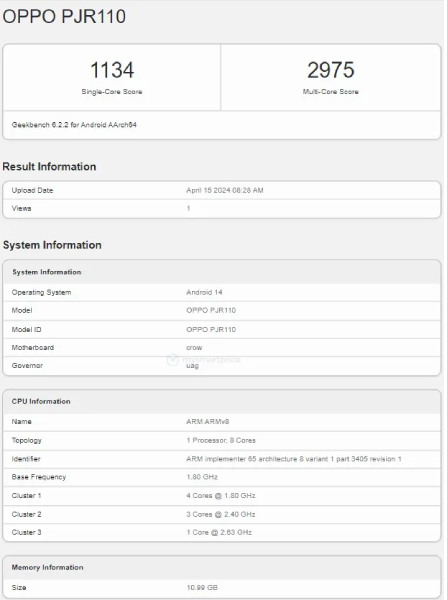
Moreover, the performance benchmark for the K12 also surfaced on the Geekbench database under the model number PJR110. The smartphone scored 1134 in single-core and 2975 in multi-core tests.
The listing also sheds light on the processor – an octa-core chipset codenamed “Crow” paired with an Adreno 720 GPU. This confirms the use of the Qualcomm Snapdragon 7 Gen 3 SoC. The K12 is expected to come in variants with up to 12GB of RAM and run on ColorOS 14 based on Android 14.
According to earlier reports, the Oppo K12 will come with a 6.74-inch AMOLED panel with FHD+ resolution and a smooth 120Hz refresh rate.
On the front, a 16-megapixel selfie camera is rumored, while the rear camera system might boast a 50-megapixel main sensor with OIS (Optical Image Stabilization) accompanied by an 8-megapixel ultra-wide lens.
Storage options could range up to 512GB UFS 3.1, paired with the aforementioned 12GB LPDDR4x RAM in the top-end variant. Powering the device will likely be a 5,500mAh battery with support for 100W fast charging.
Other expected feature includes dual stereo speakers, an in-display fingerprint scanner, and an IR blaster.
With the rumored launch not far off, Oppo might soon confirm its official launch date within the next few days.
Polestar, the electric car manufacturer, just announced the launch of its debut smartphone, the Polestar Phone. Positioned as an AI flagship for the “driver’s internet ecosystem,” the phone will be officially revealed at an event on April 23.
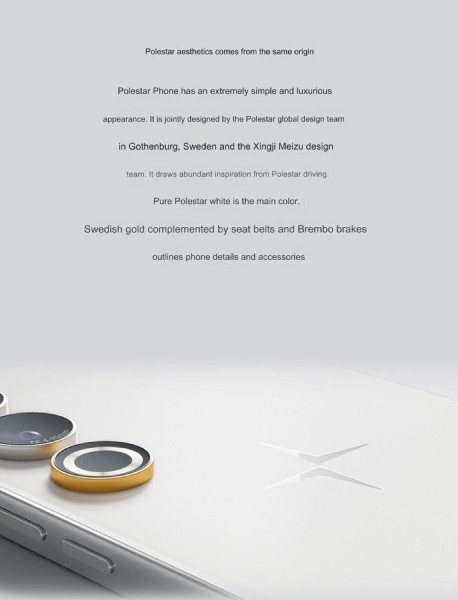
The company says the phone design is a collaboration between Polestar’s global design team in Gothenburg, Sweden, and the Meizu design team. The primary color is “Polestar White,” with stylish accents in “Swedish gold” that mirror the seat belts and Brembo brakes seen in Polestar vehicles.
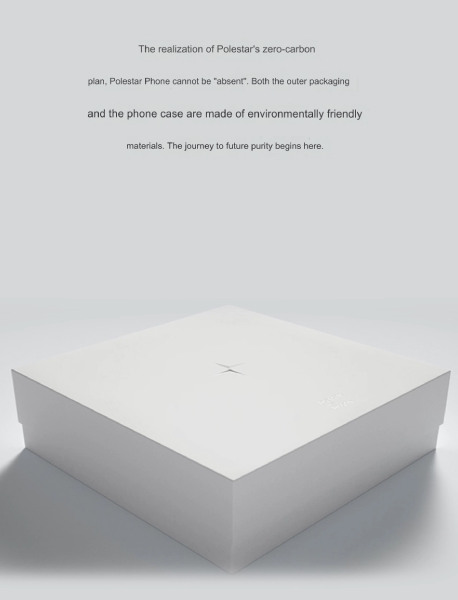
Polestar is also prioritizing sustainability with its upcoming phone. The company says the phone’s packaging and case are made from eco-friendly materials in line with Polestar’s zero-carbon goals.
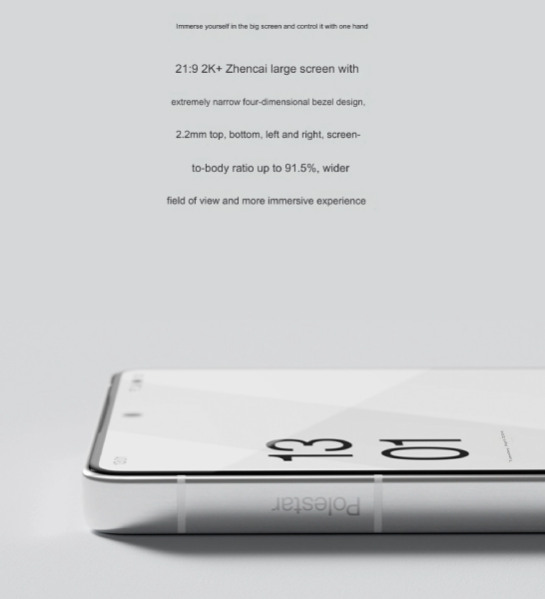
The phone itself utilizes NP66 aerospace-grade aluminum for the middle frame and AG glass with a “soft sand crystal sparkle process” for the back cover. Its display boasts a 21:9 aspect ratio with 2K+ resolution and 2.2mm symmetrical bezels on all sides.
Now if you have noticed, there are similarities between the Polestar Phone and the Meizu 21 Pro. This isn’t a coincidence, as previous reports suggested the Polestar Phone might be a rebranded version of the Meizu phone.
Following this logic, the Polestar Phone could potentially feature a Qualcomm Snapdragon 8 Gen 3 processor, a 6.79-inch 2K+ 120Hz LTPO display, and a triple-lens camera system with a 50-megapixel main sensor. Battery life could come courtesy of a 5050mAh battery with support for fast wired and wireless charging.
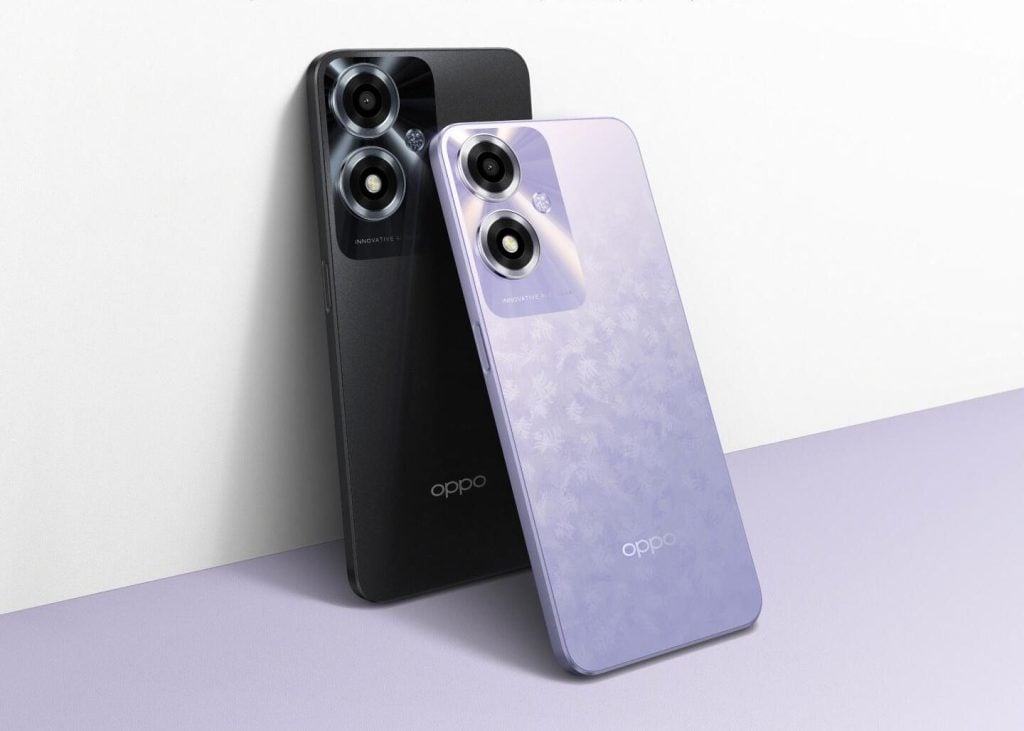
Oppo recently unveiled the Oppo A3 Pro, an IP69-rated smartphone, in China. Now, the brand has officially listed two new A-series phones, such as the Oppo A1s and Oppo A1i. Here’s a look at what these phones offer:
Oppo A1s specifications, price
Oppo A1s
The Oppo A1s has a 6.72-inch IPS LCD FHD+ display that offers a 90Hz refresh rate. For photography, it has an 8-megapixel front camera and a 50-megapixel + 2-megapixel dual-camera system on the back. It features the Dimensity 6002 chipset, up to 12 GB of virtual RAM, 12 GB of LPDDR4x RAM, up to 512 GB of UFS 2.2 storage, and a 5,000mAh battery that supports 33W fast charging. For security, it has a side-facing fingerprint scanner. The phone measures 7.99mm and weighs 193 grams.
The Oppo A1s comes in two options, such as 12GB+256GB and 12GB+512GB. These variants are priced at 1,199 Yuan (~$165) and 1,399 Yuan (~$190), respectively. It comes in three shades: Night Sea Black, Dusk Mountain Purple, and Tianshuibi (green). The A1s just a rebranded version of the Oppo A2 (China) and the Oppo A79 5G, which is available in the global market.
Oppo A1i specifications, price
Oppo A1i
The Oppo A1i has a 6.56-inch IPS LCD HD+ 90Hz screen. For selfies, it has a 5-megapixel front camera and a 13-megapixel camera on the back. The Dimensity 6020-powered device offers 8 GB of LPDDR4x RAM, up to 256 GB of UFS 2.2 storage, and a 5,000mAh battery with 10W charging. It also features a side-mounted fingerprint sensor. The handset has a thickness of 8.12mm and weighs 185 grams.
The Oppo A1i comes in configurations, such as 8GB+256GB for 1,099 Yuan (~$150) and 12GB+256GB for 1,199 Yuan (~$165). It can be bought in shades like Night Black and Phantom Purple.
Both devices are scheduled to go on sale on April 19 in China. At present, both phones are up for reservations.
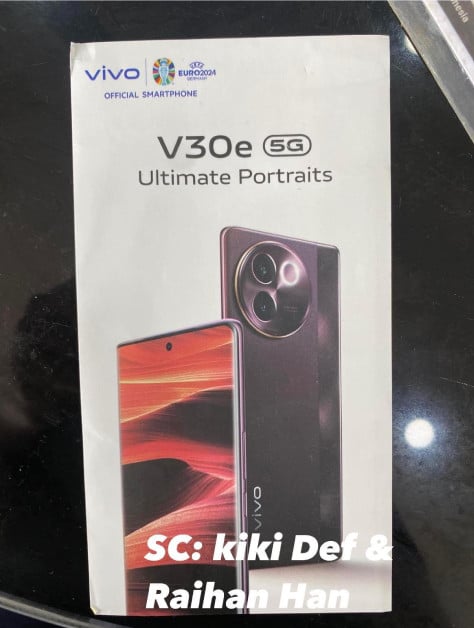
The Vivo V30e could be the latest addition to the Vivo V30 series, which already includes the Vivo V30, V30 Pro, and V30 Lite. A recent leak, revealing the retail box of the V30e, suggested its imminent release in India. A new report by 91mobiles has shed information about the phone’s key specifications.
Vivo V30e key specifications leaked
Vivo V30e leaked image
According to the report, the Vivo V30e will have a 3D curved screen measuring 6.78 inches. The AMOLED display will offer an FHD+ resolution and a 120Hz refresh rate.
Under the hood, the Vivo V30e will feature the Snapdragon 6 Gen 1. The said device bearing the V2339 model number was recently spotted in Geekbench’s database with the same chipset and 8 GB of RAM. In addition, the device is expected to offer up to 8 GB of virtual RAM and 256 GB of built-in storage.
The V30e will pack a massive 5,500mAh battery, which will have support for 45W fast charging. The report also mentions that the device will be the slimmest phone, packed with a 5,500mAh battery.
The V30e’s rear camera setup will have an OIS-enabled Sony IMX882 primary camera. Being a V30 family device, the V30e is said to be equipped with Aura LED flash. There is no information about the other cameras on the device. In addition, it is expected to arrive color options, such as brown-red and blue-green.
At present, there is no information about the launch date or price of the Vivo V30e. With leaks revealing a lot of details about the device, it appears that the V30e may launch either by the end of this month or in May.
Last year, Google entered the foldable phone market by announcing the Pixel Fold. There have been several reports that the brand is working on its second-generation foldable phone. The rumor mill tentatively calls the said device the Pixel Fold 2. However, a recent report from AndroidAuthority suggests that the device will go by the name Google Pixel 9 Pro Fold.
Google’s upcoming foldable belongs to the Pixel 9 series
Google PIxel fold 2 CAD renders by SmartPrix / OnLeaks
According to the publication, it has learned from a Google insider that there will be a fourth Pixel 9 series device. This device is said to be a foldable phone. The report states that the Pixel 9 and Pixel 9 Pro are codenamed “tokay” and “caiman.”
On the other hand, the “Komodo” and “comet” codenames belong to the Pixel 9 Pro XL and the Pixel 9 Pro Fold. The software for this year’s Pixel phones also mentions these names.
Reports have revealed that the second-generation Pixel foldable, which is now said to have the Pixel 9 Pro Fold, will feature the Tensor G4 chip. Leaked renders of the device have revealed that its design will be more in line with the Pixel 9 series.
According to previous reports, the Pixel 9 Pro Fold will have an 8.02-inch foldable screen on the inside and a 6.29-inch cover display. According to reports, the device will come with 16 GB of LPDDR5 RAM, 256 GB of UFS 4.0 storage, and the Pixie AI assistant. Now that the company’s next foldable is said to be a part of the Pixel 9 series, it is likely to break cover in October this year.
JBL has launched their new “Yinyue Fan” open wireless audio glasses, offering a whole new stylish and functional option for listening to music or taking calls on the go. The official price is set at 1,299 yuan (approximately $180 USD), with a pre-sale price of 999 yuan (approximately $155 USD) available on the Douyin platform. JD.com currently only allows users to reserve the glasses, with pre-sales yet to be announced.
The microphones use a noise reduction algorithm to filter out background noise
The Yinyue Fan features a transparent design and utilizes a custom linear track-type driver unit for clear sound quality. JBL’s directional sound field system delivery technology is designed to minimize sound leakage, ensuring your music stays with you and not those around you. For clear communication during calls, the glasses are equipped with dual beamforming microphones and an intelligent noise reduction algorithm to filter out background noise.
Comfort appears to be a priority with the Yinyue Fan. The glasses are constructed with UV anti-ultraviolet lenses that block harmful rays, and the lightweight design weighs in at just 52 grams. A metal hinge ensures durability, while the skin-friendly inner surface and ergonomic design provide a comfortable fit. Users can choose between round or square frames, each available in three color options.
The Yinyue Fan boasts an IP54 dust and water resistance rating for protection against the elements. Connectivity is provided via Bluetooth 5.2, and the glasses automatically turn on and off when taken off and put on, respectively. A single charge delivers up to 8 hours of continuous listening, and touch controls allow for easy music playback and management. For added functionality, users can download the official app to adjust the sound curve and customize touch gesture controls.
Chinese display manufacturer KOIOS has launched their new K2724UG 27-inch monitor on JD.com, boasting a “4K 160Hz” display. This feature-rich monitor is currently available for purchase at a starting price of 1,599 yuan (approximately $220 USD).
The display has a peak brightness of 600 nits, also covering 100% sRGB color gamut
The K2724UG features a high-resolution 3840 x 2160 IPS panel with a refresh rate of 165Hz, manufactured by AUO. The monitor offers a peak brightness of 600 nits, ideal for HDR content, and a fast 1ms response time for smooth performance in fast-paced games. It covers 100% of the sRGB color gamut and 95% of the DCI-P3 color gamut, ensuring exceptional color accuracy for creative work. Additionally, the K2724UG supports 10-bit color depth for richer color gradations.
For adjustability, the K2724UG monitor stand allows for tilting and rotating the display to find the perfect viewing position. It is also VESA wall mount compatible for additional flexibility in placement options. In terms of connectivity, the K2724UG comes equipped with 2 HDMI 2.1 interfaces, 2 DP 1.4 interfaces, and a 3.5mm audio jack for connecting headphones or speakers. It’s a pretty good deal, considering what is offered for the price.
Logitech has released their new M196 wireless Bluetooth mouse, available in a choice of black, white, and pink. The budget-friendly mouse starts at just 79 yuan (approximately $11 USD) and offers fast pairing Bluetooth connectivity.
The mouse has an ambidextrous design, and weighs only 61 grams
The M196 eliminates the need for a receiver or占用 (zhàn yong) computer port, connecting directly via Bluetooth. Weighing in at a mere 61-79 grams, the M196 is designed for portability and easily slips into a backpack or bag. For added comfort, the mouse features an ambidextrous design that accommodates both right-handed and left-handed users.
Functionality is kept basic yet effective. The M196 offers controllable line-by-line scrolling and optical tracking for smooth and accurate cursor control on a variety of surfaces. Logitech boasts a lengthy battery life of up to 12 months on a single AA battery (pre-installed) thanks to the mouse’s automatic sleep function.
Even the M196’s construction reflects a commitment to sustainability. The mouse shell is comprised of environmentally friendly plastic, with the black version containing 67% certified recycled materials and the white and pink versions containing 66% recycled materials. A cute, environmental friendly, affordable mouse. That’s actually quite impressive. Good job Logitech!
We use cookies on our website to give you the most relevant experience by remembering your preferences and repeat visits. By clicking “Accept”, you consent to the use of ALL the cookies.
This website uses cookies to improve your experience while you navigate through the website. Out of these, the cookies that are categorized as necessary are stored on your browser as they are essential for the working of basic functionalities of the website. We also use third-party cookies that help us analyze and understand how you use this website. These cookies will be stored in your browser only with your consent. You also have the option to opt-out of these cookies. But opting out of some of these cookies may affect your browsing experience.
Necessary cookies are absolutely essential for the website to function properly. This category only includes cookies that ensures basic functionalities and security features of the website. These cookies do not store any personal information.
Any cookies that may not be particularly necessary for the website to function and is used specifically to collect user personal data via analytics, ads, other embedded contents are termed as non-necessary cookies. It is mandatory to procure user consent prior to running these cookies on your website.