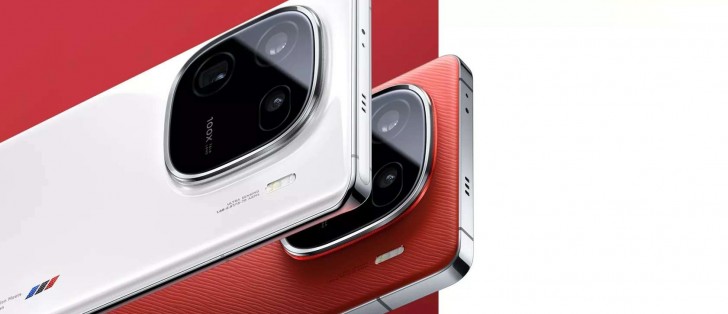
The iQOO 13 is under development and is expected to be launched in November this year. The predecessor, iQOO 12 was also launched in November last year.
Now tipster Digital Chat Station has revealed some key details about the display, camera, battery, chipset, charging, and more of a mysterious new phone. Notably, he didn’t mention anything about the brand or the model. The comment section of the Weibo post suggests that the phone could either be the iQOO 13 or the OnePlus 13.
However, judging from the specs and comparing them with previous rumors it appears that the phone could be the successor of the iQOO 12. For instance, DCS notes that the mysterious phone will offer a flat display, while the OnePlus 13 is said to equip a curved one.
iQOO 13 leaked specifications:
The phone will be equipped with a metal middle frame and glass on the front and back. The display equips a 2K flat AMOLED panel and an ultrasonic fingerprint scanner.
According to the tipster, the phone will be powered by the Snapdragon 8 Gen 4 chipset. To power the system there will be a massive 6000mAh battery and the phone will also support a combination of 100W wired + 50W wireless fast charging.
Speaking of cameras, there will be a triple-lens setup on the back and a punch-hole selfie camera on the front. The rear camera setup will consist of a 50MP main, 50MP ultrawide, and a 50MP 3x periscope telephoto.
In comparison, the iQOO 12 also adopts a flat screen design and aluminum frame and is available in three colors: Legend Edition, Track Edition, and Burning Road Edition.
Earlier this month, the Realme C61 appeared on GCF. It has also bagged NBTC, BIS, and FCC certifications. Now, the device has been spotted on the Google Play Console certification site revealing key details. It is expected to arrive as the successor to the Realme C51 from last year. The brand recently announced the budget C63 smartphone in the Indonesian market.
Realme C61 appears on Google Play Console
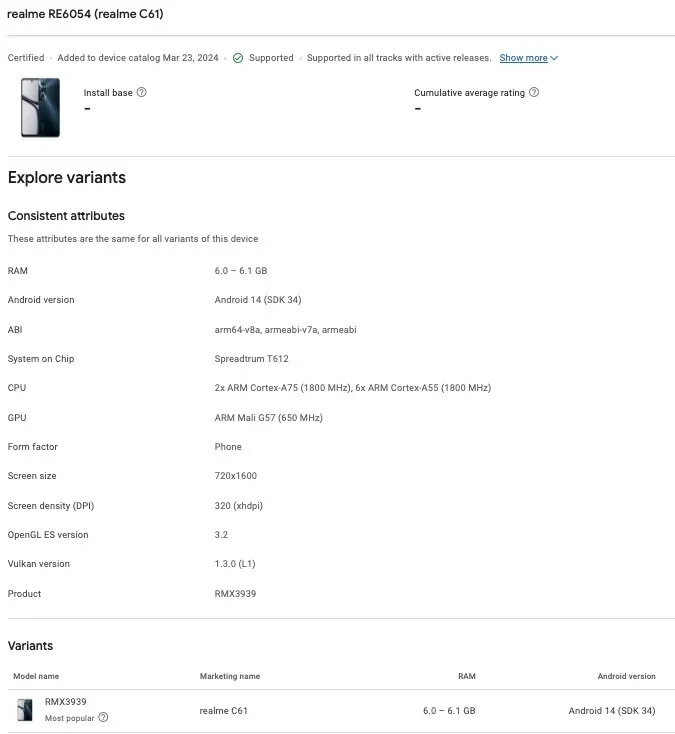
The Realme C61 is listed with model number RMX3939 on the Google Play Console certification website. The render of the smartphone reveals a centre-aligned punch-hole cutout display. It is said to bear a resolution of 720 x 1600 pixels and a 320 dpi screen density. The back panel has a gradient design with three vertically stacked rings out of which two are camera sensors and an LED flash unit. It looks similar to the Realme C65 that was released in Vietnam in March this year. However, from the core specifications, the upcoming C61 does not seem to be the same as C65.
As per Google Play Console listing, the Realme C61 will be powered by a UniSoC Spreadtrum T612 processor along with a Mali G57 GPU. The former comprises two A75 cores clocked at 1.8GHz and six Cortex-A55 cores ticking at 1.8GHz. The device is listed with 6GB RAM and we can expect more options at launch. It will ship with Android 14 OS out of the box.
This is everything the Google Play Console listing reveals about the Realme C61. As per FCC, the Realme C61 is expected to be backed by a 5,000mAh battery unit. It will come with LTE, WiFi, Bluetooth, NFC, and GPS connectivity options. Dimension-wise, the smartphone is said to measure 167.26 × 76.67 × 7.84mm and weigh 188 grams.
Ulefone is excited to announce its highly anticipated Summer Sale, running from June 17 to June 23 on AliExpress. This exclusive event offers incredible discounts of up to 69% on a selection of Ulefone’s most durable and high-performance devices. Whether you are a new customer or a loyal fan, this sale provides a fantastic opportunity to purchase top-notch technology at unbeatable prices.
Originally priced at $499.99, the Armor 25T Pro is now available for just $289.99, offering a significant 40% discount. This 5G rugged smartphone is designed for those who require robust and reliable communication tools in challenging environments. Key features include thermal imaging and night vision capabilities, making it ideal for outdoor enthusiasts and professionals in various fields. Despite its ruggedness, the Armor 25T Pro boasts a thin and light design for ease of use. A dedicated video showcase highlighting its thermal camera functionality further demonstrates its versatility.
Another highlight of the sale is the Armor 26 Ultra, with a discounted price of $359.99, down from its original $599.99. This model is equipped with the loudest speaker at 121dB, ensuring you never miss an alert or call, even in noisy environments. It also features a massive 15600mAh battery with 120W flash charging, providing long-lasting power and quick recharges. The 200MP all-scenario quad-camera system captures stunning photos and videos, making it perfect for photography enthusiasts and professionals alike.
For those needing additional communication capabilities, the Armor 26 Ultra Walkie-Talkie Version is available at $419.99, reduced from $699.99. This version includes all the standard Armor 26 Ultra features, with the added benefit of walkie-talkie functionality for an extra $60. This is particularly useful for team coordination in remote or large work sites.
Ulefone’s rugged tablet, the Armor Pad 3 Pro, is also part of the summer sale, with a 50% discount bringing its price down from $559.99 to $279.99. This tablet is designed to withstand the harshest environments, making it an excellent choice for fieldwork, industrial use, and adventurous outdoor activities. Its durability does not compromise its performance, ensuring users have a reliable device for all their needs.
For those who prioritize aesthetics alongside functionality, the Note 18 Ultra offers a fashionable appearance at an incredibly affordable price. Originally $299.99, it is now available for $149.99, reflecting a 50% discount. This model combines style with performance, making it a great choice for users who want a sleek and reliable smartphone.
Additional Information:
This summer sale highlights Ulefone’s commitment to providing rugged, reliable, high-performance devices and underscores its dedication to making such technology accessible to a wider audience. Customers can explore these deals and more on the Ulefone Summer Sale 2024 promotion page on AliExpress.
Don’t miss this chance to upgrade to a durable and high-performance Ulefone device at a fraction of the cost. Whether you need a rugged smartphone for extreme conditions, a tablet that can handle demanding environments, or a stylish phone that doesn’t compromise functionality, Ulefone’s Summer Sale has something for everyone.
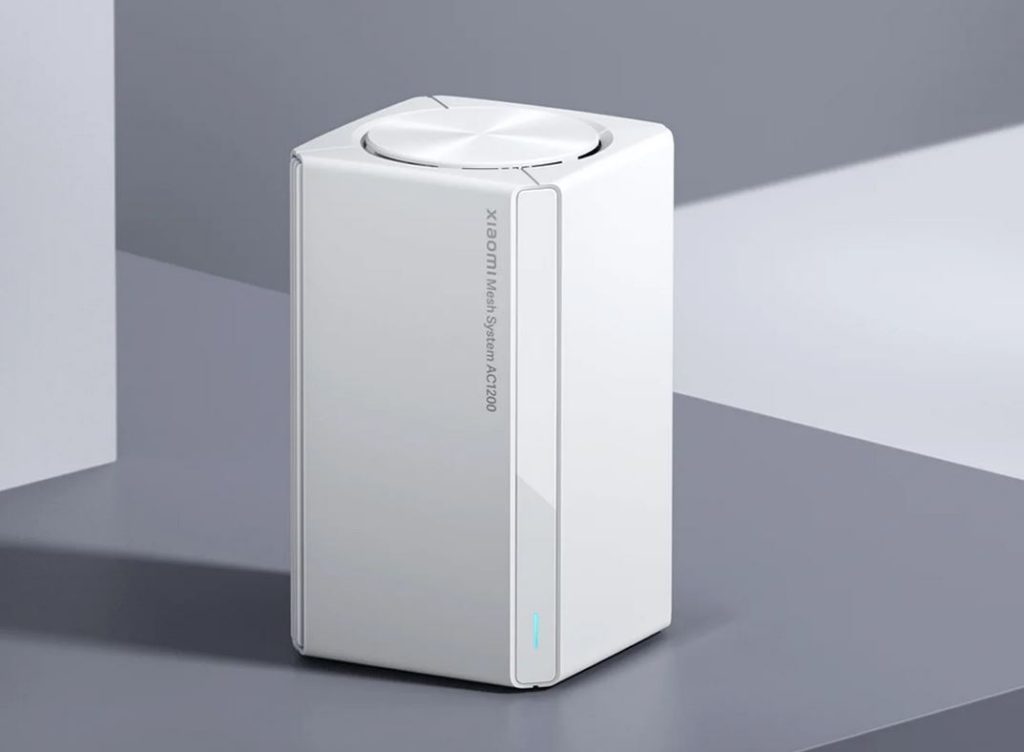
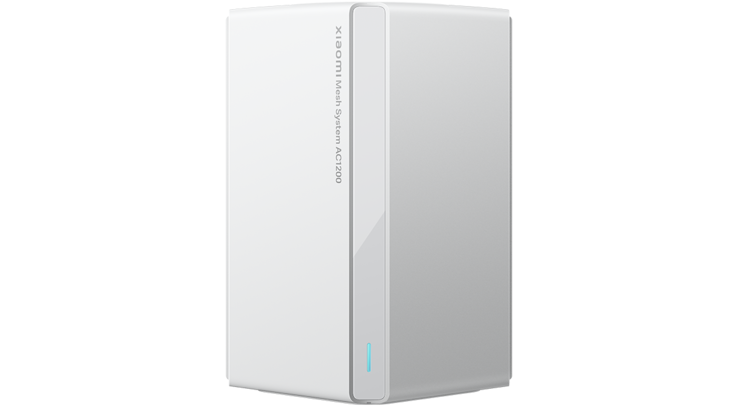
Xiaomi has listed a new wireless mesh system on its global website, pointing to its imminent global launch. The Xiaomi Mesh System AC1200 offers effective Wi-Fi coverage up to an area of 370 square meters. The new product also provides Gigabit LAN ports and the global product is coming on the heels of the release of the AC1200 router. The product comes with a minimalist and flexible design and offers complete home coverage, with an effortless network setup.
The Xiaomi Mesh System AC1200 has recently been listed on Xiaomi’s global website pointing to its global launch and availability soon. The product is expected to berth in the European market as Xiaomi already sells various mesh systems in the market such as the Xiaomi Mesh System AX3000.
The Xiaomi Mesh System AC1200 is equipped with between one and three routers depending on the coverage area required. Individually, a router can cover up to 140 square meters, while two routers can cover up to 260 square meters. The three routers offer an effective coverage area of 370 meters according to Xiaomi. The new mesh system operates on the 2.4GHz and 5GHz frequency bands, as well as supports up to Wi-Fi 5 (802.11a/b/g/n/ac) connectivity. The transmission rate of the mesh system is up to 1,200Mbps.
The new Xiaomi wireless mesh system is equipped with two WAN/ LAN ports that are each capable of up to 1,000Mbps of wired connection speed. The full-release optics including the price of the Xiaomi Mesh System AC1200 has not been provided yet. It is however expected to be more affordable than the Xiaomi Mesh System AX3000 currently retailing starting at 50 Euros ($54).
Xiaomi‘s Chairman Lei Jun has responded to demands by netizens by launching a hearing aid for the elderly. Back in May, the bulk of comments from users after Lei Jun posted a video on TikTok suggested new industries for the tech brand. Part of the wishes included persons who requested that Xiaomi produce a hearing aid that could be affordable. The crowdfunding campaign for the Xiaomi hearing aid for the elderly has now been launched. The new Zdeer hearing aid is produced by Zdeer Industrial Company although it is hosted on Xiaomi Youpin.
The Zdeer brand is focused on family health products. The company says it provides solutions to the major health needs of the young encompassed by health preservation, The new model is a 34-channel neck-hanging hearing aid designed for the elderly and features a blood pressure monitor. It also has blood glucose tracking capabilities and is already attracting funders on Xiaomi Youpin. On the crowdfunding platform, more than 50 persons have pledged and the pledged amount has already exceeded 500,000 yuan ($68,904).
As per the features and functionality of the new hearing aid, little is known at this time. The Zdeer hearing aid is offered on Xiaomi Youpin at a crowdfunding price of 999 yuan ($138). It is scheduled to be shipped to backers before June 30. There are no indications at this time whether the hearing aid will be subsequently available in the international market.
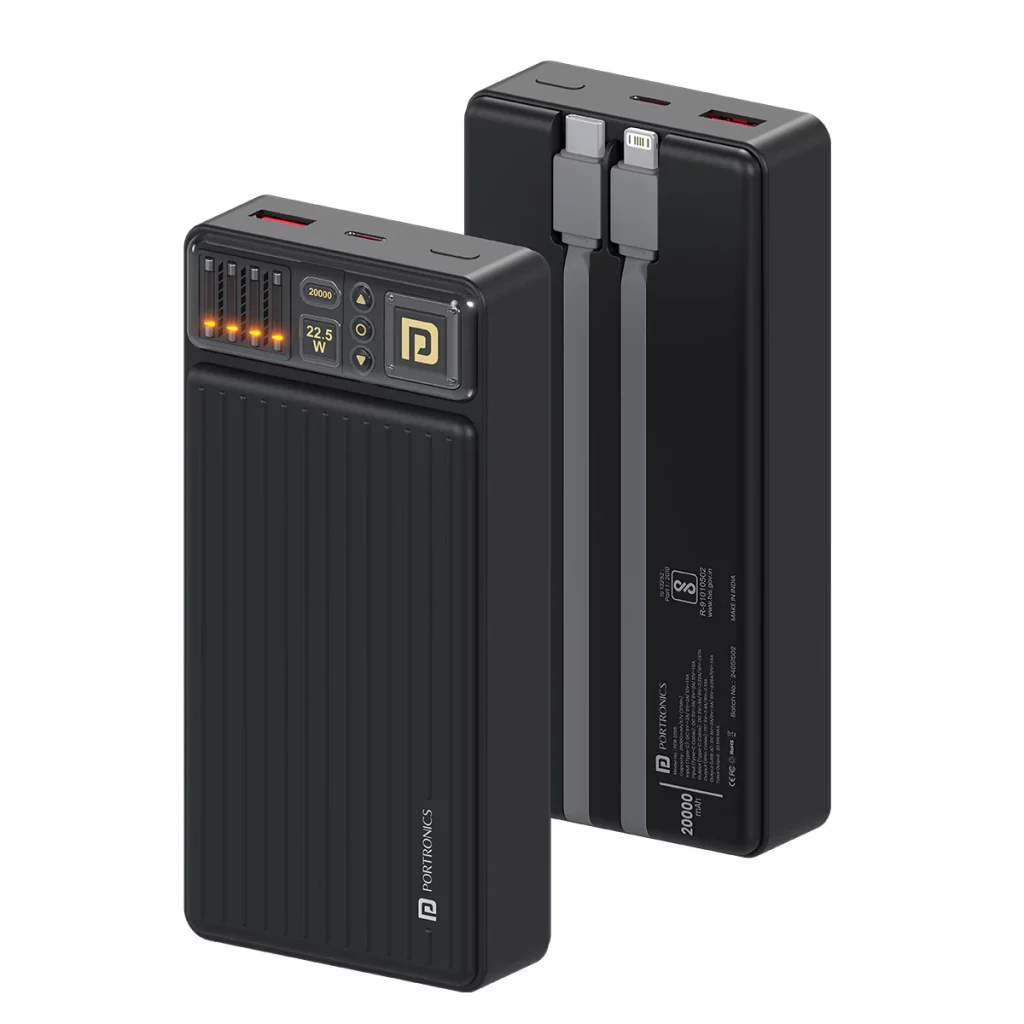
Portronics has just unveiled a new power bank with a massive battery pack. The model in question is the Luxcell Bind 20K, which is a new power bank that offers fast charging support and can juice up multiple devices at the same time. So let’s have a look.
Portronics Luxcell Bind 20K Specs
The brand’s latest power bank can charge up to three devices simultaneously with a full charge. The Luxcell Bind 20K arrives with two built-in cables. One of these is a USB Type-C charging cable while the other is for iOS devices. Apart from this, there is also a full sized USB Type A port for charging your other gadgets. Portronics’ new Luxcell Bind 20K was launched as a versatile power bank that can charge not only your Android smartphones and iPhones, but also TWS earbuds, tablets, and more.
This model is also flight approved, which means you can travel with it and even charge your devices on the airplane. It has an LED indicator that displays the charge level and a button to show when the power bank needs charging. This is also BIS certified to ensure protection and it comes with an advanced chip protection against short circuits, over voltage, over current, overheating, and other issues. In the box, you also get a USB Type C to Type C cable for fast charging.
Pricing and Availability
The Portronics Luxcell Bind 20K has been launched for an introductory price tag of 1,499 INR (roughly 18 US Dollars) in India. You can buy this device from Flipkart, Amazon, and other major retailers. This launch also arrives mere days after the brand unveiled the Bella 2, which is a 3-in-1 MagSafe wireless charger that also houses a digital alarm clock. Last month, the Portronics Bubble Square wireless keyboard was also announced in the region.
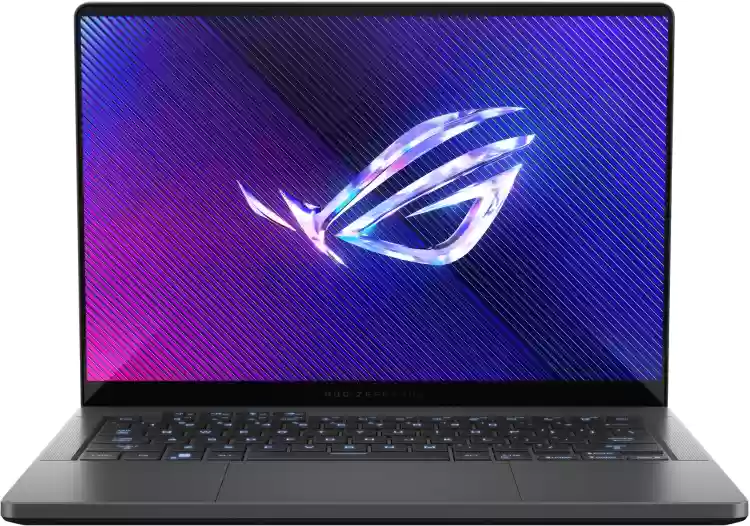
ASUS has just launched a new thin and light gaming laptop in the Indian market. This new compact notebook is the 2024 edition of the ROG Zephyrus G14. This model was first announced alongside the Zephyrus G16 during CES 2024 earlier this year. So now, here are all the details regarding its Indian release.
ASUS ROG Zephyrus G14: Specs
The ROG Zephyrus G14 (2024) sports a 14-inch OLED display with a 3K resolution and a 120Hz refresh rate. This panel also offers a 100 percent DCI-P3 color gamut, Dolby Vision, G-Sync support, ESA DisplayHDR True Black 500, and 0.2ms response time. Under the hood, it is equipped with the AMD Ryzen 9 8945HS processor, which is paired with the Radeos 890M integrated graphics. It also has the AMD Ryzen AI that offers up to 39 TOPS of AI performance. This enables features like the Windows Copilot tools. You also get a dedicated NVIDIA GeForce RTX 4060 GPU.
This model runs on the Windows 11 OS out of the box and packs 16GB of LPDDR5X RAM and 1TB of PCIe NVMe M.2 SSD storage. The front also houses a 108-p FHD IR camera for Windows Hello and a backlit chiclet keyboard as well. A 73Wh battery pack powers the ROG Zephyrus G14, which comes with a 180W AC power adapter. Other notable features include Bluetooth 5.3, WiFi 6E, microSD card reader, stereo speakers with Dolby Atmos support, and just 1.5 kilograms in weight.
Pricing and Availability
ASUS has just unveiled the ROG Zephyrus G14 in the region in a single Eclipse Gray color option. It has a price tag of 174,990 INR for its lone 16GB + 1TB configuration. It will be available for purchase from Amazon, Flipkart, ASUS India e-store, the brand’s exclusive stores, and authorized retailers like Reliance Digital, Croma, and Vijay Sales.
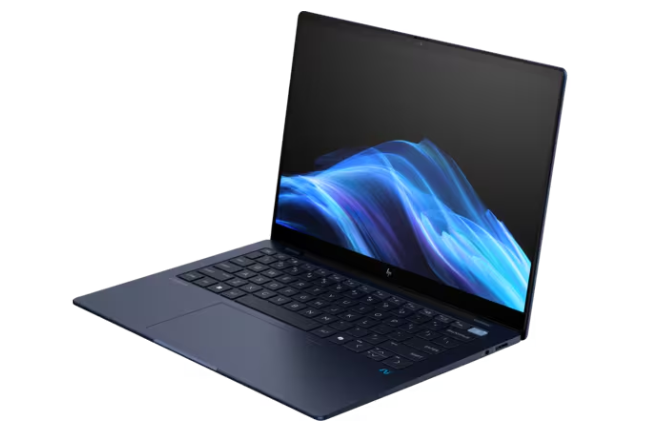
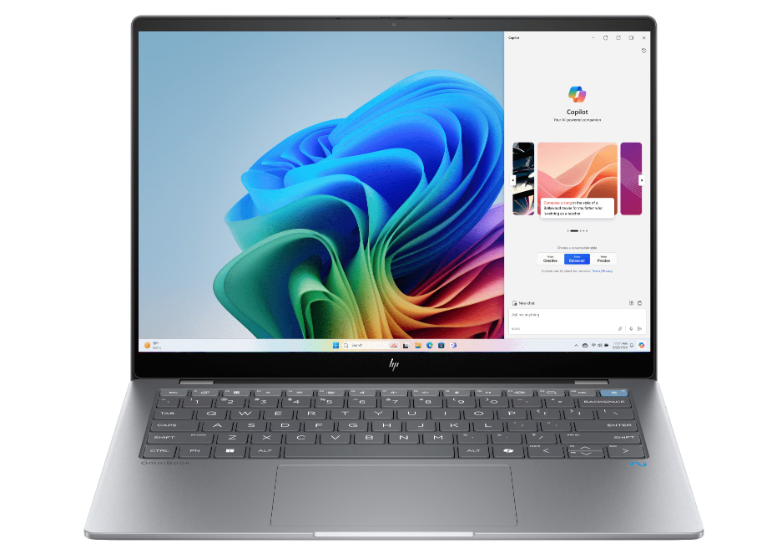
HP unveiled two AI-powered laptops for the global market last month. This included the EliteBook Ultra and the OmniBook X. Now, both of these models are arriving in the Indian market as well. Pre-booking for these laptops have gone live, so here are all the details.
HP EliteBook Ultra & OmniBook X
EliteBook Ultra
The EliteBook Ultra sports a 14-inch WLED display with a 2.2K resolution and touchscreen support. Under the hood, it is equipped with the Qualcomm Snapdragon X Elite processor, which is paired with Adreno graphics. The processor is paired with 16GB of LPDDR5SX RAM and up to 1TB of NVMe SSD storage. This model is built as an enterprise grade notebook and comes with a dedicated NPU to accelerate AI related tasks locally on the system. On the other hand, the HP OmniBook X is built for regular consumers.
It also has a 14-inch touchscreen panel as well as the Snapdragon X Elite processor. However, it comes with up to 32GB of LPDDR5X RAM and 2TB of NVMe SSD storage. The two models also feature the PolyCamera Pro which offers virtual interactions and AI filters like spotlight and auto framing. These are features useful for video calls. This is enabled thanks to the dedicated NPU, which is featured on the OmniBook X as well. On a single full charge, the duo can apparently offer up to 26 hours of battery life.
OmniBook X
Pricing and Availability
The HP EliteBook Ultra is available for pre-booking on the brand’s official website and its retail stores. Meanwhile, the OmniBook X can be pre-booked via the brand’s HP website, Reliance Digital, Vijay Sales, and Croma. The HP Elite Book Ultra has a 169,999 INR price tag (roughly 2,037 US Dollars), while the OmniBook X costs 139,999 INR (roughly 1,678 US Dollars).
Following the addition of Galaxy AI in smartphones, Samsung is now working on adding AI to its smart home products. According to a report from Businesskorea, Samsung may release AI-enabled home appliances as soon as next year. The company reportedly aims to create a “super-connected ecosystem” by adding AI to smart home products. It will also help Samsung strengthen its position against its competitors like Apple and Google.
Samsung seems to be aiming for on-device processing
The home appliances aimed for a release in 2025 will reportedly run certain large language models (LLMs) on-device, which is good for user privacy. The company has plans to introduce Bixby voice assistant controls for its smart home products in July this year. Although, initially Samsung will rely on the cloud for running the LLMs.
Some of the smart home products from Samsung that will include AI first will include the Family Hub refrigerators, washing machines, and induction cookers from Samsung’s Bespoke AI line, which features LCD screens.
Home appliances are expected to have numerous AI capabilities (such as translation capability) that are mostly limited to smartphones at present.
Through Bixby voice assistant enhanced by the latest large language models, the smart home products will understand more complex commands and offer a more natural user experience. The products will also reportedly remember previous conversations that may offer additional benefits.
Reportedly, the number of smart home products connected to Samsung SmartThings has surpassed 20 million. Notably, the number was recorded to be around 10 million in 2022. By next year, it is expected to reach 30 million.
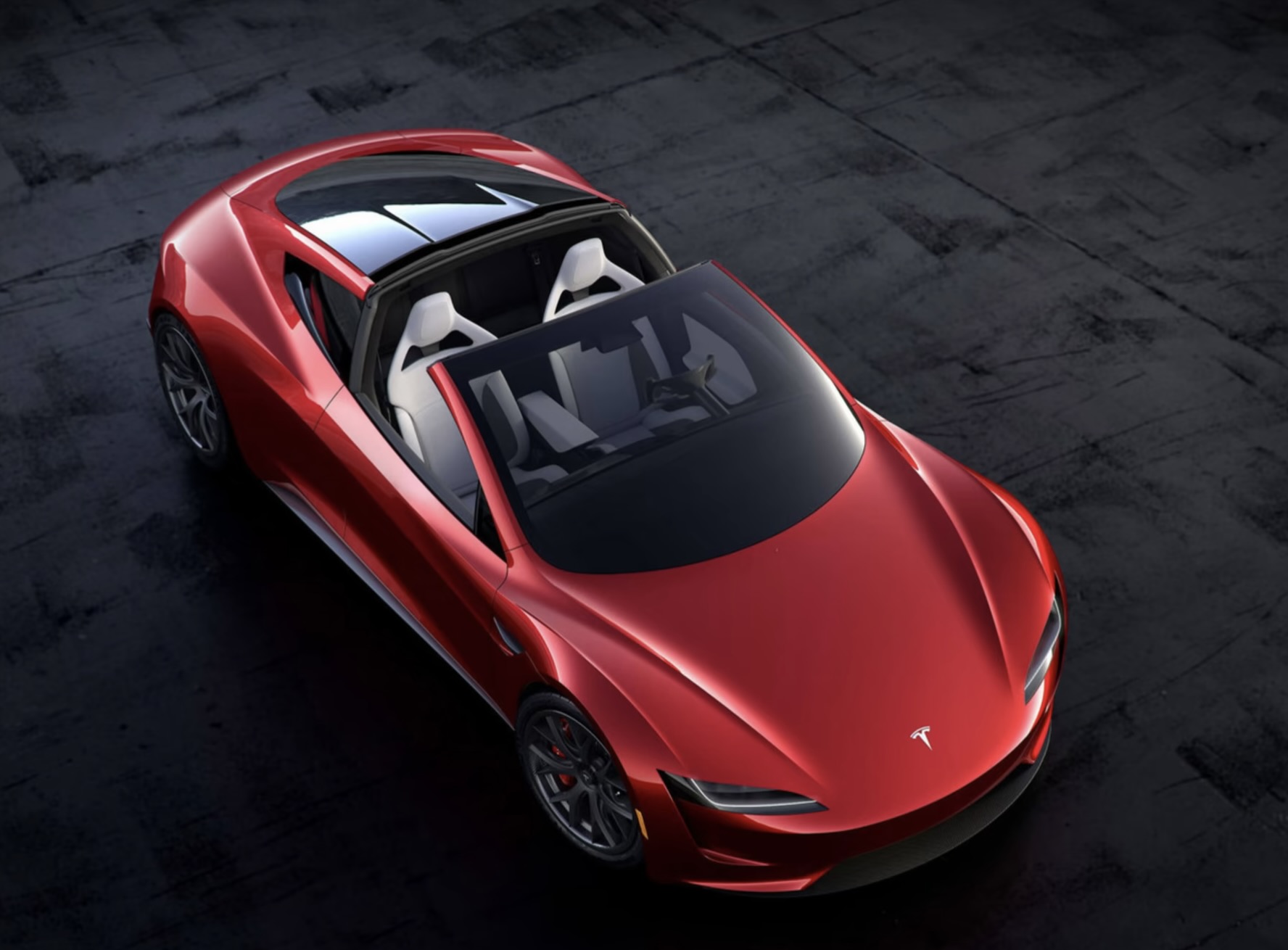
In today’s tech news roundup, we’re highlighting the global launch of the Oppo Reno 12 Series, boasting a 6.7″ Infinite View Screen and powerful AI features. Elon Musk stirs the pot again with claims that the Tesla Roadster might fly. Plus, get the scoop on potential pinch controls for the Galaxy Buds 3 and a vibrant new color for the Galaxy S24 Ultra.
All of this and more is in today’s newsletter below.
The Oppo Reno 12 Series has been launched globally, featuring a 6.7-inch Infinite View Screen, a Dimensity 7300-Energy processor, and a 50MP triple camera system. With a sleek design and AI-powered features like AI Eraser 2.0 and AI Clear Face, these smartphones offer premium specs, including fast charging and expandable storage. Priced competitively, these models will be available in Europe and the UK first.
Elon Musk’s recent claim on X (formerly Twitter) about the Tesla Roadster having flying capabilities has stirred up excitement among industry watchers despite his history of inaccurate claims. The upcoming Roadster, with a promised acceleration of 0-62 mph in just 1.1 seconds and possible flying abilities with a SpaceX option package, has been highly anticipated since its unveiling seven years ago.
The latest rumors suggest a switch from swipe gestures to pinch controls on the Galaxy Buds 3, a feature seen in other tech products. While the design may be more conventional with a stem, the addition of pinch gestures could offer a more natural and reliable user experience.
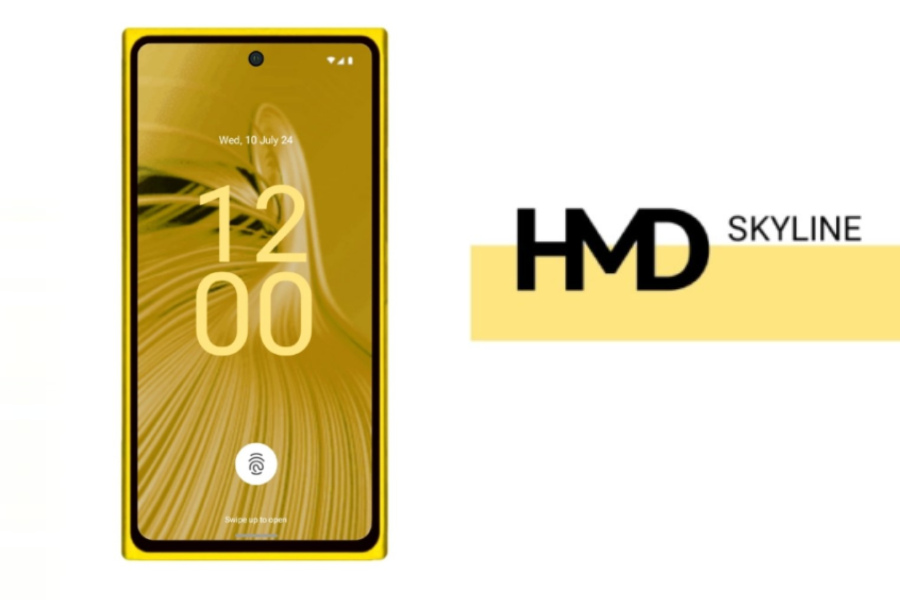
As previously reported, HMD Global is working on a new smartphone called the HMD Skyline. Renders of this new device were leaked earlier this month revealing a Nokia Lumia 920-inspired design. That said, the smartphone has now been spotted on Geekbench, revealing details about its inner workings.
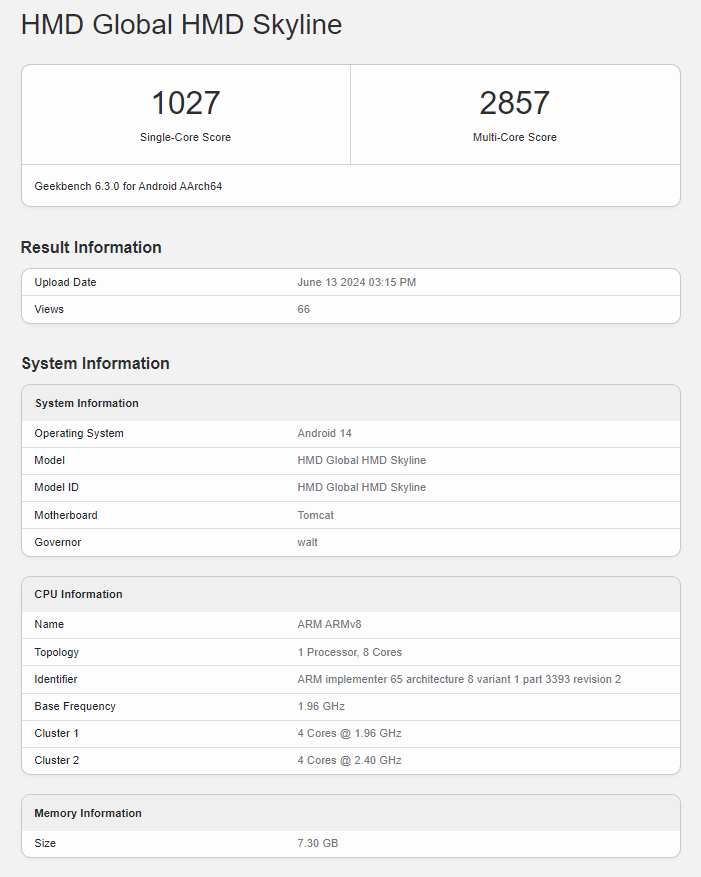
As per the Geekbench listing, the smartphone comes with a motherboard codenamed “Tomcat”, which hosts 8GB RAM along with an octa-core processor that has 4 cores running at 1.96GHz, while the other four are firing at 2.40GHz. Based on these details, the processor is expected to be a Snapdragon 7s Gen 2.
In addition to the processor, the Geekbench listing confirms that the device will launch with Android 14 onboard. Talking about its performance, it scores 1027 points on the single-core test and 2857 points on the multi-core test. Unfortunately, the Geekbench listing does not provide any further details about the device. Luckily, some specifications have previously leaked.
Going by a previous report, the HMD Skyline will feature an FHD+ OLED display with a 120Hz refresh rate and Qualcomm’s Snapdragon 7s Gen 2 SoC. For optics, the device is said to debut with a 108MP main camera, paired with an ultra-wide camera and a third lens, which can either be a macro or a depth sensor. On the front, it is said to come with a 32MP selfie snapper.
The device is said to be powered by a 4,900mAh battery paired with 33W fast charging. The device is said to come with stereo speakers, an in-display fingerprint sensor, and IP67 water and dust proofing. While the pricing is not confirmed, rumors suggest that it could cost in the neighborhood of cost €520 for the 8GB RAM and 256GB storage variant. We’ll have to wait and see if these leaks pan out since reports suggest that the brand is planning on launching the Skyline sometime in July.
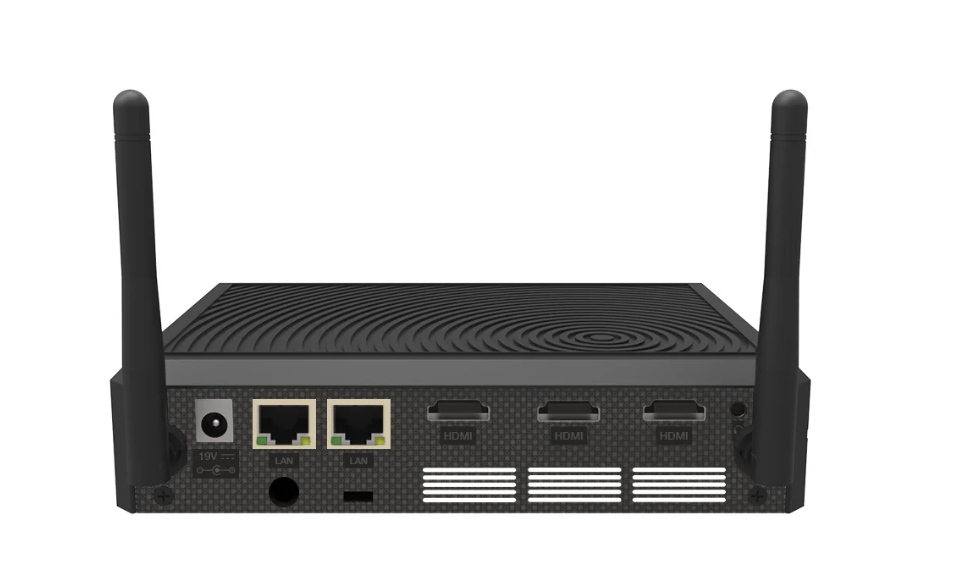
Mini PCs that are tailor-made for businesses are revolutionizing enterprise technology across various sectors, including IoT, digital signage, telemedicine, and more. These compact devices offer extensive customization options and flexibility, allowing businesses to modify components as required.
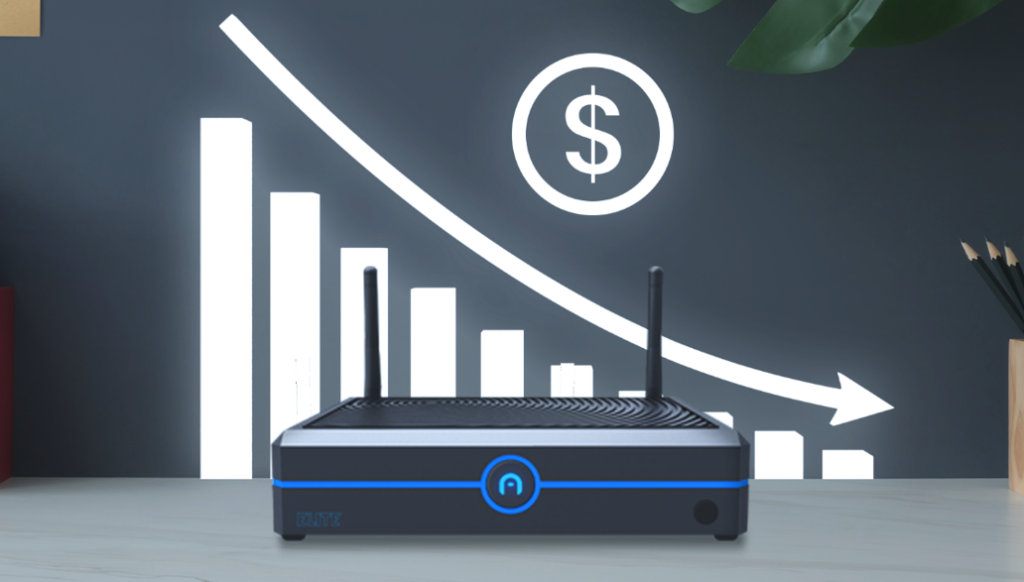
Azulle, one such prominent manufacturer in the mini PC market, has launched the Elite, an industrial-grade, ultra-powerful barebone mini PC designed to meet the dynamic needs of modern businesses.
Key Features of The Elite Barebone Mini PC
The Elite is powered by a 13th Gen Raptor Lake Processor (i3/i5/i7), ensuring robust performance and adaptability. This barebone mini PC allows users to choose their preferred operating system, RAM, and storage configurations, providing a versatile solution for diverse business requirements. It features an array of connectivity options, including dual-band Wi-Fi, 1Gbps LAN, and 2.4Gbps LAN, ensuring a reliable and stable internet connection. With multiple ports and comprehensive wireless capabilities, the Elite serves as a central hub for all connectivity needs.
One of the standout features of the Elite is its 4G LTE module, certified by AT&T. This module ensures continuous internet connectivity, even in remote locations or during power outages, making it an ideal choice for businesses that require reliable wireless connectivity on the go. This advancement underscores the Elite’s capability to maintain operations in challenging environments, ensuring business continuity.
Enhancing Versatility with 4G
The integration of a 4G LTE module into the Elite mini PC significantly enhances its versatility. This module provides faster, broader, and more secure internet connectivity, which is crucial for maintaining business operations. Here are some scenarios where the Elite’s 4G capabilities prove particularly beneficial:
Remote Work and Mobility: Field workers in industries like manufacturing can use IoT devices to update project information on-site. The Elite’s robust build and connectivity make it ideal for powering screens in tractors and remote locations, ensuring data transmission even in areas with subpar internet speeds. This functionality is crucial for maintaining productivity and efficiency in remote work environments.
Backup Connectivity: The Elite can serve as a backup internet source during outages or emergencies, ensuring uninterrupted operations. This is especially important for emergency notification systems, which rely on real-time alerts to function effectively. By providing a reliable backup connection, the Elite helps businesses avoid costly downtime and maintain critical operations during unforeseen events.
Logistics & Transportation: In the logistics sector, the Elite’s 4G connectivity can be utilized in moving vehicles such as police cars, cash-in-transit vehicles, and ambulances. This ensures security and real-time information sharing, which is crucial for effective operations. Fleet managers and drivers benefit from reliable communication for route planning and long-distance deliveries. Public transportation systems can also leverage Elite for improved location accuracy and operational efficiency, enhancing overall service quality.
Temporary Worksites: Retail pop-up shops, exhibition booths, and construction sites can use the Elite for support network operations in temporary locations. For example, construction site managers can update progress and communicate with the main office without a wired internet connection. Sales representatives can handle inventory management and collect customer data seamlessly, facilitating smooth operations at temporary worksites.
Underserved Areas: The Elite is particularly beneficial in areas with limited internet access. It can support online learning resources and virtual classrooms in rural schools and provide telemedicine services in remote medical clinics, addressing significant inequalities in internet access. By offering a cost-effective and reliable connectivity solution, the Elite helps bridge the digital divide and improve access to essential services in underserved communities.
The Azulle Elite barebone mini PC combines high performance, cost-efficiency, and extensive customization options, making it a valuable asset for various industries. Its robust design and connectivity capabilities ensure longevity and reliability, supporting businesses in diverse use cases. Whether you are an enterprise or a small business, the Elite offers unparalleled power and adaptability in a compact package.
Additionally, Azulle provides premium U.S.-based technical and customer support, ensuring a seamless experience before, during, and after purchase.
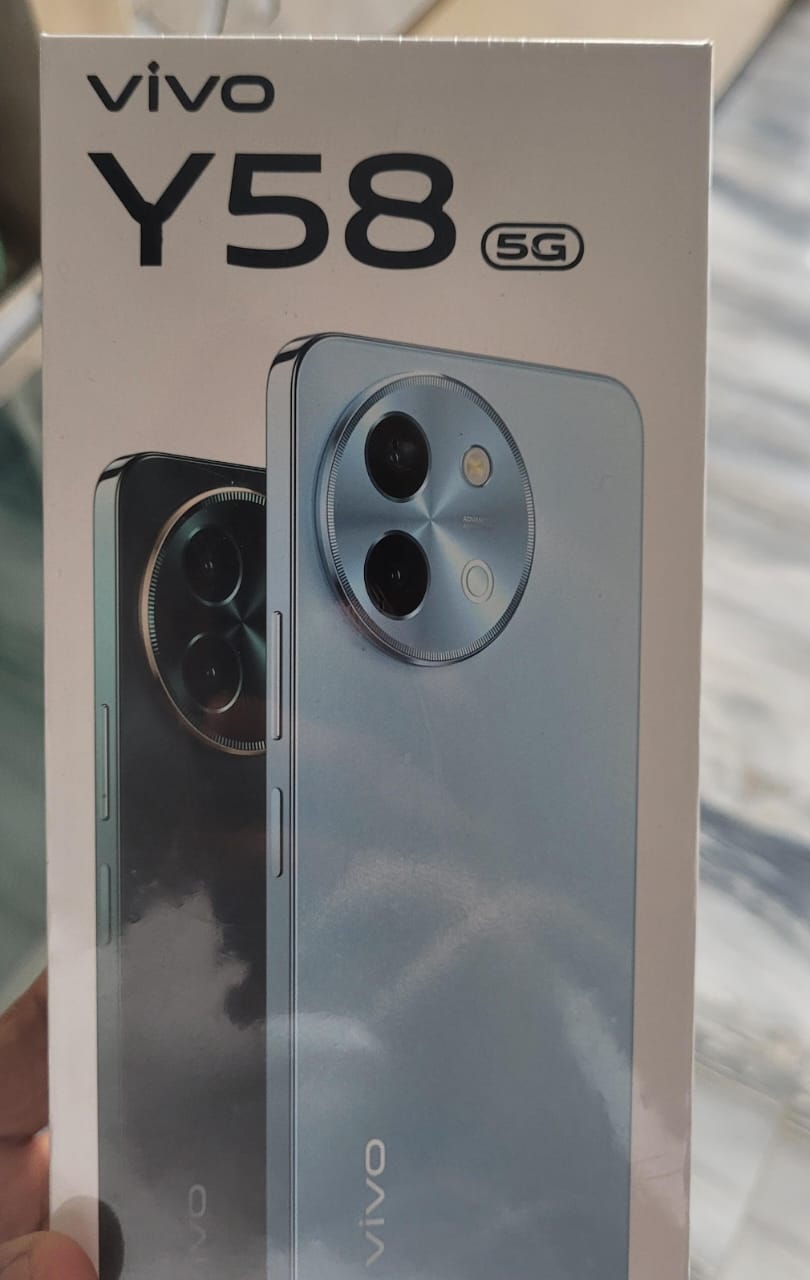
Vivo recently confirmed its intentions to launch a new smartphone in India called the Vivo Y58 5G. The device is slated to debut in India on July 20, however, tipster Sudhanshu Ambhore has spilled the beans about the specifications and pricing.
As per a recent tweet by Sudhanshu on X (formerly Twitter), the Vivo Y58 5G will feature a 6.72-inch LCD display with FHD+ resolution, 120Hz refresh rate, and 1024 nits of peak brightness.
Under the hood, the smartphone will feature a Snapdragon 4 Gen 2 processor, paired with 8GB of RAM and 128GB of internal storage. You can apparently extend it by another 8GB via virtual RAM expansion and bump up the storage to 1TB via a microSD card slot.
For optics, the device is expected to bring a 50 MP primary camera paired with a 2 MP secondary shooter on the back. On the front, it is said to feature an 8 MP selfie camera. The Vivo Y58 5G will be powered by a massive massive 6,000mAh battery pack that supports 44W wired fast charging.
Other notable features include dual speakers, IP64 water and dust resistance, a side-mounted fingerprint scanner, and a 7.99mm thick body weighing 199 grams.
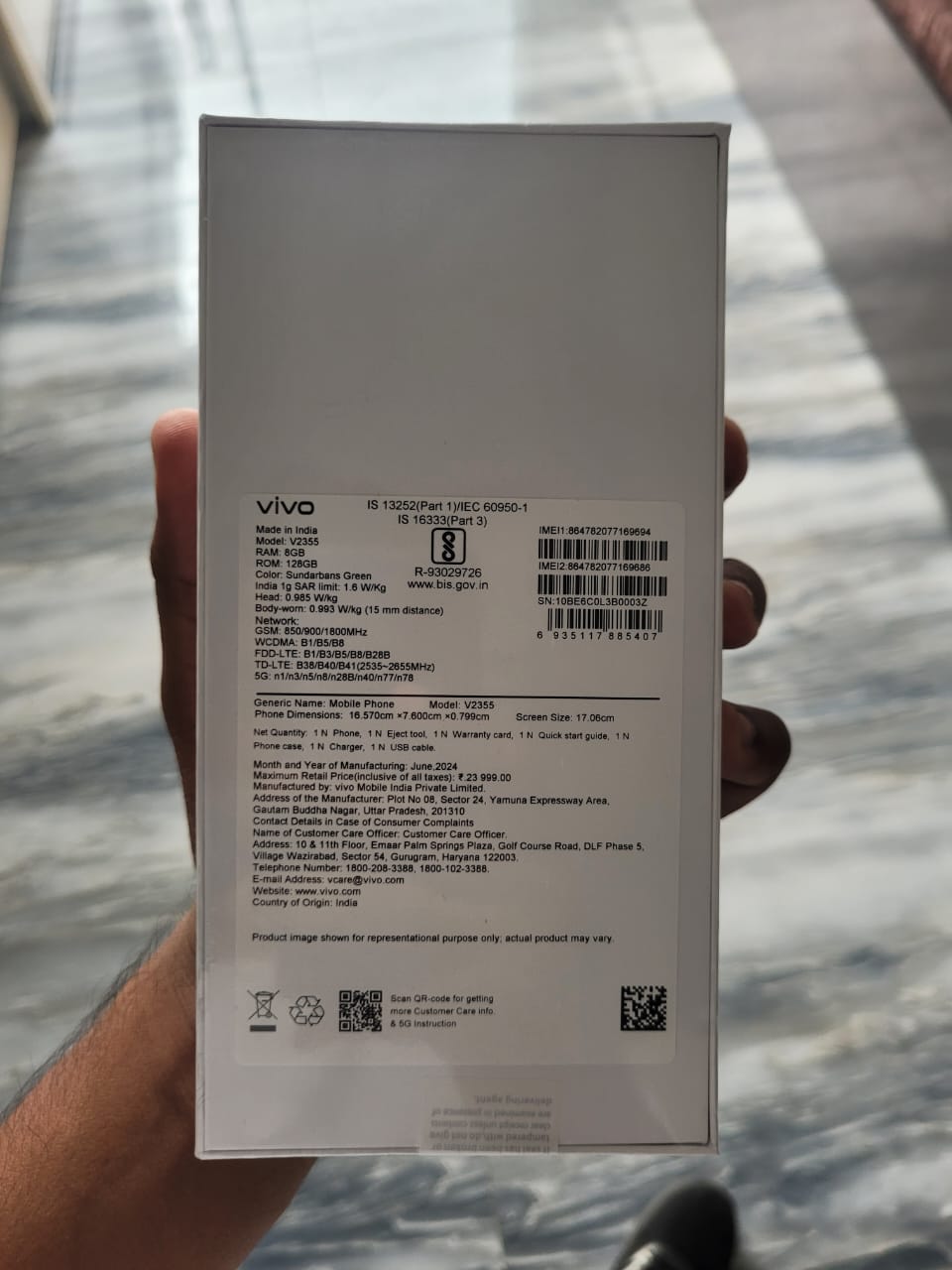
Moving on to the pricing, Sudhanshu says that the 8GB RAM + 128GB storage model will launch at Rs 19,499. The tipster has also shared a box image of the device that mentions the maximum retail price as Rs 23,999, so there is a high chance that this leaked pricing is accurate.
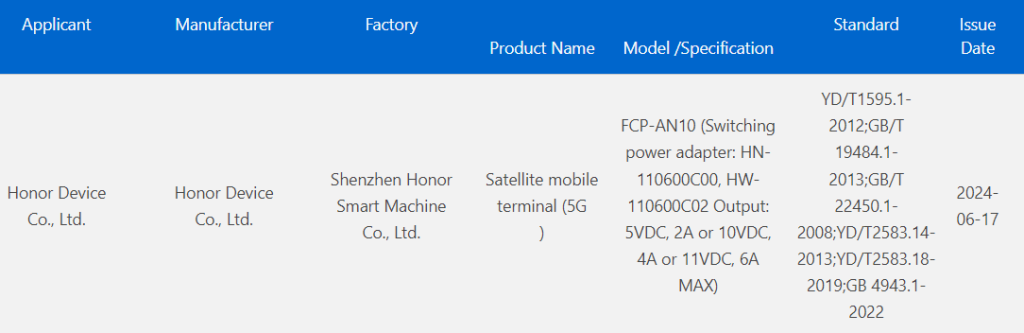
A new Honor phone with model number FCP-AN10 has received approval from the 3C authority in China. The official marketing name of the device is not known yet. However, it is speculated that it could be the forthcoming Magic V3 foldable phone.
Previous reports claimed that the Chinese market would receive the Honor 200 series of smartphones in May, the Magic V Flip in June, and the Magic V3 in July. The Honor 200 series and Magic V Flip debuted as predicted, and now the Magic V3 is expected next month.
Alleged Honor Magic V3 3C certified in China
Alleged Honor Magic V3 3C certified in China
The FCP-AN10 Honor phone, which is believed to be the upcoming Magic V3, has been spotted with a 66W fast charger in 3C’s database. The listing also reveals that the device will be supporting satellite connectivity. Unfortunately, the certification has no other information about the device.
The Magic V3 will come with the likes of the Vivo X Fold 3 Pro and the upcoming Xiaomi Mix Fold 4 in the Chinese market. Like the rival devices, the Magic V3 is also expected to feature the Snapdragon 8 Gen 3 chipset. The rumor mill is yet to reveal the other specs of the V3.
The Magic V2, which debuted in July, was praised for its amazing design by critics and users. The device weighs only 231 grams and has a thickness of only 4.7mm when unfolded. The Snapdragon 8 Gen 2-powered foldable phone has a 7.92-inch cover screen, a 6 43-inch external display, and a 5,000mAh battery with 66W fast charging.
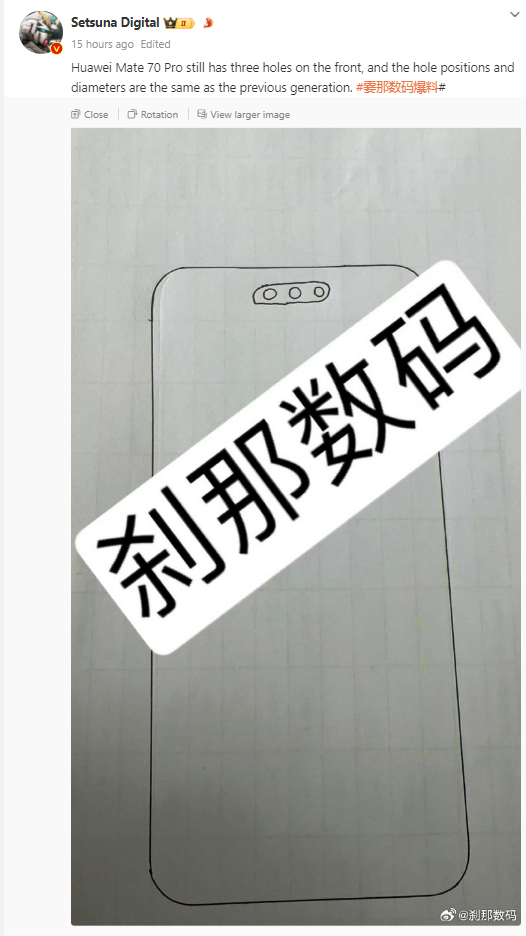
The Huawei Mate 60 series of flagship phones were announced through the Pioneer Program in August 2023 in China. Rumors are rife that Huawei is preparing for the launch of the Mate 70 series, though the official release date has not been announced. There is a possibility that it will launch in August or September of this year. A new leak has appeared on Weibo to showcase the front design of the Mate 70 Pro.
Huawei Mate 70 Pro front design leaked
According to a drawing shared by leaker Setsuna Digital, the Huawei Mate 70 Pro will retain the three front punch holes seen in the Mate 60 Pro, with similar positions and diameters. This suggests the front design will remain largely unchanged, with potential optimizations to the screen frame for a higher screen-to-body ratio.
The Mate 70 Pro’s screen is expected to offer a stronger visual experience, with Huawei being the only manufacturer using this three-hole design. Huawei has thoughtfully included a system function to hide the holes, making the space between them appear black, similar to the iPhone’s Smart Island.
To recall, the Mate 60 Pro’s front features a 13-megapixel ultrawide selfie camera, a 3D ToF sensor, and additional sensors and lasers for 3D face mapping. It is likely that the Mate 70 Pro may continue to feature the same set of sensors on its front.
Regarding the back design, the Huawei Mate 70 series will reportedly feature a circular lens module but with new design elements to enhance recognizability and a business-like appearance. The series will offer both straight-screen and curved-screen options, with the former likely for the standard version and the latter for the Mate 70 Pro and higher-end models.
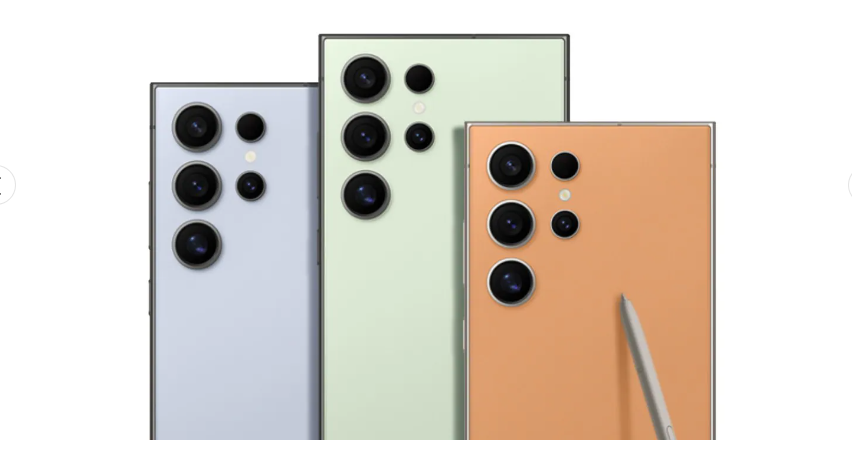
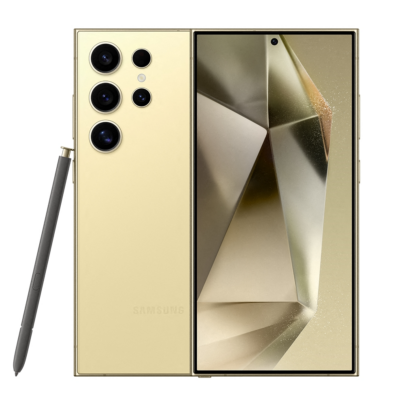
Samsung launched the Galaxy S24 series back in January this year with seven different titanium-themed colors – Titanium Black, Titanium Gray, Titanium Violet, Titanium Green, Titanium Blue, and Titanium Orange. The Galaxy S24 Ultra is currently available in six colors in India – Titanium Black, Titanium Grey, Titanium Violet, Titanium Blue, Titanium Green, and Titanium Orange. Now it seems that Samsung is going to release the Titanium Yellow S24 Ultra in India.
Samsung teasing the color Yellow in India
Samsung teased the yellow color on its social media profiles in India. The company shared an image of a woman holding a yellow sunflower and noted “All set to welcome a fresh new look for something (already) epic! Any idea what it is? Coming soon.” The color of the flower is emphasized in the image, which hints at the release of the yellow color variant of the S24 Ultra in the country. Although the company didn’t give any other hint about a certain product, it is speculated to be the company’s latest Ultra flagship.
Notably, the Titanium Yellow color option is already available in the US. Given the S25 series is still quite a bit away, keeping the S24 series in the conversation is good for Samsung, and a new color option for one of the models is expected to help in this regard.
The 256GB version of the Galaxy S24 Ultra is priced at INR 129,999 ($1,556) in India. The higher 512GB and 1TB versions are priced at INR 139,999 ($1,676) and INR 159,999 ($1,916), respectively. However, you can get an instant bank discount of INR 6,000 by making the purchase through an HDFC Bank credit or debit card. Students can also enjoy an additional 7% discount on the S24 Ultra in the country.
The phone is exclusively powered by the Snapdragon 8 Gen 3 for Galaxy chipset, which features a slightly higher clock speed on the Cortex-X4 prime core (3.39GHz vs 3.3GHz) while the other cores are clocked slightly lower.
The phone is massive with a 6.8-inch display that boasts a Dynamic AMOLED 2x screen with QHD+ resolution, and a 120Hz variable refresh rate. You can learn more about the Galaxy S24 Ultra here.
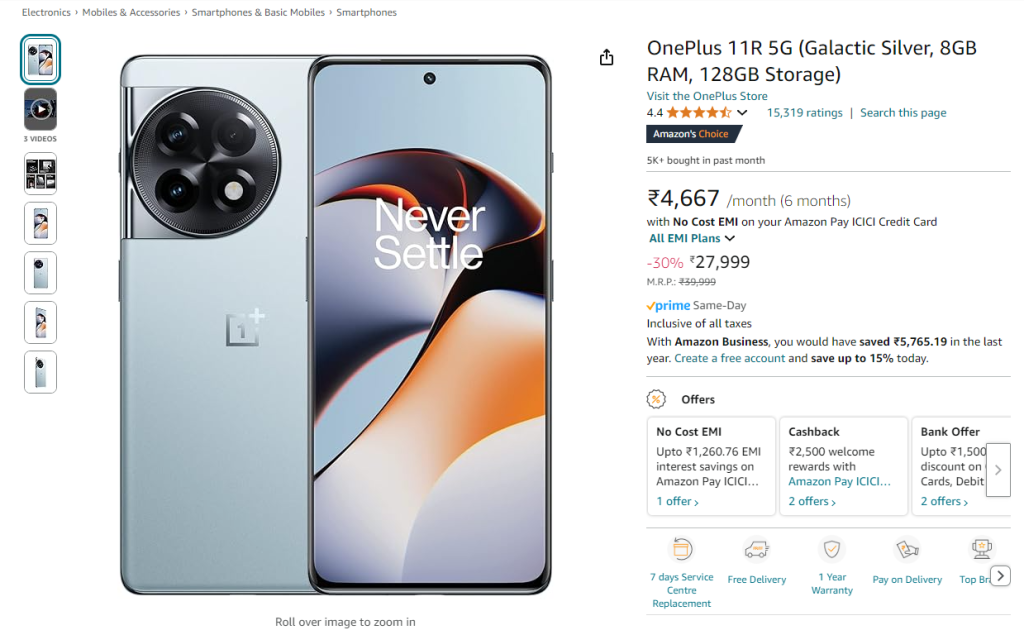
OnePlus recently cut down the price of the OnePlus Nord 3 5G smartphone in India. Now, the brand has also cut down the price of the OnePlus 11R smartphone, dropping it below ₹30,000.
The OnePlus 11R, which launched back in February 2023 with a starting price of ₹39,999 is currently selling for ₹27,999 on Amazon India. For clarity, this offer is available on the 8GB RAM + 128GB storage model. Users can also enjoy free EMI when they make payments with an Amazon Pay ICICI Bank credit card. Here’s what you’ll get for your money.
OnePlus 11R specs:
The OnePlus 11R 5G features a 6.7-inch AMOLED display with a 120Hz refresh rate, a punch-hole design for the front camera, HDR10+ support, an in-display fingerprint sensor, and Dolby Atmos audio.
It is equipped with the Qualcomm Snapdragon 8+ Gen 1 chipset, paired with LPDDR5 RAM and UFS 4.0 storage.
The device launched with Android 13 with OxygenOS 13 and has already received the Android 14-based OxygenOS 14 update. For optics, the OnePlus 11R 5G boasts a triple camera setup on the back, consisting of a 50MP main sensor, an 8MP ultra-wide-angle lens, and a 2MP macro lens. For selfies and video calls, it has a 16MP front camera.
The device houses a 5,000mAh battery that supports 100W super-fast charging. For connectivity, it includes 5G support, Wi-Fi 6E, Bluetooth 5.2, GPS, and a USB Type-C port.
Is the OnePlus 11R worth buying?
The price reduction makes the OnePlus 11R a strong contender in its category. It features the Snapdragon 8+ Gen 1 processor, which is capable of running games like BGMI at high graphics settings and frame rates. The brand has promised three major updates for the device, meaning that it will receive Android 16.
However, other options are worth considering at this price point, such as the recently launched Poco F6 with the Snapdragon 8s Gen 3 chipset, starting at ₹29,999 in India, and featuring UFS 4.0 storage compared to the UFS 3.1 on the OnePlus 11R. Additionally, the Realme GT 6T is a compelling choice in this range, boasting a Snapdragon 7+ Gen 3 chipset and ultra-fast storage.
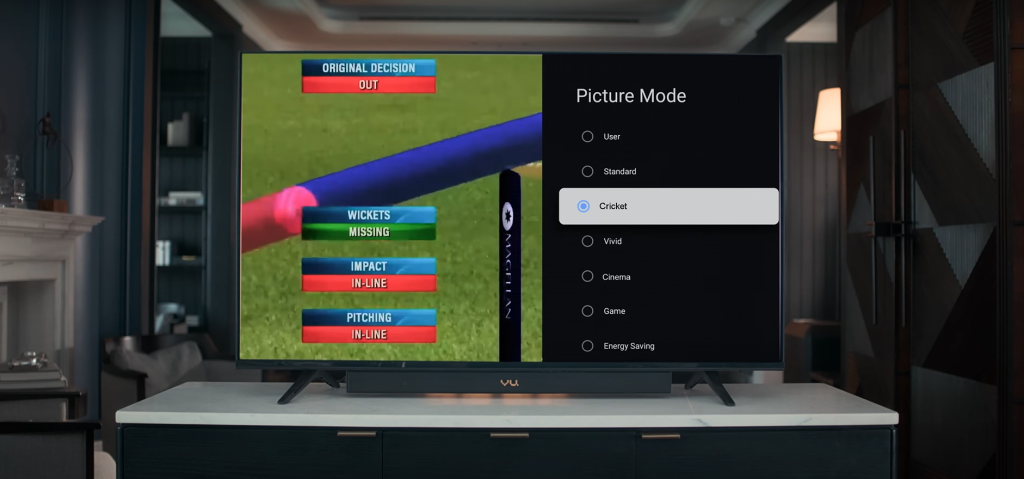
Vu Televisions has introduced its new “Cricket Mode 2024” feature in India. It is designed to enhance the viewing experience for cricket fans. Here is a look what the new feature offers.
Vu Televisions introduces Cricket Mode 2024
According to Vu, the Cricket Mode 2024 feature results from extensive work by engineers and designers at Vu’s New Product Development (NPD) centre, emphasizing the company’s dedication to innovation. The NPD centre at Vu Televisions is a hub for creativity and technological advancement, where top engineers and designers develop new products.
Vu’s Cricket Mode 2024 stands out for several reasons. The picture quality uses advanced motion technology to reduce blur, ensuring fans can follow every fast-paced second of the game. Unlike standard TVs, Vu’s high-quality panel offers clear visibility of the cricket ball during fast motion, with bright and vivid colors free from jitter or blur.
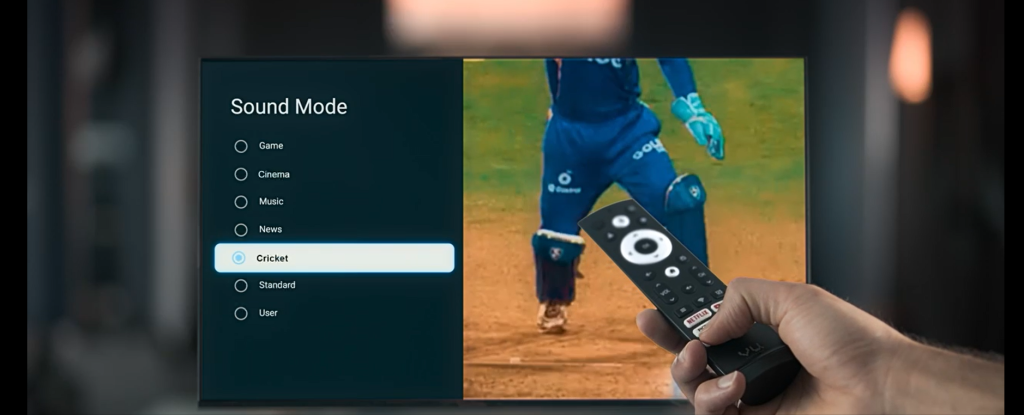
The dedicated audio settings for cricket provide an immersive sound experience, capturing every subtle nuance from the edge of the bat to the roar of the crowd, delivering clear commentary and the excitement of the game with impeccable sound clarity.
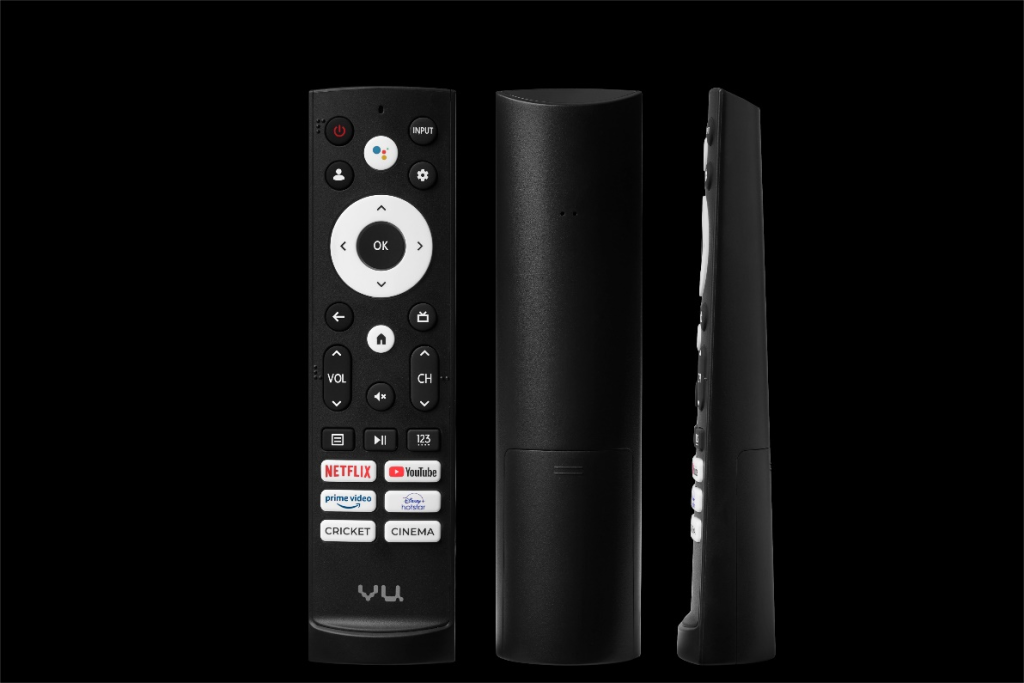
Additionally, the remote features a shortcut button that instantly switches to Cricket Mode 2024, optimizing both picture and sound settings for an enhanced viewing experience. The remote has been rigorously tested for durability to ensure a seamless experience.
Devita Saraf, Founder and CEO of Vu Televisions, emphasizes Vu’s dedication to innovation and delivering exceptional products: “At Vu, we are committed to pushing the boundaries of innovation to create products that provide remarkable experiences. The introduction of Cricket Mode 2024 underscores this commitment to excellence, aiming to offer a viewing experience so immersive and lifelike that it transports you to the cricket field. Our team of engineers and designers has invested their passion and expertise to ensure this feature exceeds expectations for cricket enthusiasts worldwide.”
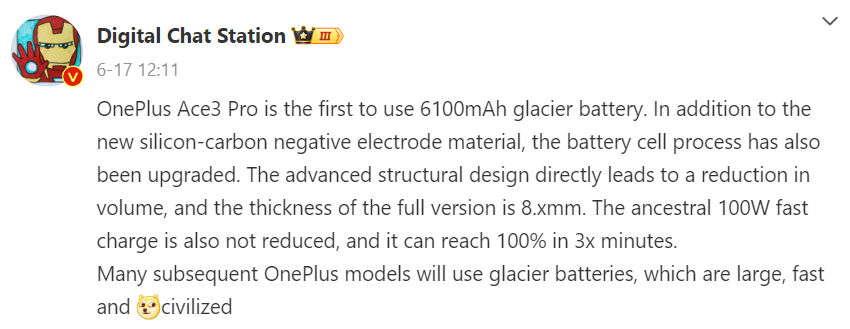
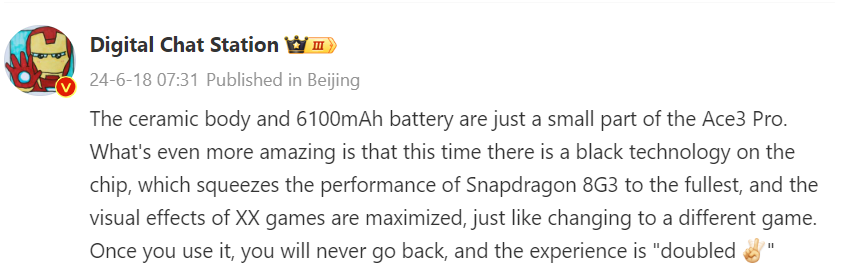
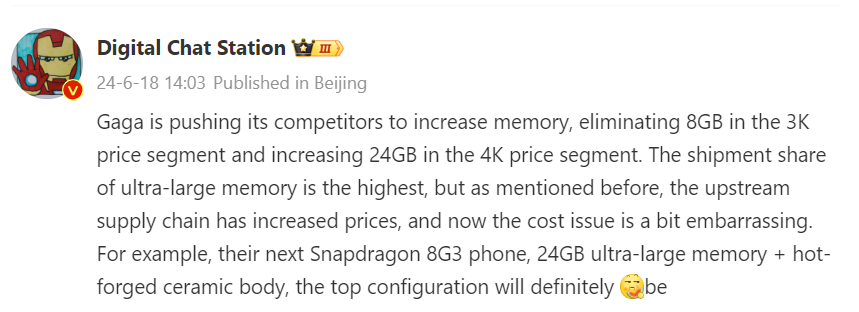
OnePlus is soon going to announce the OnePlus Ace 3 Pro, an affordable flagship phone, in the Chinese market. One of the major attractions of the device is that it will be equipped with the so-called “glacier battery,” jointly developed by OnePlus and CATL. Tipster Digital Chat Station recently claimed that it incorporates new silicon-carbon anode materials, which will make it possible for the Ace 3 Pro to pack a larger battery without any significant increase in thickness. In recent Weibo posts, the tipster revealed a few more details about the device, including its price.
OnePlus Ace 3 Pro key details tipped
According to DCS, the OnePlus Ace 3 Pro will feature a ceramic body with a massive 6100mAh battery inside. He previously revealed that, despite packing a big battery, the Ace 3 Pro will have a thickness of around 8.x mm. Like its predecessor, it will support 100W fast charging and be able to achieve a full charge in just 30 minutes.
According to DCS, the OnePlus Ace 3 Pro is equipped with advanced technology that enhances the performance of the Snapdragon 8 Gen 3, resulting in significantly improved gaming visuals and an entirely new gaming experience. The said technology is expected to significantly boost GPU performance.
The leaker said that OnePlus is pushing its competitors to launch smartphones with increased memory capacities, phasing out 8 GB of RAM in the 3000 Yuan (~$415) price range and introducing 24 GB of RAM in the 4000 Yuan (~$550) range. While OnePlus leads in market share for devices with ultra-large memory, rising costs in the supply chain present some challenges. He hinted that the top-tier variant of the Ace 3 Pro will feature 24 GB of RAM and a hot-forged ceramic body. Hence, it appears that this model could be priced above 4,000 Yuan.
Other reports have revealed that the OnePlus Ace 3 Pro will have a 6.78-inch AMOLED screen that offers a 1.5K resolution and a 120Hz refresh rate. The device will feature up to 1 TB of UFS 4.0 storage, a 16-megapixel front camera, and a 50-megapixel (OIS) + 8-megapixel (ultra-wide) + 2-megapixel (macro) triple camera unit. It will have a metal middle frame and will also come in leather and glass back options.
Motorola launched the Edge 50 Ultra in the European market back in April, and it has recently made its debut in the Indian market. Meanwhile, iQOO launched the iQOO 12 in December last year in India. Both smartphones target the flagship killer segment, offering high-end features and powerful specifications. Here’s a detailed comparison to help you decide which one might be the better choice for you.
The Motorola Edge 50 Ultra boasts a 6.7-inch 1.5K 10-bit pOLED display with a 144Hz refresh rate. This translates to smoother visuals and better responsiveness. The iQOO 12 counters with a slightly larger 6.78-inch 1.5K LTPO AMOLED display, also offering a 144Hz refresh rate.
Here, the LTPO technology in iQOO 12 promises potentially better battery efficiency by dynamically adjusting the refresh rate based on content. The Edge 50 Ultra’s display boasts a peak brightness of 2500 nits, while the iQOO 12 takes the lead with up to 3000 nits peak brightness. Both screens offer HDR10+ support.
2. Performance
Under the hood, the iQOO 12 is powered by the robust Snapdragon 8 Gen 3 SoC, while the Edge 50 Ultra features the slightly less powerful Snapdragon 8s Gen 3. Both processors are top-tier chipsets, ensuring exceptional performance.
The Edge 50 Ultra offers up to 12GB of LPDDR5X RAM in India and a staggering 1TB of UFS 4.0 storage, while the iQOO 12 provides up to 16GB of LPDDR5X RAM and 512GB of UFS 4.0 storage. The iQOO 12 also benefits from its self-developed Q1 chip, enhancing frame rate stability and optimizing gaming performance.
3. Camera
Both phones come with a triple rear camera setup with a 50MP main sensor. The Edge 50 Ultra complements it with a 50MP ultrawide sensor with macro capabilities and a 64MP 3x telephoto lens. The iQOO 12 offers a similar 50MP ultrawide sensor but uses a 64MP 3x periscope telephoto lens, which could offer better image quality at longer zoom ranges. Both phones boast a 50MP front camera for high-resolution selfies.
When it comes to the front camera, the Edge 50 Ultra boasts a 50MP snapper, whereas the iQOO 12 is equipped with a 16MP snapper. In terms of resolution, the Edge 50 Ultra clearly has the advantage.
The Edge 50 Ultra highlights features like Moto AI and Photo Enhancement Engine with functionalities like Adaptive Stabilization and Auto Focus Tracking. iQOO 12 counters with a multi-frame fusion algorithm and a bionic night sky algorithm for low-light photography. Ultimately, camera performance can be subjective, and in-depth reviews will be necessary to determine which phone captures better photos and videos.
4. Battery and Charging
The Motorola Edge 50 Ultra comes with a slightly smaller 4500mAh battery compared to the iQOO 12’s 5000mAh battery. However, the Edge 50 Ultra boasts faster charging capabilities with 125W TurboPower wired charging, 50W wireless charging, and also 5W reverse charging. The iQOO 12 offers a respectable 120W fast charging.
5. Design and Build Quality
The Motorola Edge 50 Ultra exudes elegance with its sandblasted aluminum frame, Corning Gorilla Glass Victus protection, and the use of real wood in the Nordic Wood variant. The vegan leather back in Forest Grey and Pantone Color of the Year, Peach Fuzz, further adds to its aesthetic appeal. The phone is IP68-rated for dust and water resistance, ensuring durability in various environments.
The iQOO 12, on the other hand, features an aviation-grade aluminum middle frame and boasts a sleek design with the largest vapor chamber in iQOO’s history for efficient heat dissipation. Its Legend and Alpha color options cater to different style preferences. However, it only offers IP64 dust and splash resistance, which might be a concern for some users.
6. Software
Both phones run the latest Android 14 operating system. Motorola offers a near-stock Android experience, while iQOO 12 comes with their Funtouch OS 14 on top. This means the Motorola option might offer a cleaner and more familiar interface, while the iQOO offers potentially more customization options. Both phones are promised software updates for a similar timeframe.
7. Pricing
In India, the Motorola Edge 50 Ultra initially priced at Rs. 59,999, becomes significantly more attractive with a limited-period offer of Rs. 5,000 off and an additional Rs. 5,000 instant discount with ICICI Bank cards. This brings its effective price down to Rs. 49,999, making it considerably cheaper than the iQOO 12’s base model, which starts at Rs. 52,999.
8. Verdict
Both devices offer strong performance, similar camera setups, and impressive displays.
However, the Edge 50 Ultra stands out with its elegant design incorporating premium materials like real wood and vegan leather, along with superior water and dust resistance (IP68). It also offers the convenience of wireless charging and boasts a slightly brighter display.
The iQOO 12 counters with a larger battery, specialized gaming enhancements like the Q1 chip and vapor chamber cooling, and unique color options.
In conclusion, choosing the right one involves carefully considering individual needs and preferences to make an informed decision.
We use cookies on our website to give you the most relevant experience by remembering your preferences and repeat visits. By clicking “Accept”, you consent to the use of ALL the cookies.
This website uses cookies to improve your experience while you navigate through the website. Out of these, the cookies that are categorized as necessary are stored on your browser as they are essential for the working of basic functionalities of the website. We also use third-party cookies that help us analyze and understand how you use this website. These cookies will be stored in your browser only with your consent. You also have the option to opt-out of these cookies. But opting out of some of these cookies may affect your browsing experience.
Necessary cookies are absolutely essential for the website to function properly. This category only includes cookies that ensures basic functionalities and security features of the website. These cookies do not store any personal information.
Any cookies that may not be particularly necessary for the website to function and is used specifically to collect user personal data via analytics, ads, other embedded contents are termed as non-necessary cookies. It is mandatory to procure user consent prior to running these cookies on your website.