The Xiaomi Disney Strawberry Bear Backpack is now available on Giztop store.
The Xiaomi Disney Strawberry Bear Backpack features a durable construction with different materials, depending on the color option. The Space Black variant is made of 100% polyester with a PU coating, while the Morandi Gray variant combines 40% nylon and 60% polyester. The backpack’s dimensions are 330*135*460 mm, providing ample space for all your essentials.
One of the standout features of this backpack is its versatility. It is designed to cater to different needs, whether you’re traveling or using it for your daily commute. With its sleek design and spacious compartments, you can comfortably store and organize your belongings, including your laptop, notebooks, water bottle, and other essentials.
The Xiaomi Disney Strawberry Bear Backpack is available for purchase on Giztop, and the price is set at $29. The best part is that Giztop offers worldwide shipping, so no matter where you are, you can easily get your hands on this trendy backpack.
If you are into Strawberry Bear accessories, also checkout the Xiaomi Civi 3 Strawberry Bear Limited edition model on Giztop.
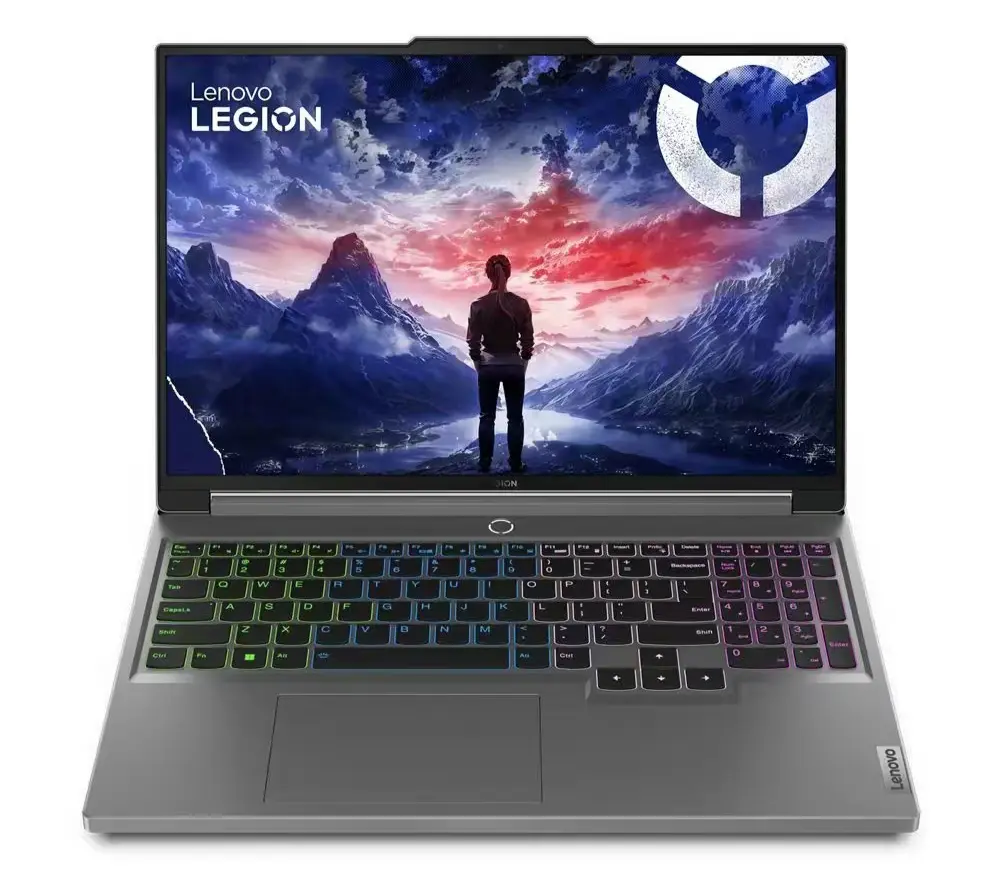
In a recent announcement, Lenovo has revealed the upcoming release of the latest iteration of its popular gaming notebook, the Legion Y7000P. The primary focus of this upgraded model is on its redesigned aesthetics and enhanced core features.
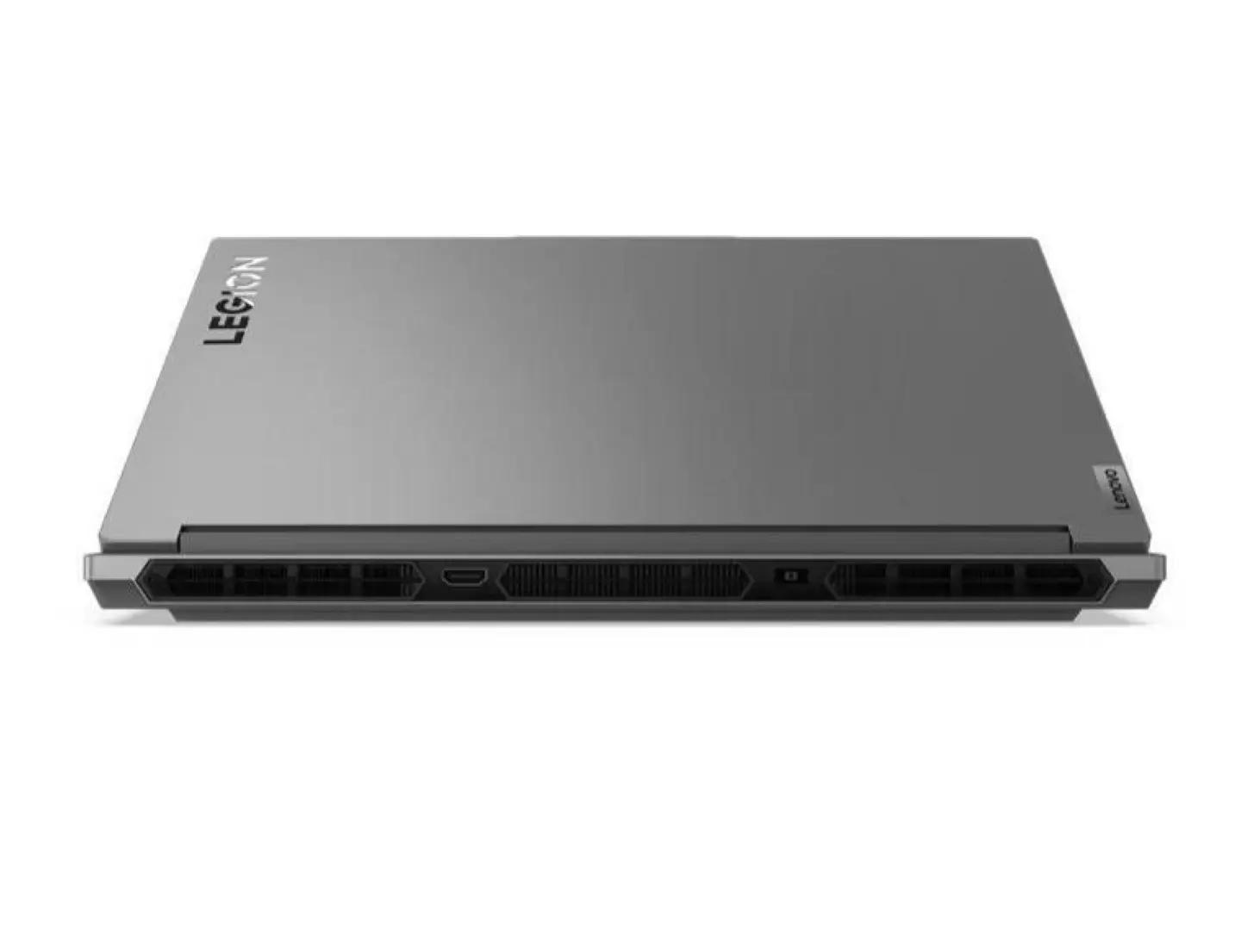
The 2024 Lenovo Legion Y7000P gaming laptop showcases a sleek redesign, featuring a new rear air outlet configuration. The images released depict a larger rear vent, accompanied by the absence of air outlets on both sides, giving the laptop a distinctive and modern appearance.
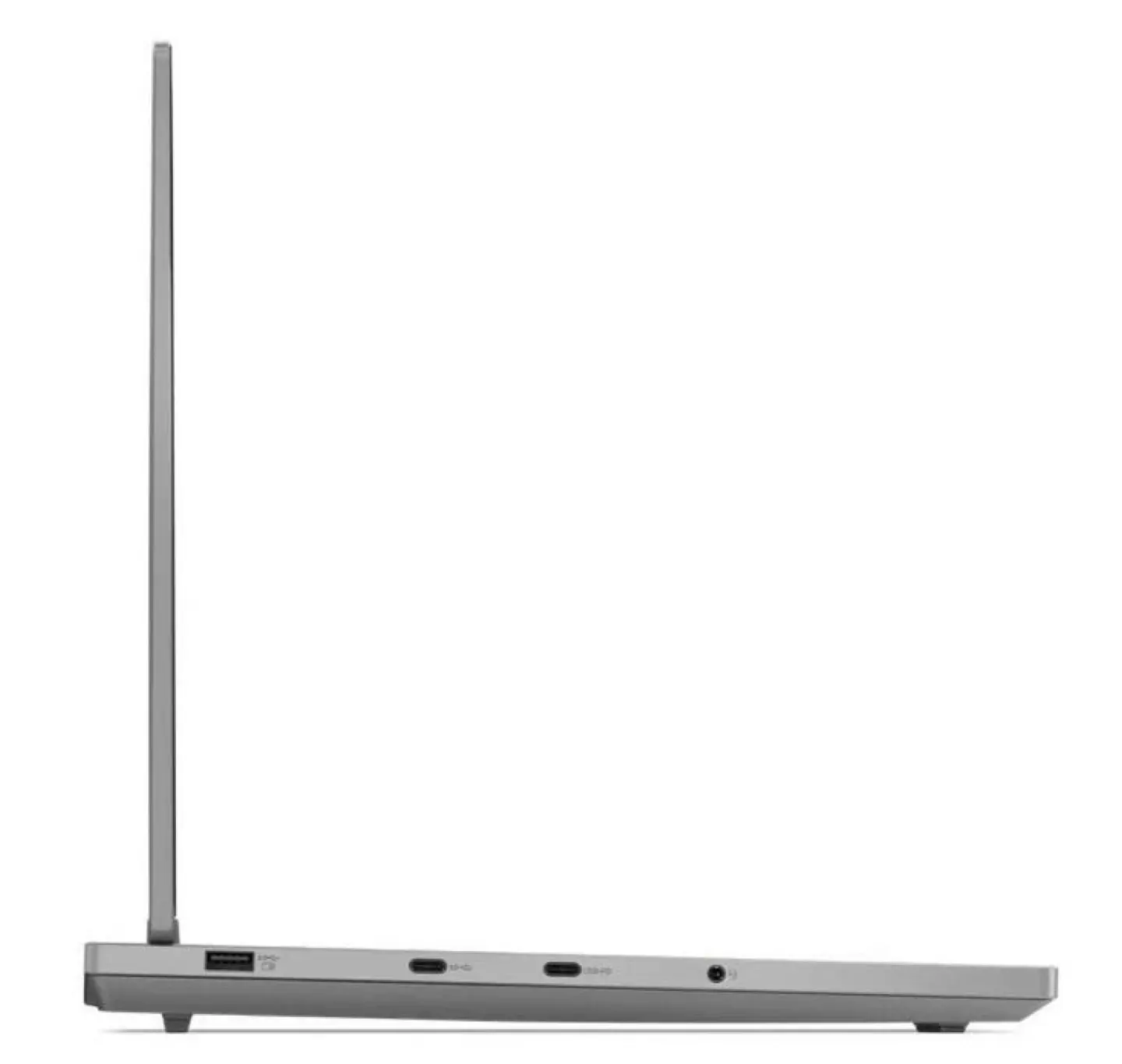
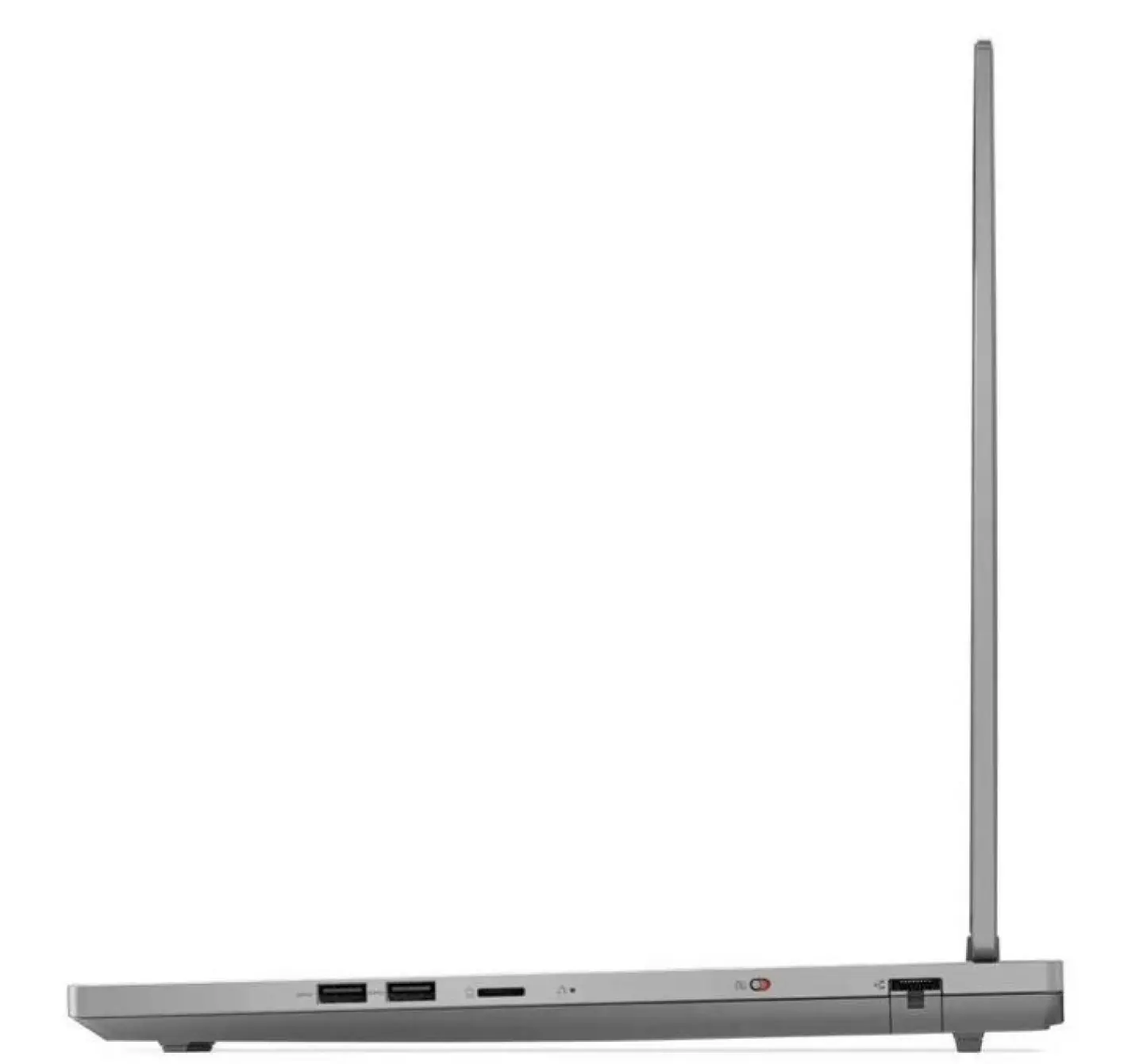
In terms of connectivity, the Legion Y7000P 2024 boasts a rear square power interface and HDMI port. On the left side, users will find one USB-A, two USB-C ports, and a 3.5mm audio interface. Meanwhile, the right side is equipped with two USB-A ports, a microSD card slot, and an RJ45 network port.
Geekbench recently showcased Lenovo’s new gaming model, expected to be the Legion Y7000P 2024. This laptop is anticipated to feature an i7-14650HX processor and an RTX 4060 graphics card. Noteworthy is the i7-14650HX processor, equipped with 8 performance cores and 8 efficiency cores, delivering a frequency reaching 5.18 GHz during testing. This marks a significant upgrade from the current i7-13650HX model, with two additional large cores and a higher frequency.
Amidst the preparations for CES 2024, where leading OEMs are gearing up to unveil their newest laptops, Lenovo is set to introduce the Legion Y7000P laptop in January.
The highly anticipated Xiaomi Civi 3 Strawberry Bear Limited Edition is finally here, and is now available for purchase on Giztop! This special edition smartphone is sure to catch the attention of Xiaomi fans and collectors alike, thanks to its unique design and impressive features.
The Xiaomi Civi 3 Strawberry Bear Limited Edition is a smartphone that combines cutting-edge technology with a playful design. The device features a vibrant pink color scheme, with adorable strawberry bear on the back. It’s the perfect choice for those who want a device that stands out from the crowd.
But the Xiaomi Civi 3 Strawberry Bear Limited Edition is not just a pretty face. Underneath its charming exterior, the smartphone packs some serious power. It boasts a powerful Qualcomm Snapdragon processor, ensuring smooth performance and speedy multitasking. The device also comes with a high-resolution AMOLED display, delivering vibrant colors and sharp details. And with a large battery capacity, you can enjoy hours of uninterrupted usage on a single charge.
The best part is that the Xiaomi Civi 3 Strawberry Bear Limited Edition is now available for purchase worldwide on Giztop. So no matter where you are located, you can easily get your hands on this fantastic device for $599.
Nvidia, the global chip giant, and its workforce have come together to raise a staggering $15 million for non-profit organizations, extending support to civilians affected by the Israel-Hamas war. This monumental donation is the largest in Nvidia’s 30-year history.
Thousands of Nvidia employees spanning 30 countries actively participated in a groundbreaking fundraising campaign, resulting in a remarkable $5 million contribution. Notably, Nvidia tripled this sum through a company matching program, adding an unprecedented $10 million to the collective employee donations.
With a significant presence in Israel, where approximately 3,200 employees are based, Nvidia’s donation adds significance. Since the acquisition of Mellanox in 2017, Israel has become a strategic center for the company, and this substantial contribution emphasizes a commitment to the well-being of the communities in which Nvidia operates.
source: Nvidia
The donated funds are directed towards various non-profit organizations, allowing employees to choose recipients. This includes notable organizations such as United Hatzalah, Jewish Agency for Israel, JGive fund, Magen David Adom, Zaka, Doctors Without Borders, IsraAID Global Humanitarian Assistance, and World Central Kitchen.
Nvidia’s support extends beyond financial aid, with hundreds of laptop computers donated to families evacuated from Israel’s northern and southern borders. Additionally, the company’s Yokneam office cafeteria has been transformed into a cooking kitchen, providing over 15,000 hot meals to those affected by the conflict.
Amidst the humanitarian efforts, the capture of Avinatan Or, a 30-year-old Nvidia engineer, at the Nova music festival on October 7, has drawn widespread support. The company expresses gratitude for the global outpouring of prayers and support for the safe return of their colleague and others held captive.
Nvidia’s initiative is not isolated in the tech industry, with other multinational technology companies, including Intel and Microsoft, also actively supporting their employees and communities in Israel during these challenging times.
Nvidia emphasizes the historical significance of this donation, not just in terms of financial magnitude but also as a testament to the company’s commitment to humanitarian causes. The $15 million raised stands as a landmark contribution during a critical period, showcasing the impactful role corporations and their employees can play in times of crisis.
Honor is expected to launch the Honor Magic 6 series in China in January. According to a leak from tipster Digital Chat Station, two flagship phones with a focus on photography are expected to be announced around Jan. 8 and Jan. 10 in the home market. This has led to speculation that both the Oppo Find X7 series and the Honor Magic 6 lineup might make their debut during this timeframe. However, a recent update indicates that the Magic 6 series could potentially be unveiled on Jan. 11
Magic 6 series launch date (expected)
Reports have claimed that the upcoming Magic 6 series will include multiple models, including the Honor Magic 6 Porsche Design. The above screenshot that is being circulated on Weibo suggests that the pre-sale period for the Honor and Porsche Design flagships will end on Jan. 11. The screengrab seems to belong to a Chinese retailer site, but there hasn’t been an official announcement on the Magic 6 series’ pre-sale period. Nevertheless, the listing suggests that the Magic 6 series will be announced on Jan. 11 in the Chinese market.
The Honor Magic 6 series is expected to come equipped with the Snapdragon 8 Gen 3 chipset. It is speculated that the topmost model in the series, which appears to be the Honor Magic 6 Pro, will come with support for two-way satellite connectivity.
One of the major highlights of the Magic 6 lineup is that it is expected to feature the one-inch, 50-megapixel OmniVision OV50K primary camera. This will allow it to rival the likes of the Oppo Find X7 Ultra, the Xiaomi 14 Ultra, and the Vivo X100 Pro+, which are expected to feature the one-inch, 50-megapixel Sony Lyt-900 main camera.
If the Magic 6 series is really set to debut on Jan. 11, the company may release an official confirmation later this week or in the coming week.
Almost everybody gets a lot of mails on a daily basis. In October this year, Google announced that it would introduce a new set of rules to combat spam emails. One of these included easier unsubscription. However, the exact timeline for when these rules would come into effect remained unclear. Now, the search giant has quietly rolled out an unsubscribe button but only for iOS users.
Gmail lets users easily unsubscribe from unwanted mails on iOS
Google has silently started rolling out an ‘unsubscribe’ button in the Gmail app on iOS. This is a greatly welcome move as it will let users to get rid of unwanted mails such as promotions, newsletters, spam, and in short mails that the user did not sign up for.
The ’unsubscribe’ button is located next to the sender’s name or just below the subject line to the right side (first spotted by Android Authority). Tapping on it will open a pop-up if the user indeed wants to unsubscribe. Confirming will allow Gmail to send an email from the user’s account to the sender’s ID. This approach requires only a single tap and no scrolling.
The new unsubscribe button is far more convenient and saves users a lot of time than the current approaches. Users had to go to the bottom of the email content and search for the sender’s unsubscribe button. Another way was to click on the three-dot menu at the top of the message window and then choose ‘unsubscribe’.
The unsubscribe button on Gmail is only available on iOS at the moment. Although the exact timeline is unclear, we can expect it to arrive on Android devices soon. The new approach is also available on the web version that is next to the sender’s name however, some mails will require the user to go to their website to unsubscribe.
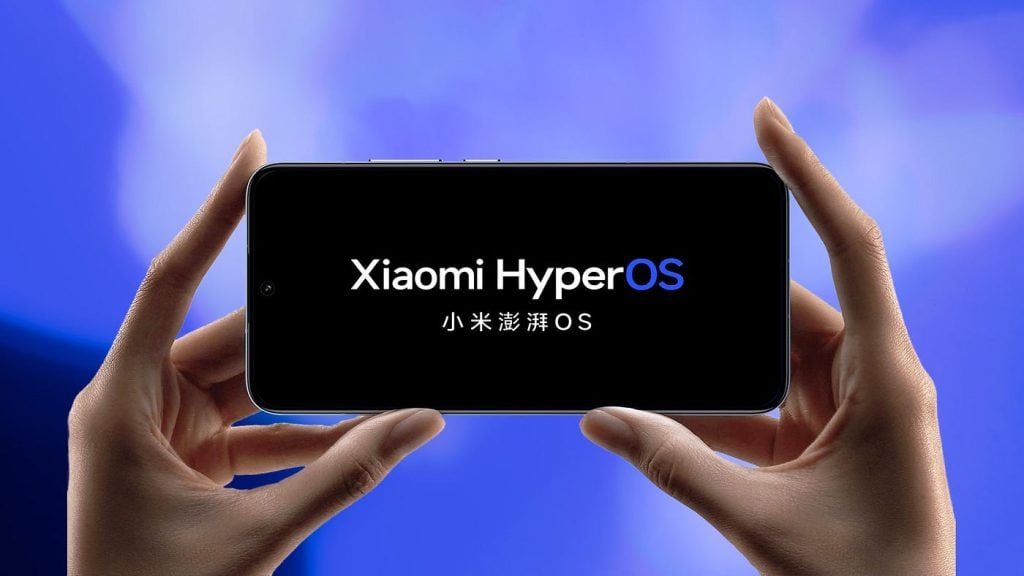
Following the initial list of smartphones in October, Xiaomi has now announced the second batch of devices eligible for HyperOS update. This latest batch consists of both Xiaomi and Redmi devices, including popular models like the Xiaomi 12S Ultra, Redmi K50 Gaming, and Xiaomi Pad 5 Pro.
The rollout is expected to commence sometime between January and June 2024, meaning specific dates may vary for each device. Here is the complete list of Xiaomi and Redmi devices slated to receive the HyperOS update in the second batch:
Xiaomi
Mi Mix Fold
Xiaomi Mix 4
Xiaomi 12S Ultra
Xiaomi 12S Pro
Xiaomi 12S
Xiaomi 12 Pro Dimensity
Xiaomi 12 Pro
Xiaomi 12
Xiaomi 12X
Xiaomi 11 Ultra
Xiaomi 11 Pro
Xiaomi 11
Xiaomi 11 Lite 5G NE
Xiaomi 10S
Xiaomi 10 Ultra
Xiaomi 10 Pro
Xiaomi 10
Xiaomi Civi 3
Xiaomi Сivi 2
Xiaomi Civi 1S
Xiaomi Civi
Redmi
Redmi K60E
Redmi K50 Ultra
Redmi K50 Gaming
Redmi K50 Pro.
Redmi K50
Redmi K40S
Redmi K40 Gaming
Redmi K40 Pro+
Redmi K40 Pro
Redmi K40
Redmi Note 13 Pro+ 5G
Redmi Note 13 Pro 5G
Redmi Note 13 5G.
Redmi Note 13R Pro
Redmi 13R 5G
Redmi Note 12 Turbo
Redmi Note 12T Pro
Redmi Note 12 Pro speed edition
Redmi Note 12 Pro+ 5G
Redmi Note 12 Pro 5G
Redmi Note 12 5G
Redmi Note 12R Pro
Redmi Note 12R 5G
Note 12R
Redmi 12 5G
Redmi Note 11T Pro
Redmi Note 11 Pro
Redmi Note 11T Pro+
Redmi Note 11 Pro+
Redmi Note 11 5G
Redmi Note 11R
Redmi Note 11E Pro
Redmi Note 11E
Redmi 12C
Tablet
Xiaomi Pad 5 Pro 12.4
Xiaomi Pad 5 Pro SG
Xiaomi Pad 5 Pro
Xiaomi Pad 5
Redmi Pad SE
Redmi Pad
Keep in mind that this upgrade plan is specifically for China for now. Xiaomi has, however, announced a global HyperOS rollout plan a week earlier — which will begin in Q1 2024.
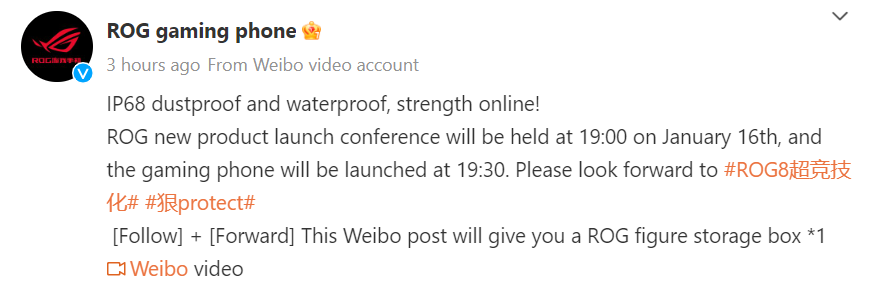
Asus is scheduled to announce the ROG Phone 8 series on Jan. 8 through the CES (Consumer Electronics Show) 2024 event. Later on, on Jan. 16, the ROG-series gaming phones will be announced for the Chinese market. Today, the brand confirmed the IP rating of the ROG Phone 8 series.
ROG Phone 8 series to feature IP68-rated chassis
As can be seen in the above teaser, Asus has officially confirmed that the ROG Phone 8 series will come with an IP68-rated chassis. It means that the ROG Phone 8 series will feature a water- and dust-resistant design, providing users with enhanced durability and protection against the elements. The IP68 rating ensures that the chassis can withstand submersion in water up to a certain depth and is tightly sealed to prevent dust particles from entering, offering users a more robust and reliable gaming smartphone experience. It is a notable improvement from the ROG Phone 7’s IP54 and the ROG Phone 6 series’ IPX4 ratings.
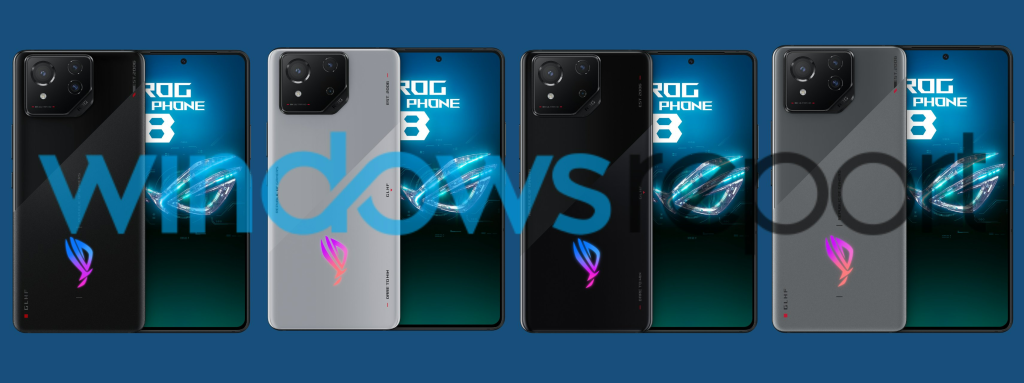
Previous teasers about the ROG Phone 8 series have revealed that it will sport a new display design. Instead of the thick bezels seen on predecessor models, the ROG Phone 8 and 8 Pro will arrive with a punch-hole display surrounded by slim bezels. The brand also confirmed that the ROG Phone 8 series will support gimbal stabilization for recording stabilized footage.
ASUS ROG Phone 8 series leaked renders by WindowsReport
In the Chinese market, the ROG Phone 8 series will rival the Red Magic 9 Pro series. Like the Nubia gaming phones, the ROG Phone 8 and 8 Pro will feature the Snapdragon 8 Gen 3 chipset.
It appears that the ROG Phone 8 series won’t strictly adhere to the conventional gaming phone model of its predecessors. Instead, it appears to be performance-oriented with an added emphasis on features such as an improved camera experience.
The OnePlus 9RT is receiving its second update of the month. After receiving the December 2023 security patch update, the company is rolling out another update with minor fixes. The firmware OxygenOS 13.1.0.595 is making slight changes as per the official changelog. However, we expect the issue could have affected several users; that’s why the company rolled out another update in the same month.
The new firmware is currently rolling out to users in India. However, we expect it to reach a broader audience in the coming few days. Below is a snippet of the official changelog:
Interested users can check for updatesby heading to Device Settings > About Menu > Software Update > Check for Updates. It is a staggered update and may take some time to reach each unit. If the user finds any issue, they can easily submit it using Google Dialer with the code *#800#. However, OnePlus is regularly seeding monthly security patches for the OnePlus 9RT smartphone.
There are plenty of new features that are part of OxygenOS 14, including the new Aquamorphic design, which offers themed ringtones and revamps system notification sounds. The new design system improves system animations and makes them feel more natural and gentle. Following the Android 14 security and privacy features, it is now safer to access apps on OxygenOS 14 with streamlined video-related permissions. There are plenty of other changes that are part of the new update.
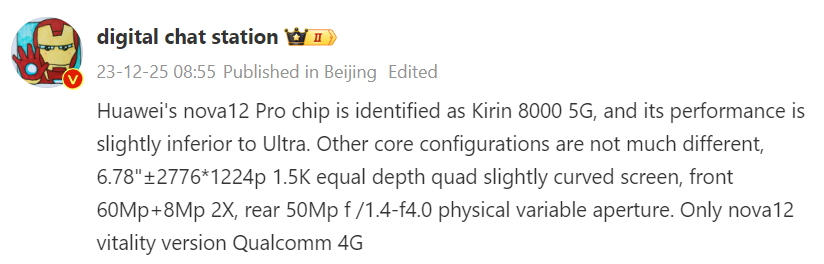
Huawei is all set to announce the Nova 12 series of smartphones on Dec. 26 in China. Recent reports have revealed key details about the Nova 12 Ultra smartphone. It is being said that it may feature an under-clocked version of the Kirin 9000s, which powers the Mate 60 series. Hence, it is expected to come with support for two-way satellite communication. A new leak that has surfaced on Weibo not only gives the first look at the front design of the alleged Nova 12 Pro, but also confirms some of its key specifications, including its new chipset. Continue reading all the details about the device.
Huawei Nova 12 Pro key specifications (rumored)
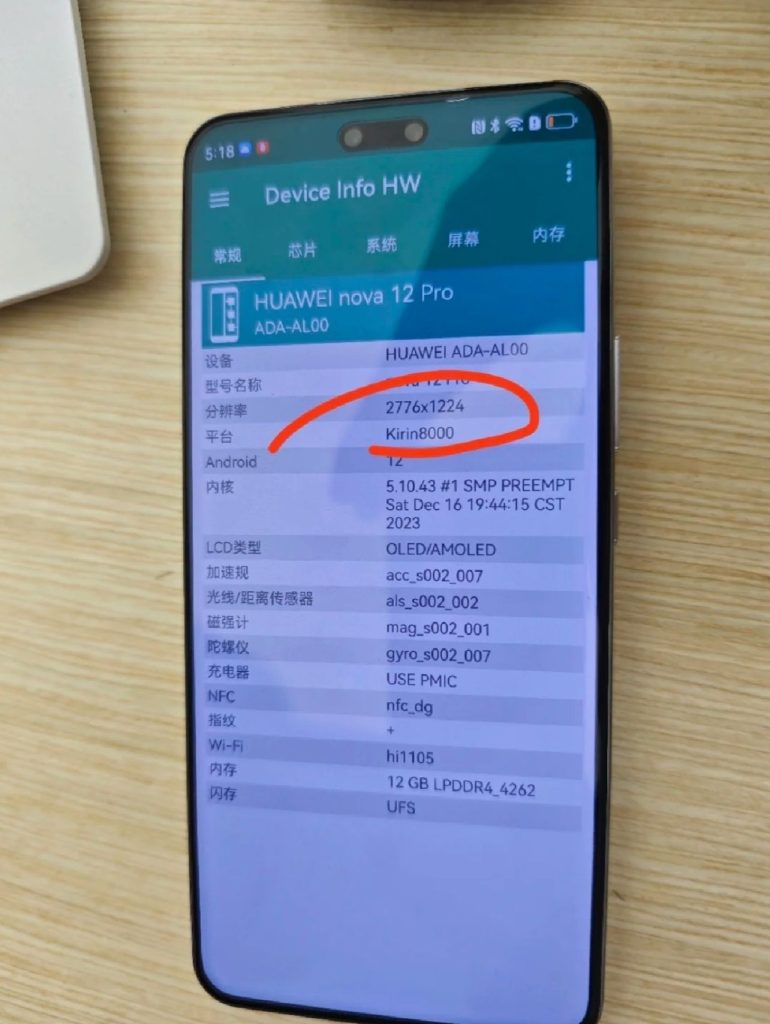
Alleged Huawei Nova 12 Pro’s leaked image
The leaked image of the Nova 12 Pro running the Device Info HW app reveals that it has a pill-shaped cutout on its screen, strongly suggesting the inclusion of a dual selfie camera setup, similar to the Nova 12 Ultra. The curved-edge OLED screen will offer a resolution of 2776 x 1224 pixels and possibly a refresh rate of up to 120Hz. The model number of the device is mentioned as ADA-AL00.
What’s interesting about the leak is that it mentions that the device is powered by the new Kirin 8000, which hasn’t launched yet. In addition, the image also reveals that the device is equipped with 12 GB of LPDDR4 RAM and a Hi1105 NFC chip.
Tipster Digital Chat Station has also shed some details about the Nova 12 Pro. He revealed that the device has a 6.78-inch display panel, and the performance of the Kirin 8000 will be inferior to the chip that powers the Ultra variant. The remaining specs of the Nova 12 Pro could be similar to those of the Ultra model.
Hence, the Pro model is also expected to feature a 60-megapixel (main) + 8-megapixel (portrait, 2x zoom) dual selfie camera system. The back panel of the device will feature a 50-megapixel main camera with an f/1.4–f/4.0 physical variable aperture. The device may also pack a 4,600mAh battery with 100W charging, like the Ultra model. While the Pro and Ultra models will support 5G, the Nova 12 and Nova 12 Lite (Vitality Edition) are said to be equipped with a 4G Snapdragon chip.
Epic Games may have offered 17 free games as part of its annual holiday event, but Steam is also getting into the festive spirit with 6 free games of its own. There’s a little something for everyone, from intense shooters like “The Finals” to relaxed sims like “Build Master: MarsVille.”
Here’s a rundown of the six free games you can claim on Steam right now:
The Finals: This hot new battle royale is taking the gaming world by storm. If you haven’t tried it yet, now’s your chance.
Build Master: MarsVille: If you’re into city-building games, then Build Master: MarsVille is for you. In this game, you’ll use your engineering skills to create a thriving colony on Mars.
Killfish: This action-FPS game takes you to a world where robots have taken over a factory. You’ll need to use your skills and wits to survive.
DreadMoon: In this game, you can transform into a powerful werewolf and free the land from the clutches of an evil vampire lord.
Duels of Fortune: Test your fighting skills in this fast-paced, combo-driven game with a diverse cast of characters.
Knight’s Path: The Tournament: This short medieval RPG is perfect for those who want a quick and engaging experience. It features challenging combat, an immersive progression system, and a nice little story.
So there you have it! If you’re looking for something to play over the holidays, be sure to check out these free games on Steam.
Meanwhile, Epic Games has also dropped its latest game as a part of its annual holiday event. The latest game available for up for grabs is Ghostwire: Tokyo. You can learn more about it from our separate story.
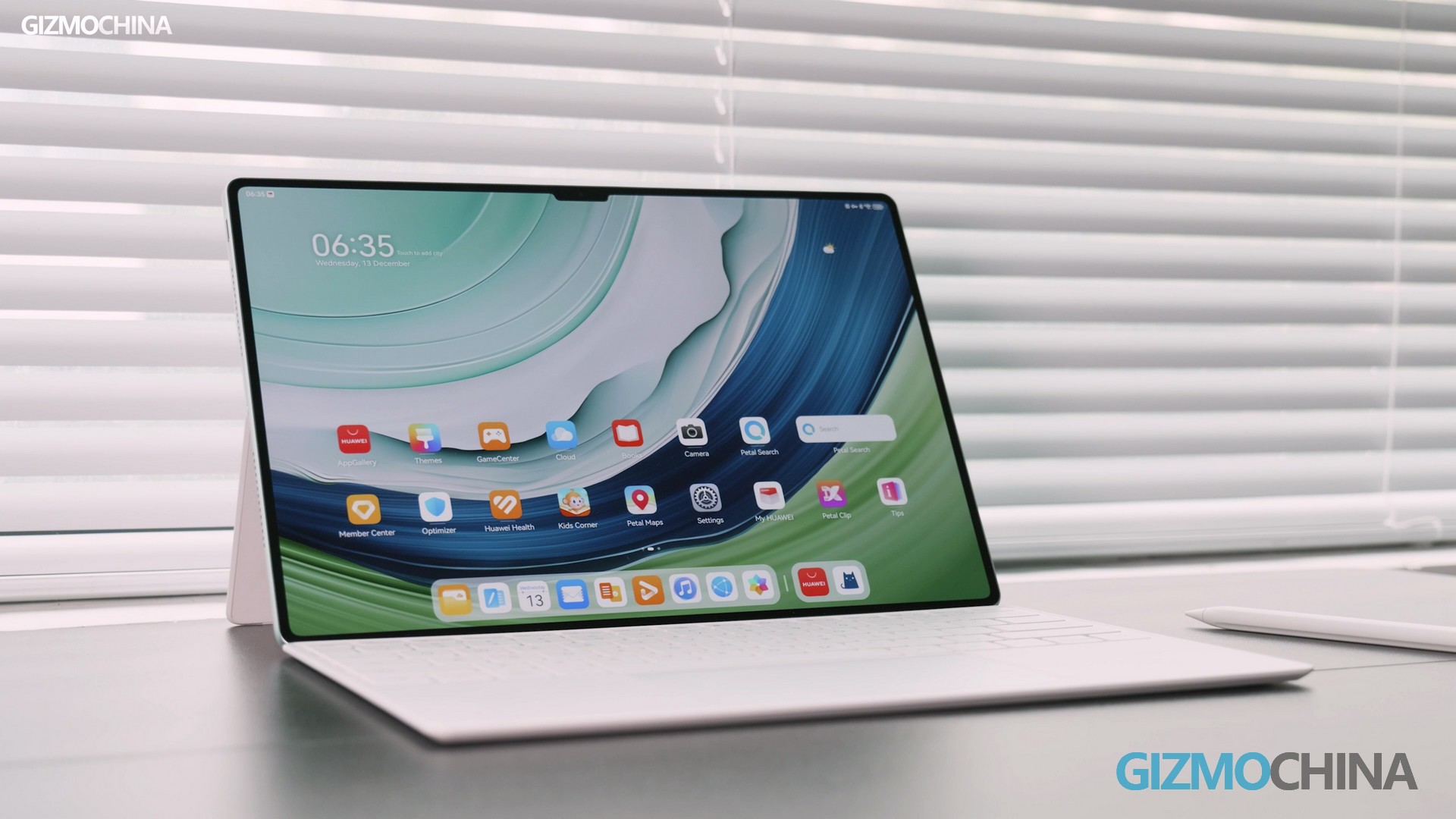
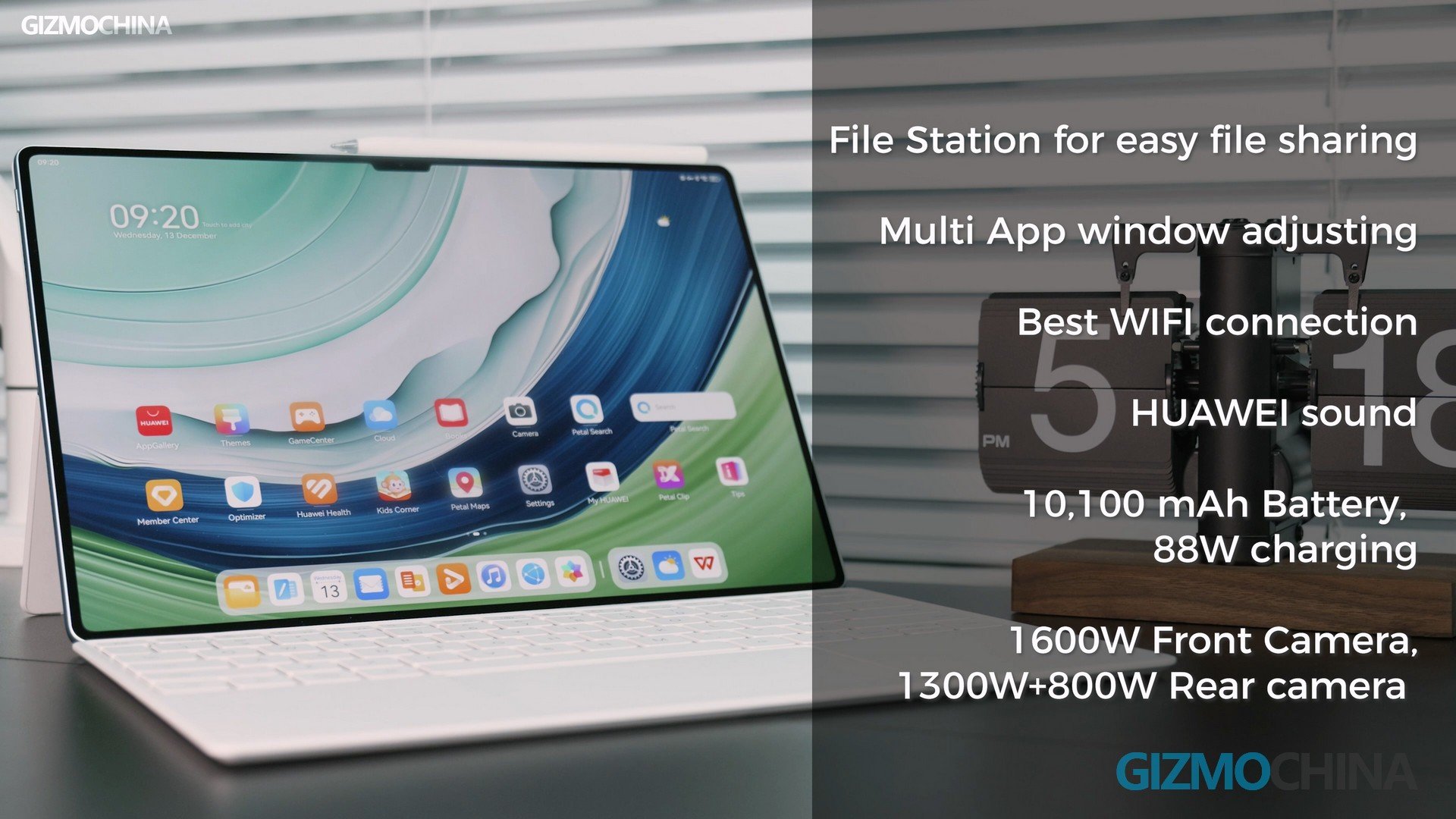
Now we have reviewed many tablets over the years, and we haven’t got a tablet quite like this one, the HUAWEI Matepad Pro 13.2 inches, this is not a typical tablet like you may have before, rather much like a laptop for productivity, and gaming, and when paired up with this Nearlink pen, writing and drawing experience are the best among all.
Body and Screen
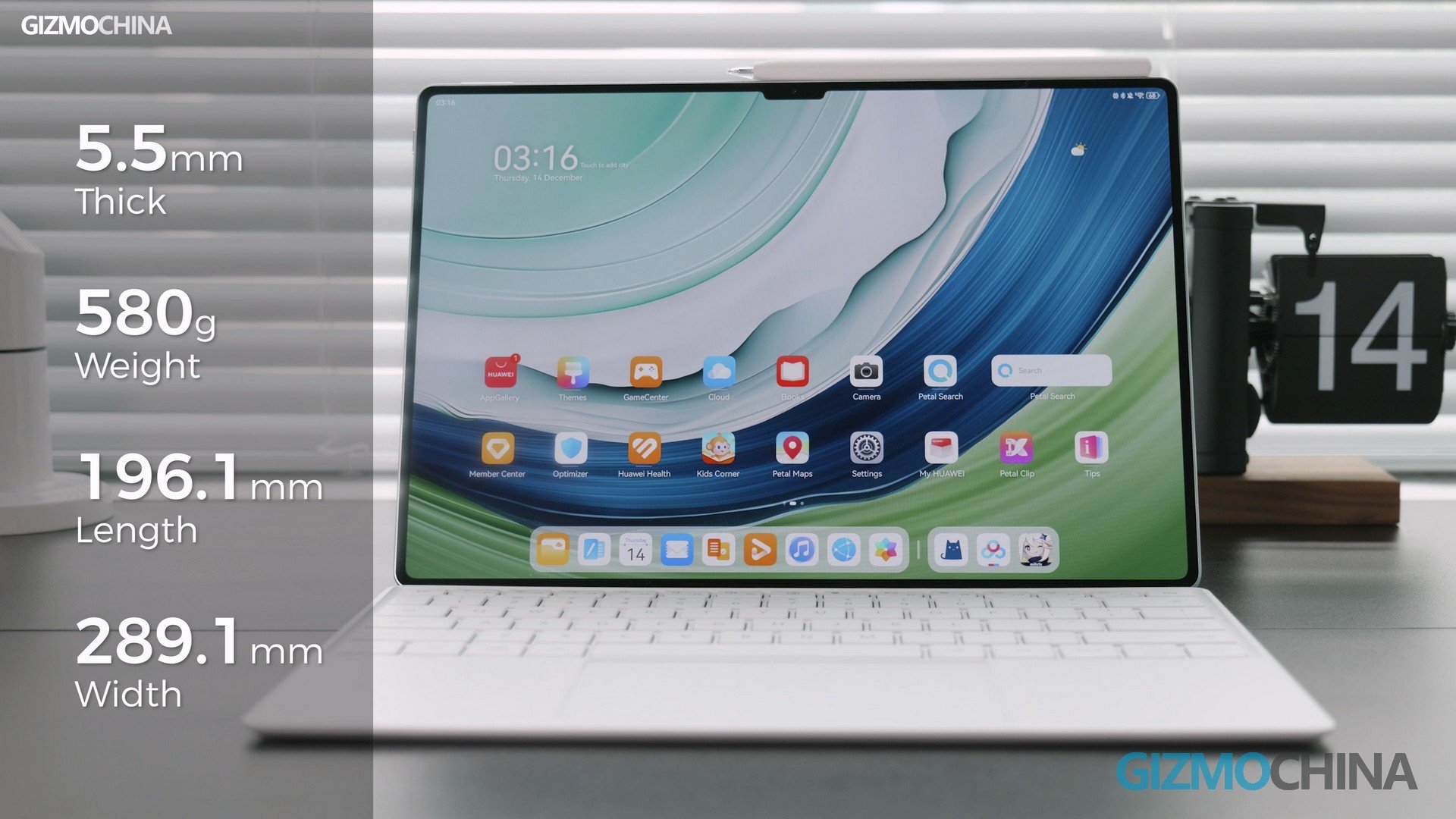
The first impression I got from this tablet is that, it is truly a phenomenal product, it is 5.5mm thick and weighs only 580g, a lot thinner and lighter than a Macbook Air, also thinner than most foldable phones out there. We got the green color, it is very refreshing, just like the Mate 60 Pro.
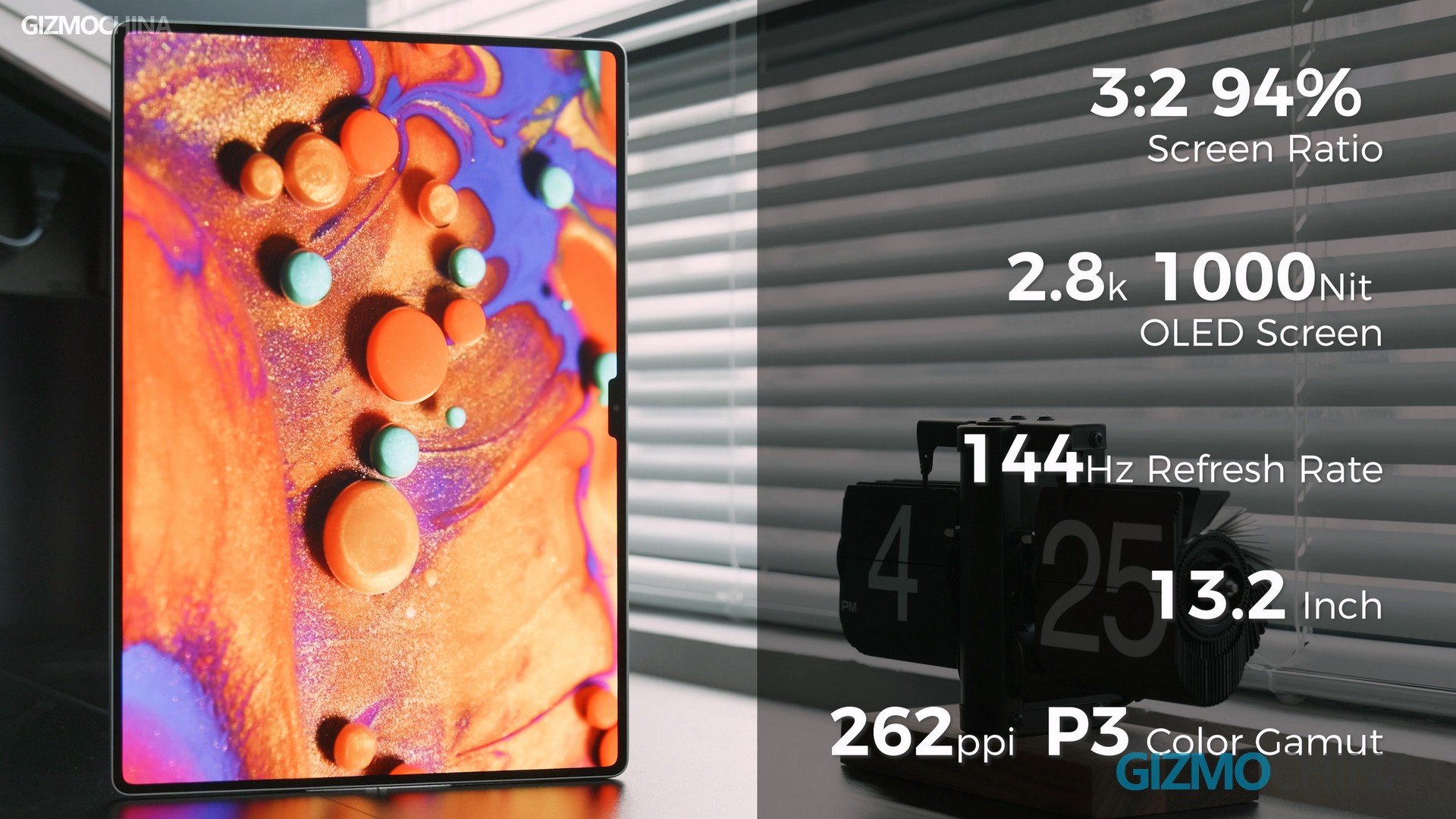
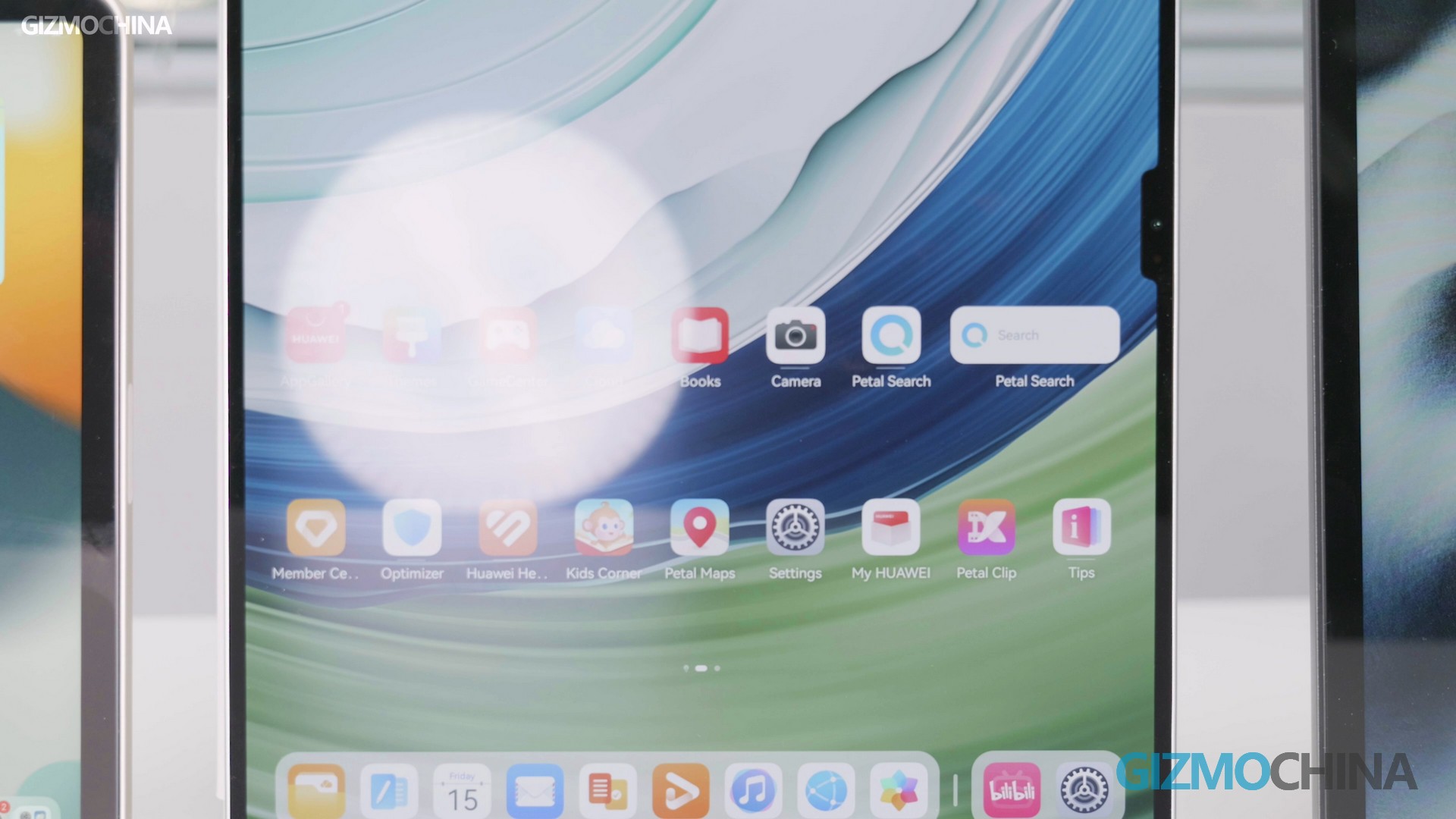
Over the top, It’s a 3:2, 94% screen-to-body ratio. Visually, this 2.8K 1000 nits peak brightness OLED panel has excellent visuals and viewing angles, the brightness and 144Hz refresh rate are also really outstanding features. We normally hold the tablet like this, facing yourself, as a screen to see some pictures or watch videos.
But once you put it down on the table for writing and drawing, the difference it makes is so obvious, that you will immediately know how good the viewing angle is. This Matepad Pro has 262PPi and also supports P3 wide color gamut, so it has surpassed the iPad Pro when we talk about screen quality.
The Anti-glare performance on this tablet is also the best, as we put the tablet and some other products together side by side, when the light shines on them, you can clearly see the screen has very little reflection. Therefore, if you need to use the tablet outdoors, this will be very helpful. A side note to this is that there should be a lot of work done to a good screen, which will naturally make you want to work on it a lot.
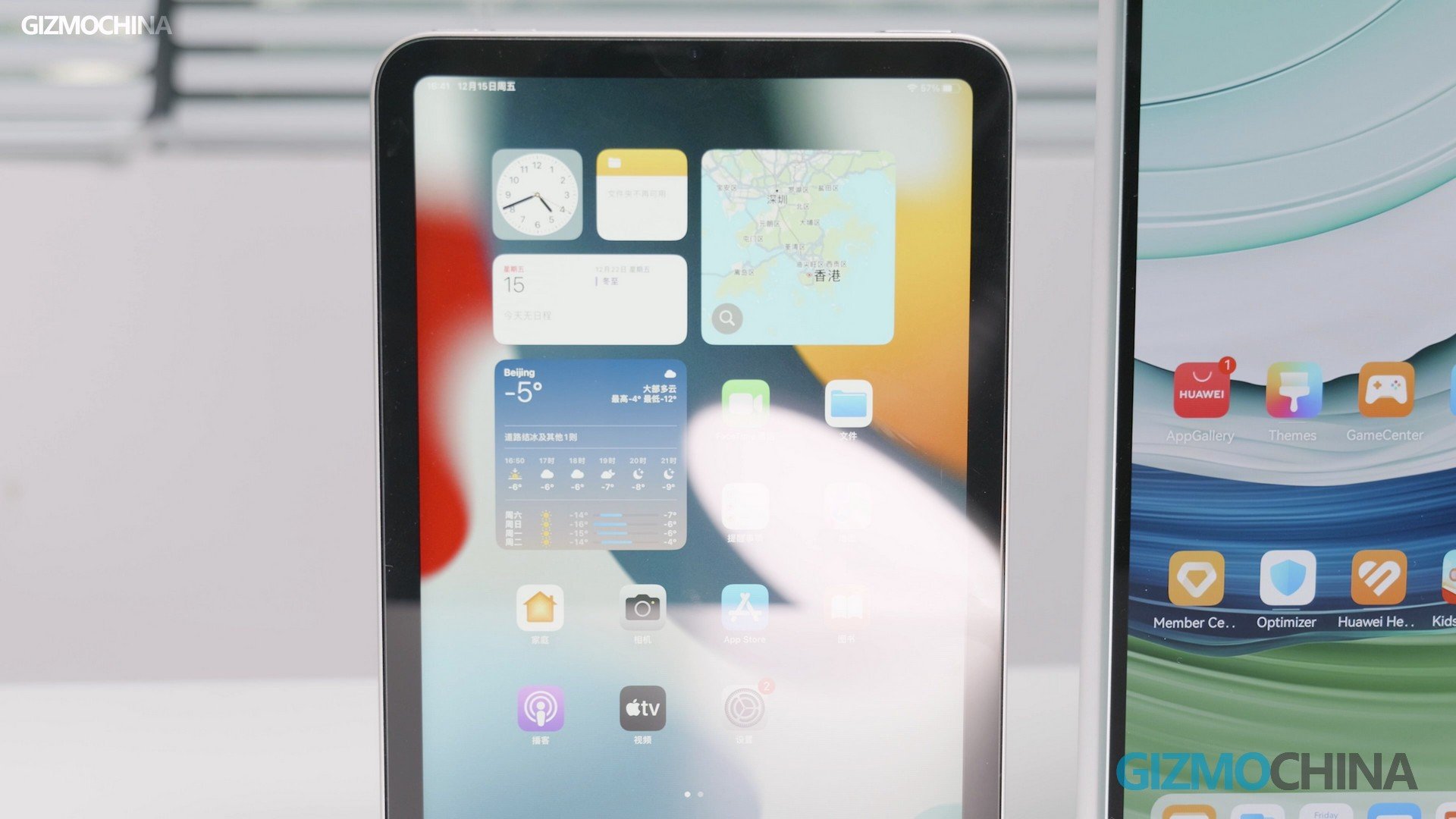
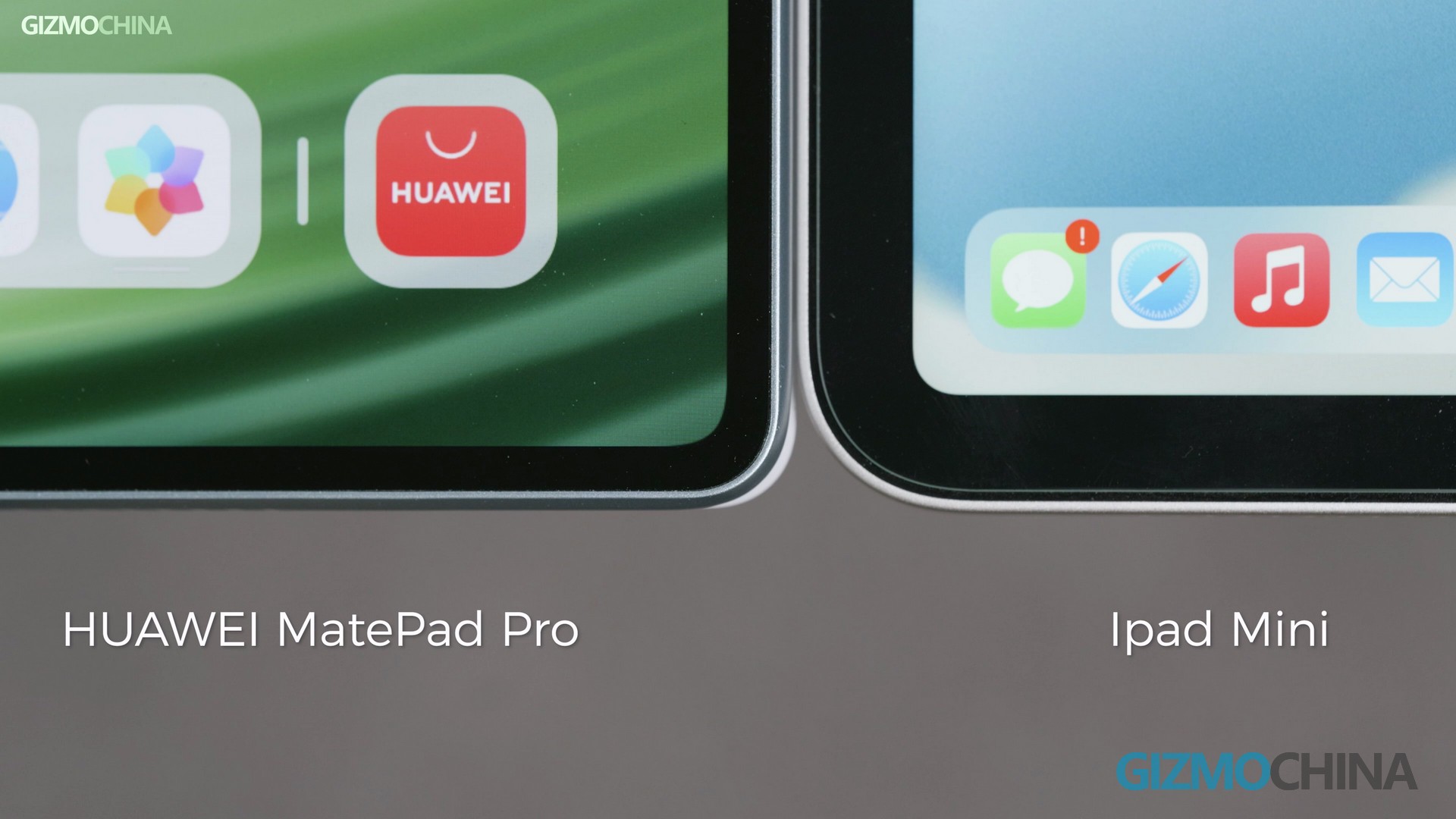
iPad mini 6HUAWEI MatePad Pro 13.2
Now the bezels on each side are equal and very very narrow, if you have watched a lot of tablet reviews, you would appreciate such an astonishing thin bezel. Compared to the iPad mini we have here, there is just a clear gap between them. This tablet has also done an excellent job in terms of eliminating the unintended touch at the edges, when you hold the tablet in one hand while operating on it with another hand, no problem at all.
Productivity
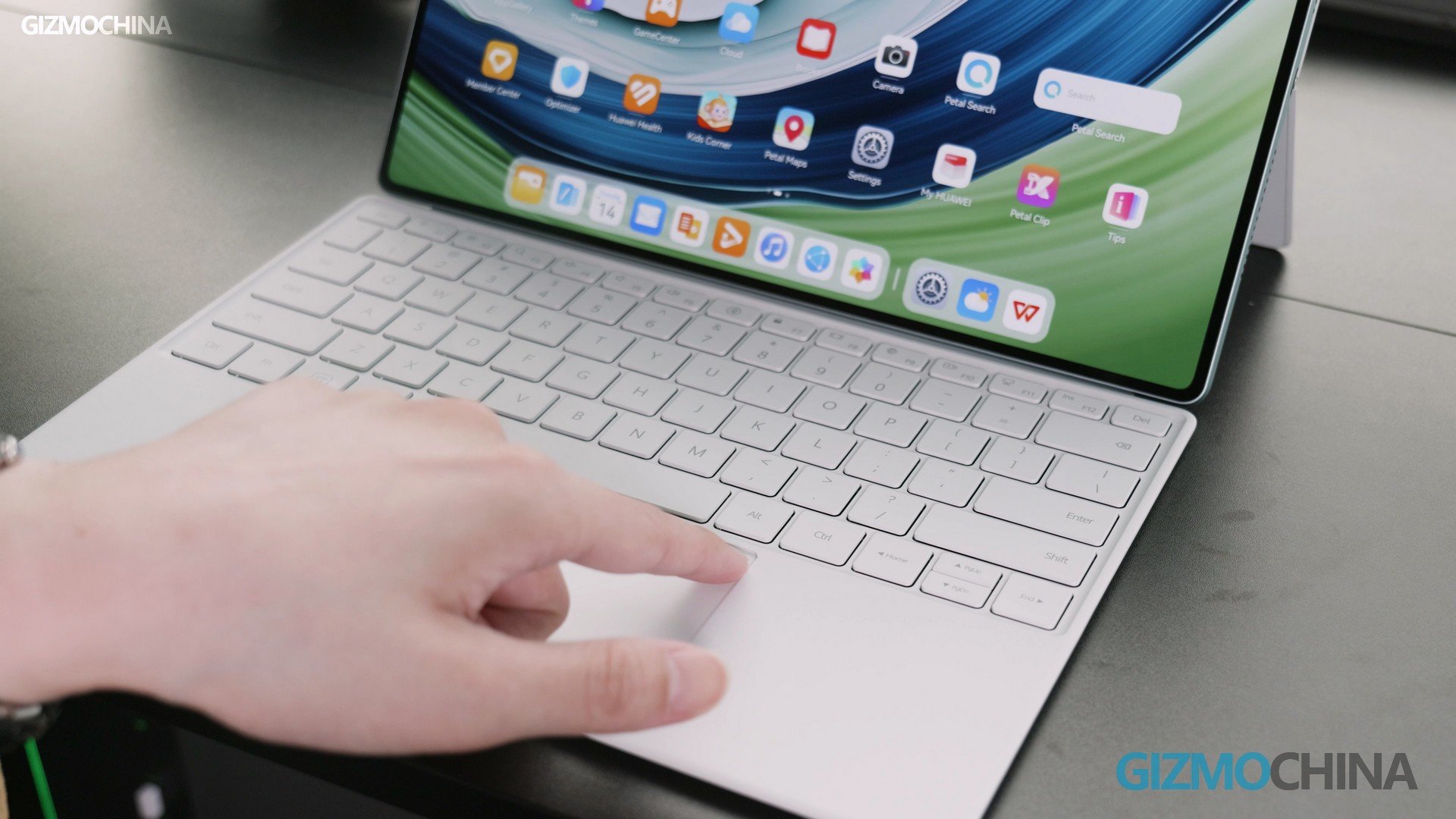
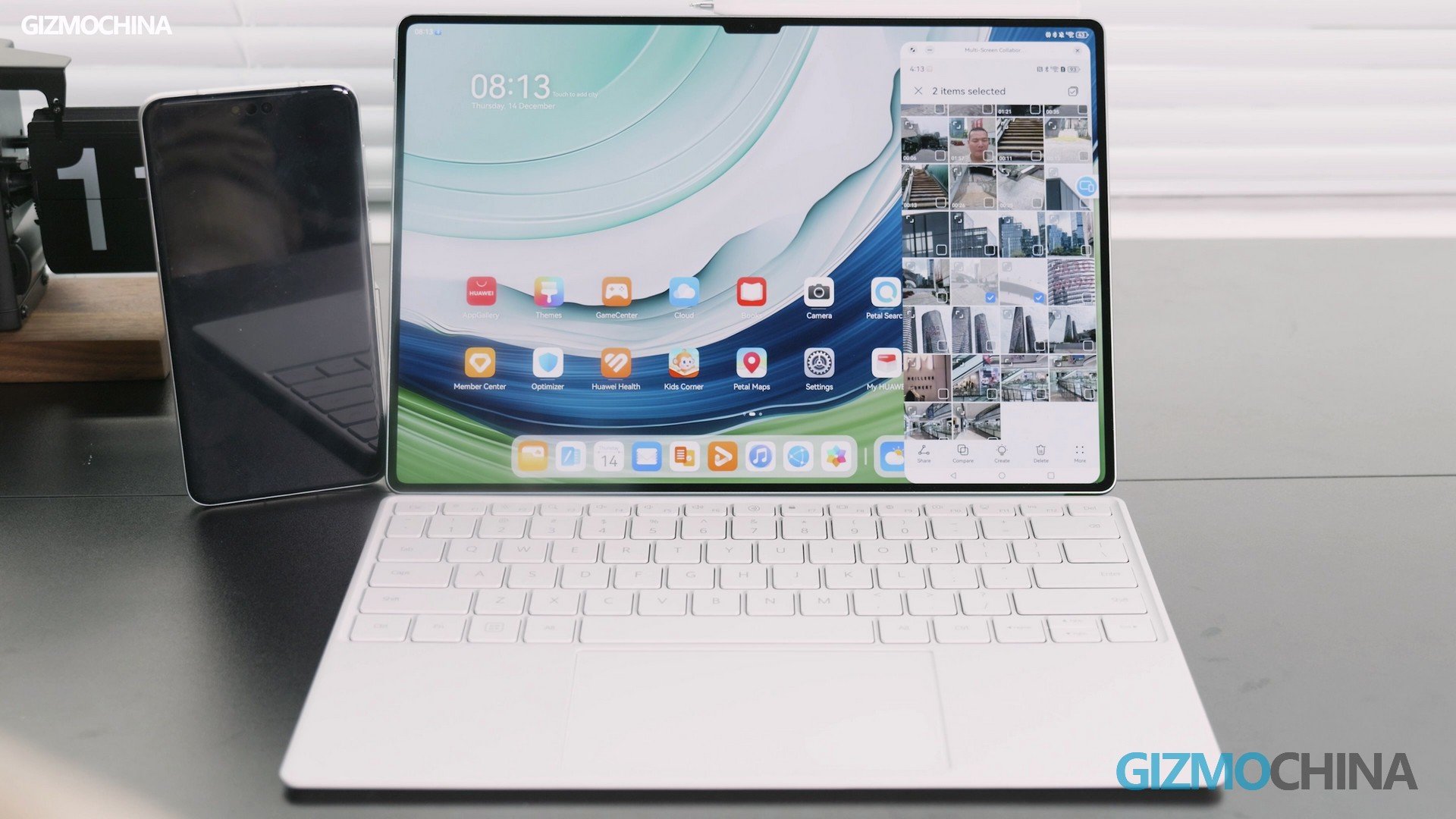
When we talk about utilizing a tablet for work, many people would doubt it, because it might just end up like another iPad resting in the corner of the room. But, not for this tablet! There is a really good keyboard that goes perfectly with it, this keyboard connects to the tablet by Bluetooth and has its own battery inside, which means you can just pull it out, put it anywhere, and then use it as a real wireless keyboard. And there is no contact pin on it, so even if it’s connected to the tablet, it is still a wireless keyboard, how innovative that is! The keyboard comes with four rubber feet, so wherever it is placed, it will not slip away, this is a very thoughtful design.
The other feature that is worth talking about is the massive touchpad here, it is not only big, the feedback is also excellent. Compared to some lousy touchpads out there, or even some on the Windows laptop, the tactile feedback is very satisfying, and you can click anywhere, including the two upper corners. Well for the tracking, I would say they are better than most, but still have a very slight lag or traveling, but if you can get used to it, then there shouldn’t be any problem at all.
Some of the keys are also customized, such as the Enter key can be the shutter button in the camera app. The Home button is taken place by the HarmonyOS button, which can take you back to the home screen. Also, you can press this key to go to the file transfer app, and then press this key to do audio-to-text input. If you have a Huawei phone, put it on the touchpad, and then they will be automatically connected to fulfill a lot of tasks, like picking and dragging files between each other, this is the power of the eco-system.
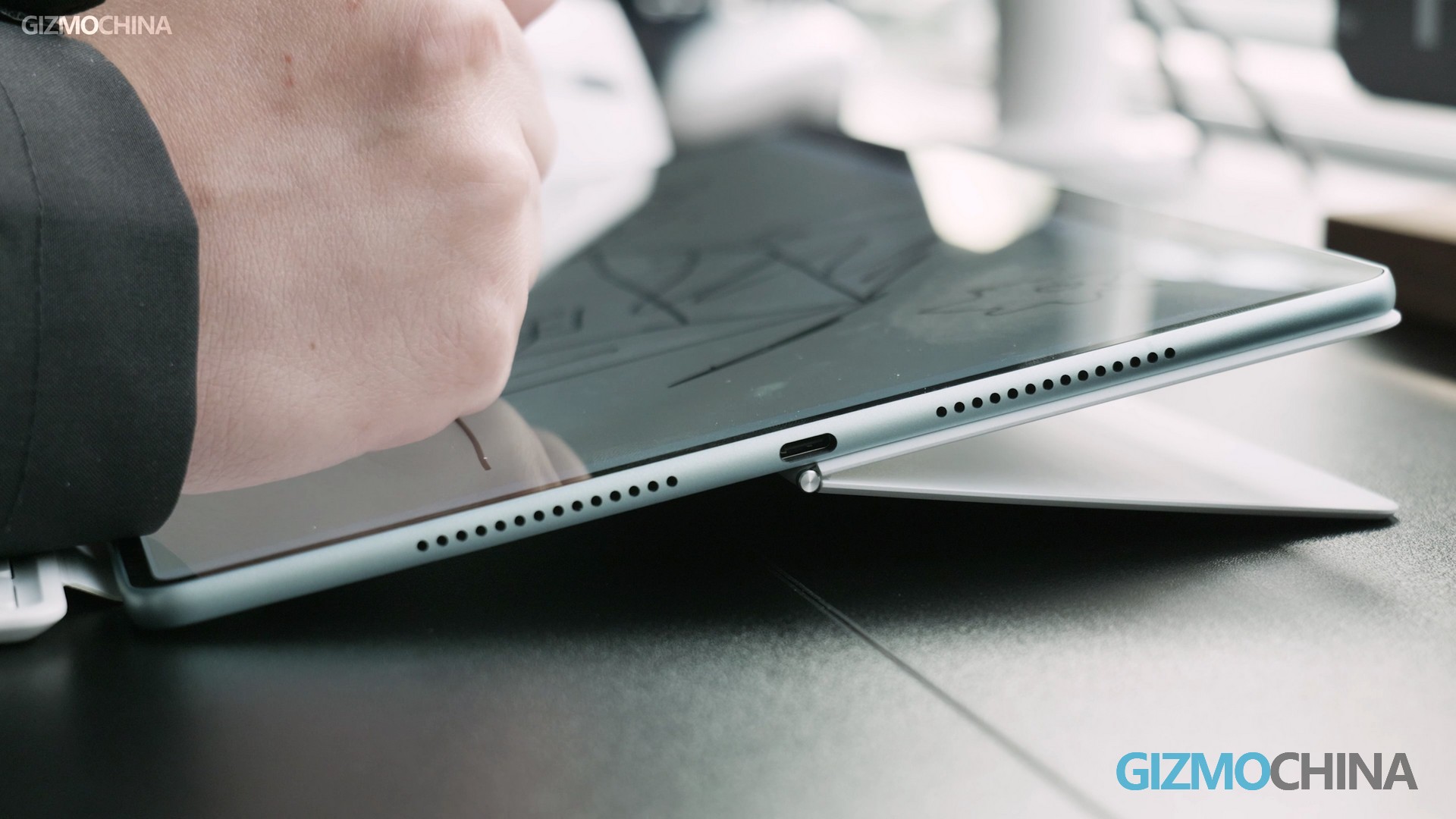
The other half of the keyboard is for protective use and serves as a stand. It is also very thin and light, and can be attached to the tablet pretty snug and fit. If you want to have a comfortable viewing angle, then tilt it back to 45 degrees like this is nice and easy. But if you are tall or sitting on a high chair, or you need to be in the creator mode, then a bigger force is needed to push it further. And once it’s in position, the resistance within the hinge is strong enough to hold it very stable. I think it is another very thoughtful design.
App Support
The other things that stop people from using a tablet as a workstation is the app support because normally they are poorly optimized for smaller screens. But since this tablet has a 13.2-inch screen, just like a portable laptop, it can fulfill all those tasks as well. HUAWEI has put a lot of effort into the HarmonyOS to seamlessly bring the software experience onto it.
At this point, you can pair it up with a mouse via Bluetooth, to have a better laptop-like UI and UX. Take this WPS as an example, the buttons lineup is no different from the ones on the laptop, whereas it is smaller and more spread out on a normal tablet, this makes working on docs and files a lot more intuitive. And there are also some other apps that have PC-like versions, such as the CAJviewer. But please note that there are apps that only work in certain areas, so maybe you will have different ones.
So this tablet is meant to be carried around with you, when you have some files on the phone or on this tablet, you can use the smart-connect on this screen to work seamlessly with each other. This can help you a lot with file transfer.
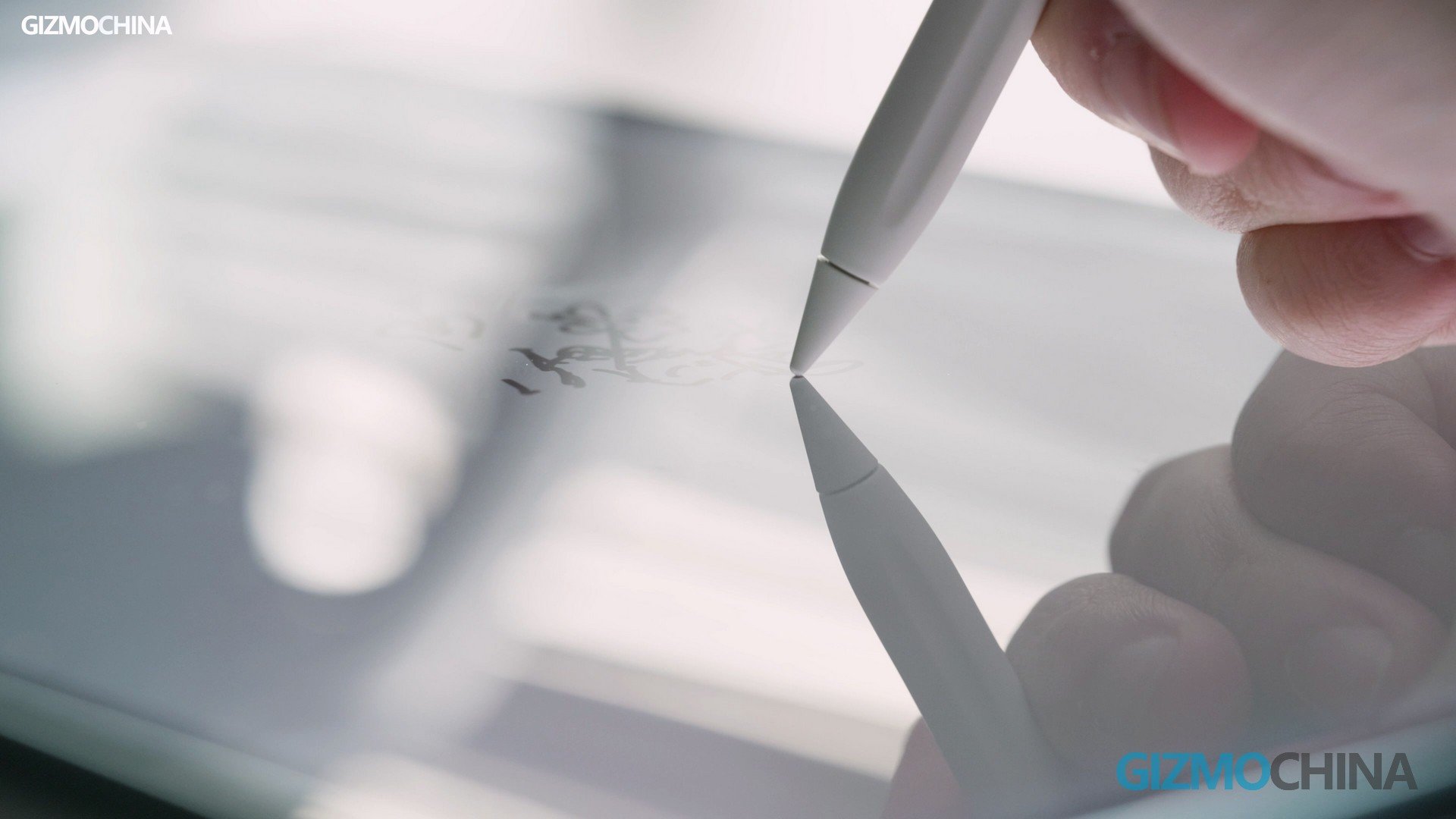
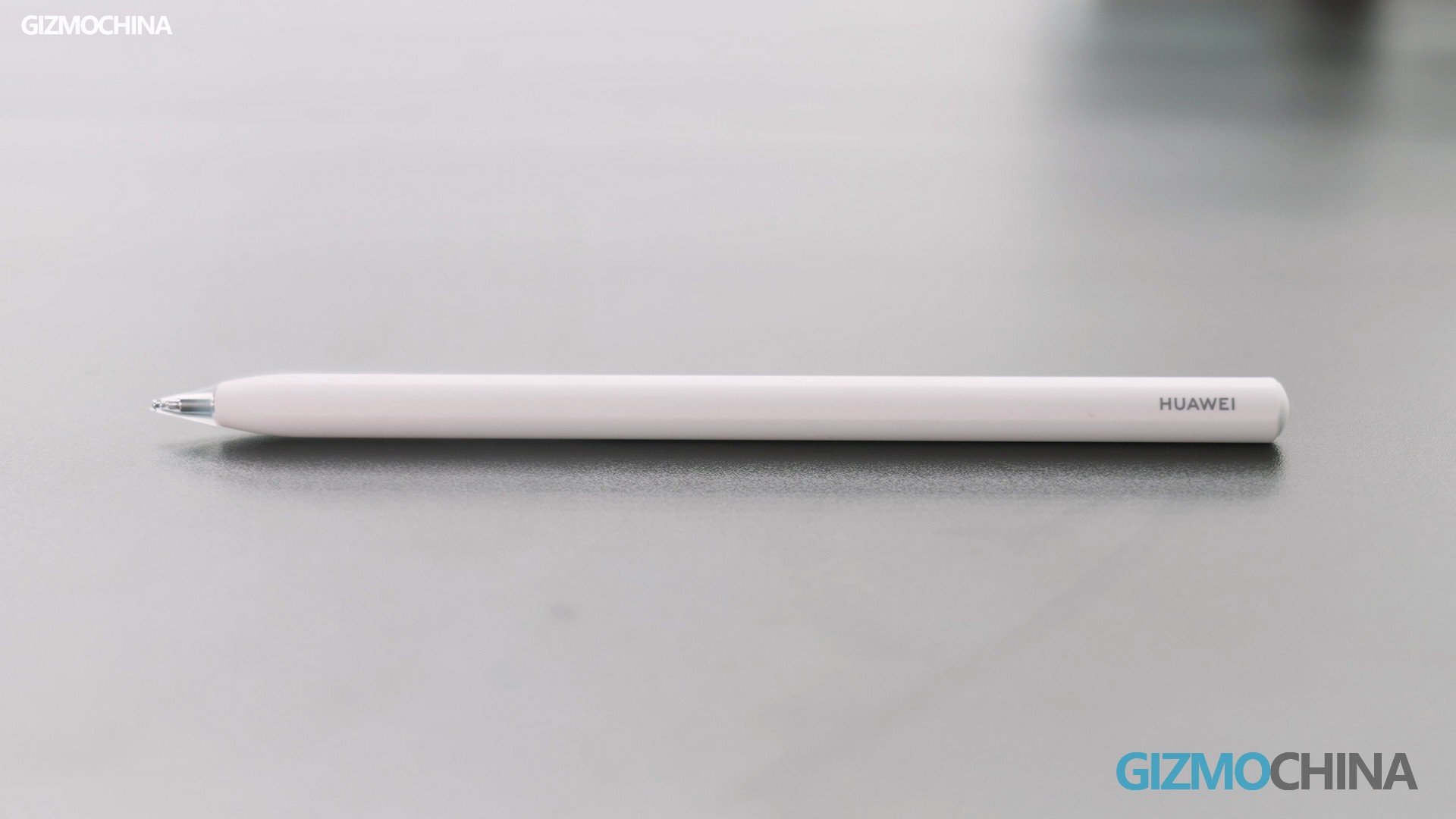
Unlike some note apps that can only do simple input, HUAWEI has created this feature Note app for many purposes. If you do a lot of note-taking or drawing, you know that you need a good pen, this M-Pencil with Nearlink tech built-in goes really well with the tablet. It supports 10000 levels of pressure sensitivity, much better than the last gen. Then if you want to write, you can utilize the white tip, it has a certain dampening to it, making writing more like it is on a real paper.
Whereas the transparent tip is smoother and you can see every move better, so it’s suitable for drawing. Other features like auto-adjusting handwriting and drawing are such life-saving functions, that you will love it! Now when you finish the note, you can save it in different formats, so the experience is much better than the iPad already.
The other use scenario is to handwrite info in the search column if you don’t have the keyboard at the side, but the writing area is limited to around the column area first, then once the handwriting mode is activated, the whole screen becomes a writing area, and I found that my writing is 100% recognizable, which is awesome!
This pencil has no port for charging, the only way to juice it up is to charge it when it’s attached to this tablet. But in order to save the tablet’s battery, when the pencil has a battery level above 80%, it just won’t charge, but you can also change it in the settings.
Other Features
We haven’t talked much about the hardware and specs here, simply because you have a very clear image of how capable it is through those features we mentioned, and that is the amazing part of a top-tier product, you never need to worry about anything, like ever!
But I might as well list them here beforehand. Also, you can leave your comment down below to let us know what you are concerned about, we will do our best to answer them.
Conclusion
It has been so long since we saw such a powerful tablet/laptop, this is a 13.2-inch workstation that has optimized functions and apps for all kinds of use. There are certain restrictions on the app diversity for sure, but HUAWEI has put tons of effort into the basics, making the keyboard, the pencil, the note app, etc, a lot better than most. If you have a HUAWEI phone, you will find this Matepad Pro a great companion for your work and daily life.
It’s not able to say with complete certainty that the chip inside is the Kirin 9000s… But based on our review and testing results, it probably is. Now the tablet is available worldwide. You can check this versatile HUAWEI tablet on their official store. You may find more innovative details and features on this newest large tablet.
The iQOO Neo 9 Series is all set to be unveiled on December 27. Ahead of its official launch, iQOO revealed its partnership with China’s NBA. Even the upcoming iQOO Neo 9 Series is called “NBA China’s Official Smartphone.” Especially, the red-white color variant of the iQOO Neo 9 Series seems to well represent NBA’s color and brand identity. A specific teaser with a basketball in red-white carrying the tagline “Neo Time to Play” is posted on Weibo.
Apart from the red-white color variant, the iQOO Neo 9 Series is coming in BlueFlighting Black and Nautical Blue, colors. The company is consistently teasing the features of the upcoming smartphone via its official handle. In the latest such teaser, the iQOO revealed the presence of a dual-rear camera consisting of a 50MP Sony IMX920 primary sensor with OIS and another 50MP JN1 ultra-wide sensor. It resembles the same camera configuration as found on the Vivo X100 flagship.
iQOO Neo 9 Features (Expected)
Furthermore, the iQOO Neo 9 Pro will feature a 6.78-inch OLED display with a 144Hz refresh rate and 1.5K resolution. It will be powered by a Dimensity 9300 SoC coupled with up to 12/16GB LPDDR5x RAM and 256/512GB UFS 4.0 storage. Further, it will house a 5160 mAh battery with 120W fast sharing. Catering to gaming enthusiasts, the device will boast iQOO’s self-developed Q1 chip.
There will be an on-screen fingerprint sensor for rapid authentication, and the presence of a dual-stereo speaker will elevate the sound experience. It features an IR blaster and bundles an x-axis linear motor.
Along with the iQOO Neo 9 series, the smartphone will also launch the new iQOO Watch and iQOO TWS 1e wearables. The watch will be based on Vivo’s BlueOS. It is confirmed to feature 16 16-channel blood oxygen sensors and 8 8-channel heart rate sensors. Meanwhile, the iQOO TWS 1e will bundle a low latency of 55 ms and will debut with Bluetooth 5.3.
Rockstar Games, the studio behind the iconic Grand Theft Auto series, is reeling from another major security breach. Following recent leaks and rumors surrounding the highly anticipated GTA 6, the entire source code for its predecessor, GTA 5 – and potentially more – has now been leaked online.
GTA 5 source code leak suggests Bully 2 could be real!
The leaked code includes some interesting tidbits, such as a file for Bully 2, a long-rumored sequel to the beloved action-adventure game. Bully was first launched in between Grand Theft Auto: San Andreas and Grand Theft Auto 4. It provided a similar gameplay experience as the aforementioned games but in a new place with new quests, characters, and activities.
Fans have been eagerly waiting for its successor, and the latest leak suggests Rockstar Games may have been working on Bully 2 behind the scenes for a while.
Along with the Bully 2, the leak also has an early map for GTA 5 and a script confirming that GTA 6 was once codenamed “Project Americas.”
YouTuber SKizzleAXE shared a screenshot of the code, seemingly verifying the leak. A fan named “Agent” also shared some leaked code and images of the RAGE engine on X/Twitter, but those posts have been removed.
BREAKING: The source code for GTA 5 has been leaked publicly 😳
It reveals Bully 2 file, early GTA 5 map & script which confirms GTA 6 was codenamed “Project Americas” pic.twitter.com/uJdzeBa75i
Unfortunately, we don’t know how this leak happened. However, there are indications that the GTA 5 code was leaked on Discord. There are also rumors that the full code has been privately traded between individuals since 2022. Although we are not sure, this time frame coincides with the initial leak of 10,000 lines of GTA 6 code, suggesting a broader breach that exposed both games.
This is a major blow for Rockstar. Not only is the leaked code a valuable asset, but it could also lead to technical issues and even delays for upcoming games, like GTA 6.
Gaming Detective (@that1detectiv3), a prominent online reporter, highlighted these potential consequences, urging caution and stressing the seriousness of the breach.
References to Bully 2 and Project Americas are included in the GTA 5 source code leaks.
We don’t know the extent of the damage yet, but this is terrible news for Rockstar. It could even lead to delays for GTA 6 depending on what exactly was leaked. pic.twitter.com/prOXdAvwlr
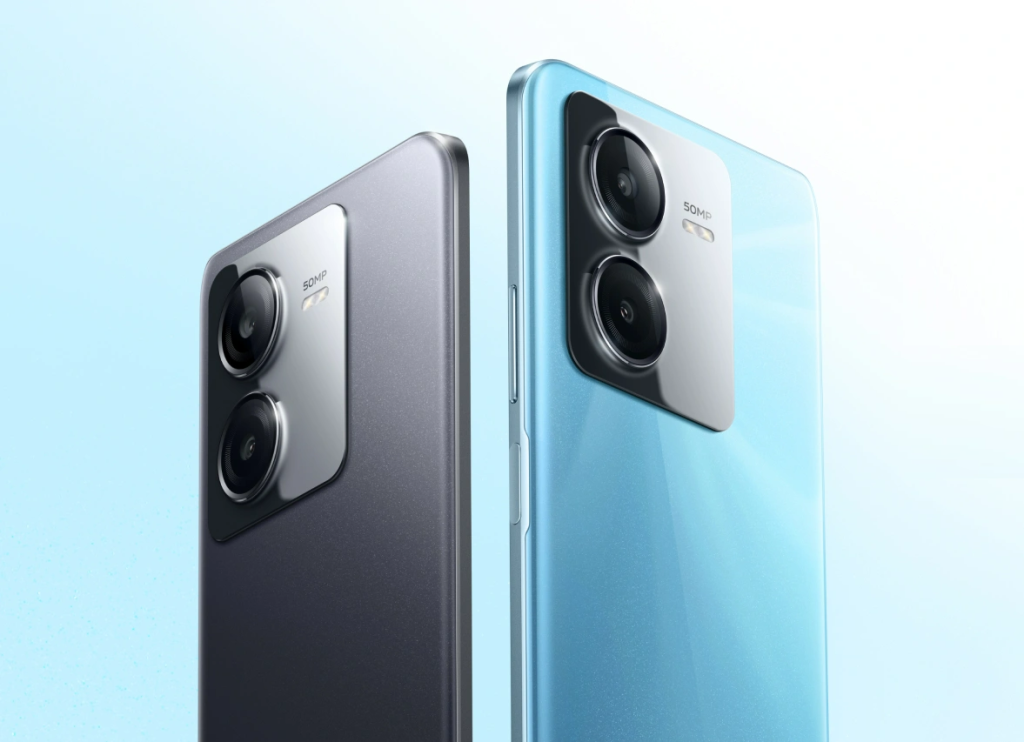
In November, Vivo unveiled the Vivo Y100i smartphone in the Chinese market. This device packed different specs as compared to the Y100i that debuted earlier this year in India. Now, the brand is back with a new Y100-series phone called the Vivo Y100i Power for China. Here is a look at what’s packed inside the new smartphone.
Vivo Y100i Power specifications
Vivo Y100i Power
The Vivo Y100i Power measures 164.64 x 75.8 x 9.1mm and weighs 199.6 grams. It features a 6.64-inch IPS LCD panel with a punch-hole design. The screen offers a Full HD+ resolution of 1080 x 2388 pixels and a 120Hz refresh rate. It runs on Android 13, which is overlaid with Origin OS 3.
Instead of the Dimensity 6020 and a 5,000mAh battery available inside the Y100i, the Y100i Power features the Snapdragon 6 Gen 1 chip and a 6,000mAh battery that supports 44W fast charging. The phone comes in a single configuration that offers 12 GB of LPDDR4x RAM and 512 GB of UFS 2.2 storage. It also offers 12 GB of virtual RAM, and for heat dissipation, the device is equipped with a 639mm2 liquid cooling heat pipe and an 8736mm graphite sheet.
The Vivo Y100i Power has an 8-megapixel camera on the front. Its back panel is equipped with a 50-megapixel main camera and a 2-megapixel depth sensor. The device comes with usual connectivity features, such as dual SIM, 5G, Wi-Fi 802.11ac, Bluetooth 5.1, GPS, and a USB-C port.
Vivo Y100i Power price
The Vivo Y100i Power is priced at 2,099 Yuan (~$295) in the Chinese market. It comes in three shades, such as black, white, and blue.
Vivo has already launched the Vivo X100 and Vivo X100 Pro smartphones, which have some competitive specifications at great price points. Now, the company is preparing for the launch of the Vivo X100 Pro+, which is scheduled to launch in the first half of 2024. There are certain reports that the Vivo X100 Pro+ could make its debut as the Vivo X100 Ultra, similar to the Find X7 Pro, which will launch as the Find X7 Ultra.
A new leak from Digital Chat Station confirms the presence of a 200 MP periscope telephoto lens with a size of 1/1.5″. It offers 4.3x optical zoom with a resolution equivalent to a 10 MP periscope and further stretches to 10x optical zoom. Jointly, it offers a maximum of 200x digital zoom. Along with the Sony LYT-900 50MP primary camera with a large aperture, the new periscope will further enhance the device’s camera prowess. However, there could be a 50MP Sony IMX589 rear ultra-wide lens and a 50MP IMX758 portrait lens.
Furthermore, the Vivo X100 Pro+ is expected to launch with a Samsung E7 AMOLED display with a 2K resolution and a 120Hz refresh rate. The smartphone will feature the Snapdragon 8 Gen 3 SoC coupled with support for two-way satellite communication. The smartphone will launch a Bundling 5400 mAh battery with 100W fast wired charging and 50W wireless charging support. It will run Origin OS 4, based on Android 14.
Vivo X100 and X100 Pro Specifications
Additionally, the Vivo X100 and X100 Pro are launched globally with a 6.78-inch curved-OLED LTPO display with 1.5K resolution and a 120Hz refresh rate. It supports 2160 Hz PWM dimming and up to 3000 nits of brightness. Both smartphones feature a Dimensity 9300 SoC, LPDRR5x RAM, and UFS 4.0 storage.
In terms of connectivity, the Vivo X100 and X100 Pro come with Wi-Fi 7, Bluetooth 5.4, USB-C (USB 3.2), NFC, an IR blaster, and an X-axis linear motor. Vivo X100 houses a 5000 mAh battery with 120W charging, while the Vivo X100 Pro features a 5400 mAh battery with 100W wired charging.
After years of rumors and leaks, Xiaomi has finally confirmed that they are holding a press conference on December 28 where they will unveil the Xiaomi EV technology. The announcement came via official channels on Weibo and the company’s CEO and founder, Lei Jun, on X.com (formerly Twitter.com). The announcement came just before the end of the year 2023, and the next year would be all about Xiaomi’s EV. The poster unveils a car chassis with “STRIDE” text over the top.
Xiaomi is currently known as the Chinese smartphone maker, and soon it will be replaced as the Chinese EV maker as the official announcement about the Xiaomi EV Technology Launch is finally here. Following some previous interviews with Lei Jun, it is clear that the company aims to compete against Tesla.
We expect Xiaomi to unveil car engine details, shed some light on AI driving features, and details about the color variants of three different models.
Xiaomi is heading into the EV market with over years of dedicated work with over 3,400 engineers and a $1.4 billion investment. The company is stepping into a highly competitive market where players like Tesla and China’s home-grown automakers are already doing excellent. It would not be easy to grab a good market share in a fiercely competitive market.
Xiaomi’s CEO is confident in the new venture, and they want to repeat their success in the smartphone industry as a leading giant. Recently, the unveiled Xiaomi 14 confirmed Xiaomi’s commitment to innovation and evolution in the tech space. We expect such advancements in the EV segment over the coming few years.
Xiaomi EV Leaks and Rumors
There have been plenty of rumors and leaks about the design, and specifications of Xiaomi’s first EV. A recent photo leak of Xiaomi’s car revealed the presence of a central control display and a three-spoke steering wheel. The car could become available to the public by next year.
Further, the car measures 4997/1963/1455 mm with a 3000mm wheelbase for spacious interiors. It could come in two-wheel options of 19″ and 20″, with type specifications of 245/45 R19 and 245/40 R20. There will be LiDAR technology for autonomous and advanced windshields. The face-recognition unlocking feature could also debut with its B-pillar camera.
There will be a rear-wheel drive and all-wheel drive version, which will offer 220 KW and 449 KW motors, respectively. It will use a cost-effective LFP battery pack from BYD. There would be three different versions of the Xiaomi Car, including the Xiaomi SU7, SU7 Pro, and SU7 Max. It will use Xiaomi’s recently introduced HyperOS operating system.
Xiaomi Car could offer two battery capacities of 73.6kWh and 101kWh, with a corresponding battery life of 668/628km and 800/750km, respectively
As the chip packaging industry gets more advanced, so do the aspirations of Intel. The company aims to make a chip with a trillion transistors by 2030. The chips should double the number of transistors every year in accordance with Moore’s law, which Fairchild Semiconductor and Intel developed. But it got worse over time, and the rate of doubling transistors slowed down to three years.
Well, a big performance upgrade seems on the way for Intel chipsets, as Intel CEO Pat Glesinger confirms that Intel could surpass Moore Law’s pace by 2031. Instead, he talked about pushing the “Super Moore’s Law” concept or “Moore’s Law 2.0” for increased transistor counts. TSMC and Samsung Foundry are going to play an exceptional role in bringing Intel’s new chips built on a 2nm node. Even Qualcomm is switching to TSMC and Samsung Foundry.
Gelsinger said during his talk, “I think we’ve been declaring the death of Moore’s Law for about three to four decades.” And while that might be true, he did admit that “we’re no longer in the golden era of Moore’s Law, it’s much, much harder now, so we’re probably doubling effectively closer to every three years now, so we’ve definitely seen a slowing.”
Following the advancements, Intel could achieve the magic number of 1 trillion transistors on a chip by 2030. This is not the first time that some Intel officials have mentioned such a big development. Even Ann Kelleher, who is executive vice president and general manager at Interl’s Technology Development, revealed, “As Moore’s Law has been progressing, traditional scaling has been slowing down.”
There are a couple of different technologies that could help Intel achieve a trillion-dollar mark on a chip. The company aims to do advanced packaging and heterogeneous integration to pack more transistors into a chip. Additionally, the company plans to use the RibbonFET that Samsung uses for 3nm production. It covers all four sides, which reduces current leakage. There is another way via PowerVIA Power Delivery, which moves the power supply lines to the rear of the chip, improving performance.
However, the advancements would cost Intel a lot. Talking about the same, Gelsinger said, “Seven or eight years ago a modern fab would have cost about $10 billion,” he said. “Now, it costs about $20 billion, so you’ve seen a distinct change in the economics.”
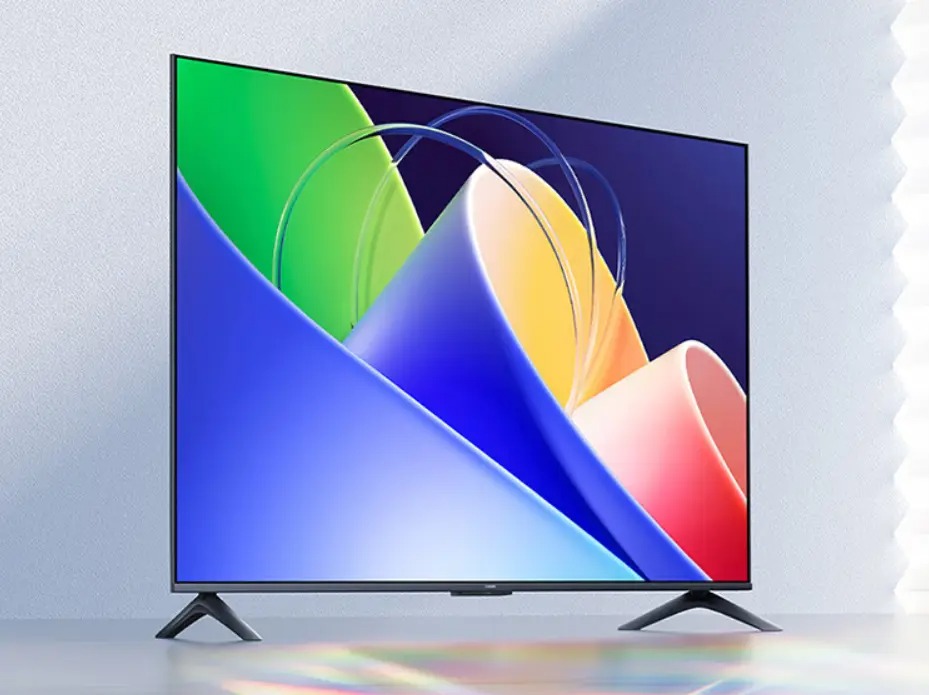
Xiaomi TV A50 appears to be the Redmi TV A50 in international markets. The new smart TV is set to officially launch on December 31 in China with some exciting features. It is already up for pre-orders via JD.com for the price of 1549 yuan, which roughly translates to $218.
Xiaomi TV A50 Features
On the end of the specification, the Xiaomi TV A50 comes with a 50-inch display that offers up to a 60Hz refresh rate. The display measures 3840 x 2160 pixels and has support for 1.07 billion colors. It offers a spectacular screen-to-body ratio of 97.2% and can be easily viewed up to a viewing angle of 178°.
The Xiaomi TV A50 offers an automatic display dimming mode along with support for reduced flicker.
Under the hood, it comes with a quad-core processor coupled with Cortex A35 cores and is available in 2GB of RAM and 32GB of storage options. In terms of connectivity, it features 2.4GHz–5GHz dual-band WiFi, Bluetooth 5.0, and 2x USB Type-A. 2x HDMI, 1AV, 1x ATV/DTMB, 1x Ethernet interface, and 1x S/PDIF port for audio.
The TV runs on the MIUI TV OS, which even sports Xiaoai voice control. It supports an inbuilt casting option, providing an easy way for users to control what’s shown on the TV.
However, interested users can head over to JD.com to book the Xiaomi TV A50 at the price of 1549 yuan, which equals $218.
Additionally, the Redmi TV A50 was launched earlier this year with the same specifications. It, however, supports 20 watts of speaker output and comes only with 2.4 GHz WiFi network support. It was up for sale at a slightly lower price tag of $184. There’s also a bigger Redmi TV A75, which surfaced a couple of months ago with a 4K 120Hz refresh rate display, 2GB of RAM, and 21GB of storage. Fortunately, it comes with dual-band WiFi support at 5GHz and 2.4GHz.
Great news for OPPO A77 users in India – the official rollout of ColorOS 14 x Android 14 is here! Users can apply for the update and take advantage of the latest features on their devices.
OPPO A77 4G
To ensure a smooth update process, make sure your OPPO A77 is running the detectable version: CPH2385_13.1.1.550(EX01)/CPH2385_13.1.1.403(EX01). Applying the update is a straightforward process – go to Settings > About device > Tap the top of the page > Tap icon on the top right > Trial versions > Official version > Apply Now. After applying, detect the update and download the new version.
However, before diving into the update, it’s crucial to back up your important personal data to avoid any potential loss due to incompatibility or unforeseen circumstances.
After the update, the Operating System will optimize your device, which might cause temporary issues like device heating, lagging, and fast battery draining. To tackle this, it’s recommended to turn off the screen and charge your device for a full night after a successful update. Alternatively, continue using the device, and it should normalize within a few days.
Keep in mind that some third-party applications might face compatibility issues with Android 14. To avoid any glitches like lagging or crashing, update these applications to the latest version in the App Market after your device gets the new update. That being said, here’s what you can expect from the ColorOS 14 update.
ColorOS 14 features:
Aquamorphic Design:
Experience enhanced sound effects, color systems, and interactions.
Enjoy ten new Aquamorphic-themed ringtones for calls, alarms, and notifications.
Benefit from a dynamically adjusting Aquamorphic Coloring System for a more intuitive user experience.
Witness Aqua Dynamics design simplifying interactions, extending to the Status Bar.
Revamped Always-On Display (AOD):
Homeland AOD showcases nature scenes, including a Go Green AOD for climate change awareness.
Explore Environment Vision pages linked to daily step counts.
Smart Touch and Seamless Content Sharing:
Utilize AI-powered Smart Touch to streamline daily tasks.
Access the File Dock on Smart Sidebar for seamless content sharing, supporting split-screen and floating windows.
Smart Image Matting and Trinity Engine Upgrade:
Smart Image Matting separates subjects from images or paused video frames.
Experience a Trinity Engine upgrade for boosted device smoothness and stability.
AI-powered Smart Charging and Privacy Assurance:
Smart Charging adjusts charging current based on usage conditions, reducing unnecessary battery wear.
Prioritize safety and privacy with integrated Android 14 capabilities.
Benefit from Picture Keeper, preventing apps from misusing permissions.
Snapchat Integration with Bitmoji AOD:
Enjoy faster app navigation and updates on messages and friend activities.
We use cookies on our website to give you the most relevant experience by remembering your preferences and repeat visits. By clicking “Accept”, you consent to the use of ALL the cookies.
This website uses cookies to improve your experience while you navigate through the website. Out of these, the cookies that are categorized as necessary are stored on your browser as they are essential for the working of basic functionalities of the website. We also use third-party cookies that help us analyze and understand how you use this website. These cookies will be stored in your browser only with your consent. You also have the option to opt-out of these cookies. But opting out of some of these cookies may affect your browsing experience.
Necessary cookies are absolutely essential for the website to function properly. This category only includes cookies that ensures basic functionalities and security features of the website. These cookies do not store any personal information.
Any cookies that may not be particularly necessary for the website to function and is used specifically to collect user personal data via analytics, ads, other embedded contents are termed as non-necessary cookies. It is mandatory to procure user consent prior to running these cookies on your website.